
Managing Python Security in Excel via Registry Hacks
Description
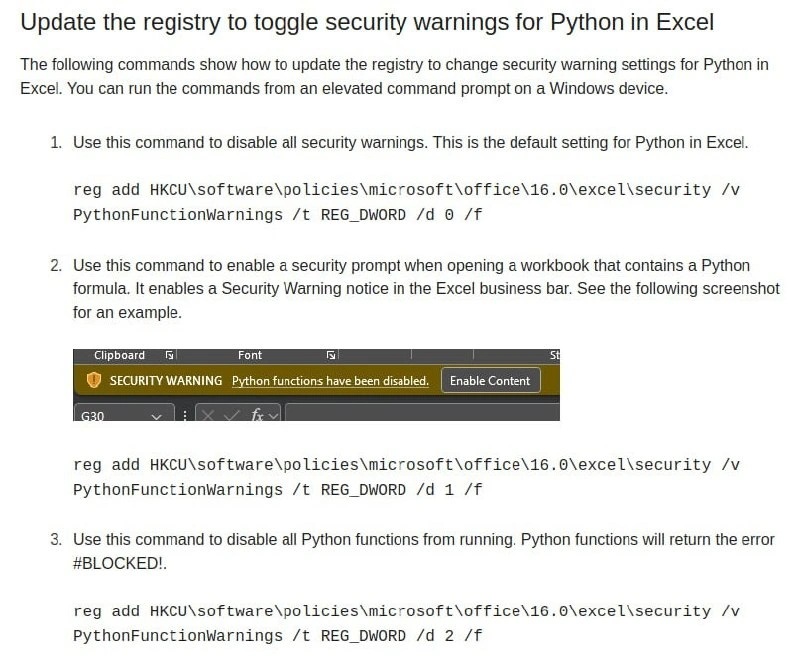
A screenshot of technical documentation titled 'Update the registry to toggle security warnings for Python in Excel'. The document outlines three steps with corresponding Windows 'reg add' commands to modify registry settings for Python functions in Microsoft Excel. An embedded screenshot displays the yellow Excel security bar with the message: 'SECURITY WARNING Python functions have been disabled.' next to an 'Enable Content' button. The commands shown are for disabling all warnings, enabling a security prompt, or completely blocking Python functions. This content serves as a technical guide for developers or system administrators on how to configure the security posture of the Python integration in Excel, a task often required in corporate environments to either enable or restrict scripting functionalities based on security policies


Comments
7Comment deleted
The modern equivalent of enabling macros in a dodgy spreadsheet from 2005 is editing the registry to let Python run wild in Excel. What could possibly go wrong?
Python in Excel is finally GA, yet its entire SDLC is a single DWORD: 0 = YOLO, 1 = managerial anxiety, 2 = security’s victory lap. Welcome to feature flagging, registry-edition
Finally, Excel gets Python support and the first thing we do is add three different registry keys to control how much we don't trust it - truly the enterprise way of saying "we wanted this feature but our InfoSec team has trust issues from the VBA macro incident of 2003."
Ah yes, the classic enterprise security dance: disable Python warnings via registry so users can run their 'totally safe' Excel macros, then spend the next quarter investigating why the finance department's spreadsheet is mining cryptocurrency. At least they documented the three states of Python security - 'off', 'annoying banner', and 'full paranoia mode' - though notably missing is the fourth state: 'users will find a workaround anyway'
Python in Excel: where the threat model is a REG_DWORD - 0 = run, 1 = “Enable Content,” 2 = “tell audit we tried.” Nothing says enterprise governance like risk managed via reg add
Python in Excel: Because nothing says 'enterprise innovation' like a 90s-era regedit hack to unblock server-side scripts in spreadsheets
Enterprise risk management, but as a feature flag: PythonFunctionWarnings REG_DWORD - 0=ship it, 1=yellow-banner theater, 2=GPO says no