Skip to content
DevMeme
5168 of 7435
The LinkedIn Hotkey Nobody Requested
Microsoft Post #5658, on Nov 13, 2023 in TG

The LinkedIn Hotkey Nobody Requested

Why is this Microsoft meme funny?

Level 1: Too Many Keys

It is like needing to press five secret buttons on a remote control just to open a magazine nobody asked for. The big glowing hero picture makes the button combo look powerful, but the result is just LinkedIn. That mismatch is why it is funny: the shortcut acts like a magic spell for something very ordinary.

Level 2: Hotkeys With Motives

A keyboard shortcut is a key combination that triggers an action. Some shortcuts belong to one app, like Ctrl+S saving a file in an editor. Others are global hotkeys, meaning the operating system or a background service can respond no matter which app is active.

The meme is about the difference between useful global shortcuts and strange product shortcuts. A useful one might lock the screen, switch windows, open search, or take a screenshot. Those actions are part of controlling the computer. Opening LinkedIn is different: it is a specific website owned by Microsoft, not a basic operating-system action.

The visible chord is funny because it is so overloaded:

  • Ctrl is already a common command modifier.
  • Shift often changes direction or selection behavior.
  • Alt is used for menus and alternate commands.
  • Win is reserved for operating-system shortcuts.
  • L usually has strong associations with lock, login, link, or launcher actions depending on context.

Stacking them together makes the shortcut look important. The punchline is that the important-looking command opens a professional social network. For developers, this is familiar UX irony: the more complicated the shortcut, the more it feels like it should do something critical. Instead, it routes you to the place where recruiters, brand posts, and "thought leadership" live.

The original post message asks whether it is even worth it, which fits the visible joke. If a shortcut is harder to remember than typing the destination into a browser, its convenience is mostly theoretical. A shortcut can be technically available and still fail as interface design.

Level 3: Enterprise Summoning Ritual

The meme's visible text says:

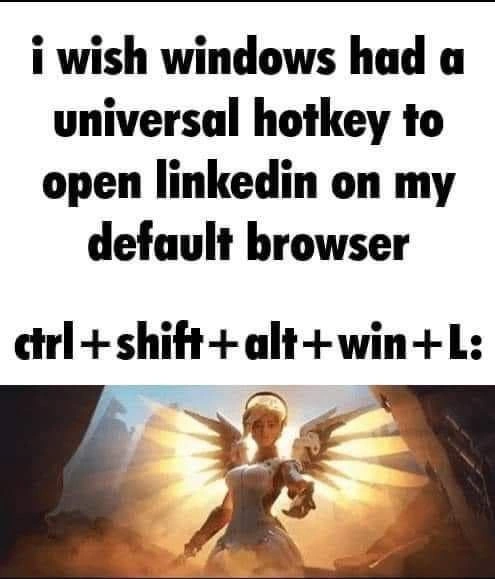
i wish windows had a universal hotkey to open linkedin on my default browser

ctrl +shift+alt+-win +L:

Under that, an angelic game character with glowing wings points forward like someone has just triggered an ultimate ability. The contrast is the joke: the key chord looks like a sacred productivity spell, but the destination is LinkedIn. Not a debugger. Not a terminal. Not password manager unlock. LinkedIn.

The technical detail being mocked is a real class of Windows shortcut weirdness: global hotkeys that operate above the active application and launch vendor-preferred destinations. Ctrl+Shift+Alt+Win is infamous because it effectively behaves like a modifier stack for Microsoft Office-key shortcuts. Once a hardware or OS-level modifier exists, product teams can bind it to apps, services, and web properties. In theory, this is convenience. In practice, it can feel like the operating system is one accidental hand cramp away from opening a professional networking feed.

That is why the word universal matters. A universal hotkey competes with every app, game, IDE, terminal, accessibility tool, and power-user workflow on the machine. Developers are protective of keyboard shortcuts because good shortcuts become muscle memory, and bad global shortcuts become workflow landmines. When a chord with four modifiers plus a letter opens a social platform, it feels less like user-centered design and more like a corporate org chart escaped into the input subsystem.

There is also Microsoft product history under the surface. Windows is not just an operating system; it is a distribution channel for Microsoft services. Office, Teams, OneDrive, Edge, Bing, Copilot, and LinkedIn can all become "one shortcut away" because platform ownership makes placement easy. The meme exaggerates the user's desire for that placement, but the sarcasm is obvious: nobody was sitting in front of Visual Studio thinking, "My compile failed, better emergency-open LinkedIn."

The glowing game image makes the shortcut look overpowered, which is exactly the right visual metaphor. The chord has boss-fight energy. It asks for both hands, a calm mind, and possibly a keyboard with emotional support. Then it launches the website where people write posts about being humbled to announce they optimized a Jira filter.

Description

The meme has large black text on a white background saying, "i wish windows had a universal hotkey to open linkedin on my default browser" followed by "ctrl+shift+alt+-win+L:". Beneath the text is a cinematic game image of an angelic character with glowing wings pointing forward, making the key combo look like an overpowered special move. The joke targets Windows and Microsoft-style shortcut design: a bizarrely complex global key chord exists for opening LinkedIn, a destination most users would not treat as emergency productivity.

Comments

21
Anonymous ★ Top Pick Nothing says productivity like hiding LinkedIn behind a modifier stack that looks one key away from rebooting the shell.
  1. Anonymous ★ Top Pick

    Nothing says productivity like hiding LinkedIn behind a modifier stack that looks one key away from rebooting the shell.

  2. @Diotost 2y

    It really works

  3. @abel1502 2y

    There's also ctrl+shift+alt+win+W for Word, which seems more useful

  4. @blacksunempire 2y

    trl+Shift+Alt+Win — Office UWP app from MS Store Ctrl+Shift+Alt+Win+W — Word Ctrl+Shift+Alt+Win+P — PowerPoint Ctrl+Shift+Alt+Win+X — Excel Ctrl+Shift+Alt+Win+O — Outlook Ctrl+Shift+Alt+Win+T — Teams Ctrl+Shift+Alt+Win+D — OneDrive Ctrl+Shift+Alt+Win+N — OneNote Ctrl+Shift+Alt+Win+L — LinkedIn Ctrl+Shift+Alt+Win+Y — Yammer

    1. @deerspangle 2y

      Wow, Yammer.. does anyone at all use that?

      1. @RiedleroD 2y

        the company I had an internship in last summer had it the last post was a few months old and about how one of their internal pieces of software was being migrated to an objectively worse one

    2. @ZgGPuo8dZef58K6hxxGVj3Z2 2y

      What about: Ctrl+Shift+Alt+Win+Space very usefull

    3. @rostopiradv 2y

      Swapping PowerPoint with Pornhub would be much better

  5. @blacksunempire 2y

    useless shit btw

  6. @Algoinde 2y

    Don't forget about Win+Ctrl+Shift+B

    1. @kiraventom 2y

      that is useful one

  7. @Bitals 2y

    They were aded for a MS keyboard with dedicated buttons for these actions.

  8. @Diotost 2y

    Ring finger on ctrl, middle finger on windows key and shift, index finger on alt. Press letters with right hand.

    1. @kiraventom 2y

      Or thumb on Win, index on alt, ring on shift, pinky on ctrl

  9. @RiedleroD 2y

    clean your keyboard

  10. @pixelsex 2y

    posting from a nuclear ground zero

  11. @pixelsex 2y

    finally an explanation for the radioactive fallout caused by my farts

  12. @MrStaudinger 2y

    Dude

  13. @RiedleroD 2y

    …no. no, not at all

  14. @V0W4N 2y

    people with 4 key rollover:

  15. @deerspangle 2y

    https://invent.kde.org/plasma/plasma-desktop/-/merge_requests/1731

Use J and K for navigation