The True King of Programmer Laziness
Why is this CLI meme funny?
Level 1: The Laziness Contest
Imagine two friends having a fun contest to see who can get away with doing the least work. The first friend puffs up proudly and says, “I’m so lazy that when I have to tidy my room, I only half-make my bed and call it done!” But the second friend just smiles and one-ups them: “Oh yeah? I’m even lazier — I taught my dog to put away my toys for me, so I don’t have to do anything!” Now the first friend is amazed and bows down, saying, “Wow, you’re definitely lazier than me.”
The meme is just like this story, but with computer commands. The humor comes from treating laziness like a championship sport where being lazier makes you the winner. It’s funny because normally being lazy is a bad thing, but here the “laziest” person is wearing a hero’s crown. In simple terms, it shows two people trying to outdo each other in not doing work, and the one who found the shortest shortcut wins the crown. Even if you don’t know anything about coding or ls commands, you can laugh at the idea that typing one less letter is treated like a royal victory. It’s a goofy way to celebrate doing things the easy way, and anyone who’s ever found a shortcut in daily life can relate to that little proud feeling of “haha, I didn’t have to work as hard!”. The comic just turns that feeling into a silly crowning moment.
Level 2: When “ls” Is Too Long
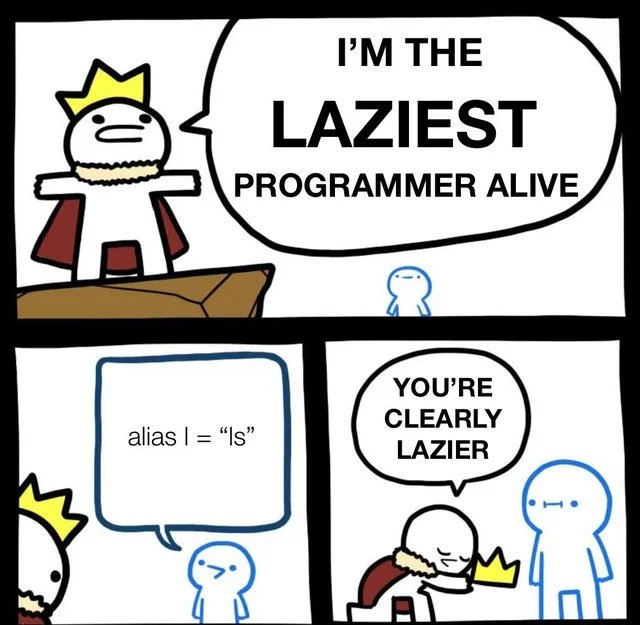
This comic is highlighting a small but telling bit of programmer behavior: using a shell alias to shorten commands. In the panels, one programmer dramatically claims to be the laziest, but another quietly demonstrates an even lazier trick: they set alias l="ls". What does that mean? In a command-line shell (like Bash on Linux or macOS), you can create an alias so that a short word or letter runs a longer command. The famous ls command in Unix-like systems lists all the files and folders in your current directory. It’s already short (just two letters, l and s), but the joke is that someone found even typing two letters was too much work and shortened it to just one letter l.
For a newer developer or someone still learning command-line tools, here’s what’s happening: Instead of typing out ls every time to see what’s in a folder, the person edited their shell settings so that just pressing “l” and hitting enter will do the same thing. It’s like a shortcut or a tiny macro. You might have seen similar aliases or shortcuts: for example, people often set alias ll="ls -l" to run a detailed list command, or abbreviate git status to gs. It’s part of customizing your CLI tools to be faster and more convenient. This falls under developer productivity tricks — little tweaks to save time and keystrokes.
The humor here comes from the extreme degree of this shortcut. ls is one of the shortest commands in existence (it’s literally the abbreviation for “list”), so making it one letter shorter is almost silly. But developers often pride themselves on being “lazy” in a productive way — meaning if they can automate something or make it require less effort, they will. There’s a well-known saying in programming that lazy programmers get the most done, because they find the quickest way to accomplish tasks. In this meme, the first coder, wearing a crown and cape like a champion, brags about being supremely lazy (implying they automate things to not do extra work). The second coder, with just one line of text (alias l="ls"), outshines the first by showing an even more optimized (or lazy) move. It’s basically a shell_aliases showdown. The crowned programmer literally kneels and gives up his crown, saying “You’re clearly lazier,” which is a funny role reversal — usually being called lazy is an insult, but here it’s an achievement.
For a junior developer, the takeaway is also a tip: you can use aliases in your shell to speed up frequent commands. It’s done by editing your shell configuration file (like .bashrc or .zshrc) and adding a line like alias shortcommand="longcommand". After you’ve done that, whenever you type the short command, the shell will swap it out for the long one. It’s a simple form of automation built right into your command-line environment. Just remember, if you get used to l meaning ls on your machine, it won’t work on someone else’s unless you set it there too! That’s another unspoken chuckle for those in the know: we become so lazy with our personalized shortcuts that when we use a fresh system without them, typing the full commands feels exhausting. This comic exaggerates that feeling in a playful way. It’s a nod to the little things developers do to make their life easier, and how we half-jokingly compete over who has the slickest, laziest shortcut of all.
Level 3: One Key to Rule Them All
In this tongue-in-cheek CLI coronation, a proud developer in a cape proclaims themselves “the laziest programmer alive,” only to be outdone by a peer who has aliased a single letter to do a whole command. The humor lands because experienced developers recognize that true laziness in programming often means maximum efficiency. Here, the two-letter Unix command ls (which lists directory contents) is deemed too laborious, so it’s shortened to a one-letter command l. This absurd level of keystroke optimization is what makes seasoned engineers smirk with recognition.
The meme exaggerates a real developer habit: using shell aliases in the command-line interface to save time and effort. Aliases are custom shortcuts in your shell (like Bash or Zsh) that expand a short command into a longer one. In practice, setting alias l="ls" in your ~/.bashrc or ~/.zshrc file means every time you type l and hit enter, the shell replaces it with ls. It’s a trivial automation – shaving off exactly one character – yet it exemplifies that lazy programmer tactics of doing a bit of upfront work (editing config files) to avoid repeating effort later.
Why is this funny to an experienced dev? Because it satirizes our obsession with efficiency. We’ve all seen those elaborate ~/.dotfiles where colleagues alias gs to git status or map weird one-letter shortcuts for everything. The ls command is already only two characters long, so aliasing it to one letter is comically extreme. It’s like a developer productivity in-joke: the less you have to type, the more powerful (or lazier) you feel. There’s even a kernel of truth—over thousands of directory listings, that single saved keystroke adds up (or so we tell ourselves to justify the fuss). It’s the same mindset that leads to scripting away repetitive tasks or writing quick bash one-liners to avoid manual work. As the crowned coder bows and offers the throne to the even lazier peer, the meme nods to a shared understanding: in programming culture, laziness is practically a virtue. (Larry Wall, the creator of Perl, famously listed laziness as the top virtue of a great programmer, meaning good devs write code to save themselves future effort.) The crown in the comic signifies this ironic honor – not all heroes wear capes; some just alias their commands down to one character.
From an engineering perspective, this also highlights how we bend our tools to our will. The Command Line Interface is beloved by power users because it’s so customizable. Using shell aliases, functions, and scripts, developers create personalized command arsenals. This meme captures the moment when someone takes that customization to an absurd peak. It’s poking fun at the ultra-optimized developer environment – the kind where every keystroke is accounted for. Seasoned developers find it hilarious because they’ve either done this exact thing or worked with someone who has a magical ~/.bashrc full of hyper-specific shortcuts. It’s a gentle roast of that impulse to automate everything, even saving one measly keystroke on a command you use frequently. And of course, it winks at the never-ending one-upmanship among programmers: “Oh, you think you’re lazy? Watch this!” There’s always someone with an even slicker shortcut or script, and here that person literally wins the laziness trophy. In summary, the meme gets its punch by combining a common CLI trick with the idea of laziness as a bragging right – a combo that senior devs find both relatable and ridiculously funny.
# A peek into a seasoned dev's shell config (e.g., ~/.bashrc)
alias l="ls"
alias gs="git status"
alias ..="cd .."
# Each alias above saves a few keystrokes for commonly used commands.
# 'l' is the ultimate tiny shortcut: why type two letters when one will do?
Description
This is a three-panel comic strip that humorously celebrates the concept of 'efficient laziness' in programming culture. In the first panel, a cartoon character wearing a crown and a cape stands on a cliff, proudly declaring in a large speech bubble, 'I'M THE LAZIEST PROGRAMMER ALIVE'. In the second panel, a much smaller, plain character standing below looks up and says, 'alias l = "ls"'. This is a shell command that creates a shortcut, allowing the user to type 'l' instead of 'ls' to list files in a directory. In the final panel, the original king character has come down from the cliff, bowing and handing his crown to the smaller character, admitting, 'YOU'RE CLEARLY LAZIER'. The joke is an inside nod to the developer mindset where creating small optimizations to save minimal effort (in this case, a single keystroke) is seen as a sign of superior efficiency, humorously framed as competitive laziness. For senior developers, this isn't just about being lazy; it's a core principle of investing a little time upfront to save a lot of time and effort in the long run, even at the micro-level of shell commands

Comments
8Comment deleted
The three great virtues of a programmer are Laziness, Impatience, and Hubris. This guy has officially mastered the first one
The day I aliased ‘l’ to ‘ls’ I finally understood why enterprise architects call 15 000 lines of YAML “infrastructure as code” - it’s just keystroke amortization at scale
Meanwhile, the senior engineer who spent three days automating a five-minute monthly task is calculating the ROI breakeven point somewhere around 2027
He spent an hour tuning his dotfiles to save one keystroke - a negative-ROI optimization he'll defend in every code review for the rest of his career
The real power move is aliasing 'l' to 'ls -la' so you can pretend you're being efficient while actually typing more configuration than you'll ever save. Bonus points if you have a 500-line .bashrc that takes longer to source than the time saved by all your aliases combined. The true laziest programmer? They just use 'l' and tab-complete everything else - because even typing two characters is for try-hards
alias ls='ls': saving zero keystrokes with maximum ceremony - senior dev no-op mastery
Aliasing “l” to “ls” feels efficient until a 3am Sev1 on a bare prod shell teaches you the real “works on my machine” problem is “works on my shell.”
Amdahl’s Law for wrists: alias l='ls' delivers a p99 keystroke reduction in my ~/.zshrc