Skip to content
DevMeme
1702 of 7435
The JavaScript Colonization of the Desktop, by Electron
Frameworks Post #1903, on Aug 12, 2020 in TG

The JavaScript Colonization of the Desktop, by Electron

Why is this Frameworks meme funny?

Level 1: Always has been JavaScript

Imagine you just found out that all your different toys were actually made of the same material, like plastic, even though they look completely different. You’d be surprised, right? You might say, “Wait, they’re all plastic?” and your older friend just shrugs and says, “Always has been.” That’s basically the joke here. All those different desktop apps (like chat apps, editors, etc.) may seem unique, but deep down they’re all made with the same stuff – JavaScript. The meme is funny because it’s like a big reveal: something we thought was many different things is really one thing in disguise, and it’s been that way all along. The first astronaut is shocked to realize everything on his computer is running JavaScript, and the second astronaut (representing the tech behind it) humorously confirms it. It’s a playful way to say, “Yep, it’s all the same under the hood,” and to laugh at how this one programming language ended up everywhere!

Level 2: JavaScript-Powered Apps

For newer developers, it might be surprising to learn that many big-name “desktop” applications are not written in low-level languages like C++ or platform-specific languages like Swift or C#. Instead, they are built using JavaScript, the same language that runs in web browsers. How is that possible? The answer is the Electron framework. Electron allows developers to create cross-platform desktop apps using HTML, CSS, and JavaScript – the core technologies of the web. It does this by bundling a modified web browser (called Chromium, which is the open-source part of Google Chrome) together with Node.js (which lets JavaScript run on your machine outside a browser). In simpler terms, an Electron app is basically a mini Chrome browser that can also tap into your operating system via Node.js. So when you run an app like VS Code or Discord, you’re actually launching a browser window that displays a web page as the app’s interface, plus some behind-the-scenes JavaScript that talks to your OS files and hardware.

This is why the meme quips, “Wait, it’s all JavaScript?” – because under the flashy icons of those apps, the logic is written in JavaScript. The Electron logo on the second astronaut’s helmet signifies that Electron is the platform secretly running the show for those apps. Developers sometimes jokingly say “JavaScript everywhere” because you can use it in the browser, on the server (with Node.js), and now even on the desktop with Electron. The trade-off of this approach is important to understand. On one hand, using Electron means a developer can write an app once and it will work on Windows, Mac, and Linux without rewriting the code for each platform. This is great for Developer Experience (DX), because teams can be more efficient and use one set of skills and tools (like the Chrome developer tools, Node’s package manager npm, etc.) to build an app for all users. It’s the ultimate cross-platform hack: one codebase to rule them all.

On the other hand, stuffing a whole browser inside each app uses a lot more memory and CPU than a traditionally engineered app would. Each Electron app carries a lot of baggage – imagine every app coming with its own copy of Chrome. If you open two or three Electron-based programs at once, you essentially have multiple Chromiums running simultaneously, which can tax your system. This is why people often complain about performance or battery life with Electron apps. It’s a bit like if every food truck brought its own full kitchen equipment and generator to a potluck – convenient because they don’t need anything from you except parking space, but inefficient because there’s a lot of duplicated effort. Still, for many apps the convenience outweighs the downsides. Users get frequent updates, consistent UIs, and features delivered quickly, while developers avoid reinventing the wheel for each operating system.

To get a feel for how an Electron app works, here’s a tiny example of starting one:

const { app, BrowserWindow } = require('electron');

app.whenReady().then(() => {
  const win = new BrowserWindow({ width: 800, height: 600 });
  win.loadFile('index.html');  // Load a local HTML file as the app's interface
});

In this snippet, an Electron app creates a new BrowserWindow – which is basically a chromed-out webview – and then loads an index.html file into it. That HTML file could be your app’s homepage, built just like a website. You can imagine that file including <script> tags for your JavaScript logic, which can use Node.js features to do things like access files or open system dialogs. This is how apps like VS Code or Discord are built internally. The meme in question cleverly illustrates this by showing those app icons near an astronaut and having him realize they’re all powered by the same thing (JavaScript). The second astronaut (with the Electron logo) confirms it humorously with “Always has been,” meaning this isn’t a new trend – it’s been the case for years. For a junior dev or anyone new to this concept, the meme is highlighting an inside joke: that despite looking and behaving like native desktop software, many apps are essentially fancy web browsers in disguise running JavaScript-heavy pages as if they were programs. Once you know that, you won’t look at those app icons the same way again! It’s both a testament to JavaScript’s versatility and a lighthearted jab at how resource-intensive this approach can be.

Level 3: Chromium Stowaway

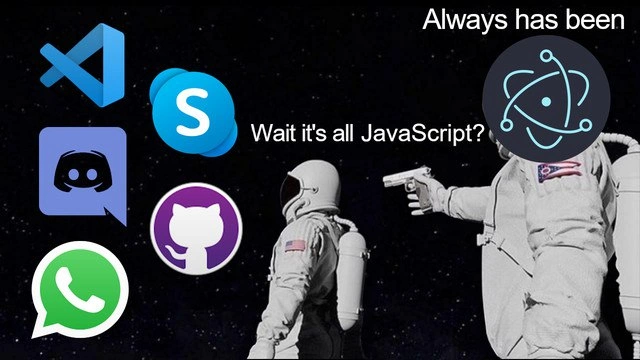
In this meme, the unsuspecting astronaut (surrounded by icons of Visual Studio Code, Skype, Discord, GitHub, WhatsApp) has just realized a startling fact: all these popular desktop applications are essentially running JavaScript. The other astronaut – with the Electron logo for a face – confirms it bluntly: “Always has been.” This format riffs on the “always has been” meme, where one character’s mind-blowing discovery gets shot down (sometimes literally, as here) by the revelation that it’s old news. The humor hits home for developers because it pokes fun at how pervasive JavaScript has become, even in places you’d traditionally expect native, compiled code.

What makes this funny (or perhaps painfully true) to a senior developer is the sheer ubiquity of the Electron framework in modern desktop software. We’ve reached a point where opening your code editor, chat client, and even some database GUI means launching multiple instances of what is essentially Google Chrome under the hood. Each of those apps is a self-contained Electron app, complete with its own embedded browser engine and Node.js integration. The meme highlights that moment of realization: “Wait, it’s all JavaScript?” — the same language that powers web pages is also driving your desktop apps. For experienced devs, this triggers a knowing grin (and maybe an eyeroll) because we’ve watched JavaScript creep from the browser into servers (Node.js), and then into desktop apps. It really is JavaScript everywhere. The always_has_been_meme format reinforces that this state of affairs isn’t new; it’s been the status quo for a while. The Electron astronaut’s pistol adds a darkly comic tone: there’s no escape from this reality, and any protest about performance is silenced by convenience and momentum.

From a developer experience standpoint, the appeal of Electron is huge: one codebase, familiar tools, and the vast NodeJS ecosystem of libraries. That’s a big DX (Developer Experience) win. Companies like Microsoft and Facebook embraced it – Microsoft built VS Code and revamped Skype with Electron, Discord did the same for its popular chat client, and even WhatsApp’s desktop app is essentially a browser wrapper. Here’s a quick roster of the usual suspects all powered by Electron (and thus JavaScript):

  • Visual Studio Code – A wildly popular code editor by Microsoft, built with Electron (yes, your C++ and Python code editor itself runs on JS).
  • Discord – A voice and text chat app beloved by gamer and developer communities (those Discord servers you hang out in are delivered via Electron).
  • Slack – The office chat app that’s basically a fancy web page in a window, notorious for gulping down RAM.
  • GitHub Desktop – GitHub’s client for managing repositories locally, built with Electron (GitHub actually created Electron, so no surprise).
  • WhatsApp Desktop – Essentially the WhatsApp Web app tucked into an Electron shell for your convenience.
  • Skype – Even the classic video chat app got a JavaScript makeover after Microsoft’s updates, using Electron under the hood.

Seeing all these icons orbiting the astronaut in the meme drives home the point: many everyday desktop tools are ElectronApps. The joke is half amazement, half gentle criticism. Developers joke about Electron’s performance_memes because, while it makes app development easier, it’s also notorious for being a resource hog. Launch a couple of Electron apps and you might notice your laptop fans spinning up like a rocket launch. 🛰️ No wonder, since you’ve effectively started multiple Chrome browsers! It’s a running gag that Slack (an Electron app) can use a gig of RAM just to show you a few text messages. The meme’s punchline “Always has been” is the Electron logo-clad astronaut saying, “Yes, and we’ve been quietly doing this all along.” It captures the mix of surprise and resignation: surprise that even heavyweight desktop apps are essentially running web code, and resignation because, well, that’s the state of modern software. Everyone in the industry knows it, even if we occasionally gripe about it. The meme resonates because it frames this well-known fact as a conspiratorial revelation: the JavaScript takeover of the desktop is complete, and those in the know have been cheekily aware the whole time.

Level 4: Chrome All the Way Down

Under the hood, Electron applications bundle an entire Chromium browser engine and Node.js runtime into every desktop app. This means each of those apps (VS Code, Discord, Skype, etc.) isn’t a lean native binary – it’s a full miniature browser running your program’s code. In theoretical terms, it’s an extreme case of abstraction: rather than writing directly for each operating system, developers write for a high-level browser layer. This approach exploits modern hardware’s speed and memory, trading efficiency for convenience. There’s even a tongue-in-cheek principle, Wirth’s Law, which observes that software bloats faster than hardware improves. Electron is a perfect example: gigahertz CPUs and gigabytes of RAM make it possible (if not entirely sensible) to ship a whole browser with every app. It’s like the computing equivalent of “turtles all the way down” – peel back the desktop app’s facade, and you find Chrome’s engine at the core.

Historically, the dream of “Write Once, Run Anywhere” fueled many technologies – from Java’s JVM in the 90s to Adobe AIR and early web runtime experiments. Electron is the modern incarnation of that dream, using the ubiquity of JavaScript and the power of the V8 engine (Chrome’s just-in-time JS compiler) to achieve cross-platform consistency. By 2020, this approach had colonized the desktop: what started as GitHub’s Atom editor (built on “Atom Shell,” the precursor to Electron) evolved into a general solution adopted by apps far beyond text editing. The fundamental computer science trade-off at play is runtime abstraction vs. native optimization. Packing a browser in each app simplifies development and ensures your code behaves the same on Windows, macOS, and Linux – at the cost of high memory usage and slower startup times. Essentially, we’ve accepted a constant overhead (the browser engine) as the price for using a single lingua franca (JavaScript) everywhere. It’s a bit like every appliance in your home coming with its own built-in power generator: massively redundant, but it guarantees that no matter where you plug it in, it’ll run just the same as in any other house. This meme’s core exaggeration – that everything is JavaScript – humorously captures a real architectural paradigm of our time, where layers of software (Chromium, Node.js, OS APIs) are stacked so deep that JavaScript has seeped into every nook of the computing world. The punchline “Always has been” underscores that this wasn’t a one-off gimmick; it’s been the quietly prevailing trend for years, a JS omnipresence that both astonishes and alarms seasoned engineers.

Description

A popular meme format, 'Wait, it's all Ohio? / Always has been', is adapted to a tech context. The scene is set in space, with one astronaut looking towards a cluster of well-known desktop application icons: Visual Studio Code, Skype, Discord, GitHub Desktop, and WhatsApp. This astronaut expresses surprise, saying, 'Wait it's all JavaScript?'. Another astronaut, seen from behind, is holding a gun to the first one's back. This second astronaut's helmet is covered by the logo for Electron.js, and they deliver the punchline: 'Always has been'. The meme humorously critiques the prevalence of the Electron framework, which allows developers to build cross-platform desktop applications using web technologies like JavaScript, HTML, and CSS. It captures the moment of realization for many developers that a significant portion of their daily software toolkit is, under the hood, a bundled web browser, a fact that is a common source of jokes about performance and memory usage

Comments

7
Anonymous ★ Top Pick Electron is the universe's ultimate punchline: to escape the browser, we put a browser in a native shell, just so we could write more JavaScript. It's the Circle of RAM
  1. Anonymous ★ Top Pick

    Electron is the universe's ultimate punchline: to escape the browser, we put a browser in a native shell, just so we could write more JavaScript. It's the Circle of RAM

  2. Anonymous

    Spent a year shaving 2 ms off p99 on the backend, then shipped a 400 MB Electron “desktop” app that spawns its own Chrome cluster - nothing says efficient architecture like moving the cloud into the user’s RAM

  3. Anonymous

    That moment when you realize your 16GB of RAM isn't for running complex algorithms or compiling massive codebases - it's for running five different instances of Chromium pretending to be native apps, each with their own V8 engine and node_modules folder consuming 500MB just to display a chat window

  4. Anonymous

    The real plot twist isn't that everything is JavaScript - it's that we're all running Chromium instances disguised as native apps while complaining about RAM usage. At least when we inevitably rewrite everything in Rust, we'll still need a JavaScript layer for the UI. The astronaut with the gun? That's the V8 engine, and it's been holding us hostage since 2008

  5. Anonymous

    We replaced three native stacks with one JS repo and an embedded Chromium - now CAP stands for CPU, Amp‑hours, and Patience

  6. Anonymous

    Electron is Docker for UIs: ship a full Chromium per app, call it “native,” and outsource performance to the user’s RAM - turns out it was JavaScript all the way down

  7. Anonymous

    JS ubiquity: the architectural pattern where one event loop rules client, server, and your on-call rotation

Use J and K for navigation