
Skip to content
DevMeme
3392 of 7435
My Rig vs. Your Problem: The Tech Support Paradox
DevCommunities Post #3725, on Sep 20, 2021 in TG

My Rig vs. Your Problem: The Tech Support Paradox

Why is this DevCommunities meme funny?

Level 1: Superhero at Home

Imagine you’re really, really good at something in your own space – like you’re a superhero in your room. Let’s say you’ve mastered a video game on your own console; you know all the cheat codes, the special moves, and your controller is set up just the way you like it. At home, you feel invincible playing that game. Now, one day you go to a friend’s house and they ask you to beat a level on the same game, but on a different console with a totally unfamiliar controller. Suddenly, you’re pressing the wrong buttons and you look kind of clumsy, maybe even saying “Uh, I’m not sure how to do this.” That’s exactly the feeling this meme jokes about.

In the meme, the developer is like a wizard or superhero on their own computer – picture them wearing a cape, effortlessly using their many monitors to do amazing things. But when someone asks them to fix another computer, all of a sudden they act like they’ve lost their powers. They shrug with a confused face, as if to say “I have no idea what I’m doing,” even though everyone expects them to be a computer genius. It’s funny because we don’t expect a superhero to ever be clueless, just like people assume anyone good with computers can solve any tech problem. The truth is, even experts have their own special tools and environments. Outside of those, they can feel as ordinary as anyone else. So the meme is like seeing Clark Kent and Superman as the same person: in one situation he’s Superman flying confidently (that’s the developer on their own super setup), and in another he’s Clark Kent shrugging (that’s the developer faced with someone else’s computer). We laugh because we all know that feeling of being awesome in one place and totally awkward in another. It’s a playful reminder that context matters – even a computer whiz can act like a newbie if you take them out of their element.

Level 2: Green Code vs Blue Screens

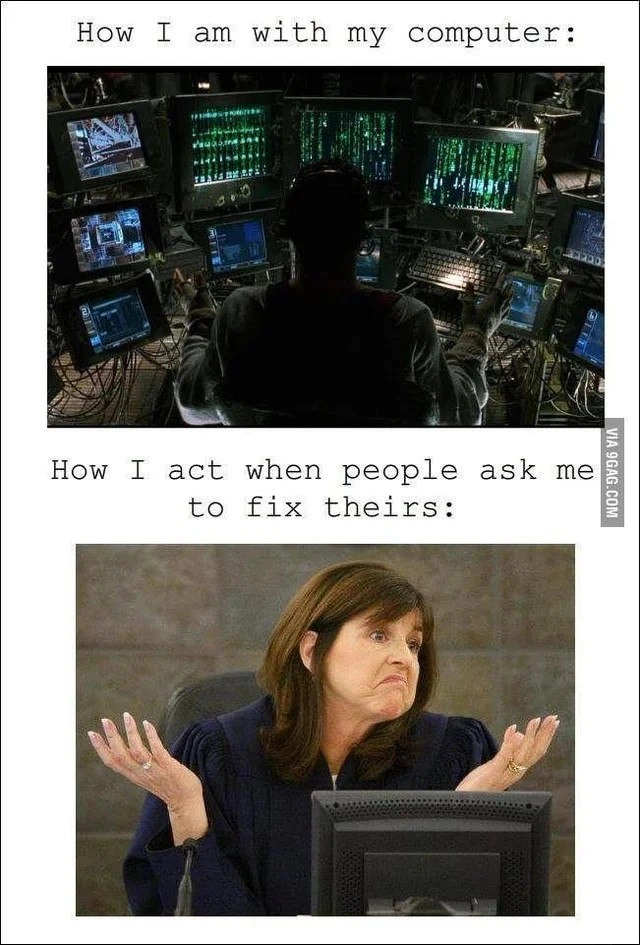
Let’s break down the meme in simpler terms. It’s showing a funny contrast that many people in tech find very relatable. In the first panel (the top image), we see a person at an extremely high-tech computer setup – it looks straight out of a movie like The Matrix. There are a bunch of monitors (more than ten!) arranged in a semicircle, all displaying what looks like green code or data cascading down the screens. This green “falling code” is an iconic image from The Matrix, often used in memes to represent hacker mode or doing something very advanced on a computer. The text above this image says “How I am with my computer:” suggesting that the developer feels like a powerful hacker when using their own PC. This is a bit of humorous exaggeration, of course – most of us don’t literally have a dozen monitors or glowing green code wallpaper – but it symbolizes feeling in control and ultra-competent in our personal work environment. Many developers do have multi-monitor setups (perhaps 2 or 3 screens usually) to help them multitask: one screen might show code, another might show the program running or logs, and another could have documentation or a debugger. Even if we don’t look as cinematic as the meme image, we often feel like that cool hacker character when everything is configured just how we like it. This falls under DeveloperExperience_DX: a great developer experience often means having your tools and hardware tailored to your workflow, which boosts your confidence and productivity. So, the meme is playfully saying: “On my own machine, I’m basically Neo, the hero of The Matrix – unstoppable and super-savvy with tech.”

Now, the second panel (bottom image) flips the scenario. Here we have a normal-looking woman seated at a single monitor (a very plain, standard computer). She’s in a well-lit room (apparently a courtroom, but the specific location isn’t important) and she has both hands up in the air in a dramatic shrug, with a perplexed or clueless expression on her face. The text above this image reads “How I act when people ask me to fix theirs:” meaning when someone asks the tech-savvy person to fix their computer, suddenly the “expert” acts like they have no idea what to do. This is immediately funny because it’s the exact opposite of the first image. It’s the classic joke of being extremely good at something in one context, but pretending (or truly feeling) totally inept in another.

Why would a programmer or “computer person” shrug and act confused when asked to fix someone else’s computer? There are a few key reasons packaged into this joke, easily understood by junior developers or anyone starting out in tech:

  • Different environment, different rules: Think of a time you used a friend’s phone or game console and felt all mixed up because the settings or controls weren’t how you’re used to. Similarly, a developer’s own computer is set up exactly how they like it – it might even have a specific operating system (like a Mac with a custom terminal setup, or a Linux machine with all their favorite programming tools installed). When they sit down at someone else’s computer, it might be a totally different setup (say, a Windows PC full of unfamiliar software). It’s like speaking a slightly different tech language. The developer who knows every inch of their machine might genuinely be slower or less confident on a machine configured in a way they’ve never seen. This is a form of context switching: moving from one environment to another can throw you off, especially if you’re used to certain shortcuts or tools that aren’t there. A junior dev might have experienced this the first time they used a coworker’s PC or a new development environment – initially, it’s confusing and you don’t feel as “powerful” as you do on your own setup.

  • “Works on my machine” syndrome: This is a lighthearted term in programming where a developer says “Well, the code works on my machine!” meaning they built or ran something successfully on their own computer, but it fails on others. In this meme’s context, it implies “I can solve problems on my own machine, but on your machine, all bets are off.” It’s a tongue-in-cheek excuse. A junior developer might relate if they’ve ever written a program that ran perfectly on their laptop but then didn’t run on the class computer or a coworker’s device because of some setup difference. Here that idea is applied to human skills: I’m only an expert under very specific conditions! It’s humorous because we expect an “IT guy” to know everything about any computer, but in reality, their knowledge might be specialized.

  • Basic tech support is a different ball game: Debugging code (which developers do often) is not the same as troubleshooting a random home computer issue. For example, as a developer you might be great at finding a bug in a JavaScript function or optimizing a database query, but your family might be asking about why their computer is so slow or why the printer isn’t working. Those are more like general IT or support issues. A junior dev might not have experience with those at all (you don’t learn “how to remove viruses” in a coding class, typically). So you actually might feel clueless when someone asks, especially if it’s about a program or system you never use. The meme exaggerates this by showing an over-the-top shrug, as if to say “Computer? What is that? I have no idea how to fix it.” It’s playing on the RelatableHumor of being the go-to “computer expert” in your family even when you don’t actually know the specific fix. Many of us have had that moment where a friend or relative asks a question about, say, an Excel formula or a printer jam, and we’re like “Uhhh… let me Google that real quick.” It’s a bit embarrassing but also common – knowing one area of tech deeply (like programming) doesn’t mean you know every gadget or software out there.

  • Communication gap with non-tech folks: Another angle here is communication. When family or non-technical people describe a problem, it might sound super vague or nonsensical to us (“The internet is broken!” or “My computer just doesn’t like me, can you fix it?”). As a junior dev, you’re taught to ask clear, specific questions to debug an issue. But family might not even know how to explain the issue. This can make you, the supposed “expert,” feel at a loss. The shrugging lady image captures that feeling of “I don’t even know where to start, because what you’re saying doesn’t give me much to go on.” It highlights a Communication challenge: experts sometimes struggle to translate their knowledge to help non-experts, especially if the non-experts can’t provide detailed information. So the easy way out is to just act confused and hope they drop the request, or to manage expectations that “hey, I’m not sure I can help either.”

Overall, the meme is categorized under Debugging_Troubleshooting and DeveloperExperience_DX because it’s talking about solving technical problems (troubleshooting) and the experience developers have when working in different environments. It’s a prime example of TechHumor and RelatableHumor: it takes a scenario many in the tech community have faced (being asked to fix someone’s computer) and exaggerates the response (from all-knowing to all-clueless) for comedic effect. Even as a newer developer, you can appreciate the joke: it’s saying that no matter how good you get with code or your own tech, you might still feel like “🤷 I dunno” when dealing with random consumer-tech issues. And that’s okay – it’s a humorous reminder not to feel bad if you don’t know everything. Even the “Neo” of coding might act like an absolute beginner when faced with Uncle Bob’s virus-ridden PC. The dramatic shrug in the image is basically the universal developer signal for “This isn’t my specialty!”

Level 3: Works on My Machine

For seasoned developers, this meme elicits a knowing chuckle of relatable pain. It captures the contrast between a coder’s Developer Experience (DX) in their own setup versus the dread of being the de facto “IT support” for friends and family. In the top panel, we see the developer in full command of an elaborate workstation – multiple monitors glowing with code and system dashboards. It’s an over-the-top representation (think The Matrix aesthetics) of how in-the-zone we feel on our own rigs. We have our IDE open on one screen, logs tailing in a terminal on another, perhaps a CI/CD dashboard and documentation on others. Cables snake around, keyboards and gadgets tuned to our workflow – this is our multi_screen_cockpit where every piece of hardware and software is familiar. In this domain, we’re wizard-like: diagnosing a segfault, containerizing an app, or querying a database feels as natural as breathing. The text “How I am with my computer:” proudly heralds this superhero mode. Many developers do indeed accumulate a kind of neo (pun intended) superpower on their own machines – countless hours of configuration and practice have made us extremely efficient and seemingly omniscient about our system’s quirks. It’s DeveloperHumor 101 to depict ourselves as Neo, the hacker hero, within our personal development Matrix.

Then comes the punchline: “How I act when people ask me to fix theirs:”. The bottom image cuts to a bright, mundane scene where a person (looking like an ordinary office worker or perhaps even a judge in a courtroom) gives an exaggerated shrug behind a basic PC. This stark change in posture and setting is instantly recognizable to anyone in tech who’s ever been begged to fix a relative’s computer. Suddenly, our all-powerful coder is acting totally clueless. Why? Quite a few reasons that senior devs understand all too well:

  • Context collapse: The mental model we use for software development doesn’t directly translate to general tech support. At work, “troubleshooting” might mean reading stack traces or using git bisect. At home, troubleshooting Auntie’s laptop might mean deciphering a vague error like “something is wrong with the emails” with no logs or documentation to consult. It’s a jarring context switch. As a result, we often freeze or approach the task very cautiously. It’s not that we literally can’t fix a Wi-Fi router or a printer jam – it’s that our mindset is optimized for debugging code, not haphazard home networking issues. We’re out of our comfort zone, like a fish out of water, so our brain reports a big “404: skill not found” (hence the confused shrug).

  • Familiarity (or lack thereof): On our own computer, we know every inch of the system. We’ve installed the OS we like, or at least configured the settings to our taste, possibly using a specific distro, shell (zsh or bash with custom dotfiles), text editors with personalized shortcuts, and so on. But when someone hands us a Windows PC laden with unfamiliar toolbars, antivirus pop-ups, and who-knows-what default settings, it’s disorienting. The family_it_support scenario often involves computers that are the polar opposite of our clean dev machines: outdated OS versions, random bloatware, maybe even malware causing the problem. It’s no surprise that a developer proficient in writing Python scripts might be utterly confounded by why “the printer queue is stuck again.” In fact, many of us use Mac or Linux daily, so when confronted by a relative’s Windows issue, we might literally not know the current menus to navigate (or vice versa for Windows devs asked to fix a Mac problem). This is a classic case of “Works on My Machine” – our expertise works superbly on our machine/environment, but we “act helpless” with theirs, partially because our knowledge doesn’t directly map and partially, let’s admit, by choice (more on that in a second).

  • Reluctance and boundaries: Seasoned engineers learn to set boundaries (or at least joke about it) when it comes to free tech support. The bottom image’s exaggerated shrug – “Who, me? Fix your PC? I have no idea, sorry!” – is often a performance to avoid getting roped into a 3-hour chore of removing viruses or fixing the Wi-Fi for free. It’s a form of self-preservation wrapped in humor. We’ve all been there: family gatherings where as soon as someone learns you “work with computers,” you’re peppered with requests to fix the router, recover a crashed hard drive, or explain why the iPad won’t sync. Even if you do have the skill to tackle it, you might feign cluelessness to keep your day off sane. This meme resonates because it’s poking fun at that shrugging response – playing dumb so you don’t become the on-call technician every time your cousin’s laptop glitches. It’s a bit of communication judo: non-verbal shrugging says “I’m not the right person for this,” in a way that’s more socially acceptable (and funny) than outright refusing. The humor is in the role-reversal: the same person who confidently administers servers at work now suddenly behaves like a novice user when presented with grandma’s blinking error message.

  • Different skill sets: Software development and general IT support are distinct skill domains. A backend engineer who can optimize an algorithm in C++ might not be up-to-date on the latest printer driver issues or how to recover a corrupted Excel file – nor do they necessarily want to be. The meme highlights this expert_vs_amateur_dichotomy: to the outside world, anyone “good with computers” should be good with all computers. But under the hood, being a good developer is a specialized skill – it doesn’t automatically make you a hardware technician, a network admin, or a support desk guru (even if there’s some overlap in basic knowledge). The shrug is a way of satirizing that misunderstanding. It’s classic TechHumor because it reveals an inside joke: we might be coding ninjas, but ask us to sync your iPhone contacts and we might just scratch our heads. It’s not true for all devs, but it’s a stereotype based in reality – many of us have had humbling moments where a non-technical person asks a “simple” computer question and we realize we’re not sure either (usually because we overthink it or haven’t used that consumer tech).

To drive the point home, consider this little illustrative pseudo-dialogue in code form. It’s how a seasoned developer’s internal script might handle a family tech support request vs their own environment:

def fix_computer(computer):
    if computer.is_my_own:
        # Engage uber-hacker mode: I can solve anything on my turf
        open_all_terminals()
        hack_the_matrix()
        return "Problem solved on my machine!"
    else:
        # Family member's computer... initiate confused shrug protocol
        raise NotImplementedError("🤷 Sorry, no idea how to fix this")

And indeed, sometimes when put on the spot with someone else’s device, a developer might attempt something completely incongruous out of habit, only to realize how out-of-place they are. For example, a Linux guru might unconsciously try a familiar command in Windows and get nowhere:

# Developer tries a Linux command on a family member's Windows PC out of habit:
C:\> sudo apt-get install drivers  
'sudo' is not recognized as an internal or external command, operable program or batch file.

In short, the meme lands so well in DeveloperHumor circles because it exaggerates a truth we rarely admit upfront: even the tech experts have limits to their expertise (and patience). The top half is the image we have of ourselves in our domain – powerful, competent, in total control of our multi-monitor universe. The bottom half is how helpless (or pretend-helpless) we can become when asked to venture outside that comfort zone. It’s a playful nod to the Communication gap between what family thinks we do (fix all computers easily) and what we actually do (write code, which is a very different thing). The next time someone says “Oh you’re a programmer, you can fix my laptop, right?”, you might recall this meme and feel that urge to put on the same clueless shrug. After all, it works on my machine – and that’s the only guarantee we ever give!

Level 4: Context-Switch Overload

At the highest technical level, this meme evokes the concept of context switching in both computer systems and human cognition. Just as an operating system saves CPU state to perform a context switch between processes, a developer must swap out their mental state when moving from coding on their own machine to troubleshooting someone else’s PC. This carries significant overhead. In a CPU, frequent context switches can thrash caches and pipelines – the processor spends more time saving/restoring state than executing useful work. Likewise, when our developer is yanked from their flow state at a multi-monitor battlestation into ad-hoc tech support mode, their “mental cache” of shortcuts, environment variables, and muscle memory experiences a major cache miss. The specialized knowledge optimized for their custom rig doesn’t map to Aunt Mabel’s ancient Windows laptop, much like how highly-optimized code can run poorly on an unfamiliar architecture. The meme’s top image – a dimly lit cockpit of monitors with green code rain – symbolizes a developer operating at peak throughput, analogous to a CPU maximizing pipeline efficiency and cache hits. The bottom image – a bright scene with a person shrugging behind a single monitor – represents a forced task switch where the “programmer process” is now running in a drastically different context (family IT support), incurring heavy cognitive load.

From a theoretical perspective, this scenario also hints at the limits of familiarity bias in user interfaces and hardware. Developers configure their workstations like finely-tuned systems: window layouts across ten screens, custom key bindings, scripts, aliases, and preferred OS settings. In essence, their personal computer is a bespoke operating environment with near-zero page faults – every tool and reference is exactly where expected, yielding near-instant recall. But when confronted with a relative’s stock PC, it’s as if a program is executing in an environment with completely different system calls. The terminal-centric wizard who speaks in commands (grep, ssh, top) might suddenly face a clunky GUI wizard (the “Next, Next, Finish” dance of installer dialogs) and feel lost. This is akin to running a Linux binary on Windows – without the right subsystem or translation layer, even a powerful algorithm fails to execute. The meme exaggerates this dissonance for effect: the expert vs amateur dichotomy is so extreme it’s comedic. The developer who can debug race conditions in a multithreaded server (a complex Debugging_Troubleshooting feat) appears stumped by a simple printer spooler issue on a family PC. It’s a reminder that in computing (and life), expertise is often highly domain-specific – even Neo in the Matrix has to jack in to a familiar system to be a hero. Outside that system, he’s subject to the same rules (and confusion) as everyone else. In technical humor terms, the meme is poking fun at a “works on my machine” phenomenon at the human level: the developer is like a program optimized for one environment, now hilariously underperforming in another due to context-switch overhead and missing dependencies.

Description

This two-panel meme contrasts the sophisticated relationship a developer has with their own computer versus their reaction to fixing others' machines. The top panel, captioned 'How I am with my computer:', displays a scene from the movie 'The Matrix,' showing a person from behind, silhouetted in front of a vast array of monitors all displaying the iconic green cascading digital rain. This represents a deep, complex, and highly skilled interaction with a powerful, customized system. The bottom panel, captioned 'How I act when people ask me to fix theirs:', shows a woman, possibly a judge, shrugging with a look of feigned helplessness and mild disgust in front of a generic desktop monitor. The meme humorously captures the universal experience of tech-savvy individuals who are experts in their specialized domain but are completely unwilling to become free IT support for friends and family dealing with common, mundane computer problems. For senior developers, the joke is layered: their expertise is in building and maintaining complex systems, not troubleshooting consumer-grade hardware or user-inflicted software issues
Comments

13
Anonymous ★ Top Pick Yes, I architect distributed systems that handle millions of requests. No, I don't know why your printer is offline, but I'm confident the solution involves a sledgehammer and a new printer
  1. Anonymous ★ Top Pick

    Yes, I architect distributed systems that handle millions of requests. No, I don't know why your printer is offline, but I'm confident the solution involves a sledgehammer and a new printer

  2. Anonymous

    I’ll debug a deadlocked microservice mesh before coffee, but Mom’s Vista laptop - essentially a monolithic coupon-toolbar - has zero logs, zero observability, and absolutely no SLA in my contract

  3. Anonymous

    After 20 years in tech, I've mastered every distributed system pattern, can debug kernel panics in my sleep, and have opinions on memory allocators... but when my neighbor asks why their printer won't work, I suddenly develop the technical acumen of someone who thinks 'the cloud' is just weather

  4. Anonymous

    The fundamental theorem of developer support: technical competence is inversely proportional to the number of browser toolbars on the machine you're asked to fix. We architect distributed systems handling millions of requests, but somehow a relative's Windows XP machine with 47 Ask.com toolbars and McAfee running at 100% CPU becomes an NP-complete problem we'd rather not solve

  5. Anonymous

    Architecting distributed systems with eventual consistency? Easy. Delivering 'turn it off and on' to boomers? Strict consistency demands partition intolerance

  6. Anonymous

    On my box: reproducible builds and trace IDs; on yours: an unversioned snowflake - recommended fix: terraform destroy

  7. Anonymous

    I orchestrate multi‑region failovers with SLOs, but Aunt Linda’s printer is explicitly out‑of‑scope per my personal SLA for unmanaged home environments

  8. Deleted Account 4y

    Beside of what causing the problem, I personally don't want to involve myself in someone's problem unless they pay me for it.

  9. Deleted Account 4y

    Some of people expect you to fix their computer for free because they are friends, relatives or something.

    1. @fzsys 4y

      if this person is doctor i will take 5 times more money from him...

  10. @fzsys 4y

    how they usually do

  11. @fzsys 4y

    😂😂

  12. @SamsonovAnton 4y

    It's usually quite the opposite: regular people have relatively simple problems that can be easily resolved, meanwhile IT-sophisticated persons use their hardware for advanced tasks and therefore their troubles are much more puzzling.

Use J and K for navigation
