The Universal, Unspoken Urge of the Windows Desktop
Why is this Microsoft meme funny?
Level 1: Bubble Wrap for the Brain
Imagine you’re sitting in front of your computer and you see a big colorful Windows logo (the Windows flag) on the screen. There’s nothing else going on – you’re a little bored. Suddenly, a funny little idea pops into your head: “What if I draw a box around that logo?” So you take your mouse, click on the empty space near the logo, and drag a little dotted square all around it. It doesn’t do anything useful at all – it’s just like drawing a temporary outline. But you know what? It feels oddly satisfying, kind of like popping bubble wrap just because it’s fun. One part of you (your “brain”) is urging, “Go on, try it!” and the other part of you asks, “Why should I? It’s silly.” The answer from your brain is simply, “Just do it, it’s fun!” In the end, you do it and maybe giggle to yourself. The humor here is that doing something so small and pointless can feel good. It’s like when you have an urge to press a big red button just because, even if nothing special will happen. This meme makes us laugh because we’ve all had moments where we do something on the computer for no real reason except that our brain thought it would be fun – and it secretly makes us happy for a second!
Level 2: Desktop Highlight Impulse
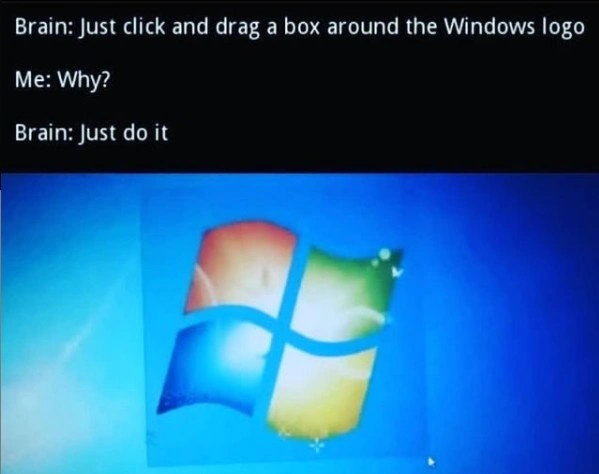
Let’s break down what’s happening in this meme in simpler terms. The image shows a Windows desktop (looks like Windows 7 with its blue background and familiar multicolored Windows logo in the center). On the screen, the user has clicked and dragged the mouse to create a faint selection rectangle that perfectly outlines the Windows logo. In normal use, dragging a selection rectangle on the desktop is how you select multiple icons at once. For example, if you have many files or shortcuts on your desktop, you can click on an empty space, hold the mouse button, drag a box around several icons, and release to select all of them. The selected icons would be highlighted, allowing you to move or delete them together. This feature is part of the Windows GUI (Graphical User Interface) – it’s a standard operating system behavior to help users work with files visually.
Now, in this meme scenario, the funny thing is that the person is drawing that selection box around the Windows logo itself, which is not an icon or file you can actually select. The Windows logo here is likely just part of the wallpaper (the background image). So dragging a box around it doesn’t “select” anything at all – it just draws the rectangle on the screen and then it disappears when you release the mouse. In other words, it’s a purely visual action with no real effect. The humor is that the person’s brain is urging them to do it just because. It’s a random impulse: they see the Windows logo and think, “wouldn’t it be neat to perfectly fit a rectangle around that?” It’s a bit like noticing a square tile on the floor and suddenly wanting to trace its outline with your foot for no reason. User Experience (UX) designers certainly didn’t intend for this selection feature to be used as a toy, but here it’s providing a tiny moment of satisfaction.
The text at the top of the meme (“Brain: Just click and drag a box around the Windows logo. Me: Why? Brain: Just do it.”) is a representation of an internal dialogue. This format is commonly used in memes to show a conflict between one’s impulsive thoughts and one’s rational side. The "Brain" represents that little spontaneous voice or urge inside us, and the "Me" represents our conscious self questioning the urge. So in plain terms, the person is basically thinking to themselves:
- Impulse (Brain): “Hey, click and drag a selection box over the Windows logo!”
- Rational self (Me): “Why would I do that? It doesn’t make sense.”
- Impulse (Brain) insists: “Just do it, no reason, it will feel good.”
It’s a playful way to illustrate the thought process. We’ve all experienced these silly urges when using our computers (especially when we’re bored or procrastinating). For example, you might have opened and closed the Start menu repeatedly, or rapidly clicked an icon to see the animation, or dragged a window around in circles on your screen. Here, the urge is specifically about outlining the Windows logo with the selection tool. The humor and relatability come from the fact that many people reading this meme realize, “Haha, I’ve done that!” or at least “I totally get the temptation.”
Some technical context: Microsoft Windows (especially older versions like Windows XP, Vista, 7) had that distinct four-colored flag logo either as the Start button or prominently in the default wallpaper. The Windows desktop allows a click-and-drag selection (often called a “marquee” or “lasso” tool in UI terms). When you perform this action on an empty area, a semi-transparent rectangle (traditionally a dotted outline in very old versions) shows up and follows your mouse, indicating the potential selection region. Anything inside that region that is selectable (like icons) would be highlighted. If nothing is inside, the rectangle just vanishes when you release the mouse. It’s meant as a usability feature to let you group-select items with precision. But outside of its intended use, it becomes this harmless visual effect you can trigger.
For a newer developer or someone not as familiar with Windows quirks, it’s worth noting how ordinary this behavior is in everyday computer use, and that’s why it’s funny to make a meme of it. It’s taking something mundane and shining a light on how we sometimes misuse it for fun. The UX/UI angle here: a user interface element (the selection box) is being used in a way that has zero user experience benefit, aside from personal amusement. That’s the ironic twist – the feature exists to help users work, yet we’re using it to goof off momentarily.
This meme falls into the category of developer humor (or more broadly tech humor) because it’s the kind of thing people who spend a lot of time on computers notice and laugh about. If you showed this to someone who only occasionally uses a PC, they might chuckle at best, but those of us who stare at screens all day immediately recognize that internal “itch”. It’s a form of relatable humor in the tech community – no matter how advanced or different our jobs are, many of us share these small experiences. It’s not about Windows vs. Linux in any serious sense (despite the tag WindowsVsLinux), but there is a gentle poke: Windows, being a very visual OS, invites this kind of playful interaction. A Linux user who lives in the terminal (command-line only) might joke, “I can’t relate, I don’t even have a GUI to drag boxes around in!” Meanwhile, others might point out their Linux desktop or macOS also has similar selection box behaviors. But overall, the meme isn’t about an OS war – it’s about a universal silly moment many have experienced on a Windows machine.
In summary, the meme is showing a person’s compulsion to use a common Windows UI feature in a purposeless way, solely because it’s mildly satisfying. The conversation text format emphasizes how one part of the person’s mind is totally on board with this goofy idea (“Brain: do it!”) and the other part is bemused or hesitant (“Me: why though?”). This lighthearted internal conflict and the visual of the Windows logo neatly "highlighted" by a selection box are what make the meme funny. It’s a quick snapshot of developer life where even the operating system’s interface becomes a toy when we’re bored. If you’ve ever found yourself doing something on the computer that had no real purpose – like flipping the cursor around, moving icons just a pixel, or yes, drawing selection rectangles – then you instantly get the joke. And now, if you didn’t have the urge before, you might catch yourself trying it next time you see that Windows logo on your screen, just to see if you can trace it perfectly. Don’t worry, it’s harmless fun – sometimes our brains just seek a tiny victory or distraction wherever they can find it!
Level 3: Selection Box Shenanigans
Brain: Just click and drag a box around the Windows logo
Me: Why?
Brain: Just do it
This meme speaks to every developer who's ever been stuck waiting on a slow compile or pondering a tough bug and suddenly felt an odd urge to play with the operating system UI. Here, the internal dialogue (the classic "Brain vs. Me" meme format) perfectly captures that random user impulse: an irrational little voice in your head nudging you to drag-select a perfect rectangle around the Microsoft Windows logo on your desktop. It’s a subtle form of procrastination and UX mischief that seasoned devs know all too well. The humor comes from recognizing this strangely relatable behavior and the absurd brain logic behind it. Why on earth would anyone do this? There’s absolutely no productive reason—and that’s exactly the point.
From a senior developer’s perspective, this scenario is both amusing and painfully familiar. Many of us have spent long hours in front of a Windows PC, eyes glazing over at that serene Windows 7 desktop. Our brain, seeking a dopamine hit or a shred of novelty, seizes on the simplest interactive toy at hand: the desktop itself. Operating systems like Windows include a GUI feature where if you click and drag on an empty desktop, the OS draws a translucent selection rectangle (often called a "marquee selection" or rubber-band selection) to let you lasso multiple icons. Normally, this helps you select files or icons in bulk. But when there are no icons under your cursor—say, only the Windows flag logo in the wallpaper—you're essentially just drawing a pretty translucent box on the screen. It’s absolutely useless… and yet so satisfying when you align it just right. The meme nails this unspoken developer habit: using a core UI feature in a totally unintended, whimsical way, as a mini-diversion.
Why is this funny to those of us in tech? Because it’s tech humor that pokes at our shared idiosyncrasies. The developer community often jokes about the weird little things we do when we’re tired or procrastinating. For instance, you might catch an engineer spinning in an office chair after a long debugging session, or typing arp -a for no reason other than to watch the output scroll. Here, dragging a selection box around the Windows logo is exactly that kind of low-stakes entertainment. It's akin to doodling in the margins of your notebook during a dull meeting. UX irony comes into play because a user interface feature meant to enhance productivity is repurposed as a boredom-reliever. The meme’s "Brain: Just do it" command is hilariously accurate: some primal part of our brain just wants to interact with the shiny UI element, and the rational part (the "Me") has no real counterargument except "Why?". In the end, the brain wins with no logic beyond just do it – and the joke is that we actually obey.
There’s also a whiff of nostalgia and tech history here. The image clearly shows the classic Windows 7 era desktop with its bright blue background and 3D multicolor Windows flag logo. Any developer who grew up on Windows XP/Vista/7 remembers that exact translucent blue selection rectangle. Drawing that rectangle was practically a reflex, especially if you came from an era of chunky CRT monitors and idle MySpace chats. Back then, waiting for a program to install or tests to run, you'd idly click the desktop and make little boxes appear and disappear. This simple GUI behavior has been around since the early days of graphical interfaces (even Windows 95 had the dotted marching-ants rectangle). It's a fundamental part of the desktop experience, so much that it's become a sandbox for our fidgety moments. The absurdity that decades of OS development and sophisticated UI design boil down to me using the desktop as a fidget toy is just pure comedic gold for anyone who appreciates operating system quirks.
In terms of real-world scenarios that senior devs will recognize, think about those interminable build times or deployments. You’re on a conference call, code is compiling, or you're SSHing into a server waiting for a script – your hands are free, your mind is wandering. So what do you do? You wiggle the mouse and start desktop rectangle dragging, highlighting nothing in particular. Maybe you box-select the Recycle Bin, or trace a square around the "My Computer" icon. In this meme, the target is the iconic Windows logo itself, centered on the screen like a bullseye. It’s so utterly pointless that it loops back around to being entertaining. Developers often bond over these tiny acts of rebellion against boredom. The joke's underlying theme is, "Look how ridiculous we are, and yet you totally get it, don’t you?" And indeed, a chorus of commenters and colleagues would respond, “OMG I do this too! 😂”. It’s a comforting realization that this relatable humor isn’t just you — it’s a mini universal in developer culture.
Another layer to this meme is the unspoken comparison between different tech cultures, hinted by tags like WindowsVsLinux. Hardcore Linux users might smugly say, “Ha, Windows devs have time to draw boxes around logos? I’m too busy staring at my terminal!” But let’s be honest, every platform has its procrastination quirks. A Linux user might spend 10 minutes tweaking their shell prompt color scheme or catting /dev/urandom to watch gibberish, while a Mac user might jiggle their windows just to see them genie minimize in slow motion (yes, that’s a thing). No matter the OS, humans find ways to toy with the interface once work gets monotonous. This Windows meme just captures one of the most visually obvious examples. It’s a gentle poke at Microsoft’s flagship OS being so ubiquitous that even its logo becomes a plaything.
On a technical note, consider how the Windows OS is handling this selection-box under the hood. The moment you depress the left mouse button on an empty desktop, the GUI subsystem starts tracking your mouse movement. As you drag, it dynamically draws that semi-transparent rectangle (in older Windows, it was a XOR-ed dashed line box) between your start point and current cursor position. There’s likely efficient bitblt or GPU overlay magic happening to make it smooth. The OS checks for any selectable icons inside that rectangle. In our situation, the Windows logo is part of the wallpaper – it’s not an actual selectable object – so the system is basically drawing a rectangle around a ghost. The code responsible might be something hidden deep in Explorer.exe (the Windows shell) that says: “if mouseDrag && no icons selected, just paint the selection visuals.” Ironically, the only purpose here is visual feedback, which in our case is the entire fun. It’s like the OS is unwittingly collaborating in our silly game, dutifully rendering a UI element just to please our inner child. The senior engineer in me can’t help but appreciate that even this trivial interaction was thought of by the OS designers — they knew people might drag on empty space, and they made sure something agreeable happens (a nice little rectangle appears) rather than nothing. Little did they know it’d become a procrastination toy for coders decades later!
Ultimately, the humor resonates on both a technical and human level. Technically, it’s a wink at how user interfaces work and how even insignificant features can be engaging. Human-wise, it’s about the brain’s quirky wiring: sometimes we do things simply because they’re oddly satisfying. The meme’s conversational format dramatizes this internal struggle in a way every overworked developer understands. The brain here is like that mischievous coworker egging you on: “C’mon, live a little, draw that box!” The me is the rational developer: “This is dumb, why would I—” and before the thought finishes, the brain (and the hand on the mouse) already went ahead and did it. It’s an innocuous rebellion against the constant demand to be efficient and logical. For once, you can do something utterly pointless in Windows and enjoy it without needing a reason. And if anyone asks why you’re grin-smirking at your screen, well… you can blame it on your brain and a meme you saw on the internet. In the grand circus of developer humor, sometimes dragging a little translucent rectangle around a logo is the highlight of our day, and that shared absurdity is what makes this meme so hilarious and endearing.
Description
The image is a two-part meme. The top section features white text on a black background, structured as a dialogue: 'Brain: Just click and drag a box around the Windows logo', 'Me: Why?', 'Brain: Just do it'. The bottom section is a photograph of a computer screen displaying the classic, vibrant Windows 7 desktop background and its iconic four-color flag logo. A translucent selection box, created by clicking and dragging the mouse, is being drawn around the Windows logo. The meme humorously captures a widely shared, yet purposeless, compulsion among users of graphical interfaces, especially from the Windows XP/7 era. It's a nostalgic nod to a common, fidgety habit that serves no function but feels oddly satisfying, highlighting a universal quirk in human-computer interaction that many experienced tech professionals will instantly recognize from their own history with these operating systems

Comments
15Comment deleted
Dragging a box around desktop icons is the GUI equivalent of typing 'git status' for the 10th time in five minutes. You know nothing's changed, but you do it anyway out of pure, unadulterated compulsion
Drag-selecting the Windows logo is basically wrapping a 15-year-old monolith in a Dockerfile - zero functional change, but my brain swears we’ve modernized something
After 20 years in tech, I've optimized every millisecond of our CI/CD pipeline, implemented chaos engineering, and architected systems handling billions of requests... yet I still can't resist the primal urge to drag selection boxes around desktop icons while waiting for builds to complete. Some behaviors transcend all levels of engineering sophistication
Every senior engineer has experienced this: you're deep in architectural design, mentally juggling microservices, event sourcing patterns, and CAP theorem tradeoffs... then your brain suddenly demands you select the Windows logo for absolutely no reason. It's the OS-level equivalent of 'I wonder if I can fit this entire function in a one-liner' - technically possible, completely pointless, but somehow irresistible. The real question is whether this counts as context switching overhead in your sprint velocity calculations
Event Viewer's drag-select: outlasting Kubernetes dashboards, humbling overengineered souls since XP
Dragging a selection box around the Windows logo is my brain’s cheapest E2E for hit-testing and dirty-rect repainting - if the marquee flickers, I cancel the deploy and start hunting GPU drivers
Box-selecting the Windows logo: my first load test for DWM's alpha-blend pipeline - zero business impact, 100% dopamine throughput
We all did this while waiting... Comment deleted
Когда в юньке проект загружаешь Comment deleted
в десятке легче Comment deleted
*приступ* Comment deleted
Я не старался Comment deleted
На скрине к посту рукожоп, нужно идеально, до пикселя вместить в квадрат Comment deleted
Just why ? Comment deleted
yes. Comment deleted