Skip to content
DevMeme
2525 of 7435
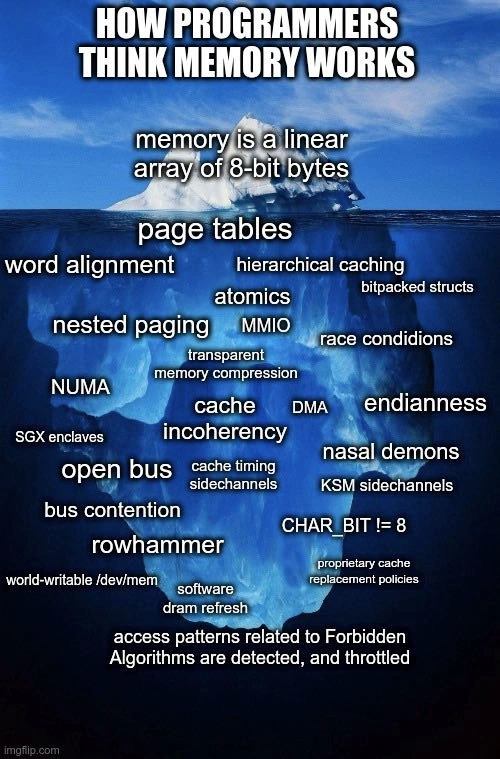
The Terrifying Depths of Memory Abstraction
CS Fundamentals Post #2799, on Feb 25, 2021 in TG

The Terrifying Depths of Memory Abstraction

Why is this CS Fundamentals meme funny?

Level 1: Magic Faucet

Imagine a little kid turning on a faucet to get a drink of water. To the child, it’s simple: turn the knob and water magically comes out. They probably aren’t thinking about where that water actually came from. But behind the scenes, there’s a whole world making that “magic” happen – pipes running through the walls, a water heater maybe, plumbing under the streets, a water treatment plant cleaning the water, pumps and water towers maintaining pressure. The kid just sees clear water in their cup, but hidden from view is a massive infrastructure working to deliver that water seamlessly. This meme is joking about the same kind of thing with computer memory. Most people think of memory in a computer like that faucet: you ask for some data and poof! it’s just there, coming straight out of a simple source. But in reality, the computer is doing a ton of behind-the-scenes work – managing caches, translating addresses, refreshing memory, coordinating between different parts – all so that you experience something as straightforward as retrieving a byte of data. It’s funny (and a bit startling) when you realize that what you thought was as easy as turning on a faucet actually has an iceberg of complexity behind it, quietly making sure everything flows smoothly. The meme makes us laugh because it’s like discovering that your simple kitchen sink is secretly connected to a whole city’s plumbing network – who would’ve thought?

Level 2: More Than Just Bytes

To a newer developer or a student, a computer’s memory might seem straightforward: you have RAM, you store values in it, done. But as the iceberg meme humorously illustrates, there’s a lot going on under the hood. Let’s break down the terms from the meme in a more approachable way, explaining what each means in the real world:

  • Memory is a linear array of 8-bit bytes – This is the simple idea we start with. Think of memory as one huge numbered sequence of boxes, each box holding 8 bits (which is 1 byte, often enough to store a single character like “A” or a small number 0–255). In this model, if you have the address of a box (say box #1000), you can go directly there and put something in or take something out. High-level programming reinforces this idea: an array in C or Python acts like contiguous slots you can index by number. This is a useful mental model, and indeed software lets us treat memory this way. However, it’s a bit like treating a giant library as a single row of books on a shelf – it glosses over the actual logistics behind accessing those books quickly and safely.

  • Page tables & virtual memory – In reality, each program doesn’t directly index physical memory. The operating system gives every process its own virtual memory space. Page tables are like the OS’s secret lookup charts that translate from a process’s virtual addresses (those nice linear addresses your code uses) to the actual physical addresses on the RAM chips. They work in chunks called pages (commonly 4 KB each). So address 0x12345000 in your program might map to some physical frame in RAM – and the page table knows where. If you try to access an address that isn’t mapped in the table, the CPU raises a fault (that’s the infamous segmentation fault or access violation). Virtual memory with page tables provides isolation (one program can’t accidentally access another’s memory because it doesn’t have a page table entry for it) and convenience (each program thinks it has a full continuous memory starting at address 0). It’s as if every program has its own map to a treasure chest of memory, and the OS manages those maps.

  • Word alignment – A “word” is the natural unit of data for a CPU (often 4 bytes on a 32-bit system, or 8 bytes on a 64-bit). Word alignment means data is stored at addresses that align with these word boundaries. For example, a 4-byte integer might be best stored at an address that’s a multiple of 4 (like 100, 104, 108, etc.). If it’s not aligned (say a 4-byte int starting at address 102), the CPU might have to fetch part of it from one place and part from another, since it straddles a boundary – that’s slower. On some systems, misaligned access isn’t just slow, it’s invalid and will cause an error. So compilers usually align data structures automatically (inserting a few filler bytes as padding if needed). As a developer, you might only notice alignment if you’re doing low-level stuff or analyzing performance, but it’s one of those behind-the-scenes rules that the hardware prefers you follow for efficiency.

  • Hierarchical caching – Modern processors have multiple layers of cache memory (small, fast memory) sitting between the CPU and main RAM. Commonly, we have L1 (Level 1) cache per core (very small but very fast), L2 cache per core (bigger but a bit slower), sometimes L3 cache shared among cores (even bigger, slower), and then main memory (much bigger, much slower compared to caches). The idea is that the CPU checks these caches first when it needs data: if the data is in L1, great – it gets it in just a few cycles. If not, it checks L2, then L3, and if not in any cache, finally goes out to main memory which is hundreds of cycles (eternity in CPU time). Because programs tend to reuse the same data (like looping over an array or repeatedly accessing the same variables), caches make the average access much faster. The catch is that caches introduce complexity: data can be in multiple places (RAM and caches), and managing that (keeping it in sync, deciding what to evict when cache is full) is a whole aspect of computer design. But fundamentally, caches are why consecutive memory access or accessing things that were recently used is quicker than some random access far away – not something you’d guess if you only thought of memory as uniform array of bytes.

  • Bitpacked structs – Usually, each field in a data structure (struct/class) gets its own chunk of bytes. But sometimes we intentionally pack fields together tighter than the byte level to save space. For example, imagine a struct to hold flags (yes/no values) – instead of using 1 byte for each flag (which would typically use only 1 bit and waste the other 7 bits), you can pack 8 flags into 1 byte. This is called bit-packing or bit fields. It’s efficient memory-wise but means the program must do extra work to read/write those fields (extracting the right bits with masks and shifts). Also, how those bits are packed (order of bits, etc.) can depend on the system’s endianness or compiler implementation, making it less straightforward than normal fields. So while a programmer might think of having 8 boolean variables, under the hood they might all live inside one byte, and the CPU has to untangle them when you access them.

  • Atomics & race conditions – In multi-threaded programs, a race condition happens when two or more threads try to access and modify the same memory at the same time without proper coordination, leading to unpredictable results. For instance, if two threads both do x = x + 1 at the same time, and if those operations overlap, one increment might get lost because they interfered with each other’s read/write of x. Atomic operations are the remedy: they are operations that the CPU guarantees will complete entirely or not at all, with no in-between states visible to other threads. “Atomic” means indivisible in this context. CPUs provide atomic instructions (like “atomic increment”) or mechanisms (like a lock prefix on x86) so that when one core is doing that update, others are briefly blocked from touching it. Using these (via language features like std::atomic in C++ or atomic package in Java, etc.) prevents race conditions for that operation. It’s like having a special single-user restroom – one thread goes in, locks it (the hardware lock or atomic), does its business (update), and comes out, then another can go. Without atomics or locks, it’s like an open door restroom: two people might rush in and… well, the result is a mess.

  • Nested paging (virtualization) – When you run a virtual machine (VM) – say you have VirtualBox/VMware or KVM running an entire guest OS – that guest OS thinks it’s managing memory with its own page tables, completely unaware it’s virtualized. Meanwhile, the real host OS is actually managing the physical memory. So there’s a two-layer system: the guest has page tables (guest virtual to guest physical), and the hypervisor/host has a second set (guest physical to real physical). Modern CPUs handle this by hardware-supported nested paging. It means every memory access inside the VM goes through two lookups: first the guest page table, then the host’s page table. To make this faster, CPUs use things like a second-level TLB to cache the results of that combined lookup. Even so, there’s additional overhead. In simple terms: the guest OS is living in a made-up “physical memory” of the VM, and the hypervisor translates that to the real machine’s memory. It’s a bit like a dream within a dream – the guest is dreaming it has its own memory, but the host is the one controlling the actual memory reality. All this is transparent to the programs running in the VM (they just see an address space like normal), but those in systems programming know that an extra translation means extra complexity and potential performance cost.

  • MMIO (Memory-Mapped I/O) – Computers often make devices (like graphics cards, disk controllers, network cards) appear as if they are regions of memory. The CPU can read and write to certain special addresses, and those operations go out to the device rather than regular RAM. This is called memory-mapped I/O. For example, writing a value to a specific memory address might actually send that value to a hardware register that triggers, say, an LED to turn on or tells the disk controller to start a transfer. Reading from another address might actually fetch data from a device’s buffer. To software, these look like normal memory accesses (you might literally do something like *ptr = 0xFF; in a driver and that writes to a device register). But they don’t behave like normal memory – they might be slower, might not allow caching (you wouldn’t want to cache a hardware register typically), and reading them might have side effects (like consuming data from a device FIFO). MMIO is how drivers efficiently communicate with hardware using the same load/store instructions used for memory, simplifying the programming model at the expense of adding yet another thing the memory subsystem has to handle.

  • NUMA (Non-Uniform Memory Access) – In some systems, especially servers, the system’s memory is physically split across different boards or CPU sockets. Each CPU can access all the memory, but it will access the memory that’s on its own board (its “local” memory) faster than memory that’s attached to another CPU on a different board. This is non-uniform memory access: some memory is “near” (low latency, high bandwidth) to a CPU, and some is “far” (higher latency, lower bandwidth) through an interconnect. Operating systems are NUMA-aware and try to allocate memory for a thread on the same node that the thread is running on, to keep things efficient. If a program isn’t aware of NUMA and it ends up using memory from another node heavily, it can run significantly slower. You can think of it like multiple warehouses (memory nodes) each next to a particular work station (CPU). If a worker has to constantly walk to a far warehouse instead of the one next door, he’ll be slower. So, NUMA adds another layer: not all memory is equal speed from the perspective of a given CPU.

  • Transparent memory compression – This is when the operating system tries to save RAM by compressing data that’s in memory but hasn’t been used recently. For example, if you have some big buffers or a lot of idle data, the OS might compress those pages (like zipping them) and store the compressed version in RAM, freeing up some space. Then later, if your program tries to access that memory, the OS will quietly decompress it, making the data available again, and possibly compress something else to reclaim space. It’s “transparent” because your program isn’t explicitly aware of it – from the program’s view, it stored X and later got X back, unaware that in between X was actually stored in a smaller form. Tools like zRAM or zswap on Linux do this. The upside is it can delay hitting swap (using disk) by making better use of RAM. The downside is it uses CPU time to compress/decompress and can introduce unpredictability (accessing that chunk of memory might sometimes be fast, sometimes a bit slow if it was compressed). It’s like the OS is Marie Kondo-ing your memory in the background – tidying up by vacuum-sealing the rarely used clothes, and unsealing them when you suddenly need that winter coat again.

  • Cache coherency – In multi-core systems, each core has caches (L1, L2, maybe L3 shared) as mentioned. Cache coherency is the mechanism that ensures that if one core changes the value of some data in its cache, other cores don’t keep using an outdated copy of that data from their caches. Without cache coherence, two processors could each have a cached copy of the same memory location and each think they have the latest value – which would go horribly wrong if both tried to work with what should be a single shared variable. So, hardware implements coherence protocols. Essentially, caches “talk” to each other (through the memory bus or a special coherence network) to notify when a cache line is updated or needs to be invalidated. For example, if Core 1 has a cache line and wants to write to it, it will signal to others “Hey, I’m writing this, toss out your copies!” (In MESI protocol terms, it might move that line to a “Modified” state and others to “Invalid”). All this complexity is so that the abstraction of a single shared memory is maintained across cores. It’s hidden from programmers in that you don’t have to manage it manually (except in very special cases), but if you’ve debugged multi-threaded issues or looked at performance, you might see effects of it (like slight delays when one core writes data that another core was also using – that’s the coherency traffic at work).

  • Cache incoherency – This would be the scenario (usually hypothetical in modern mainstream CPUs, or deliberate in some systems) where that guarantee above doesn’t hold – meaning caches could have different values for the same memory location and not fix it up automatically. Most of the time, you do not want this to happen, because it breaks the illusion that all cores see the same memory. However, in some specialized cases (or older hardware without coherence), developers had to manually ensure coherence by flushing caches or using special memory regions. If you ever hear about “write combining” or non-coherent DMA memory, those are cases where either temporarily or in a specific region, the system isn’t keeping caches coherent and expects software to handle it. It’s tricky to manage, which is why coherence is the default. The meme listing cache incoherency is basically saying, “imagine the nightmare if caches didn’t auto-sync – yep, that’s a thing you might have to think about at low levels.”

  • DMA (Direct Memory Access) – DMA lets devices transfer data to or from memory without involving the CPU executing loads and stores for each byte. For example, when you send data to a sound card, you could either have the CPU write each sample to the card (lots of CPU effort), or you set up a DMA transfer where the CPU just says “Hey, DMA engine, copy this 1 MB of audio data from memory to the sound card’s buffer” and then the CPU can go do other things while the DMA hardware handles the byte-by-byte transfer in the background. This is great for performance. However, because DMA means memory can change out from under the CPU without the CPU itself running instructions, there’s complexity in coordinating caches and memory content. Typically, when using DMA, you might use cache flush and invalidate operations around the buffer being transferred, or use memory that is mapped as “uncached” for that purpose, so that the CPU’s caches don’t conflict with device writes. If you didn’t do that, a device could write to memory but the CPU might still have stale data cached, or vice versa (the CPU wrote something that’s only in cache but not in RAM yet, and the device reads RAM and misses the update). Ensuring that doesn’t happen is part of low-level programming and is why DMA buffers and cache management often go hand-in-hand in device driver code.

  • Endianness – Endianness is about the order in which a multi-byte number is stored in memory. Big-endian means the big end (most significant byte) is stored first (at the lowest memory address), so the bytes appear in the same order as the number is normally written. Little-endian means the little end (least significant byte) is stored first, so the bytes are in reverse order when you look at memory addresses from low to high. For example, take the 16-bit number 0x1234 (hex). In memory, on a big-endian system, it would be [12][34] (0x12 at address N, 0x34 at N+1). On a little-endian system, it would be [34][12] (0x34 at N, 0x12 at N+1). Both are valid ways to represent the number 0x1234 in two bytes; it’s just a convention that differs between systems. Most modern PCs (x86, AMD64) are little-endian, whereas some others (certain embedded processors, older mainframes) might be big-endian. If you’re just using high-level languages and not dealing with raw binary data, you might not notice this. But if you do things like read binary files, work with network protocols (network byte order is big-endian by convention), or do cross-platform development, you need to be mindful of endianness. A classic example: if you write an int to a binary file on a little-endian system and then read it on a big-endian system, the bytes will be “backwards” unless you swap them. So, endianness is one more thing that complicates the idea of memory as just holding numbers – the interpretation of those bytes can depend on the system’s byte ordering.

  • SGX enclaves – Intel SGX (Software Guard Extensions) enclaves are a technology for running code in a secure, isolated region of memory. The idea is that even if the OS or other programs are malicious, they cannot peek into the enclave’s memory; the CPU ensures it’s encrypted or otherwise protected. Developers use enclaves to handle sensitive data or computations (like encryption keys, DRM, secure banking operations, etc.), trusting that even a compromised kernel can’t get at that data easily. Now, the iceberg includes it to illustrate another “special case” of memory: memory isn’t uniform if some regions are guarded by SGX. Entering an enclave and exiting it (called enclave transitions) have performance costs. Also, enclaves come with many limitations (limited memory size, special APIs to communicate outside, etc.). And intriguingly, even enclaves have been attacked indirectly (through side-channels). But from a pure practical view: if you’re running enclave code, there’s an area of memory that is cordoned off with extra rules. It’s like having a high-security vault inside the memory – you need the right keys (CPU instructions, CPU’s internal keys) to access it, and unauthorized attempts are blocked. This is far beyond the simple idea of “just read a memory address” – an enclave address will not yield useful data unless you’re the enclave code itself.

  • Open bus – When the CPU reads from a memory address, it expects some device (either a memory chip or a memory-mapped device) to respond with data. If nothing is mapped at that address, what happens? In modern systems, usually the memory management unit (MMU) would catch it (since no valid page mapping) and raise an exception. But in simpler systems or old computers, if you perform a read on an address that no hardware responds to, the result is essentially undefined – often whatever electrical value is left on the bus. In many cases, this appears as reading either a default fill value (like all 1s, which is 0xFF for a byte) or just some “stale” data from the last thing that was on that bus. This is the “open bus” phenomenon. Think of it like asking a question in an empty room – you might just hear an echo of your own voice or nothing coherent at all. On some classic game consoles, for example, reading unmapped addresses would yield predictable but weird values (like the last byte of a valid read, etc.), which game programmers sometimes even exploited as quirks. It’s a reminder that at the hardware level, not every address is valid or backed by something, and reading nonsense addresses can give you nonsense data (or nowadays, a crash). So while beginners think you can theoretically read any address (like “it’s just an array index”), in practice addresses have to correspond to real memory or devices, or you’re in phantom territory – which the OS usually prevents with faults.

  • Cache timing sidechannels – This refers to gaining information by observing how fast or slow certain memory operations are, exploiting the caches. Here’s an example scenario: Suppose a secret (say a password or cryptographic key) influences what memory locations a program accesses. If an attacker can measure how long certain operations take, they might infer which memory locations were accessed, and from that deduce the secret. Why does timing reveal that? Because if an access is fast, it was likely served from cache; if slow, it had to come from main memory. An attacker can intentionally evict certain cache lines and see if the victim’s access brings them back into the cache, or measure access times to guess whether data was already cached. These are the principles behind many side-channel attacks like Spectre, Meltdown, Flush+Reload, Prime+Probe, etc. In a simple analogy: imagine you (the attacker) want to know if your roommate (the victim) looked at a particular page in a book. You stash the book somewhere inconvenient (analogous to evicting from cache). Later, you see your roommate go to retrieve it – if they come back really quickly, maybe they already had the book handy (cache hit). If they take longer, they had to go find it (cache miss). In computing terms, attackers don’t see the victim’s data directly, but by using timers and clever tricks with caches, they infer it. It’s a very deep and wild form of attack because it doesn’t violate traditional security boundaries directly – it abuses the nuances of performance optimizations. Top-level takeaway: not only do caches affect speed, but that speed difference itself can become a channel for information leakage.

  • Nasal demons – This is a humorous way to refer to the unpredictable outcomes of undefined behavior in programs, especially in C/C++. If your program does something it’s not supposed to (like reading memory it shouldn’t, writing past the end of an array, using an uninitialized pointer, etc.), the C/C++ standards say the behavior is “undefined.” That means there’s no guarantee what will happen – maybe the program crashes immediately, maybe it seems to work, maybe it produces bizarre results later. The joke is that in theory, it could do absolutely anything – including a ridiculous thing like causing demons to fly out of your nose. Of course, that won’t literally happen, but it’s a metaphor for “all bets are off.” In practice, nasal demons might manifest as your program corrupting data silently, or jumping to a random location in code, or other weird bugs. It’s a cautionary term that seasoned C/C++ programmers use to remind each other that once you step outside the lines of defined behavior, the outcome is not under your control. If you ever see a program act possessed (variables changing mysteriously, program flow derailing with no clear reason), a veteran might quip “nasal demons – must be undefined behavior somewhere.”

  • Bus contention – Think of the memory bus (the pathway connecting CPU and memory) like a highway, and the CPU cores and DMA devices like cars that want to drive on that highway. Bus contention happens when too many try to use it at once – they contend for bandwidth. If one core is already saturating memory (say, streaming through a huge array doing loads and stores non-stop), and another core tries to do the same, they will have to share the bandwidth. Neither will get full speed; they’ll effectively slow each other down. In extreme cases with many cores, adding more threads doesn’t increase throughput because the bus (or the memory controllers) can’t handle more traffic – it’s like rush hour, you can add more cars but everyone just goes slower. Developers who optimize for multi-threading on high-core-count machines pay attention to this. It’s one reason why, for example, 64-core servers don’t always run a single memory-heavy task sixty-four times faster than a single-core machine – they’re limited by how fast the memory system can feed all those cores. In the iceberg, “bus contention” is one of those physical bottlenecks that breaks the ideal of uniform memory access. In the naive model, you’d think every core can do memory access independently at full speed, but in reality they’re often all sharing the same lanes to main memory.

  • KSM sidechannels – KSM (Kernel Same-page Merging) is a feature typically used in virtualization. It scans memory to find identical pages in RAM (from different processes or VMs) and merges them into one copy to save memory (with the caveat that if someone writes to that page, it’ll then un-merge – copy-on-write). It’s great for, say, 10 Linux VMs all running the same OS: instead of 10 copies of the identical code in RAM, keep one and let them share it. However, if an attacker is in one VM and suspects that another VM has a specific piece of data (say a secret or a certain library loaded), the attacker can load that same data in their own VM and see if the memory gets merged (one indicator could be reduced memory usage or the timing of a memory access changing slightly). If it merges, it means the other VM likely had that page content too. If it doesn’t, maybe not. That’s a side channel – using this shared resource behavior to infer something about another VM. While it doesn’t give you the data itself, even knowing “VM B has this library or this specific data in memory at address X” could be useful to an attacker as part of a bigger exploit chain. Because of such concerns, some cloud platforms disable or limit these deduplication features. In summary, KSM sidechannels show that even memory optimization features can inadvertently leak information, which is quite the twist – an optimization meant to be invisible ended up poking a hole in isolation.

  • CHAR_BIT != 8 – In the C language, CHAR_BIT is the number of bits in a byte (the size of the char type). We nearly always assume it’s 8, because virtually all modern general-purpose computers use 8-bit bytes. But there have been systems (and still are some niche ones) where a byte is, say, 9 bits or 16 bits. For example, some older DEC machines had 9-bit bytes, and certain DSPs (digital signal processors) might choose non-8 sizes for practicality. If CHAR_BIT were 16, then a char can hold values 0–65535! The iceberg includes this to poke at our deep assumptions. It’s like saying “hey, you know that thing you’re 99.9% sure of, that a byte is 8 bits? Well, in the depths of the ocean, even that can be false.” It’s an extreme edge case, but from a low-level portability standpoint, it’s true – the C standard allows it. This rarely affects typical developers (who will likely never see a system where this isn’t true), but it’s a reminder that what we take as fundamental can sometimes be an artifact of the common platforms. When writing truly portable code or working on very specialized hardware, you might have to remember not to hard-code assumptions like 8-bit bytes.

  • Rowhammer – Rowhammer is a fascinating hardware bug/attack. It exploits the electrical design of DRAM memory. DRAM stores data in rows of tiny capacitors (which hold charge for 1s). Activating (reading) a row causes a bit of electrical disturbance; normally it’s fine, but if you do it rapidly and repeatedly, adjacent rows can be disturbed enough that some bits flip (0 becomes 1 or vice versa). Think of pounding on a table and making a nearby object shake or fall – you’re not touching the object, but the energy transfers. Rowhammer does that with memory cells. The scary part is an unprivileged program could intentionally hammer its own memory in a pattern that causes a neighboring memory row (which might belong to another program or the OS) to flip bits. Suddenly, you’ve affected memory you’re not supposed to have access to, potentially breaking security. For example, flipping a bit in a page table could give your process higher privileges. Rowhammer showed that the abstraction “your writes only affect your memory” wasn’t absolute – by just reading (or writing) intensely, you could induce changes elsewhere. It’s at the bottom of the iceberg because, frankly, it was a “whoa, I can’t believe that’s possible” moment in computing. Hardware makers have since added mitigation (like target row refresh, where memory controller detects rapid accesses to one row and proactively refreshes neighbors to prevent flips), but Rowhammer remains a classic example of the kind of deep, physical-world issue that breaks the simple mental model completely.

  • Proprietary cache replacement policies – When a cache is full and needs to make room for new data, it has to decide which existing cache entry to evict. There are algorithms for this – least recently used (LRU) is common in theory, or variants of it. But in real CPUs, the exact policy can be complex and is often not publicly documented in detail (hence “proprietary”). Each CPU generation might tweak it for better performance on average. For instance, they might not use pure LRU because of cost or suboptimal patterns; they may use pseudo-LRU, or random eviction in some cases, or have special handling for certain access patterns. For most developers, this is too deep in the weeds – we don’t know or care exactly how the cache chooses to evict line A or B. We just see the end result in performance. But if you’re really doing low-level performance tuning or designing a CPU, these policies matter. Why is it on the iceberg? It emphasizes that even if you try to predict cache behavior, the vendors might have some secret sauce algorithm that you’re not privy to, meaning you can’t perfectly second-guess the cache. It adds to the sense of uncontrollable complexity – you can design a workload thinking “my critical data will stay in cache because of X, Y, Z,” and then the cache might surprise you because its replacement policy isn’t what you assumed. In short, it’s a wink that says, “there are dragons here – and they’re patented.”

  • World-writable /dev/mem – On Unix/Linux systems, /dev/mem is a device file representing the physical memory of the computer. Normally only the kernel or root (with great caution) would use it, and modern OSes often restrict it heavily because it’s powerful and dangerous. If something is “world-writable,” it means any user or process could write to it. So world-writable /dev/mem would be a huge security hole: it’s effectively saying any program can poke any value anywhere in physical memory. That would let a malicious program do things like modify the running kernel or another program’s memory, completely bypassing all normal protection. It’s game over for security and stability – chaos would ensue (undefined behavior at a system-wide level). This usually doesn’t happen by accident; it’d be a gross misconfiguration. But it has existed in some historical or intentional scenarios (for instance, back in DOS days, there was no memory protection at all – any program could do similar things to what /dev/mem allows). In the iceberg, having this at the bottom is kind of a humorous exaggeration of “the worst possible scenario.” It’s like saying, if you thought things above were bad, imagine if literally the entire memory space was open to tampering by anyone. It’s the ultimate antithesis of isolated, nicely managed memory – an absolute free-for-all. It also subtly references the idea that many of these deep problems (rowhammer, side-channels, etc.) are about breaking isolation in weird ways; /dev/mem being world-writable breaks it in the most direct, blunt way.

  • Software DRAM refresh – Dynamic RAM, as mentioned, needs periodic refresh cycles to keep its data intact. Today this is handled by the memory controller hardware automatically. In the very early days of microcomputers (or in some simple embedded systems), there wasn’t a dedicated memory controller to do this, so the CPU had to dedicate some time to refresh memory. For example, the original IBM PC’s DMA controller was programmed to perform refresh cycles, and some older systems literally had the CPU execute a tiny refresh routine at intervals. If the refresh didn’t happen, memory would start losing bits (imagine an array of bits slowly decaying from 1s to 0s – spooky!). So, software-driven refresh was a thing: the software had to periodically read or write to each row of memory to recharge it. The reason it’s on the iceberg is likely as a fun bit of deep trivia – a reminder that something as fundamental as memory preserving its content had a manual aspect in the past. It’s almost unfathomable to a modern programmer that you’d have to explicitly “water the flowers” of memory to keep them alive. This also underscores how dynamic (and thus complex) our memory systems are: DRAM is not like a static archive, it’s more like a leaky bucket that needs constant topping up (refreshing). Nowadays hardware handles it, but hey, if that ever failed, the software might have to step in (so it’s not purely theoretical – NASA had to do software refresh hacks on some systems when hardware was malfunctioning, for instance). In any event, it’s the kind of thing only old school engineers or extreme computer architecture geeks talk about, so it earns its spot deep under the water.

  • Forbidden algorithm detection & throttling – This phrase isn’t a standard technical term, but it hints at a scenario where the system recognizes a program is doing something “bad” or at least highly undesirable and actively slows it down or stops it. It sounds almost like folklore, but there are real analogues. For security, as mentioned, hardware might detect rowhammer-like patterns and intervene (some DDR4 memory has target row refresh, essentially mitigations that act when an access pattern is too rowhammer-y). For performance, an OS scheduler might notice a process is hogging the CPU or memory bandwidth and could deprioritize it to keep the system responsive (not exactly “algorithm detection,” more like behavior-based throttling). In extreme cases, some algorithms are so inefficient that when you run them, the system’s thermal management might kick in (CPU overheats and throttles frequency) – so it’s like the computer saying “this is a forbidden approach, I shall slow down to protect myself,” in a sense. The meme’s phrasing is exaggerated to sound spooky and secret: “Forbidden Algorithms” as if some patterns are taboo. It gives a fittingly dramatic capstone to the iceberg: after plowing through caches, buses, and demons, we reach the idea that if you push too hard, the system might just smack you down. This adds a tongue-in-cheek, semi-ominous finish that made seasoned readers smirk – it’s effectively a humorous way to say, “By the time you exploit all these crazy low-level things, the computer will have had enough of your nonsense.” In other words, it’s acknowledging with a wink that at some depth, we cross from engineering into the arcane, where the system’s response might appear as if it’s magically forbidding what you’re doing.

Whew! That’s a lot, right? Each of these terms is a whole topic of its own. The takeaway for a newer developer is that what seems like a simple memory operation actually involves many layers. The computer goes to great lengths to preserve the illusion that memory is just an array of bytes – but under the covers it’s translating addresses, caching data, synchronizing between cores, dealing with hardware quirks, and protecting memory from misuse. The meme’s joke is essentially: “We usually ignore all this, but it’s there – and when it goes wrong or when you work at low levels, you suddenly have to confront these hidden complexities.” It highlights the huge engineering effort that makes computers feel simple for us most of the time, and it gives a nod to the experts who do have to wrangle with those complexities when pushing performance limits or debugging nasty issues.

Level 3: Beneath the Waterline

For experienced developers in low-level programming and systems architecture, this meme elicits equal parts laughter and shivers. It perfectly captures the gulf between the tidy mental model most programmers have of memory and the chaotic reality that veteran engineers know lurks underneath. The caption “HOW PROGRAMMERS THINK MEMORY WORKS” sitting atop the tiny iceberg tip – “memory is a linear array of 8-bit bytes” – pokes fun at that simplistic view. Sure, at the surface level, when you write code, it feels like memory is just a big, flat span of bytes numbered from 0 up to some huge number. Need to store something? Put it at address X. Need it back? Go to address X and retrieve it. Easy, right? Every CS 101 course and programming intro reinforces this lovely illusion.

But once you’ve spent a few years in the trenches of systems programming or performance tuning, you discover that this view is like thinking the sun revolves around the Earth – a handy impression that doesn’t match what’s actually happening. The iceberg’s submerged portion lists the true factors at play. Page tables are one of the first deeper concepts a programmer might encounter when they ask, “Hey, why can’t my program just use address 0xFFFF_FFFF? Who says that’s invalid?” That’s when you learn about virtual memory and how the operating system uses page tables (essentially a multi-level lookup structure) to translate the addresses your program uses into physical addresses on the RAM chips. It hits you that your program’s memory is a bit of an illusion: there’s a whole translation process, involving things like a TLB (Translation Lookaside Buffer) for caching those address mappings, happening every time you access memory. And if a mapping isn’t present – boom, you get a segmentation fault. So the simple act of reading memory actually involves the OS and hardware skulking in the background, ensuring you only touch what you’re allowed and mapping your linear address to a real location. Seasoned developers recall the first time they debugged a pointer bug or null pointer dereference and ended up neck-deep in discussions of page faults and memory protection – a far cry from “just an array of bytes”!

Another iceberg entry, word alignment, resonates with anyone who’s dealt with weird crashes or slowdowns due to misaligned data. A senior dev might chuckle remembering that one time they tried to read a 32-bit integer from an odd address and got a hardware bus error on a particular architecture.Aligning data (say making sure a 4-byte int lies on a 4-byte boundary) is usually taken care of by compilers, but when you bypass language rules (perhaps by using #pragma pack in C or doing manual memory fiddling), you might hit the ugly reality that unaligned access can be either slower or outright forbidden. This is the kind of bug that is utterly invisible at the “bytes array” abstraction level – after all, what could go wrong reading at an odd index? Well, on the real hardware, it might translate into two memory fetches or a fatal alignment fault. Cue the veteran engineer nodding at the meme: yep, been there, discovered that the hard way.

Hierarchical caching is another big chunk of the submerged iceberg that every performance-minded programmer eventually crashes into. It’s often said that modern computers are speed demons held back primarily by memory delays – hence the elaborate pyramids of cache. An experienced dev likely remembers the shock when a small code change or data structure tweak made their program run an order of magnitude slower or faster, all because of cache effects. Maybe they changed a loop to access an array in a less linear pattern and suddenly each iteration took way longer due to cache misses. It’s practically a rite of passage to realize “Oh, memory isn’t uniformly fast. There’s L1, L2, L3 caches, and if I fall out of them, I pay a huge penalty.” The humor in the meme listing “hierarchical caching” is that it’s such a dry term for something that can cause dramatic, almost cartoonish consequences in program performance. And let’s not forget the classic wisecrack among senior devs: “There are two hard things in computer science: cache invalidation, naming things, and off-by-one errors.” Cache invalidation – that is, deciding when to remove or update data in cache – is infamous because getting it wrong can lead to subtle bugs or stale data. It’s a nod to how caches, despite being a performance feature, add a lot of complexity to memory behavior. The meme’s audience of seasoned engineers would smirk at that, recalling endless debugging sessions that boiled down to “the data wasn’t where/when I assumed, thanks to caches.”

Now, consider atomics and race conditions. These are terms that haunt anyone who’s done multi-threaded programming in C/C++ or any low-level context. The meme placing them underwater signals: “Memory operations aren’t simple once threads enter the picture.” A senior developer can attest that the first time you truly internalize what a race condition is, it’s both scary and enlightening. You might have had a trivial piece of code, e.g. two threads incrementing a global counter, which you assumed would just work – and then you observe that sometimes the final result is wrong, because updates clobbered each other. That’s when the world of atomic instructions, memory fences, and memory models opens up. The iceberg’s humor here is in highlighting how far from that “just an array of bytes” model we have to go: we need special CPU instructions to tell the hardware “hey, treat this memory operation in a very controlled way so no other core interferes mid-operation.” Without atomics, reading and writing to memory in parallel can turn into a nondeterministic nightmare. Many of us have that memory (pun intended) of chasing a heisenbug that only appears in optimized builds or on multi-core machines, only to discover it was a missing std::atomic or lock – the program was invoking undefined behavior by having unsynchronized threads. The phrase nasal demons might even come to mind in those moments, because the program acted possessed until we fixed the race. Senior engineers laugh at the iceberg because yep, on the surface you think “just write to a variable,” but beneath you must contend with the reality that without proper atomicity, that simple write isn’t simple at all in a multi-threaded context.

Let’s talk about nested paging and virtualization. This is something a systems engineer or anyone who’s worked with virtual machines (VMs) would appreciate. The meme lists “nested paging” not for the faint of heart: it’s basically the mechanism that makes cloud computing possible. A veteran who’s worked on hypervisors or even just debugged performance in a VM knows that when you’re inside a VM, each memory reference goes through not one but two page table lookups: one for the guest OS’s virtual->physical translation, and one for the host’s physical->machine (actual) physical translation. The term sometimes used is EPT (Extended Page Tables) or SLAT (Second Level Address Translation). It’s a lot of fancy jargon to say there’s an extra layer of indirection. If a newcomer complains “hey, why is my code slower on a VM than on bare metal?”, a seasoned dev might grin and introduce them to nested paging effects, TLB misses that now cascade, and other fun. The iceberg’s humor in including this is that it’s yet another thing far below the surface that most application devs never think about — until they hit a weird performance pit or a bug unique to VMs. It’s one more reminder: the deeper you go, the more mind-bending the memory subsystem gets. It’s almost comical how complicated it becomes.

The meme also throws in hardware-centric terms like MMIO and open bus, which are beloved by folks who have done embedded systems or OS kernel work. A senior engineer in that domain can’t help but smirk seeing those in the iceberg. They recall that unlike normal RAM, some “addresses” actually correspond to device registers. For example, writing to an address might start a DMA transfer on a disk controller, or reading from a certain address might fetch a character from a UART. The first time you explain to someone that reading from memory could actually trigger hardware or that some memory addresses don’t exist and might just return nonsense, they look at you like you have two heads. It’s so contrary to the everyday abstraction of memory. The open bus scenario, largely historical or embedded, is even weirder: if no device responds at an address, you might just get residual electrical signals (like seeing whatever was last on the bus lines). That’s a ghostly concept – it’s like expecting to open a book to a blank page but instead reading faint left-over words from whatever was read before. Engineers who have dealt with old consoles or microcontrollers with sparse memory maps find humor (tinged with horror) in that. It’s exactly the sort of deep cut that appears near the bottom of the iceberg to represent “things you’d never worry about... until you’re writing a device driver or bare-metal firmware.”

Moving further down, the meme touches on performance and security nightmares that senior folks know by headlines if not by direct experience. NUMA architecture issues, for instance. If you’ve ever optimized a program on a dual-socket server, you might recall the surprise that if a thread on CPU A allocates memory, a thread on CPU B accessing it might suffer extra latency. Suddenly, you care about which node (NUMA node) memory is on. You might have had to use special APIs to allocate memory “closest” to a thread. It’s a subtlety that completely doesn’t exist in the simplistic “one big memory pool” view. The iceberg’s audience knows that failing to account for NUMA can make scaling an application from 1 CPU to many go from linear performance gains to a depressing flatline or even regressions. It’s a facepalm moment for the uninitiated and a knowing sigh for the experienced.

Transparent memory compression is another modern twist: systems like Linux trying to compress infrequently used pages to stretch available RAM. A sr. dev might remember noticing unpredictable stalls in an otherwise memory-bound program, only to find that the OS was busy compressing or decompressing pages in the background. It’s kind of funny – the computer is secretly zipping and unzipping parts of memory to make it seem like you have more RAM, which is ingenious but also one more thing that can introduce hiccups. The meme listing it is effectively saying, “bet you didn’t think your bytes might be auto-zipped behind your back, did ya?”

Security-related items in the iceberg evoke a more sardonic laughter from seasoned engineers. Rowhammer – who could forget the first time they heard that word and thought, “You can what? Flip DRAM bits by just reading a bunch?” It was equal parts fascinating and horrifying. Similarly, cache timing sidechannels remind us how the meltdown and spectre vulnerabilities turned everyone’s understanding of “protected memory” on its head. Pre-2018, if you told a typical software developer that a user program could read arbitrary kernel memory just by measuring timing of cache accesses, they’d likely raise an eyebrow in disbelief. Post-2018, we all know it’s possible and had to patch all the things. Senior devs see “cache timing sidechannels” in the meme and likely shake their head with a wry smile – yeah, even the CPU’s optimizations became our undoing in security. The inclusion of SGX enclaves side by side with sidechannels is also rich with irony recognized by insiders: Intel designed SGX enclaves to be this bulletproof vault for code and data, and then researchers broke into the vault using the tiniest cracks (timing leaks and even messing with the enclave via power management attacks like Plundervolt). It’s a reminder that complexity can undermine even our security measures intended to mitigate complexity!

And near rock bottom we have things like world-writable /dev/mem and KSM sidechannels, which are almost cartoonishly scary or obscure. World-writable /dev/mem is basically a nightmare configuration where the operating system’s core memory protections go out the window. It’s the sort of scenario that makes a security engineer either laugh or cry – laugh at the absurdity or cry if they actually encounter it on a system because it’s so dangerous. It’s not a situation you’d normally find outside of a deliberate misconfiguration or CTF challenge, so seeing it on the iceberg is like an inside joke: “this is how bad things could be, theoretically.”

KSM sidechannels is one of those entries that really separate the hardcore systems folks from the rest. If you get that reference, you’re probably the kind of person who reads academic papers on VM isolation or has debugged weird interactions in a cloud environment. It refers to the ability to spy on another virtual machine by exploiting the memory deduplication feature (Kernel Same-page Merging) – a niche but real concern in shared hosting environments. Mentioning it in the meme is tipping a hat to the deep-cut knowledge that even optimizations at the hypervisor level have unintended security implications. It’s the meme equivalent of a wink to the experts: “yeah, we know about that one too.”

Finally, the ominous line about “access patterns related to Forbidden Algorithms are detected, and throttled” is the chef’s kiss of the meme – it exaggerates to the point of absurdity, suggesting that if you do something really egregious, the computer gods will intervene. While no OS message will literally tell you “Forbidden algorithm detected, slowing you down,” there’s truth wrapped in the joke. It evokes things like runtime heuristics that prevent certain attacks (e.g., the CPU’s speculative execution mitigations or an OS noticing your process is hammering memory and scheduling it less aggressively). It also kind of captures that feeling one gets when they try an incredibly heavy approach and the system just chugs – as if it’s saying “Stop that, you’re hurting me.” Seasoned devs might laugh remembering times they attempted something theoretically neat but practically disastrous (like a super nested loop or an algorithm with ridiculous Big-O complexity) and effectively got “throttled” by reality (be it thermal throttling, the OS OOM killer, or just the program grinding to a halt).

The brilliance of this meme is how it balances accuracy and absurdity. Each item below the waterline is real (or grounded in something real), yet the sheer quantity and extremity of them is comedic. It’s saying, “Look at all this crazy stuff that’s actually part of how memory works!” The senior engineers laugh because they’ve learned many of these the hard way, often one painful lesson at a time. There’s a bit of commiseration in that laughter: we’ve all been the programmer thinking memory was simple, until we hit one of these iceberg chunks head-on. It’s almost therapeutic to see them listed out like this, externalizing the often hidden knowledge that veteran developers carry.

Ultimately, the meme resonates strongly with experienced folks because it’s a caricature of their journey. The top is where we all started – “just bytes” – and as you go down you see milestones of enlightenment (or rude awakenings). By the bottom, you’re practically in mythical territory (demons, forbidden knowledge) which tongue-in-cheek matches how it feels to debug those kinds of issues. It’s funny because it’s true, and it’s funnier because it’s so true that it takes an exaggerated iceberg diagram to even begin cataloging the madness. Any senior dev looking at this will likely forward it to a colleague with a note like “Remember that cache-coherence bug? This is our life…” and share a knowing laugh (while perhaps quietly hoping they won’t have to dive to those depths again anytime soon).

Level 4: Turtles All the Way Down

In theoretical computing, we often imagine memory as an idealized random-access array where any address can be read/written in constant time. This meme humorously shatters that ideal, revealing how the simple model is just the iceberg’s tip. The linear array of bytes is a convenient abstraction rooted in the classic von Neumann architecture, but beneath that lies a labyrinth of hardware and OS mechanisms. In formal terms, what we treat as a flat address space actually involves multiple layers of address translation and caching. Researchers have spent decades developing memory consistency models to reason about how operations on different CPUs appear to interleave, because real hardware does not automatically behave like one unified, instantaneous array of bytes. The deeper entries on this iceberg (like atomics, cache coherency, and race conditions) allude to the theoretical frameworks (such as sequential consistency vs. weak memory models) that experts use to reason about correctness in concurrent systems. In essence, providing the illusion of a simple linear memory while juggling speed and correctness across caches, cores, and peripherals is a feat of both engineering and theoretical computer science.

One way to appreciate the depth here is to consider cache coherence. Maintaining a single consistent memory view across multiple CPU cores is akin to solving a miniature distributed consensus problem (imagine many agents each with a copy of data, agreeing on updates): it’s not trivial, and there are fundamental trade-offs. In fact, the challenge of keeping caches coherent has parallels to the CAP theorem in distributed systems – you can’t have it all instantly updated and ultra-fast without some delays or complexity. This is why real hardware implements protocols like MESI, which guarantee coherence but at the cost of extra messages (snoops, invalidations) under the hood. The iceberg’s list (with items like cache incoherency and cache timing sidechannels) hints at the edge cases and unintended consequences of these protocols. For example, the mere timing differences introduced by cache hits and misses create side channels that theoreticians model as leaks of information from a supposedly closed system. Academic research papers have explored how timing variations can violate security boundaries that were assumed in more abstract models of computation. A perfectly secure algorithm (in theory) can leak secrets if the implementation’s memory access pattern betrays those secrets via timing – a concept that has led to fields like provable secure cryptography considering cache-aware adversaries.

The bottom of the iceberg references some almost sci-fi aspects of memory behavior that nevertheless have firm grounding in research and theory. Rowhammer, for instance, was discovered by pushing hardware beyond expected use: it’s essentially exploiting the physical theory of DRAM operation. By repeatedly activating (accessing) the same row of memory, researchers found they could induce bit flips in adjacent rows due to electrical interference – a phenomenon that wasn’t part of the abstract model of memory, but is very much real in analog circuit terms. This has forced hardware engineers to rethink assumptions and add countermeasures (like extra refreshes or physical isolation of rows) – effectively updating the theory of how we must model memory to include such failure modes. Similarly, cache timing sidechannels and exploits like Spectre/Meltdown compelled a refinement in our theoretical security models. They showed that the classical assumption “memory reads and writes only affect program state” needed an asterisk: they also affect microarchitectural state (caches, branch predictors) which can be observed. In formal verification of software/hardware, these attacks introduced the concept of microarchitectural state as part of the system’s observable behavior, requiring new models (e.g. models of speculative execution and cache observables) to reason about what a program might leak.

Even the quirky terms like nasal demons tie back to deep theoretical ideas in programming language semantics. “Nasal demons” is the community’s tongue-in-cheek way of describing the result of undefined behavior in languages like C/C++. In theoretical terms, when a program invokes undefined behavior, the execution is no longer bound by any formal specification – the mathematical model of the program’s behavior ceases to exist, meaning anything can happen (the compiler is allowed to assume this path never happens, leading to seemingly absurd outcomes). It’s a humorous way to acknowledge a very serious point: the C/C++ abstract machine simply doesn’t define certain things, and thus the correspondence between the code and any logical reasoning dissolves (cue the demons). This iceberg’s inclusion of nasal demons at a deep layer nods to the fact that at the bottom of it all, if you break the rules of the abstraction, you fall into an abyss where logic and guarantees don’t apply. It’s a playful warning grounded in the theory of formal correctness – deviating from defined behavior places you outside the realm of provable properties.

The mention of “forbidden algorithms” being detected and throttled suggests a boundary where practical engineering meets almost philosophical governance of computation. While not literally a standard term, it evokes real scenarios: modern systems can monitor memory access patterns for anomalies. For instance, certain high-end DRAM controllers or hypervisors might notice a pattern resembling the rowhammer attack and intervene (by slowing down accesses or doing proactive refreshes). Likewise, some operating systems have heuristics to prevent pathological workloads from bringing a system to its knees (you could say the OS “throttles” programs that thrash the memory subsystem too heavily, whether intentionally or not). Theoretically, we can view this as the system recognizing when an algorithm’s complexity or behavior is crossing a threshold of good conduct – almost like an immune response in a complex system. It’s amusing because it anthropomorphizes the system as if it knows certain memory usage patterns are so bad or malicious that it outright steps in. This borders on the idea of runtime verification and automated stabilizing systems – topics in research that ensure certain bad patterns are corrected on the fly to maintain overall system health. The meme exaggerates it to “forbidden algorithms,” conjuring an image of some almighty computer judge, but the core concept has roots in real techniques (from simple ones like Linux’s Out-Of-Memory killer stopping memory hogs, to advanced speculative execution guards in CPUs that detect dangerous branch patterns).

Historically, many of the iceberg’s deeper items connect to pivotal moments in computing. CHAR_BIT != 8 hearkens back to an era of diverse architectures – for example, older mainframes or mini-computers with 36-bit words where a byte might be 9 bits, or certain DSPs where data busses dictated 16-bit bytes. It’s a reminder of the historical contingency of what we consider “standard.” The dominance of 8-bit bytes came from practical standardization (ASCII characters, 8-bit microprocessors, etc.), not an inviolable law of nature. Tech historians can point to computers like the PDP-10 (with 36-bit words and 57-bit bytes) to illustrate that our modern assumptions could have been different. Likewise, software DRAM refresh harks back to early dynamic RAM in the 1970s and 80s, where some systems had the CPU or a simple timer explicitly step through memory rows to refresh them, because hardware controllers were primitive or absent. It’s almost unimaginable today to worry about manually preserving memory bits with timed code, but enthusiasts who restored vintage computers know it was once part of a programmer’s world. This highlights how far abstractions have come – we’ve automated away such responsibilities at the hardware level as technology advanced.

In summary, the “iceberg of memory” humorously underscores the difference between the tidy abstractions taught in theory and the messy details discovered in practice. Each submerged term on that image has a rich story behind it – be it a fundamental theory concept (like memory ordering), a breakthrough research discovery (like rowhammer or cache side-channels), or a historical quirk (like non-8-bit bytes) that informed modern design. The meme’s joke lands so well with experienced developers because it’s essentially saying: beneath the simple concept of memory you learned, there’s a stack of turtles all the way down. And on each turtle’s back is a whole subfield of computer science or engineering that had to be wrangled to make memory appear simple. It’s both a celebration of how robust our systems are (that they usually hide all this complexity) and an acknowledgement of the deep intellectual rabbit hole awaiting anyone curious (or unlucky) enough to dive deeper into low-level behavior.

Description

This image uses the classic iceberg meme format to illustrate the gap between a programmer's high-level understanding of memory and its deep, underlying complexity. The visible tip of the iceberg is labeled 'HOW PROGRAMMERS THINK MEMORY WORKS' and shows the simple concept: 'memory is a linear array of 8-bit bytes'. Submerged beneath the water, the massive, hidden part of the iceberg is layered with increasingly esoteric and complex memory-related concepts. These start with familiar topics like 'page tables' and 'hierarchical caching' and descend into advanced and obscure subjects such as 'NUMA', 'cache incoherency', 'rowhammer', the joke 'nasal demons' (a term for undefined behavior), and the ominous 'access patterns related to Forbidden Algorithms are detected, and throttled' at the very bottom. The joke highlights how modern computing abstracts away immense complexity, allowing developers to be productive without needing to understand the arcane, and often frightening, details of the hardware and operating system's memory management

Comments

21
Anonymous ★ Top Pick Most of us just pray the memory allocator returns a valid pointer, blissfully unaware that deep down, the silicon is busy exorcising nasal demons and hoping rowhammer doesn't accidentally flip the 'is_payroll_processed' bit
  1. Anonymous ★ Top Pick

    Most of us just pray the memory allocator returns a valid pointer, blissfully unaware that deep down, the silicon is busy exorcising nasal demons and hoping rowhammer doesn't accidentally flip the 'is_payroll_processed' bit

  2. Anonymous

    I love when someone says “memory is just a byte array” and I get to reply, “Cool - on which NUMA node, under which cache-replacement oracle, and with CHAR_BIT still equal to 8 after rowhammer’s done?”

  3. Anonymous

    After 20 years in the industry, you realize the real memory model is just a distributed consensus protocol between your CPU, compiler, and the elder gods of undefined behavior - and sometimes they disagree on whether your pointer dereference should summon nasal demons or just silently corrupt production data

  4. Anonymous

    This iceberg perfectly captures the moment when a junior engineer confidently declares 'memory is just an array' during architecture review, and the entire room of gray-beards simultaneously experiences PTSD flashbacks to debugging cache coherency issues at 3 AM, hunting down rowhammer exploits, or explaining why their 'simple' optimization actually introduced a race condition that only manifests on NUMA systems with specific cache replacement policies. The real kicker? The deepest layer about 'Forbidden Algorithms' being detected and throttled isn't even a joke anymore - modern CPUs literally do this for certain cryptographic operations to prevent side-channel attacks. We've reached the point where the hardware actively gaslights your code

  5. Anonymous

    Junior: 'Just an array of bytes.' Senior: 'Until NUMA, rowhammer, and nasal demons turn your access pattern into a side-channel symphony.'

  6. Anonymous

    We model memory as a flat byte array until NUMA, MMIO, and proprietary cache policies promote our O(1) hot path to “depends on where the page landed this boot,” and the nasal demons file a P1

  7. Anonymous

    Memory is “a flat array” until NUMA moves your threads, MMIO lies to your pointers, the TLB shoots down your optimism, and the cache replacement policy - proprietary, of course - decides LRU was just a rumor

  8. @RiedleroD 5y

    wtf are nasal demons

    1. Deleted Account 5y

      ub

      1. @RiedleroD 5y

        bruh

  9. @nuntikov 5y

    In what modern architecture CHAR_BIT != 8 ?!

    1. Deleted Account 5y

      DSPs, mostly

  10. @karumsenjoyer 5y

    actually, yes

    1. @RiedleroD 5y

      hey, I just noticed your latvian flag… Hello from austria :)

  11. @p4vook 5y

    ha ha nice meme loser too bad i have seen it on profunctor optics two days ago pathetic bet you feel like a fucking idiot right now

    1. @soulstorms 5y

      roasted

  12. @lycheefoxpup 5y

    Someone please explain the last one.

    1. Deleted Account 5y

      nvidia borking eth mining

  13. @Supuhstar 5y

    These are all abstractions upon that linear array of words tho

  14. @Magilarp 5y

    Thanks abstraction, very cool!👍

    1. @Supuhstar 5y

      💜

Use J and K for navigation