
Skip to content
DevMeme
4757 of 7435
Developers prompt Windows CMD to recite its infamous ls not recognized line
CLI Post #5211, on May 19, 2023 in TG

Developers prompt Windows CMD to recite its infamous ls not recognized line

Why is this CLI meme funny?

Level 1: Speaking the Wrong Language

Imagine you have two friends who each speak different languages. One friend speaks Spanish and the other speaks English. You’re used to saying “hola” to greet your Spanish-speaking friend every day. But one morning, you accidentally say “hola” to your English-speaking friend, who just stares at you confused because they don’t understand that word. Oops! You used the wrong word for that friend, so they didn’t know how to respond.

This meme is joking about the same kind of mix-up, but with computer commands. Think of the computer like a friend that only understands its own special language. One type of computer (like Linux or Mac) understands the command ls as “show me what’s here.” Another type of computer (Windows) uses a different word, dir, to mean the exact same thing. In the picture, a bunch of people (programmers) tell the Windows computer, “Say the line!” – they want it to repeat the error it always gives when someone messes up the words. The Windows computer then basically says, “I don’t know what ls means!” And all the people cheer and laugh, because they’ve all made that mistake and find it funny.

It’s like calling your dog by your cat’s name – the dog will look at you like, “That’s not me,” until you use the right name. Here, the programmer called Windows by the wrong “name” (command), and Windows responded with a confused error. It’s a lighthearted way to show that computers only do exactly what they’re told, and if you use the wrong word, they’ll just shrug (or show an error message). Developers find it funny because it happens to everyone, and sometimes the only thing you can do is laugh and then remember to use the right word next time.

Level 2: ls vs dir 101

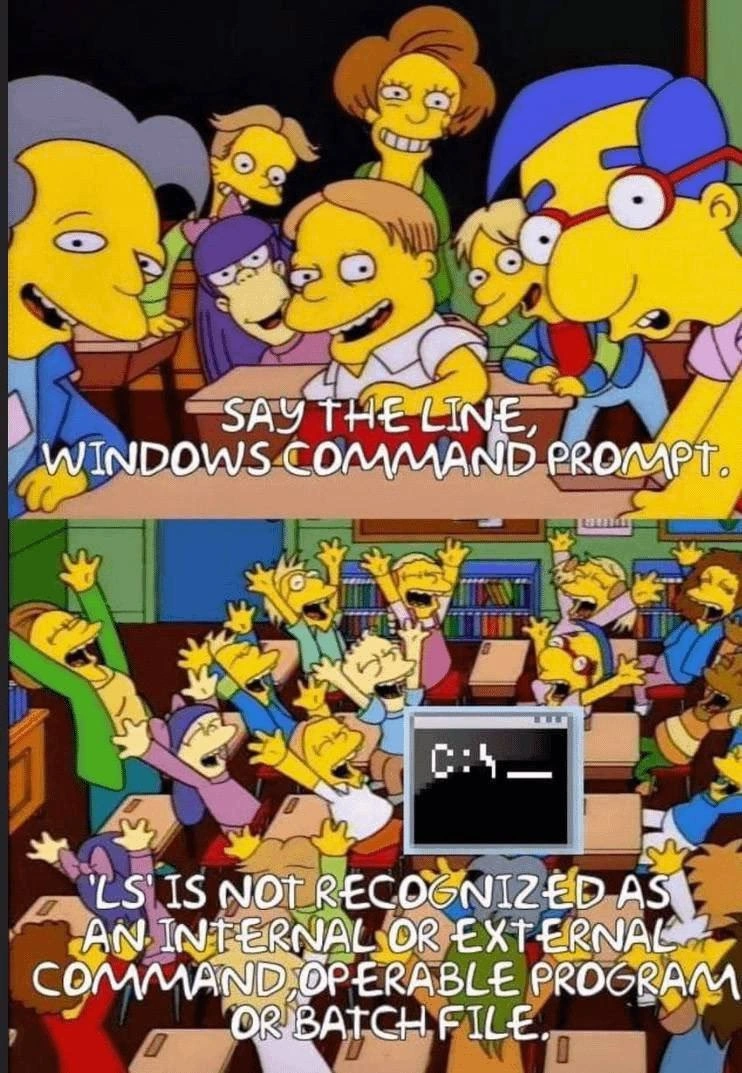
This two-panel image uses a classic scene from The Simpsons to illustrate a common developer mix-up. In the first panel, a group of cartoon school kids excitedly shouts to the Windows Command Prompt:

Kids: “SAY THE LINE, WINDOWS COMMAND PROMPT!”

They’re treating the Command Prompt like a character with a famous catchphrase. In the second panel, a little Command Prompt window on the teacher’s desk responds with the dreaded line everyone expects:

Windows CMD: “‘ls’ is not recognized as an internal or external command, operable program or batch file.”

Upon hearing those words, the kids jump out of their seats cheering wildly. It’s a silly exaggeration of how developers feel when they encounter that error message (again). We don’t literally cheer in real life – usually we groan – but the meme is using cartoon humor to say, “Yep, there it is, the classic Windows error we all know!”

Now, why is that message so famous among developers? It helps to know a bit about the command line. The Command Line Interface (CLI) is a text-based way to give instructions to your computer. You type commands, hit Enter, and see text responses. It’s like chatting with your operating system using special keywords. Windows and Linux/macOS have their own command-line shells (environments where you type commands). Windows’ traditional shell is the Windows Command Prompt (the black screen that shows a C:\> prompt). Linux and macOS use shells like Bash, where the prompt might look like $ or % in a terminal.

Different shells have different commands for some tasks, even if those tasks are basically the same. A perfect example is listing the files in a directory (folder). On Linux or macOS, the command to list files is ls. It’s short for “list” and it’s been a standard Unix command for ages. On Windows’ Command Prompt, the command to list files is dir, short for “directory”. Both commands show you the contents of the current folder, but their names are not interchangeable. They belong to different systems’ vocabularies.

So what happens if you mistakenly use the wrong one? If you type ls in a Windows Command Prompt, Windows doesn’t know that command. It’s not built-in, and unless you installed some special tools, Windows has no program named “ls”. The result is that big scary error message. It basically means “I didn’t find any program or command by that name.” By contrast, if you type ls in a Linux terminal, it works and lists your files, because Linux knows that command. And if you type dir on Linux, you’d likely get an error there, because Linux expects ls instead. Each system has its own set of words it recognizes.

Here’s an illustration of this difference in action:

# On a Linux or macOS terminal (Unix shell):
$ ls
Documents  Photos  app.py  notes.txt

# On Windows Command Prompt (cmd.exe):
C:\> ls
'ls' is not recognized as an internal or external command,
operable program or batch file.

# (On Windows, the correct command is "dir")
C:\> dir
 Volume in drive C is Windows
 Directory of C:\ 
 <files and directories are listed here>

In the Windows example above, you can see the exact error text from the meme: 'ls' is not recognized as an internal or external command, operable program or batch file. This is just Windows’ wordy way of saying, “I don’t understand ls.” Let’s break that down: an “internal command” is something the shell (Windows Command Prompt) knows how to do by itself (like dir or copy). An “external command” means an actual program or script on the computer (like Notepad.exe or a .bat file) that the shell can run. When Windows says a command is not recognized as internal or external, it means it’s not a built-in word it knows, and it didn’t find any program by that name either. In simpler terms: “No such command here.” It even throws in “operable program or batch file” to cover all its bases (like, maybe you meant to run a program or script, but those aren’t found either). It’s a famously verbose error message — in contrast, a Linux shell would simply say something terse like command not found.

Now, the reason developers find this meme so relatable is because of muscle memory and habit. Many programmers work with multiple operating systems. For instance, you might write code on a Mac (which uses Unix-style commands) but deploy that code on a Windows server, or vice-versa. After you use ls a thousand times, your fingers just type it automatically. So sooner or later, you’ll be on a Windows machine, quickly open the terminal to check something, type ls without thinking… and stare at that familiar error. It’s the computer equivalent of trying to speak Spanish to someone who only understands English — you get a blank look (or an error message) in return. The first few times, it’s frustrating or even embarrassing (“Why isn’t this working?... Oh, duh, wrong command.”). After years, it becomes an inside joke you share with others: “I did it again, typed ls on Windows!”

The meme exaggerates this into a joke scenario where developers want to hear that error line, as if it’s a beloved catchphrase. That’s where The Simpsons reference comes in. In the original TV scene, a bunch of school kids are eagerly waiting for Bart Simpson to say his iconic tagline and they cheer when he finally says it. Here, the “iconic tagline” is ironically a Windows error message. The cheering developers (in place of the kids) are basically us laughing at ourselves for making this mistake so often. TerminalCommands can be like learning different dialects: the meme gets humor from the idea that even a computer’s scolding can be legendary.

For a junior developer or someone just learning: don’t worry, this mix-up is extremely common! The key lesson is that Windows and Unix-like systems have different command sets. If you’re in Windows’ Command Prompt, use dir to list files. If you’re in a Linux/Mac terminal, use ls. If you use the wrong one, you’ll just get an error — nothing will break. In fact, many of us intentionally set up our Windows environments to be more Unix-like (for example, installing Git Bash or enabling the Windows Subsystem for Linux) so that ls will work everywhere. Windows PowerShell, a more modern shell, even recognizes ls as a friendly alias. But the classic CMD.exe doesn’t change — it still speaks its own old-school language. That’s why this joke never gets old in programmer circles. It’s a little nod to the everyday challenge of remembering which computer “language” you’re speaking. And when we see Windows spitting out that line in a meme, we can’t help but chuckle and think, “Ah, the old ls mistake – been there, done that!”

Level 3: Console Culture Clash

This Simpsons-inspired meme lands a punch with cross-platform CLI humor. In the first panel, a classroom of cartoon kids leans forward eagerly, essentially representing developers who’ve suffered this issue. They shout, “SAY THE LINE, WINDOWS COMMAND PROMPT!” — as if the Windows console has a famous catchphrase. In the next panel, the kids erupt in cheers because the Windows Command Prompt delivers exactly what they expected: its notorious error message. That message reads: 'ls' is not recognized as an internal or external command, operable program or batch file. For seasoned developers, this line is a painfully familiar punchline. It satirizes the muscle-memory mistake of using a Unix command in a Windows shell, something even the best of us still do after years of switching contexts.

Why is this so funny to experienced devs? It’s highlighting a shell culture clash embedded in computing history. Unix-like systems (think Linux or macOS) and Microsoft’s Windows evolved along separate paths, each with its own Command-Line Interface (CLI) commands. In a Unix shell (like Bash or Zsh), ls (short for “list”) displays the contents of a directory. But Windows’ classic shell (the venerable cmd.exe, descendant of MS-DOS) expects dir (short for “directory”) for the same task. These differences go back decades: DOS inherited commands from CP/M and other early microcomputer systems, favoring English words like DIR, while Unix, shaped by AT&T Bell Labs culture, favored terse abbreviations like ls to save keystrokes. The result? Two incompatible vocabularies for doing identical things. Every experienced dev knows this, yet when you’re moving fast, muscle memory wins. You might be in a Windows terminal out of habit and type ls… and Windows immediately barks that iconic “not recognized” line. It’s a rite-of-passage error message – practically a meme in text form – that signals “whoops, wrong OS!”

The humor is amplified by the meme’s format. The Simpsons kids demanding “Say the line!” is an allegory for how predictable this situation is. The Windows Command Prompt’s error has effectively become a catchphrase in DeveloperHumor culture. Everybody who’s bounced between Linux vs Windows has seen that exact rejection from Windows, verbatim. In real life we groan when it happens, but seeing it presented as a comedic performance – with Windows CMD as the deadpan comedian delivering its one-liner – is hilariously on-point. The cheering cartoon kids mirror our shared relief and camaraderie: “Ha, I’ve done that too!” We’re laughing at ourselves through the Command Prompt’s obstinate formality.

On a deeper level, this meme pokes fun at how fragmented our tools can be. In a perfect world, a terminal command to list files might be universal. But historically, Windows and Unix were developed by different people with different philosophies, so we ended up with parallel universes of commands. The ls is not recognized…” error message encapsulates that divide in one clunky sentence. Windows doesn’t just say “Unknown command.” It delivers a whole paragraph reminding you that ls isn’t part of its vocabulary. That verbose wording hasn’t changed since the ‘90s, so it’s seared into our brains (much like Bart Simpson’s chalkboard gags). Many senior devs have even devised coping mechanisms: some add aliases or install tools so ls will work on Windows, others switch to PowerShell (which cheekily accepts ls as an alias for its Get-ChildItem cmdlet). Yet, inevitably, someone ends up in plain old Command Prompt again, and the first thing they do is trigger this error — prompting half the team to jokingly yell, “Say the line!”

The punchline lands because it’s true: no matter how advanced our dev setups get, a simple habit like typing ls in the wrong place can still trip us up. The meme perfectly captures that mix of frustration and nostalgia. Seasoned engineers smirk because they remember all those times they absentmindedly typed the wrong command on a server or a coworker’s PC and got schooled by the shell. It’s a gentle reminder that even experts mess up simple things when juggling different systems. In the grand timeline of tech, the ls vs dir saga is a small but enduring quirk — one that continues to unite developers in laughter (and occasionally, facepalms) across the operating system divide.

Description

Two-panel Simpsons meme. Panel 1: a classroom of cartoon kids leaning towards the front, text in large white capital letters reads, "SAY THE LINE, WINDOWS COMMAND PROMPT." Panel 2: the same kids celebrate with arms raised; in the middle is a pixelated Command Prompt window showing "C:\>". Over the scene, white capital letters say, "'LS' IS NOT RECOGNIZED AS AN INTERNAL OR EXTERNAL COMMAND, OPERABLE PROGRAM OR BATCH FILE." The joke riffs on muscle-memory clashes between Unix-style commands and Windows CMD, highlighting cross-platform CLI pain when developers instinctively type "ls" instead of "dir"
Comments

6
Anonymous ★ Top Pick Windows shouting “’ls’ is not recognized” is my favorite reminder that our “cross-platform” build toolchain is just a stack of Bash scripts wearing a flimsy .bat trench coat
  1. Anonymous ★ Top Pick

    Windows shouting “’ls’ is not recognized” is my favorite reminder that our “cross-platform” build toolchain is just a stack of Bash scripts wearing a flimsy .bat trench coat

  2. Anonymous

    After 20 years of cross-platform development, I've trained three junior devs, implemented WSL2 across the org, and written PowerShell aliases for every Unix command known to humanity... yet my fingers still type 'ls' in cmd.exe with the confidence of someone who's never seen Windows before

  3. Anonymous

    The 'ls' error in Windows CMD is the developer equivalent of trying to speak your second language to native speakers of your first language - your brain knows what it wants to say, but the environment refuses to cooperate. After 20 years of Unix dominance and WSL becoming standard, we're still collectively performing this ritual humiliation, immediately followed by the sheepish 'dir' correction. It's the technical debt of our own neural pathways, a reminder that despite all our infrastructure-as-code and containerization, we still can't abstract away the fundamental incompatibility between Microsoft's 1980s DOS legacy and the POSIX-compliant world the rest of us inhabit

  4. Anonymous

    True cross-platform engineering is shipping a doskey macro that aliases ls to dir, just to keep the team’s muscle memory within the error budget

  5. Anonymous

    Windows CMD: “ls is not recognized.” Senior response: install WSL; junior response: alias dir. PowerShell twist: “ls” works - as objects - so your grep pipeline dies anyway

  6. Anonymous

    20 YoE architects still typing 'ls' in CMD: the one tech debt that outlives any monolith

Use J and K for navigation


