
Skip to content
DevMeme
4758 of 7435
Bell curve compares KDE and tiling window managers across developer intelligence levels
OperatingSystems Post #5213, on May 20, 2023 in TG

Bell curve compares KDE and tiling window managers across developer intelligence levels

Why is this OperatingSystems meme funny?

Level 1: Back to Basics

Imagine you’re learning to ride a bicycle. At first, when you don’t know much, you just use a normal bike with maybe some training wheels – it’s simple and it works. Now picture an older kid who’s learned a bit about biking: they might get obsessed with a fancy unicycle or a super complicated stunt bike, thinking it’s the “cool” way to ride. They spend a lot of time trying to master it and probably get a bit frustrated or fall off a lot (they might even cry in frustration!). Finally, think of a professional cyclist or a very wise biker – you might expect them to use something wild, but instead they choose a regular good bicycle that just works reliably. They know all about the fancy bikes, but they’ve realized the simple bike lets them focus on enjoying the ride rather than constantly fixing or adjusting the bike.

This meme is like that. It’s saying when programmers start out, they use simple, common tools (like a normal desktop setup – just clicking on things to open them). In the middle stage, some programmers try to use very complex, special setups (kind of like the unicycle) to be more efficient or feel advanced, but it can be a lot of work and make them unhappy. In the end, the really expert programmers come back to the easy setup again (the regular bike) because it makes life easier and they can get their work done without hassle. The funny part is realizing the beginner and the master end up making the same choice, even though for opposite reasons – one because they don’t know better, and one because they know too well that sometimes the simplest way is best. It’s a little joke about going on a big adventure in complexity and then coming home to simplicity again.

Level 2: Desktop Diversity 101

On Linux (an operating system loved by developers), you aren’t stuck with a single way of doing things – you have a ton of choices for your graphical interface. This meme contrasts two broad categories of those choices: desktop environments (like KDE, GNOME, XFCE) versus tiling window managers (like i3, Xmonad, AwesomeWM, etc.). If those names sound unfamiliar, think of it this way:

  • Desktop Environments (DEs) such as KDE Plasma, GNOME, or XFCE are the full-fledged “everything included” graphical shells. They come with a start menu or app launcher, taskbars, system trays, settings panels – all the stuff you expect when you log into a user-friendly OS. For example, GNOME (used by Ubuntu by default) has a dock, clickable menus, and polished visuals. KDE is another popular one; it’s known for being very feature-rich and customizable via settings dialogs (you can tweak almost anything in KDE through a GUI, from window animations to widget styles, without editing text configs). XFCE is a bit more lightweight and old-school looking, but it’s still a complete environment with panels and icons, often chosen for its speed on older hardware. The key thing is: if you install one of these, you log in and you immediately have a functional, familiar desktop – much like Windows or MacOS gives you by default. There’s usually no need to touch the command line for basic navigation if you don’t want to.

  • Tiling Window Managers (WMs), on the other hand, are more minimalist. A window manager is a piece of software that controls how application windows appear and arrange on your screen. Tiling WMs specifically arrange windows in a non-overlapping way (tiling them like tiles on a floor, hence the name). Instead of dragging windows around freely and letting them overlap, a tiling WM will snap every new window into a grid or tiled layout. For instance, if you open a browser and then a terminal, a tiling WM might automatically size them each to take up 50% of the screen side by side (or top and bottom) by default. Open a third window, and it might split the space again so all three are visible without overlap. You can navigate between them using keyboard commands rather than a mouse. i3 is a very popular example of this — it’s essentially just a window tiler with a configuration file you edit manually to set your key shortcuts and preferences. By itself, i3 doesn’t provide a start menu or desktop icons or a system tray (you’d add separate tools for those if you want them). It’s barebones by design. Other names in the meme, like herbstluftwm, bspwm, AwesomeWM, and Xmonad, are similar tiling managers with their own twists (for example, AwesomeWM uses the Lua programming language for configuration; Xmonad uses Haskell code for config, which is very programmer-centric; bspwm manages windows as a binary tree, controlled via messages from a companion program; herbstluftwm allows scripting and hooks, etc.). These are typically used by more experienced or adventurous users who want to fine-tune their environment at a granular level.

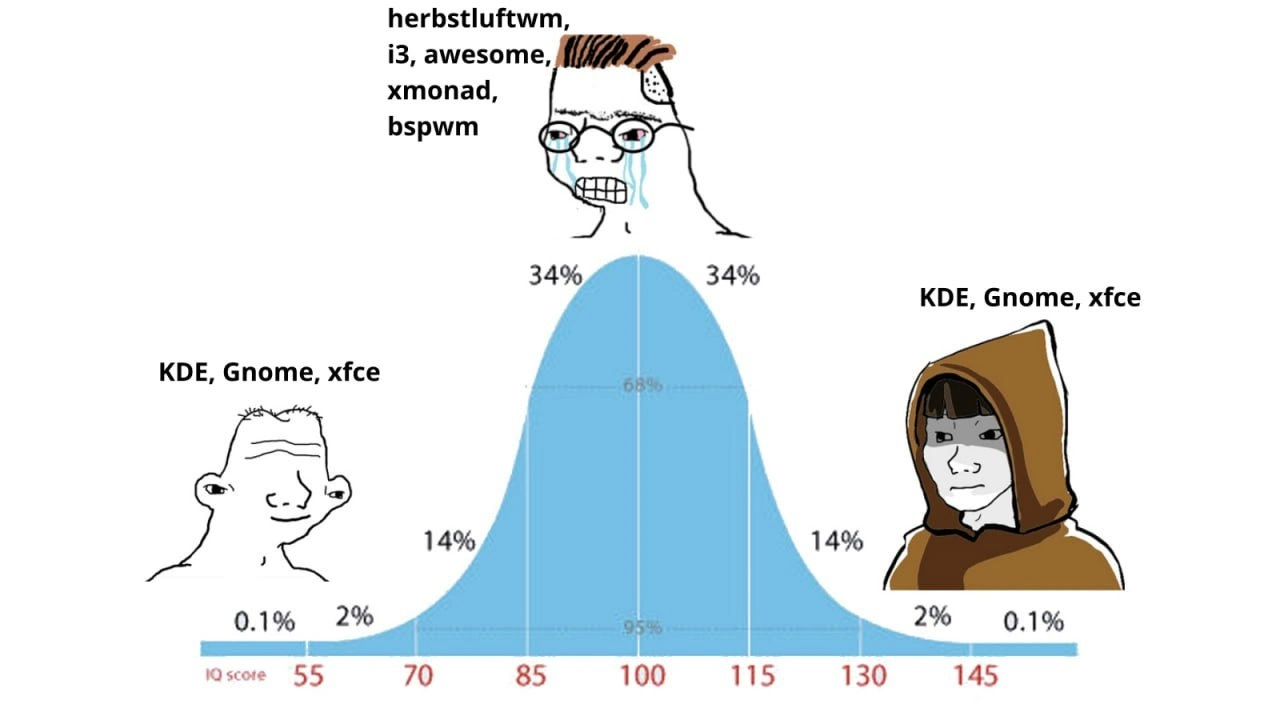
Now, what the meme shows is a classic bell curve (that blue curve with percentages 0.1%, 2%, 14%, 34%, etc. corresponding to IQ scores along the x-axis). On that curve, the left end (very low IQ score side) has a goofy simple-faced character labeled “KDE, Gnome, xfce.” This represents beginner developers or users with “low knowledge” who just use a standard desktop environment like everyone else. They’re content with the defaults — maybe they installed Ubuntu or Fedora and accepted whatever desktop came with it, and they’re happy because it works. They have that dumb happy look, implying they don’t overthink it.

In the middle of the curve (average IQ ~100 region), there’s the peak with a nerdy Wojak wearing glasses and tears streaming down. He’s labeled with the names of all those tiling WMs: “herbstluftwm, i3, awesome, xmonad, bspwm”. This is the enthusiast who’s discovered these niche tools and is obsessing over them. The crying face is a bit of meme humor: it suggests that this person is kind of in “nerd anguish” – possibly stressing himself out setting them up or maybe crying because people don’t appreciate his ultra-cool setup. Essentially, it pokes fun that the mid-level guy is over-complicating his life with these choices and possibly feeling superior but also miserable (“I’ve made everything so complex, why am I not actually happier or more productive? Waaah!”). The glasses and anguished expression convey the stereotype of a somewhat socially awkward, overly analytical techie who is both intellectually proud and physically exhausted.

Finally, on the right end of the curve (very high IQ side), we see an “enlightened” hooded figure (often called the galaxy brain or enlightened Wojak in meme culture) again labeled “KDE, Gnome, xfce”. This implies that the truly wise or advanced user ends up choosing the same type of simple setup as the beginner. The hooded figure looks calm and all-knowing, which in meme language means “this person has figured it out on a deeper level.” So the joke is that both the noob and the guru are using the normal desktop environments, while the intermediate guy is the one complicating things with fancy window managers. It’s a funny twist on expectations: you’d think the smartest tech wizard would have the most complex, customized setup, but here the meme says the opposite — the smartest realize the mainstream option was fine (or even best) all along.

For a junior dev or someone new to this: it helps to know that among Linux users and programmers, customizing your environment is almost a rite of passage. There are entire communities (like subreddits, forums) where people show off screenshots of their desktops with wild custom themes, and share dotfiles (configuration files) for others to try. Terms like “ricing” refer to making your desktop look unique and cool (it comes from the slang of making something flashy, like adding “rice” glitter to a car, but in tech it means heavy personalization of the UI). So an intermediate dev might spend days “ricing” their i3 window manager – picking color schemes, fonts, writing scripts to display system info in the panel, etc. It’s often done in the pursuit of productivity (“If I bind all my frequent actions to keyboard shortcuts and remove distractions, I’ll code faster!”) and also a bit for bragging rights (“Check out my setup, I built it from scratch!”). However, as one gains more experience in actual software development work, one might find that maintaining these configs and constantly tweaking isn’t worth the time, especially when projects and deadlines loom. That’s exactly what the meme highlights: the middle guy’s effort versus the seemingly carefree approach of the extremes.

In summary, KDE, GNOME, XFCE = user-friendly, ready-made desktops (easy and sane defaults). i3, herbstluftwm, Xmonad, etc. = advanced, DIY window managers (powerful but require lots of manual setup). The meme uses an IQ bell curve to humorously showcase how beginner developers and seasoned experts converge on using straightforward tools, while the intermediate devs are off on a crusade of ultra-customization. It’s a lighthearted jab at the way we sometimes swing to extremes in tool choices on our journey to expertise.

Level 3: Pendulum of Complexity

This meme nails a common developer culture phenomenon: the pendulum swing between simplicity and complexity in one’s tooling. It’s portraying how a programmer’s approach to their environment often goes full circle. On the left, you have the newbie or “just get it done” dev happily using KDE, GNOME, or XFCE. These are full-featured, mainstream desktop environments on Linux that work out-of-the-box. They have slick graphical interfaces, panels, icons — everything you need without much fuss. The rookie doesn’t even know about exotic alternatives, or if they do, they might not feel the need to try them yet. Their priority is basic Developer Experience (DX): they want things to be easy and functional so they can start coding or browsing. And honestly, GNOME or KDE provide that convenience. (Why spend time configuring your window manager when you’re still figuring out Git and Stack Overflow?)

Now look at the middle of the bell curve. That bespectacled, crying Wojak represents the mid-level developer who has discovered the wild world of tiling window managers and went all-in on customization. This is the phase where a developer has enough experience to be dissatisfied with defaults, yet not enough perspective to gauge the ROI of tweaking. They’ve spent countless hours replacing their desktop environment with something like i3, herbstluftwm, AwesomeWM, Xmonad, or bspwm. These are all examples of tiling window managers – basically minimalist programs that handle window placement without the usual “overlapping windows” or fancy desktop effects. To someone at this stage, the mainstream DEs (KDE/GNOME) look bloated, inefficient, or “too user-friendly.” There’s a sort of ideological zeal here: they believe a tiling WM, controlled heavily by the keyboard and config files, will make them ultraproductive and is more “pure”. It’s very much aligned with a hardcore LinuxCustomization ethos and the UnixPhilosophy of using small, composable tools. The meme lists several of these niche WMs, indicating the mid-tier dev probably hops between them or has tried more than one. Each of those names – herbstluftwm (German for “autumn air window manager”), bspwm (Binary Space Partitioning WM), awesome (which uses Lua scripting), Xmonad (which is configured in Haskell), etc. – comes with its own learning curve, config files, and quirks. It’s not unusual for an enthusiast at this level to spend a whole weekend editing dotfiles, writing config scripts, and perfecting their CLI shortcuts, all for marginal gains (or just for the fun challenge of it).

The humor really shines in how the mid-level tweaker is portrayed: crying, frustrated, nerdy. Why? Because this stage can be ironically painful. Sure, tiling WMs can be super efficient when everything is set up perfectly. Tapping $mod+Enter to launch a terminal in exactly the right part of the screen can feel slick. But getting to that point is a journey of endless config tweaks, Google searches, and maybe breaking your GUI a few times. For instance, an i3 user might brag about their i3 config like:

# Sample i3 config lines
bindsym $mod+Enter exec alacritty    # Launch terminal with Mod+Enter
bindsym $mod+j focus left           # Focus window to the left with Mod+J
bindsym $mod+Shift+Q kill           # Close a window with Mod+Shift+Q

Every line like this is something the intermediate user chose or tuned. The middle Wojak’s tears hint at the reality: maintaining and remembering all these custom keybindings and scripts can be exhaustive. Maybe they broke their bspwm configuration and windows stopped resizing correctly just before a meeting. Or they forgot the 20 different key combos needed to manage their five open terminals. Perhaps they realized that their fancy setup doesn’t play nice with some new app (say, a video conferencing tool that doesn’t understand tiling, so it spawns weirdly). The crying is the recognition that being a self-appointed sysadmin of your own desktop environment is a part-time job. It’s “the point of diminishing returns” incarnate — you’ve invested so much effort for perhaps only a slight improvement (and occasionally a worse experience when things go wrong). Many developers in the community chuckle at this because they recognize their younger self in that middle Wojak: spending more time tweaking the dev environment than actually coding. It’s a rite of passage! The joke lands because it’s so true: the moment you feel super proud telling everyone you use a tiling WM with a custom rice (slang for a personalized theme), is often the moment you’re also secretly wrestling with it day-to-day.

Finally, on the right side, we circle back to the seasoned veteran developer — the hooded “monk” Wojak exuding calm. This person has been through the wars of configuration and came out the other side. They likely tried the hardcore setups in their day (and still could, if needed), but they’ve realized that time and energy are limited. They have big problems to solve in code or architecture, and the last thing they want is their OS getting in the way. So what do they do? They often return to using KDE, GNOME, or XFCE — the same easy, mainstream desktop environments the newbie used — but now it’s a conscious choice. The expert isn’t doing it out of ignorance; they’re doing it out of pragmatism. They know exactly what they could customize, but they choose not to, because the default tools are “good enough” and extremely stable these days. This stage is about maximizing focus on what actually matters (the code, the project, maybe mentoring others) rather than endlessly fine-tuning one’s window layout. There’s a bit of ironic wisdom: after all those years, the “senior engineer” might say, “KDE just works, and I have real work to do.” It’s a pendulum swinging back from complexity to simplicity, but with full awareness.

The bell curve format amplifies this joke by suggesting an “IQ distribution” — implying that both the lowest and highest IQ devs end up making the same choice (using KDE/GNOME/XFCE), while the mid-IQ folks are the ones complicating things. Of course, this isn’t literally about IQ; it’s a tongue-in-cheek way to frame the scenario. It’s making fun of the stereotype that really smart developers actually favor simple, reliable solutions (no ego about using “default” tools), whereas the mid-tier folks are desperate to prove their smartness by using esoteric solutions. The galaxy-brain meme vibe (with the hooded enlightened figure) drives it home: true enlightenment in developer tooling is realizing you don’t need to prove anything with flashy setups. Many experienced devs laugh at this because they’ve either lived it or seen colleagues go through this cycle of tool obsession. It’s a little bit of self-deprecating humor for the tech crowd, poking fun at that period where you have a custom terminal font, a .vimrc that’s 1,000 lines, an i3 config that reads like a novel, and so on. Eventually, you mature and perhaps use VS Code or IntelliJ out of the box, and a pre-packaged desktop environment — and you’re actually happier. This meme encapsulates that entire journey in one brilliant bell curve illustration.

Level 4: The Tao of Tiling

At the extreme high end of expertise, developers rediscover a kind of Zen simplicity in their tools. This meme’s shape hints at a U-shaped relationship between skill level and tool choice, almost like an optimization curve. The enlightened monk Wojak on the right (representing ultra-senior devs) uses mainstream Linux desktop environments like KDE, GNOME, or XFCE again, just as the newbie on the left does. Why would the most advanced engineer choose the same setup as a beginner? It’s the classic paradox of mastery: after exploring every complex tweak and tiling window manager in the book, the expert recognizes the value of defaults that “just work.” In a way, it echoes the Zen saying: “Before enlightenment, chop wood, carry water. After enlightenment, chop wood, carry water.” Both the novice and the master keep it simple — albeit for different reasons.

Under the hood, this journey touches on deep notions of system design and human factors. Tiling window managers (like i3, Xmonad, bspwm) turn window layout into an algorithmic problem – they literally partition your screen (often using a binary space partitioning algorithm) so no pixel is wasted. You could view this as solving a small NP-hard puzzle every time you open a new window, optimizing screen real estate and focus. The intermediate dev in the meme voluntarily takes on this complex optimization task for perceived productivity gains. There’s even a whiff of theoretical computer science here: one of the mentioned WMs, Xmonad, is configured in Haskell and named after monads (a notoriously abstract CS concept). That means tweaking your window setup might involve writing Haskell code and wrestling with functional programming paradigms. The mid-level “crying Wojak” is essentially living in a lambda calculus world just to move windows around! It’s an absurdly high-level approach to something basic, like using category theory to organize your sock drawer. Meanwhile, KDE or GNOME take a more heuristic, user-friendly approach — they abstract away those low-level decisions and use pre-built graphical interfaces (buttons, panels, drag-and-drop) to manage windows. This abstraction is rooted in decades of HCI (Human–Computer Interaction) research about reducing cognitive load with intuitive visuals. The enlightened dev appreciates these abstractions as a mature optimization: why solve manually what’s already solved by the OS?

We can even draw parallels to the Unix philosophy vs. integrated design debate. Tiling WMs embody the Unix philosophy (“write programs that do one thing well”) – each component (window manager, panel, launcher) is separate, scriptable, and minimal. The intermediate power-user builds a custom environment by chaining many such pieces, almost like solving a tricky theorem where each lemma (tool) must be proven (configured) to fit. In contrast, a desktop environment like KDE is a monolithic but cohesive system – more akin to a high-level framework that hides the gritty details. The guru-level dev, having solved and proven those lemmas in the past, now picks the high-level framework again for efficiency. It’s reminiscent of a seasoned mathematician who, after deriving something from first principles for years, just uses the known formula from a textbook to save time. There’s a hint of the Dunning–Kruger effect inverted here too: the least and most knowledgeable share a confidence in simple methods, while the intermediate folks (at the peak of “a little knowledge”) are least content, second-guessing everything with complexity. Fundamentally, the meme pokes fun at how Operating Systems and developer tooling choices can become a philosophical journey. In the end, the enlightened path in developer experience (DX) is sometimes back to basics – not because of ignorance, but because of hard-won wisdom about where complexity is worth it.

Description

The meme shows a blue Gaussian IQ-bell-curve diagram with percentile markers (0.1 %, 2 %, 14 %, 34 %, 34 %, 14 %, 2 %, 0.1 %) and IQ scores 55-145 along the x-axis. On the left tail is a simple, goofy-smiling Wojak head captioned “KDE, Gnome, xfce”. In the middle peak a crying, bespectacled Wojak is captioned “herbstluftwm, i3, awesome, xmonad, bspwm”. On the right tail a hooded “enlightened monk” figure is again captioned “KDE, Gnome, xfce”. The joke riffs on the bell-curve/galaxy-brain trope: new or ultra-senior users pick mainstream desktop environments while mid-level tweakers obsess over niche tiling window managers. For engineers, it lampoons the pendulum of tooling sophistication, Linux desktop customization culture, and the cyclical quest for productivity


Comments

39
Anonymous ★ Top Pick Career progression: 1) KDE. 2) 800-line xmonad.hs to reclaim 4 pixels. 3) Realize DORA doesn’t track pixel efficiency - reinstall KDE and ship the feature
  1. Anonymous ★ Top Pick

    Career progression: 1) KDE. 2) 800-line xmonad.hs to reclaim 4 pixels. 3) Realize DORA doesn’t track pixel efficiency - reinstall KDE and ship the feature

  2. Anonymous

    After 20 years in the industry, you realize the real power move isn't mastering obscure tiling WMs - it's billing $500/hour while using stock GNOME because you're too busy architecting distributed systems to care about your window gaps being pixel-perfect

  3. Anonymous

    After 15 years of maintaining bspwm configs across three machines, debugging X11 quirks at 2 AM, and writing custom polybar scripts, senior engineers realize that KDE's 'just works' philosophy isn't a compromise - it's the architecture decision they should have made when they still had time to actually ship features instead of tweaking window gaps

  4. Anonymous

    KDE rice peaks the curve because it trades tiling purity for actual productivity - after 20 YoE, that's the real high-score architecture

  5. Anonymous

    After a decade of i3/XMonad, I found the real 10x: deleting 3,000 lines of dotfiles and letting KDE remember my monitors

  6. Anonymous

    Linux WM bell curve: interns and staff engineers both ship KDE/GNOME; the middle tier writes 800 lines of i3/xmonad config to save 200ms per Alt-Tab and loses an hour every time they dock a second monitor

  7. @sashakity 3y

    tiling is mostly a meme tbh

    1. @sanspie 3y

      Tiling is kinda convenient for just coding

      1. @sashakity 3y

        its like, fine for coding everything except graphical stuff

      2. @paul_thunder 3y

        its awesome, but only using popOS version. ubuntu integration is very buggy . But is still much better than windows version or a meme UX provided by MacOS

        1. @RiedleroD 3y

          ubuntu integration is shitty because ubuntu is shitty. get a better distro

          1. @paul_thunder 3y

            yeah. i know. But its good enough at the moment. and i`m fine with it

            1. @RiedleroD 3y

              fair. you do you

    2. @RiedleroD 3y

      what, no

    3. @asm3r 3y

      Tiling are winner on mobiles

  8. @sashakity 3y

    when i want to get stuff done i turn on floating mode

  9. @Algoinde 3y

    xfce is a de, not only a wm i ran xfce + bspwm for a reason

  10. @thisisluxion 3y

    the actual one on the right is the dude who realizes that everybody can use whatever works for them

    1. @dst212 3y

      Yep. Same old story

  11. @sashakity 3y

    if something opens a new window when you run it to test it just awkwardly moves all your other windows around and ends up being an inconvenience

    1. @RiedleroD 3y

      that's why I use tabbed tiling, not whatever i3 does by default

    2. @paul_thunder 3y

      you can add an exception for a window or program if you don't want it to be tiled

  12. Deleted Account 3y

    weston, plz

  13. @pixelsex 3y

    there's no coming back from tiling wms

  14. @RiedleroD 3y

    you can waste or save your time both on gnome and sway, it doesn't matter what you choose

  15. Deleted Account 3y

    Windows>>Linux any day

    1. @sylfn 3y

      key=unusability

    2. @Vlasoov 3y

      then why tf it deletes all my torrent clients? even mac does not

      1. @sylfn 3y

        just use windows xp (like I did until 2022)

      2. @lab0rat 3y

        rly?

        1. @Vlasoov 3y

          yes, you can google this problem they gave all torrent clients some category of malware in their piece of shit called «Windows Defender»

  16. Deleted Account 3y

    use what you find easiest to use

  17. @prirai 3y

    I'm glad to have finally reached the right end of this bell curve, well many other bell curves too.

  18. Zeno Bin Kanaan 3y

    Galaxy brain: Mate

  19. @RiedleroD 3y

    yeah nobody said it was revolutionizing. I think.

  20. @sanspie 3y

    So one workspace for ide, other for browser and switch between them in a process

  21. @RiedleroD 3y

    switching desktops is what I do for that. Definitely way faster than alt+tabbing, but that's nothing to do with floating/tiling and everything to do with good desktop switching keybinds

  22. @RiedleroD 3y

    yes, but most people have more than two windows also I like to have separate windows for docs and stackoverflow-ish stuff also usually one more window for project home (like github or codeberg)

    1. @RiedleroD 3y

      in my case, all browser windows are on desktop 3, with wm tabs separating them

Use J and K for navigation
