
Skip to content
DevMeme
2623 of 7435
The Existential Horror of a XAML Rewrite
Microsoft Post #2902, on Apr 6, 2021 in TG

The Existential Horror of a XAML Rewrite

Why is this Microsoft meme funny?

Level 1: Kid Rewires the House

Imagine you walk into your living room and see your little brother Timmy has opened up the wall and started pulling out all the electrical wires. He found a fancy new wiring kit and thinks he can rewire the entire house to “make it better.” The lights and TV were working just fine before, but now half the power is out and sparks are flying. How do you think Mom or Dad would react? They’d absolutely panic, yell “Stop right now!”, and grab Timmy away from the wires as fast as possible. The house’s wiring is like the code that runs a computer program, and Timmy’s big “improvement” is actually a dangerous mess. Dad’s over-the-top freak-out in the comic is funny because we understand why he’s doing it – he’s desperately trying to stop Timmy before he wrecks something that was perfectly okay. It’s a silly way of saying that sometimes, trying to redo something that isn’t broken can cause a lot of trouble, especially if you don’t really know what you’re doing.

Level 2: Refactor vs Rewrite

Let’s step back and explain why Dad is panicking about XAML and what it means to “rewrite the codebase” instead of just fixing it. XAML stands for eXtensible Application Markup Language – basically an XML-based language (similar in vibe to HTML) used to design UIs in Microsoft’s .NET frameworks like WPF (Windows Presentation Foundation) and UWP. A WPF application is a type of desktop app where you often use XAML files to describe the windows, buttons, and layouts, while C# or VB.NET code runs the logic underneath.

Now, what’s the big deal with a rewrite? In software, there’s a huge difference between refactoring and rewriting:

  • Refactoring: This means cleaning up or improving the existing code without changing what it does. For example, a developer might break a long function into smaller ones, rename confusing variables, or simplify a complex bit of logic. The key is that after refactoring, the program’s behavior is the same – it just has cleaner, more maintainable code. Think of it like tidying your room: you’re reorganizing what’s already there, not throwing everything out.
  • Rewriting: This means throwing away the old code and building the whole thing again from scratch (often using a new language or framework). It’s like deciding your room is too messy, so you burn everything and buy all new furniture. 😬 A rewrite can sometimes make sense for a very old or badly broken project, but it’s risky because you have to re-implement every feature and fix all the old bugs all over again. You lose a lot of hard-earned stability in the process.

In the comic, Timmy (the kid) is basically doing a rewrite – he’s not just tweaking or improving the code, he’s redoing it entirely in a different form (XAML markup). That’s why the parent figure absolutely loses it. From a junior developer’s perspective, it might seem exciting or innovative to rebuild an app in a new technology (“Hey, I just learned this cool WPF stuff, let’s use it everywhere!”). But experienced developers get concerned because they know it’s not a trivial change.

Imagine you have a working program that was written in one style (say, using straightforward C# code for the interface), and then someone decides to convert the whole thing into a WPF application with tons of XAML files. Suddenly, the team has to juggle new XML syntax, XAML binding rules, and the quirks of the WPF framework. All the old code that everyone understood is replaced with new code that might behave differently and definitely has a learning curve. That’s a prime example of framework churn: constantly jumping to a new framework or toolset. It can lead to confusion and slow everyone down, especially junior devs who had just gotten used to the last system.

Let’s clarify a few terms and why they matter here:

  • XAML (Markup Language): A way to describe user interface layout with tags. It’s very powerful for designing UIs in tools like WPF because you can define the interface structure (buttons, text boxes, menus, etc.) in a clear, declarative way. But XAML is very verbose (lots of text and configuration), and it’s not intended for writing all your program logic.
  • WPF (Framework): Windows Presentation Foundation is a Microsoft framework for building rich desktop applications on Windows. It uses XAML for the front-end design and a programming language like C# for the back-end code. WPF introduced cool things like animations, data binding (connecting UI elements to data automatically), and styles that make apps look modern. However, it’s more complex than older approaches like WinForms. Switching an existing project to WPF means everyone has to deal with that complexity and the specific way WPF apps are structured (often using the MVVM design pattern).
  • Technical Debt: This is a metaphor for the “mess” in code that accumulates when you take shortcuts. For example, if you write quick, sloppy code to meet a deadline, you’ve taken on technical debt – you saved time now, but you’ll pay for it later when that code causes problems. Rewriting code from scratch is sometimes an attempt to wipe away technical debt. But if the rewrite is done hastily (or by someone without full knowledge of the old system), it can create new problems – kind of like paying off one credit card with another one.
  • Framework Churn: This means repeatedly changing the frameworks or technologies your project uses, instead of sticking with one and improving it. It’s like if every year your team decides to use a completely new toolset: one year it’s Angular for a web app, next year it’s React, then the year after they switch to Vue, and so on. In a desktop app context, imagine rewriting once in WinForms, then in WPF, then in UWP, etc. Constantly resetting like this means a lot of time spent learning and rebuilding, and less time spent actually adding useful features. It’s exhausting and can make the product unstable.

For a newer developer, the comic’s scenario is a funny exaggeration but also a gentle warning. You might recall a time when you learned a cool new language or framework and felt the urge to rewrite one of your projects using it. Maybe you thought, “This will make the app so much better!” – it’s a natural excitement in the learning process. But often you discover that the new approach has its own challenges. Meanwhile, your project that used to work is now half-broken because you embarked on a big rewrite. The lesson is: improvements are great, but they should be done carefully and usually in small steps (that’s refactoring) rather than all at once with a big leap (that’s rewriting).

The parent’s panicked reaction in the comic (“Stop! Don’t do that!”) is like a senior developer intervening when a junior dev tries something risky. It’s not that new ideas or frameworks are bad – in fact, WPF and XAML are powerful tools for building modern applications. It’s that dumping a whole working codebase for a shiny new thing is usually a last resort, not a first choice. Incremental changes tend to be safer and easier to manage. The comic uses the kid and dad to make this point in a humorous way: Timmy is the enthusiastic coder who doesn’t see the big picture, and Dad is the experienced coder who’s seen what happens when you tear everything up without a solid plan.

Ultimately, this DeveloperHumor comic makes us laugh and think at the same time. It reminds junior developers (and all of us) that sometimes, trying to rewrite everything from scratch can cause more trouble than it fixes. A little cleanup (refactoring) is often better than a complete overhaul, especially if things are working okay. And if you do need to make a big change, it’s wise to have a really good reason – otherwise you might end up in the same chaotic situation as Timmy, with a parent-figure desperately pulling you away from the keyboard!

Level 3: XAMLpocalypse Now

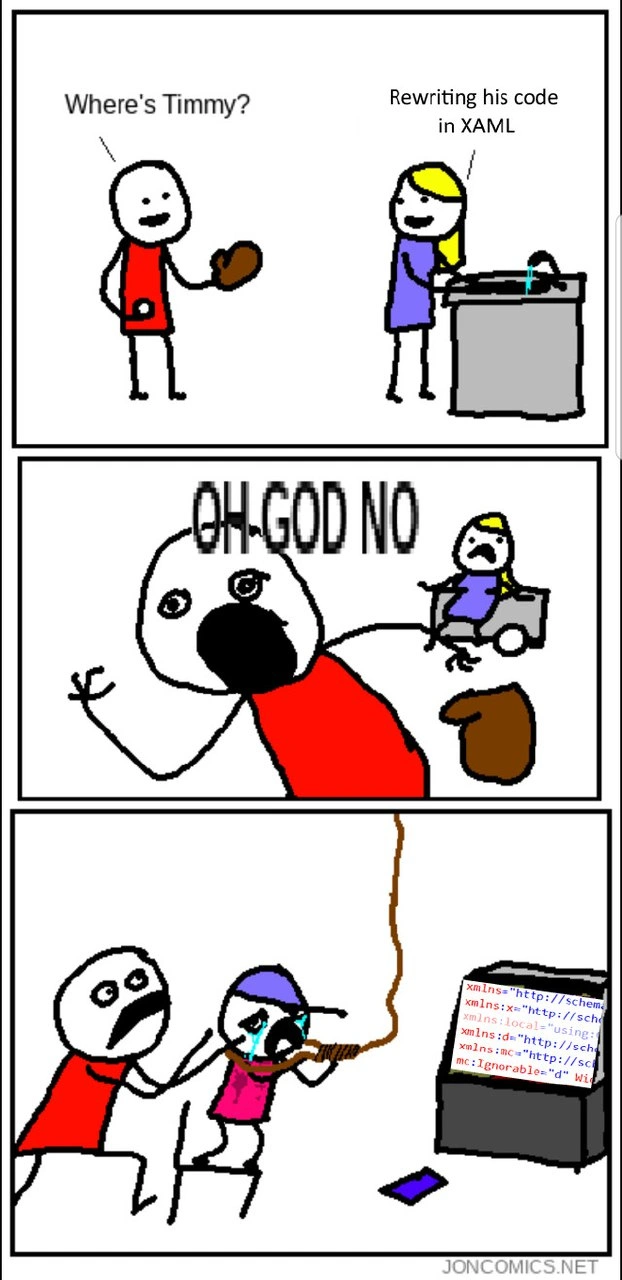
Dad: “Where’s Timmy?”
Mom: “Rewriting his code in XAML.”
Dad: “OH GOD NO!”

The instant our red-shirted Dad Developer hears that his kid is rebuilding the project in XAML, panic sets in like a Sev-1 outage at 3 AM. This comic scenario gives seasoned .NET engineers war flashbacks. The dad’s over-the-top reaction – shrieking in terror and frantically yanking little Timmy away from the keyboard – isn’t just slapstick; it’s rooted in real refactoring pain and framework churn trauma.

Why such a dramatic freak-out? Because rewriting a stable codebase wholesale into XAML is like deciding to rewire a spaceship mid-flight using nothing but a hot glue gun and XML. Sure, it’s technically possible, but any veteran dev knows it’s a one-way ticket to disaster. XAML (eXtensible Application Markup Language) is a verbose XML-based language used in frameworks like WPF (Windows Presentation Foundation) and UWP to design user interfaces. It’s great for declarative UI layout, but it’s not meant to swallow your entire application logic. In a proper WPF app, you keep the heavy lifting in C# code-behind or in ViewModel classes, not crammed into the markup. So if Timmy is converting everything to XAML, he’s using the wrong tool for the job and probably intertwining UI description with core logic in ways that send shivers down a senior dev’s spine.

Just seeing those dreaded xmlns="http://schemas.microsoft.com/winfx/2006/xaml/presentation" lines on Timmy’s monitor is enough to give the dad cold sweats. Seasoned devs know that an avalanche of XML namespaces means a WPF markup spree is underway:

<Window xmlns="http://schemas.microsoft.com/winfx/2006/xaml/presentation"  
        xmlns:x="http://schemas.microsoft.com/winfx/2006/xaml"
        xmlns:mc="http://schemas.openxmlformats.org/markup-compatibility/2006" 
        mc:Ignorable="d"
        Title="RewriteNightmare" Height="300" Width="400">
    <!-- ... dozens of verbose XAML lines defining UI and maybe misusing it for logic ... -->
</Window>

This wall of tags is the Dad Developer’s cue to freak out. It signals that little Timmy has gone full “XAML all the things,” likely dragging the entire codebase into a WPF-centric architecture overnight. Timmy, a child in the comic, represents the naïve developer (or overly enthusiastic junior) who just discovered a shiny new framework and wants to rebuild everything with it. Meanwhile, the dad stands in for the battle-scarred senior dev who’s survived one too many “ground-up rewrite” fiascos and knows exactly what kind of chaos is coming.

Let’s break down the carnage Timmy is about to unleash:

  • Ill-Advised Rewrite: Timmy isn’t just tweaking a few lines; he’s redoing the whole project from scratch. Seasoned dev rule #1: Don’t rewrite working code without a darn good reason. By scrapping a functional codebase, you also throw away years of bug fixes and stability. It’s a high-risk move that usually leads to many new bugs (and late-night “hotfix” sessions to re-fix things that were fine before).
  • Markup Overload: XAML is an XML dialect for GUIs – useful, but extremely verbose. A little XAML can nicely define a UI, but a lot of XAML can turn into an indigestible thicket of <Grid>, <StackPanel>, and <DataTemplate> tags. That much markup becomes hard to read and even harder to debug. (Ever tried finding a tiny mistake in a 500-line XAML file? Not fun.)
  • Logic in the Wrong Place: If Timmy is truly rewriting “the entire codebase” in XAML, he might be attempting to encode program logic in markup via data bindings, converters, or triggers. This is essentially markup language misuse. It’s like trying to write your app’s brain in a language meant for visuals – doable in some cases, but very tricky. Mixing core logic into the UI layer leads to spooky, hard-to-trace bugs. Cue the endless BindingExpression errors in the output window when something doesn’t hook up correctly.
  • Framework Churn: Jumping to a new framework (here, moving everything into WPF/XAML) just because it’s “cool” is a textbook example of framework churn. The dad has seen this movie before: big promises of a modern UI and easier development, followed by months of everyone struggling with unfamiliar patterns, performance issues, and missing features. All that effort, and sometimes you end up no better off — or even worse — than when you started. It’s the software equivalent of changing horses mid-race and then finding out the new horse has three legs.

In short, the comic exaggerates a very real developer horror story. Major rewrites and constant framework switches create a special kind of dread in experienced programmers. Today it might be “let’s rewrite our whole desktop app in WPF XAML,” yesterday it was “let’s port everything to Silverlight” (until Silverlight got abandoned), and tomorrow someone will insist “let’s rebuild it in Blazor/MAUI/Next.js/you-name-it.” Each time, the grizzled veterans groan internally and recall how many late nights were spent wrestling with the “new, improved” system that was supposed to save the day, but ended up introducing fresh problems.

The father’s panicked “OH GOD NO!” is essentially every senior developer’s reflex when they hear the words “complete rewrite” thrown around lightly. We laugh at this comic because it’s so true – it’s a shared joke in the programming world that big rewrites often backfire spectacularly. The final panel’s imagery (Dad literally lassoing and dragging a crying Timmy away from the PC) is an exaggerated cartoon metaphor for what a senior dev or tech lead might wish they could do in real life: stop the madness before it goes too far. It’s the human equivalent of hitting undo or yelling “Abort mission!” when you see a junior gleefully charging toward a cliff edge.

In the end, this meme is poking fun at how technical debt and overenthusiastic fixes can spiral out of control. Timmy’s intentions might be good – maybe he just wanted to make things better – but the way he’s going about it will likely cause more harm than good. The dad knows this from hard experience. The humor comes from that relatable oh no, not again feeling: it’s absurd to imagine a kid rewriting code in markup, yet it perfectly symbolizes the real-world predicament of needless, disaster-prone rewrites. Any developer who’s lived through such a saga can chuckle (and cringe) at this cartoon, thinking, “Yep, seen that... and thank goodness someone pulled the plug in time!”

Description

A three-panel stick-figure comic from 'JONCOMICS.NET' illustrating a developer's painful experience with XAML. In the first panel, a character in a red shirt asks, 'Where's Timmy?'. A woman with blonde hair replies, 'Rewriting his code in XAML.' The second panel shows the first character screaming in horror, 'OH-GOD NO'. The final panel depicts the horrified character saving a crying child, Timmy, who is attempting to hang himself with a rope in front of a computer monitor. The monitor displays a block of notoriously verbose XAML code, starting with multiple 'xmlns' namespace declarations. The comic uses dark humor to exaggerate the frustration and poor developer experience associated with XAML, a Microsoft technology for defining user interfaces. For senior developers, especially those from the .NET world, the joke is instantly relatable. It satirizes the language's verbosity and complexity, which often made UI development feel tedious and painful compared to more modern alternatives


Comments

16
Anonymous ★ Top Pick XAML is proof that you can have a declarative UI language so verbose that by the time you've finished defining the namespaces, the business requirements have already changed twice
  1. Anonymous ★ Top Pick

    XAML is proof that you can have a declarative UI language so verbose that by the time you've finished defining the namespaces, the business requirements have already changed twice

  2. Anonymous

    Timmy just discovered XAML; now every ResourceDictionary is a land-mine and I’m one binding error away from explaining to the VP why changing a font size added 300 MB to the RAM graph

  3. Anonymous

    After 15 years in the industry, you realize the real reason Microsoft deprecated Silverlight wasn't technical debt - it was to prevent a class action lawsuit from developers who developed PTSD from debugging two-way bindings and dependency property precedence in 10,000-line XAML files

  4. Anonymous

    XAML: where you need three namespace declarations, a resource dictionary, and a binding converter just to center a button. The real tragedy isn't that Timmy rewrote his code in XAML - it's that he probably added 10x more lines to accomplish the exact same thing, and now every UI change requires scrolling through an XML forest of Grid.Row and Grid.Column attributes. At least with HTML/CSS you can pretend the verbosity serves a purpose

  5. Anonymous

    “Rewriting it in XAML” is architect-speak for moving your logic into Styles, your state into DependencyProperties, and your bugs into silent Binding errors in the Output window

  6. Anonymous

    Nothing says rewrite like trading 200 lines of C# for 2,000 lines of XAML with five xmlns spells, an mc:Ignorable charm, and a binding that fails silently until prod

  7. Anonymous

    XML rewriting: where a boolean flag demands its own namespace, and your IDE scrolls into the abyss

  8. @honmiv 5y

    Eeee uwwwppppp

  9. @cheburgenashka 5y

    Before OAS/RAML — SOAP service in WSDL was way easier than pseudo REST by PHP monkeys. You would instead write your own XSD parser faster than negotiate a spec with them or reach 10% compliance with HTTP/REST semantics (unless you supposed to consume SOAP service written in PHP crap that is just printing it via strings concatenation.) Today's situation with REST API not much better. You still have SPAs that can only accept HTTP 200 and the rest codes to panic.

  10. @cheburgenashka 5y

    How old are you kiddo?

    1. @RiedleroD 5y

      guess lol

      1. @RiedleroD 5y

        found his steam profile… He's active since 2011, so I guess not a kid lol.

  11. @RiedleroD 5y

    you would do everyone a favour if you would stop using unnecessary reaction gifs.

  12. @cheburgenashka 5y

    Farter*

  13. @cheburgenashka 5y

    Is it only kids and furries here?

    1. @RiedleroD 5y

      mostly

Use J and K for navigation
