Skip to content
DevMeme
3029 of 7435
The Existential Dread of an HTML Email Developer
WebDev Post #3344, on Jun 28, 2021 in TG

The Existential Dread of an HTML Email Developer

Why is this WebDev meme funny?

Level 1: The Sad Task

Imagine you’re a super smart robot, and you ask your creator, “What am I here to do?” Now picture the creator says, “Your job is to make pretty letters (emails) look right on every kind of old computer.” That’s it. Nothing cool like saving the world or even cooking breakfast – just making those fancy emails over and over. You’d probably feel pretty sad or even shocked, right? That’s exactly what’s happening in this joke. The little robot finds out its only job is a boring, frustrating chore.

For a simpler real-life comparison: think about if you learned to be a chef and you’re excited to cook amazing meals, but then you get hired and they say, “All you will do is wash dishes, every day.” You’d be like, “Oh my god, really? That’s my purpose?” In the meme, making HTML emails is like the coding world’s version of washing dishes – it has to be done, but no one really enjoys doing it because it’s messy and tricky in an old-fashioned way. The robot’s big “Oh my god” moment is just like anyone’s reaction when they get stuck with a job that feels way less fun or meaningful than they hoped. The humor comes from how dramatically the robot reacts, which is funny and also a little true to life – sometimes developers feel the same drama inside when faced with such tasks. In simple terms, the meme is saying: even a robot would be upset if its only job was doing this annoying, tedious work!

Level 2: Email Markup 101

Let’s break down why “making HTML emails” is such a big deal in this meme, especially if you’re newer to web development. HTML emails are emails that contain HTML code (like a mini webpage) so they can have formatted text, images, columns, colors, etc., instead of just plain text. On the surface, writing an HTML email sounds just like making a small webpage. You use HTML (HyperText Markup Language) to structure content and CSS (Cascading Style Sheets) to style it. In practice, though, it’s a whole different ballgame — one stuck with a lot of old-school rules.

Why is it different? Well, when you code a normal webpage, you assume the user’s web browser (Chrome, Firefox, etc.) will render it, and those browsers are pretty standardized these days. They consistently support modern HTML/CSS (think flexbox, CSS Grid, external stylesheets, you name it). But an HTML email isn’t rendered by a browser; it’s rendered by an email client (like Gmail, Outlook, Yahoo Mail, Apple Mail, Thunderbird, to name a few). And each email client has its own way (often a very outdated way) of displaying HTML. Some use browser engines, but in a restricted mode; others use totally different rendering engines.

For example, Outlook, especially older versions (2007-2016), infamously uses the Microsoft Word engine to display emails. Word’s engine wasn’t made for complex web pages, so it ignores a lot of modern CSS. Imagine designing a nice webpage, then opening it in MS Word – that’s what your email might look like in Outlook. 😬 Because of that, email developers often have to support legacy Outlook by coding with very simple, older HTML techniques:

  • No external CSS files: Many email services strip those out for security, so all your styling must be directly in the HTML. This is why inline_css is mentioned – it means writing CSS right inside each HTML tag via the style="..." attribute. For instance, instead of having a separate CSS rule like .header { background: yellow; }, you’d put style="background: yellow;" on the element in the HTML itself. It’s repetitive, but it’s the only way to ensure the style isn’t thrown away.
  • Limited CSS Properties: Email clients support a very limited set of CSS. A lot of the cool stuff you might have learned – like CSS transitions, flexbox layouts, media queries for responsiveness – might not work everywhere. You have to stick to basic things like colors, fonts, simple positioning, and hope for the best. Email_client_compatibility becomes a big concern: you often create something that looks fine in one client (say Gmail), only to find it looks broken in another (say Outlook or some old Android mail app). So you end up testing and tweaking repeatedly.
  • Table-based_layouts: This is a technique from the early web (circa late 90s) where developers used HTML <table> elements to layout content on a page. On the modern web, we avoid using tables for layout (we use them only for actual tabular data) because CSS gives us better options. But in HTML email, those better options might not be available or reliable. So to position two blocks side by side, or to create padding and spacing that works everywhere, you often nest tables within tables. It’s not unusual to see an email HTML file that’s hundreds of lines of nested <table><tr><td> tags. It looks scary to newcomers – and honestly, it is a bit of a maintenance nightmare! But that’s sometimes the most robust way to get a consistent layout across all the weird email clients.
  • No JavaScript: Email clients disable scripts for security (we wouldn’t want emails executing random code when opened – that could be a huge security risk). So, any interactive or dynamic feature you might consider on a webpage simply can’t be done in an email. This means emails are static. Even something like a simple drop-down menu or a carousel that you might do with CSS/JS on a webpage is usually off-limits in emails (there are very hacky ways with checkbox hacks in CSS for some interactive email gimmicks, but those are advanced tricks and still not widely supported).

All these constraints mean that building an HTML email can feel like time-traveling to an older era of web development. If you’re a junior developer who’s learned modern practices, it can be frustrating and confusing. You might find yourself Googling things like “how to center a div in Outlook email” only to discover advice from 2005 about using a <center> tag or (you guessed it) another table cell hack. It’s no wonder many developers swap war stories about html_email_horror. It’s a task often given to newbies or whoever draws the short straw on the team, because senior devs have been through it and know how maddening it can be. This is exactly what the meme is poking fun at: the idea that a sophisticated robot (or by analogy, a skilled developer) would be assigned such a tedious, soul-sapping job as their sole purpose.

The reference to Rick and Morty adds flavor because in that show, Rick (the scientist) casually creates a tiny robot just to pass the butter at the breakfast table. The robot quickly realizes that’s all it was made to do and feels an existential dread, asking “Oh my god” in despair. In this meme’s version, making HTML emails is equated to passing butter – i.e. a menial, almost absurd purpose for something as advanced as a robot (or for someone as skilled as a developer who knows far more sophisticated technologies). It’s a form of DeveloperHumor that’s very relatable if you’ve experienced it: you study all these cool programming concepts and then somebody asks you to spend your week wrestling with email template formatting.

To decode some of the tags in simpler terms:

  • FrontendPainPoints/DeveloperPainPoints: These refer to problems or tasks in development that are known to cause headaches. HTML email making is a prime example in front-end development of a pain point – it’s not enjoyable and often tricky to get right.
  • DeveloperExperience_DX: This is about how the experience of developing (the process, tools, tasks) impacts developers. A good DX means the dev is happy/productive. A bad DX, like dealing with emails’ weird quirks, means the dev probably feels annoyed or drained. This meme highlights a bad DX scenario (the robot/dev is clearly not happy).
  • Rick_and_Morty_reference & butter_robot: These tags show the meme uses a reference from the Rick and Morty TV show (the specific butter-passing robot scene). If you haven’t seen it, just know it’s used often to joke about discovering one’s “purpose” is trivial or depressing.
  • Email_client_compatibility & legacy_outlook_support: These point to the core technical issue – having to support old email clients like legacy Microsoft Outlook means writing code in a very backward-compatible way (often using outdated methods). “Compatibility” is key: the email must look okay in all clients, not just the best ones.

So at this level, the explanation is: The meme is funny to developers because making HTML emails is unexpectedly complicated and notoriously frustrating. It’s a well-known WebDevelopment challenge that feels like a step back in time. When a newbie developer first encounters it, they’re often shocked (“Oh my god, is this really how we have to do it?!”). The meme uses the shocked butter robot to perfectly capture that feeling. It’s both a bit of commiseration (“Yep, we’ve all been that poor robot”) and a bit of dark humor about the kinds of tasks developers sometimes get stuck with. In short, if you’re learning web dev, be aware: at some point someone might hand you an email template to code, and you too might react like this robot when you realize what that entails!

Level 3: Inline CSS Inferno

In this meme, a hapless little robot confronts the ultimate developer nightmare. It’s a twist on a classic Rick and Morty scene: the butter-passing robot’s existential crisis. Here, instead of passing butter, the robot learns its entire purpose is to build HTML emails. For seasoned web developers, that task is almost more horrifying than anything Rick’s multiverse can throw at us. The humor hits hard because it mixes a darkly funny sci-fi reference with a very real FrontendPainPoints scenario. We’ve all seen that thousand-yard stare on a developer’s face when they’re told, “You’ll be coding the email templates.” It’s as if someone said, “Hey, all those modern web skills you love? Forget ’em. Time to live in the year 1999 for the sake of Outlook’s quirks.”

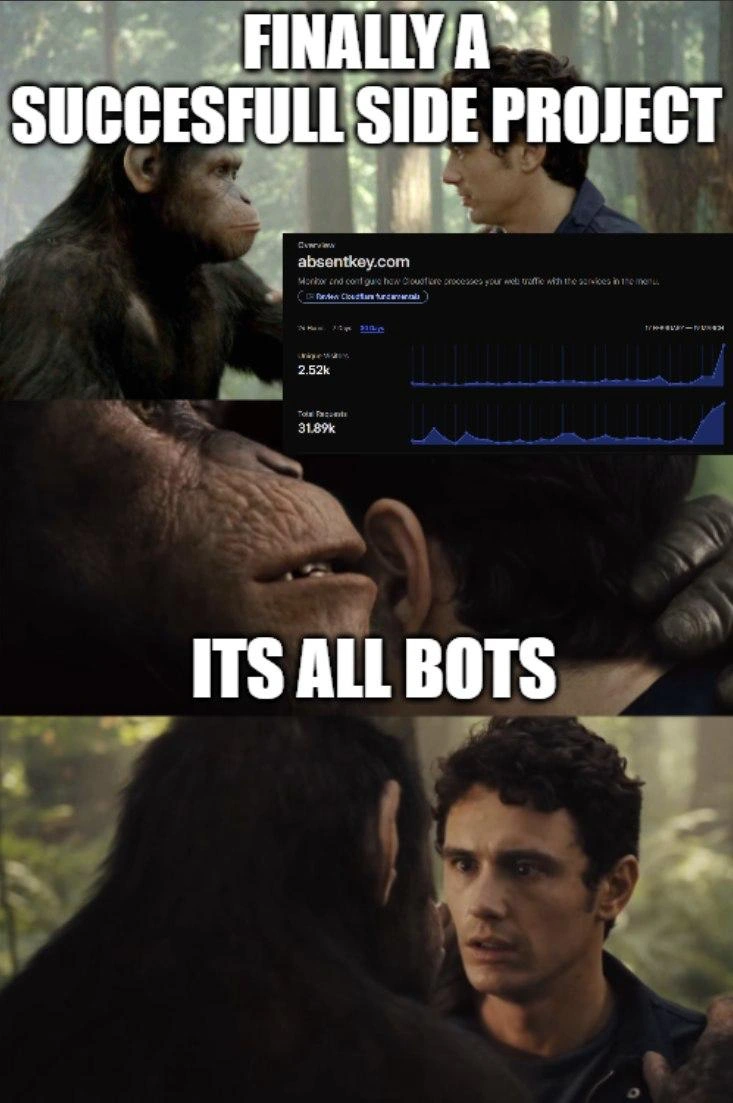
Robot: "What is my purpose?"
Rick: "You make HTML emails."
Robot: "Oh my god."

This dialogue mirrors the show, but swapping in “make HTML emails” instantly taps into a collective developer trauma. Why? Because crafting HTML emails is notoriously frustrating. It’s a job that sounds simple (“just an email, how bad can it be?”) but quickly drags you into a pit of archaic hacks and endless testing. The meme’s punchline “Oh my god” is the robot’s horrified reaction – and every developer’s reaction upon realizing they’ve been assigned to HTML email duty. It’s an existential_crisis_meme for coders: you start questioning your life choices when you spend hours making an email look almost the same in Gmail, Outlook, Yahoo, Apple Mail, and some client from 2003 nobody told you still exists.

The image shows Rick nonchalantly telling the robot its fate. Rick represents the indifferent forces of management/clients (“Just do it, what’s the issue?”) while the robot stands in for the developer or intern who had higher aspirations (modern web app development! React! fancy CSS!), now crushed by the reality of an ancient WebDev task. The scenario is funny because it’s true: in many teams, the least experienced dev gets the thankless job of email templates. It’s practically a rite of passage — or a form of hazing. Senior devs chuckle (or shudder) remembering the first time they fought with an email’s HTML. This meme nails that moment of dawning horror.

Now, why are HTML emails so infamously painful? Let’s peel back the layers (like an onion… or a stack of nested tables):

  • Quirky Email Clients: Every email client is like its own web browser from a parallel universe. They each have their own limited HTML/CSS support. Some ignore <style> tags entirely, others won’t load external CSS files. Consistency? Never heard of it.
  • Legacy Outlook Support: Ah yes, Outlook, the bane of email devs. Certain versions of Microsoft Outlook use the Word engine to render HTML (yes, Microsoft Word, the word processor). This is as absurd as it sounds. Many modern CSS features you use on websites simply don’t work in Outlook. For example, want to use a simple CSS button style? Outlook might treat it like a weirdly formatted Word document from 1998, messing up your layout.
  • Inline Styles Everything: Because of the above, the safest bet is writing all your CSS inline on each element. Instead of a nice clean <head><style>...</style></head> separation of content and design, you end up with style attributes everywhere, on every <td> and <p>. Your HTML turns into a tangled mess of style="...;" strings. Updating a color or font means find-and-replace across dozens of instances, and hope you didn’t miss one. It’s like coding with your arms tied, forced to repeat yourself endlessly.
  • Table-Based Layouts: Remember using <table> for page layout in the late ’90s? Probably not (if you’re lucky). In web dev courses today, that’s taught as a historical bad practice. But in email land, it’s still the norm. You can’t rely on modern CSS layout techniques like flexbox or grid (most email clients simply don’t support them). So, you resort to stacking HTML tables within tables to get that multi-column design or to make sure that image and text sit side by side. The result is deeply nested tables reminiscent of an Excel spreadsheet masquerading as code. Debugging that is pure fun torture.
  • No JavaScript, No Fancy Interactivity: Email clients don’t run JavaScript for security reasons (imagine if every email could run scripts… yikes). So any dynamic behavior or interactive UI is off the table. Even simple things we take for granted on the web, like a hover effect using CSS, might not work reliably. You’re basically stuck in a static world of text and images, with only primitive styling.

To illustrate the “nightmare” code visually, here’s a tiny snippet of what an HTML email component often looks like:

<!-- An example of email HTML with inline CSS and tables -->
<table width="100%" cellpadding="0" cellspacing="0" border="0">
  <tr>
    <td align="center" bgcolor="#ffeecc" 
        style="padding: 20px; font-family: Arial, sans-serif; font-size: 16px; color: #333;">
      <strong>Hello, User!</strong><br>
      This is an <em>HTML email</em> example.
    </td>
  </tr>
</table>
<!-- Yes, that's a table for what would normally be a simple div. Welcome to email development. -->

Notice the inline style on the <td> and the use of a table for basic layout. That <!-- comment --> hints at the fact we’re doing things in email HTML that we’d never do on a modern website. A senior dev looking at this code knows it’s not because the coder is clueless – it’s because email clients force us to write HTML in this clunky way. It’s a kind of html_email_horror show: you feel like an archaic code gremlin, shoving presentational attributes and deprecated practices into your markup just to satisfy Outlook or Gmail.

The DeveloperExperience_DX angle here is strong. DX means how pleasant (or in this case, miserable) it is to do your job as a developer. Building a normal web page, you can use all the latest tools, frameworks, and Chrome devtools to debug. Building an HTML email, you’re basically stuck manually testing in dozens of environments. There are services to help (Litmus, Email on Acid) which let you preview your email in many clients, but even using those is a slog: tweak code, send test email, see that Outlook 2013 still breaks it, sigh deeply, repeat. It’s an iterative loop of despair that every front-end dev learns to joke about so they don’t cry.

The meme hits on relatablehumor: only slightly exaggerating how dreadful this feels. The butter robot in Rick and Morty was so upset to have a trivial purpose (“You pass butter.” “Oh my god.”). In the developer version, “You make HTML emails” triggers the robot (developer)’s horror because it’s a task seen as dull, finicky, and thankless. It implies “Out of all the meaningful coding I could do, THIS is what I’m built for?!” That melodrama is exactly how it feels when you’re knee-deep in a labyrinth of <table> tags at 2 AM because the marketing team needs the email pixel-perfect by morning.

Crucially, everyone in on the joke knows why it’s so bad, making the meme funny and cathartic. It’s a form of venting. The unspoken agreement is: yes, making HTML emails is such a peculiar corner of hell, even a robot would have an existential crisis if condemned to it. It’s developer gallows humor. And just like Rick doesn’t offer any comfort to the robot (he just goes back to eating pancakes), in the real world, your project manager might not offer much sympathy either: “Yeah it’s a crummy job, but it has to be done.” That indifference is part of the joke’s sting.

So, why does this keep happening? Historically, emails started as plain text. HTML emails became a thing for richer content, but there was never a single standard for how email clients should render HTML. Each big player (Microsoft, Google, Apple, Yahoo, etc.) did their own thing. By the time web standards improved, email had fallen behind. Corporate environments stuck with old Outlook versions indefinitely (some businesses even today require support for Outlook 2010 or earlier!). And security concerns meant stripping scripts and external resources. Thus, devs in 2021 (as in the meme’s date) are forced to code like it’s the GeoCities era whenever they hear “email template.” It’s a perfect storm of legacy support and stagnation. FrontendPainPoints hardly gets more real than this.

In summary, the meme is a senior-level inside joke. It humorously encapsulates the soul-crushing revelation every web developer dreads: sometimes your high-tech skills get used on a low-tech, maddening problem. And the only sane reaction is to echo the butter robot: “Oh my god.” 😅

Description

A three-panel meme using the 'What is my purpose?' scene from the animated show Rick and Morty. In the first panel, a small, sentient robot with tank treads asks its creator, Rick Sanchez, 'What is my purpose?'. In the second panel, Rick, looking bored at a breakfast table, flatly responds, 'You make html emails'. The third panel shows the robot slumping in despair, uttering, 'Oh my god'. A watermark for the editing tool 'KAPWING' is visible in the bottom right. This meme humorously captures the profound frustration and sense of futility many developers feel when tasked with creating HTML emails. This is a notoriously difficult and archaic corner of web development, infamous for its lack of standards across email clients (especially Microsoft Outlook), forcing developers to use outdated techniques like table-based layouts and inline CSS, leading to a painful and unrewarding developer experience

Comments

18
Anonymous ★ Top Pick HTML email development is the only field where your main goal is to write code that renders correctly on a browser engine from 1999, also known as Microsoft Outlook
  1. Anonymous ★ Top Pick

    HTML email development is the only field where your main goal is to write code that renders correctly on a browser engine from 1999, also known as Microsoft Outlook

  2. Anonymous

    Butter Robot’s release cycle: inline every CSS rule, nest a dozen tables, sprinkle VML for Outlook 2007, hit “Send” - and suddenly that COBOL batch job feels like greenfield work

  3. Anonymous

    After 20 years in tech, you realize the butter robot had it easy - at least butter doesn't require testing across 47 different email clients, each with their own interpretation of what 'padding' means and whether CSS written after 1999 should be honored

  4. Anonymous

    Ah yes, HTML emails - where it's perpetually 1999, tables are still the pinnacle of layout technology, and 'margin' is a CSS property that exists only in legend. Nothing says 'we value your engineering expertise' quite like debugging why Outlook 2016 renders your perfectly valid flexbox as a vertical stack of regret, forcing you to nest tables six layers deep like some kind of markup matryoshka doll. At least the robot gets to power down at night

  5. Anonymous

    HTML emails: where 'responsive design' means begging Outlook's Word engine not to mangle your tables into VML abominations

  6. Anonymous

    HTML email is where a principal engineer ships nested tables, inlined CSS, and MSO conditionals and calls it “responsive” - the client CAP theorem: Outlook, Gmail, or sanity; pick two

  7. Anonymous

    HTML email: where TDD means Table-Driven Development and the renderer is Microsoft Word - no wonder the robot questioned its purpose

  8. @ZgGPuo8dZef58K6hxxGVj3Z2 5y

    😂😂😂😂😂😂😂

  9. @VolodymyrMeInyk 5y

    sad but true

  10. @yury_tikhoglaz 5y

    What’s wrong with it? Just daily life of marketing guy.

  11. @asoteric 5y

    i made a raspberry pi send html weather forecast emails daily and i love it so much

    1. @Dobreposhka 5y

      go to samsung and you'll get a notification every day in the morning about the weather

      1. @asoteric 5y

        accuweather also provides (or provided? they may be canceling it soon) a weather email service

        1. @Dobreposhka 5y

          weather by email is inconvenient

  12. @AidDeath 5y

    Is any laws in robototechnics about suicide exists?

  13. @dsmagikswsa 5y

    Do people still use table tag to semantic html email?

    1. @Sakaala 5y

      Yes

    2. @scout_ca11sign 5y

      once I had to do boxes in fucking outlook... no modern styles worked but tables did.

Use J and K for navigation