Skip to content
DevMeme
6246 of 7435
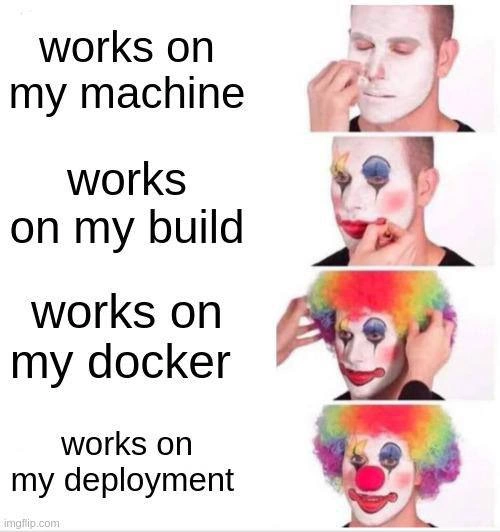
Each environment check adds another layer of clown makeup for DevOps engineers
Deployment Post #6849, on Jun 5, 2025 in TG

Each environment check adds another layer of clown makeup for DevOps engineers

Why is this Deployment meme funny?

Level 1: Too Soon to Celebrate

Imagine a kid preparing a clown act for the school talent show. He practices his routine alone in his room and it goes perfectly. Then he tries it in front of his parents in the living room — they laugh and clap. Next, at a small rehearsal with a couple of friends, he even puts on his colorful clown costume, and again everything works great. But finally, on the night of the big talent show, he’s on stage in front of the whole school in full clown makeup, and suddenly the act falls apart. The jokes that worked at home get no laughs under the bright stage lights; the trick he had mastered in practice fails in front of the crowd. He ends up standing there in his clown outfit, feeling very silly. The lesson here is the same as the joke in the meme: just because something worked in all your practice runs doesn’t mean it will work when it really counts. Each early success made the kid more confident (adding more clown makeup), but a small change in environment — a bigger audience and a real stage — ruined the performance. It’s a funny reminder not to celebrate too early, because you don’t want to end up as the clown if things go wrong at the final moment.

Level 2: But Not in Prod

At a simpler level, this meme highlights how code can “work” in one environment but still fail in the next, especially the one that counts (production). Each panel’s caption is one step in the software release process:

  • “works on my machine” – The code runs on the developer’s personal computer. This is often said in a defensive way: “It works on my machine, so the problem must not be my code.” But your own laptop’s setup can be unique (different OS, installed tools, hidden configs), so passing this stage doesn’t guarantee much for others. It’s the first layer of confidence, and sometimes a false one.
  • “works on my build” – The code also passes the automated build and test process, often on a continuous integration (CI) server or build pipeline (like Jenkins, Travis CI, or GitHub Actions). In other words, a fresh system was able to compile the code and run the test suite successfully. This is a stronger check than just your laptop, because it’s a clean environment closer to production. Developers feel more confident when the CI build is green, but it’s still not the final proof.
  • “works on my docker” – Now the application is packaged into a Docker container and runs fine in that container (likely on the developer’s machine or a test server). Docker is a containerization tool that bundles the app with its environment (OS, libraries, settings) so it should run the same anywhere. Saying “works on my Docker” implies “we even containerized it, so environment differences shouldn’t be an issue.” It’s essentially the modern update to “works on my machine” – meaning you expect it to work on any machine that runs Docker. This adds yet another layer of confidence: if it runs in a container on your system, you assume it will run in the container on the real server too.
  • “works on my deployment” – Finally, the code is deployed to an actual server or environment (maybe a staging server that mimics production, or even the real production cluster) and it’s up and running there. At this point, the developer claims victory: the app is running in the target environment without immediate crashes. “My deployment” suggests they pushed it out and everything appears fine. It’s basically saying, “See, I deployed it and it still works – we’re done, right?”

The joke is that each of these statements adds confidence, yet all of them come with the unstated assumption “…therefore it will work in real production for users.” The meme implies that despite all these boxes checked, something could still go wrong when actual traffic or a slightly different prod configuration comes into play. In other words, it works in every controlled environment, but not necessarily in production where it truly matters. The final panel shows the developer in full clown makeup, implying that proudly saying all these “works on my ___” made them look foolish in the end, because the app likely failed when it hit real usage.

This speaks to a common DevOps concern: environment parity. We try to make development, testing, and production environments as similar as possible to avoid any surprises. If you’ve heard the mantra “Keep dev and prod the same,” that’s what it means. Using CI pipelines and Docker is part of keeping things consistent, so that if it works here, it should work there. However, in reality, tiny differences often slip through (like a different setting, a different library version, or an infrastructure quirk) – these are the gaps in environment parity that can cause a bug to appear only in production. It’s a shared pain point in software teams (DevOps culture loves to minimize these surprises, but they still happen).

The clown makeup image is a popular meme format used to show someone gradually turning into a clown as they make more foolish decisions. Here it symbolizes the developer becoming a clown (i.e. looking silly) by assuming that each environment’s success guarantees the next. By the time he’s saying “works on my deployment,” he has metaphorically put on the rainbow wig and red nose. Essentially, the meme is a light-hearted warning: if you boast “it works here and here, so of course it’ll work in production,” you might end up with egg on your face (or in this case, clown makeup) when something goes wrong in the one environment that matters.

For a newer developer, the takeaway is to not celebrate too early. Just because your code works on your machine, passes the CI tests, and even runs in a Docker container or staging server, doesn’t mean you won’t hit a snag in real production. Many of us have felt the sting of saying “But it worked in testing!” only to find out there was a production-only issue we didn’t catch. This meme is a humorous reminder to be cautious – until your software is actually proven in the real world with real data and users, any confidence is provisional. Otherwise, like the clown in the meme, you risk laughing at yourself later.

Level 3: Continuous Clown Integration

“Works on my machine” – famous last words in DevOps circles. This scenario is peak developer humor: any senior engineer who’s been around build systems and CI/CD has seen this circus play out in real life. Each panel corresponds to a stage in the pipeline: first the code runs on the developer’s own machine, then it passes the continuous integration build, then it even runs in a Docker container, and finally it’s deployed without immediate errors. With each step, the developer’s confidence soars – and so does the clown makeup. By the last panel (“works on my deployment”), our overconfident engineer is in full rainbow-wigged glory. We’re cringe-laughing because we know the punchline: claiming victory before real-world testing is a clown move, and production is about to throw a pie in his face.

Under the greasepaint lies the hard truth of environment parity – or rather, the lack of it. In a perfect world, every environment (development, CI, staging, production) would be identical, eliminating the infamous “works on my machine” excuse. Modern DevOps culture preaches practices to achieve this: containerize your app with Docker for consistency, use Infrastructure as Code to mirror configs, run everything through robust CI/CD pipelines. These practices aim to prevent any development-to-production drift. Indeed, containerization was supposed to end the madness – “Hey, it works on my Docker, so it’ll work anywhere!”, right? But as this meme points out, each layer of assurance can become just another layer of illusion. We proudly announce “Works on my build!” after Jenkins gives a green light, or “Works on my Docker!” after spinning up a container image locally. Yet all too often, these statements simply mean we’ve packaged our problem with a bow, ready to be unwrapped as a production surprise. The meme is essentially mocking the illusion of true reproducibility. It’s a Dev/Prod parity parody: every added tool or environment was supposed to reduce uncertainty, but if one tiny thing is off, we’ve just put more makeup on the clown.

Why do these environment-specific “successes” so often turn into an epic fail under real traffic? Seasoned engineers could write novels (or at least incident post-mortems) about this. Here are a few usual suspects behind the environment parity gap:

  • Configuration drift: That one config file or environment variable that isn’t the same across environments. Maybe you had a DEBUG=true flag or an .env entry locally that never made it to production, or the app reads a setting from a path that differs. It works on your box with that hidden setup – in prod, kaboom. Each environment had slightly different config, but you only discover the difference at the worst time.
  • Dependency mismatches: “It built on CI, how can it be broken now?” Well, your laptop ran Library v1.2, and the CI’s Docker image had 1.3 – both close enough that tests passed. But production’s container pulled in 1.4 because someone updated the base image last week. Surprise! A subtle change in a dependency or a slightly different runtime version (Node, Python, etc.) can introduce behavior changes. Works on my build doesn’t guarantee works everywhere if the underlying packages aren’t exactly the same.
  • Data and scale issues: You tested with 100 rows of sample data; production has 10 million. Or your QA clicked a button twice; real users hammer it in parallel from around the globe. The build pipeline and unit tests often use idealized conditions. Under real load, new failures emerge: memory exhaustion, race conditions, database deadlocks – all the fun stuff that never showed up in dev. It worked on my Docker with a toy dataset, but in prod the app is now falling over. ba-dum-tss.
  • Infrastructure quirks: The networking, OS, or hardware environment isn’t truly identical. Classic example: case-sensitive file paths. On your Windows dev machine, Config.json and config.json might as well be the same file; on a Linux production server, that capitalization mistake means file not found. Or maybe your app calls localhost assuming everything runs on one box; in the Kubernetes deployment, services have different hostnames or require container links. Suddenly, nothing connects. And let’s not forget the eternal punchline: it’s always DNS. In short, the underlying infrastructure can turn a passing build into a failing service if you didn’t account for those subtle differences.
  • Missing secrets or setup: Locally you run the app with certain environment variables (API keys, passwords) present. In the CI pipeline you stub them out for tests. Come production, those variables need to be set in the cluster or secrets store. If someone forgot to configure one, your app might crash or refuse to start. “Works on my deployment” quickly becomes an error page and a stack trace like NullReferenceException: API_KEY not found. Nothing gives you a big red clown nose faster than realizing the prod environment didn’t have the same secret config as your test environments.
# Example of environment drift biting back:
# Developer’s local environment (works on my machine)
export CONFIG_PATH="./config/dev.json"
node app.js   # Uses dev.json, runs fine locally.

# CI build environment (works on my build)
export CONFIG_PATH="./config/test.json"
npm test      # Uses test.json for tests in CI, all green.

# Docker image build (works on my Docker)
ENV CONFIG_PATH=/app/config/prod.json
CMD ["node", "app.js"]
# The app is baked with prod.json as default, runs fine in a local Docker container.

# Production deployment (the clown reveal...)
# We needed to override CONFIG_PATH in prod, but forgot to set it in the Kubernetes manifest!
kubectl apply -f deployment.yaml   # Deploys container with no CONFIG_PATH provided
# App in production crashes: "Error: ENOENT, no such file or directory '/app/config/prod.json'"

In this contrived sequence, each environment used a different config path. It “worked” in dev, CI, and even in a local Docker run, but the final production deploy missed a critical setting and face-planted. This is how an environment parity gap sneaks through despite all our tools: one tiny difference, and it’s clown city.

Each scenario above is the story of a real deployment pain point that left some engineer feeling foolish. It’s the kind of shared pain that makes you grin and wince at the same time. The final panel’s fully-costumed clown is essentially every developer who declared victory too soon. It’s a cautionary tale wrapped in a joke. This brand of deployment humor is funny precisely because it’s true – we’ve all been there. In the end, the meme is laughing at the false confidence we gain from passing tests in isolated environments. All those “it works here!” assurances don’t mean much until the code faces the chaos of the real world. As every grizzled SRE knows, “works on my machine” is a setup for embarrassment – and nothing feels worse than realizing you’ve been painting on the clown face the whole time.

Description

Four vertical panels of the classic clown-makeup meme show a man progressively applying white face paint, colored eye shadow, and finally a rainbow wig. Panel-by-panel captions read, top to bottom: "works on my machine", "works on my build", "works on my docker", and "works on my deployment". The visual punchline is that confidence rises with each stage while the developer literally morphs into a full clown, symbolizing how environment-specific success claims become increasingly ridiculous. Technically, the meme skewers the false sense of reproducibility offered by local setups, CI builds, and even container images when configuration drift, secret mounts, or infra quirks wreck production. Seasoned engineers will recognize the satire of environment parity promises that crumble the moment real traffic lands


Comments

11
Anonymous ★ Top Pick Docker made the build reproducible - right up until prod pulled a different secrets volume and honked back
  1. Anonymous ★ Top Pick

    Docker made the build reproducible - right up until prod pulled a different secrets volume and honked back

  2. Anonymous

    The real clown move is thinking your Docker container's behavior on your M1 Mac with 64GB RAM will perfectly match that t2.micro instance running your production workload with a different kernel version, network topology, and that one environment variable nobody documented

  3. Anonymous

    The four stages of deployment grief: denial ('works on my machine'), bargaining ('works on my build'), acceptance ('works on my docker'), and full clown mode ('works on my deployment'). By the time you're debugging why your containerized app fails in production despite passing every previous environment, you've earned that rainbow wig. The real joke? We all know someone who still doesn't use Docker because 'it works on their machine' - they're stuck in panel one, blissfully unaware of the circus tent awaiting them in production

  4. Anonymous

    Local: deterministic bliss. Prod: quantum bugs in superposition - broken until observed in the logs

  5. Anonymous

    After years of IaC, CI, and containers, the only artifact that consistently ships is the pager - everything else depends on someone’s ~/.bashrc and a shadow env var

  6. Anonymous

    We pinned :latest, mounted a local volume, and assumed compose equals Kubernetes - congrats, you've achieved environment parity theater

  7. @grinya_a 1y

    works on indian guy’s yt video 🍷

  8. @SamsonovAnton 1y

    tl;dr: WFM

  9. @mrYakov 1y

    nix: am i joke for you ?

    1. @polyduekes 1y

      absolutely

  10. 扇子 1y

    works on my watch

Use J and K for navigation