
Skip to content
DevMeme
1697 of 7435
Switching to light theme: the summertime tan for indoor developers
IDEs Editors Post #1893, on Aug 10, 2020 in TG

Switching to light theme: the summertime tan for indoor developers

Why is this IDEs Editors meme funny?

Level 1: Indoor Sunburn

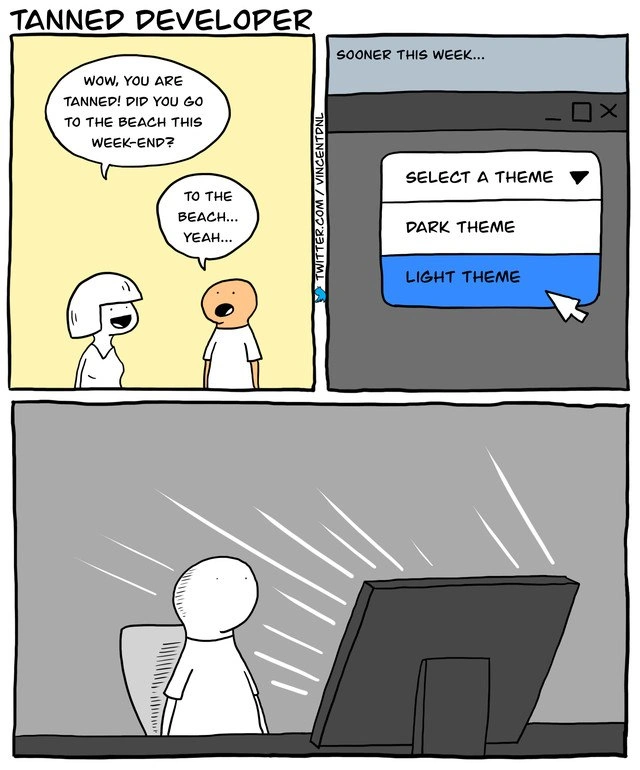
Think of it like this: imagine you’ve been sitting in a dark room for a long time, and then someone turns on a huge bright light right in front of you. You’d probably cover your eyes and your face would light up really bright. You might even look a bit funny-colored because of that strong light. That’s basically what happened to the person in this comic, except the “huge bright light” was his computer screen! He decided to change his computer background from dark to very light, so the screen suddenly became almost all white – as bright as a little sun in his room. It shined on his face so much that when his friend sees him, the friend jokes that he looks tanned (like he’s been out sunbathing on a beach).

Why is that silly? Well, normally you get a tan by spending a lot of time under the real sun outside. But this guy is an indoor person (a programmer who sits inside with his computer). So instead of going outside to get a tan, it’s like he got a fake sunburn from his computer screen! Of course, computer screens can’t actually give you a real tan, but the picture makes it look that way for fun. The developer even goes along with the joke – when asked if he went to the beach, he nervously says “Yeah… the beach,” because it’s less embarrassing than admitting he just sat in front of his monitor all weekend. It’s a funny, exaggerated way to show how bright that screen was. In simple terms, the comic is making us laugh at how a computer’s bright white screen in a dark room can seem as intense as a sunny day at the beach. It’s poking fun at the idea that some people who code a lot stay inside so much that their computer becomes their “sunshine.” So, the poor guy in the cartoon didn’t get his golden glow from summer vacation – he got it from his blinding light theme computer screen!

Level 2: Dark vs Light Mode

For a newer developer (or someone just starting out coding), let’s break down the core of this joke. When we talk about dark mode versus light mode, we mean the color scheme of an application’s interface and text editor. A Light Theme usually means black or dark text on a light background (often white or pale gray). It’s like writing on white paper with a pen – the screen looks bright, almost like a sheet of paper under a lamp. A Dark Theme is the opposite: it’s light-colored text (white or neon colors) on a dark background (usually black or charcoal gray). This looks more like writing with chalk on a blackboard, or neon signs glowing in the night. Most code editors, IDEs, and even many websites let you choose between these modes (and sometimes many other color themes in between).

Why do developers care so much about this? Imagine staring at a computer screen full of text for hours. If you’re in a brightly lit room or it’s daytime, a light theme (bright background) can feel natural – your screen looks like the documents or books you might read on paper. But if you’re coding in a dimly lit room or late at night (which is very common for coders pushing on a project or working with the lights low), that same bright-white background can feel like a flashlight shining directly in your face. It’s harsh. Your pupils have adjusted to the dark, and suddenly the monitor is like a 100-watt bulb. Eye strain and headaches can happen if the contrast is too extreme for too long. That’s where dark mode comes in: a darker background emits less light, so it’s gentler on your eyes in a dark environment. Many programmers find it more comfortable and “cool looking” to have their code editor in dark mode, with syntax highlighting in vivid colors on a black background. It can reduce the overall brightness and make long coding sessions more pleasant.

Now, the meme shows a developer who presumably usually uses dark mode (like a lot of us do) suddenly switching to light mode. In the second panel, there’s a dropdown menu labeled “Select a Theme” with options for Dark Theme and Light Theme, and the cursor selects Light Theme. This is a very familiar interface element in many software settings or preferences menus. For example, in Visual Studio Code’s settings you might choose "workbench.colorTheme": "Light+ (default light)" to switch to the default light theme, or in an IDE like IntelliJ you might go to Appearance settings and pick a different theme. So, the cartoon developer toggled that setting from dark to light.

The result (panel 3) is drawn dramatically: the entire room turns dark and the monitor glares pure white, illuminating the coder like a spotlight on a stage. In reality, when you switch to a light theme on your IDE or text editor, your screen will indeed suddenly become mostly white (since the editor background and panels turn light). If the room lights are off, your face will literally get lit up by the screen. You might have seen this effect when someone opens a bright webpage in a dark room — their face glows bluish-white from the monitor’s light. The comic exaggerates it by making the glow so strong that the character’s skin turns orange as if sun-tanned.

This is funny to developers because it’s a playful exaggeration of something we all feel. No, you won’t get an actual sunburn or tan from a computer screen (there’s no UV radiation in typical LCD/LED screens like there is in sunlight). But it feels like a tiny sun just hit your face when that light mode comes on unexpectedly. Some developers joke that using light mode at night “burns their eyes” or that they “need sunscreen” before opening a particular bright webpage. These are obviously jokes, but they highlight the genuine preference many have: keep things dark and comfortable. In developer communities, light vs dark theme discussions are common, and you’ll often hear lighthearted ribbing like “Only psychopaths use light theme” or conversely “Dark mode is just a trend, light mode is perfectly fine.” It’s all part of a broader developer humor and culture of personalizing our tools. We even have the term “indoor dev” to laugh at ourselves – implying we spend so much time indoors coding that the only tan we’d get is from something like a powerful lamp or, in this case, a high-brightness monitor.

So for a junior developer or someone new: the meme is showing an extreme version of what happens if you turn on a light theme in a dark room. The colleague teasingly asks if he went to the beach because he looks tan. The joke is that the only “sun” he saw was his computer screen after switching the theme. It riffs on the notion that some coders hardly go outside, and even a computer screen could be their version of “catching some rays.” It’s also a nod to how a simple UI setting (theme color) can have a surprisingly big impact on your user experience when coding – something you’ll quickly become aware of as you spend more time in front of the screen. Don’t worry, though: switching to light theme isn’t actually harmful, and many developers use light mode especially in bright offices or during daytime. But most will agree, if you suddenly toggle it late at night, you might find yourself squinting and instinctively reaching for the brightness dial or the nearest pair of sunglasses – much like this cartoon character effectively did!

Level 3: Blinded by the Light Mode

In this meme, a developer’s IDE theme choice becomes a literal punchline. The poor coder switches from a beloved dark theme to an ultra-bright light theme, and the result is a comically overdone “monitor tan.” The first panel sets up the joke: a coworker exclaims, “Wow, you are tanned! Did you go to the beach this week-end?” The developer, depicted with an almost orange glow, sheepishly replies, “To the beach... yeah...” This dishonest answer is funny because insiders know the real culprit: not a sunny beach, but a blinding computer screen. It’s poking fun at the DeveloperExperience (DX) of working long hours indoors and the lengths we go to customize our coding environments. The title even calls it “the summertime tan for indoor developers,” emphasizing that many coders get their “sunshine” from multi-monitor glare rather than the actual sun.

This joke taps into the longstanding EditorWars culture, specifically the battle of dark mode vs light mode. Many developers feel as strongly about their editor’s color scheme as they do about their choice of version control or programming language. Using a light theme in a dim room can feel like staring into a spotlight. The meme exaggerates this effect to absurdity: panel 3 shows the developer alone in a pitch-dark room, utterly irradiated by the monitor. Bright white rays shoot from the screen, practically blasting the coder’s face like UV rays. Of course, real monitors don’t emit UV light, so they can’t cause a tan or sunburn – but any developer who’s opened a bright window on a dark screen can relate to that “my eyes, it burns!” moment. The humor is in the overexposure: the screen’s glow is drawn as if it’s as intense as midday sun.

From a UX/UI perspective, this also winks at the importance of theme choices. Modern IDEs and text editors (from Visual Studio Code to IntelliJ to good old Vim) feature theme selectors like the one in panel 2. That second panel (captioned “SOONER THIS WEEK…”) displays a typical “Select a Theme” dropdown UI with Light Theme being chosen. It’s a scene any developer recognizes: toggling a simple setting in the editor’s preferences. The humor skyrockets when that mild interface decision leads to an outlandish outcome in panel 3. Essentially, the meme says: “Switching to light mode felt so bright, it’s like I went sunbathing.” Many of us have actually recoiled when a tool unexpectedly opens in light mode, especially if we’re working in a dark office or pulling a late-night coding session. It’s an absurdly truthful shared experience – the screen_brightness_overexposure is real! Senior developers chuckle because they’ve lived it: the sudden white-out of an all-white background can genuinely leave you seeing spots, as if you looked directly at the sun.

There’s some tech history feeding this joke, too. Early computer terminals often had black backgrounds with green or amber text (saving our eyes and looking matrix-cool). But with the rise of GUIs, many applications adopted black text on a white background to mimic ink on paper. Code editors followed suit for a while – older IDEs like early Visual Studio defaulted to light themes. Then came the backlash: developers rediscovered dark color schemes (remember the popularity of the “Solarized” and “Monokai” themes?) to reduce eye strain during long coding hours. By the 2010s, dark mode had become so popular that even operating systems and websites followed suit. This meme plays on that modern sentiment: switching to a light theme now feels retro and blinding to those accustomed to dark interfaces. It’s as if the developer momentarily traveled back to a time of bright CRT monitors and is suffering the consequences. The developer humor here is both in the relatability (we all know that blast of light) and in the exaggeration (nobody’s actually getting a bronzed skin tone from VS Code, but it sure can feel like it). In short, the meme cleverly satirizes how such a trivial configuration in our tools – the color theme – can dramatically affect our comfort, even to the point of comparing it to a physical tan. It’s an ode to the DeveloperExperience details that only insiders truly appreciate, wrapped in a joke about a very pale profession finding sunshine in a screen.

Description

Three-panel comic titled “TANNED DEVELOPER.” Panel 1 shows a white-background conversation: a colleague says, “Wow, you are tanned! Did you go to the beach this week-end?” The developer, skin colored bright orange, replies, “To the beach… yeah…”. Panel 2 (captioned “SOONER THIS WEEK…”) depicts a desktop settings window; a dropdown reads “SELECT A THEME,” with items “DARK THEME” and a highlighted “LIGHT THEME” that the cursor is clicking. Panel 3 shows the same developer sitting alone in a dark room, washed out by blinding white rays from a large monitor - implying the tan came from the screen’s glare after enabling light theme. The joke riffs on the perennial dark-vs-light editor theme debate and how tool configuration choices (IDEs, terminals, web apps) affect developer experience more than actual sunlight


Comments

6
Anonymous ★ Top Pick Switched my IDE to light theme - five seconds later Prometheus paged me; apparently anything over 800 nits counts as a Sev-1 incident
  1. Anonymous ★ Top Pick

    Switched my IDE to light theme - five seconds later Prometheus paged me; apparently anything over 800 nits counts as a Sev-1 incident

  2. Anonymous

    After 15 years of arguing about tabs vs spaces and vim vs emacs, we've finally found the hill senior engineers will actually die on: defending light theme while their retinas slowly carbonize from 14-hour debugging sessions at 500 nits

  3. Anonymous

    The only time a senior engineer gets a 'tan' is when they accidentally merge a PR that switches the entire codebase's IDE config to light theme, and they spend the next three hours in retina-searing brightness trying to revert it before anyone notices. The real tragedy? They can't just `git revert` their corneas

  4. Anonymous

    Switched my IDE to light theme; came back with a tan and an incident titled “Luminance spike in prod.” Dark mode is UX, light mode is OSHA

  5. Anonymous

    Light theme: the ultimate DX refactor - tans your face without migrating to prod

  6. Anonymous

    Switched our design tokens to light and discovered a new SLO: max melanin throughput - turns out prefers-color-scheme: dark is a production safety feature

Use J and K for navigation
