Skip to content
DevMeme
4844 of 7435
The Classic PC and MAC Address Identity Crisis
Networking Post #5304, on Jul 19, 2023 in TG

The Classic PC and MAC Address Identity Crisis

Why is this Networking meme funny?

Level 1: A Silly Mix-Up

Imagine you have two friends: one friend is named Mac and another friend loves Big Macs (the burgers), but they’re totally different things. If someone said, “Hey, I got a Mac for you,” you might be confused: do they mean your friend Mac, an Apple Mac computer, or a Big Mac burger? In real life, you’d figure it out from context. This meme is funny because the computer saw the word “MAC” and got all confused, kind of like a person mixing up two things that just happen to have the same name. The Windows computer thought “MAC address” had something to do with Apple Mac computers and panicked, like a kid hearing “apple pie” and worrying someone put an iPhone in the pie! In reality, it’s just a coincidence in names. The computer isn’t actually turning into an Apple – the “MAC” here is just a technical code for its network ID. The humor comes from this goofy misunderstanding: the poor PC is basically saying “No way, I don’t want to become a Mac!” when nothing of the sort was happening. It’s a bit like hearing the term “Java beans” and thinking there are tiny computers in your coffee. It’s silly, and that’s why we laugh – we know the PC is freaking out over nothing, just because of a tricky word.

Level 2: Not That Kind of Mac

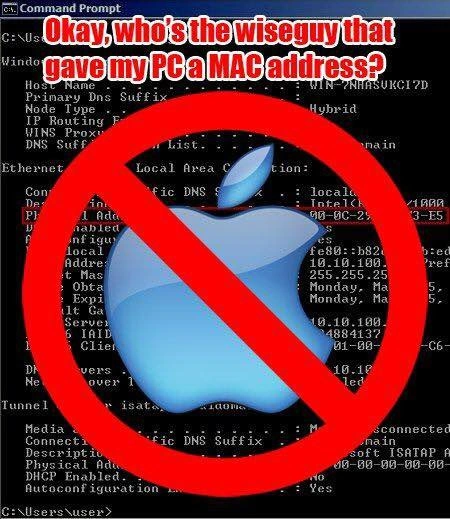
Let’s break down the joke in plain terms. The meme shows a Windows command prompt (the black text window) with the output of ipconfig /all. This is a Windows command that lists all your network configuration details. In the text, you see things like Windows IP Configuration, details about the network adapter, and importantly a line labeled Physical Address. That Physical Address (00-2C-29-3E-B5-35 in the image) is what tech people call the MAC address for that network card. MAC in this context stands for Media Access Control. It’s basically a unique ID or serial number for the piece of hardware that connects your PC to a network (like the Ethernet port or Wi-Fi chip). Think of it like a fingerprint for your device on the local network – no two network devices should have the same MAC address within the same local network segment. The format is a series of numbers 0-9 and letters A-F (hexadecimal notation) usually shown in pairs separated by hyphens or colons. Every computer, whether it’s running Windows, macOS (Apple’s operating system), Linux, or even your smartphone, has one of these addresses for each network interface. It’s a fundamental part of how devices communicate in a network: when data is sent to your machine on a local network, it’s directed to this hardware address.

Now, the humor: the text on the meme says, “Okay, who’s the wiseguy that gave my PC a MAC address?” and there’s a big blue Apple logo with a red "no" slash over it. The joke is playing with the word MAC. To most people, “Mac” (capital M, lowercase ac) means an Apple Macintosh computer – basically an Apple laptop or desktop. Apple’s Macs are a whole different world from Windows PCs; there’s a long-standing playful rivalry between Microsoft’s Windows PCs and Apple’s Macs. So, when a non-technical person hears “MAC address,” it’s easy to mishear it as something to do with a Mac (Apple computer). In reality, MAC address has zero to do with Apple or MacOS. But the meme imagines that the Windows PC itself is confused by this. It’s as if the PC is saying: “Hey, why does my system have something called MAC? I’m a Windows machine, no Apple stuff here! Who snuck that in?” The giant Apple logo with a ban symbol reinforces that idea – the PC is “allergic” to anything named Mac. This is pure comedic exaggeration because, of course, every Windows PC has a MAC address from the start as a normal part of networking.

For someone early in their tech career, it helps to clarify the terms:

  • MAC address (Media Access Control address): A hardware identification number that’s unique to each network adapter, used in networking. It often looks like AA-BB-CC-11-22-33 (a series of hex numbers). It’s sometimes called a physical address. You can find it on Windows by running ipconfig /all or on Mac/Linux by running ifconfig or ip a. It’s not set by Apple; it’s set by the device manufacturer and every vendor (Dell, HP, Apple, Cisco, etc.) uses MAC addresses.
  • Mac (Macintosh): Short for the Apple Macintosh computer. When someone says “I use a Mac,” they mean an Apple computer running macOS. It’s a brand/type of personal computer, like MicrosoftProducts (Windows PCs) vs Apple products (Macs).

The meme’s text is a playful misunderstanding: mixing up these two meanings of “Mac.” It’s as if the Windows system admin sees the term “MAC” in the network settings and thinks someone tried to turn his machine into an Apple Mac behind his back. Imagine an office scenario: a tech asks a new intern, “Did you set the MAC address on that Windows server?” and the intern responds in panic, “We don’t have Macs here, only PCs!” That’s the type of confusion this meme is joking about. In reality, setting or finding a MAC address on a Windows PC is routine and has nothing to do with installing Apple software or anything.

This is a classic bit of networking humor mixed with the pc_vs_mac_rivalry trope. The rivalry is mostly light-hearted – like sports team fans ribbing each other. In tech history, Apple Mac computers were seen as the arch-nemesis of Windows PCs (there were even famous commercials with two actors personifying a Mac and a PC). Here the Windows PC is portrayed as comically defensive, seeing the mere text “MAC” on its screen and thinking, “Uh-oh, is Apple taking over?” That’s why it says “who’s the wiseguy that gave my PC a MAC address?” as if some prankster loaded Apple stuff onto it. The TerminalHumor aspect comes from using the boring command-line output (which only nerds usually read) as the canvas for a joke – not something you see every day, which makes it extra amusing to those of us who do work in the terminal.

For a junior developer or someone just learning IT, the takeaway is: don’t let the names confuse you. A MAC address is just a technical identification label and is not related to Apple’s Mac computers. It’s unfortunate that the word “MAC” can mean two very different things in computing, but it often happens (like how “Java” can refer to a programming language or coffee!). The meme exaggerates this confusion in a funny way. Once you know the difference, the joke becomes clear: the Windows PC is effectively making a dad-joke or newbie mistake, and that’s why it’s amusing. In practice, if someone asks you for your PC’s MAC address, they’re talking about that networking ID, not anything to do with Apple. And yes, your Windows PC absolutely has a MAC address – all network-capable devices do – and it doesn’t mean it’s secretly an Apple device. 😄

Level 3: MAC Attack

For experienced developers and sysadmins, the humor jumps out immediately: it’s a pun born from a naming mix-up and a dash of OS rivalry. The image shows a Windows Command Line Interface output (ipconfig /all) superimposed with a big glossy Apple logo and a red “no symbol,” plus the sarcastic caption “Okay, who’s the wiseguy that gave my PC a MAC address?”. This combines two familiar themes in tech humor: confusion over terminology and the age-old PC vs. Mac rivalry. A senior IT pro knows that every networked device has a MAC address by design – it’s not something you “give” a computer as a prank; it’s there from day one. So the phrase implies someone must have snuck an Apple Mac element into the pristine Windows environment, which is absurd and hilarious. It’s as if the Windows PC is personified as a grumpy old sysadmin, upset that anything with the letters “MAC” has shown up on its watch. This plays on that tribal mentality from the Microsoft vs. Apple culture wars: picture a Windows PC angrily shouting “No Macs allowed in my house!”

This joke resonates with seasoned tech folks because it also reminds us of real-world terminology mix-ups. Many of us have encountered a user or newbie admin who gets tripped up by jargon. For instance, asking someone for their computer’s MAC address occasionally elicits confused responses like, “But it’s a PC, not a Mac!” We chuckle because we’ve been there or had to patiently explain the difference. The meme exaggerates this misunderstanding to comic effect: here the Windows PC itself is portrayed as making that novice mistake, conflating MAC (the address) with Mac (the Apple computer). Experienced engineers find that funny because it’s a role reversal – the machine is clueless instead of the user. It’s a bit of inside NetworkHumor that pokes fun at how non-intuitive naming can be if you’re not in the know.

Beyond the wordplay, the meme also tickles the nostalgia of the PC vs Mac rivalry that many senior devs grew up with. Remember those “I’m a Mac, I’m a PC” commercials? There was a time when Windows and Mac users playfully (or seriously) feuded over which platform was superior. Here that rivalry is caricatured by a paranoid Windows system seeing an Apple logo as an invasion. The big “no 🚫 Apple” graphic plastered over the Windows terminal output screams of exaggerated turf protection. In reality, of course, having a MAC address doesn’t mean your PC is secretly running macOS or being taken over by Apple. But this image imagines a world where Windows is so allergic to Apple that even a network address with the acronym MAC triggers an alarm. It’s a tongue-in-cheek jab at the tribalism of tech ecosystems, presented in a way only sysadmins and network geeks might imagine.

The senior perspective also appreciates the subtle truth hiding in the joke: the complexity of tech terms. We’ve all seen acronyms collision and context confusion cause trouble. MAC is a prime example of an overloaded term – besides Media Access Control, it can also mean Macintosh in casual talk, and even Mandatory Access Control in security contexts or Message Authentication Code in cryptography. Miscommunication is almost inevitable unless you clarify context. Seasoned developers have learned to clarify “MAC address (hardware ID)” when talking to mixed audiences, precisely to avoid this kind of confusion. The meme exaggerates what happens if you don’t clarify – your poor PC might think you’re trying to turn it into an iMac! This is a scenario that’s “too real” in that it reflects how easily non-technical stakeholders or juniors can misinterpret technical jargon. It’s a comedic reminder that in tech, precision in language matters. The fact that a simple acronym can invoke two completely different images – a hex address versus a glowing Apple logo – is both funny and a little cathartic for experienced folks. It lets us laugh at a problem we often have to solve with patience and documentation.

In summary, for the veteran crowd this meme hits on multiple levels: the pun of MAC vs Mac, the satire of Windows vs Apple animosity, and the inside joke of having explained this difference countless times. It’s classic TerminalHumor – using a bland command-line readout as the setup for a geeky punchline. We grin because we know exactly why the misunderstanding is ridiculous. And maybe we also cringe just a tiny bit remembering that one meeting where someone actually did say, “Wait, our PCs have MAC addresses? Is Apple involved?” True story or not, it feels like something that could happen, which makes the joke land with a satisfying, knowing chuckle.

Level 4: OSI vs OS X

At the deepest technical level, this meme highlights an acronym collision between two completely unrelated worlds: network engineering and operating systems. In networking, MAC stands for Media Access Control. A MAC address is a 48-bit hardware identifier assigned to a network interface (like your Ethernet or Wi-Fi card) at the factory. It’s expressed in hexadecimal, often as six pairs of characters (for example, 00-2C-29-3E-B5-35). Every device connected to a network — whether it’s a Windows PC, a Linux server, or an Apple Mac — has a unique MAC address burned into its network adapter. This address operates at OSI Layer 2 (Data Link Layer), facilitating local network communication. It's how switches and network protocols like ARP (Address Resolution Protocol) distinguish one machine from another on the same LAN. The term Media Access Control comes from early network protocol design, referring to controlling who can use the shared communication medium at any time (avoiding collisions on an Ethernet wire, for instance). In other words, a MAC address is fundamental plumbing of networking, establishing a device’s identity on a local link – it’s about as low-level and hardware-centric as it gets in networking.

Crucially, this technical meaning of MAC has nothing to do with Macintosh computers (commonly called Macs). The identical three-letter term is pure coincidence. In fact, the acronym “MAC” in MAC address predates the 1984 debut of the Apple Macintosh – it appears in the IEEE 802 standards for Ethernet and other link-layer protocols. Ironically, even an Apple Mac (running macOS) uses MAC addresses on its network interfaces, just like any device. The operating system or brand doesn’t matter for this purpose: MAC addresses are an OS-agnostic concept defined by networking standards, not by Apple or Microsoft. This is a great example of how context disambiguates meaning in tech: OSI (Open Systems Interconnection model) might make a seasoned engineer think of networking layers, whereas OS X (old name for Apple’s macOS) makes one think of Apple computers. They sound similar, but live in entirely different layers of abstraction. The meme humorously mashes these contexts together, leading to an absurd scenario: a Windows PC reacting to its MAC address as if it implies Mac (Apple) infiltration.

From a systems perspective, the Windows command ipconfig /all displays the Physical Address, which is the MAC address of the network adapter. Windows calls it “Physical Address” likely to avoid any confusion and to emphasize it as a hardware ID. This value is typically managed by the IEEE and allocated in blocks to manufacturers (the first half, called the OUI – Organizationally Unique Identifier – can even tell you the vendor of the network card). For example, if the OUI corresponded to Apple, that would simply mean the network chip was made by Apple or one of its partners – it wouldn’t mean the PC is turning into a Mac! The deep technical reality is that MAC addresses are just hexadecimal labels for network interfaces, crucial for routing frames on a LAN, and utterly unrelated to the user-facing operating system branding. The meme’s joke works because it exploits the homograph (same spelling) of MAC in two domains: one deeply technical (network addresses) and one cultural/brand-oriented (Apple’s Mac). For veterans in computer science, it’s a reminder of how naming collisions happen – the classic joke that one of the hardest problems in computer science is naming things rings true here. This particular naming quirk is usually harmless, but in this meme it’s the catalyst for a cross-domain pun, conflating OSI layer-2 jargon with the Apple vs Microsoft rivalry.

Description

A classic tech meme featuring a screenshot of a Windows Command Prompt running the `ipconfig` command. The background shows the output of the command, with lines of white text on a black screen detailing network adapter information. Over this technical output, a large, glossy Apple logo is centered, but it's crossed out with a bold red 'no' symbol (a circle with a slash). A prominent, stylized white text with a red outline at the top of the image reads, 'Okay, who's the wiseguy that gave my PC a MAC address?'. The humor is a deliberate pun, feigning confusion between a 'MAC address' (Media Access Control address, a unique hardware identifier for network cards) and a 'Mac' (an Apple Macintosh computer). The joke plays on the long-standing rivalry between PC and Mac users, with the PC user humorously expressing outrage at finding anything 'Mac'-related on their system


Comments

11
Anonymous ★ Top Pick I told my PC to drop the MAC address. Now it refuses to join any network that isn't using a proprietary, overpriced adapter and is complaining about the lack of artisanal, single-origin coffee in the server room
  1. Anonymous ★ Top Pick

    I told my PC to drop the MAC address. Now it refuses to join any network that isn't using a proprietary, overpriced adapter and is complaining about the lack of artisanal, single-origin coffee in the server room

  2. Anonymous

    PM saw ipconfig, screamed “Why does our Windows server have a MAC?!” - spent the sprint explaining it’s Media Access Control, not an unsanctioned migration budget; classic layer 2 fact, layer 8 meltdown

  3. Anonymous

    After 20 years in tech, I still chuckle when junior devs ask why their Linux box won't sync with their iPhone's MAC address - wait until they discover that ARP poisoning has nothing to do with actual toxins and that promiscuous mode isn't what HR warned them about

  4. Anonymous

    The real tragedy isn't the MAC address confusion - it's that someone's still running ipconfig /all without piping it to findstr to filter the noise. Though I suppose if you're surprised your Windows box has a MAC address, grep probably isn't in your vocabulary yet either

  5. Anonymous

    Every outage bridge has someone asking if the “duplicate MAC on VLAN 20” means revoke two MacBook licenses - meanwhile I’m chasing an OUI collision on a dying NIC

  6. Anonymous

    Breathe - MAC is Layer 2, not a platform switch; your Windows box only looks “Apple” because the USB Ethernet dongle’s OUI is from Cupertino, which is why the CMDB thinks we own 300 Macs

  7. Anonymous

    Intern's first commit: 'Refactored bindings to null pointer for ultimate loose coupling.'

  8. @Araalith 2y

    The same person who gave the MacBook PCIe slots.

  9. @RiedleroD 2y

    bro back in the day, PCs even had PS2 ports

    1. @Forenore 2y

      PS/2?

      1. @RiedleroD 2y

        yes

Use J and K for navigation