Skip to content
DevMeme
3535 of 7435
When code cleanup feels amazing until somebody asks about tests
CodeQuality Post #3871, on Oct 29, 2021 in TG

When code cleanup feels amazing until somebody asks about tests

Why is this CodeQuality meme funny?

Level 1: Oops, I Needed That!

Imagine you clean your room and throw away a whole bunch of old toys and junk. You feel really proud because the room looks so neat now — wow, you got rid of a lot of stuff! 😄 But then your friend comes over and asks, “Hey, you didn’t throw away the rare Pokemon card I gave you, right?” Suddenly you freeze. That sinking feeling hits: you never checked the box of “junk” before tossing it. 😧 What if that special card was in there? You were so happy for cleaning up, and now you’re worried you might have thrown out something important by mistake. This meme is joking about that exact feeling, but with computer code: being excited about cleaning up, then panicking because maybe you didn’t double-check and might have broken something important. It’s funny and scary at the same time, just like realizing you might have tossed out your prized card.

Level 2: Works on My Machine

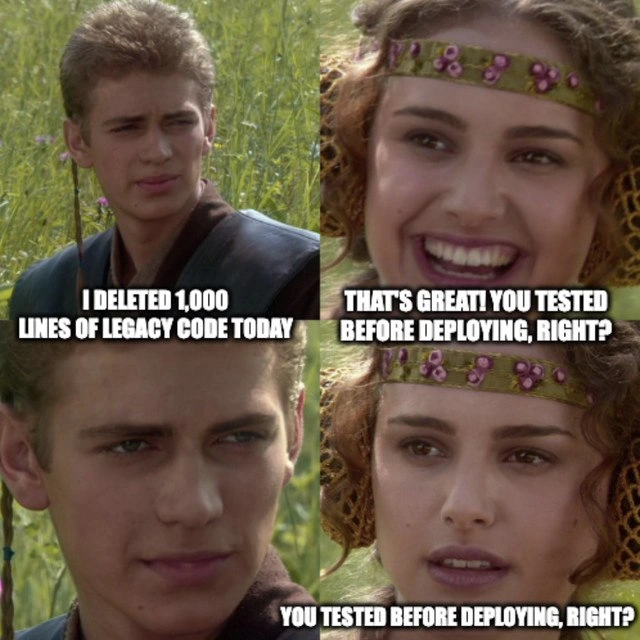
Let’s break this down in simpler terms. The meme uses four panels from Star Wars (the Anakin/Padmé meadow scene) to act out a conversation between two coworkers. In panel 1, Anakin (the developer) is super happy and says, “I deleted 1,000 lines of code today.” He’s bragging about cleaning up a bunch of old code. Think of that code as stuff in a closet that wasn’t being used – maybe it was legacy code (old code from earlier versions or deprecated features). Deleting such code can be good for CodeQuality because it makes the codebase smaller and easier to understand. It’s a form of refactoring – a fancy word for reorganizing or improving code without changing what the program actually does. Developers often feel proud after a big refactor or cleanup, and it’s common to celebrate a big deletion like that. In fact, seeing minus 1000 lines in a commit diff is almost a badge of honor in programming circles! 🎉 Less code to maintain (in theory) means fewer chances for bugs.

Padmé (the coworker or maybe a QA engineer) in panel 2 responds with excitement at first: “That’s great!” She’s happy because cleaning up code sounds positive. But immediately she asks, “You tested before deploying, right?” This is the crucial question. “Testing before deploying” means running the application or automated tests to make sure that removing those lines didn’t break anything. Automated tests are like a safety check: for example, a unit test might call a function and verify it still gives the correct result. An integration test might run the whole app or a large portion of it to ensure different pieces still work together correctly. If the developer had a good test suite, it would detect if those 1000 deleted lines were actually needed for some calculation or feature. Essentially, Padmé is asking: “You did make sure everything still works, right?”

In panel 3, Anakin just gives a blank, slightly worried look. There’s no caption there – just his face going from proud to uneasy. That silence is the joke. It implies he did not test before pushing the change out (git push to production, perhaps). Maybe he was in a rush, or maybe there were no tests available for that old code. It’s a relatable dev experience: many new developers have been so eager to deploy changes that they skip steps, only to realize later, uh-oh. The text doesn’t say it, but we can imagine him thinking, “... testing? um, about that...”

Panel 4 shows Padmé again, now with a very concerned face, repeating “You tested before deploying… right?” with emphasis. The same line is repeated, but now it reads as, “Please tell me you did something to verify it, because I have a bad feeling you didn’t.” Her smile is gone. This repetition is both funny and stressful because we know he has no good answer. It’s basically the meme equivalent of your team lead or a colleague double-checking: *“You did run the tests and click through the main features after your big change, didn’t you?”* And you just gulp. That sinking feeling is what we call deployment anxiety: the nervousness that something might go wrong in production.

To put it simply, the meme highlights the Testing part of software development that should accompany any big Deployment. Deploying means moving the new code into the live environment where users use it. Doing that without testing is risky. There’s a common humorous phrase developers use when something fails in production: "But it worked on my machine!" 😅 This meme is basically showing how that situation arises. The developer probably ran the app locally and it seemed fine (or maybe he didn’t even do that much), so in his environment everything “works on my machine.” But he didn’t thoroughly test all scenarios. Without tests, he wouldn’t know if, say, those 1000 lines of code he deleted were doing something important for certain users or conditions. Maybe the code was checking for a rare error case or was needed for older data. If he deploys to production without testing, the only testers will be the real users — and they won’t be happy if something crucial broke. In other words, skipping tests means you’re kind of using your real app as the test environment, which is not a best practice (it’s often joked about with a straight face but with irony: “We’ll test in production, what’s the worst that can happen?” Please don’t actually do this).

Let’s define a few terms from the meme context clearly:

  • Legacy code: Code that is inherited from previous developers or older versions of the software. It’s often uncomfy to work with (maybe it’s poorly documented or just outdated in style). Importantly, legacy code often lacks automated tests (back then, they might not have written any). Here, Anakin deleted legacy code, likely thinking it was safe to remove since it’s “old stuff we don’t need.”
  • Refactoring: This is when you change the internal structure of code without changing its external behavior. Think of it like tidying up a messy room without throwing out anything crucial. In theory, after refactoring, the program should still do all the same things, just the code is cleaner. However, without tests, there’s no proof that you didn’t accidentally change something you didn’t intend to.
  • Testing (in software): This usually means writing and running programs (tests) that automatically check if your code is doing the right thing. For example, you might have a test to confirm that when you delete a user account, all their data is actually removed. If someone “refactors” the user deletion code, the test will fail if the new code doesn’t remove the data correctly. In our meme, the lack of mention of tests suggests either they had no tests or the developer didn’t run them. Big no-no!
  • Deployment: This is the act of releasing code changes to a production environment (servers, cloud, etc.) where end-users interact with it. Deploying untested changes is like launching a rocket that hasn’t been through a full pre-flight check – it might blow up unexpectedly. That’s why Padmé is alarmed.

The humor here is very DeveloperHumor flavoured: it’s funny to software folks because we’ve been in that awkward spot. Imagine committing a change on Friday evening (classic mistake) and skipping the test suite because it’s slow, then someone asks if you’re sure everything’s okay… Your heart skips a beat. The meme exaggerates this feeling with the dramatic Padmé/Anakin expressions for comic effect. But it’s also a gentle lesson: always test your changes. Even if it’s not automated tests, at least click around or check the critical things your code might affect. Many teams use a Continuous Integration system that automatically runs tests on every code change, specifically to prevent this scenario. If a test fails, the CI will block the deployment, effectively asking the developer, “Are you sure about this? Something doesn’t seem right.” In our scenario, it looks like no such safety net caught the issue in time. Padmé’s character basically represents that safety net voice, and unfortunately, it’s coming a bit too late.

Level 3: Refactoring Without a Net

In this Star Wars-themed scene, a developer (Anakin) proudly proclaims he deleted 1,000 lines of legacy code. That’s basically the holy grail of a big refactor – wiping out a chunk of old, crusty logic to improve code quality. Less code often means fewer bugs and easier maintenance, so the team might initially cheer. It’s that sweet victory over technical debt: finally deleting code that’s been sitting there doing nothing (or so we hope). In dev speak, this kind of massive_code_deletion is a bold form of refactoring – restructuring or cleaning up code without changing its intended behavior. What could be better?

But the meme’s punchline lands when Padmé (his colleague) asks the million-dollar question: “You tested before deploying, right?” Her smile fades as she has to ask again, trailing off: “…right?” That repeated you_tested_right_callback is comedic timing gold and a gut punch of truth. We realize Anakin’s boastful silence means no, he didn’t test. He performed a code_cleanup_without_tests. This is the classic setup: pride in a huge code cleanup, immediately vaporized by the dawning dread of an untested_code_deploy. It’s like pulling out a giant Jenga block from the code tower – and not checking if the tower’s still stable before walking away.

Seasoned developers see the humor because we’ve all witnessed (or caused) this horror show. Removing 1,000 lines of code feels amazing, but if those lines weren’t truly dead, something important might have been in there. Without a safety net of unit tests or integration tests, how can you be sure nothing breaks? There’s a saying: “The best code is no code.” Sure – if that code was truly unused. But if you misjudged, you’ve just deleted a feature or a guardrail, and no one will know until something explodes. Legacy code has a way of striking back when you least expect it. Often, such code was doing something, even if it’s not obvious. Maybe it handled an edge case or an old requirement. With no tests to catch a regression, you’ve essentially set a production landmine. Deployment anxiety intensifies because now you’re not confident what will happen in production. Experienced devs get minor PTSD from this meme: it’s funny because it’s terrifyingly real.

This scenario underlines why having a robust test suite and Continuous Integration (CI) pipeline is so crucial. In a mature project, if you try to delete 1000 lines, you’d run npm test or your CI server (like Jenkins, CircleCI, etc.) would automatically run all tests. If any of those deleted lines were actually needed, tests would fail and scream “Hey, you broke something!” 🚨. That early catch spares you a 3 AM on-call meltdown. But our Anakin here either had no tests or was in too much of a rush/overconfidence to run them. Perhaps there were no automated tests at all – a hallmark of true “legacy code” (Michael Feathers famously defined legacy code as code without tests). Or worse, he merged and deployed before CI finished running – yikes. In any case, Padmé’s concern is every senior engineer’s concern: please tell me you didn’t just YOLO deploy a massive change.

We also sense some DeveloperHumor self-deprecation here. Developers often gloat about deleting code (it’s oddly satisfying – fewer lines to maintain!). It’s like cleaning out the garage; we love boasting “Look at all the junk I tossed out.” The meme then gives us the reality check: Did you double-check none of that junk was actually important? This is a relatable dev experience because most of us have learned the hard way that untested “cleanup” can create chaos. The combination of a youthful Anakin bragging and Padmé’s growing concern mirrors a senior-junior dev relationship. Padmé’s face in the last panel practically says, “I’ve seen things, Anakin. I’ve been burned before.” Meanwhile, Anakin’s gulp in panel 3 is every coder’s “uh-oh” moment when they realize they might have acted a bit too fast. The humor lands on that unspoken understanding: we laugh, because otherwise we’d cry. We’ve all had a deployment where we were silently praying we didn’t break anything. The meme exaggerates it with a beloved movie scene for effect, but the tension is 100% real in software teams.

To put it bluntly, shipping a huge refactor without testing is like saying “I have altered the code. Pray I don’t alter it further.” The dark side of joyfully deleting code is the fear that you just introduced a nasty bug. Padmé’s insistence, “You tested this… right?” is basically the voice of QA, your tech lead, or that cautious part of your brain. It’s the conscience of the software team kicking in. And when Anakin has no answer, you know trouble is coming. In real life, this is when you scramble to run tests after the fact, or frantically watch the monitoring dashboard for errors, hoping you truly deleted only dead code. The meme nails that familiar scenario with a dose of gallows humor. It’s a gentle reminder (with a wink): next time, write tests before you brag. Otherwise, that 1,000-line triumph might turn into a long night of bug-hunting under a very worried team lead’s gaze.

 // Example: refactoring out a supposedly "unneeded" step
 function processData(data) {
-    data = legacyTransform(data);  // removed this legacy step
     return computeResult(data);
 }

Above: Removing a legacy function call in a refactor. Without tests, who knows if that legacyTransform was quietly ensuring data was in the right format? Everything compiled and the app launched, so our confident dev deploys. Unfortunately, if legacyTransform was fixing an edge-case in data, something might break later. No unit test failed (since none existed) to warn the dev. Production users might be the first to discover the bug. Refactoring without a net, indeed. As every battle-scarred coder will tell you, “I find your lack of tests… disturbing.” 👻

Description

Four-panel Star Wars 'Anakin / Padmé' meme: Panel 1 shows Anakin grinning in a sunlit meadow with the white caption, “I DELETED 1,000 LINES OF CODE YESTERDAY.” Panel 2 shows Padmé smiling back; caption reads, “THAT’S GREAT! YOU TESTED BEFORE DEPLOYING, RIGHT?” Panel 3 returns to Anakin now looking uneasy; this frame has no text, underscoring his sudden silence. Panel 4 shows Padmé’s smile fading to worry, with the caption, “YOU TESTED BEFORE DEPLOYING… RIGHT?” The joke highlights the developer habit of celebrating massive refactors or dead-code removal without the safety net of automated tests, a shortcut that can turn deployments into production landmines

Comments

6
Anonymous ★ Top Pick Deletion-driven development: remove 1,000 lines on Friday, watch code coverage leap to 100% - because you can’t unit-test what no longer exists
  1. Anonymous ★ Top Pick

    Deletion-driven development: remove 1,000 lines on Friday, watch code coverage leap to 100% - because you can’t unit-test what no longer exists

  2. Anonymous

    The only thing scarier than 1,000 lines of legacy code is the developer who deletes them all without understanding why they were written in COBOL-style defensive programming patterns to handle that one edge case from 2003 that only happens during leap years on Tuesdays when the moon is full

  3. Anonymous

    Ah yes, the classic 'delete first, ask questions never' approach to legacy code modernization. Nothing says 'senior engineer' quite like confidently yeeting 1,000 lines into the void on a Friday afternoon without so much as a `console.log()` to verify the blast radius. At least when the pager goes off at 2 AM, you'll have that warm fuzzy feeling knowing you single-handedly validated why we have staging environments, feature flags, and that one grumpy architect who keeps insisting on test coverage metrics

  4. Anonymous

    Deleting 1,000 lines feels senior until you realize you also deleted your only executable spec: the tests

  5. Anonymous

    Deleting legacy code without tests: the refactor that turns 'mission accomplished' into 'all hands on pager duty'

  6. Anonymous

    Deleted 1,000 lines and the suite stayed green - amazing what 100% coverage of mocks can assure you about production

Use J and K for navigation