
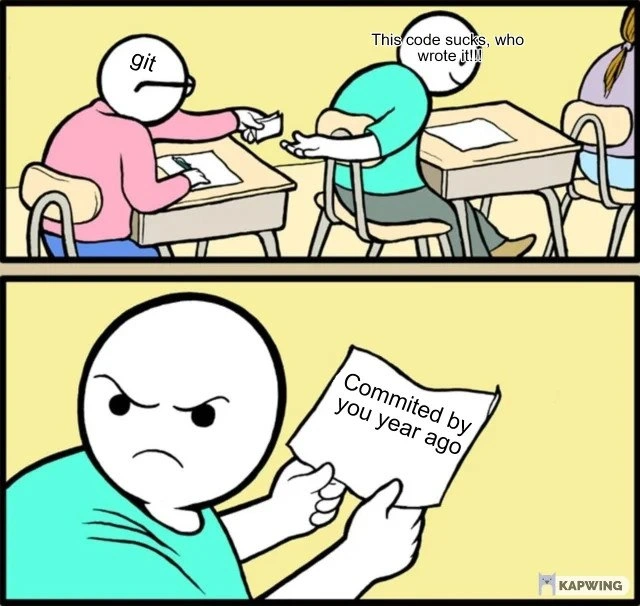
When git blame reveals you wrote the terrible code last year
Why is this VersionControl meme funny?
Level 1: Oops, It Was Me
Imagine you walk into your kitchen and see cookie crumbs all over the counter. The cookie jar is empty. You get upset and shout, “Who ate all the cookies and made this mess?!” You’re ready to blame your brother or sister. Then your mom comes in and shows you a little note (or maybe a video) that says: “You ate all the cookies last week.” Suddenly, you remember – it was actually you who sneaked those cookies and left the crumbs. Uh-oh! You feel pretty silly because you were angry at “someone else,” but really you did it yourself.
That’s exactly what’s happening in this meme, but with computer code. The person was mad about some messy work, only to find out they were the one who made the mess, just a while ago. It’s funny in a teasing way: sometimes we complain about a problem and discover that we caused it. The lesson? Be careful when pointing fingers, because you might just be pointing at a mirror without realizing it!
Level 2: When Git Blame Hits Home
Let’s break down the joke in simpler terms. We’re dealing with Git, which is a popular version control system that developers use to track and manage changes in code. Think of Git as a save-history for all your code files, remembering who changed what, and when. One handy (or dangerous) command in Git is git blame. Despite its harsh name, git blame simply shows you the last person who modified each line of a file, along with the timestamp of their change. It’s like asking, “Who touched this part of the code last?” and Git pointing a finger. Developers often use it when they find a bug or messy code and want to know who to ask about it – or, let’s be honest, who to silently blame for the headache.
In the meme, the developer uses git blame on some “sucky” code, expecting to uncover the culprit. The meme’s two-panel classroom scene visualizes this: the green-shirted developer is complaining loudly, “This code sucks, who wrote it!!” Meanwhile, Git is personified as the pink-shirted student passing a note. That note is essentially the output of a git blame. In the bottom panel, the developer reads the note and discovers the shocker: it says “Committed by you year ago.” In other words, the version control history shows their own name as the author of the bad code, committed one year in the past. The developer’s angry expression flips into a kind of annoyed disbelief – they have effectively blamed themselves. The humor comes from this twist: he was ready to chew out some other developer, only to learn he’s the one who wrote the very code he hates. It’s a classic relatable dev experience. Many programmers have felt exactly this. You open an old section of code, find something clunky or broken and think, “Ugh, who did this?” – and then you check the commit history and go, “…Oh. It was me.” Cue the facepalm.
A few concepts here are key. First, code quality: when the meme says “this code sucks,” it means the code is of poor quality – maybe it’s hard to read, inefficient, or full of bugs. Over time, a codebase can accumulate such problematic code, often referred to as technical debt. Technical debt is a metaphor for the consequences of quick-and-dirty coding shortcuts. It’s like opting not to tidy your room for weeks – eventually, you have a big mess that you (or someone else) will have to clean up. In coding, if you write something hastily without following best practices, you “borrow time” but incur a debt: sooner or later, that messy code will create more work (bugs to fix, refactoring to do). In this meme, the developer is looking at a bit of technical debt from a year ago and calling it out as “terrible code.” The twist is realizing he was the one who caused that debt in the first place.
Second, the idea of commit history as a record. A commit in Git is like a snapshot of changes with an author and date attached. So “committed by you a year ago” means that according to Git’s records, this person made those changes one year prior. It’s a factual, if brutal, reminder. We sometimes forget what we coded last year (or even last month!). Software projects can be huge, and our memory of every little change fades. That’s why tools like Git are useful – they remember for us. But it can be jarring when that memory comes back around. Here, it’s almost as if Git acted like a time-traveling messenger: Present-You asks, “Who did this?” and Git brings a message from Past-You: “Hey, it was you, buddy!” It’s both funny and a bit embarrassing.
What makes this a developer humor meme and not just a sad story is how common and light-hearted the scenario is. Almost every programmer has improved their skills over time, which means code written earlier in your career might look bad to you now. It’s actually a good sign of learning – if you look at your old code and think “wow, this is bad,” it likely means you know better now! But in the moment, it’s easy to rant at the code before realizing your own hand in it. The meme exaggerates the reaction for comedic effect: the student (developer) is literally yelling in class about how the code sucks, which is a silly image. And Git handing over a note is a funny visualization of a git blame result coming to ruin your day. The inclusion of the little Kapwing watermark in the corner tells us this is a meme image created with an online generator, highlighting that it’s meant for quick laughs in the dev community.
In summary, the meme is a light joke about self_blame in programming. Git blame is used to find who wrote a piece of code, and it “hits home” when you find out you were the author all along. It’s poking fun at that mix of frustration and sheepishness a developer feels upon such a discovery. You start out ready to scold someone else for the mess, and end up muttering, “Oh... I guess that was me. Awkward.” The joke reminds developers not to be too quick to judge “bad code” — sometimes the call is coming from inside your own house (or rather, inside your own commit history). It’s a little lesson in humility wrapped in humor: Git won’t lie to you, even if the truth is a bit painful to your ego. Next time, you might double-check the git log before shouting “Who’s responsible for this?!”
Level 3: Shame-Driven Development
In this meme’s little drama, version control becomes a time machine of shame. A grumpy developer in a green shirt scowls at some rotten code and barks, “This code sucks, who wrote it?!” We’ve all been there – stumbling upon an ugly snippet in the codebase and instinctively launching a hunt for the guilty party using git blame. In the top panel, Git (personified as the pink-shirted classmate) silently hands over the evidence: a slip of paper with the commit info. The bottom panel delivers the punchline: the paper reads “Commited by you year ago.” Oof. Typos and all, Git just showed that the “terrible” code was written by the very same developer, only a year in the past. It’s the ultimate coder self-own: commit_history_regret served cold. The green-shirted character’s furious face says it all – a mix of disbelief, embarrassment, and annoyed acceptance. In other words, we have met the enemy, and he is us.
This darkly funny scenario hits home for any seasoned programmer. Why? Because encountering technical debt you left behind is a rite of passage in software development. Over time, what once seemed like an okay solution can become obviously cringe-worthy. Code has a way of aging poorly when requirements change or when you’ve since learned better practices. The meme exaggerates this as “code quality decline”, but it’s painfully real: maybe Past-You was rushing to hotfix a production bug on a Friday evening, or you were a junior developer writing code without full understanding. A year later, Present-You looks at that same code and cringes, wondering “Which incompetent wrote this?!” – only to discover the call is coming from inside the repo. It’s a comedic reminder that yesterday’s quick fix can become today’s ugly hack. The code didn’t literally rot, but your perspective changed. You’ve grown as a developer (hopefully), so what was acceptable or out-of-sight then is now glaringly bad. In a way, finding your own old code appalling is a good sign of progress – but it sure is humbling, too.
The humor also plays on git blame itself – a tool whose very name encourages finger-pointing. git blame is commonly used to identify who last modified each line of code. In theory, it’s for accountability and getting context; in practice, it’s often invoked in frustration: “Who wrote this mess?!” It’s a bit of a blame game in dev culture. But here the blame backfires spectacularly. Git doesn’t sugarcoat it – it hands you the raw truth, showing your name and a timestamp from last year. There’s irony in how impersonal tools like Git can reveal very personal truths. This is self_blame at its finest: you literally have only yourself to blame, and Git just proves it in black-and-white. It’s a relatable dev experience because so many of us have had that jaw-dropping moment where we realize the “villain” behind the bug or bad code is our own past self. As a grizzled coder might quip, “I see the problem… and it’s me.”
On a deeper level, this meme highlights the ongoing battle with technical debt and the transient nature of code ownership. Over a year, teams change, memory fades, and context is lost. It’s all too easy to forget the shortcuts or shaky assumptions we ourselves introduced. That “terrible code” might have been written under duress – a looming deadline, an urgent bugfix with no time to refactor, or maybe it was the best you could do with the knowledge and tools you had then. One year in software development is a long time; you might have switched projects or simply never looked back at that module until now. So when you exclaim “This is awful, who wrote it?” you genuinely don’t realize it was you. Time_traveling_git_blame is real: version control history lets you dig up the past, and sometimes the ghost of developers past… is your own. The result is both funny and a bit sobering. Seasoned devs have a saying: “Always code as if the person who ends up maintaining your code is a homicidal maniac who knows where you live.” The twist in this meme is that the person maintaining your code (and silently judging it) turned out to be you. Past-You didn’t think about Future-You, and now Future-You is annoyed. It’s a kind of temporal code paradox where you are both the culprit and the accuser. In the annals of DeveloperHumor and TechHumor, this situation is a classic because it satirizes the universal truth that writing code is easier than maintaining it – especially when you’re cleaning up your own mistakes.
From the VersionControl perspective, this is also a gentle jab at how we use tools. We treat git blame like a detective’s magnifying glass to find the perpetrator of some bad code. But software engineering lore often encourages a “no blame” culture – focus on the fix, not the person. After all, code quality issues are often systemic: lack of code reviews, tight deadlines, missing documentation, etc. The meme pokes fun at the impulse to assign blame at all. It’s telling us that chasing someone to blame might just lead you to a mirror. Instead of saying “Who wrote this garbage?” we probably should ask “Why was it written this way?”. Maybe if Past-You had more time, clearer requirements, or a second pair of eyes, that code wouldn’t suck. But of course, in the moment of frustration, it’s easier to curse the code and its author. Git’s unemotional reply – “committed by you” – is the mic-drop moment. The silly spelling mistake on “Commited” only adds to the comedic effect, almost like Past-You couldn’t even spell while rushing that commit. It’s the who_wrote_this_code_meme brought to life: the accusatory question gets an answer you didn’t expect (or want).
Ultimately, this meme resonates because it encapsulates a journey every developer goes through: initial outrage, investigative enthusiasm, and then the hard smack of self-realization. It’s equal parts embarrassing and enlightening. You get a laugh, but you also get a lesson in humility. Next time you see a lousy piece of code, you might hesitate with the blame gun, because you know the culprit could very well be you from the past. In the world of code, yesterday’s hero can be today’s villain. And as this meme shows, sometimes the only thing Git truly reveals is how far you’ve come (or how low you sank) since last year.
Description
Two-panel cartoon meme set in a classroom. In the top panel, a pink-shirted student on the left, labelled with the text “git,” passes a sheet of paper to a green-shirted student on the right who is exclaiming, “This code sucks, who wrote it!!”. In the bottom panel the same green-shirted student, now frowning angrily, unfolds the paper which reads, “Commited by you year ago” (spelling error included). A small “KAPWING” watermark sits in the lower-right corner. The joke riffs on the moment a developer uses git blame to investigate bad code, only to discover the commit history incriminates their past self - highlighting common realities of code quality decline, technical debt, and self-inflicted bugs
Comments
10Comment deleted
git blame: because nothing humbles a principal engineer faster than finding out Past-You thought a 500-line switch statement qualified as a plugin architecture
The only thing worse than inheriting a legacy codebase is realizing you're the founding architect who wrote those 'temporary workarounds' that became load-bearing infrastructure three acquisitions ago
The most humbling moment in any senior engineer's career: running `git blame` on that horrific code you've been complaining about in standup, only to see your own commit from 18 months ago - back when you thought nested ternaries and single-letter variables were 'elegant.' At least you can't throw yourself under the bus in the PR review
Git commit: 'Quick fix'. Git blame one year later: 'WTF were you thinking?'
Git blame: confirming 'who wrote this?' - me, during a Sev-1, five minutes before change freeze
At scale, git blame is just a mirror: every Sev-2 traces back to your “temporary” hotfix that survived twelve releases
A good sign if you understand it now. But if no... Comment deleted
Committed by you one month ago. Comment deleted
Comitted by you one week ago (after holidays) Comment deleted
It just means you improved your skills Comment deleted


