Third-party library heroically saves your unvalidated, unsanitized parameters from disaster
Why is this Dependencies meme funny?
Level 1: Friend Saves the Day
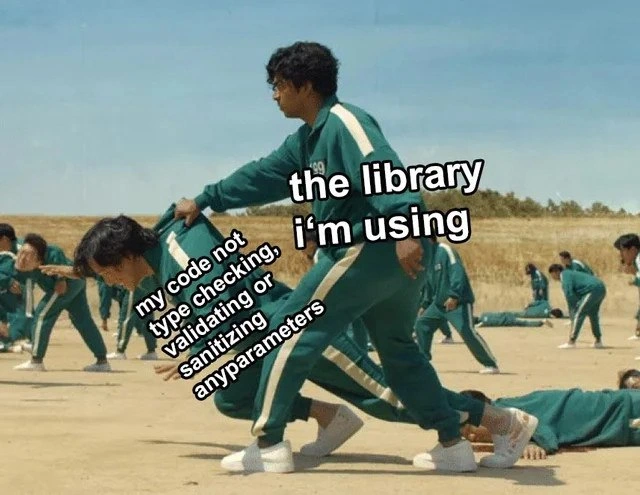
Imagine you’re playing a game of freeze tag where if you move at the wrong time, you’re out. You start running really fast without watching where you’re going. You trip on a rock because you didn’t tie your shoelaces properly – uh oh! You’re just about to faceplant hard on the ground (that would hurt, right?). But at the last second, your friend zooms in and grabs you by the arm, stopping you from falling flat on your face. Phew! You both freeze in that moment, and you don’t get out of the game. In this story, you were a bit careless (you should’ve tied those laces and watched your step), and your friend acted like a hero, preventing an accident. It’s funny and relieving because usually it’s YOUR job to not trip yourself up, but here your friend basically did the job for you. In the meme, our code is like the clumsy runner who didn’t check anything, and the library is the friend who catches us just in time. We laugh because we see ourselves in that clumsy moment, thankful that someone (or something) else saved us from the big disaster we nearly caused.
Level 2: Library to the Rescue
Let’s break down what this meme is talking about in simpler terms. In programming, a third-party library is like a pre-made set of tools or code written by someone else (not by you or your team) that you include in your project to help you do things faster or more easily. For example, instead of writing your own code to handle dates or math, you might use a library that provides those functions. You get it via package managers like npm (for Node/JavaScript), pip (for Python), Maven (for Java), etc. Now, when it says “the library I’m using,” it’s referring to such a library that our code depends on.
On the other hand, “my code not type checking, validating or sanitizing any parameters” means that the code we wrote isn’t doing some important safety steps. Let’s define those terms:
Type checking: This means making sure a piece of data is of the expected type before you use it. For instance, if a function expects a number but someone passes a string (text) instead, a type check would catch that. Some languages do this automatically at compile time (like C# or Java will give you an error if you try to put a string where an int should go). Other languages, like JavaScript or Python, won’t complain until the code is actually running – and if the type is wrong, you might get a runtime error (like a
TypeErroror just incorrect behavior). If our code is “not type checking,” it means we’re not manually checking types in a language where the system doesn’t do it for us. We’re kind of crossing our fingers that the right thing (like a number or a valid object) is passed in.Validating parameters: Validation is about checking the content and rules of the data. Even if the type is right, the value could be nonsensical or out of expected bounds. For example, if you have a function that calculates the square root of a number, you might validate that the number is non-negative (since square root of a negative is not a real number). If a user is signing up and you have an “age” field, you’d validate that the age is, say, between 0 and 120 (nobody is 400 years old, and negative ages don’t make sense). If the code isn’t validating, it’s just accepting whatever comes and trying to use it, which can lead to bugs or errors. Imagine a function that doesn’t validate and just does
1/age– ifagecomes in as 0 and we didn’t check, oops, that’s a divide-by-zero error at runtime.Sanitizing parameters: Sanitization is a specific kind of validation focused on cleaning up input data to make it safe. This often refers to security-related cleaning. For instance, if you take text from a user that will be displayed on a webpage, you should sanitize it by escaping HTML characters – otherwise a user could input
<script>alert("hi")</script>and if you directly put that on the page, it would actually run as code (this is called an XSS attack). Sanitizing that input would turn the<and>into harmless characters (like<and>), so it would just show up as text “” instead of executing. Another example: if you take a username or ID from a user and use it in an SQL query to your database, you should sanitize or parameterize it. Without sanitization, a crafty user might try to input something that breaks your query and does something malicious (that’s the SQL injection scenario). Sanitization often involves removing or escaping characters that aren’t expected or could cause harm (like quotes, angle brackets, or other special symbols in certain contexts). If our code isn’t sanitizing, it means it’s not guarding against those malicious or accidental problematic characters.
So the meme sets up a situation: our code doesn’t do any of this stuff – it doesn’t check if the right types are coming in, doesn’t validate the values, and doesn’t sanitize anything. It’s kind of just trusting everything blindly. That’s like a programmatic “trust fall,” and normally you’d expect it to crash or misbehave if anything even slightly off comes its way. Yet, in the meme, we see that “the library I’m using” is catching the fall. This suggests the library has some built-in smarts: maybe it’s doing those checks itself. Many well-designed libraries do! Library developers often know that not everyone using their code will remember to do all the safety steps, so they include their own validations and sanitizations internally. For example, a web framework might automatically validate that an email address looks like an email format, or it might auto-sanitize any output that goes to a webpage (to prevent that XSS we talked about). A database driver library might automatically escape dangerous characters or require you to use parameters which make it immune to injection attacks.
Let’s put this in a concrete example to see how a library can save the day: Imagine you’re writing a web application and you have a route that takes a user ID from the URL and fetches user data. Your code might look like:
// Our code, very naive:
app.get("/user/:id", (req, res) => {
let userId = req.params.id; // we get the ID from the URL, e.g., "123" or could be anything
// No validation or type check here: assuming userId is a proper integer
database.findUserById(userId, (err, user) => {
if (err) return res.status(500).send("Error");
res.send("User name is " + user.name);
});
});
If someone passes a string or some weird input as :id, our code doesn’t check it at all. Now, suppose database.findUserById is a function from a third-party library (like an ORM or database client). A robust version of that library function might internally do something like:
// Inside the library (hypothetical example):
function findUserById(id, callback) {
if (typeof id !== "number") {
// Try to convert or handle it
let num = Number(id);
if (isNaN(num)) {
return callback(new Error("Invalid ID format"));
}
id = num; // converted string to number if possible
}
// Now proceed with id as a number, knowing it's a valid type
// ... query database safely with the number ...
}
What happened there? The library’s findUserById anticipated that someone might pass an id that isn’t a number (maybe a string like "123" from a URL). It checked the type (typeof id !== "number") and even attempted to validate/convert it by turning it into a Number. If it turned out completely not a number (say the input was "abc"), it returns an error instead of blindly querying the database. By doing this, the library prevented a situation where an invalid id could cause a database error or something worse. Meanwhile, our code didn’t do anything and still everything didn’t break horribly – so our code “was saved” by the fact that the library was defensive.
Another real example: many templating libraries for web development auto-sanitize output. Let’s say we’re using a template to display a user’s comment on a website. A naive approach without sanitization might be:
<p>User comment: ${ userComment }</p>
If userComment contains something evil like "<script>stealCookies()</script>", that would get injected right into the page and run as a script – yikes! But if we use a template engine like, for example, Handlebars or Jinja2, by default they will output-encode variables. That means internally they do:
<p>User comment: ${ escapeHtml(userComment) }</p>
where escapeHtml (provided by the library) turns < into <, etc. So the evil script would become harmless text on the page. In this scenario, our code didn’t sanitize the comment, but the library did automatically, thereby protecting us and the users. We might not even realize it at first – everything “just works” and is safe, and only later do we smack our forehead thinking, “Good thing the framework took care of that, I totally forgot to.”
So, “library to the rescue” is exactly what’s happening. The library provides a kind of safety net or guardrail. It’s like those bowling lane bumpers that prevent your ball from going into the gutter – your throw (input) might be wild, but the bumpers (library checks) keep it in play. Developers who are early in their journey might rely on these safety features without even knowing they’re there. Have you ever used something and noticed it never crashes even when you accidentally pass something weird? Chances are the people who wrote that library put in some protective code.
However, it’s worth noting (and every mentor will tell you this): you shouldn’t depend solely on libraries to do the right thing. It’s important to understand why we need to validate and sanitize. The meme is funny because it’s a bit of a “guilty laugh” – we know we got lucky. In real development, a better practice is to double-check things yourself at the boundaries of your code. Think of it like teamwork: you and the library should both be careful, and not just assume the other will handle it. If you always rely on “someone else’s code will fix my sloppy input,” one day you’ll use a library that doesn’t, and that day might end with a crash or a security issue in production. So, learn from the meme: be grateful for helpful libraries, but try not to abuse their goodwill! Writing clean, validated input handling in your own code will make you a hero to the next developer down the line (and future you).
Level 3: Dependency Deus Ex Machina
For seasoned developers, this meme elicits a knowing grin because it encapsulates a scenario we’ve all witnessed (or been guilty of). The image is a scene from Squid Game – specifically the tense “Red Light, Green Light” round – where one contestant in a green tracksuit is about to fall and another grabs him just in time, preventing a fatal game over. In our coding context, my code is the stumbling player, having recklessly charged ahead without any input checks, and the library I’m using is the quick-reacting friend who grabs hold to stop a total wipeout. The humor (and horror) comes from the recognition that the code was about to do something dangerous or stupid, and only an external dependency’s precaution saved it. It’s basically the software equivalent of, “I didn’t look both ways before crossing the street, but luckily someone else hit the brakes.”
Why is this funny to experienced devs? Because it’s so relatable. We’ve seen codebases (maybe our own early code or a rushed hotfix) that take in parameters from the wild — user input from a form, API data, command-line args — and just assume everything is fine. No type checking (e.g., not confirming that an age field is actually a number), no validation (not checking that the number is within a sensible range, or that an optional field isn’t null), and no sanitization (not removing or escaping characters that could be malicious or cause formats to break). This is the kind of CodeQuality snafu that books on secure coding beg us to avoid. It’s the first item on the list of “never do this” in any security guide: never trust input. Yet in the real world, due to deadlines, laziness, or ignorance, such lax practices slip in. Maybe the team thought “Oh, the input will always be correct because the UI restricts it” or they just forgot the validation in the rush to ship a feature before Friday.
The meme’s punchline is that, against all odds, things didn’t immediately explode, because the third-party library in use had some built-in guardrails. It’s a tongue-in-cheek celebration of how Dependencies can sometimes cover our butts. The bold text “the library I’m using” perched over the rescuer highlights an uncomfortable truth: we often outsource not just functionality to libraries, but also responsibility. The library becomes a deus ex machina, swooping in to prevent the bug or security flaw that should have been our job to prevent. This resonates strongly with anyone who’s done firefighting in production. For instance, imagine a bug report comes in about a weird user input — you get that sinking feeling realizing you never validated that field. You brace for the worst, only to find in the logs that the library function you called rejected the bad value or sanitized it, and the application stayed running. You breathe out, “oh thank goodness,” simultaneously relieved and a bit chagrined. The library saved the day, and maybe saved your weekend from an emergency patch.
There’s also an implicit satire of modern development practices here. Today’s software projects often rely on a tower of third-party packages (thank you, DependencyManagement!). It’s common (especially in JavaScript with NPM or Python with PyPI) to pull in libraries for almost everything. Need to parse a date? Install a library. Need left-pad functionality? There was literally a famous tiny library for that! (Remember left-pad, which humorously broke the internet for a day when it was unpublished, because so many projects depended on it to add zeros to strings.) We’ve grown used to delegating a lot of work to dependencies. The meme jokes that we even delegate input protection to them. It’s like saying, “I write the fun code, and this library over here handles all the boring safety checks I skipped.” Seasoned devs see the irony: those safety checks are not boring extras, they’re essential — skipping them is how you get nasty Bugs or security breaches. Over-reliance on libraries can create a false sense of security. We laugh, but it’s a knowing laugh, because many of us have seen a junior dev say, “It’s fine, I’m using XYZ library, it will sanitize the input for me,” and we wince internally. Indeed, many major bugs in software (or outright vulnerabilities) come from the assumption that someone else’s code is handling something that your code neglected.
A real-world scenario: consider an application that builds an SQL query string directly from user input. If you do query = "SELECT * FROM users WHERE name = '" + userInput + "'"; and call that on the database, you’re inviting a SQL injection attack — one of the top BugsInSoftware security issues where a malicious user can send in userInput = "'; DROP TABLE users; --" and poof, your user table is gone. Good practice is to validate and sanitize that input (or better, use a parameterized query so the library handles it safely). Now suppose the developer did none of that, but they happened to use a database library that under the hood notices, “hey, this query string looks dangerous, let me escape those single quotes or throw an error.” The app doesn’t get hacked; not because the app code was written well (it wasn’t), but because the library’s maintainers were paranoid enough to include a check. The meme’s humor plays on this dynamic: your sloppy code survived only by the grace of someone else’s diligence.
From the senior perspective, there’s both comedy and a cautionary tale. We chuckle at the phrasing “heroically saves” because it’s phrased like a medal-of-honor citation for the library – as if this NPM package dove on a grenade to save your project. The truth behind it: library authors often do implement such safeguards precisely because they know many callers won’t. It’s a form of runtime_guardrails. But as experienced devs, we also know this isn’t something to brag about – it’s a tech debt smell. If your code “works” only thanks to a library’s safety net, you’ve got a latent bug waiting to happen if anything changes. What if a future version of the library removes that check or changes behavior? What if you switch to a different library that assumes you did your homework? You might not be so lucky next time. So, underlying the laugh is a bit of nervous laughter: there but for the grace of open-source go I.
In summary, Level 3 recognizes the meme as a witty commentary on code quality (or lack thereof) in the presence of abundant libraries. It highlights the shared experience of relief when a dependency averts a catastrophe we inadvertently set up. It also implicitly reminds us of the unwritten implicit_contracts in software: the caller should provide good input, but the callee might clean up if they don’t. Seasoned devs appreciate the dark humor of that scenario, having lived through both the lucky saves and the times those hopes backfired. Not every hero wears a cape; some come in a .jar or an npm package indeed. Just don’t count on always having a Squid Game buddy to catch you — better to learn to stand on your own (validated) feet.
Level 4: Type Safety Blanket
At the most rigorous level, this meme touches on the deep principles of type safety and program correctness. In an ideal world, every function would formally specify its input requirements (type, format, allowed range) and any violation would be caught automatically. Some languages and frameworks approach this ideal with things like design by contract and advanced type systems. For example, in Eiffel (an early champion of design by contract), you might declare a precondition that an input string must_not_be_null or an integer must_be > 0. The program will actively check these conditions at runtime (or even verify them statically) and halt or throw an error if they’re not met, rather than blindly marching toward a disaster. This is a way of building a safety net into the code’s very specification – much like having the rules of the game enforce that you can’t proceed if you’re about to misstep. Modern static analysis tools and type systems carry on this tradition: a static type checker (like in Rust or Haskell) can prove at compile time that certain kinds of wrong inputs simply cannot happen, because the code wouldn’t compile in the first place if you tried to pass, say, a string where a number is required. Essentially, the compiler or verifier acts like an automated referee, saying “red light!” the moment it sees an input that doesn’t conform to the expected type or format.
However, as powerful as type systems and formal methods are, they have limits. There’s a famous notion in theoretical computer science (related to the Halting Problem and Rice’s Theorem) that you can’t have a program which perfectly decides every interesting property of another program’s behavior. In simpler terms, no tool can catch every possible bad input or bug at compile time for all programs – some things are just undecidable in the general case. Because of this, even robust systems rely on runtime checks and balances for issues beyond pure type mismatches (like logical validity of data, or preventing malicious content). This is where the concept of taint analysis in security comes in: advanced analysis tries to track “tainted” (untrusted) data flowing through a program to ensure it’s cleansed before reaching sensitive operations (like sending that data to a database or an eval function). Tools can prove some guarantees (e.g., “no unchecked user input reaches this critical function”), but in practice they often have to be conservative or imperfect.
Given these realities, library authors often employ defensive programming as a backstop. They anticipate that callers might not follow the ideal contract, so they put in their own defensive checks. A well-written third-party library might include lines of code like:
// Inside a library function, for example:
public Result getUserById(Object id) {
if (!(id instanceof Integer)) {
throw new IllegalArgumentException("ID must be an integer");
}
// ... proceed knowing 'id' is an Integer
}
Here the library is actively catching a type mistake at runtime, essentially saying, “If you didn’t enforce the correct type, we will – at least we’ll stop and complain before something truly bad happens.” In more dynamic environments, libraries often normalize or sanitize data on behalf of the caller. Think of a templating library that automatically escapes HTML special characters: even if your code forgets to sanitize a <script> tag out of user input, the template engine will convert < into < so that script doesn’t execute. It’s not quite the lofty assurance of a mathematical proof, but it’s a pragmatic runtime safeguard. This mix of approaches reflects an underlying truth: we build multiple layers of safety. The compiler or static analyzer prevents some classes of errors, and the runtime (including third-party libraries) guards against the rest. The meme humorously glorifies that last line of defense – the library – as a hero, because in absence of the earlier layers (no type checks, no validation in the user code), it’s the library’s internal checks that avert a catastrophe. In theoretical terms, the library is acting like an invariant enforcer at runtime, maintaining certain guarantees (like “the input string is properly formed” or “no invalid characters present”) that the surrounding code failed to uphold. It’s a bits-and-bytes incarnation of a safety net, grounded in both the theory of robust software design and the hard-knocks reality that not every program will be correct on its own.
Description
Image is a still from the TV show Squid Game: participants in green tracksuits are stumbling in a dusty field. One standing contestant grabs another who is mid-collapse, preventing him from hitting the ground; background players are also frozen mid-motion. Bold white text over the rescuer says "the library i’m using". Diagonal white text on the falling player reads "my code not type checking, validating or sanitizing any parameters" (spacing preserved). The meme jokes that sloppy application code relies on a dependency to catch bad inputs, highlighting issues of code quality, missing input validation, and over-reliance on third-party libraries. It resonates with developers who trust external packages to handle edge cases their own code neglects
Comments
9Comment deleted
Nothing says “enterprise-grade” like a multimillion-TPS API whose entire input-validation layer is an open-source library maintained by one sleep-deprived grad student - our threat model is basically ✨npm install hope✨
After 15 years of watching libraries gracefully handle my team's creative interpretations of 'optional' parameters, I've learned that the real MVP isn't the developer who writes perfect code - it's the library author who anticipated we'd pass a Promise<string[]> where they expected a number and somehow made it work anyway
When your application code treats every function parameter like an untyped 'any' while the library you're calling expects a rigorously validated, sanitized, and type-checked input - suddenly those runtime exceptions aren't so mysterious. It's the classic case of 'garbage in, segfault out,' except the library is just enforcing the contract your code never bothered to read. Pro tip: if your error logs look like a crime scene, maybe start validating inputs before they reach production-grade dependencies that actually respect their own type signatures
Letting a third-party lib do all validation is the microservice equivalent of making the API gateway your QA team - fine until a minor release flips sanitize=false and you ship XSS-as-a-service
Manual validation across 50 endpoints: because consistent bugs beat dependency risks
Validation strategy: let the library throw - our trust boundary is a transitive dependency and SemVer‑fueled optimism
Hehe Comment deleted
Library? So powerful? Comment deleted
rubocop?) Comment deleted