Mobile Development Unmasked
Why is this WebDev meme funny?
Level 1: Wolf in Sheep’s Clothing
Imagine you have a wolf who wants to sneak into a flock of sheep. What does he do? He puts on a sheep’s clothing so all the other sheep think he’s one of them. Sneaky, right? This meme is basically saying a similar thing: something that looks like a mobile app on the outside is actually a web page on the inside. It’s like a friend dressing up in a costume – take off the mask, and you see it’s been your friend all along!
Think of it this way: you have a tablet or phone game that says it’s a brand new app. You tap it, it opens up, and you play. It feels like a normal app. But later you find out it wasn’t built the usual way apps are built – it was actually made with website stuff (the same kind of code that makes a page on the Internet). They just packaged it up so the tablet treats it like an app. That’s the joke here: mobile app development is the costume, and underneath, web development is the real identity.
In everyday life, it’s like buying what you think is a fancy new device, but when you open it up, you recognize the parts from something you already know. Not necessarily a bad thing – it still works – but it’s a bit of a funny surprise. The meme makes us laugh because it’s a big “Gotcha!” moment. We’re essentially pointing and saying, “Ha! You almost fooled us, but we see you for what you really are!” Just as unmasking a villain in a cartoon is satisfying, realizing an app is basically a repackaged website gives tech folks that same little thrill of discovery. Even if you’re not a developer, you can get the gist: sometimes new apps or technologies are just old tricks in disguise, and catching that is both funny and enlightening, just like unmasking the wolf among the sheep.
Level 2: It Was HTML All Along
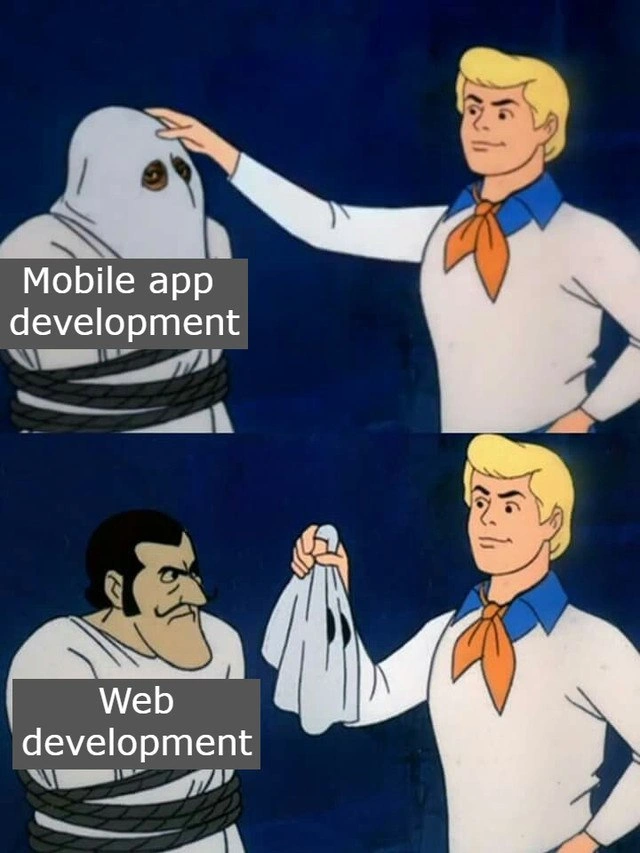
For those newer to the development world, let’s break down the joke. The meme uses a classic scene from Scooby-Doo, a cartoon where the heroes catch a villain and unmask them to reveal who they really are. Here, the masked villain is labeled "Mobile app development" and when unmasked, the face is labeled "Web development". The joke is saying: many things we call mobile app development are actually web development on the inside. In other words, a lot of apps on your phone are built with the same tools used for websites!
Mobile app development usually means creating apps specifically for phones or tablets, often using platform-specific languages and tools. For example:
- Writing an iPhone app in Swift or Objective-C using Apple’s iOS SDK.
- Writing an Android app in Kotlin or Java using Android SDK.
These are called native apps because they’re written in the native language of the device’s operating system and can directly use all the phone’s features (camera, GPS, etc.) with high performance. Native development is like tailoring the app specifically for each platform.
Web development, on the other hand, means building websites or web applications using HTML (for structure), CSS (for styling), and JavaScript (for interactivity). These run in a web browser (like Chrome, Safari, Firefox). Traditionally, web apps were separate from mobile apps — you’d open them in a browser, not from your home screen.
Now, how can something be both a mobile app and web-based? Enter the world of hybrid apps and cross-platform development. These approaches let you write code once (often in web technologies) and deploy it on multiple platforms, including mobile devices. There are a few key terms and examples to know:
WebView – This is a component that can display web content inside a mobile app. Think of it as a mini browser window with no address bar, that you can embed in a native app. Some frameworks create apps that are basically one big WebView running your web code. So the user taps an app icon, a native shell opens, and then loads an internal webpage that looks and feels like an app. They might never realize a browser engine is doing the work in the background.
PhoneGap/Cordova – One of the first popular hybrid app solutions. With Cordova, developers build an app using HTML, CSS, and JavaScript, then Cordova packages it into a native wrapper with a WebView. You also get access to device features via JavaScript APIs (Cordova plugins) even though you’re writing mostly web code. For example,
navigator.camera.getPicture()could call the phone’s camera from JavaScript. It feels like mobile development, but you’re basically writing a website that’s tucked inside an app. In the meme’s terms, Cordova let Web development wear a Mobile app mask.Ionic – A higher-level framework built on Cordova (and now also supporting other toolkits). It provides UI components that mimic native styles but are implemented with web tech. With Ionic, you design your app pages with HTML/CSS and use Angular/React/JavaScript for logic. Underneath, it’s still using a WebView (via Cordova or a similar bridge) to run the show.
React Native – This is a cross-platform framework created by Facebook (now Meta) that also uses JavaScript and React (a web library) to build mobile apps. However, it’s not using a WebView for the UI. Instead, React Native’s JavaScript code is executed by a JavaScript engine on the phone, and it renders real native components (buttons, text fields, etc.) by calling platform APIs. So it’s a bit different: it’s like a Web developer learned to directly control the native UI using their tools. The end result doesn’t have a browser inside; it’s closer to a true native app, but the developer wrote it in a web-style (React) syntax. Still, the spirit is “use web skills to build mobile apps.” In our meme’s language, React Native is like Web development unmasked, standing there saying “hey, I’m actually JavaScript, but I put on a native costume for the performance.”
Progressive Web App (PWA) – This is a web application designed to behave like a native app. You make a normal website, then add special files (a service worker for offline support, a manifest for app metadata) so that mobile browsers can offer “Install this site as an app.” If installed, it puts an icon on your home screen and can even run without the browser chrome (no URL bar, full-screen). It’s still the browser under the hood (using WebKit on iOS, for instance), but to the user it can feel like an independent app. PWAs blur the line between Web and MobileDev even more: it’s literally WebDevelopment that the phone treats almost like a native app. In Scooby-Doo terms, a PWA is like the villain didn’t even bother with a full mask – it’s just wearing a hat, because phones nowadays will recognize it as an app if it looks close enough.
The meme’s bold labels "Mobile app development" and "Web development" highlight this disguise. Many junior devs starting out are surprised to learn that the app they use everyday might be running on HTML/JS/CSS behind the scenes. For example, did you know the early versions of the Facebook mobile app were HTML5-based inside a native container? Or that apps like Slack and Discord on desktop are built with Electron (which is like a WebView but for desktop)? The mobile world has similar examples. If an app’s UI feels a little off or not as smooth as a pure native app, some developers wink and say, “I bet it’s just a web app under the hood.” The meme’s joke is pointing out this secret identity of many apps.
This is also a relatable humor for developers because it often sparks debates: Should we do it the quick cross-platform way, or build two separate native apps? Juniors might experience this when their team decides to use, say, Ionic or React Native for a project. At first, you think you’re doing MobileDevelopment (cool, working on an Android app!), but then you realize you’re mostly writing web code and debugging in Chrome’s developer tools. It can feel a bit like scooping out the insides of a phone and finding a mini website running there. Surprise!
To connect it to the meme: imagine Fred (from Scooby-Doo) as the experienced developer who suspects something fishy about a supposedly “native” project. He pulls off the mask, and Velma might chime in, “Jinkies! It’s been HTML and JavaScript all along!” The villain (fake ghost) might add, “...and I would have shipped a laggy app too, if it weren’t for you meddling kids learning the truth!” :smile: It’s a funny way to learn that terms like hybrid app, cross-platform app, or PWA all involve web technology playing dress-up as native.
In simpler terms, the meme teaches that mobile vs web isn’t a clear-cut fight; sometimes they’re the same thing dressed differently. As a new developer, it’s a hint: don’t be intimidated if someone says “build a mobile app” – you might be able to apply your web skills more than you think. And conversely, when someone brags about their fancy mobile app, you now know to ask: is it built with Swift/Java, or is it essentially a web project in disguise? In the end, understanding this concept helps you see the connections between different areas of development, and that’s a powerful insight (plus it lets you in on the joke that made so many devs chuckle).
Level 3: Cross-Platform Conspiracy
At first glance, this Scooby-Doo style mask reveal gag hits close to home for seasoned developers in both MobileDevelopment and WebDevelopment. The meme shows Fred unmasking a villain labeled "Mobile app development" only to reveal Web development underneath. It’s poking fun at how many modern MobileDev projects are essentially powered by web technology under the hood. In the world of cross-platform toolchains, a so-called "native" app often hides a web-based core. The humor comes from that “aha!” moment: the slick mobile app we’ve been chasing was really a web app in disguise all along.
Why is this funny to experienced devs? Because we’ve seen this plot twist before. The industry has a history of wrapping websites into app form. From early PhoneGap/Cordova projects to today’s Ionic and React Native, developers keep reinventing ways to reuse FrontendDevelopment skills on mobile. It’s a running joke that every few years someone yells “Write once, run anywhere!” and builds a framework to do it. The promise is always enticing: one codebase for iOS, Android, and maybe even the web, all at once. The reality? Often it means an app that’s basically a bundled browser (WebView) showing HTML/CSS/JS content. Mobile app development? More like running a mini website on your phone. :wink:
This meme resonates because it reveals a common DeveloperPainPoint: the blurred line between building native apps and just serving up web pages with extra steps. Real-world example: a company needs an iPhone and Android app fast. Instead of hiring separate Swift and Kotlin teams, they slap their responsive website into a WebView wrapper. Presto, two “apps” for the price of one web codebase! Seasoned engineers recognize this trick and chuckle (or groan) at it. It’s the FrontEndHumor of discovering that shiny new app is basically an old browser friend in costume. We joke that the villain (the slow, clunky app) would exclaim, “And I would have gotten away with it, if it weren’t for you meddling devs and your debuggers!”
Behind the laughter is a nugget of truth about cross-platform development. Hybrid approaches (like wrapping a web app in a native shell) save time and money, but they come with trade-offs. Performance can suffer — after all, you’re effectively asking a mobile device to run a browser (for the UI) on top of the app itself. Older phones especially struggled when you tried to do complex animations or heavy calculations in a hybrid app; the infamous jank and slow load times gave the disguise away. Even today, a trained eye can often tell when an app is really a web page lurking beneath: maybe there’s that telltale 300ms click delay (older mobile browsers issue) or a styling quirk from CSS not quite matching native UI guidelines. It’s like seeing the villain’s mask slip just a bit.
There’s also the architectural deja vu: years ago, we had desktop apps morphing into web apps, and now web apps morph into mobile apps. History repeats in cycles. The TechHumor here is partly in realizing how far web tech has come. Modern JavaScript frameworks and engines are so powerful that you can build an entire mobile experience with them and most users won’t notice. In fact, frameworks like React Native blur the lines further by using JavaScript and React (a web paradigm) to produce real native UI components. It’s a clever compromise—call it web development wearing a high-quality mask—since the app feels native but is orchestrated by code a web dev would write. Meanwhile, Progressive Web Apps (PWA) offer a web-first route: they run in the browser but can be installed on your home screen, work offline, send push notifications, and generally behave almost like native apps. A PWA is basically a website with extra powers, and on Android you can even trick users into thinking it’s a normal app (no app store required). It’s yet another instance of the mobile/web identity crisis.
From an organizational perspective, this mashup of WebDev into MobileDev happens because of practical pressures. Maintaining two or three separate codebases (one for web, one for iOS, one for Android) is expensive and time-consuming. Managers love the idea of a unified solution — it promises faster delivery and easier updates. Developers might be skeptical, having survived past cycles of “universal” frameworks that inevitably had edge-case bugs on one platform or needed clunky plugins for device features. (Anyone remember debugging a Cordova plugin at 3 AM that worked fine on Android but broke on iOS? Good times.) The meme nails the feeling that, despite all the new fancy tools, we often end up rediscovering that a lot of apps are just the same old web repackaged. As a community, we find it both funny and exasperating that after all the debates of ReactNative vs native or PWA vs native apps, the outcome is frequently: shrug, just ship a web view.
In summary, the top panel’s “Mobile app development” mask and the bottom’s “Web development” face represent a truth seasoned devs know well. It’s a playful jab at how the roles in FrontendDevelopment and mobile often overlap. The meme format perfectly delivers this insider joke: Fred (the detective) pulls off the hood to expose the imposter. For many in the industry, that reveal comes as no surprise — we always suspected that under the mask, it was HTML, CSS, and JavaScript all along. So we laugh, knowingly, because we’ve unmasked this DeveloperHumor villain before.
Description
A two-panel meme using the 'Scooby-Doo Villain Reveal' format. In the top panel, the character Fred is about to remove the sheet-like disguise from a captured ghost. The ghost is labeled 'Mobile app development'. In the bottom panel, Fred holds up the disguise, revealing the villain underneath, who is labeled 'Web development'. The meme makes the cynical but often accurate observation that a significant portion of modern mobile application development, especially with the rise of cross-platform frameworks, is fundamentally just web development packaged differently. Technologies like React Native, Ionic, or even Progressive Web Apps (PWAs) allow developers to use web technologies (HTML, CSS, JavaScript) to build mobile experiences, essentially making mobile development a specialized form of web development in disguise

Comments
12Comment deleted
I'm a native mobile developer. My app is so native, it runs JavaScript inside a native WebView that natively renders a DOM. It's the most native non-native app you'll ever see
Nothing like opening the “native iOS” repo, spotting package.json next to index.html, and realizing you’ve just inherited another Cordova-in-a-trench-coat solution
After 15 years of mobile development evolution, we've successfully reinvented the browser with extra steps, 30% App Store tax, and mandatory annual developer certificates - but hey, at least we get push notifications and a home screen icon
The real plot twist? Both are actually JavaScript in a trench coat, and they would've gotten away with it too if it weren't for those meddling native performance requirements
Most “native” roadmaps start as WKWebView + 47 npm deps - the budget decides when the rewrite happens
Mobile dev unmasked: web apps in WebView drag, fooling PMs but not the cold start times
Unmask “mobile” and it’s web dev wrapped in a WebView and a provisioning profile - the only native feature is the App Store review delay
Oh yes, 1 TB mobile app development Comment deleted
- kindly offered by backstage gang Comment deleted
*PWA has entered the chat* Comment deleted
No Comment deleted
Proudly posted by disgusting crossplatform mobile app devs Comment deleted