Skip to content
DevMeme
4885 of 7435
The Vicious Cycle of Software Logging
Observability Monitoring Post #5347, on Aug 18, 2023 in TG

The Vicious Cycle of Software Logging

Why is this Observability Monitoring meme funny?

Level 1: “Notes or No Notes” – A Simple Analogy

Imagine you’re in class at school. For a few weeks, the teacher is going over topics you find easy. You think, “Eh, I don’t need to take notes, I get this stuff.” So you stop writing things down – maybe taking notes isn’t that necessary after all, you tell yourself. And indeed, for a while, everything is fine; you remember the lessons and the homework is easy. This is like the computer program running smoothly and not keeping a “diary” (logs) because it seems like nothing bad is happening.

Now, surprise: one day the teacher springs a difficult quiz on the class – something really tricky that wasn’t obviously important before. You look at the questions and realise you don’t remember the details because you didn’t take any notes. Uh oh! This is the mysterious bug appearing – something bad happened and you have no record or memory of the important details. You feel totally unprepared and panicked because you have nothing to refer back to.

Frantically, for the next class, you bring a giant notebook and decide, “I’m gonna write down EVERYTHING the teacher says, every word, every example!” You fill pages and pages with notes to make sure that if another quiz comes, you’ll have all the information. This is like the developer saying “I’m gonna log EVERYTHING” – recording every tiny detail so they won’t be caught off guard by a problem again.

But then, after a while, writing everything down becomes tiring. Your hand hurts, and you notice not everything in those pages was needed for the quiz anyway. Maybe you even miss something the teacher says because you’re too busy writing. Eventually you might think, “Maybe I can skip writing down the easy parts…” And thus the cycle can start again.

The meme is basically this story in a tech setting. Logging is like taking notes for a program – it’s how the program “remembers” what happened or tells us what it did. Not logging (or taking no notes) feels fine until a surprise problem (or quiz) hits, and then you wish you had all those details written down. The funny loop in the picture shows how developers (or students in our analogy) swing between overconfidence (“I don’t need notes/logs, everything’s fine”) and panic (“I need every detail recorded!”). It’s poking fun at how we sometimes only value something (notes or logs) after we desperately need it. The lesson, in simple terms: keeping some notes (or logs) as you go is wise, because you never know when you’ll face a tough question (or a tricky bug)!

Level 2: Logging 101 for New Developers

Let’s break down the meme in simpler terms, focusing on the key concepts like logging, bugs, and observability. In software, logging means having the application write down messages about what it’s doing – usually to a file or console. These messages, or log entries, can include things like errors, warnings, or just informational text for developers. For example, a web server might log each request it receives (INFO: Received GET request on /home) or an error (ERROR: Database connection failed). Logging is a crucial part of observability_and_monitoring – it helps us keep an eye on what the software is doing internally, almost like a diary or report that the program keeps as it runs.

Now, logs come with different verbosity levels. Think of levels like DEBUG, INFO, WARN, and ERROR as labels for how important or detailed a log message is:

  • DEBUG is very detailed, meant for developers to diagnose issues (e.g., “entered function X with value Y”). This is usually turned off in a production (live) system unless needed, because it can produce a lot of data.
  • INFO is normal operational messages (e.g., “user John logged in”). Useful for general monitoring.
  • WARN (warning) indicates something odd but not fatal happened (e.g., “cache miss, falling back to DB”).
  • ERROR is for serious problems (e.g., “unhandled exception, failed to process user request”).

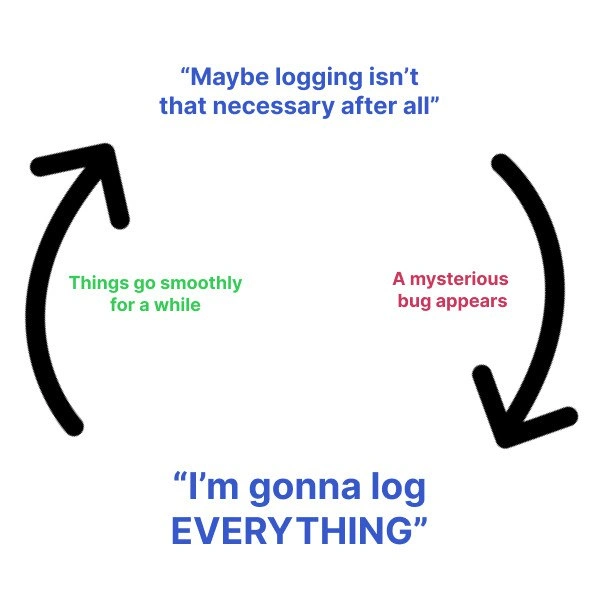
In the meme, when it says “Maybe logging isn’t that necessary after all” at the top, it implies the developer is thinking of turning off or reducing verbose logging (perhaps disabling those DEBUG logs or similar). This often happens after the system has been stable for a while – nothing bad has been happening, so the logs have been mostly empty or filled with routine info that nobody reads. The green text “Things go smoothly for a while” reflects this period of stability. Everything works fine, and the developer feels confident that the app doesn’t need heavy monitoring. They might lower the log level to only capture warnings or errors, to avoid clutter. This could be for performance reasons (less logging can make the app slightly faster) or just to reduce noise (huge log files can be hard to manage and cost money to store, especially in cloud environments where every gigabyte stored or processed is billed).

Then, inevitably, “A mysterious bug appears” (written in red on the right side). This is when an unexpected bug (an error or glitch in the software) shows up in the application. The bug is mysterious because it’s something the developer never saw before and doesn’t understand immediately. It could be a weird crash, data corruption, or some user action causing an error that wasn’t anticipated. Now the developer needs to do debugging_troubleshooting – basically detective work to figure out what went wrong. This is when logs usually become lifesavers: by reading the log entries around the time of the error, you can often trace what the program was doing and find clues to the bug’s cause. But here’s the problem: earlier, the developer decided logging wasn’t necessary and turned most of it off! So when they go to check the logs for the bug… there’s not enough information. Maybe there’s a single error line with no context, or nothing was captured at all if, say, the bug caused a crash before any error log. This situation is a developer’s nightmare – it’s like trying to solve a mystery with hardly any clues. You feel frustrated because you don’t know what the program was doing internally when it broke. This is why logging is part of observability: without logs (or other observability tools like metrics or traces), you’re essentially blind to your system’s inner workings.

Faced with this, the developer in the meme swings to the opposite extreme: “I’m gonna log EVERYTHING” (blue text at the bottom). This means they decide to turn the logging up to the maximum level – basically enabling every possible log message in the hope of never missing a clue again. In practice, that might mean setting the log level to DEBUG (or even a custom TRACE level) so that every tiny detail is recorded. If an HTTP request comes in, they’ll log the headers, body, response, and processing steps. If a user clicks a button, they log which pixel was clicked 😅. “Log everything” is an exaggeration – it means the developer is so shaken by the bug that they want excessive_logging as a safety net. They’re thinking, “Next time something weird happens, I’ll have pages and pages of logs to look at, so I won’t be in the dark.” This mindset is common right after a tough debugging session: it’s like after getting lost once, you start carrying a map, a GPS, and a compass everywhere you go.

However, the reason this is a cycle (as shown by the looped arrows in the image) is that after the bug is fixed and things calm down again, all that “log EVERYTHING” starts to feel like overkill. Huge log files, performance slowdown, etc., might cause the developer (or their boss) to say, “Okay, this is too much logging… do we really need all of this?” And here we go again: back to “Maybe logging isn’t necessary,” and the cycle repeats. In many development teams, especially those managing production systems (live systems with real users, where failures have consequences), this balance is a constant push and pull. They want enough logging to debug issues (that’s the observability_tradeoff – trading some performance or cost for better insight), but not so much that it overwhelms the system or budget.

To give a concrete example: imagine you have an online store application. When everything is fine, you might not log each product lookup or each step a user takes (to save space). You just log high-level info like “User X purchased item Y.” Now suppose one day purchases start failing with an error. If you didn’t log the detailed steps – like calling the payment API, reducing inventory, etc. – you might have no idea which step failed. All you see is “Error: Purchase failed.” That’s our mysterious bug with no trail. In panic, you deploy a new version with lots of logs around the purchase process to catch every detail. Now you get logs like “Step1: contacting payment gateway… success,” “Step2: reducing inventory… failure at SQL update,” etc. With those logs, you finally discover the database had a deadlock or a missing column. Problem solved. But now you’re left with super-detailed logging on every purchase going forward, which might be unnecessary once the issue is fixed. Those logs could slow down the purchase process or make your log system (like an ELK stack or cloud logging service) work overdrive. So a week later you might remove or lower those logs again. See the loop? It’s a real balancing act.

Some keywords from the meme and tags that we can define in simple terms:

  • Logging: The act of recording information about a program’s execution (usually into a file or system) for later review. Developers use logging to understand what the program did, especially when things go wrong.
  • Log verbosity: How much detail the logs record. High verbosity = lots of detailed logs (like logging every function call), low verbosity = only important events (like serious errors).
  • Observability: A buzzword meaning how well you can understand the internal workings of your system from the outside. Logs, along with metrics (numerical data like request rates, memory usage) and traces (records of how a single request flows through various services), are tools that improve observability. High observability means if there’s a problem, you have enough data (from logs/metrics) to figure it out.
  • Debugging: The process of finding and fixing bugs (errors) in the software. Often involves going through logs, error messages, and trying to reproduce issues.
  • Production bug: A bug that occurs in the production environment – i.e., the real system used by end-users. These are the scariest because they affect real users/customers and often are urgent to fix. Production is also where you can’t easily use a debugger or add print statements on the fly, so you rely on whatever logging and monitoring you built in beforehand.
  • Toggle log verbosity: This means changing how much logging is output, often by switching the log level. E.g., toggling from INFO to DEBUG to get more detailed logs, or vice versa to reduce output.

The meme’s humor comes from recognition – if you’re a new developer, know that this isn’t just you; it’s a common industry experience. It’s basically saying, “We’ve all been overconfident and turned off logs, only to freak out later when a bug hit us out of nowhere.” Logging may seem boring when everything is fine, but the moment you’re troubleshooting, it becomes your best friend. The cycle depicted is a bit exaggerated for effect (not everyone swings from zero logs to “log everything” dramatically), but it’s grounded in truth. It encourages a balance: keep enough logging so you’re not blind, but not so much that you’re buried in data or slowing your app. As a junior dev, finding this balance is something you learn over time – usually by making exactly the mistake shown in the meme at least once! 😅

Level 3: Murphy’s Logging Law

In practical senior-engineer terms, this meme nails a scenario every experienced dev or on-call SRE has encountered. It’s basically Murphy’s Law applied to logging (let’s call it Murphy’s Log Law): the one thing you didn’t bother logging will invariably be what causes the next production incident. The top text, “Maybe logging isn’t that necessary after all,” are indeed famous last words in software development. It usually happens after a long period of calm in your system where everything’s been running smoothly (“Things go smoothly for a while” as the meme says in green). During those sunny days, verbose logs can start to feel like pointless noise. You might think: Why are we logging every little detail? It’s just cluttering disks and dashboards, and our monitoring alerts are quiet. Maybe your log files are growing huge and costing money to store, or your log dashboard (like Kibana or Splunk) is becoming unwieldy with too much data. So the team decides to dial down the log verbosity – perhaps by raising the log level from DEBUG to INFO or even WARN for less critical components. This is the phase of logging apathy: turning down or off what seems like “excessive_logging” to optimize performance and save resources. After all, why record every minor detail when nothing bad is happening?

For a time, that decision seems totally fine. The app keeps humming along, users are happy, and you pat yourself on the back for having such a stable system (and maybe for saving a few bucks on the observability budget). This is the green arrow in the image: “Things go smoothly for a while.” The logs are quiet, succinct, and the system isn’t complaining. In observability terms, you’ve reduced noise and everything appears healthy. This calm period might last weeks or months… until it doesn’t. Enter the red arrow: “A mysterious bug appears.” And of course it appears out of nowhere, probably at the worst possible time (late Friday night deploy, anyone?). Suddenly there’s an outage or a critical glitch in production, and now you’re scrambling to troubleshoot a production issue. You open up the logs… and find almost nothing useful. Those detailed debug statements you removed or turned off are exactly what would have explained the strange behavior. Instead, you might see a single error line like NullReferenceException in Module X with zero context. Cue the debugging_frustration: you’re basically blind. The system is misbehaving in some unexpected way (the very definition of a “mysterious bug”), and you have scant clues because earlier you thought “logging isn’t that necessary.” It’s an awful feeling – every developer can relate to that sinking pit in the stomach when you realize you have no trail of breadcrumbs to follow. This is the panic debugging stage: you start combing through whatever little data you have (maybe some metrics or a cryptic error code), and you’re likely thinking “Why, oh why, didn’t I log more info here?!”

The meme then completes the loop with the bottom text: “I’m gonna log EVERYTHING.” This is the overreaction phase – the knee-jerk reaction to being burned by missing logs. After fighting the fire and maybe solving the bug through painful detective work or by reproducing it in a test environment, the developer swears never to be caught in the dark again. They crank the logging level up to 11 (Spinal Tap style). Every step, every variable, every decision gets a console.log or logger.debug line. It’s logging overkill born out of paranoia: “Never again will a bug slip by without a trace!” For a while after such an incident, teams tend to go log-crazy – instrumenting everything that moves, adding new monitoring dashboards, and dumping tons of detail into the logs. This is often encouraged by post-mortems: the root cause analysis might explicitly say “Lack of sufficient logs prolonged the outage – action item: add more logging around X.” It’s a classic observability_tradeoff response; after getting burned, you choose the side of visibility over cost. It’s almost cathartic – empowering – to sprinkle logs everywhere, because you feel armed for next time.

However, as the meme implies, this state won’t last forever. Logging everything has its drawbacks. Soon the log files are gigantic, the log search tool is slow (or your cloud logging bill skyrockets), and the volume of data itself becomes noise. The system might even run a tad slower because writing to log on every function call isn’t free – excessive I/O or CPU spent formatting log strings can add up. Eventually, someone on the team will complain: “Our logs are too noisy and expensive; do we really need all this info?” And thus, the cycle restarts – back to “Maybe logging isn’t necessary after all,” completing the loop. The humor (and pain) of this meme is that so many of us have lived this cycle repeatedly. It highlights the perpetual tug-of-war between observability_monitoring and performance (or cost). On one side, you have the need for debugging_troubleshooting data when bugs strike; on the other, the desire for lean, efficient operations when all is well. Real-world engineering is full of these trade-offs, and we often oscillate between extremes until we (hopefully) learn to seek a balance.

Notably, this cycle is extremely relatable humor in the developer community. It’s a bit of developer_dark_humor mixed with an inside joke: everyone remembers a time they didn’t have the logs they needed. That shared trauma is what makes the meme funny – it’s laughing so we don’t cry about the nights spent debugging blind. It also pokes fun at our human tendency to react rather than plan: we calm down and forget the pain (turning logging off), then panic and overcorrect when it bites us (turn logging to max). The meme doesn’t name specific technologies, but you could easily insert your stack: e.g., turning off verbose SQL query logging to save database I/O, then hitting a bizarre deadlock that you can’t untangle without those query traces. Or reducing HTTP request logs, then later scrambling when a client’s calls show odd behavior with no logs of what happened. In any tech stack, the pattern holds.

To mitigate this, seasoned developers develop guidelines: use appropriate log levels (DEBUG, INFO, WARN, ERROR) and don’t completely disable critical debug logging in production – instead maybe leave it on but sample it, or have a way to toggle it dynamically when needed. Some systems implement dynamic log level switches – so when “a mysterious bug appears,” you can flip a switch to increase verbosity temporarily without a full redeploy. This is akin to having an observability feature flag ready, breaking the cycle by being proactive. But of course, hindsight is 20/20; it’s easy to say in theory. In practice, even the best teams get caught off guard by something they didn’t log. As a wise graybeard might say (with a smirk), “Logging is cheap until you have too much, and priceless until you have none.”

In summary, the meme resonates because it distills a real developer pain point into a simple visual loop. It’s a nod to the on-call engineers who’ve been haunted by missing logs and to all the code warriors who’ve spammed print statements at 2 AM out of sheer desperation. It cautions and amuses at the same time: observability and monitoring are indispensable… except when we convince ourselves they aren’t, only to learn the hard way they always were. This cycle of logging apathy followed by panic-driven debugging is practically a rite of passage in software development. Every experienced engineer has that scar, and that’s why we chuckle (or groan) at this meme – we’ve ridden this carousel enough to know exactly where it goes. 🚀🔁📜

# Pseudo-code dramatization of the cycle:
import logging

logging.getLogger().setLevel(logging.WARNING)  
logging.warning("Maybe logging isn't that necessary after all")  
# ...System runs with minimal logging...
print("Things go smoothly for a while")  

# Uh oh, an unexpected error occurs:
try:
    raise RuntimeError("MysteryBugError")  
except Exception as e:
    logging.error(f"A mysterious bug appears: {e}")  
    # We only logged the error, with no detail due to high log level.

# Realizing we need more info to debug, crank up verbosity:
logging.getLogger().setLevel(logging.DEBUG)  
logging.debug("I'm gonna log EVERYTHING now!")  
# ...Detailed logs now enabled (hopefully not too late)...

Level 4: Observability Ouroboros

At the deepest technical level, this meme hints at a fundamental observability paradox in systems design. In control theory terms, a system is observable if you can deduce its internal state from its outputs (like logs, metrics, etc.). When a developer says “Maybe logging isn’t necessary after all,” they’re essentially choosing to reduce the system’s output signals. This makes the system closer to a black box – you lose visibility into what’s happening inside. For a while, everything might be fine (no outputs needed because no surprises occur), which lulls you into confidence. But the moment a complex failure arises (the “mysterious bug” on the meme’s right side), the lack of detailed output means the internal state that led to the bug is unknowable from the outside. In other words, you’ve violated the conditions for observability, and now you’re stuck guessing about internal behavior.

Why not just log everything all the time then? In theory, if you captured every single state change or event (imagine logging every variable assignment or every network packet), you’d have perfect information to debug any bug. However, this runs up against real-world physical and computational limits. Think of Shannon’s information theory and data rates – a program executes billions of operations, and writing all that to disk or network is infeasible. The logging bandwidth and storage required would be astronomical, and the act of logging can slow down the system (the classic observer effect in computing: observing the system changes its behavior). There’s a joke among old-timers that if you actually enabled trace-level logging everywhere, the application would basically grind to a halt under the log volume. The meme’s extreme swing to “I’m gonna log EVERYTHING” is unsustainable in the long run; it’s like trying to achieve omniscience about your software’s behavior and hitting a practical wall. In academic terms, it’s reminiscent of the Heisenberg uncertainty principle but for software: the more you try to know about the exact state and path of the program, the more you perturb its natural behavior (timing, race conditions, performance). Seasoned engineers know that certain bugs (especially concurrency issues or timing-sensitive failures) can disappear when you add logging, turning into elusive Heisenbugs – the very act of instrumenting the code with debug logs changes thread scheduling or memory layout enough that the bug doesn’t manifest the same way. This is a frustrating irony: sometimes the observability tools we use (like heavy logging) alter the system so much that the “mysterious bug” we’re chasing goes into hiding or changes its spots.

The Ouroboros (a snake eating its tail) is an apt metaphor: we reduce logging to improve performance and normal operations, but that very lack of insight comes back to bite us, forcing us to increase logging again. It’s an eternal cycle because there’s no final victory – you’re balancing on a spectrum between too little information and too much overhead. Modern observability engineering (logs, metrics, traces) is essentially about finding a livable compromise in this paradox. Approaches like dynamic log levels, sampling, and structured logging are attempts to get just enough detail without drowning in noise or costs. But as long as systems have finite resources and unpredictable behaviors (thanks to complex interactions, distributed components, or plain old Murphy’s Law), this loop of complacency and panic will continue. The meme humorously captures that quasi-law of nature in software: the moment you declare “I have enough visibility,” the universe conjures a scenario that proves you wrong. It’s a gentle nod to the theoretical impossibility of perfectly observing a non-trivial system without paying a price.

Description

A simple diagram illustrating the cyclical nature of a developer's attitude towards logging. Two large, black, curved arrows form a circle on a white background. At the top, blue text reads, 'Maybe logging isn't that necessary after all'. Following the clockwise arrow, red text on the right says, 'A mysterious bug appears'. At the bottom, bold blue text declares, 'I'm gonna log EVERYTHING'. Following the next arrow, green text on the left explains, 'Things go smoothly for a while', which leads back to the top. The meme perfectly captures the developer's journey from complacency during periods of stability (leading to reduced logging) to frantic over-correction (logging everything) when a difficult bug inevitably surfaces. It's a universally relatable experience in software engineering, highlighting the constant tension between the cost/overhead of logging and the critical need for observability when troubleshooting

Comments

7
Anonymous ★ Top Pick A developer's approach to logging is a perfect sine wave oscillating between 'Why are we paying so much for storage?' and 'I would trade a junior engineer for a single stack trace right now.'
  1. Anonymous ★ Top Pick

    A developer's approach to logging is a perfect sine wave oscillating between 'Why are we paying so much for storage?' and 'I would trade a junior engineer for a single stack trace right now.'

  2. Anonymous

    Quarterly cycle: CFO yells about ingest costs, we flip everything to WARN; phantom bug appears, we flip to TRACE; CloudWatch invoice and pager duty alternate like a two-phase commit - and somehow both always roll back our weekend

  3. Anonymous

    The four stages of logging enlightenment: from 'logs are for the weak' to 'I need microsecond timestamps on every variable assignment' - usually discovered at 3 AM when that one customer's edge case brings down the entire distributed system and all you have is a single 'Something went wrong' in the logs

  4. Anonymous

    This perfectly captures the observability pendulum: you start with log.Debug() everywhere until your S3 bill arrives, strip it all out for 'clean code,' then spend 3am on a Saturday SSH'd into production running `tail -f` on the one log file that exists, desperately wishing you'd kept that 'unnecessary' trace statement from six months ago. By Monday, you've added OpenTelemetry spans to your hello world function and set log retention to 'forever.' The cycle continues until you discover the senior architect has been using printf debugging in production for 15 years and somehow always finds the bug first

  5. Anonymous

    From 'logging is overhead' to 'grep ERROR in 10GB of spaghetti' - the observability event horizon

  6. Anonymous

    Our logging policy is event-driven: no logs until a Sev-1, then we reinvent Splunk with PII, trace IDs, and a 10x bill the CFO calls a cardinality tax

  7. Anonymous

    Observability maturity curve: “we don’t need logs” until the first prod incident; then “log everything” until the Elasticsearch cluster becomes the incident

Use J and K for navigation