
Skip to content
DevMeme
3343 of 7435
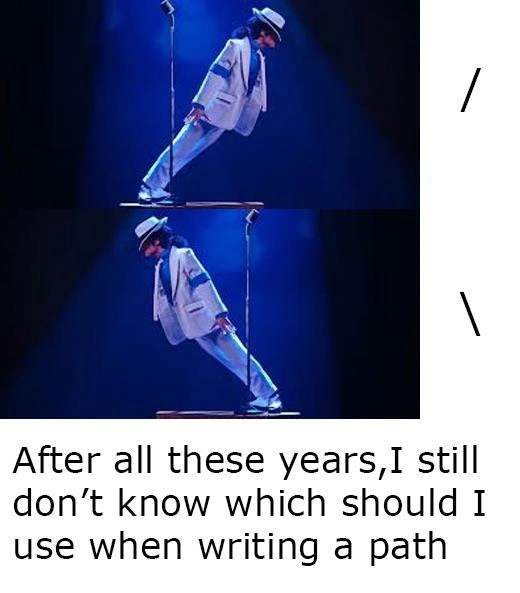
When even Michael Jackson can’t decide on path separators across OSes
OperatingSystems Post #3672, on Sep 10, 2021 in TG

When even Michael Jackson can’t decide on path separators across OSes

Why is this OperatingSystems meme funny?

Level 1: Left or Right Side?

Imagine you have two toy train tracks that connect differently: one set of tracks connects using a red connector piece and the other uses a blue connector piece. If you try to mix them up, the tracks won’t fit and the train might crash off the rails. In the developer world, writing a file path is a bit like connecting tracks: Windows computers want you to use one style of connector (the backslash \ – think of it like driving on the left side of the road), while Linux computers want the other style (the forward slash / – like driving on the right side). The meme is joking that even a super cool dancer leaning left or right (like a toy figure tilting in either direction) can’t decide which connector to use. It’s funny in a silly frustration kind of way: developers feel like even after many years, we sometimes still grab the wrong piece and our “train” stops. In simple terms, it’s a joke about how two different rules for something as basic as file addresses can make life a little confusing, just like remembering which side of the road to drive on when you visit a new country.

Level 2: The Slash Dilemma

Let’s break down the joke for those newer to the command-line world. In computing, a file path is like the address of a file or folder on your computer. Just as an address has commas or a certain format to separate parts (street, city, state), a file path uses special separator characters to separate folder names. Here’s the crux: different Operating Systems chose different separators, and it’s been confusing developers ever since.

  • Windows paths use a backslash \. For example, a path to a README.txt file might look like: C:\Users\Alice\Documents\README.txt. Notice the backslashes between each folder (Users, Alice, Documents).
  • Linux/Unix paths (this includes macOS and Linux distributions) use a forward slash /. The analogous path on a Linux system might be: /home/alice/documents/README.txt. Here, each / separates directories (home, alice, documents).

These two are functionally the same kind of thing – they both separate directories in a path – but they lean in opposite directions, much like the two Michael Jackson poses in the meme (one angled forward /, one backward \). The meme’s text *“I still don’t know which should I use when writing a path”* is poking fun at how easy it is to mix them up when you’re switching between environments. If you’re a developer writing a script or code that runs on **Linux** and then on **Windows**, you might catch yourself using the wrong slash out of habit. For instance, a beginner might write a Windows file path in a Python script as "C:/new_folder/data.csv" because they’re used to seeing forward slashes on the web or in Linux. Surprisingly, Windows is somewhat forgiving and might accept / in some cases, but many Windows programs expect the backslash. Conversely, if you put backslashes in a Linux shell script like mkdir C:\new_folder, the shell will be very confused – it interprets \n as a newline, not as “new_folder”! This is the essence of path_separator_confusion: using the wrong symbol can cause errors or unexpected behavior.

That brings us to escape characters. In many programming languages and config files, the backslash \ has a special meaning: it “escapes” the next character, turning sequences like \n into a newline or \t into a tab. This is what we mean by escape_character_hell. For a new developer, the first encounter might be something like:

file_path = "C:\new\folder\file.txt"
print(file_path)

Instead of seeing C:\new\folder\file.txt, the output might surprise them:

C:
ewolder\file.txt

Why the weird output? Because \n became a newline and \f became a form-feed (a kind of page break)! The backslashes \n and \f didn’t show up as characters at all; they triggered special actions. The correct way to write that path as a literal string would be either:

file_path = "C:\\new\\folder\\file.txt"  # escape each backslash
# or better, use a "raw" string if the language supports it:
file_path = r"C:\new\folder\file.txt"

Now it will actually represent the intended Windows path. Many newcomers find this confusing: “Why do I need double backslashes?!” It’s because one backslash is getting absorbed as a special symbol. This is the kind of “gotcha” the meme hints at with forward_vs_backward_slash and why even experienced developers chuckle (or groan) at it. We’ve all accidentally written a Windows path only to have it misbehave because of an unescaped \ or the wrong slash entirely.

The mention of path.join utilities in the description is about the tools and functions that help avoid this confusion. Pretty much every programming environment has something to help with file paths:

  • In Python, you have os.path.join("C:", "new_folder", "file.txt") which will produce the correct string with \ for Windows or / for Linux automatically.
  • In Node.js/JavaScript, there’s const fullPath = require('path').join('C:', 'new_folder', 'file.txt').
  • In Java, Paths.get("C:", "new_folder", "file.txt") does something similar.

These functions check what OS you’re on and use the appropriate separator, or they rely on a constant like java.io.File.separator which is "\\" on Windows and "/" on Unix. Using them means you, the developer, don’t have to manually remember which slash to use — the code will join parts of the path using the correct one. When the meme says “resorted to path.join utilities”, it’s referencing how developers eventually learn to trust these tools because manually concatenating strings for paths ("C:" + "/" + "folder" + "/" + "file.txt") is error-prone and a mild form of insanity. We’d rather let the computer handle the slash logic than end up debugging a trivial typo at 2 AM.

Cross-platform development often feels like dealing with parents who can’t agree on how to do something – say, one insists the toilet paper roll go over, the other under 😅. You either appease one at a time or find a clever neutral approach. In the case of file paths, the neutral approach is to write code that doesn’t hard-code any specific slash. Instead, we rely on the OS or runtime to tell us the right separator, or use forward slashes in contexts that support them universally (many languages and tools on Windows actually do accept /). In build pipelines and CI (Continuous Integration) systems, this becomes especially important. For example, your project’s tests pass locally on macOS (which is Unix-based using /), but then a Windows runner in GitHub Actions fails because somewhere a path was constructed with / instead of \. The error might be a mysterious “file not found” or a cryptic crash in a shell script. When you finally discover it’s just the wrong slash, you facepalm. The meme gets a laugh because it dramatizes that exact pivot we do in our heads: “slash or backslash? forward or backward?!” — and even the king of pop looks unsure.

In short, the Slash Dilemma is a rite of passage for developers. You start out only knowing one world (maybe you’ve only ever coded on Windows or only on Linux), and then you encounter the other and suddenly everything you assumed about file paths is flipped. The meme uses Michael Jackson’s cool leaning dance move to symbolize that flip. It’s funny and relatable because every developer, junior or senior, remembers the first time they had to untangle a problem caused by the cross_platform_file_paths difference. Now you know: the OperatingSystem matters when writing file paths, and the choice of / or \ must match the environment. Otherwise, your code might just do the anti-gravity lean… and fall flat.

Level 3: Bash vs Backslash

Seasoned developers have been moonwalking between path separators for decades. The meme’s core joke is an OS culture clash that even a gravity-defying Michael Jackson lean can’t resolve: Windows uses the backslash \ for file paths, while **Unix/Linux** uses the forward slash /. After all these years, we still find ourselves tilting back and forth between them, just like MJ in Smooth Criminal. The humor cuts deep because it’s a shared scar in Developer Experience (DX): cross-platform projects often break in hilarious (and painful) ways thanks to this petty difference.

On a senior engineering level, this seemingly trivial **/ vs \** issue is the embodiment of *“the nice thing about standards is that there are so many to choose from.”* We’ve accumulated endless war stories of build scripts and CI pipelines going off the rails because someone committed a path with the wrong slash for the target OS. For example, a shell script might happily use ./build/output (with forward slashes) and work fine on Linux, but then a Windows runner in CI trips over it, effectively face-planting like a failed dance move. The text “After all these years, I still don’t know which should I use when writing a path” perfectly captures that exasperation. It’s not that we don’t know — it’s that muscle memory is hard to retrain when you constantly switch contexts. Ever tried doing a moonwalk in hiking boots? That’s what it feels like moving from Linux to Windows paths.

Why is this still a thing? History and backward compatibility. Windows’ lineage (back to MS-DOS) chose \ for folder separation because / was already taken for command-line **flags** (thanks, CP/M and DOS conventions). Meanwhile, Unix stuck with / from the 1970s as the one true separator. Fast forward 40+ years, and here we are: modern developers writing code that has to dance between two worlds. Changing either standard now would break millions of scripts and applications — a *thriller* nobody wants a part of. So the absurd reality is we cope with both. Experienced devs often use library functions like **path.join()** (Node.js, PHP), **os.path.join** (Python), or Path.Combine in .NET to abstract away the mess. These utilities intelligently insert the correct slash for the current Operating System so we don’t have to manually pivot like Michael on stage every time. But when we **forget** to use those and hard-code a separator, we risk reenacting the same old slapstick: a File not found error because we leaned the wrong way.

And let’s not forget escape character hell. The backslash \ has a second job as an escape character in many languages and file formats. Seasoned devs have all been haunted by strings like "C:\new\folder" producing a freaky newline (\n) and a tab (\f) instead of a path. 😱 In JSON or many programming languages, that needs to be "C:\\new\\folder" to actually get C:\new\folder. Yes, to literally write one backslash you often have to type two (or even four in regex!). It’s the kind of quirky bug that sends you on a wild goose chase at 3 AM, cursing both Michael Jackson and Bill Gates under your breath. This meme winks at those late-night debugging sessions: even the King of Pop is unsure which way to lean. For veteran developers, that’s painfully relatable humor — we’ve all been that person, oscillating between slashes, singing “You are not alone” to our frustrated selves as we fix a broken path in a pipeline for the umpteenth time.

In essence, the meme lands because it transforms a long-standing, platform-y dichotomy into a visual sight gag. The forward slash is leaning **/, the backslash is leaning **, and here we are leaning along with Michael, trying to remember which choreography applies on which stage (OS). It’s a snapshot of cross-platform life: one foot in Windows, one in Linux, and a misstep means you end up on your backside. Relatable? Heck yes. This is the kind of inside joke that makes developers smirk knowingly, because behind the humor lies the shared pain of cross_platform_file_paths confusion — a tiny detail that manages to trip us up no matter how senior we are. After decades in the industry, the path separator dilemma is still the same old dance: lean left, lean right, and hope you don’t collapse.

Description

The meme shows two stacked stills of a famous dancer in a white suit performing his gravity-defying lean: the top frame leans left and is annotated on the right with a single forward-slash “/”, the bottom frame leans right and is annotated with a backslash “\”. Beneath both images, bold black text reads: “After all these years, I still don’t know which should I use when writing a path”. The visual gag mirrors the constant pivot developers make between Unix-style “/” and Windows-style “\” path delimiters, a nuance that rears its head in shell scripts, build pipelines, and cross-platform tooling. The meme resonates with seasoned engineers who have resorted to path.join utilities, double-escaping in JSON, or outright cursing when a CI job fails because the slash leaned the wrong way


Comments

46
Anonymous ★ Top Pick Some teams refactor monoliths; the rest of us are still refactoring ‘/’ into ‘\\’ just to make the same build pass on Windows - talk about technical debt with 50-year amortization
  1. Anonymous ★ Top Pick

    Some teams refactor monoliths; the rest of us are still refactoring ‘/’ into ‘\\’ just to make the same build pass on Windows - talk about technical debt with 50-year amortization

  2. Anonymous

    After 20 years of writing cross-platform build scripts, I've mastered every design pattern except one: the Observer pattern that watches me type 'C:/Users\Documents/project\src' and silently judges my inconsistent path separators

  3. Anonymous

    The path separator debate is the developer equivalent of the tabs vs spaces war, except it's actually enforced by the OS kernel. You can write `os.path.join()` or `pathlib.Path()` all you want, but deep down you know there's a raw string literal with a hardcoded separator lurking somewhere in your codebase, waiting to break on the first Windows CI runner. The real smooth criminal move? Using forward slashes everywhere and letting Windows silently accept them in most APIs while your Linux colleagues remain blissfully unaware of the chaos you've avoided

  4. Anonymous

    Senior take: the only correct separator is whatever path.join/Path.Combine/std::filesystem returns - hand‑typing slashes is a cross‑platform regression in waiting

  5. Anonymous

    By 20+ years in, the only slash I choose is whatever path.join returns - every other choice becomes a Friday postmortem titled: “C:\ wasn’t /.”

  6. Anonymous

    MJ mastered the lean; Windows mastered '/' support in '95. Unix devs still can't escape the drama

  7. @sashakity 4y

    forward slash. it's cross platform and you don't need to put two of them.

    1. Deleted Account 4y

      +

    2. Deleted Account 4y

      which one is forward slash?

      1. @RiedleroD 4y

        the opposite of the backwards slash

      2. @RiedleroD 4y

        forward slash is the one that's easier to type on the keyboard

      3. @sashakity 4y

        /

  8. @chekoopa 4y

    Windows is the only back-slash domain, IIRC

    1. @kitbot256 4y

      DOS?

      1. @chekoopa 4y

        Yes, too

    2. @CcxCZ 4y

      OS/2 CP/M Also there's locale fun such as ¥ But nowadays I'm not aware of many systems that try to not have at least some semblance of POSIX compat that are not RTOSes

  9. @Dexconv 4y

    Backslash for windows Forward slash anywhere alse

  10. @Vanilla_Danette 4y

    Lmao, true. I always forget

  11. @mrybs1 4y

    / если linux \ если windows

    1. @sylfn 4y

      Translation: use / on linux use \ on windows Please use English in this chat and do not violate the rules

      1. @mrybs1 4y

        Sorry

    2. @RiedleroD 4y

      what if you wanted to program something cross-platform…? Answer: don't bother, every sensible library uses /

      1. @mrybs1 4y

        you can make two versions, one with / and the other with \. #define SLASH "/" and then #define SLASH "\"

        1. @feskow 4y

          or use std::filesystem

        2. @sashakity 4y

          / works on windows too, you don't need to do that

        3. @sylfn 4y

          you have fucked up second define, you chould have written #define SLASH "\\" because backslash has to be escapee

          1. @mrybs1 4y

            understood. I'm just on Linux

            1. @sylfn 4y

              it doesnt matter when you print \n you get a newline how to print backslash? double backslash.

              1. @mrybs1 4y

                Ok

  12. @RiedleroD 4y

    perfect

  13. @r_beat 4y

    I would add automatic disk format and Linux installation to this code. 🙃

  14. Deleted Account 4y

    i have both at the same key

    1. @RiedleroD 4y

      huh?

    2. @RiedleroD 4y

      On my kbd it's shift+6 for forward and altGr+(+) for backwards

  15. @RiedleroD 4y

    bruh

  16. Deleted Account 4y

    \ | /

  17. @Dobreposhka 4y

    on my laptop keyboard it is the same

    1. @RiedleroD 4y

      seems to be the standard for English keyboards then

  18. @Diotost 10mo

    Someone needs to build a time machine and "convince" cp/m developer to not use / for command options.

  19. Deleted Account 10mo

    Windows: \ unix: /

    1. @TheFloofyFloof 10mo

      Windows: \ insane: /

      1. @deadgnom32 10mo

        and to use for escape sequences?

        1. @TheFloofyFloof 10mo

          /

          1. @TheFloofyFloof 10mo

            I choose violence today

          2. @deadgnom32 10mo

            but powershell uses `

      2. @pyrothefuck 10mo

        path\to\directory even looks atrocious and unnatural to me

Use J and K for navigation
