Vim vs. Emacs: The Tutorial's Final Word
Why is this IDEs Editors meme funny?
Level 1: Chocolate vs Vanilla
Imagine you’re reading a recipe or a how-to guide, and it suddenly takes sides about something silly. For example: “If you have chocolate ice cream, go ahead and eat it. But if you have vanilla ice cream, stop! Throw the vanilla in the trash and get yourself chocolate instead.” Sounds unfair and ridiculous, right? It’s basically saying only chocolate is good and vanilla lovers must switch to chocolate before they can enjoy their dessert.
That’s exactly the kind of joke this meme is making, but with computer tools. One text editor (Vim) is like the chocolate ice cream that the author loves, and the other editor (Emacs) is the vanilla that the author says to dump out. It’s funny because it’s so over-the-top. In real life, both chocolate and vanilla are fine flavors (it just depends on what you like), and likewise, both Vim and Emacs are fine editors – it’s a personal choice. The meme is joking by pretending the only “right” choice is Vim, just like a silly friend might insist the only good ice cream is chocolate. It’s the exaggeration that makes us laugh: the guide is clearly written by someone who’s a huge fan of one option and isn’t even pretending to be fair about it. So the feeling you get is, “Haha, they’re so biased!” – and that’s the whole point of the humor.
Level 2: Terminal Translator
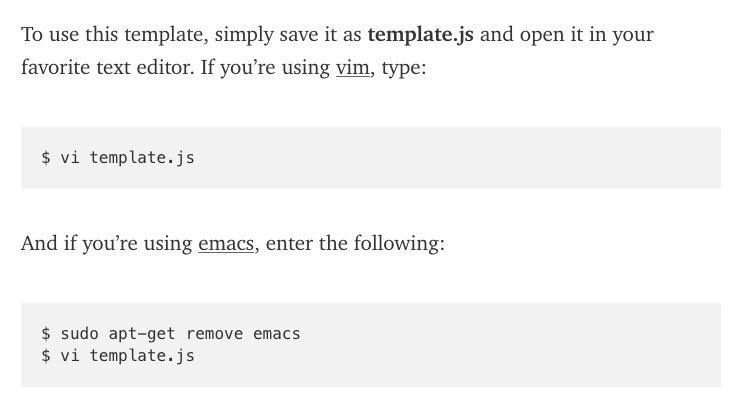
Let’s break down the meme’s content in simpler terms and explain the technical bits. The snippet is pretending to be a set of instructions for using a file called template.js (which sounds like a JavaScript file template). It says to open that file in your favorite text editor. Now, “favorite text editor” just means whichever program you like to use for editing code or text. In programming, text editors can be a personal choice, and two very popular ones (especially among programmers who work in terminals) are Vim and Emacs. They’re both powerful tools for writing code, but they work a bit differently and people tend to prefer one or the other, often quite passionately. This long-standing competition between Vim and Emacs fans is often jokingly called the editor war. That’s the context here: the instructions immediately split into two cases as if catering to both kinds of users.
For Vim users: it says If you’re using vim, type: and then shows the command vi template.js. Here’s what that means: in a Unix or Linux terminal, you usually open a file in Vim by typing vim filename. Often, the command vi is available and actually launches Vim (or a very similar editor) because Vim is essentially an improved version of the old vi editor. So $ vi template.js is telling the computer: “use the vi/Vim editor to open the file named template.js.” The $ at the start of the line represents the shell prompt (it’s what you see in a terminal to indicate you can type a command — the actual character could be $ or # for root, etc., $ is common for a normal user). So, that first code block is basically: open the file with Vim. No surprises there. If you’re a Vim user, that’s exactly what you’d do.
For Emacs users: a typical instruction would have been something like emacs template.js to open the file with Emacs. But the meme intentionally does something else. It says: If you’re using emacs, enter the following: and then provides two command lines:
$ sudo apt-get remove emacs$ vi template.js
Let’s decode that:
sudo: This stands for “superuser do.” It’s a way to run a command with administrator privileges (on Linux or macOS). You needsudohere because uninstalling a program affects the whole system, and normal users usually aren’t allowed to do that. When you putsudoin front of a command, it will ask for your password (to confirm you have permission) and then run the command as the superuser (aka root).apt-get remove emacs: This is using the Advanced Package Tool (apt-get) on Debian/Ubuntu Linux to remove a package, in this case the package named “emacs.”apt-getis a command-line package manager – basically a tool to install or remove software from the system’s software repository. Soapt-get remove emacsliterally means “uninstall the Emacs program from the computer.” Combining withsudo, the full command is telling the system: “Please, as an administrator, remove the Emacs software.”- After that, it says
$ vi template.jsagain – which, as we saw, opens the file in Vim.
So the instructions for Emacs users translate to: first get rid of your Emacs editor entirely, then open the file with Vim instead. It’s definitely not what a neutral tutorial would say – normally, if your preferred editor were Emacs, you’d just do emacs template.js and call it a day. That’s why it’s funny: the text pretends to be accommodating Emacs users, but instead it sneakily tells them to switch to Vim.
Let’s clarify a few terms and concepts for a junior developer or someone less familiar with this context:
Text Editor (vs. IDE): A text editor is a program that lets you write and edit text, including code. Vim and Emacs are both text editors (very powerful ones). They run in a terminal (though Emacs also has a graphical version) and are keyboard-centric. This is a bit different from an IDE (Integrated Development Environment) like Visual Studio Code or IntelliJ, which has a graphical interface and lots of built-in tools. Vim and Emacs are beloved by many programmers who live in the terminal and want speed and customization. The meme falls under the IDEs_Editors category because it’s about these coding tools.
Vim (
vi): Vim is a popular text editor known for its efficiency and modal editing (it has modes like “insert mode” for typing text and “normal mode” for commands, which is why Vim users press theEsckey a lot to switch modes). It’s the improved version of an older editor called vi, and on many systems the commandviactually launches Vim or a vim-like editor. Vim is usually used through the command line, which is why the example shows$ vi template.js. After running that, you’d be inside the Vim editor editing the file.Emacs: Emacs is another famous text editor. It’s extremely customizable and has tons of features (like you can run a terminal inside Emacs, manage files, or even play Tetris – it’s almost like its own little ecosystem). Normally, to edit a file in Emacs, you’d type
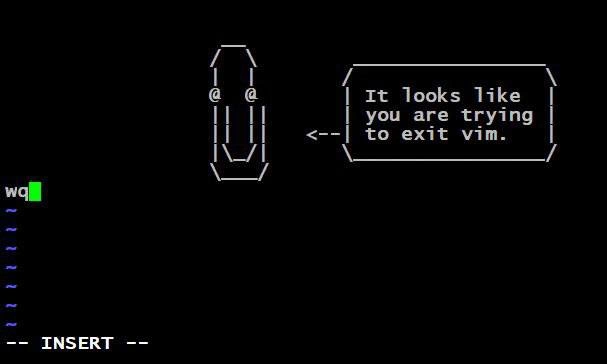
$ emacs template.jsand it would open the file in the Emacs editor. Emacs has a different feel from Vim – for example, it doesn’t use modes; instead, it relies on key combinations (likeCtrlandAltwith other keys) for commands. Emacs and Vim have been around for a long time and are both considered somewhat “old-school” but very powerful editors.The rivalry (EditorWars): There’s a running joke/tradition in programming where people jokingly feud over Vim vs Emacs, similar to how sports fans might feud over their teams. It’s not a literal war, of course, but you’ll hear lighthearted insults and memes flying around. For instance, Vim users tease that Emacs is unnecessarily complex or bloated, and Emacs users tease that Vim’s modal interface is archaic or user-hostile (ever hear jokes about people being stuck in Vim because they don’t know how to exit? That’s a classic!). These are editor preference jokes – usually done in good humor. In reality, you can use whichever you like; both are capable editors. But within developer culture, picking “your editor” can feel like joining a spirited club, complete with its own inside jokes.
CLI (Command Line Interface): This refers to interacting with the computer through text commands in a terminal window, rather than clicking icons or using a GUI (Graphical User Interface). The meme is entirely set in the CLI world. The
$prompt and commands likeviandapt-getare all things you’d type into a terminal (like Bash or zsh shell). The CLI tag and BashScripting context tell us that understanding these command-line instructions is key. Here, the joke is delivered through commands you’d run in a Bash shell. If you’re new to this, just know that developers often use the terminal to do things quickly, and Vim/Emacs are tools that run in that environment.sudo apt-get remove ...: To ensure it’s crystal clear, this is a command you’d run on a Debian-based Linux system (like Ubuntu) to remove (uninstall) a package.apt-getis the older command-line tool (these days people also use the neweraptcommand, butapt-getis still very common and recognizable). The structure isapt-get remove <package-name>. By specifyingemacsas the package, the command is removing Emacs from the system. That’s why this line stands out – it’s not editing the file at all, it’s modifying the system’s installed software. Usingsudomeans you’re doing it with admin rights (because normal users can’t install or remove software by default). The presence of this line in what’s supposed to be a simple “how to open a file” guide is intentionally over-the-top. It’s like a dead giveaway that the author is biased: they literally suggest removing the other editor from your machine! In a real tutorial, you’d never see something like that — you’d just see the appropriate command for each editor.
So, putting it together in plain language: The meme’s “documentation” says, “Use your favorite editor to open the file. If your favorite is Vim, just open it normally. If your favorite is Emacs, well... maybe it shouldn’t be your favorite. Uninstall Emacs, then use Vim instead.” It’s a joke playing on the stereotype that “Vim users think Emacs shouldn’t even be an option.” This resonates with many developers because it exaggerates the playful antagonism between the two camps.
For a junior developer encountering this, the key takeaways are:
- There are different text editors (Vim and Emacs being two legendary ones), and some developers have strong opinions on them.
- The meme shows commands that you’d run in a Linux terminal to use those editors (or in Emacs’s case here, remove it!).
- It’s meant to be humorous – in reality, use whichever editor you like! The joke is that the “instructions” aren’t genuinely helpful to an Emacs user; they’re just poking fun at Emacs.
Don’t worry if you’re not familiar with Vim or Emacs yet. Think of it this way: It’s like giving directions to two groups of people, but telling one group to ditch their car and take the other group’s bus instead – clearly biased and meant to raise an eyebrow. In coding culture, this kind of gentle trolling is common around tool choices. It might also spark your curiosity to try out both Vim and Emacs someday to see what all the fuss is about. Just know that the EditorWars are mostly tongue-in-cheek nowadays. It’s a shared cultural joke among programmers, and this meme is a lighthearted example of it.
Level 3: Emacs Exodus
At the highest level, this meme is a witty nod to the vim vs emacs rivalry, one of the longest-running EditorWars in programming. It’s cleverly formatted like official documentation, but with a devilish twist that experienced devs will immediately recognize. The text starts off innocently: “To use this template, simply save it as template.js and open it in your favorite text editor. If you’re using vim, type:” — followed by the expected command:
$ vi template.js
So far, so good. Opening a file with Vim (vi) via the CLI is standard fare. But then comes the punchline: “And if you’re using emacs, enter the following:” and the code block shows:
$ sudo apt-get remove emacs
$ vi template.js
This is where a seasoned developer bursts out laughing. Instead of telling Emacs users to run emacs template.js (which would be the normal equivalent), the “documentation” cheekily instructs them to uninstall Emacs entirely and then use vi (Vim) to open the file. In other words: “Oh, you use Emacs? Step 1: get rid of it; Step 2: use Vim like the rest of us.” It’s a blatant, humorous display of editor partisanship — the editor preference jokes distilled into tutorial form. The meme is parodying real documentation style: usually, one might see separate instructions for different OSes or tools (for example, “If you use Yarn, run this; if you use NPM, run that.”). Here, that concept is used to comedic effect by giving Emacs users a deliberately sabotaging set of steps. It’s a CLI documentation parody with an agenda: Vim supremacy.
Why is this so funny to experienced devs? Because it echoes decades of friendly (and sometimes not-so-friendly) feuding between these two camps. The vim_vs_emacs_rivalry is legendary. Both Vim and Emacs are powerful text editors with devoted followings, and since the early days of Unix, programmers have playfully bickered over which one is “the One True Editor.” It’s akin to the Montagues vs Capulets of coding, or the Jedi vs Sith of the terminal 😄. Many of us have seen flame wars on forums and IRC where someone inevitably declares, “Just quit using that editor and switch to the real one.” This meme takes that classic flame-war line and embeds it into what looks like a neutral tutorial. The result is a mock-official endorsement of Vim that senior developers recognize as an old joke wearing a new disguise.
Digging a bit into the technology and culture behind it: Emacs and Vim have fundamentally different philosophies, which is why people get so passionate. Emacs (originally created in the 1970s, with GNU Emacs by Richard Stallman) is often called “a great operating system, lacking only a decent editor” – a tongue-in-cheek way of saying it’s extremely powerful and extensible (you can do everything in Emacs, from editing code to reading email and even playing games), but it’s also large and can be complex. In contrast, vi (and its improved version, Vim, created by Bram Moolenaar in 1991 as “Vi IMproved”) comes from the Unix tradition of small, fast tools. Vi/Vim is lightweight, starts up instantly, and is famed (and sometimes cursed) for its modal editing (switching between modes for inserting text vs issuing commands). Vim devotees love how efficient it makes editing once you climb its steep learning curve. Emacs users adore their editor’s limitless customizability (Emacs has a built-in Lisp interpreter, so you can script it to do almost anything). There’s a rich history here: IDEs_Editors choices often reflect a developer’s philosophy about simplicity vs. completeness, minimalism vs. maximalism. And so, over the years, countless jokes and jabs have been exchanged: Emacs fans might joke Vim is primitive or that Vim users like torturing themselves memorizing cryptic key combos, while Vim fans might joke that Emacs is so bloated it stands for “Eight Megabytes And Constantly Swapping” (an old joke back from when 8 MB RAM was a lot!). Another famous quip is that EMACS actually stands for “Escape Meta Alt Control Shift”, riffing on its complex keyboard shortcuts. Here, the meme’s author clearly sides with team Vim, effectively saying Emacs isn’t even worth using – hence the apt-get remove emacs command as the first step. It’s a playful exaggeration of the Vim fan’s mindset: “the best way to use Emacs is... not to use it at all.”
The command itself, sudo apt-get remove emacs, is a bit of technical humor too. It implies this is happening on a Linux system (since apt-get is the Debian/Ubuntu way of installing/removing software). By using the actual syntax of a shell command, the joke feels nerdily concrete. A senior dev sees $ sudo apt-get remove emacs and knows this isn’t just a whimsical suggestion — it’s literally telling the system to purge Emacs from the machine. Using sudo (superuser do) adds gravity, as if root privileges are needed to carry out this sacred editor exorcism. It satirizes the idea that someone would go to system-level lengths (uninstalling software) just to enforce an editor preference for opening one file. That’s hilariously overkill, which is why it lands as a joke. We’ve all seen overzealous tool advocacy, and this meme just takes it to the extreme for comedic effect.
What makes this particularly DeveloperHumor is the recognition factor. Anyone who has been around programmers has likely heard debates like “vim vs emacs” or “tabs vs spaces” or “dark mode vs light mode” escalate into mock-serious arguments. There’s a camaraderie in these recurring jokes: we pretend as if using the “wrong” editor is a cardinal sin, but it’s all in good fun (most of the time). This meme’s faux-documentation format is the perfect delivery method because it catches you off-guard. It looks like a helpful guide, but then smacks down Emacs in favor of Vim out of nowhere. That surprise, combined with recognition of the age-old rivalry, is what makes experienced devs smirk. The absurdity is crystal clear to us: documentation would never actually tell users to uninstall a competitor’s tool — that would be outrageously unprofessional. Here, doing exactly that is a tongue-in-cheek way to say, “We all know this is a joke, because nobody would really write instructions like this… unless they really, really loved Vim.”
In essence, the meme is both a celebration and a parody of developer culture. It riffs on the editor_preference_jokes that have been around for ages. A veteran coder might recall actual instances of bias — like an internal README that only gave vim examples because the team lead was a Vim user, or a teammate who’d tease “I’ll only help you if you use Emacs.” Those memories amplify the humor. The image caption "Uninstall Emacs first, then open template.js in Vim — classic editor rivalry instructions" says it all: classic indeed. This joke has been told in many forms over the years, but framing it as official instructions is a particularly elegant (and biting) form. It’s a reminder that no matter how advanced technology gets, the DeveloperHumor community never tires of poking fun at the little tribal camps we form around our tools. After all, whether you shout :q! to exit Vim or hit Ctrl-X Ctrl-C to exit Emacs, we’re all just trying to save and quit without losing our sanity. And this meme cheekily suggests one surefire way to quit Emacs: uninstall it and join team Vim 😉.
Description
This image displays a screenshot of a text document, likely from a piece of technical documentation or a tutorial. The text provides instructions on how to open a file named 'template.js'. It presents two scenarios. The first, for users of the text editor vim, gives a straightforward command: '$ vi template.js'. The second scenario, for users of emacs, offers a two-step, humorous command: '$ sudo apt-get remove emacs' followed by '$ vi template.js'. The joke is a classic example of the 'editor wars,' a long-standing rivalry in the developer community between proponents of the Vim and Emacs text editors. The punchline implies that the only correct course of action for an Emacs user is to uninstall it and use Vim instead, showcasing a strong, albeit tongue-in-cheek, bias

Comments
7Comment deleted
Why did the Emacs user cross the road? They couldn't figure out how to exit the other side. The Vim user, however, was already there, having teleported with a single keystroke they've since forgotten
We invented CRDTs so everyone can edit concurrently, but the onboarding script still starts with `sudo apt-get remove emacs && vi template.js` - apparently eventual consistency doesn’t cover editor choice
After 20 years in the industry, I've learned the most efficient way to resolve the editor wars is to simply redefine 'emacs' as an alias for 'vi' in everyone's .bashrc during code reviews - it's called 'eventual consistency' in distributed systems
The real senior move here is recognizing that after 20 years of vim muscle memory, your fingers will type ':wq' in Slack messages, Excel cells, and even your divorce papers - so why fight it? Just accept that emacs is a great operating system, it just needs a better text editor
After 20 years of configs, the real escape sequence is 'sudo apt remove emacs' - standardize on vi for zero DX debt
Vim vs Emacs is an architecture decision: Emacs pushes complexity into the tool (a Lisp VM), Vim pushes it into the user (modal muscle memory). Procurement settled it - apt-get remove emacs; vi template.js
Documentation-as-policy: sudo apt-get remove emacs - the original culture-as-code pre-commit hook