
Drake Meme: Opening Project Just To Hit Ctrl+S Instead Of Coding
Why is this IDEs Editors meme funny?
Level 1: Looking Busy
Imagine you have homework to do. You know you should open your notebook and start writing your assignment, but you really don’t feel like it. Instead, you open the notebook, stare at the blank page for a moment, then simply write your name at the top (because that’s easy and makes it look like you did something). Right after that, you close the notebook and say, “Done!” even though you haven’t actually answered any questions. This meme is exactly like that, but for a computer programmer.
In the picture, a programmer is supposed to write code (that’s like doing the homework). But the joke is that the programmer doesn’t write any code at all. They just open their project on the computer, hit the “save” button, and quit. Pressing “save” is kind of like putting a checkmark on a task list without doing the task. It makes it look like work was done when it really wasn’t. It’s funny because we all recognize that little lazy trick: doing a tiny, effort-free action to feel productive. It’s like tidying your desk instead of actually doing your school project – a way of looking busy so you can fool yourself (or others) that you’ve worked, even though nothing substantial happened. The humor comes from that relatable feeling of “Welp, at least I did something!” when in truth, nothing important got done. It’s a playful wink saying everyone sometimes just pretends to work instead of actually working, and that’s why we can laugh at it.
Level 2: Open, Save, Exit
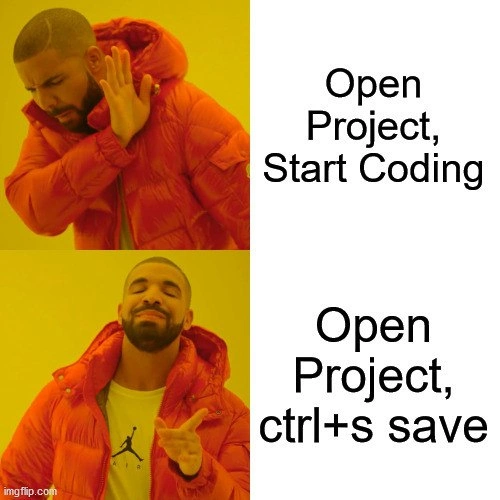
Let’s break down what’s happening in this meme in simpler terms. The image uses the famous Drake Hotline Bling format – you’ve got the rapper Drake in two poses: in the first, he’s turning away in dislike, and in the second, he’s pointing approvingly. The captions next to him describe two different actions a developer might take.
In the top panel (Drake saying “no”), the text says “Open Project, Start Coding.” This is the normal, expected action when you open your programming project: you dive into coding right away. Drake’s negative reaction here implies the developer is not in the mood for that. It’s like saying “Nah, I don’t feel like coding even though I opened the project.”
In the bottom panel (Drake happy), the text reads “Open Project, ctrl+s save.” Here, Drake is enthusiastic about a much more trivial action: simply pressing the save shortcut. On Windows/Linux the shortcut
Ctrl+S(on Mac it’s⌘+S) is the universal command to save your work in almost any application. In code editors and IDEs (Integrated Development Environments like Visual Studio Code, IntelliJ IDEA, or Eclipse), this saves the file you’re working on. Drake approving this means the developer is basically saying, “I’m satisfied just opening my project and hitting save.” It implies that just saving (without writing any new code) is the preferred action.
So why is that funny to developers? It highlights a little secret of the developer workflow: we don’t always jump into coding as soon as we open our projects. Maybe we’re procrastinating, maybe we hit a creative block, or maybe we just wanted to peek at something in the code and then lost motivation. The meme is comedy because it shows a dev doing the absolute minimum and treating it like an accomplishment. Opening the project is step one of doing work, but here the next step isn’t writing code – it’s literally just saving and quitting. It’s like opening a document, not typing anything, but still hitting save. Nothing new was added, but you go through the motion of the save action anyway.
Let’s clarify a few terms and ideas involved:
- Project: in software, a project usually means the collection of code files, resources, and configuration that make up an application or piece of software. You “open a project” in an IDE to start working on that codebase.
- Start Coding: means to actually write new code or modify existing code. That’s the productive part of development – adding features, fixing bugs, etc.
- Ctrl+S (save): This is a quick keyboard shortcut to save your current file or project state. Developers use it very frequently. Even if you haven’t changed anything, pressing save will typically just ensure the file is stored. In many modern code editors, if no changes were made, the save action won’t alter the file’s timestamp or content – but the act of pressing it is a habit. It’s like hitting “Save” just to be extra sure nothing will be lost. Long-time coders have almost a reflex: type something, hit Ctrl+S, type, Ctrl+S. They do it so often that sometimes they press Ctrl+S when nothing has been edited – simply out of muscle memory.
- IDE (Integrated Development Environment): This is the program you use to edit and manage code. Examples are Visual Studio Code, IntelliJ, PyCharm, Eclipse, etc. They often have features like auto-complete, debugging, and project management. Most IDEs and code editors highlight unsaved changes and have save functions. Many will prompt you to save if you try to close with unsaved edits. Some even auto-save periodically or when you pause typing. However, despite auto-save features, many developers still manually press save (Ctrl+S) out of habit.
- Developer productivity vs. fake productivity: Normally, developer productivity would mean getting actual coding done – writing new functionality, solving problems, pushing commits that improve the software. Fake productivity (what the meme jokes about) is when you do something that gives the impression of productivity without the real substance. For instance, just opening your project or moving some files around, or making a trivial change, might make it look like “work happened” (especially to any system that’s tracking activity), but the software isn’t any better for it. In the meme, hitting save is a stand-in for that kind of hollow activity. It doesn’t add any code, but superficially it feels like you did a step of the workflow.
Now, consider why someone might do this “open then save” routine. It could be that the developer wanted to feel like they at least tried to work. By opening the project, they set the stage to start coding, but perhaps they immediately felt stuck or distracted. Instead of writing code, maybe they just skim a couple of files, sigh, and decide to call it a day. Before quitting, they press Ctrl+S (maybe because it’s so habitual or because it feels like officially wrapping up). It’s a bit like closing a file drawer after barely looking inside. To an outside observer, if they didn’t know better, it might seem like “hey, Alex was working on the project, they saved their changes at 3:45 PM.” But reality: Alex didn’t actually change anything! This is where version-control timestamps come into play. In a version control system (like Git, which developers use to track changes to code), every time you make a commit (a saved change-set in the repository), there’s a timestamp. If one were to commit after doing nothing, the log would show an entry, even if that commit had no actual code differences. In fact, developers sometimes joke about committing changes that only adjust whitespace or comments just to have something in the history (for example, to keep a daily contribution streak on GitHub). It’s a cheeky way to appear active.
However, in our meme’s scenario, it doesn’t even necessarily go as far as making a commit – it might just be local. The joke simply rests on the absurd minimal effort: open editor, hit save, done. It’s making fun of the days when we devs are not productive at all, yet we still perform some trivial ritual so it feels like we didn’t completely slack off. The humor is very much developer humor: if you’re a programmer, you likely chuckle because you recognize this pattern in yourself or colleagues. It’s a lighthearted poke at our own work habits. Even though it’s a bit embarrassing to admit, a lot of developers have been in a situation where they allocate time for coding, but end up accomplishing virtually nothing – and they still might compulsively hit that save shortcut on the way out, as if that lends some legitimacy to the session.
In essence, the meme uses a funny, exaggerated example to say: “Sometimes developers do literally nothing but still act like they worked.” The Drake format drives this home by preferring the silly action (just saving) over the real action (actually coding). It’s a reminder not to take ourselves too seriously, and it’s okay to laugh at those unproductive moments. After all, recognizing this habit is the first step to overcoming it… or at least to having a good laugh about it with your fellow coders later!
Level 3: No-Op Commit
For seasoned developers, this meme hits dangerously close to home. It parodies a common scenario in a developer’s life: opening an IDE to work on a project, then doing absolutely nothing of substance. The two-panel Drake meme format makes the contrast explicit. In the top panel, Drake rejects the caption “Open Project, Start Coding” – the very thing we’re supposed to do – with a hand held up as if to say “nah.” In the bottom panel, he’s all smiles and finger guns for “Open Project, Ctrl+S save.” In other words, the developer in question would rather go through the motions of opening the code and hitting the save keyboard shortcut than actually write any new code. This tongue-in-cheek reversal is funny because it highlights a form of productivity theater in our field: performing an action that feels work-like (hitting Ctrl+S, the universal save command) despite producing no real output (no new code). It’s an illusion of progress.
What makes this especially humorous to experienced devs is the underlying truth. Many of us have done this or something similar on a slow day or a late night. You fire up your project, intending to code, but end up just staring at the screen or browsing Stack Overflow. Eventually, out of habit or guilt, you tap Ctrl+S – perhaps to ensure you “don’t lose changes” (even if you didn’t make any!) – and then close the project. It’s the coding equivalent of a no-op (no operation) – an action that accomplishes nothing. Yet psychologically, it gives a tiny hit of satisfaction, as if you at least touched the project. In version control systems like Git, this behavior sometimes translates into trivial commits just to update the timestamp. There’s even a command git commit --allow-empty that lets you create an empty commit (one that records a new commit in history with 0 lines changed). Why would that exist? Often for things like kicking off CI pipelines or marking a state – but in the context of this meme, it’s like the developer is abusing such tricks to fake productivity. They might commit a file with just a whitespace change or a comment tweak, so that the repository shows an activity at 5:00 PM on Friday, even if nothing of value was added. It’s a sly nod to how developer productivity can be gamed by superficial actions.
This joke also touches on muscle memory and habits formed by senior engineers. Back in the day, before ubiquitous auto-save and reliable editors, hitting Ctrl+S every few minutes was a survival skill – IDEs could crash, and unsaved work could be lost in an instant. Over years, saving becomes a reflex, like a nervous tick. Now, even with modern editors (VS Code, IntelliJ, etc.) that auto-save or prompt before closing unsaved files, veteran devs still instinctively press Ctrl+S after making a change… or apparently even when they haven’t made one! It’s a bit of keyboard-shortcut habit that this meme exaggerates for comedic effect. We laugh because Drake approving “Open, Ctrl+S, save” is basically saying: doing the bare minimum (literally just saving your work) is so much more appealing than doing the actual work. It’s a shared wink among developers who’ve all had days of low motivation or procrastination. The meme is poking fun at our occasional fake productivity spurts – those moments where we look busy (files saved, timestamps updated) but haven’t actually written a single new feature or fixed a bug.
In summary, the humor comes from recognizing this absurd yet relatable workflow: Open, Save, Quit. It’s a “no-op commit” ritual that developers might jokingly perform when they’re not feeling up to real coding. The project gets opened and saved (to save face, pun intended, as if some work happened) and then closed without any coding. It satirizes the idea that sometimes, in software development, we comfort ourselves by appearing productive – even if that means committing essentially an empty change or repeatedly hitting save for our own peace of mind.
# Pseudo-code of the meme scenario:
project = open_project("AwesomeApp") # Step 1: Open the project
# ... (no code written, developer procrastinates) ...
project.save_all_files() # Step 2: Hit Ctrl+S to "save" (even though nothing changed)
project.close() # Step 3: Close the project and call it a day
This code snippet does nothing meaningful – which is exactly the point. The meme humorously acknowledges that sometimes doing nothing (and saving it) is the path we choose, and it playfully validates that feeling among developers with a knowing grin. We’ve all been Drake in that second panel at some point, opting for “saved” over “productive.”
Description
Two - panel Drake “Hotline Bling” meme on a yellow-orange background. Top panel shows Drake with a hand up in rejection beside the caption “Open Project, Start Coding.” Bottom panel shows Drake pointing approvingly beside the caption “Open Project, ctrl+s save.” The joke riffs on developers who launch an IDE, press the universal save shortcut, and then quit - creating the illusion of progress without writing a single line. It pokes fun at productivity theater, version-control timestamps, and habitual keyboard-shortcut muscle memory common in senior engineering workflows
Comments
12Comment deleted
Nothing like opening the monolith, tapping Ctrl+S on a whitespace change, and watching the 400-step CI pipeline burn $2k in AWS just to keep the GitHub activity graph green
The only version control more reliable than git is the phantom diff between your last Ctrl+S and the one you're about to hit right now
Ctrl+S on an unmodified file isn't a no-op, it's a heartbeat check - trust in autosave is eventual consistency, and we've all seen what 'eventual' means
Every senior engineer knows the sacred ritual: open project, ctrl+s three times to appease the git gods, watch prettier reformat nothing, check if tests still pass without changes, then finally consider maybe writing code. It's not procrastination - it's establishing a clean baseline state and ensuring your toolchain is properly initialized. The fact that it delays actual work by 15 minutes is purely coincidental
Senior dev pro tip: Ctrl+S first - because 'Unsaved Changes?' is the real prod outage waiting to happen
Open project, ctrl+s - the senior dev ritual that wakes the file watchers, pokes the LSP, placates Prettier, and proves we still don’t trust autosave
Modern dev ceremony: open the monorepo and hit ctrl+s to ping Prettier, ESLint, tsserver and webpack/vite - the local equivalent of kubectl rollout restart when the watchers fall asleep
!"IntlliJ IDEA" moment Comment deleted
Open project, Close project Comment deleted
You only save once? Pathetic Comment deleted
Coding difficulty levels: 1. Infinite saves, any time. 2. Automatic saves at a predefined checkpoint only (commit?). 3. A sinlge save per the entire project. 4. No saves at all - it's real life after all. [Re]type the code each time you need it. Believe it or not, level 4 was usual with antique computers not having a reliable way to store and load the data: that is, you could save the program to magnetic tape, but had near zero chance to load it later no matter how many times you tried. R TAPE LOADING ERROR Comment deleted
Even better Create Blank Project, F5 Run Comment deleted


