
Skip to content
DevMeme
6145 of 7435
A Developer's Nightmare: The Illusion of Escape
IDEs Editors Post #6740, on May 11, 2025 in TG

A Developer's Nightmare: The Illusion of Escape

Why is this IDEs Editors meme funny?

Level 1: No Way Out

Imagine you’re trying to leave a room, and every door you open just leads you into another door marked “Exit.” It sounds silly, right? No matter how many doors you try, you’re still stuck in the same place. This meme is like a computer version of that joke. It shows a keyboard where every single button is an “Escape” key – the key you normally press to close things or get out of menus. You’d think having a lot of “escape” buttons would help you escape faster, but actually it means you can’t do anything else! It’s like having a TV remote where every button only turns the TV off. Sure, you can always turn off the TV, but you can’t change the channel or adjust the volume. In the picture, a programmer had a nightmare that their keyboard was only escape keys, which is funny because it’s the one thing that’s supposed to help you get out. The twist is that with only escape keys, there’s really no way out – a playful little nightmare that makes computer folks laugh and shake their heads.

Level 2: Escape Key 101

For less experienced developers (or anyone new to coding), let’s break down why a keyboard full of Esc keys is funny. The Escape key (labeled Esc on keyboards) is traditionally the “cancel” or “close” button in computing. Pressing Esc often means “stop what I’m doing” or “exit the current dialog.” For example, if a pop-up window is on your screen, hitting Esc usually closes it. In many video games, Esc pauses the game or opens the exit menu. It’s basically the universal “get me out of here” key. Now, in coding, a lot of developers use text editors and IDEs (Integrated Development Environments) to write code. Some of these editors are modal, meaning they have different modes for different tasks. Vim is a famous modal text editor that programmers use in the terminal. In Vim, you switch modes by pressing keys – and you press Esc to switch from Insert mode (where you type text) back to Normal mode (where you give commands or move around the file). If you’ve never used Vim: Insert mode is like regular typing, and Normal mode is like a special command mode where your keystrokes aren’t typed as text but are interpreted as actions (like moving the cursor or deleting lines). Hitting Esc is how you exit insert mode. So Vim users hit the Escape key a lot.

Now imagine you’re a new developer who accidentally opened Vim (it happens – say you run git commit and suddenly this scary interface pops up… that’s Vim waiting for your commit message!). You try to quit the program. Most software has a clear “Exit” button or at least lets you use the mouse or Ctrl+Q, but not Vim. In Vim, to quit, you actually need to type :q and press Enter (or :q! if you want to force quit without saving). That’s not obvious if you’ve never learned it. So what do most beginners do? They start pressing keys looking for a way out! The first guess is often the Esc key, because logically Esc = escape/quit, right? They hit Esc once… twice… ten times… and nothing visibly happens (aside from Vim maybe flashing or beeping because you’re already in Normal mode after the first press). Panic sets in. They might try Ctrl+C, or typing exit, or mashing every key… which often makes things worse (you might accidentally start typing weird commands or insert gibberish). There’s a running joke that “How to exit Vim” is one of the most frequently searched or asked questions by new programmers. In fact, it’s a top question on programming forums because so many people get stuck in this exact situation!

New dev: “Help! I opened Vim and now I can’t get out – I’ve pressed Esc a million times!”
Seasoned dev: “Press Esc to stop editing, then type :q! and hit Enter.”
New dev: “I… I can’t type colon Q because all my keys say ‘Esc’!?” 🤦

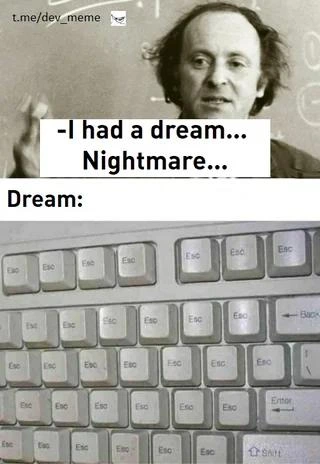
The meme’s keyboard image labeled with Esc everywhere is a playful visualization of that nightmare scenario. It exaggerates the feeling of “no matter what key I press, I can’t quit!” If every key were truly Esc, pressing any key would just do the same thing: cancel/escape. You wouldn’t be able to type anything meaningful, just like the panicked newbie who keeps hitting the one key they know. It’s a modal_editing_nightmare come to life. In reality, of course, not all keys are Esc – you just might feel that way when you’re overwhelmed and none of the keys you try are getting you out of Vim or a similar situation. The lone Enter key left on that keyboard is darkly funny too: even if you knew the :q command to quit Vim, good luck typing the : or the q when every key you press turns into Esc! It’s as if the dream is taunting: “Here’s the Enter key to finish the quit command… if only you could type the command itself.”

Let’s also talk about overuse_of_escape_key beyond Vim. Developers often work in the terminal or in text-heavy environments. In many command-line tools or text UIs, pressing Esc might cancel the current operation or clear a menu. For instance, you might use Esc to back out of a selection in an editor plugin, or to close an auto-complete suggestion window in an IDE. We get conditioned to reach for Esc whenever something unwanted pops up or when we want to safely abort. It becomes a reflex, much like hitting Ctrl+Z to undo. This meme takes that reflex and asks, “What if your whole keyboard was built around that one reflex?” It’s funny because it’s impractical – you can’t code or type if all you have is Esc – but it symbolically represents the developer’s desire for a big, dedicated “NOPE” button when things go wrong. In everyday terms, it’d be like having a car where every pedal is the brake pedal: sure, you can stop anytime, but you’re not going to get very far or be able to steer! That’s the kind of CodingHumor and DeveloperHumor at play here: it riffs on a relatable developer experience (getting stuck in a program and frantically trying to exit) by using a silly, literal image. Any programmer who’s struggled with a stubborn editor or an IDE pop-up can laugh at this and think, “Yep, I’ve wanted a keyboard like that… and I also see why that would be a nightmare.”

Meanwhile, the mention of “I had a dream… Nightmare…” with that frizzy-haired person in the top panel gives the meme a storytelling vibe. It’s like the dev is recounting a horror story to their peers: “Guys, you won’t believe the terror I dreamt about!” And then the punchline is the picture of the keyboard. The IDEsAndTextEditors community often shares these kinds of inside jokes. There’s even a classic joke where someone remapped Exit to a dedicated key because they couldn’t quit Vim – here the meme says, why stop at one key? Let’s make every key an exit! It also subtly touches on the EditorWars culture: Emacs users joke their editor is hard to quit too (you have to remember Ctrl-X Ctrl-C), so it’s not just Vim. The whole situation is a rite of passage in programming. Once you’ve learned to confidently exit Vim, you earn a badge of honor (and maybe you start sharing this meme with your new colleagues to tease them). In summary, for a junior developer or a non-developer, the image is funny on a basic level (“why are all the keys the same? that’s so absurd!”), but for those in the know, it’s relatable absurdity – especially if you’ve experienced that cold sweat of not knowing how to escape an editor or program. Now you know: the Esc key is essential for exiting modes, but only Esc keys is a recipe for being stuck forever.

Level 3: Infinite Escape Loop

At first glance, this meme is a developer nightmare distilled: a frantic coder dreams of a keyboard where every single key is labeled Esc. In the top panel, a shell-shocked programmer recounts “I had a dream… nightmare…” and in the bottom panel we see why – the PC keyboard is a horror show of Escape keys. Only a lone Enter and a solitary Shift remain untouched. This absurd image strikes a chord with seasoned developers, especially those who have wrestled with modal editors like Vim in the terminal. It’s a literal take on the reflexive habit of hammering the Escape key to exit insert mode, dismiss dialogs, or bail out of anything. The humor cuts deep because it exaggerates a very real muscle memory: when in doubt, slam Esc until the problem goes away. But here, every key is an escape key – an infinite escape loop with no other way out. Irony level 9000: you have an “ultimate exit strategy” keyboard, yet there is no escape for real.

This joke hits on the infamous vim_exit_struggle. In the developer world, one does not simply exit Vim. We’ve all seen the memes and war stories: a newbie opens Vim, can’t figure out how to quit, and descends into panic. Esc is supposed to stop whatever mode or prompt you’re in – it’s the universal “get me out of here” key in Vim and many other environments. Experienced devs have that key imprinted on their souls. The phrase “But there was no escape” (as the post caption quips) is a clever double meaning: with every key turned into an Escape key, you literally can’t escape the editor because you can’t issue the actual quit command. It’s like being stuck in a modal_editing_nightmare where you keep mashing the one key that usually saves you, only to realize you’re trapped in an all_escape_keyboard purgatory. This is programming humor at its finest – a mix of TerminalHumor and collective PTSD from years of accidentally getting stuck in Vim.

On a serious note, the meme highlights a quirk of developer life in IDEs_Editors circles. Vim, a powerful terminal-based text editor, famously uses modes: you switch between Insert mode (for typing text) and Normal mode (for commands). The Escape key is how you switch from typing back to command mode. Seasoned Vim users hit Esc all the time – it’s practically a nervous twitch. Ever closed a random pop-up in your IDE by instinctively hitting Esc? Or hit Esc a dozen times when a script acts up? You’re not alone. This reflex is baked into our DeveloperExperience: when something unexpected happens on screen, slam that Esc like it’s a life raft. The meme just pushes it to absurdity by imagining a keyboard tailored for that instinct – every key a panic button. The result? A keyboard that’s 100% overuse_of_escape_key, comically useless for anything except fueling your escapism. It pokes fun at our tendency to reach for Esc in any situation, a habit from decades of computing where Esc usually backs you out of trouble (except, of course, when it doesn’t).

There’s also an inside joke here about EditorWars and keybindings. In the eternal Vim vs Emacs debate (a classic of developer lore), Vim users are escape-key addicts, while Emacs users gymnastically contort their fingers with Ctrl and Meta combos. Each camp teases the other’s pain points. Vim aficionados joke about remapping their keyboards to make Escape easier – for instance, turning the Caps Lock key into an extra Esc (because hitting Esc on modern keyboards requires a pinky stretch to the far corner!). Fun fact: early vi/vim users on 1980s keyboards had the Esc key positioned where today’s Tab or CapsLock sits, right under the left hand, making it convenient to smack. Modern keyboards moved Esc to Siberia (top-left corner), so now Vim users often remap keys or even use shortcuts like jj to escape insert mode. In other words, we’ve been adding more Esc-keys to our workflow for comfort – which is exactly what this nightmare keyboard overdoes. It’s the DeveloperHumor version of “careful what you wish for.” Sure, you wanted easier Esc keys… now every key is Esc!

The deeper satire is that more escape keys don’t actually solve the core issue: knowing how to quit or cancel properly. If you’re stuck in Vim and don’t know the command :q (quit) or :q! (quit without saving), smashing Esc repeatedly won’t help – Vim will just beep at you indignantly. In this nightmare, even the keys you’d need to type :q or to navigate are replaced with Esc, so you truly can’t quit. It’s a perfect ridiculous scenario illustrating the plight of a panicked developer. This resonates as RelatableDeveloperExperience because so many of us have lived a version of it. We chuckle (and maybe cringe) remembering that feeling of “There’s no way out!” The meme exaggerates it to superlative heights: What if literally every option I have just means “Escape”? It’s equal parts hilarious and horrifying to anyone who’s had a late-night showdown with an editor that just won’t let them go.

Description

A two-panel meme illustrating a programmer's anxiety. The top panel features a black-and-white photo of an intense-looking man in front of a chalkboard, with superimposed text reading '-I had a dream... Nightmare...'. Below this, the word 'Dream:'. The bottom panel shows a close-up of a computer keyboard, but every single key has been replaced with an 'Esc' (Escape) key. The humor derives from a technical paradox: the 'Esc' key is used to exit modes (famously in the Vim editor), cancel actions, or close windows. A keyboard with only 'Esc' keys presents an ironic trap - an infinite number of ways to 'escape' but no means to type, command, or actually do anything constructive. It perfectly visualizes the feeling of being stuck in a problem with no real way out, a nightmare scenario for any developer. The caption from the original post, 'But there was no escape', reinforces this theme


Comments

11
Anonymous ★ Top Pick This isn't a nightmare, it's just the final boss of Vim. You think you can escape, but every exit just leads you back to another 'escape'
  1. Anonymous ★ Top Pick

    This isn't a nightmare, it's just the final boss of Vim. You think you can escape, but every exit just leads you back to another 'escape'

  2. Anonymous

    Finally, a hardware solution for senior engineers who still can’t remember :q! - now every key abandons ship, just like our micro-service owners on pager duty

  3. Anonymous

    After 15 years of vim, you realize the real escape was never from insert mode, but from the endless cycle of remapping caps lock to escape, then escape to caps lock, then buying a keyboard with escape on the home row, only to discover your muscle memory now types ':wq' in every Slack message

  4. Anonymous

    This is what happens when you finally master Vim's escape sequences but forget there's supposed to be other keys too. The real nightmare isn't being trapped in Vim - it's realizing that even with infinite Escape keys, you still can't exit the existential loop of modern software development. At least now when someone asks 'How do I exit Vim?' you can confidently answer: 'Press literally any key... they're all Esc.'

  5. Anonymous

    Vim dev's fever dream: infinite Esc, zero insert - :q! your career while hjkl-ing into oblivion

  6. Anonymous

    Finally, hardware that matches our architecture: 100% escape hatches - press Esc to dismiss the modal, Esc+Esc to abort the deploy, and hold Esc for canary rollback

  7. Anonymous

    Enterprise-grade keyboard: every switch wired to scancode 0x01 (ESC) - a hardware-enforced rollback policy so nothing ever reaches prod

  8. @inviprog 1y

    Is he in VIM?

  9. @deadgnom32 1y

    VI Modified

    1. Deleted Account 1y

      :q

  10. @Dark_Lord_of_Debian 1y

    That is actually pretty awesome! Back in college we used to spray paint our keyboards with stencils, which made it impossible to see the letters on the keys. This is just like that, only using a Escape keys from hundreds of other keyboards to do something unique.

Use J and K for navigation
