Skip to content
DevMeme
330 of 7435
The SDLC Shortcut to Production Incidents
SDLC Post #389, on May 24, 2019 in TG

The SDLC Shortcut to Production Incidents

Why is this SDLC meme funny?

Level 1: Recipe for Disaster

Imagine you're baking a cake for a party, but you're in such a rush that you decide to skip all the normal steps. You have a basic idea of what kind of cake you want (so you know your goal), but you don't read the recipe or measure any ingredients (meaning you don't plan or prepare properly). You also don't bother to taste the batter or check if the cake is fully baked (so you don't test anything as you go). Then, as soon as you pull it out of the oven, without any further checks, you serve it to your friends. What do you think happens? The cake might turn out awful – maybe it's still gooey and raw in the middle or it tastes terrible – because you skipped all the steps that ensure it would come out right. This is the same idea as what the developer in the meme is doing, just with software instead of a cake. The boy trying to leap up the stairs is like a baker who skips straight to serving the cake and ignores all the important steps in between. We find it funny (and a bit silly) because everyone knows that skipping those necessary steps is basically a recipe for disaster. Just like you wouldn't skip following a recipe and checking the cake before you feed it to your friends, programmers shouldn't skip planning and testing when they build a new feature. If they do, the final product could end up a total mess – just like a badly made cake. We laugh at the meme because it shows someone doing something obviously risky: jumping right to the end and just hoping everything will magically turn out fine.

Level 2: Implement Now, Test Later

Let's break down what's happening in the meme in simpler terms. The image labels four steps of the software process on a staircase, and the guy is trying to jump straight from the first to the last step. These steps correspond to common phases of the Software Development Life Cycle (SDLC):

  1. Requirement gathering – figuring out what needs to be built. This is when developers or product managers talk to the customer or stakeholders to nail down exactly what the software should do. (For example, "We need a feature that lets users reset their password.")
  2. Design – planning how to build the solution. This could mean drawing diagrams, writing pseudo-code, or choosing which tools and architecture to use before actually writing the real code. (Think of it like sketching a blueprint for a house before you start hammering nails.)
  3. Implementation (Coding) – writing the code to create the feature according to the design. This is the programming phase where the developer actually builds the new functionality.
  4. Testing – checking if the code works correctly. This involves running the software to see if it does what it's supposed to do and making sure it doesn't break anything else. It can include writing automated tests (like unit tests), or having a QA (Quality Assurance) engineer manually test the feature. The goal is to catch bugs before real users do.
  5. Release (Deployment) – putting the new code into the real-world product so that users can use the new feature. This is when the feature goes live after all the above steps are completed.

Normally, you go through those steps in order (especially in older "waterfall" style projects), or you at least make sure all those aspects are covered one way or another (in newer Agile processes, teams do these steps in smaller cycles for each feature, but they still do them).

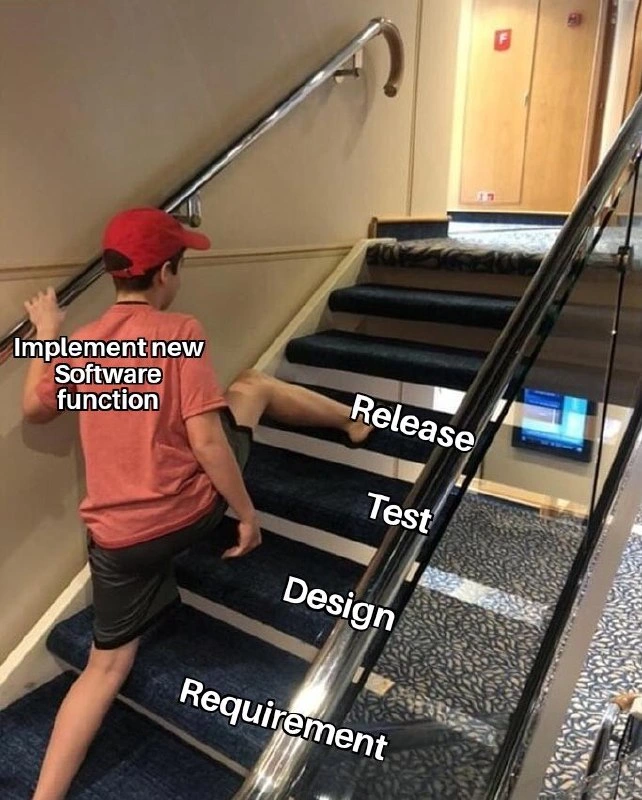
In the meme, each phase from Requirement to Release is literally shown as a stair step, and the boy labeled "Implement new Software function" is stretching his leg from the bottom step (Requirement) all the way to the top step (Release), completely ignoring Design and Test in the middle. In plainer words, he's got an idea of what needs to be done (a requirement) and immediately writes some code and pushes it out to users (release) without taking time to design how it should work or to test if it actually works correctly.

For a newer developer, it might be tempting to think you can save time by skipping to the coding and deployment because that's the "fun part" or the most visible part of the work. But skipping requirements means you might not fully understand the problem or the feature you're supposed to build. If you misunderstood what was needed, you could end up coding something that doesn't really solve the user's problem. Skipping design means you didn't outline or think through your solution first – which can lead to code that is disorganized or doesn't fit well with the rest of the project. (Imagine adding a new room to a house without any plan; you might build it in the wrong place or make it unsafe because you didn't consider the house's structure.) Skipping testing is one of the riskiest moves: it means you haven’t verified that your code works in all the ways it needs to. Without testing, you might introduce a bug that breaks part of the application and not know about it until users start complaining. Testing is how we catch problems in a safe environment so that end-users (or customers) don't have to experience those problems in real life.

This meme exaggerates a situation that sometimes happens under pressure. Maybe your boss or client is pushing you: "We need this new feature live by tomorrow!" In that rush, a developer might feel like, "Alright, I'll just code it quickly, skip the unit tests and design docs, and deploy it. It'll be fine." The text "Implement new Software function" on the boy is basically that rushed coding effort. By jumping straight to Release, he's effectively saying "I wrote some code, it runs on my machine, so let's put it in production now."

The problem is, when you cut out those middle steps, issues tend to pop up later. Because there was little to no testing, the feature might crash or malfunction when real users try it (since no one tried those odd cases or high loads beforehand). Because there was no proper design, the code might be hard to maintain or might not scale well if more people start using it or if the project grows. Developers often refer to this as accumulating technical debt: it's like choosing a quick-and-dirty shortcut now that you'll have to pay for with extra work later. Skipping these steps might seem faster in the moment, but it usually means spending much more time down the road debugging, fixing, and reworking the code.

In a healthy development process, even when moving fast, you still do some version of all these steps. For example, in Agile development, you might write a quick user story or have a short meeting to clarify the requirement, spend a little time discussing or thinking about the design (maybe on a whiteboard or notepad), then write the code, and immediately test it (writing a few automated tests or doing a quick manual test) before releasing. The meme is funny because it shows an obviously bad idea – the developer skipping straight from start to finish. It highlights in a goofy way why those intermediate steps exist. It's basically a reminder: if you try to skip the "boring" steps, you'll likely create more work and trouble for yourself later on. In software (and pretty much anything else), doing things the right way may take a bit more time upfront, but it saves you from disasters after you "release" your work to the world.

Level 3: Stairway to Technical Debt

In a mature Software Development Life Cycle (SDLC), each stage exists for a crucial reason: we gather requirements to understand what to build, we create a design to plan how to build it, we test to ensure it actually works, and only then do we release the software to users. This meme comically shows a developer attempting an acrobatic shortcut: one foot planted on the "Requirement" step and the other stretched all the way to "Release," completely bypassing the "Design" and "Test" steps in between. The bold label "Implement new Software function" plastered on the boy sums it up – diving straight into coding and deployment while skipping the formalities. It's a perfect visual metaphor for cutting corners in the SDLC, something every seasoned engineer has cringed at.

The humor here has a dark edge of truth: skipping Design and Testing isn't just an innocent time-saver, it's a textbook recipe for technical debt. An experienced developer knows that a proper design phase prevents a lot of pain later on. By skipping the design stage, our eager coder is likely writing code without fully thinking through how it fits into the existing system or what the best approach is. Imagine trying to bolt a new feature onto a complex application without checking the blueprint – you often end up with a clunky workaround or a nasty architectural kludge that future developers will curse. For example, they might introduce a function that duplicates logic which a well-planned design would have put in a shared module. Senior engineers have seen this before: a rushed feature that violates design principles (ignoring concepts like SOLID or proper layering) and eventually becomes a maintenance nightmare. The immediate result might "work" by some definition ("Hey, it compiles, let's ship it!"), but beneath the surface it's sowing seeds of bugs and future refactoring. Code quality suffers when design is skipped, because there's no time taken to ensure the code is clean, modular, and aligns with the system's architecture.

Skipping the Testing phase is even more dangerous. When a developer jumps straight to Release with no testing, they're effectively saying, "It works on my machine, let's hope it works everywhere." Veterans recognize this as the infamous works-on-my-machine syndrome. Without writing unit tests, doing integration testing, or having any QA process, the first people to test the new feature are the unsuspecting users in production. This is basically "testing in production," which usually translates to discovering catastrophic bugs at the worst possible time. It's funny in a meme, but in real life this is how you get those dreaded 3 A.M. emergency phone calls because the quick untested fix crashed a service or corrupted customer data. Every senior dev has at least one horror story of a feature pushed without tests that led to an outage or a mad scramble to rollback. As the ops folks like to say, "There's never time to do it right, but there's always time to do it over." By not testing now, you'll be testing later under far more stressful conditions.

That boy's awkward split-legged leap from Requirements to Release perfectly symbolizes how unsustainable this approach is. It's physically precarious (he looks seconds away from faceplanting), and it's just as precarious in software engineering. Cowboy coding – charging straight into writing code without a plan or safety net – might occasionally get something out the door faster, but it's a huge gamble. It's the Wild West approach to development: deploy first, ask questions later. Sure, sometimes you get lucky and nothing breaks... but more often, you end up paying the price. The technical debt incurred by skipping design and testing is like a high-interest credit card: you save time now, but you repay with hefty interest later when you're debugging and patching the issues you didn't catch initially. Skipping steps is the fastest way to accumulate bugs and messy code that will need costly rewrites down the line.

This meme resonates with developers because it's an exaggerated snapshot of a real anti-pattern we've all witnessed. Maybe a manager once insisted, "We need this feature ASAP – just implement it now, we'll fix any issues later!" Or perhaps in a crunch, a team decides to cut out "non-essential" steps to meet a deadline. The result is almost always the same: a deployment filled with anxiety and a future backlog full of technical debt. Seasoned engineers laugh (and cringe) at this image because it highlights the gap between best practices and the all-too-common reality of shortcut culture. It's a reminder that while skipping requirements gathering, design, and testing might seem to save time in the moment, it usually means spending far more time fixing problems afterward. Those shortcuts often lead straight to production fire-fighting and weekend hotfixes – essentially, a one-way trip up the Stairway to Technical Debt.

Some may attempt to justify this "implement now, ask questions later" philosophy with buzzwords: "We're being Agile; we don't need all that heavy process." But skipping essential steps isn't what real Agile means. Modern Agile and DevOps practices still include requirement discussions (e.g. defining user stories), design considerations (even if informal whiteboard sessions or pair programming), and thorough testing (often automated tests in a CI/CD pipeline) – they just do all that in smaller, iterative loops. What our friend in the meme is doing isn't agility at all; it's just raw chaos masquerading as speed. True agility means being able to move quickly with control – whereas this staircase leap is speed without control, almost guaranteeing a tumble.

Description

A meme using the 'skipping steps' format, depicting a person in a red cap taking a giant leap up a flight of stairs. The stairs are labeled from bottom to top with the phases of the software development lifecycle: 'Requirement', 'Design', 'Test', and 'Release'. The person, labeled 'Implement new software function', is shown stepping directly from the 'Requirement' step to the 'Release' step, completely bypassing 'Design' and 'Test'. This image humorously criticizes the common and dangerous practice in software development of rushing from a requirement directly to implementation and release without allocating time for proper design and thorough testing. It's a relatable scenario for senior engineers who have seen this shortcut lead to technical debt, bugs, and costly production failures
Comments

8
Anonymous ★ Top Pick This isn't just skipping steps, it's the express elevator to a high-severity incident, a team-wide burnout, and a 'lessons learned' meeting that everyone will ignore
  1. Anonymous ★ Top Pick

    This isn't just skipping steps, it's the express elevator to a high-severity incident, a team-wide burnout, and a 'lessons learned' meeting that everyone will ignore

  2. Anonymous

    We call it “stair-driven development”: Requirement ➜ jump straight to Release, and let PagerDuty retroactively fill in Design and Test at 3 AM

  3. Anonymous

    After 20 years in this industry, I've finally figured out why we put 'Implement new Software function' at the top of the stairs - it's the only way to ensure developers get their cardio while the product owner moves the requirements three steps down every sprint

  4. Anonymous

    He's not skipping steps - requirements, design, and test were moved to the post-release phase, also known as incident review

  5. Anonymous

    This perfectly captures that moment when the PM says 'we can parallelize the SDLC phases' and suddenly you're implementing features while simultaneously gathering requirements, designing the architecture, writing tests, and deploying to prod - all while maintaining the structural integrity of exactly none of these activities. Bonus points if the handrail you're desperately clinging to is actually the legacy system you promised to deprecate three sprints ago

  6. Anonymous

    Waterfall SDLC, dev-optimized: one giant leap past planning, straight into prod gravity well

  7. Anonymous

    Waterfall parkour: leaping from “Requirement” straight to “Release” and then submitting a Grafana screenshot to the CAB as test evidence while negotiating who owns the pager

  8. Anonymous

    Release-first SDLC: requirements arrive via PagerDuty, design via the hotfix, and tests via the postmortem

Use J and K for navigation