Elegant Code Recovery: The Ctrl+Z, C, Y, V Dance
Why is this DeveloperProductivity meme funny?
Level 1: Magic Undo Button
Imagine you’re drawing a big picture with crayons. You draw a really cool house in one corner. Later on, you rub out (erase) that house because you think you don’t need it. But oops! Now you realize you want that exact house drawn on the other side of the picture. How can you get it back without redrawing it from scratch? If this were a magical world, you could press an undo button and rewind time on your drawing to the moment before you erased the house. Now the house is back! Then you magically copy the house – like taking a sticker of it. Next, you press a redo button to fast-forward your drawing to the present; all the other things you drew after the house are returned. Finally, you paste the house sticker onto the new spot where you want it. Tada! You didn’t have to draw the house again at all.
In real life, of course, you don’t have a real undo button or time machine. 🕰️ But on a computer, when writing code, programmers do have undo and redo buttons (or keys) that work kind of like magic time control. The funny picture with Winnie-the-Pooh is joking about two ways to save work. The sensible way is to save things you’ll need later (like keeping a spare copy of your house drawing for later use). The silly but relatable way is what most of us might actually do: just rely on the computer’s “undo” to grab stuff from the past because we didn’t plan ahead. Winnie-the-Pooh in a fancy tuxedo is used to poke fun at that second way, acting like it’s a super fancy strategy when it’s really a lazy trick. It’s amusing because it’s a bit like saying, “Who needs to be responsible if you have a secret cheat button?” We laugh because we’ve all wished for that cheat and, in coding, sometimes we actually use it!
Level 2: Undo, Redo, Reuse
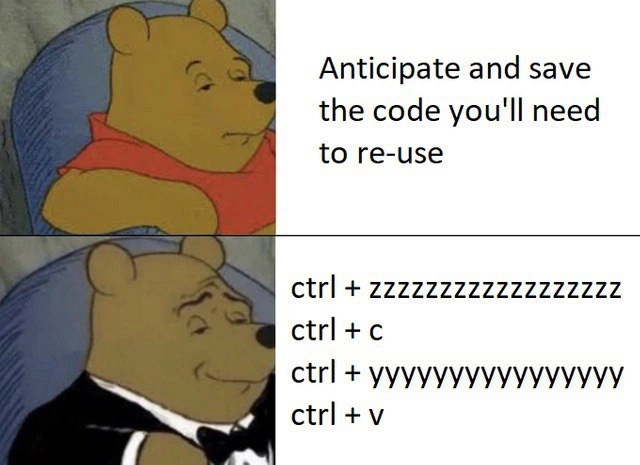
Let’s break down what’s happening in this meme in more straightforward terms. The meme uses a popular Winnie-the-Pooh two-panel format. In the first panel, Pooh Bear (in his normal red shirt) looks half-asleep and unimpressed next to the caption, “Anticipate and save the code you’ll need to re-use.” This phrase is advising developers to plan ahead – basically saying: “If you know you will need a piece of code later, save it now or design your program so you can reuse it easily.” This could mean writing a function or putting the code in a utility file, or even just copying that snippet somewhere safe for later. It’s the kind of advice new programmers often hear about code reuse and organization. Pooh’s bored expression suggests that this advice, while good, is kind of obvious or not exciting.
In the second panel, Pooh has a smug smile and is wearing a tuxedo, indicating he’s acting all fancy. The text next to him isn’t a normal sentence; it’s a sequence of keyboard shortcuts:
Ctrl+Z(with a bunch of extra “z” letters to show it’s pressed many times) – This is the Undo command in most editors. Every time you press Ctrl+Z, the editor undoes the last change you made to the code. If you press it multiple times in a row, you keep undoing step-by-step, going further back in your edit history. It’s like rewinding your code.Ctrl+C– This is the standard Copy command. It copies whatever text is selected into the clipboard (an area where copied data is stored temporarily). In coding, you use this to copy a piece of code so you can paste it somewhere else.Ctrl+Y(with a trail of “y” letters, meaning it’s also pressed repeatedly) – This usually is the Redo command (for example, in Visual Studio, VS Code, and many Windows applications). Redo does the opposite of undo: it reapplies the changes you just undid, moving you forward in time back toward your latest edits. Pressing Ctrl+Y multiple times will reapply multiple undone changes, effectively fast-forwarding your edit history to where you started. (Fun note: In some programs,Ctrl+Shift+Zis used for redo instead, but the meme is usingCtrl+Ywhich is common on Windows).Ctrl+V– This is the standard Paste command. It takes whatever is currently in the clipboard (from a prior copy or cut action) and inserts it at the cursor position. In code editors, this is how you paste the code you copied.
Now, why are these shortcuts listed in this order? They represent a clever (if a bit cheeky) trick to reuse code that you didn’t plan to reuse. Here’s the scenario the meme is hinting at: Suppose a developer wrote some code, then later removed or changed it. Oops, now they realize they actually need that old code again for some reason. Maybe they closed that file or overwrote the function. If they had anticipated needing it, they would have saved it somewhere or not deleted it outright. But they didn’t, so now they’re stuck… or are they? If the code editor still has that text in its undo history, the programmer can do the following:
- Undo like crazy (
Ctrl+Z z z...): Press Ctrl+Z repeatedly to undo recent edits until the code you want comes back into view. Essentially, you’re traveling back in time through your changes. Imagine tapping undo until, for example, the function you deleted yesterday reappears in the editor. - Copy the code (
Ctrl+C): Once the target code is visible again, highlight it and press Ctrl+C to copy it to the clipboard. Now you have the lost code snippet saved temporarily. - Redo everything (
Ctrl+Y y y...): Now press Ctrl+Y repeatedly to redo the changes you undone, step-by-step. This brings your editor back to the present state of the code, as if nothing ever happened. All the changes you rolled back are reapplied in order. You’ve effectively restored your code to the latest version but you still have that old snippet in your clipboard from step 2. - Paste the code (
Ctrl+V): Finally, move your cursor to where you need the old code and press Ctrl+V. This pastes the snippet from the clipboard into the file. Congrats, you have successfully brought a piece of code from the past into your current code without having to rewrite it from scratch!
This sequence is what the bottom panel’s text describes. And Pooh in the tuxedo is looking proud of this sequence, as if it’s a super high-class, sophisticated technique. Of course, it’s actually a bit of a hack. It’s the kind of quick-and-dirty trick people use when they didn’t follow the first panel’s advice. Instead of the disciplined approach of organizing and reusing code properly, the developer here is doing a manual recovery operation with the help of the IDE’s features. It’s like saying, “I didn’t bother to plan ahead, I just rely on the editor’s undo history as my backup plan.” The joke lands because many developers have done exactly this at least once! It’s a relatable bit of DeveloperHumor.
To put it in context of things a newer coder might know: there’s a concept called code reuse which is all about not writing the same code twice. Instead, you structure your program so that if you need a certain functionality in two places, you write it once and call it from both places. This could mean writing a reusable function or method, or using inheritance or libraries – lots of strategies exist to avoid duplicating code. That’s what the first panel hints at (“anticipate and save the code you’ll need”). It’s essentially “save yourself time later by not throwing away useful code now.” There are also tools like snippet managers or simply saving bits of code in a scratch file so you can copy them later. Following those practices leads to cleaner, more maintainable code (CodeQuality is higher because if you need to change that logic, you change it in one spot, not several copies).
Now, the second panel approach is the opposite of a clean practice – it’s a form of CopyPasteCoding, literally using copy and paste to reuse code. Usually, copy-pasting code wholesale is considered poor practice because if that code has a bug, you’ve now duplicated the bug in multiple places, and any improvement made in one place won’t automatically happen in the other. But despite the warnings, programmers often do copy-paste for small things or under time pressure. And what if you didn’t copy when you should have? That’s where this undo/redo trick comes in – it’s copying after the fact by exploiting the editor’s memory of your actions.
Because the meme appears in a context of IDEs_Editors and DeveloperProductivity, it’s also pointing out how reliant we are on our tools. Modern editors have infinite (or very large) undo stacks and even features like local history. “Local history” is a feature in some IDEs that automatically keeps versions of your file as you edit, so you can restore code even if you didn’t press undo at the time. But the meme isn’t about a fancy feature – it’s about a very manual use of basic features that every editor has (Undo/Redo) to achieve the same end. It’s a bit like using a hammer and chisel (basic tools) in a clever way to fix something rather than using a specialized power tool.
The Winnie-the-Pooh tuxedo format is itself a joke template: the first panel (regular Pooh) shows something ordinary or what someone might deem inferior, and the second panel (tuxedo Pooh) shows a supposedly superior, “high-class” alternative. Here, the ordinary thing is being prepared (kind of boring but sensible), and the “superior” thing is an over-the-top workaround that involves basically undoing your whole work and redoing it. The elongated “zzzz” and “yyyy” in the text really emphasize how much undo/redo spamming might be needed – as if the person is holding down the keys or frantically tapping them 20 times. That exaggeration makes it funnier, because we picture the developer’s fingers in a blur on the keyboard. The meme is essentially saying: “Sure, you could be prudent and plan for code reuse… but behold! Why not just resurrect your code from the dead using pure finger finesse? How elegant!” – with tongue firmly in cheek.
So for a junior developer or someone new to coding, the takeaways and definitions are:
- Code reuse: Not writing new code when you can use existing code. Normally achieved by good planning (like making reusable functions) or at least saving your work. It’s a hallmark of good coding and improves productivity in the long run.
- Keyboard shortcuts: Handy key combinations that do certain actions quickly (like Undo, Redo, Copy, Paste). Knowing these in an editor can significantly speed up your workflow. Here,
Ctrl+Z,Ctrl+Y,Ctrl+C,Ctrl+Vare specific shortcuts for undoing changes, redoing changes, copying text, and pasting text respectively. This meme assumes you know these or introduces you to the idea that developers use them constantly. - Undo/Redo as a trick: Using Undo/Redo to scroll through your editing history is like having a rewind/fast-forward for your code. It’s generally used to correct mistakes (undo something you just did by accident). But in this scenario, it’s repurposed as a quick-and-dirty method to retrieve old code that was removed.
- IDEs/Editors role: Modern code editors let you do multiple undos. (Long ago, some environments allowed only one undo or none at all! So this trick wouldn’t work if you couldn’t go back far enough.) Because our tools are powerful now, they inadvertently support this kind of lazy retrieval.
- The humor aspect: It’s funny because it’s true – many of us have done it and felt a bit sneaky. It highlights a common developer habit in a jokey way. The fancy Pooh is calling this hack the “refined approach,” which is ironic. It’s like saying the lazy way is the classy way, which is a playful contradiction. This is classic CodingHumor, where we laugh at our own silly workflows.
In short, the meme is a lighthearted nod to a trick every programmer might use when they haven’t followed best practices. It contrasts the recommended approach (anticipate and design for reuse) with the fast-and-loose approach (rely on undo/redo and copy-paste to salvage code). Both achieve code reuse, but one is well-regarded and one is… well, a bit hacky. By presenting the hacky method as if it’s sophisticated (with Pooh in a tux), the meme gets its punchline. It’s basically winking at the reader: “We know what you really do when no one’s watching, and it’s okay – we do it too!”
Level 3: Time-Travel Code Reuse
In this meme, we see a satire of two polar opposite approaches to code reuse: one idealistic and one deviously practical. The top panel text, "Anticipate and save the code you'll need to re-use," represents the textbook best practice. It’s the vision of a well-organized developer who plans ahead – perhaps by refactoring common logic into reusable functions, maintaining a library of code snippets, or at least using version control branches or stash to hold onto useful code. This is the virtuous path of high CodeQuality: avoid duplicate code by design, follow the DRY (Don’t Repeat Yourself) principle, and be prepared to reuse modules elegantly. It’s akin to a scout’s motto applied to programming: “Always be prepared (to reuse).” Pooh Bear in the first panel looks drowsy and unimpressed, as if this obvious advice bores him. After all, planning and organizing isn’t very glamorous – it’s just responsible software engineering 101.
Enter the bottom panel: Pooh in a tuxedo, smirking with a posh attitude, next to a list of IDE keyboard shortcuts:
ctrl + zzzzzzzzzzzzzzzzzz
ctrl + c
ctrl + yyyyyyyyyyyyyy
ctrl + v
Suddenly, our lazy Pooh has transformed into Tuxedo Pooh, sarcastically portraying a “refined” solution. The humor is that this second approach is anything but refined from a software craftsmanship perspective – it’s a brute-force hack using the editor’s undo/redo history as a time machine. The elongated "z" and "y" in the meme text visually convey spamming those keys many times: Pooh is essentially bragging about hammering Ctrl+Z and Ctrl+Y repeatedly. Why? To rewind his code to an earlier state, grab a chunk, then fast-forward back to the present. It’s the programming equivalent of time-travel thievery: going back to steal your own past code and reusing it in the future state of your project.
This is a scenario almost every developer can chuckle at. Imagine you wrote a piece of code earlier, maybe in a different function or an alternate approach that you later deleted or changed. Now you suddenly realize that code (or a part of it) is needed again – perhaps in a new place or because your “improved” approach isn’t working as expected. In theory, you should have saved it or abstracted it for reuse. In practice, many of us don’t realize we’ll need it until it’s gone. So what do we do? We frantically hit Undo (Ctrl+Z… repeatedly) until that precious code resurfaces like a sunken treasure emerging from the sea. Then we quickly copy it (Ctrl+C), and Redo (Ctrl+Y… repeatedly) to time-travel back to our latest code state, and finally paste (Ctrl+V) that snippet into its new home. Voilà! You’ve just performed manual, impromptu version control without ever leaving your editor – a sly trick to boost DeveloperProductivity in the moment, at the cost of doing things the “right” way.
What makes this hilarious to seasoned developers is the contrast between the ideal vs. the real. We’ve all sat through code quality talks or onboardings where best practices are preached: “Reuse code properly, write maintainable abstractions, anticipate future needs.” But when you’re under pressure or simply iterating quickly, there’s an almost instinctual reliance on the almighty undo stack. It’s so much faster to hit a few keys than to design a whole subsystem for reuse in the heat of the moment. The meme nails this dichotomy by sarcastically crowning the quick-and-dirty Ctrl+Z/Ctrl+Y method as the sophisticated one – hence Pooh’s smug tuxedo face. It’s an ironic anti-pattern celebration. The tuxedo Pooh template is perfect here: usually, Tuxedo Pooh humorously labels something as high-class or elite, even when that thing is actually silly or suboptimal. In this case, the “gentleman” approach to code reuse is literally the laziest workaround imaginable, yet all dressed up as if it’s an aristocratic life-hack of coding.
Under the hood, this gag also hints at how modern editors/IDEs have empowered such shenanigans. Many code editors (VS Code, IntelliJ, Visual Studio, etc.) maintain a multi-level undo buffer that can track changes far back in your editing session. This means you can often retrieve code you wrote hours ago, as long as you haven’t closed the file or exceeded the buffer. It’s a bit like having a mini time-travel device at your fingertips. Seasoned developers might snicker here because they know it’s a risky habit: relying on undo means your code wasn’t permanently saved anywhere. If your editor had crashed or you closed the file, that snippet could have been lost forever (bye-bye productivity!). Proper use of version control (like making frequent commits or using git stash to shelve changes) is a safer way to preserve code, but in reality, when you’re in “the zone” coding fast, who wants to pause to commit? The Ctrl+Z method is the path of least resistance: no context switching, no overhead – just pure muscle memory and hope. It’s an open secret among developers that sometimes the quickest way to recover a lost thought is not a fancy tool, but a quick finger dance on the keyboard.
From a CodeQuality standpoint, this meme also jabs at the consequences of such copy-paste reuse. Sure, you rescued the code and duplicated it elsewhere, but now you potentially have the same logic in two places (if you didn’t remove the original). This is how technical debt starts creeping in: you were supposed to refactor that common logic into one place, but deadlines and dopamine hits from quick fixes said copy-paste. Future-you or your teammates might face bugs because one copy of the code was updated and the other wasn’t. Every senior developer has witnessed (or perpetrated) a bloated codebase full of near-duplicate code chunks – often born from these little “I’ll just grab this and reuse it real quick” moments. So, the meme’s dark humor is also a gentle poke: the “refined” approach can backfire in the long run, yet we still do it because it feels so efficient right now. It’s a bit of shared DeveloperHumor catharsis: “Yes, I know I should be disciplined, but hey, sometimes CopyPasteCoding via undo/redo gets the job done and I feel like a 1337 hacker for a minute.” The tuxedo Pooh smirk is basically us giving a self-satisfied grin after pulling off this cheeky keyboard stunt, even as we know it’s a tad shameful.
In summary, this meme resonates on multiple levels with experienced coders: it lampoons the gap between anticipatory design vs. brute-force undo recovery. It’s funny because it’s true – we all recognize that temptation to hit Undo instead of doing things properly. The combination of Winnie-the-Pooh’s deadpan face for the boring-but-correct method, and the smug tuxedo face for the hacky-but-convenient method, perfectly captures that inner dialogue between our better engineering angels and our lazy devil-on-the-shoulder. The result is comedic gold precisely because it’s an exaggerated reflection of real life in software development. As a veteran coder might quip with a grin (and perhaps a hint of sarcasm): “Who needs foresight and proper design when you have a fast finger on Ctrl+Z? Truly, the mark of a classy programmer.” 😏
Description
This is a two-panel meme using the 'Tuxedo Winnie the Pooh' format, which contrasts a simple idea with a supposedly more sophisticated, but often more convoluted, alternative. The top panel features a regular Winnie the Pooh next to the text: 'Anticipate and save the code you'll need to re-use'. This represents the sensible, planned approach to coding. The bottom panel shows a smug-looking Winnie the Pooh in a tuxedo, next to a sequence of keyboard shortcuts: 'ctrl + zzzzzzzzzzzzzzzzzzz', 'ctrl + c', 'ctrl + yyyyyyyyyyyyyyy', 'ctrl + v'. This sequence represents a frantic yet common developer workflow: undoing a series of changes to find a deleted piece of code, copying it, redoing all the changes, and then pasting the recovered code. The joke lies in satirically presenting this chaotic, last-minute recovery method as the more refined and superior technique, a relatable experience for any developer who has ever deleted something and immediately regretted it
Comments
33Comment deleted
My editor's undo history is my primary version control system. Git is for when I've already hit Ctrl+Y one too many times and nuked the session
Our official code-reuse strategy: treat the IDE’s undo stack as a single-node event store - just keep Ctrl-Z-ing until the function rehydrates, then Ctrl-C it into the “new” service
After 15 years, I've learned that the most reusable code is the one sitting 47 undos back in your editor's history buffer - it's like a personal git reflog, except with more emotional attachment and less semantic versioning
Ah yes, the elegant 'temporal version control' pattern - where your undo stack becomes a time machine and you're just trying to find that one perfect commit from 47 ctrl+z's ago. Who needs proper abstraction and DRY principles when you can simply excavate your clipboard history like an archaeologist searching for ancient artifacts? Bonus points if you've lost count of how many times you've pressed ctrl+z and are now in a quantum superposition of 'did I undo too far or not far enough?'
DRY in practice: treat the undo stack as an event store - Ctrl+Z to time‑travel and copy, Ctrl+Y to replay, Ctrl+V to replicate
Real pros call it local reflog‑driven development: traverse the undo log, cherry‑pick with Ctrl+C, fast‑forward with Ctrl+Y, then apply the patch with Ctrl+V
Copy-paste: because one fragile function is lonely - duplicate it across 50 files for robust, symmetric failure
ctrl + zzzzzzzzz ctrl + c Y good bye 10 minutes of work Comment deleted
Trueeeeeeeeeeeeeeeeeeeee Comment deleted
Living risky Comment deleted
Time travel Comment deleted
or ctrl + zzzzzzzzz ctrl + c ctrl + yyyyyyyyy ctrl + c oh shit, here we go again Comment deleted
"Windows key" + v Comment deleted
how enabling of vertical tiling of my window manager will help? ;) Comment deleted
wot? It opens a multipaste window with your history Comment deleted
not in linux Comment deleted
well, sorry for using an inferior system \s (I like linux, don't beat me) Comment deleted
I will because Microsoft's advertisement said "Open Source Software supports terrorism" /s Comment deleted
"All Qaeda IT Specialists" wtf Comment deleted
Microsoft ™️ Comment deleted
ctrl + zzzzzzzzz ctrl + c BACK TO THE FUTURE Comment deleted
wait is this like legit real? Comment deleted
no, that's fake lol Comment deleted
oh thank God Comment deleted
Yeah it was Comment deleted
source? Comment deleted
I just googled it because I dont have the original gif anymore but you can try to find it online. It is legit and was in 2003 Comment deleted
I use ctrl shift z instead of ctrl y Comment deleted
don't Comment deleted
Y? Comment deleted
cause you won't be like in the meme Comment deleted
and i do esc then multiple u buttons 😁😜 Comment deleted
more of ctrl + zzzzzzzzz ctrl + y y y ctrl + c ... Comment deleted