The Art of Code Reuse: Planning vs. Frantic Undo-Redo
Why is this DeveloperProductivity meme funny?
Level 1: Magic Undo Button
Imagine you’re drawing a picture and you make a really cool shape or doodle. Then you decide you don’t need that doodle and you erase it. Later on, you realize that doodle would actually be perfect in another part of your picture. Oops! In a perfect world, maybe you would have drawn it on a separate piece of paper to use later. But you didn’t. So what can you do? If this is on a computer, you have a magic undo button. You press the undo button over and over until your cool doodle comes back (as if you’re going back in time). Then you copy it, press redo a bunch of times to return to the present (so all the other parts of your drawing come back), and finally you paste that doodle where you want it now. Ta-da! You just rescued your lost piece of art with some quick button taps.
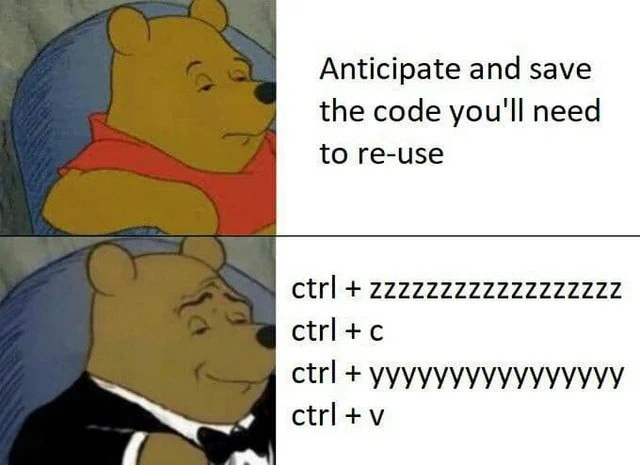
This is funny because it’s like a cheeky shortcut. The smart thing would have been to save that doodle somewhere safe when you first made it, right? But instead, you kind of cheated by rewinding time to grab it. In the meme, Winnie-the-Pooh is wearing a tuxedo and looking proud while doing this “undo, copy, redo, paste” trick. It’s as if he’s saying, “Look how fancy and clever I am!” even though what he’s doing is a bit silly. We laugh because we’ve all been a bit like Pooh here – instead of planning ahead, we rely on a last-second trick to fix our mistake. It’s a playful reminder that sometimes, rather than doing things the proper way, people just use an easy trick and feel oddly proud about it.
Level 2: Undo, Redo, Reuse
Let’s break down the joke in simpler terms. The meme uses two images of Winnie-the-Pooh: one normal and one in a fancy tuxedo. In the first image (Pooh in his red shirt looking bored), the text says, “Anticipate and save the code you’ll need to re-use.” This is basically advice to programmers: if you think you’ll need some code again later, plan ahead and save it. For instance, you might put that code in a separate function or file, or keep it in a snippet manager (a tool in many editors that lets you save and quickly insert common pieces of code). It’s encouraging code_reuse the right way — write it once, use it many times. This approach improves code quality because you’re not duplicating code all over the place. It’s like saying “be organized and save that useful piece for later.”
Now, the second image is Pooh looking smug in a tuxedo, and the text shows a series of keyboard shortcuts:
ctrl + zzzzzzzzzzzzzzz
ctrl + c
ctrl + yyyyyyyyyyyyy
ctrl + v
This is a humorous way to describe what the developer is actually doing instead of planning ahead. Those shortcuts are very common in any text editor or IDE (Integrated Development Environment, which is basically a programmer’s advanced text editor with extra features):
- Ctrl+Z means Undo (on Windows/Linux, or Cmd+Z on Mac) – it reverses your last edit. The meme writes
ctrl + zzzzz...with a lot of “z” to show the person is pressing undo multiple times, not just once. They’re basically going back in time through their edits. - Ctrl+C means Copy – copying the selected text to the clipboard.
- Ctrl+Y means Redo (Cmd+Y on Mac) – it re-applies the last undone change. Writing
ctrl + yyyyy...suggests they again pressed redo multiple times, undoing the undos to go forward in time back to where they were. - Ctrl+V means Paste – inserting whatever was copied.
So what’s happening? The developer likely wrote some code earlier, then removed or changed it. Later they realize, “Hey, I need that code again!” But they didn’t save it anywhere. So their solution is to use the editor’s undo history like a temporary storage. They basically do the following:
- Press
Ctrl+Zrepeatedly until the previously written code that was deleted reappears (undoing enough changes to see that code again in the file). - Press
Ctrl+Cto copy that chunk of code to the clipboard (now it’s saved in memory). - Press
Ctrl+Yrepeatedly to redo all the undos, bringing the file back to its latest state (so nothing is permanently lost; they return to where they started, as if nothing happened, but they still have that code in the clipboard). - Press
Ctrl+Vto paste the copied code wherever they need it now.
It’s a clever little trick — essentially using keyboard_shortcuts to retrieve something that wasn’t kept but is still lurking in the undo history. The meme presents this like it’s a sophisticated strategy (hence Pooh wearing a tuxedo, which is an internet meme way to indicate a smug, “fancy” feeling about something not-so-fancy).
For a junior developer or someone new: the humor is in the contrast between what we’re supposed to do and what we actually do when we’re scrambling. Ideally, if you know you’ll need code again, you don’t want to duplicate it by copy-pasting; instead you’d refactor – a fancy term meaning reorganize the code. For example, you could move that repeated code into a single function and call it from different places, or use a common library. That way your code base stays clean and you adhere to the DRY principle (Don’t Repeat Yourself). Many modern IDEs and editors even help with this: they let you highlight code and extract it into a new function, or provide a snippets feature to store reusable code blocks. Proper snippet_management or reuse planning is considered a mark of good CodeQuality and developer foresight.
But in reality, when you’re in a hurry or didn’t expect to need that code again, you might take a shortcut exactly like this meme describes. It’s practically the programmer’s equivalent of a quick-and-dirty fix. It certainly falls into CopyPasteProgramming – literally copying and pasting code – which is generally something we joke about because it’s not the best practice. If you copy-paste a lot, you might end up with the same code in many places, and that can lead to bugs or maintenance headaches (imagine finding a flaw in that code; you’d have to fix it everywhere you pasted it). Still, every developer, especially when starting out or under pressure, has done something like this at least once.
So, the meme is funny because it’s true. The top text is the proper advice (sounding a bit like a teacher or a coding guide), and the bottom text is the real-life hack that developers end up using. The contrast is made comical by Pooh’s transformation from disinterested to smugly classy. In simple terms: we know we should plan our code reuse carefully, but hey, if we forget, there’s always Ctrl+Z and Ctrl+V to save the day! The humor lies in recognizing this gap between ideal behavior and actual behavior. Even though the bottom approach is a bit lazy, the meme portrays it like it’s a slick, high-class move – that irony is what makes it coding humor.
Level 3: Undo-Driven Development
At first glance, this Winnie-the-Pooh Tuxedo meme hilariously contrasts textbook code reuse advice with the gritty reality of a rushed developer. The top panel’s advice “Anticipate and save the code you’ll need to re-use” echoes the DRY principle (Don’t Repeat Yourself) and best practices in CodeQuality: plan ahead, refactor common logic into shared functions, perhaps use a snippet manager or at least stash the code in source control. In theory, organized code reuse saves time and prevents bugs by avoiding duplicate code – the kind of forward-thinking every developer claims to do.
Enter the bottom panel: Pooh in a tuxedo smugly mashing keyboard shortcuts: Ctrl+Z then Ctrl+C then Ctrl+Y then Ctrl+V. This is the antithesis of proper planning – a cheeky undo_redo_hack to salvage code on the fly. In real developer life, we’ve all done some form of this “Undo-Driven Development.” For example, you might delete a block of code thinking it’s not needed (maybe following YAGNI – “You Aren’t Gonna Need It”), but then requirements change or you realize that code was actually useful. Uh-oh – it’s gone... or is it? If you haven’t closed your editor, you’ve got a lifeline: abuse the IDE’s undo stack. The meme’s exaggerated ctrl + zzzzzzzzzzzzzzz and ctrl + yyyyyyyyyyyyy text shows the developer furiously holding down undo and redo through dozens of changes. It’s effectively time-traveling within your editor’s history to copy a lost snippet. They retrieve what they need, then zip back to the present state – a keyboard_shortcuts joyride that results in a quick copy-paste. Pooh’s fancy tuxedo and smug face satirically label this ridiculous workflow as if it’s an elite strategy.
Why is this funny to seasoned developers? Because it rings painfully true. Instead of a clean, pre-planned reuse via a utility function or proper snippet management, we witness lazy_refactoring at its finest: duplicate the code via clipboard and pretend everything is fine. Sure, it’s a hack – the kind of “refactoring” you won’t find in textbooks – but when you’re racing a deadline or too deep in the zone, hitting Ctrl+Z/Ctrl+Y to resurrect code feels like a secret productivity trick. It’s a bit of a guilty pleasure in DeveloperProductivity: faster in the moment, but you’re knowingly incurring technical debt. Now that code exists in two places, violating DRY, and if a bug is in that snippet, you’ve cloned it too. A cynic might chuckle because we’ve seen where this leads: six months later, someone will fix a bug in one copy and wonder why the app still misbehaves (having missed the twin). CopyPasteProgramming can come back to bite, yet the meme embraces it with a wink. It’s essentially saying, “Who needs foresight when you have Ctrl-Z?” – a sardonic nod to the gap between what we aspire to do (well-planned code reuse) and what we actually do under pressure.
In a broader context, this speaks to real-world workflow friction. Version control tools (like Git) or IDE features could have helped here – e.g. checking the diff, using git stash, or utilizing an IDE’s snippet/template feature. But often the code wasn’t committed yet or the snippet library wasn’t prepared, so the desperate undo/redo trick is the last resort. The humor hits home because developers recognize this improvised tactic as both clever and absurd. We’ve all felt that mix of relief and “I can’t believe I just did that” when recovering code via undo. The tuxedo Pooh format labels the second panel as the “classy” alternative, dripping with irony: it’s the tuxedo_pooh meme’s way of elevating a brute-force hack to high society. The truth is, wearing a tux doesn’t make the hack any less hacky – but it sure makes for a relatable joke in DeveloperHumor circles. This meme perfectly captures that moment of proud face-palm when we celebrate a quick fix that we know isn’t the “right” way. After all, nothing screams CopyPasteCoding elegance like treating your editor’s undo buffer as a personal code vault and feeling like a 1337 hacker for pulling it off.
Description
A two-panel meme using the 'Tuxedo Winnie the Pooh' format to contrast two methods of reusing code. The top panel features the standard, unimpressed Winnie the Pooh next to the text: 'Anticipate and save the code you'll need to re-use'. This represents the planned, organized, and 'correct' approach. The bottom panel shows the sophisticated Winnie the Pooh in a tuxedo, looking smugly satisfied, alongside a sequence of four keyboard shortcuts: 'ctrl + zzzzzzzzzzzzzzzz', 'ctrl + c', 'ctrl + yyyyyyyyyyyyyyyy', and 'ctrl + v'. This sequence describes the chaotic but highly relatable developer workflow of realizing you need a piece of code you just deleted, frantically hitting undo (Ctrl+Z) until it reappears, copying it (Ctrl+C), frantically redoing (Ctrl+Y) to get back to the present, and then pasting (Ctrl+V) the recovered code. The humor lies in portraying this messy, ad-hoc process as the superior, more refined technique
Comments
13Comment deleted
Ah, the temporal pincer movement of code retrieval. It's the most effective version control system for the last 30 seconds of work, provided your editor's redo buffer doesn't get garbage collected
Clipboard-Driven Event Sourcing: traverse history with Ctrl-Z, capture a snapshot with Ctrl-C, roll forward with Ctrl-Y, and ship to prod with Ctrl-V - who needs shared libraries when your architecture fits on the clipboard?
After 15 years, I've mastered the art of version control: it's called 'Ctrl+Z as a Service' with clipboard persistence layer. Who needs git stash when you have muscle memory that can navigate the undo buffer like a time-traveling code archaeologist?
Why write reusable functions when you can just traverse your editor's undo history like it's a distributed version control system? Senior engineers know that ctrl+z is just git log with better UX, and the real architectural pattern is 'Eventually Consistent Clipboard' - where your code exists in a superposition of deleted and pasted states until you finally commit it to a file. It's not technical debt if you never acknowledge the transaction
Copy-paste: scales beautifully until one business rule change demands regex across 50 files
We call it CDD - Clipboard‑Driven Development: leveraging the editor’s event‑sourced undo tree for “reusability.” No APIs, no versioning, just four hotkeys and a steadily compounding debt ledger
Event-sourced reuse: Ctrl+Z back to when the function existed, Ctrl+C, Ctrl+Y to restore the timeline, Ctrl+V into the next microservice - way faster than negotiating a shared library with the platform team
Time travel Comment deleted
Classic Comment deleted
I don't like how much I relate to this Comment deleted
So tru Comment deleted
What is called a pro coder move Comment deleted
what isn't? Comment deleted