Skip to content
DevMeme
475 of 7435
When the Documentation is an Impossible LEGO Puzzle
Documentation Post #546, on Aug 11, 2019 in TG

When the Documentation is an Impossible LEGO Puzzle

Why is this Documentation meme funny?

Level 1: Building Blocks Confusion

Imagine you’re trying to build a new LEGO set. You open the instruction booklet, and it shows you where to put each piece… except one step is really weird. It has a brick floating in the air with two arrows pointing down, but the arrows point to two different spots. It’s like the book is telling you to put the same brick in two places at once! You’d probably scratch your head and say, “Huh? That doesn’t make sense. Where do I actually put this piece?” You might feel a bit frustrated or think you’re misunderstanding something.

Now picture asking your older brother or a friend for help, and they just shrug and say, “Just follow the instructions.” That’s annoying, right? Because you did try to follow the instructions, but the instructions were confusing. This meme is making a joke exactly about that kind of situation, but in the world of computer programmers. The “documentation” is like the instruction booklet for software or tools. A senior (more experienced) developer tells a junior (newer) developer to read the manual for answers. But the funny (or frustrating) part is when the manual’s guidance is as unclear as that tricky LEGO instruction page.

For someone who isn’t a developer, think of it this way: it’s like if your teacher tells you to read the textbook to understand a homework problem, but when you read it, the textbook explanation is so unclear that you still don’t know what to do. You’d feel stuck and a bit irritated, right? That’s why this image is both funny and true for a lot of developers. It’s showing the feeling of “I did what I was told — I read the instructions — and I’m still confused!” in a simple, visual way with the Lego example.

So, the emotional core here is feeling confused and maybe a little exasperated when the help you were promised doesn’t actually help. It’s relatable to anyone who’s tried to follow confusing directions. The humor comes from that oh-so-familiar scenario: being told to rely on written instructions and then finding those instructions about as useful as a treasure map drawn by a toddler. In the end, whether it’s building a toy or setting up a computer program, clear instructions are key. And when they’re unclear, all you can do is laugh a bit at how silly it is — like trying to put a single LEGO brick in two places at once.

Level 2: Clear as Mud Manual

Let’s break this down in simpler terms. In the programming world, documentation means the written guides, manuals, or README files that explain how to use a piece of software or an API. It’s like the instruction booklet for your code. A good doc is supposed to be step-by-step, like a clear LEGO manual that shows exactly where each brick goes.

Now, in the meme the text says:

Senior Developer: “Just read the documentation!”
The documentation: (image of a confusing Lego instruction)

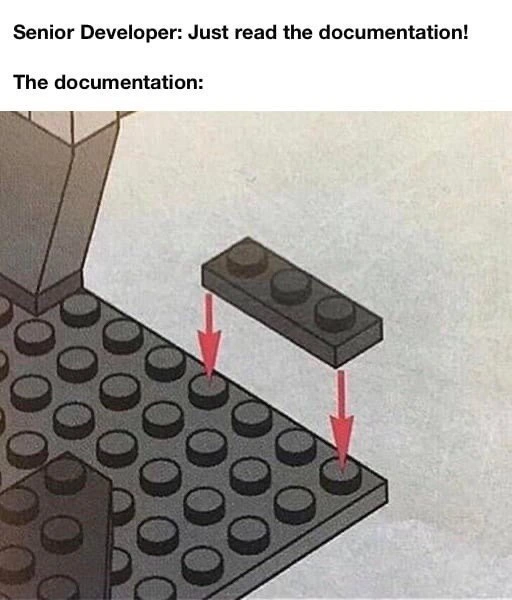
That image is a Lego instruction panel where you’re adding a new piece. Normally, an arrow in such instructions points to the exact spot you should place the brick. But here we have a 2x4 Lego brick hovering over a base, and two red arrows pointing down to two different spots on the base. Huh? Are we supposed to cut the brick in half? Place it in two places at once? It’s an impossible, ambiguous instruction. In other words, the manual is unclear about what to do next.

This is directly poking fun at ambiguous_documentation in tech. Ambiguous documentation is when the manuals or guides for developers are confusing or contradictory. For example, imagine an official guide that says “Now connect the module to the platform” without any diagram or detail — you’re left thinking “...connect it how and where exactly?” Or a tutorial that tells you to run a command, but there are two different versions of the command shown and it’s not clear which one to use. Those are real-life equivalents of the two arrows pointing at nowhere in particular.

“Just read the documentation!” is a common phrase, especially from a more experienced developer (the senior) to a less experienced one (the junior). It’s often well-intended: the senior wants the junior to be self-sufficient and find answers in the official docs. It also carries a bit of that RTFM culture. Now, “RTFM” is an old tech acronym that stands for “Read The Freaking Manual” (let’s say “freaking” to keep it polite, but you get the idea). It basically means “the answer is documented, go look it up.” So when the senior developer says this, they assume the documentation will solve the problem.

The punchline is that sometimes the documentation itself is the problem. The meme humorously portrays documentation woes by showing documentation that doesn’t actually help. This is a big part of DeveloperExperience_DX – if the docs are bad, the developer’s experience using that software or tool is bad. Developer frustration sets in quickly when you do follow the instructions but still can’t figure things out because the guide was incomplete or unclear. It’s like being given a map with blurry directions. You’re trying to do the right thing, but the info you need just isn’t there or it’s as clear as mud.

The LEGO analogy is great because even non-coders know what it’s like to follow instructions. Visual inconsistency (like those mis-pointed arrows) in a Lego manual would make any kid or adult say, “Wait, what do they want me to do here?” Similarly, in software, a poorly written doc might say “just add this code to your configuration” without telling you which file or which section to put it in. That’s missing_context_in_docs – they left out where or how exactly to perform the step. Or a guide assumes you already performed a previous step that was never actually mentioned. That’s an example of a documentation_quality_gap, where the quality of explanation drops right when you need it most.

This situation is super relatable (RelatableDeveloperExperience is basically what this meme banks on). Many developers can recall reading some official guide or API documentation and feeling just as confused as if they were staring at that floating Lego brick. It’s practically a rite of passage in software development: you try to set something up by the book, and the book turns out to be confusing. Then you end up on Stack Overflow or looking for blog posts because the “official” instructions left you hanging.

The meme also hints at the dynamic between Senior vs Junior Developers (SeniorVsJuniorDevelopers tag). The senior might not realize how unclear the docs are, maybe because they haven’t read them recently or they already know the stuff by heart from experience. The junior, meanwhile, is trying to learn from scratch and is depending on the documentation to be accurate. So you get this little ironic situation: expectation vs. reality (DeveloperExpectationsVsReality). The expectation is “the docs will make it clear” – the reality is “these docs are as confusing as an arrow pointing at two places at once.”

In summary, the meme is funny (and a bit painful) to developers because it highlights a common scenario: being told to rely on the official documentation, only to find those docs are poorly written or incomplete—a half_baked_guide. It’s pointing out the everyday truth that sometimes the manual or guide can fail you, and you end up just as lost as before, except now you’ve wasted time reading something that might as well have been written in another language. Pretty much every coder, from newbie to veteran, can nod and say, “Oh yeah, I’ve had to deal with docs like that.” It’s a humor born from shared frustration.

Level 3: 2x4 of Uncertainty

The seasoned engineer in me chuckles darkly at this one. It’s a classic case of DocumentationHumor highlighting painful documentation woes and RTFM irony. Picture a Senior Developer smirking, telling a junior “Just read the documentation!” as if the manual is the holy grail. But then you open the documentation and it looks like a cryptic LEGO instruction panel from hell. In the image, a 2×4 brick is hovering above a baseplate, with two big red arrows pointing down at two different spots several studs apart. Unclear_steps? Oh, absolutely. It’s impossible to tell where that piece is supposed to actually go. The visual screams ambiguous_documentation: a step that’s so confusing you’d think the manual was written by a sadistic puzzle-master tired tech writer on a Friday night.

This meme nails the DeveloperExperience_DX gap between developer expectations vs reality. The senior’s mantra “RTFM” (Read The Fine Manual – with fine being the polite word 😉) assumes the docs have all the answers. It’s an almost ritual chant in tech circles, often thrown at hapless juniors. But the punchline here is documentation_quality_gap: the manual itself is as clear as mud. It’s the kind of developer frustration that’s hilariously relatable. We’ve all been that junior, dutifully opening the guide, only to find something that might as well say “assemble the thingy to the whatnot” with an illustration that raises more questions than it answers. The lego_instructions_meme format is spot on: building software can feel exactly like trying to follow instructions that don’t make sense, leaving you with a floating piece and a “now what?” expression.

Why is this so painfully on point? Because half_baked_guides and missing_context_in_docs are more common than we’d like to admit. In real projects, you often find documentation that was written in a rush or by someone who assumed you already knew the missing pieces. The result is guides that skip steps or give contradictory directions, just like those two misaligned arrows in the Lego manual. Visual inconsistency in the doc (or diagram) translates to confusion in your implementation. It’s the kind of thing that triggers flashbacks for veteran devs: “Oh no, not again… where exactly am I supposed to put this piece of code?”

Let’s be real, we’ve all seen docs that felt like this. Perhaps an official API guide instructs you to “insert the widget into the framus” without telling you which widget or where the framus is located. Maybe a cloud service tutorial says “just configure X” but doesn’t mention Y and Z are prerequisites for X – oops. These are the documentation woes the meme mocks. The SeniorVsJuniorDevelopers dynamic adds a layer of cynical humor: the senior, who probably struggled with the same docs ages ago, now blithely assumes you’ll magically divine meaning from them. It’s hazing via manual. Meanwhile, the junior is thinking, “I did read the docs… and now I have even more questions.”

In such scenarios, a jaded developer might recall countless late-night battles: 3 AM on-call, system down, frantically paging through official docs that feel as useful as a roadmap drawn in crayon. The trauma is real and shared: you can practically hear the collective groan of every programmer who’s been burned by ambiguous documentation. It’s a relatableDeveloperExperience because the pain is ubiquitous — from open-source projects with sparse README files to enterprise systems with tomes of text that somehow say nothing concrete. This meme brilliantly compresses all that frustration into one image and a sarcastic caption.

Here, the humor and horror stem from the developerExpectationsVsReality of documentation. We expect a manual to guide us (one arrow, one stud, clear as day). Instead we get a riddle (two arrows, figure it out!). It’s like the docs themselves need their own docs. As a battle-scarred dev, I’ve learned that whenever someone chirps “It’s in the documentation,” there’s a fair chance I’ll discover an error, a gap, or something as utterly confusing as placing a single LEGO piece in two places at once. The meme perfectly captures that cynical wisdom earned from too many documentationWoes.

To spell it out, we often encounter documentation fails such as:

  • Ambiguous instructions or visuals: Steps that could mean two different things (like an arrow pointing at two spots simultaneously).
  • Missing steps or context: Critical prerequisites or setup info that were never mentioned (“just plug it in” — plug what in, exactly?).
  • Out-of-date information: Guides referencing options or screens that no longer exist, leading you on a wild goose chase.
  • Inconsistent examples: Code snippets or diagrams that don’t match the accompanying text, doubling the confusion.

All of these pitfalls turn “read the docs” into a bit of a gamble. The meme’s Lego analogy distills it perfectly: being told to RTFM and finding out the “M” might as well stand for mystery. Seasoned devs laugh (maybe a touch bitterly) because we have been there, done that, and juniors laugh (or cry) because they’re right there in it. In the end, it’s equal parts comedy and cautionary tale: documentation is supposed to be our savior, but when it’s as clear as ambiguous Lego brick arrows, all you can do is either facepalm or laugh... possibly both.

Description

A two-part meme format. The top part has text that reads, 'Senior Developer: Just read the documentation!'. The second part, labeled 'The documentation:', shows a diagram from a LEGO instruction manual. In the diagram, a rectangular black LEGO brick with four studs is shown being fitted onto a grey baseplate. However, two red arrows indicate that the brick should connect to two studs on the baseplate that are diagonally offset, making it physically impossible to attach the piece as instructed. This meme humorously critiques the common developer experience of being told to consult documentation that is unclear, incorrect, or contradictory. It uses the universally understood frustration of impossible LEGO instructions as a metaphor for flawed technical guides, a pain point that resonates with developers at all levels who have been stumped by unhelpful or nonsensical docs

Comments

7
Anonymous ★ Top Pick Our internal API documentation is like this. It shows you how to connect to the endpoint with a GET request, but the endpoint only accepts POSTs and the schema is from two versions ago. You're expected to figure it out from the unit tests, which, of course, are also outdated
  1. Anonymous ★ Top Pick

    Our internal API documentation is like this. It shows you how to connect to the endpoint with a GET request, but the endpoint only accepts POSTs and the schema is from two versions ago. You're expected to figure it out from the unit tests, which, of course, are also outdated

  2. Anonymous

    If your architecture diagram uses arrows like those LEGO instructions, congratulations - you’ve just shipped Schrödinger’s microservice: it simultaneously depends on every upstream and none at all until the on-call opens the docs at 3 a.m

  3. Anonymous

    The documentation was clearly written by the same person who implemented the authentication system - both assume you already know the secret handshake

  4. Anonymous

    Ah yes, the classic 'just read the docs' advice - where the documentation is as precise as LEGO instructions with arrows pointing to the general vicinity of where something might go. It's the technical equivalent of being told 'the bug is somewhere in the codebase' or 'just check the logs.' Senior developers love to invoke RTFM as if documentation were some sacred text that answers all questions, when in reality most docs are written by engineers who already understand the system, for engineers who already understand the system. The arrows might as well say 'place brick here-ish' with a confidence interval of ±50 studs. This is why we spend more time reading GitHub issues and Stack Overflow than actual documentation - at least there, someone has already encountered the same ambiguous instruction and documented the actual solution in a comment thread from 2016

  5. Anonymous

    Like many enterprise wikis, the docs use human eventual consistency - two arrows, missing writes inferred from tribal memory

  6. Anonymous

    Enterprise docs: one SVG connector for a cathedral of undocumented monoliths - because context is for juniors

  7. Anonymous

    You know it's enterprise docs when 'just drop in the module' secretly requires a sidecar, an IAM policy, ENABLE_MAGIC=true, and a default flipped in 2013

Use J and K for navigation