Skip to content
DevMeme
4832 of 7435
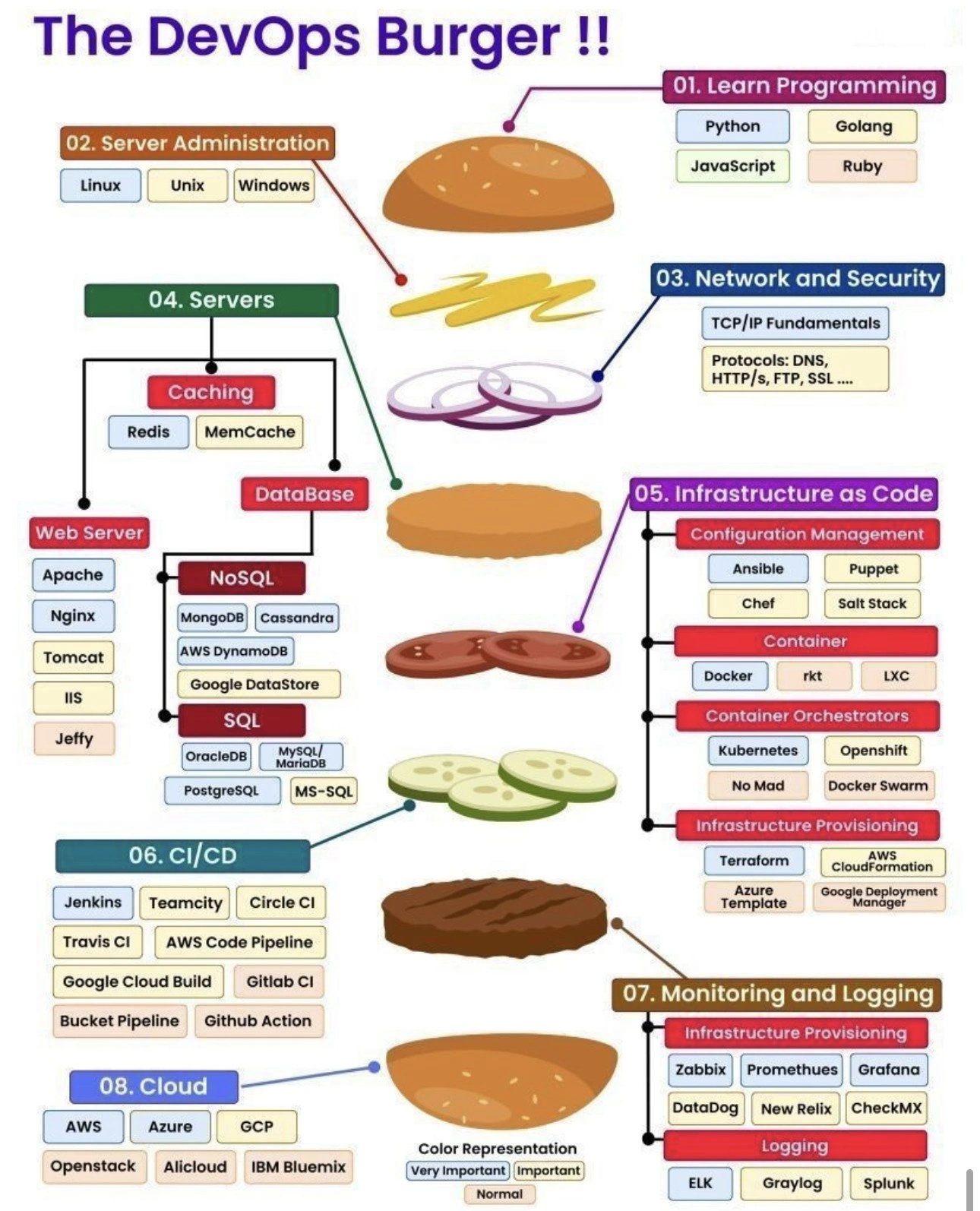
The DevOps Burger: Layered roadmap of tools from code to cloud
DevOps SRE Post #5292, on Jul 9, 2023 in TG

The DevOps Burger: Layered roadmap of tools from code to cloud

Why is this DevOps SRE meme funny?

Level 1: Too Big to Bite

Imagine you went to a burger restaurant and asked the chef to put everything on your burger – not just cheese and pickles, but every single topping and sauce they have. 🥪 The chef brings out a burger so gigantic you can barely see over it. It has eight layers of all kinds of ingredients, from the bun on top to the bun on the bottom. It’s so tall and stuffed that you can’t even fit it in your mouth to take a bite! It looks kind of funny, right? This meme is just like that, but with computer things instead of food. Each layer of the burger is a bunch of tech skills or tools stacked up. The joke is that a DevOps engineer (a tech person who helps get code running live on the internet smoothly) is expected to “eat” (know) this humongous burger with every possible ingredient (all those different tools and technologies). It’s poking fun at how overwhelming and silly it is to try to learn absolutely everything at once. The feeling it gives is like when you have a huge textbook of stuff to study and you think, “Do they really expect me to know all of this?!” Just as a burger with too much in it would be impossible to bite into, a job that asks one person to be expert in programming, servers, networks, security, databases, containers, CI/CD, monitoring, and every cloud platform is kind of impossible (and a little ridiculous). The meme uses the big burger to make us laugh about that. Even if you don’t know the tech words, you can see it’s a layered tower of colorful boxes – that’s the “everything burger.” The humor is in the exaggeration: no one actually eats a burger that has literally everything on it, and in the same way, it’s crazy to expect one developer to know every single tech tool out there. But it sure looks impressive (and maybe a bit tasty to tech geeks)! So, basically, the DevOps Burger meme is saying: “Being a DevOps engineer means you need a lot of different skills – so many that it’s as if you’re trying to chomp down the world’s biggest burger.” It makes us smile because we relate to that wide-eyed feeling of “whoa, that’s a lot to handle!” yet it’s presented in a fun, appetizing way.

Level 2: From Code to Cloud

Let’s break down the DevOps Burger in simpler terms. Each layer of this burger corresponds to a stage or skill area in the journey from writing code to running that code in the cloud. If you’re a junior developer or just starting in DevOps, here’s what each part means in real life:

  • 01. Learn Programming: The top bun of the burger is learning a programming language. This is your foundation because everything starts with code. Languages like Python, Go (Golang), JavaScript, or Ruby are popular choices. For example, Python is loved for its easy syntax and huge ecosystem (great for automation scripts or web backends), while Go is known for creating fast, compiled programs that are good at running concurrent tasks (often used in cloud and container tools themselves). Learning any one language well will teach you core concepts like variables, loops, functions – the building blocks of software. It’s like choosing the flavor of your burger bun: whether it’s Python or JavaScript, you’ll use it to hold everything together (the applications you eventually deploy).

  • 02. Server Administration (Linux/Unix/Windows): Just beneath the code layer is the operating system it runs on – this is the server administration slice. In DevOps, you need to be comfortable with operating systems, especially Linux, which runs the majority of servers worldwide. (Windows Server is used too, though less in modern DevOps, and Unix is the family Linux comes from.) Server admin skills include things like using the command line, managing users and permissions, editing configuration files, and understanding how processes, memory, and file systems work. Think of the OS as the pan or grill where your code “burger” cooks – if the pan is too hot or the grill is off, your patty (application) can burn. For example, you might need to configure a Linux server to host a web application: that involves installing required software (say, apt-get install nginx on Ubuntu), setting environment variables, and making sure the service starts on boot. Knowing your way around the shell (bash commands, etc.) and tools like SSH (to log into servers remotely) is essential. This layer teaches you how to provision and maintain the machines that your code will ultimately run on.

  • 03. Network and Security (TCP/IP, DNS, HTTP, SSL, etc.): Next, the burger has a layer of networking and security, visualized as maybe some onions or sauce – not always visible, but you feel the effect. In plain terms, this is about how computers talk to each other and keep that communication secure. TCP/IP fundamentals are the basics of internet networking: TCP/IP is the suite of protocols that make the internet function, handling how data is broken into packets, sent, and reassembled. You don’t need to do complex math, but you should understand concepts like IP addresses (the unique number for each machine on a network), ports (sort of like apartment doors, each service on a machine listens on a different port), and how data reliably gets from point A to B (TCP ensures packets get delivered in order, UDP is a faster but no-guarantees alternative). On top of that, common protocols like DNS (Domain Name System), HTTP/HTTPS (HyperText Transfer Protocol, the foundation of the web, with HTTPS being the secure, encrypted version), FTP (File Transfer Protocol for moving files, not used much now), and SSL/TLS (Secure Sockets Layer / Transport Layer Security, which is the encryption used in HTTPS) are crucial to know. In practice, this means understanding things like: how does your computer find the IP for google.com? (DNS resolution), or what happens when you type a URL in the browser? (an HTTP request goes out, perhaps over TCP port 80 or 443 for HTTPS). Security comes hand-in-hand: you learn about firewalls (they block/allow network traffic on certain ports), encryption (SSL certificates that ensure a website is secure – that little padlock icon), and basics like why you shouldn’t send passwords in plain HTTP. For a DevOps role, you might not deep dive into cryptography, but you’ll definitely be configuring domains, setting up HTTPS for websites, and troubleshooting network issues (like why can’t server A talk to service B – is it DNS, is a port closed, is the network route broken?). This layer is like the seasoning that goes through the whole burger – it affects every bite because all services need to communicate reliably and safely.

  • 04. Servers (Web Servers, Caching, Databases): This is a big, meaty layer – actually several sub-layers – in the burger. Once you have code and a server OS and network, you need the server software that directly runs or serves your application. This layer is split into a few parts:

    • Web Servers: These are programs that handle HTTP requests, serving web pages or API responses to users. Examples are Apache and Nginx, which are very popular open-source web servers often used to serve static content or as reverse proxies forwarding requests to application code. Tomcat is a Java application server (runs Java Servlets/JSPs, basically Java web apps), IIS (Internet Information Services) is Microsoft’s web server for Windows. The meme even lists “Jeffy”, which likely means Jetty – another lightweight Java web server. So depending on what your application is, you might install one of these web servers to host it. For instance, if you wrote a Python Flask app, you might put Nginx in front to handle the incoming traffic and serve static files, while your Flask app runs behind it. Knowing web servers also means understanding concepts like configuration files (e.g., Apache’s httpd.conf), setting up virtual hosts or routes, enabling SSL, etc.
    • Caching Servers: These are like the cheese slice that makes everything tastier by speeding it up. Caching means storing frequently used data in memory so you don’t have to fetch it from a slower source (like disk or database) every time. Tools like Redis or Memcached are in-memory data stores used as caches. For example, if your web app queries the database for the same info repeatedly, you might use Redis to cache that info in RAM, cutting response times from, say, 100ms to 5ms. DevOps engineers often need to deploy and configure caching layers to improve performance. It’s important to know how these work (they’re basically key-value stores in memory) and to understand eviction policies (like when the cache is full, which data do we throw out?) and persistence options (Redis can snapshot to disk, etc.).
    • Databases (SQL & NoSQL): At the bottom of the “Servers” layer we have databases – the persistent storage for application data. SQL databases are relational databases; they use Structured Query Language and have tables with defined schema. Examples: Oracle, PostgreSQL, MySQL/MariaDB, MS SQL Server. These are great for relational data where you need transactions and strong consistency (e.g., banking systems). As a DevOps engineer, you might not become a full DBA, but you should know how to set up a database, run backups, write basic queries, and understand concepts like tables, indexes, and ACID properties (which ensure reliable transactions). NoSQL databases are a broad category for data stores that don’t use the traditional table structure. Some, like MongoDB, store JSON-like documents; Cassandra is a wide-column store that excels at scaling out across many servers; AWS DynamoDB and Google Datastore are cloud-managed NoSQL services. These often sacrifice some strict consistency or structure in favor of horizontal scalability and speed for specific use cases. For example, if you need to store millions of log entries or user events quickly, a NoSQL store might be more appropriate than a SQL one. In DevOps, you’ll encounter both types – maybe your app uses a MySQL for core data and Redis for caching and perhaps Elasticsearch (a kind of NoSQL search engine) for logs or search functionality. The key is knowing the difference: SQL = structured relations and powerful queries, NoSQL = flexible schemas and easy to distribute across clusters. Setting up a database also means caring about security (don’t leave them open to the internet), backups (so data isn’t lost), and performance tuning (indexes, memory configs). This “servers” layer is big because an application often needs all three sub-layers: a web server to handle requests, a database to store data, and a cache to speed things up. DevOps ensures each of these is properly installed, configured, and maintained so the whole system runs smoothly.
  • 05. Infrastructure as Code (Config Management, Containers, Orchestration, Provisioning): Now we move into the heart of DevOps tooling – automating and managing infrastructure with code and modern platforms. This layer has multiple parts, each addressing a different piece of the puzzle of deploying and scaling applications:

    • Configuration Management: Tools like Ansible, Puppet, Chef, and SaltStack help automate the setup and configuration of servers. Instead of manually installing packages and editing config files on each server, you write scripts or playbooks that do it for you. For example, with Ansible (which uses YAML files), you might write a playbook to create a new user, install Nginx, copy over your web app files, and start the service – and you can run that on 10 servers as easily as on 1. Puppet and Chef similarly let you define the “state” a server should be in (they use a declarative language or Ruby, respectively). These tools often run repeatedly to enforce that state (if someone changes something by hand, the tool will change it back to match the script). This ensures consistency across environments (dev, staging, prod) – a principle often phrased as "Infrastructure as Code", meaning you treat your server setups just like code (version-controlled, repeatable). As a beginner, you’d likely start with one tool – Ansible is a common choice for its simplicity – and learn how to automate routine tasks. It spares you from logging into 100 servers to apply an update one by one!
    • Containers: This part of the layer is about packaging applications and their environment into a container so they can run anywhere. Docker is the big name here; it allows you to put your app and all its dependencies (like specific library versions, runtimes) into a single image. That way, you don’t get the “but it works on my machine!” problem – the container runs the same regardless of the underlying server as long as Docker is there. Other container technologies include rkt (Rocket) and LXC (Linux Containers), though Docker is by far the poster child. For a newcomer, think of a container like a lightweight virtual machine – it’s isolated but shares the host kernel, making it much more efficient than full VMs. You’d typically learn how to write a Dockerfile (a recipe to build an image with your app) and how to run containers. Containers make it easy to move applications from a developer’s laptop to a production server or into the cloud without many surprises, which is why they’re so popular in DevOps.
    • Container Orchestrators: Once you have containers, you need to manage them, especially if you have lots of them running across many servers. That’s where orchestrators like Kubernetes (often abbreviated “K8s”), OpenShift (Red Hat’s distro of Kubernetes with extra features), Nomad (HashiCorp’s scheduler, spelled as “No Mad” in the meme for fun), and Docker Swarm (Docker’s own simpler orchestration) come in. These systems automatically schedule containers to run on a cluster of machines, restart them if they crash, scale them up or down, and handle service discovery and load balancing (so your containers can find each other and users can reach them). In other words, if containers are like individual ingredients, an orchestrator is the chef coordinating the whole kitchen. Kubernetes is the most widely used today – as a beginner, you might start by using a local K8s setup (like minikube) to deploy a few containers, learning concepts like Pods (the smallest unit, often one container), Deployments (how you define a group of replicas), and Services (how to expose them). Orchestrators have a learning curve, but they solve the serious problem of running apps reliably at scale (think of how many microservices big companies run – you need automation to keep that working!).
    • Infrastructure Provisioning: This final part of layer 5 is about provisioning the actual infrastructure (servers, networks, databases, etc.) using code. Tools like Terraform, AWS CloudFormation, Azure Resource Manager (templates), and Google Deployment Manager let you define cloud resources in configuration files. For example, you could write a Terraform script that says “create 3 AWS EC2 instances of type t2.medium, in these subnets, with this security group, plus an RDS database and a load balancer,” and with one command, Terraform will talk to AWS and make it so. If you ever need to recreate that environment, you just run the script again. This is incredibly powerful for consistency and disaster recovery. Instead of clicking around a web console to set up cloud resources (which is error-prone), Infrastructure-as-Code ensures everything is documented and repeatable. For a newcomer: imagine you could set up an entire data center by writing a text file – that’s what these tools do. They also manage dependencies (create network before VM, etc.) and can show you a plan of changes (so you review what will happen before it does). Learning Terraform, for instance, is a common entry point; you’d get comfortable writing .tf files to, say, set up a simple web server on AWS with Terraform. The key idea is you’re treating servers and network gear as configurable by code, bringing software discipline to operations.
  • 06. CI/CD (Continuous Integration/Continuous Deployment): Next is the CI/CD layer, which can be thought of as the automated assembly line for delivering software. Continuous Integration (CI) means developers constantly merge their code changes into a shared repository (like Git), and each change is automatically built and tested. Continuous Deployment/Delivery (CD) means those changes can automatically be deployed to production or a staging environment if they pass tests. The meme lists popular CI/CD tools: Jenkins, TeamCity, CircleCI, Travis CI, AWS CodePipeline, Google Cloud Build, GitLab CI, Bitbucket Pipeline (listed as “Bucket Pipeline”), and GitHub Actions. All these tools essentially do similar things: run your build/test scripts whenever code is updated, and sometimes handle deployment. For example, Jenkins is an open-source automation server where you set up “jobs” or pipelines; a typical pipeline might pull the latest code, run mvn test or npm test (depending on your project), and if all tests pass, build a Docker image and deploy it. A newbie might start by writing a simple pipeline in Jenkins or GitLab CI (which uses a YAML file .gitlab-ci.yml) to see how automatic testing works. CI/CD is crucial in DevOps because it removes the big scary manual releases – instead of deploying huge changes infrequently (which is risky), teams deploy small changes often, with automation ensuring quality. If something does break, you know it was the last small change and can fix it faster. Tools like Travis CI or CircleCI are often used by open-source projects for free testing; AWS CodePipeline and GCP Cloud Build are cloud-specific solutions integrated into those ecosystems. The details vary, but all encourage best practices like automation, repeatability, and fast feedback. In the burger, this layer is like the conveyor belt that takes your assembled burger, wraps it up, and delivers it quickly to the customer (the end users) repeatedly and reliably. For a concrete example: imagine every time you push code to GitHub, a GitHub Action workflow automatically runs your tests and, if green, deploys your app to a QA server – that’s CI/CD in action.

  • 07. Monitoring and Logging: After your application is up and running, you need to keep an eye on it – that’s what the Monitoring and Logging layer is about. Monitoring tools watch the health and performance of your systems, and logging tools record what’s happening for later analysis. The meme splits it into two subcategories:

    • Monitoring (and Alerting) & Metrics: Tools like Zabbix, Prometheus, Grafana, Datadog, New Relic, Checkmk fall here. Monitoring in practice means collecting metrics (numbers) like CPU usage, memory usage, disk space, network traffic, or application-specific metrics (e.g., number of login requests per minute, error rates). Older tools like Zabbix or Nagios focus on infrastructure metrics and basic alerting (like “notify me if CPU > 90% for 5 minutes”). Modern ones like Prometheus (often paired with Grafana) are built for cloud environments: Prometheus scrapes metrics from instrumented services (you add a library to your app or use exporters for common services like databases), stores them efficiently (a time-series database), and lets you query them. Grafana is a visualization tool where you create dashboards to see those metrics plotted over time. It’s common to see a Grafana dashboard with graphs of requests per second, error rates, and latency – the vital signs of an application. Datadog and New Relic are commercial “all-in-one” monitoring services that provide metrics, alerting, and often tracing (following the path of a single request through a system). Checkmk (spelled “CheckMX” in the image) is another monitoring system, similar to Nagios, often used in Europe. The main point is: a DevOps engineer sets up monitoring so that if something goes wrong at any layer (CPU spike, a service goes down, traffic suddenly drops), they get alerted and have data to diagnose the issue. It’s like having a heart-rate and blood pressure monitor on your application at all times.
    • Logging: On the logging side, we have things like ELK, Graylog, Splunk. ELK stands for Elasticsearch, Logstash, Kibana – a popular open-source stack for logs. Logstash (or its newer variant Beats) will collect log entries from various sources (your app logs, server logs), Elasticsearch stores and indexes those logs so you can search them, and Kibana provides a UI to query and visualize log data. If your app crashes and you want to know what happened right before, you go to Kibana and search the logs by time or error message. Graylog is another open-source log management tool, and Splunk is a well-known enterprise tool (very powerful but also costly) for searching and analyzing logs. Logging is crucial because it’s like the black box on an airplane – when something goes wrong, the logs tell you the story of what the system was doing. DevOps engineers set up centralized logging so you don’t have to SSH into 50 servers and check each log file manually. Instead, all logs flow into one system where you can easily search for “ERROR” or a request ID across the whole fleet. When learning, you might start by running a local ELK stack to see how logs from a sample app flow through and become searchable. Monitoring and logging together are sometimes called observability tools – they allow you to observe the internal state of your systems easily. After deploying, this layer is what keeps you sane: it’s much easier to sleep at night knowing you have alerts if something goes wrong and logs to investigate issues.
  • 08. Cloud (AWS, Azure, GCP, etc.): Finally, the bottom bun of the burger is the Cloud. This is the foundation that everything sits on nowadays. Cloud providers like AWS (Amazon Web Services), Azure (Microsoft Azure), GCP (Google Cloud Platform), as well as OpenStack (open source cloud platform you can run yourself), AliCloud (Alibaba’s cloud in China), and IBM Bluemix (now called IBM Cloud) offer on-demand computing resources. What does that mean? Instead of owning physical servers, companies rent computers, storage, and network from these providers as needed. AWS, for example, has services like EC2 (virtual machines), S3 (storage for files), RDS (managed databases), and many more. Azure and GCP have similar offerings (compute, storage, databases, serverless functions, machine learning APIs, you name it). Knowing “cloud” in a DevOps context means being familiar with how to deploy and manage resources on at least one of these platforms. Each has its interface (web console, CLI, and APIs) and quirks. For instance, to host a simple website, you might create an EC2 instance on AWS, or a Compute Engine VM on GCP, or an Azure VM – each step is roughly analogous but the commands and exact services differ. A big part of DevOps is also understanding cloud architecture: how to design systems that take advantage of cloud features, like auto-scaling (automatically adding more servers when load is high), using managed databases instead of running your own, or designing with fault tolerance (spreading across multiple availability zones so that one data center outage doesn’t take down your app). When people say “There is no cloud, it’s just someone else’s computer,” it’s a reminder that cloud doesn’t mean magic – it’s essentially renting computers in bulk from providers who are really good at operating them. But from your perspective, cloud is awesome because with a credit card and a few clicks or scripts, you can have a whole infrastructure up and running in minutes, and tear it down when you’re done (paying only for what you used). As a newcomer, you’d likely start with one cloud (say AWS, since it’s the most popular) and learn the basics: launching a server, setting up storage, understanding the pricing model, and how to secure your resources. Multi-cloud (knowing AWS, Azure, GCP all) is often more of an advanced or specific-job requirement – each is complex enough on its own. But the burger lists all major ones to show the range of environments DevOps might operate in. Essentially, this layer means you should grasp the fundamentals of cloud computing: virtualization, scalability, and the services that replace what used to be physical hardware or on-prem software.

All together, these layers represent a DevOps learning path – from writing code, to understanding the systems that run the code, to automating deployment, and finally to maintaining and monitoring the running application. Each ingredient (tool or concept) in this burger has a purpose:

  • Programming is about creating the application.
  • Server admin, networking, and security are about preparing the environment for that application.
  • Servers (web server, DB, cache) are the runtime components the application needs.
  • Infrastructure as Code and containers are about ** automating and scaling** the setup of those components reliably.
  • CI/CD is about moving changes quickly and safely from developers to production.
  • Monitoring and Logging are about keeping the system healthy and understanding issues in real time.
  • Cloud is the platform that provides the hardware and global reach to run everything.

For a junior tech enthusiast, the “DevOps Burger” might seem huge (and it is!), but don’t worry: you don’t eat it all in one bite. You learn one layer at a time, often overlapping. The infographic suggests an order (it makes sense to learn some programming before tackling deployment pipelines, for example), but everyone’s journey will differ slightly. The key takeaway is that DevOps isn’t a single skill – it’s a combo meal. You gradually pick up each piece, and over time, you’ll see how they all fit together to deliver software to users reliably. Plus, if you love tech, sampling all these flavors – from coding a script to configuring a server to deploying on the cloud – can be really rewarding. It’s like being a chef who doesn’t just cook the patty, but bakes the bread, grills the meat, and also runs the whole restaurant kitchen! This meme-breakdown is a playful menu, but also a real checklist of areas to explore as you grow from a coding newbie into a full-fledged DevOps engineer.

Level 3: Full-Stack Overflow

For seasoned engineers, this meme hits home as both an aspirational stack and an inside joke about DevOps job descriptions. The visual gag of a gigantic burger made of tech layers lampoons the expectation that one person should be an expert in everything from writing code to managing cloud infrastructure. It’s a “full-stack overflow” of responsibilities – a tall order that triggers knowing groans and grins. Here’s why experienced DevOps and SRE folks find this funny and relatable:

  • The Absurdly Broad Skillset: Modern DevOps/SRE roles have ballooned to cover development, system administration, networking, security, build pipelines, containerization, cloud services, and Observability. The meme quite literally stacks all these domains into one comically oversized burger. A senior DevOps engineer chuckles because they’ve seen job postings asking for Python, Kubernetes, AWS, Terraform, Jenkins, and 10 other skills – essentially this entire burger – in a single role. It’s the “layered_skill_stack” from hell. We know nobody masters every flavor in this sandwich, so the humor is in the unrealistic expectation. It’s like a restaurant saying one burger has 8 types of patties plus all the toppings; an experienced diner (or DevOps lead) knows that’s more for show than practical consumption.

  • Shared Pain and War Stories: Each layer evokes specific memories. “01. Learn Programming” – we all started here, maybe with a “Hello World” in one of those languages. “02. Server Administration (Linux/Unix/Windows)” – any old-school sysadmin recalls late nights editing config files in Vim and the inevitable moment a Linux box crashed because of a missing semicolon in /etc/ssh/sshd_config. Those with scars from production outages nod at “03. Network and Security” – phrases like DNS, HTTP/s, SSL trigger the reflexive joke “It’s always DNS.” Why? Because countless outages traced back to a misconfigured DNS record or an expired SSL certificate at 3 AM, reinforcing this running gag. To veterans, the inclusion of DNS in the burger is a wink that says: yup, this layer will come back to bite you unexpectedly. And don’t forget firewalls and ports – who hasn’t had the “why isn’t my service reachable? … oh, port 443 was closed” moment. The meme quietly points out that a DevOps engineer must troubleshoot across all these layers when things go sideways.

  • Satire of Buzzword Overload: The burger piles on buzzwords like a gourmet monstrosity. Kubernetes, Jenkins, Docker, Terraform, AWS... it reads like the LinkedIn profile of a “DevOps ninja” parody. Experienced folks laugh because it’s true: the industry churns out new tools and acronyms non-stop, and a DevOps career can feel like continuously stuffing new buzzwords into your brain. There’s a term “resume-driven development” where teams adopt trendy tech just to pad resumes. This infographic exaggerates that phenomenon – practically every trendy tool of the last decade is somewhere in there. A senior engineer might jokingly add, “Wait, they forgot Kafka and Istio – must be on the secret menu!” The absurdity lies in treating every new tool as a must rather than focusing on underlying principles. It’s a gentle jab at how tech culture sometimes values breadth of tool familiarity over depth of understanding. Yet, any DevOps practitioner knows the truth behind the joke: eventually you do end up encountering most of these in real projects. It’s funny because it’s a little too real.

  • Integration Hell: With experience, you learn that each layer isn’t isolated – they interconnect in messy ways. The meme’s tidy separation is a fantasy; reality is more like a sloppy Joe. Consider deploying a web service: you write code (layer 1), containerize it with Docker (layer 5), deploy on AWS (layer 8) using Kubernetes (layer 5 again), which relies on Linux nodes (layer 2) and networking (layer 3), use Jenkins to automate (layer 6), and monitor with Prometheus/Grafana (layer 7). If anything fails, you play whack-a-mole across all layers. Seniors find humor in how neatly the burger slices the concerns, whereas in practice an issue often oozes from one layer into another. For instance, a small code change (layer 1) might cause high memory usage, which triggers the container orchestrator’s OOM killer (layer 5) to evict pods, which then causes an alert in Grafana (layer 7) and maybe even an auto-scale event on AWS (layer 8). Debugging that chain requires biting through the entire burger. The laugh comes from recognizing this all-in-one reality: a true DevOps engineer sometimes has to take a big bite and taste everything at once.

  • Historical Perspective – How We Got Here: Senior folks also appreciate the historical layering. Decades ago, roles were siloed: developers wrote code, system administrators managed servers (bare metal), network engineers handled switches, separate DBAs managed databases. The DevOps movement (coined around 2009) was a cultural and technological response to tear down these silos for faster delivery and more reliable systems. This meme is essentially a “career_progression_diagram” showing how one role now spans what used to be done by multiple specialized teams. It’s funny in a bittersweet way: on one hand, we have amazing tools to automate and unify these tasks – you can spin up a whole data center in minutes with a few Terraform scripts – on the other hand, keeping up with it all feels like drinking from a firehose. A veteran might recall, “In my day we racked physical servers and wrote Bash scripts; now kids are wrangling Kubernetes on GCP and calling it cattle not pets.” It’s remarkable and overwhelming. The burger analogy nails that sentiment – everything’s changed, yet the job description just got bigger. The Cloud layer being the bottom bun is especially telling; it underpins everything now, whereas 20 years ago “the cloud” was not even a thing – you’d have a data center or co-located servers as the foundation. Seeing AWS/Azure/GCP as just another layer is humorous because each of those is a giant universe of complexity in itself (each with dozens of services and quirks). But hey, now it’s just one slice of cheese in the burger. “There is no cloud, it’s just someone else’s computer,” we joke, referencing the classic tech bumper sticker – yet here we are treating someone else’s computer as a basic building block you’re expected to know.

  • Reality vs Roadmap: The infographic is labeled a “roadmap” for learning DevOps, implying if you just follow 1 through 8, you’ll be a fully-formed DevOps engineer. Seasoned pros smirk at this oversimplification. We know in reality learning is not strictly linear – you often circle back and learn layer 3 (networking) only after a production incident taught you why it matters, or you pick up a new CI/CD tool when the project demands it. The burger layers suggest a neat progression (finish your programming before you get dessert in cloud), but real careers are more like mixing ingredients. A junior might start at a cloud-first company and learn AWS (layer 8) before ever touching an on-premises Linux server (layer 2). The humor here is in the checklist mentality: as if one could just bite through each layer sequentially and be done. In truth, a DevOps journey is messy. Experienced folks would advise, “Start with the fundamentals (OS, networking, a language) and then learn the others as needed,” rather than trying to eat the entire burger in one go. The meme ironically presents the DevOps learning path as a fixed menu, knowing full well that in practice, everyone’s path through this buffet is different.

  • Subtle Easter Eggs: A senior eye might catch the little quirks: “Jeffy” listed under web servers likely refers to Jetty (a Java server) – either a typo or a bit of flavor humor (who is Jeff? Did he fork Apache?). Also “No Mad” (Nomad by HashiCorp) is cheekily spaced out. The presence of these slightly off labels is amusing in itself, like the meme is aware that not everyone will recognize every tech (Nomad is less famous than Kubernetes, Jetty is niche compared to Apache or Nginx). Even the color coding of “Very Important/Important/Normal” in the legend is a nod to how we prioritize learning certain tools – presumably, basics like Linux, Git, and maybe Docker are “very important” (must-have), whereas something like IIS or SaltStack might be “normal” (good to be aware of, but not every shop uses it). Industry veterans know that these priority judgments are subjective and ever-changing. Today’s hot tool might be obsolete in a few years (remember when Chef and Puppet were the rage? Now YAML-centric tools and containers stole the show). So we grin at the confidence of labeling any tool “Normal” or “Very Important” universally. The meme invites debate: which condiment in this burger is absolutely essential? Some will argue you must know Kubernetes nowadays (hence “very important”), others say a solid foundation in Linux and networking matters more than chasing the latest container fad. By presenting it all, the image sparks that fun senior-level discussion (often held over coffee or beers) about what knowledge truly makes a DevOps engineer effective versus what’s just hype. It’s humorous to see our entire professional toolkit laid out like a fast-food order, and it reminds us not to take the buzzwords too seriously – what matters is delivering reliable systems, whether you used Ansible or Puppet, AWS or GCP.

In summary, the seasoned perspective revels in how The DevOps Burger meme captures the all-you-can-eat buffet of modern infrastructure work. It’s a satire of the “jack of all trades” expectation, a celebration of how far our tooling has come, and a light-hearted acknowledgement of the shared struggles in keeping all these layers working together. The next time an on-call pager goes off, any DevOps veteran might quip, “Time to take a bite out of the problem”, fully aware that problem might be hidden in any layer of this enormous sandwich of technology!

Level 4: Turtles All The Way Down

At the deepest level, this DevOps burger illustrates how complex computing systems are built on layer after layer of abstraction – it's turtles all the way down. Each ingredient in the stack corresponds to a crucial layer in a distributed system, and behind each tool is a theoretical foundation:

  • Layered Architecture & OSI Model: The burger’s stacked roadmap evokes the classic 7-layer OSI network model (plus extra toppings). In theory, layering simplifies design by separating concerns – just as networking has physical up to application layers, DevOps has its own strata from code to cloud. This helps manage complexity: each layer (programming, OS, networking, etc.) provides services to the layer above and hides details of the layer below. The meme playfully extends this concept to eight layers, suggesting a DevOps engineer must understand a full stack of abstractions. The top bun (coding) relies on everything under it, down to the bottom bun (cloud infrastructure). It’s a reminder of Leaky Abstractions: even if you code in Python without worrying about servers, when something goes wrong in production those lower layers bite back. The theoretical insight is that no abstraction is perfectly sealed – a concept Joel Spolsky dubbed the “Law of Leaky Abstractions.” For example, a web app might normally ignore TCP details, but a performance bug could force developers to consider how TCP congestion control or a dropped packet (network layer) is affecting user experience. In a full-stack DevOps context, knowledge trickles down through all layers because real systems interconnect deeply.

  • Distributed Systems Theory: The inclusion of multiple databases (SQL and NoSQL) hints at core distributed computing trade-offs. Here’s where the famous CAP Theorem (Consistency, Availability, Partition tolerance) lurks beneath the surface. A seasoned engineer sees MongoDB or Cassandra and recalls that in a distributed database you “pick two out of three” in CAP. For instance, Cassandra sacrifices immediate consistency for partition tolerance and uptime (eventual consistency model), whereas PostgreSQL or MySQL prefer strict consistency at the expense of availability during network partitions. This theoretical limit is why NoSQL databases exist at all – we can’t have our data burger and eat it too, so to speak. The DevOps roadmap implicitly teaches that choosing a database involves understanding these fundamental impossibilities: you can’t magically ensure instant consistency, total fault tolerance, and high availability across geographies all at once due to the physics and math of distributed systems. Each database technology is an implementation of a particular point in this theoretical design space (CP vs AP in CAP). Recognizing these underpinnings helps an expert DevOps engineer decide which data layer ingredient to stack on the burger for a given system’s needs.

  • Consensus and Orchestration: Look at the Container Orchestrators layer – Kubernetes, OpenShift, Nomad, etc. Under the hood, these systems employ complex algorithms (like the Raft consensus algorithm in Kubernetes’ etcd datastore) to keep cluster state consistent across nodes. That’s some serious computer science: consensus in the face of failures is a classic hard problem (related to the Paxos algorithm and the FLP impossibility result). When a DevOps pro deploys a Kubernetes cluster, they're implicitly relying on decades of distributed consensus research to ensure that, say, exactly one leader scheduler is coordinating pods at any time. The humor of cramming “K8s” into a burger belies the elegant theory making it possible: these orchestrators act like a distributed operating system, scheduling container processes across many machines similar to how a kernel schedules threads on a CPU. They must handle synchronization, state replication, and network partitions gracefully – issues studied in academic papers but manifested in our daily Containerization tools. The meme doesn’t spell out Raft or Paxos, but an expert sees Kubernetes and knows there’s a metaphorical brain in this burger that uses consensus to keep all the other layers working in concert.

  • Infrastructure as Code & Idempotence: The Infrastructure as Code (IaC) layer embodies principles from software engineering applied to ops. Tools like Terraform, CloudFormation, or Ansible encourage declarative definitions of infrastructure, which connect to formal concepts like state convergence and idempotence. In theory, an idempotent operation means doing it twice yields the same result as doing it once – a crucial idea for reliable automation. Config management tools (Puppet, Chef, Ansible, Salt) enforce desired state: e.g. “there should be exactly one nginx installed” – running the script any number of times ends in that state. This is essentially applying mathematical functions (where f(f(x)) = f(x)) to real-world servers. The burger’s configuration layer hints at this theoretical approach: treat servers not as unique snowflakes but as results of deterministic processes (like functions), so they are reproducible and interchangeable. The payoff is massive reduction of entropy in systems – a concept from information theory – by ensuring deployments don’t drift over time. A veteran DevOps engineer appreciates that behind YAML playbooks are graph algorithms resolving resource dependencies and ensuring order of execution (Puppet, for instance, builds a dependency graph of services). The meme’s stack, while playful, alludes to how computing has evolved from artisanal system administration to a model-driven, declarative paradigm that borrows concepts from programming language theory and graph theory to manage real machines.

  • Observability & Control Theory: The Monitoring and Logging layer isn’t just about tools; it’s rooted in the concept of observability from control systems engineering. Observability (in control theory) is about inferring the internal state of a system from its outputs. In modern software, tools like Prometheus and Grafana provide that window into a system’s health by exposing metrics (CPU load, request latency) – essentially the outputs we can measure. Logs and traces similarly let us reconstruct what the code (the internal state) was doing. The joke of throwing Zabbix, Datadog, New Relix (yes, spelled like New Relic, not a magical potion) into the burger highlights that a DevOps engineer must become a bit of a data scientist of system behavior. They set up dashboards and alerts, effectively implementing feedback loops. The theory here is that to control a complex system (like keep it running reliably), you need to observe it, which connects to principles like feedback control loops. Too many alerts (noise) versus too little (blindness) is a balancing act, analogous to tuning a PID controller in engineering. While munching this layer, one might recall academic roots such as Norbert Wiener’s cybernetics – but in practice it means setting the right triggers so your pager doesn’t blow up at 3 AM for a trivial blip. The burger packs all those ideas in a digestible form: the spice of production operations is making systems observable enough to tame.

In essence, the “DevOps Burger” humorously stacks practical tools that each rest on deep theoretical foundations. From the lambda calculus that influenced high-level programming languages, to the packet-switching theory underpinning TCP/IP, to the consensus algorithms orchestrating containers, this meme compresses an entire computer science curriculum between two buns. The comedy is that achieving true full-stack mastery would require digesting everything from algorithm design to networking theory to cloud architecture. It’s a towering order – a reminder that while no individual can absorb all these layers completely, understanding the principles beneath each layer is what enables DevOps professionals to integrate these disparate pieces into one cohesive, working system. Just like a well-engineered burger, all components must work together, and knowing the recipe (the theory) ensures the final product (your application in the cloud) doesn’t collapse under its own weight.

Description

The infographic titled “The DevOps Burger !!” depicts a cartoon hamburger representing an eight-step DevOps roadmap, each numbered layer pointing to color-coded boxes of technologies. “01. Learn Programming” lists “Python, Golang, JavaScript, Ruby”; “02. Server Administration” lists “Linux, Unix, Windows”; “03. Network and Security” shows “TCP/IP Fundamentals” and “Protocols: DNS, HTTP/s, FTP, SSL …”. Section “04. Servers” splits into “Caching: Redis, MemCache”, “Web Server: Apache, Nginx, Tomcat, IIS, Jeffy”, and “Database” with “NoSQL: MongoDB, Cassandra, AWS DynamoDB, Google DataStore” plus “SQL: OracleDB, PostgreSQL, MySQL/MariaDB, MS-SQL”; “05. Infrastructure as Code” details “Configuration Management: Ansible, Puppet, Chef, Salt Stack”, “Container: Docker, rkt, LXC”, “Container Orchestrators: Kubernetes, Openshift, No Mad, Docker Swarm”, and “Infrastructure Provisioning: Terraform, AWS CloudFormation, Azure Template, Google Deployment Manager”. “06. CI/CD” features “Jenkins, Teamcity, Circle CI, Travis CI, AWS Code Pipeline, Google Cloud Build, Gitlab CI, Bucket Pipeline, Github Action”; “07. Monitoring and Logging” lists “Zabbix, Prometheus, Grafana, DataDog, New Relix, CheckMX” and under “Logging” shows “ELK, Graylog, Splunk”; “08. Cloud” names “AWS, Azure, GCP, Openstack, Alicloud, IBM Bluemix”, with a legend marking items as “Very Important”, “Important”, or “Normal”. Stacking these buzzwords like burger ingredients delivers developer humor while illustrating the layered nature of modern DevOps practice - from programming and servers through infrastructure-as-code, CI/CD, observability, and multicloud expertise


Comments

37
Anonymous ★ Top Pick The DevOps Burger looks appetizing until you remember every layer versions independently - by the next sprint the Kubernetes patty is a release behind, the Prometheus pickles have forked, and the Terraform bun drifted so far you’re basically eating prod off the floor
  1. Anonymous ★ Top Pick

    The DevOps Burger looks appetizing until you remember every layer versions independently - by the next sprint the Kubernetes patty is a release behind, the Prometheus pickles have forked, and the Terraform bun drifted so far you’re basically eating prod off the floor

  2. Anonymous

    After 15 years in the industry, I've realized the DevOps burger is missing the most critical layer: the 3am pager duty pickle juice that seeps through everything, making the whole stack taste slightly bitter no matter how well you've containerized your condiments

  3. Anonymous

    Ah yes, the DevOps burger - where every layer is 'critical infrastructure' and removing any single ingredient triggers a P0 incident. Notice how the monitoring and logging layer is at the bottom? That's because you only remember to add observability after the production outage at 3 AM. And just like a real burger, by the time you've assembled all these layers, half the technologies are already deprecated and the other half require a Kubernetes cluster just to say 'Hello World.'

  4. Anonymous

    Executive: “Just give me Kubernetes with CI/CD.” Me: “Great - want that on a Terraform bun with DNS onions and observability pickles, or should I serve a raw Docker patty on a YAML napkin?”

  5. Anonymous

    DevOps burger: IaC provisions flawless layers every build, but prod observability reveals the secret sauce is just on-call heartburn

  6. Anonymous

    DevOps burger: no matter what you order, it tastes like Kubernetes; the special sauce is Terraform state, and the observability bun only gets added after the first 2 a.m. incident

  7. @Vanilla_Danette 3y

    This is a very good scheme, but now I'm hungry :(

  8. @MMageGangsta 3y

    Cursed burgar

  9. @CcxCZ 3y

    More of a buzzword bingo to put on resume. Also WTF they mean by Unix? UNIX® as an OS had last release in 1989, prior to breakup of Bell Labs.

    1. @Jinkros 3y

      I guess other unix derivated systems like the ibm and hp ones?

      1. @CcxCZ 3y

        Possible. In which case I'd rather put FreeBSD there as something you'd be much more likely to encounter in the wild. But just seeing Linux and Unix as distinct options suggests they don't mean systems conforming to SUS, which is that the Unix trademark essentially became after being sold to Novell. Perhaps they meant to write "other unix-like systems"? Maybe they were just clueless?

        1. @Jinkros 3y

          Its pretty weird yeah xD

        2. @prirai 3y

          Or OpenBSD

          1. @CcxCZ 3y

            Sure, that system is nice too. Though where devops is relevant I would expect to see fbsd way more often because of 1) jails for apps 2) ZFS for storage.

            1. @prirai 3y

              Yes, you're correct

    2. @RiedleroD 3y

      I think they mean the posix standard

      1. @CcxCZ 3y

        But why is it Linux not included in that?

        1. @RiedleroD 3y

          only god knows

        2. @RiedleroD 3y

          actually, maybe they specifically meant MacOS but didn't want to write MacOS

  10. Felix 3y

    "posix-styled with gnu-coreutils"

  11. @endisn16h 3y

    lel thats actually a good scheme, except i wouldve added markup langs ontop, and changed gitlabCI to blue color (also why hte fuck javascript is here??)

    1. @CcxCZ 3y

      IMO it's more important to understand principles on which these technologies operate than trying to catch all the variants like pokemon. Something like https://norvig.com/21-days.html but with systems approach would be nice. Like - learn at least one AP database (Riak, Cassandra, Aerospike), learn at least one transactional CP database (*SQL), learn at least one distributed CP database (Etcd, Zookeeper)…

      1. @endisn16h 3y

        yeah, i agree, but markup langs are absolutely needed for devops, HCL not as much tho, but my ratin glci is more of an anecdote, since i encountered more gitlabCI pipelines and thus i think this way

        1. @CcxCZ 3y

          No disagreement there. Even if you don't do webdev it has crept into enough of places to make it a need to know at least essentials.

          1. @endisn16h 3y

            i am devops, and i do not know js, and have no intention to learn it

            1. @CcxCZ 3y

              I prefer to call myself sysadmin/programmer. Though I've done things all across the software spectrum by now. From microcontrollers to distro packacing to databases to fat GUI. I avoid the web whenever I can. At my latest job I'm more of sysadmin/DBA currently.

              1. @endisn16h 3y

                "I prefer to call myself sysadmin/programmer." well that what a devops means it is development/operations after all so you needed to be both in dev team and in operations team to provide communication and niggas saying "works on my machine, ops problem now"

                1. @Assarbad 3y

                  Your description sounds like how it should be. In reality DevOps is often simply another team. And more often than not their skills will lean more heavily on one side (dev or ops) instead of being balanced.

                  1. @endisn16h 3y

                    were all going to be consumed by k8s and yaml after all

                  2. @CcxCZ 3y

                    It varies wildly by what the company is about. In hardware-oriented company I did not much ops besides internal stuff and some customer contracts on hardware they purchased from us. Yet I've did system design and configuration for both the embedded Linux devices and servers we sold. And in a company that does web services it's much more akin what you're describing. Dedicated infra team (that's where I am) and three distinct dev teams of which at least two are expected to handle some ops tasks.

                    1. @Assarbad 3y

                      My main point is that the way I have seen it implemented, it didn't bring dev and ops closer (the way I understood DevOps when the term got coined), but merely added another layer in between.

                      1. @CcxCZ 3y

                        From my experience it's just that thanks to unified deployment architecture dev teams can be made responsible for managing/scaling/resource limiting their apps. Usually team leads/seniors do this. But everything that runs outside of that, such as database systems and other forms of storage still fall on the infra/ops team.

                  3. @CcxCZ 3y

                    It's bit wild that the two ways to get certification is either paying money or to make actually compliant system. One of the closest things to the latter might be Adélie Linux, whose core devs actively work on that to the extent of routinely reporting bugs and posting fixes to Austin group for the official POSIX test suite.

  12. @mpolovnev 3y

    This burger can choke you if you study it in rush! (

    1. @CcxCZ 3y

      Hence I've linked the 21 days essay.

  13. @Assarbad 3y

    UNIX is a trademark, it's as simple as that. You can certify something as UNIX if you adhere to a given minimum set of standards and pay them money. At least two Chinese Linux distros were officially certified UNIX at some point. On the other hand some systems that many would not recognize as "a Unix" were also at some point certified UNIX as far as the trademark is concerned.

  14. @chupasaurus 3y

    That whole burger is just an ops work with some syntax sugar.

Use J and K for navigation