
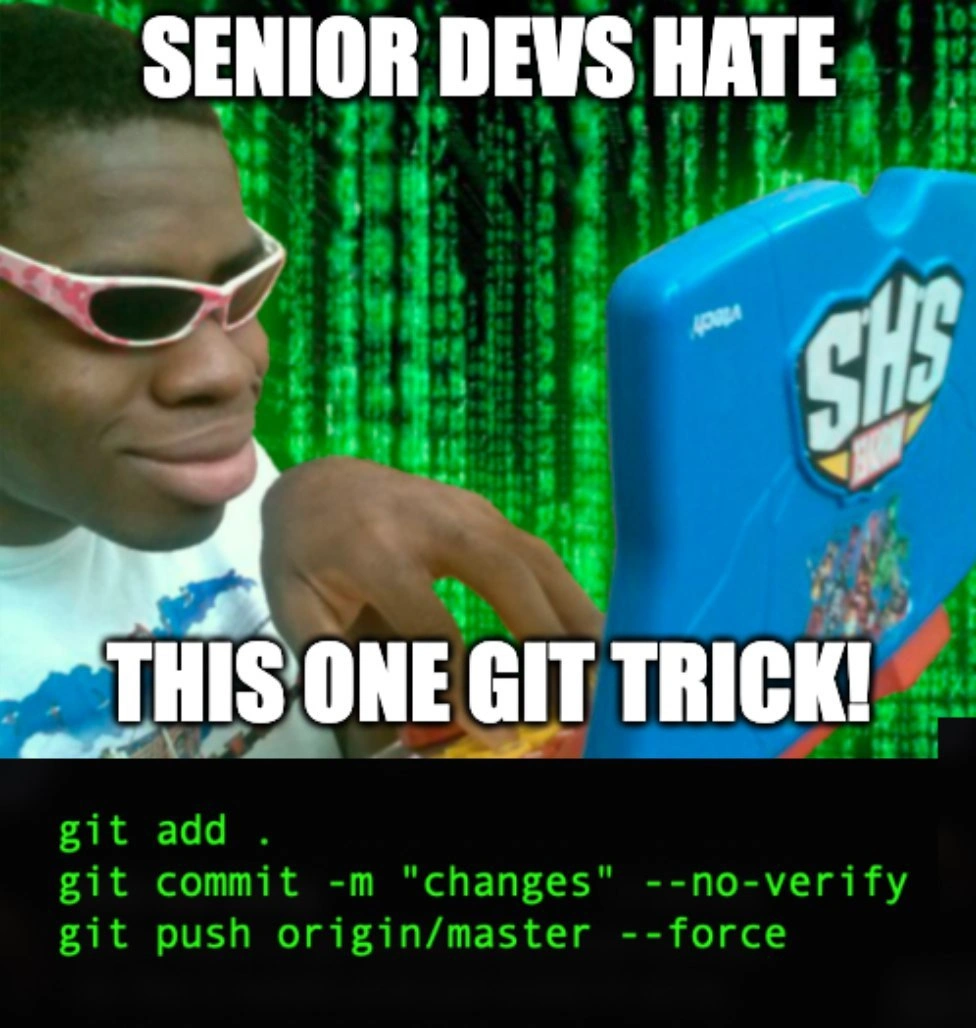
Force pushing to master: the outrageous git trick seniors despise
Why is this VersionControl meme funny?
Level 1: Big Shortcut, Big Mess
Imagine you’re playing a board game with your friends, and one kid suddenly decides to break all the rules to win instantly. He grabs his game piece and jumps straight to the finish line, declaring, “Haha, I won! See, what a great trick!” Now, how would everyone else feel? They’d probably be upset or shocked, because he didn’t play by the rules and ruined the fun and fairness of the game. In this meme, the young guy on the toy laptop is like that kid. He found a “shortcut” in coding – doing things super fast by ignoring all the normal steps – and he’s acting like it’s a clever trick. But what happens when you skip all the rules? You make a big mess. In a coding team, those rules (like checking your work, reviewing it with others, and not messing up the shared project history) exist to keep everything working smoothly. When someone ignores them, it might feel like they got things done quickly, but it usually causes confusion and breaks things for everyone else. That’s why the experienced developers (“the seniors”) are horrified – just like the other kids in the board game would be mad at the cheater. The meme is funny because we all recognize that cocky feeling of wanting to take a shortcut, and we also know how badly it can end. It’s basically saying: “Sure, you can do that crazy shortcut… but you really shouldn’t, unless you want everyone to be angry and the whole game (or project) to fall apart.”
Level 2: Skipping Safety Nets
Let’s break this down in simpler terms. This meme is about Git, which is a popular version control system that developers use to keep track of code changes. The main branch (called master in this meme) is like the official storyline of the code – it’s where the code that everyone trusts and uses is kept (these days many projects call it “main” branch, but it’s the same idea). When you work on a team, you don’t usually change this official story without letting others review your changes first, because you could introduce errors or conflict with what someone else is doing.
Now, what is our cheeky young developer doing? He’s using a sequence of Git commands that effectively skips all the safety nets that are normally in place:
git add .– Theaddcommand tells Git to start tracking changes in files, preparing them for a commit. The dot.means “add everything in the current directory”. So if he changed 5 files, all 5 get staged at once. This is a quick way to stage changes, but it can be risky: it might include files you didn’t intend to commit (like temporary files or debugging changes). Seasoned devs prefer to be selective (e.g.,git add file1.js file2.js) to make sure they know exactly what they’re committing. Usinggit add .is like saying “eh, just take everything I did, no questions asked.” It’s convenient, but a bit indiscriminate.git commit -m "changes" --no-verify– Here, he creates a commit (a recorded snapshot of the staged changes). The-m "changes"part gives a commit message of "changes". That message is extremely vague – typically commit messages should say something like "Fix login bug" or "Add feature X to homepage" so everyone knows what the commit is about. Just saying "changes" is unhelpful to anyone who later looks at the history; it’s almost like labeling a storage box as "stuff". Now, the--no-verifyflag is important: Git normally can run pre-commit hooks, which are like little scripts that run automatically when you commit. These might do things like run your tests, check your code style, or ensure you haven’t left any debug statements. They’re basically quality checks.--no-verifytells Git to skip those checks. So he’s deliberately bypassing any automated safeguards that would normally run when committing. Maybe there’s a test that would have failed or a linter that would have complained – he doesn’t want to deal with it, so he doesn’t even let them run. This is like saying “I’m not going to proofread or check my work at all; I’ll just submit it.” It’s faster, sure, but obviously riskier. The result is a commit that might contain sloppy or broken code (which the checks might have caught) and with a message that tells colleagues nothing useful.git push origin/master --force– Finally, this command takes the commit and pushes it to a remote repository namedorigin(which is usually the main server or source where everyone else pulls from) into themasterbranch. Normally, if your commit history has diverged from the remote (for example, if someone else updated master while you were working), Git will stop you and say you need to merge or pull first – it’s a safeguard to prevent you from accidentally overwriting other people’s work. The--forceoption basically says, “I know my history is out of sync, but push anyway and override whatever is there.” This is why it’s so dangerous: it will make the server’s master branch match exactly what this guy has locally, even if that means some commits on the server get overwritten or dropped. In a typical workflow, instead of pushing to master directly, a developer would push to a separate feature branch (like their own copy of the code changes) and then open a Merge Request or Pull Request so that others can review the changes and approve them before they go into master. By force-pushing directly to master, he’s skipping that review process entirely. It’s basically going “I don’t need anyone else to look at this, let’s just put it in the main codebase now.” If other developers have been working off the old master, now their view of history is different – they’ll have to reconcile that when they next sync with the repository. This often causes headaches like merge conflicts (when two people changed the same part of code in different ways) or confusion because the commit they saw yesterday on master is suddenly gone or replaced. Many teams protect the master branch to disallow pushes without review or to reject non-fast-forward updates (which a force push bypasses). The fact that he can do this implies either those protections are off or he has high privileges and is using them recklessly.
So, in real-world terms, what’s happening is he’s bypassing code review, skipping test checks, and throwing his code straight into the shared codebase. This is why the meme labels it as an “outrageous git trick.” It’s outrageous because it goes against VersionControlBestPractices. Usually, best practice is:
- Write clear commit messages.
- Run and pass all tests/linters (don’t use
--no-verifyunless absolutely necessary). - Get your code reviewed (don’t push to master directly; open a pull request).
- Don’t rewrite shared history (avoid force-pushing to a branch others use, especially
master).
He ignored every one of those. Now, the format of the meme text – “SENIOR DEVS HATE THIS ONE GIT TRICK!” – is mimicking those clickbait ads you see online, like “Dentists hate this one weird trick for whitening teeth” or “Doctors don’t want you to know this secret.” It’s a joke that this behavior is being advertised as if it were some genius shortcut or forbidden knowledge that “they” don’t want you to have. In reality, seniors “hating” it is tongue-in-cheek; of course they hate it, because it’s bad practice, not because it’s giving juniors some magical advantage. The meme flips the script of clickbait: here the “trick” being peddled is clearly bad. And anyone experienced (the seniors) reacts with horror, not because their authority is undermined, but because they foresee a train wreck coming.
The image itself adds to the humor: we’ve got a young guy smirking with pink sunglasses, typing on what is obviously a toy laptop (it even says some toy brand on it). In the background is the Matrix code waterfall effect – bright green text on black, streaming down – which is a classic representation of “hacking” in pop culture. The combined effect: it portrays this fellow as a wannabe hacker or a kid who thinks he’s doing something super cool and sneaky in code. The toy laptop indicates that he’s not truly a serious professional – it’s a playful jab that someone doing this “trick” is being childish or naive. The Matrix backdrop is hyperbole, implying he imagines he’s in some high-tech hacking scene, when in reality, what he’s doing is not cool at all in a professional context. It’s a visual gag that matches the textual gag: a “leet hacker” vibe for something that real devs consider a facepalm moment.
This is definitely a VersionControlHumor meme because it plays on the tools and habits of using Git, which developers deal with daily. If you’re a newer developer (or someone not deeply familiar with Git yet), the big deal is: this guy is basically ignoring all the collaboration rules. It might work for him in the moment (he does get his changes in, after all), but it’s likely to create a lot of problems for his teammates and for the project. Think of it like driving through every red light because you want to save time – you might not crash immediately, but you’re causing chaos and a crash is almost inevitable if you keep it up. That’s why experienced people react strongly. They’ve “crashed” before or seen accidents when someone didn’t follow the rules.
To connect it to a junior dev’s experience: almost every programmer has a “Git screw-up” story from when they were learning. Maybe you committed something you didn’t mean to, or you accidentally overwrote someone’s work, or you got a nightmare merge conflict that you had to ask a senior to help with. This meme is basically showcasing the ultimate Git screw-up scenario – and doing it intentionally as a “trick”! It’s funny once you know enough Git to appreciate how bad of an idea it is. Until then, just remember: --force is powerful and dangerous, and skip the --no-verify unless you really know why you’re doing it. Those “hated” rules (tests, code review, not force pushing) are there because teams learned the hard way that the alternative is a broken codebase and unhappy coworkers. In short, the meme exaggerates a junior mistake to an absurd level: it’s a DeveloperExperience nightmare presented as if it were a cool hack. Seasoned devs laugh (or groan) because it’s a shared cultural joke – we’ve all seen a little of ourselves or our past teammates in that overconfident meme kid at one point or another.
Level 3: Force Push Fiasco
At the senior developer level, this meme reads like a horror story in three lines of code. It highlights a scenario that combines multiple cardinal sins of collaborative programming, all in one go. The humor (tinged with anxiety) comes from the sheer audacity and recklessness of it. Why do experienced devs hate this “one git trick”? Because many of them have been on the cleanup crew after someone actually tried it. Let’s break down the cringe-inducing elements that make seasoned engineers instinctively recoil:
Adding everything blindly: The command
git add .indiscriminately stages all changes in the repository. It’s quick and convenient, sure – but it often means you haven’t reviewed what you’re committing. You might be scooping up config tweaks, debug logs, or half-written code. It’s the shotgun approach to version control. Senior devs encourage deliberate commits (adding only intended files) for a reason: to avoid the “Oops, I didn’t mean to commit that secret.env file” moments. Seeinggit add .is the first red flag that this user is just carpet-bombing the repository with changes without discrimination.Vague commit with hooks bypassed: Next,
git commit -m "changes" --no-verifyis basically a double whammy of bad practice. The commit message is literally"changes"– which tells us exactly nothing about what’s inside. This is the commit history equivalent of leaving a sticky note that says “did some stuff”. It frustrates any developer (especially seniors) who later tries to understand why those changes were made. It’s a pain point in code maintenance when commit logs are meaningless. And the--no-verifyflag? That’s explicitly bypassing any pre-commit hooks – perhaps tests, linters, or formatting checks that the team set up. So this person is not only committing who-knows-what, they’re also saying “I don’t have time for quality checks.” It’s a big no-no in Developer Experience (DX) and team culture: those hooks exist to catch mistakes early. Skipping them is like saying “I’m sure my code is perfect, no need to double-check” – famous last words in development. Experienced devs have learned (often the hard way) that skipping tests or linters leads to broken builds and nasty bugs. This line screams “I’m in a rush and I hope nothing goes wrong.” Spoiler: things go wrong.Force pushing to master: Finally, the pièce de résistance:
git push origin/master --force. This is the high-explosive of Git commands. On a healthy team, direct pushes to themasterbranch (often the main or production branch) are usually restricted or at least reviewed. And force-pushing to master is almost unheard-of outside of emergency or solo-project situations, because it can overwrite commits that other team members have based their work on. It’s the fastest way to create chaos in a shared repository. Think of all the work your colleagues pushed to master – a force push can make it vanish from the branch history (not permanently lost, perhaps, but no longer where it was). If someone else had commits on master that our friend didn’t have locally, his force push says “my version of history is the new truth; wipe out anything else.” This is how you get teammates frantically messaging, “Hey, where did my changes go?!” or why continuous integration suddenly reports half the tests failing – because maybe the code he forced through wasn’t even passing those tests. In terms of merge conflicts, this sets the stage for nasty ones: everyone who pulled the old master now has to reconcile it with the new master once they realize the history changed. It’s extremely disruptive. Senior devs often have near-PTSD flashbacks about this: they remember that one time an inexperienced colleague force-pushed and the whole team spent a day untangling the mess, diffing commits from reflogs to recover lost work. It’s CodeReviewPainPoints and VersionControlHumor rolled together: it’s funny as a meme because it’s true, but it’s also not funny when it happens to you.
So in summary, the meme is basically a triple violation of VersionControl best practices:
- Pushing straight to
masterinstead of via a reviewed pull request (bypassing CodeReviews entirely). - Rewriting the shared history with
--force, which can erase others’ commits or at least confuse the heck out of the team. - Skipping automated checks with
--no-verifyand providing a useless commit message, undermining code quality and traceability.
Each one of those alone is bad; combined, it’s a force push fiasco that triggers every alarm for a seasoned developer. The text at the top of the meme – “SENIOR DEVS HATE THIS ONE GIT TRICK!” – is styled like those clickbait ads (“Doctors hate him!”). This is intentionally tongue-in-cheek: the “one git trick” here is essentially “ignore all the rules.” Senior devs hate it for the same reason doctors would hate a “one weird trick” health hack that’s actually dangerous. It’s because we have a whole system of best practices and safeguards in place, and this trick is gleefully turning them off.
The image choice amplifies the joke. We see a grinning young guy in funky pink-white sunglasses hunched over a bright blue toy laptop (it even looks like one of those kiddie computers). Behind him is the iconic green “Matrix” cascading code effect. It’s the meme image often used to parody someone pretending to be a 1337 hacker (elite hacker), but in a totally unserious setup. This visual juxtaposition is comedy gold for dev memes: it implies “Look at me, I’m such a hacker genius, using my kiddie laptop to break all the rules.” The Matrix background is classic hacker movie imagery – in reality, of course, coding doesn’t look like neon green glyphs flowing on screen, but it’s an aesthetic that screams “hacker mode”. By putting that backdrop behind a guy with a children’s laptop, the meme mocks the overconfidence and naiveté. It’s saying: only someone ignorant or overly brash would think this “git trick” is something to be proud of. Seasoned developers know it’s a recipe for disaster, not a clever hack.
You can almost hear the facepalms hitting desks when a senior dev sees those commands. The humor comes with a side of pain: it’s funny because it’s a caricature of the worst-case commit, and we laugh, having learned (perhaps the hard way) never to do this. But it’s also a bit of a nervous laugh, because any dev team that actually experienced this will remember the scramble to fix the repository afterward. In a well-run project, you’d have safeguards: protected branches (to prevent pushing to master without review), CI pipelines that run tests (which --no-verify tries to dodge), and educated team members who know not to rewrite shared history casually. When those safeguards are absent or ignored, you get exactly what this meme depicts: a rogue “hacker” thinking he found a neat shortcut, and a bunch of horrified senior devs who now have to deal with the fallout.
Level 4: Timeline Tampering
Deep down, this meme spotlights the internal mechanics of Git’s version control and the peril of rewriting shared history. Git isn’t just a simple list of changes – it’s a distributed system tracking commits in a directed acyclic graph (DAG). Each commit is like a node with a unique hash, pointing to its parent commit. The branch master (usually the main code line) is basically a named pointer to one of these commits – the tip of that branch’s history. When our smirking friend runs git push origin/master --force, he’s essentially yelling at the remote repository: “Move the master pointer to my commit, no matter what!” This creates a non-fast-forward update, meaning he’s replacing the remote’s current history with a new one, possibly dropping commits that were there. Normally, Git rejects such pushes to prevent casual history nuking, but the --force flag overrides that safety. It’s like performing a bit of timeline tampering in a distributed timeline: he’s unilaterally rewriting the project’s history on the server.
Under the hood, a force-push to origin/master changes what commit hash the master branch on the remote points to. If the remote previously had commit C at the tip and he’s force pushing commit D instead, Git will oblige and make D the new tip, effectively orphaning C (and any of C’s descendant commits if they weren’t in D’s ancestry). Here’s a sketch of what that looks like in the commit DAG:
Before force-push:
A --- B --- C (origin/master)
\
D (developer's commit on his local branch)
After force-push:
A --- B --- D (origin/master now moved to D)
X C (C is orphaned - no branch ref)
In this diagram, commit C was originally at origin/master. Our eager developer had his own commit D based off B (perhaps he didn’t pull C at all). Forcing the push makes D the tip of origin/master, and commit C becomes dangling on the server (marked with X here). Anyone who had pulled C now has a divergent history: their local repo’s origin/master might point to C (or they have C in their history) while the actual remote master jumped to D. This disparity is what senior devs dread – it’s a recipe for confusion and merge conflicts. All other collaborators must now figure out how to reconcile this new history. They might see messages like “🚫 fatal: the upstream branch has been force-updated” when they try to pull or push. The only way forward is often to manually reset or sync with the new master, possibly discarding or re-applying their own work on top of D. In the world of distributed systems, consistency just took a hit – the team has temporarily lost a single, agreed-upon history until everyone realigns.
Now consider the git commit -m "changes" --no-verify part. Git allows commit hooks (like a pre-commit hook that runs tests or linters) to execute before a commit is finalized. Using the --no-verify flag is basically telling Git “skip all those checks; I don’t care if my code passes the tests or follows the coding standards.” It’s a deliberate override of quality gates. From a theoretical standpoint, those hooks are enforcing certain invariants or properties (say, all tests must pass to maintain software correctness). Skipping them is akin to ignoring an error condition in a program – you might get away with it in the short term, or you might have just committed a time bomb. If we think of the codebase as a state machine, the hooks verify that each new state (each commit) satisfies certain properties. --no-verify removes that verification step, so the commit could be introducing an invariant-breaking state. In other words, he’s bypassing local consistency checks for speed.
At an architectural level, force-pushing to a shared branch violates the assumptions of collaborative version control. It’s the opposite of a consensus algorithm – instead of everyone agreeing on the next state of the system, one actor unilaterally decides the state and forces everyone else to accept it by fiat. In a multi-player environment (which Git effectively is, with each developer’s repo like a node in a distributed network), this is jarring. No wonder most teams put branch protection rules in place (e.g., disabling force pushes or requiring up-to-date merges) to prevent exactly this scenario. It’s a bit like having a big red “Do Not Press” button on the production server – and this meme’s protagonist just slammed it, grinning. Senior engineers “hate this one trick” because it breaks the fundamental guarantees that make collaborative development sane: history integrity, code review processes, and automated testing workflows. By defying those guarantees, the --force with --no-verify combo essentially weaponizes Git’s flexibility against the team’s stability. The humor here, from a deep technical angle, comes from how absurdly against the grain this maneuver is: it’s using powerful features of Git (history rewriting, hook skipping) in the most reckless way possible. It’s the equivalent of exploiting an admin backdoor on your own project – yes, Git lets you do it, but with great power comes great responsibility (which our friend is completely ignoring). The meme gets a laugh (and a groan) because any seasoned developer recognizes that this “trick” is less a clever hack and more a teardown of all the safeguards that make modern software development manageable.
Description
Meme image shows a smirking young man in pink-white sunglasses hunched over a bright blue toy laptop, with cascades of green Matrix-style code filling the background. Bold white Impact text at the top reads “SENIOR DEVS HATE”, and a matching caption across the middle says “THIS ONE GIT TRICK!”. A black terminal-like panel along the bottom displays lime-green monospace commands: “git add .”, “git commit -m "changes" --no-verify”, and “git push origin/master --force”. The joke riffs on click-bait ads and highlights a reckless workflow that skips pre-commit hooks, bypasses reviews, and force-pushes directly to master - actions guaranteed to horrify experienced engineers aware of the merge-conflict and history-rewriting fallout
Comments
25Comment deleted
Alias `git push --force origin master` to `deploy.sh` and watch your “stream-aligned team” discover the true meaning of recovery time objectives
This is the Git equivalent of performing brain surgery with a chainsaw while blindfolded - sure, it's fast, but the post-mortem will reveal why we have code review processes, branch protection rules, and that one senior dev who still has PTSD from the great force-push incident of 2019
Ah yes, the legendary 'git push --force origin/master' - the nuclear option that transforms you from a team player into a solo developer real quick. It's like telling your CI/CD pipeline 'I don't care about your opinion' while simultaneously making every senior engineer within a 50-mile radius feel a disturbance in the Force. Bonus points for the '--no-verify' flag to skip those pesky pre-commit hooks that were definitely put there for no reason at all. Nothing says 'I've achieved enlightenment' quite like bypassing every safety rail the team spent months configuring, all while committing with the message 'changes' - because future you will definitely remember what that meant at 2 AM six months from now
“Senior devs hate this one Git trick”: add everything, skip hooks, and force-push to master - bypass governance, rewrite production history, and turn “branch protection” into next week’s postmortem
“--no-verify && push --force” is chaos engineering for Git - except the blast radius includes your org chart
Force-pushing 'changes' to master: the senior dev's 'I'll fix it later' that juniors inherit as eternal merge hell
git add . git commit --amend -m "changes" --no verify git push origin/master --force Comment deleted
That's a crime. Lol Comment deleted
Too evil to even amend it too. Tho force will drop additional changes on top of local branch anyway, soo Comment deleted
Are you looking for a job? I want you as team leader. Comment deleted
lol I'm in an internship rn & after that I still have a year of school to finish Comment deleted
Git reset . --hard Comment deleted
Skill issue. I use this all the time. Comment deleted
You know what else is hard? https://youtu.be/_CCnkswncec?t=259 Comment deleted
Real Senior will set rules and don’t bother to worry this. Comment deleted
Real niggas use total commander instead of git. Comment deleted
real ones use cp Comment deleted
scp Comment deleted
Call of Duty® Points? Comment deleted
Child pornography Comment deleted
"git add ." alone garantees everyone in the team will hate you Comment deleted
rm -rf XYZ git clone XYZ Comment deleted
Forgot git init, no? Comment deleted
Forgot add remote "origin" Comment deleted
Lol:) Comment deleted


