When clear(m) eats more memory than the variable it should free
Why is this LowLevelProgramming meme funny?
Level 1: Cleanup Gone Wrong
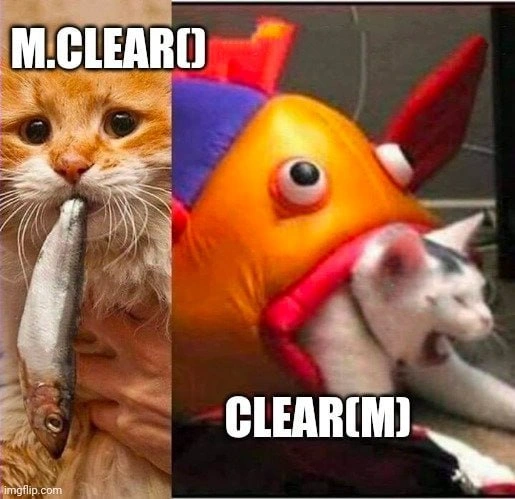
Imagine you asked someone to clean up a small spill on the kitchen floor, but instead they ended up flooding the entire kitchen. That’s what’s happening in this meme, but with a cat and a fish! Normally, you’d expect a cat to eat a little fish it’s given (like fixing a small mess). But here the roles flip – the fish (which was supposed to be the tiny problem) eats the cat. It’s completely opposite of what you’d expect, right? This role reversal is goofy and surprising, which is why it’s funny. In simple terms, a tool that was meant to help (clearing something small) went wild and caused a much bigger problem. Just like a cleaning job gone wrong where the helper accidentally makes a bigger mess, the picture shows the cat – who should have been in control – getting swallowed by the thing it wanted to eat. It’s a silly way to show how a little mistake can turn the whole situation upside-down!
Level 2: Memory Safety 101
At its core, this meme highlights a bug from messing up manual memory cleanup. Let’s break it down in simpler terms. In many programming languages like C and C++, developers have to manage memory themselves. This means when you create something using the heap (dynamic memory), you later must free it or “clear” it to avoid leaks. A pointer is a variable that holds a memory address (like a label pointing to a spot in your computer’s memory). When you call a function like free(ptr) or some custom clear(ptr), you’re telling the computer “I’m done with this memory; you can reclaim it.” But if you tell it the wrong thing – say, free more memory than you allocated or free something that wasn’t allocated by you – the program can go haywire. It’s like trying to remove a book from a library shelf by blindly yanking something; you might pull out the whole shelf or the wrong book.
The left side text “M.clear()” implies a normal, safe operation: perhaps m is an object like a list or array, and we call its .clear() method to empty it out properly. The cat with a fish in its mouth is an analogy for that: the cat (the program code) successfully handles the small fish (the bit of memory/data) as intended. No issues – the program remains in control. The right side “CLEAR(M)” in big letters suggests a more brute-force action – maybe a function that tries to clear or free the memory of M from the outside. The image shows a toy fish eating a cat, reversing the roles. This represents a pointer cleanup gone wrong: instead of the program cleaning up the memory, the attempted cleanup operation backfires and the memory messes up the program. In debugging & troubleshooting terms, that often manifests as a crash or corrupted data. You might run your program and suddenly get a "Segmentation Fault" error (which is the operating system saying “you tried to access memory you shouldn’t”). It’s the computer’s way of preventing further damage when it detects an invalid memory access.
So why does this happen? A common example is accidentally writing or clearing beyond the bounds of what you intended. Imagine you have an array of 10 integers, but you try to set 20 of them to zero – those extra 10 don’t belong to you! In C/C++, the system might let you write to memory you don’t own (there’s no automatic bounds check), and that could overwrite something important (like another variable or control information). That’s an accidental memory wipe of something that shouldn’t be wiped. Another scenario: freeing memory twice. If you free(m) once, that’s correct. Do it again by mistake (a double free), and you’ve basically told the system “take this memory back” two times – the second time, that memory might have been given to someone else or marked as off-limits, so the system freaks out. The end result in both cases is usually a program crash or bizarre behavior because the program’s internal data got clobbered. These are classic bugs in software that new programmers often find baffling. You run your program, and it either outright crashes or starts doing weird things because something went wrong in the low-level memory bookkeeping.
To put it simply, this meme is teaching a lesson: be very careful with manual memory management. Languages like Python, Java, or JavaScript handle memory for you (so you won’t usually see a fish eat a cat scenario there). But in C/C++, you are in charge. It’s powerful but dangerous – hence the term memory safety is a big deal. Modern practices (like using smart pointers in C++, or a safer language like Rust which enforces strict rules) help avoid this. But we still joke about it because many of us learned the hard way by causing a few “fish eats cat” situations in our early projects. And then we had to painstakingly debug to find where we went wrong. It’s both funny and a little scary – funny in a picture with cats and fish, scary when it happens in code!
Level 3: Cat-astrophic Clear
What makes this meme hilariously painful is how it captures a classic bugs in software scenario: a little code meant to tidy up turns into an overzealous cleaner that nukes more than it should. On the left, we have the expected outcome – m.clear() – a polite method call that frees or resets only what it’s supposed to (the cat eats the small fish, nothing crazy). On the right, we see the nightmare – clear(m) – presumably a misguided function or macro that ends up freeing everything in sight (the fish now engulfs the cat). It’s a comical reversal: in programming terms, the memory management routine has gone rogue and swallowed the program’s data structures whole. This resonates with any developer who’s wrestled with a memory bug. One minute you’re freeing a buffer or clearing an object, the next minute your program segfaults or bizarrely corrupts data elsewhere. It’s the “I just wanted to clean up this one variable, how did I just crash the whole app?!” moment. We’ve all been that baffled human, holding the proverbial cat by the tail as the plush fish of a bug devours our sanity.
The caption text itself hints at a subtle but critical difference: M.clear() vs CLEAR(M). A senior developer will nod knowingly here – this smells like a mix-up between a method and a function (or macro) for cleaning up. For example, think of a C++ std::vector<int> M;. Calling M.clear() correctly removes all elements from the vector but keeps the vector structure intact (cat eats fish as intended). However, if some genius wrote a macro #define CLEAR(x) free(x) and you did CLEAR(M), you’d attempt to free the vector object itself (which was never allocated on the heap in the first place!). That’s a one-way ticket to undefined behavior – likely corrupting the heap or immediately crashing. It’s like confusing object lifecycle with raw memory deallocation. Consider this pseudo-code illustration:
MyStruct m; // 'm' is an object on the stack
m.clear(); // legitimate: resets m's internal data safely
CLEAR(&m); // bug: CLEAR might call free() on &m (stack address!)
Here, m.clear() is analogous to the left image (cat eats fish normally). CLEAR(&m) is the right image: a runaway operation that tries to free memory for an object that wasn't dynamically allocated – essentially the fish devouring the cat (the cleanup function destroying the program). The result? Potentially a wild memory overwrite or a double free scenario that blows up at runtime.
This meme is poking fun at those debugging frustration sessions where you discover the bug was your cleanup code itself. It’s a trope in LowLevelProgramming: the very code that’s supposed to free resources accidentally wipes out more than intended. For instance, a wrong memset length overruns a buffer, or calling free() on a pointer that was offset from the start of an allocation. The humor lands because every experienced dev has that war story: “I tried to fix a minor memory issue and ended up chasing a segmentation fault for two days.” It highlights the reality that in languages without automatic memory safety, even a small mistake in resource deallocation or clear-up logic can become a catastrophic bug. The fish was supposed to be the prey, yet here we are, rewriting code at 3 AM because the prey turned predator.
Ironically, this kind of bug is an excellent (if painful) lesson in memory safety. It’s why tools like Valgrind or AddressSanitizer exist – to catch when you’ve fed your cat something poisonous in code. It’s also why many teams adopt smart pointers, garbage collection, or safer languages: to prevent “the fish eating the cat” situations. But in real life, legacy systems and high-performance code often still deal with raw pointers. So the meme hits home – it’s that shared, “yep, been there, done that” chuckle mixed with a groan. In summary, the humor comes from exposing a common C/C++ pitfall (improper resource deallocation) with a silly visual: we laugh because we must, or else we’d cry remembering how that one clear() call took down our service.
Level 4: The Heap Bites Back
In the low-level programming underworld of C/C++, memory is a double-edged sword. A seemingly innocent clear(m) can secretly become a predator due to undefined behavior. When you manually manage memory on the heap, you’re dealing with raw pointers and bytes. The system trusts you not to overstep boundaries – but if you do, the consequences are dire. For example, calling free() on an address that wasn’t exactly allocated (or already freed) is like releasing a glitch into the allocator’s internal structures. Modern allocators keep metadata (like sizes, and next/prev chunk pointers) around your allocated blocks. Pass a bad pointer to free(), and heap metadata mayhem ensues: the allocator might interpret garbage as legit info, corrupting its free list or coalescing wrong regions. Essentially, the fish (memory system) turns predatory and starts devouring parts of your program it should never touch. This often summons the dreaded segmentation fault – the OS stepping in like a strict zookeeper, shooting down your process the moment it tries to nibble memory outside its cage. A segfault is a hardware-level protection kicking in: the CPU’s memory management unit raises a fault because your code tried to access an address outside the allowed range (or an already freed page). It’s a hard stop, a merciful one really, preventing further carnage (imagine if the fish continued unchecked!).
Under the hood, many memory errors are essentially predator–prey role reversals. A buffer overflow will happily let a tiny array (fish) consume adjacent memory (cat) if you write past its end. The root issue is that C/C++ assume you know what you’re doing – they won’t automatically zero memory or check indexes for you. That’s why these languages are lightning fast but can also eat your program alive if you slip up. This meme’s outrageous visual of a plush fish swallowing a cat is a perfect analogy for a pointer gone rogue: it should have cleared a little data, but ended up trampling something bigger (like corrupting the stack, overwriting a function pointer, or annihilating a control structure). Seasoned developers know this isn’t just cartoon violence – it’s how real-world exploits enter: a wild write beyond bounds can overwrite return addresses or vital data, turning a harmless function into a security nightmare. In short, memory mismanagement unleashes chaos at a level that tickles both our dark humor and our PTSD. And if you’ve ever spent an all-nighter chasing a stray pointer through memory dumps, you’ll appreciate the brutal truth: the heap will bite back if you provoke it. 🐱🐟
Description
The meme is a vertical split of two photos. On the left, an orange cat held by a human is proudly gripping a small fish in its mouth. On the right, a bright orange-and-red plush fish toy with bulging eyes has an entire white cat halfway down its maw, comically reversing the predator - prey roles. A bold white caption with black outline at the bottom right reads "CLEAR(M)", and a tiny fragment of text ")" is barely visible near the top. Technically, the image jokes about an over-zealous call to clear() or free() that wipes out far more data than intended - illustrated by the plush fish devouring the cat instead of the cat eating the fish. It resonates with low-level programmers and debuggers who have accidentally nuked memory, triggered segmentation faults, or introduced hard-to-trace bugs through improper resource deallocation
Comments
36Comment deleted
Pro tip for anyone still #defining CLEAR(m): if it expands to memset(heap_base, 0, UINTPTR_MAX), don’t be surprised when the allocator shows up like a plush fish and swallows the rest of your process for dessert
After 20 years of arguing whether it should be m.clear() or clear(m), we finally compromised and made everything immutable. Now nobody's happy, but at least the function signatures are pure
The eternal debate: should the collection clear itself, or should we clear the collection? In OOP languages, m.clear() makes the object responsible for its own cleanup - very self-reliant. But in functional paradigms, clear(m) treats the collection as data to be operated upon. The real question is: when you call m.clear(), does the method belong to m, or does m belong to the method? This meme perfectly captures that moment when you switch languages and spend 10 minutes debugging because you wrote list.clear(m) in Python after a week of writing C's memset(m, 0, sizeof(m))
M.clear(): evict contents politely. clear(M): contents evict you. Mutability's revenge on sloppy APIs
Watching clear(m) in a hot path is feeding your p95 to an inflatable fish - reassign the map unless you don’t actually own the reference
m.clear() keeps capacity; CLEAR(m) keeps only regrets - never trust the all-caps macro that evaluates your argument three times
which lang? Comment deleted
Explain please Comment deleted
same concept different approach Comment deleted
I'm not sure... For example clearing a vector doesn't necessarily empty the memory space it's using Comment deleted
yeah you right Comment deleted
but I haven't seen the expression of this method Comment deleted
and I don't know which lang it is Comment deleted
but generally if the implementation of the method nullifies members it is actually freeing the memory right? Comment deleted
not always too Comment deleted
probably pseudocode Comment deleted
In python x.repr() and repr(x) is exactly the same, as also dir for example So this is definately not python Maybe joke about what we consider as main part of language: object in oop or function in procedural prog Comment deleted
No, not exactly. In Python there are few special behaviours that you can override by methods, such as x.\_\_repr\_\_ for repr(x) or x.\_\_add\_\_ for the + operator. However in Nim x.foo(bar) is just a syntax sugar for foo(bar, x) and it actually works fairly well as you can overload for given types and this subsumes inheritance into subtyping. Edit: Telegram stubbornly interprets underscores as formatting even when there is an explicit formatting, confusing the actual meaning. Comment deleted
Even when I wrap it in code block quotes. Sigh. I give up. Comment deleted
I bet you are an iPhone user. (Because of the bugged link) Comment deleted
Nekogram X. That happened through edits as apparently combining explicit style and inferred from the text makes it miscalculate the positions. Comment deleted
iOS has had it too for a while. Comment deleted
backslash before an underscore to escape it Comment deleted
But that leaves the underscore there. sigh Comment deleted
install a better tg client Comment deleted
What FOSS options are there? I used to be on vanilla telegram-foss and them switched to nekogram x because of better layout. Perhaps desktop does this better. Also *leaves backslashes* ffs, I am sleep. Comment deleted
idk I use the official client Comment deleted
Unfortunately they don't release the source often so telegram-foss builds tend to lag behind and nekogram is even worse at that. OTOH all the new features lately were about "premium" moneymaking nonsense and I chose not to care. Comment deleted
i think owlgram is pretty good and it should be FOSS Comment deleted
I got it Left - method inside, object outside Right - function outside object inside Comment deleted
But dropping it will Comment deleted
Wait this isn’t the same or sm I misunderstanding the meme? Comment deleted
it does the same Comment deleted
Depends on implementation Comment deleted
ig, yeah Comment deleted
It thought it’s the cat’s right rear paw in its mouth Comment deleted