Skip to content
DevMeme
2840 of 7435
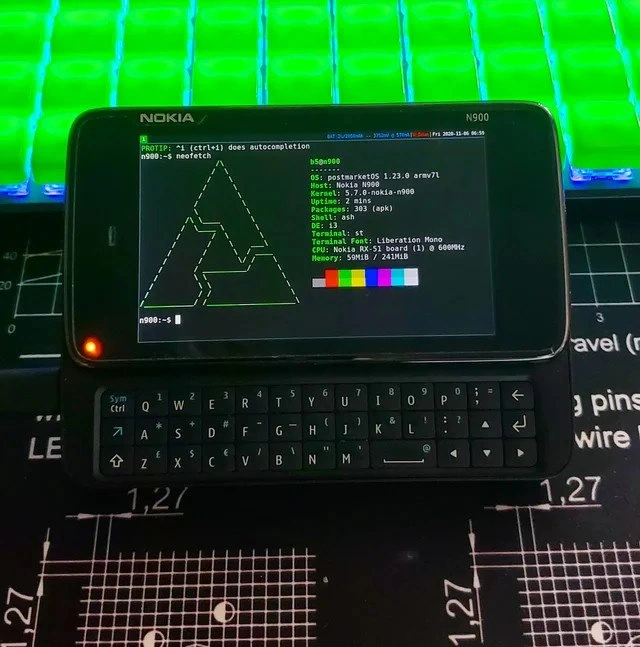
When the anime-themed GRUB menu greets you at every dual-boot startup
OperatingSystems Post #3131, on May 19, 2021 in TG

When the anime-themed GRUB menu greets you at every dual-boot startup

Why is this OperatingSystems meme funny?

Level 1: Starting Up in Style

Imagine you have a big fancy light switch that turns on two different lights: one orange (Linux) and one blue (Windows). Every morning, you choose which light to turn on. Now, normally the switch is pretty boring looking – maybe just some plain text labels. But you love cartoons, so you spend an entire afternoon decorating the wall around the switch with a huge poster of your favorite anime character. You even change the labels into a fun, swirly handwriting style. It doesn’t make the lights work any better or faster, but it sure looks cool every time you go to flip that switch!

That’s exactly what’s happening in this picture. Turning on a computer can sometimes let you pick between two “lights” (two operating systems). This person made that choice screen look amazing by putting a cartoon background on it and fancy letters. It’s like putting your favorite superhero on your notebook cover instead of just a plain cover. It doesn’t help you do your homework, but it makes you smile whenever you open it. 😊 The joke is that the developer spent a lot of time on this decoration. It’s a funny kind of distraction: they could have been doing real work (writing important code), but instead they were painting the “welcome sign” of their computer. It’s silly and endearing — every time the computer starts, an anime character says hello! It doesn’t change how the computer runs, but it definitely starts the day with a bit of personal style and joy. And that mix of serious technology with fun personal art is what makes everyone grin when they see it. It’s like seeing a very serious robot wearing a colorful party hat – a little goofy, very personal, and utterly charming.

Level 2: Boot Menu Makeover

Stepping down to a more junior-friendly view, let’s explain what’s happening in this image. We’re looking at a computer’s boot menu — specifically the GRUB bootloader screen — that appears when you have a dual-boot setup (meaning two different operating systems installed on one machine). In this case, the two OS choices are likely Ubuntu (a popular Linux distribution) and Windows. Normally, when you start a dual-boot computer, you get a plain text menu or a simple logo where you can pick which OS to start. But here, someone has themed it dramatically. There’s a stylish anime background image and even the text looks hand-drawn. This isn’t the default look at all; it’s a result of bootloader customization.

Let’s break down the elements: “Ubuntu” is highlighted, meaning if you hit Enter, the computer will boot Linux. “Advanced” probably refers to “Advanced options for Ubuntu” (usually containing things like older kernel versions or recovery mode). “Windows” is the option to boot into Windows. “UEFI Settings” likely is a custom entry that, when selected, will reboot the machine into the UEFI firmware settings (like the modern equivalent of BIOS setup). So this menu is offering various startup choices. GRUB is managing this because when you install Ubuntu alongside Windows, Ubuntu installs GNU GRUB as the primary bootloader in place of the Windows boot manager. GRUB will then show you this menu each time you power on, allowing you to choose between Ubuntu or Windows (or other options).

GRUB (Grand Unified Bootloader) is effectively the first program that runs after your PC’s firmware (BIOS/UEFI) does its initial checks. It’s responsible for loading and handing control to an operating system’s kernel. GRUB is very configurable via text files. Typically, you’d configure it by editing /etc/default/grub and perhaps some scripts in /etc/grub.d/, then running sudo update-grub to generate the final grub.cfg. By default, GRUB’s look is pretty spartan: maybe a purple or black background and standard white text (Ubuntu’s stock look is usually purple background with orange highlights, for example). But GRUB supports backgrounds and themes. You can specify an image to use as the background, change text colors, and even change the font and menu layout through a theme file.

How might one get an anime wallpaper into GRUB? Likely by adding a line in the config pointing to an image file. For instance, setting a variable like GRUB_BACKGROUND="/boot/grub/my_anime_wallpaper.png" in /etc/default/grub and then updating grub. If they changed the font to that handwritten style, they probably used a tool to convert a font into GRUB’s special format (a PF2 font). GRUB can’t use standard TrueType fonts directly (since at boot time it’s running in a limited environment without the full operating system services), so the user might have run a command like grub-mkfont -o /boot/grub/fonts/handwrite.pf2 /usr/share/fonts/truetype/handwrite.ttf 24. That would create a font file GRUB can use. Then they’d reference it in a GRUB theme or config. They might also have installed a complete GRUB theme package – these themes are collections of settings (sometimes found on forums or GitHub) that include background images and fonts to give GRUB a whole new look.

Here’s an example of what some lines in a GRUB config or theme might look like:

# in /etc/default/grub or a theme txt file
GRUB_BACKGROUND="/boot/grub/themes/anime/awesome_wallpaper.png"
GRUB_FONT="/boot/grub/themes/anime/coolhandwriting.pf2"
GRUB_TIMEOUT_STYLE=menu
GRUB_TIMEOUT=5   # seconds to automatically boot default
# ... other GRUB settings ...
# (After editing, run 'sudo update-grub' to apply changes)

In the snippet above, GRUB_BACKGROUND points to the anime image file (perhaps that stylized character we see). GRUB_FONT is set to a custom font file. GRUB_TIMEOUT is how long the menu shows before booting the default (they might have increased it to admire the artwork longer!). By editing these configurations and updating GRUB, the user achieves a personalized boot menu.

For a junior developer or someone new to OS configuration, the funny part is a bit more accessible: it’s the idea of spending time on something that’s technically impressive but not really necessary. Many of us start by personalizing our tools and environment. You might recall customizing your IDE color theme, your terminal prompt, or writing a fancy ASCII art banner for your shell – it’s fun! Here, the person has taken customization to the system startup level. The Linux vs Windows angle is noteworthy: Linux allows this sort of deep customization; Windows typically doesn’t let you put a custom anime picture behind its boot selection menu (at least not without unsupported hacks). So the meme also shows a bit of Linux pride — “Look what I can do with my open-source OS that you can’t easily do on Windows!” The OperatingSystems category is highlighted by this dual-boot context, and the Configuration aspect shines in how a plain grub.cfg file (or a theme config) can transform the user experience.

Another reason devs find this relatable is the phenomenon of productive procrastination. Instead of tackling whatever coding task or bug was on the to-do list, it’s easy to get sucked into tweaking your system. Editing a boot theme scratches a creative itch and gives a quick reward: every reboot now feels special. It’s like decorating your workspace – not directly coding, but it makes your environment feel uniquely yours. Of course, the joke is that this might be a form of procrastination; the code hasn’t been written, but at least the bootloader looks amazing! Colleagues might tease, “Hey, nice boot screen, but did that help fix the memory leak in our app?”

Finally, consider the risk-reward balance that junior devs might not realize: fiddling with boot settings is cool, but if you accidentally misconfigure GRUB, you could temporarily make your system unbootable. Then you’d have to do some command-line recovery with a live USB. It’s a rite-of-passage kind of mistake many Linux users have encountered. The person in the meme clearly succeeded — their menu is working and gorgeous. But the seasoned folks know to always keep a recovery drive handy when playing with boot settings!

In essence, at this level we understand the meme as: A developer has dually booted their computer with Linux and Windows, and rather than stick with the plain default GRUB boot menu, they customized it into an anime-themed showcase. It’s technically involved but doable, and it exemplifies the fun side of configuring an operating system. It’s humorous because it’s a lot of effort for a purely cosmetic reward – a classic dev indulgence.

Level 3: Kernels & Kawaii

At the highest technical (and humorous) level, this meme mashes up operating system bootloaders with anime flair — a combination that only an enthusiast developer would concoct. We’re seeing a GNU GRUB bootloader screen that’s been customized to feature a stylized anime wallpaper and even a quirky handwritten font. Why is this funny to seasoned devs? Because it’s a textbook case of yak shaving in the tech world: spending hours tweaking low-level configuration details (like the boot menu’s aesthetics) instead of actually writing or shipping code. It’s the kind of lovingly excessive customization that senior engineers chuckle at because, well, we’ve all been there (often at 3 AM).

From an experienced perspective, the humor comes from the contrast between the mundane seriousness of a boot process and the playful personal touch of an anime theme. The bootloader is supposed to be a no-nonsense piece of software that simply loads your OS; it usually greets you with a plain text menu or a corporate logo if you’re on Windows. But here, it’s transformed into a canvas for otaku creativity. The menu entries – “Ubuntu”, “Advanced”, “Windows”, “UEFI Settings” – float on a dark background beside an anime character’s face. This suggests our developer has edited the GRUB configuration (grub.cfg) to load a custom GRUB theme: likely specifying a background image and maybe even generating a custom font (GRUB uses .pf2 bitmap fonts, so someone possibly ran grub-mkfont on a fancy handwritten TTF font). The result? Every time the machine boots, an anime protagonist literally looks back at the developer while they decide between Linux or Windows.

There’s rich irony here. Dual-boot setups already imply a user who can’t give up either Linux or Windows, juggling two worlds. But instead of just tolerating the vanilla GRUB menu, this person went full-on bootloader customization mode. It’s as if they said: “If I must see this boot selector every day, it might as well spark joy!” This resonates with veteran devs because it’s a shared trope: engineers often procrastinate or indulge in side projects like pimping out their dev environment or boot sequence. It’s funny because it’s impractical yet relatable — polishing something that has zero impact on product deadlines or performance. The code isn’t getting written faster, the feature isn’t shipping sooner, but darn if that boot menu isn’t a work of art!

Let’s not ignore the technical guts: GRUB (GRand Unified Bootloader) is highly configurable, but also finicky. Seasoned folks know that messing with grub.cfg or theme files is a delicate dance. One wrong setting in /etc/default/grub and you might end up staring at a rescue shell with a blinking cursor instead of your OS choices. Getting a high-res anime image to display during pre-boot involves understanding your firmware’s graphics support (thankfully modern UEFI firmware can supply a nice framebuffer for GRUB to show graphics). There’s even a menu entry for “UEFI Settings” in the screenshot – a clue that this GRUB installation is aware of the UEFI firmware interface, and the user added a shortcut to jump into BIOS/UEFI config from GRUB. That’s a power-user move; it saves the trouble of mashing F2/Delete on startup. Only an experienced tinkerer goes that far, which is why other seniors grin at this: it’s equal parts impressive and absurd.

Historically, Linux users have enjoyed control over such things in a way Windows users can only dream of. Windows’ own boot manager is pretty locked down (just a bland blue menu or logo), whereas GRUB on Linux lets you go wild: custom colors, background images, even themes that completely reskin the interface. (There’s a whole cottage industry of bootloader themes on forums and places like DeviantArt or r/unixporn.) Senior devs remember earlier bootloaders like LILO (text-only, no frills) – customizing those meant maybe an ASCII Penguin or two. But now, with GRUB2 and modern hardware, you can have a 1080p anime splash screen if that’s what your heart desires. We’ve come a long way in OS boot configuration culture, and possibly gone full circle to where boot time isn’t just about loading an OS, but also about flexing your personalization.

This meme also pokes fun at priorities. The subtext is, “Sure, the project’s deadline is looming, but hold on – my boot menu needs more anime!” 😅 It highlights that quirky developer impulse to perfect trivial details. In real workplaces, this might be analogous to bike-shedding: focusing on something flashy but insignificant while the core tasks languish. A cynical veteran might joke that the advanced option listed in the menu isn’t just for kernels – it’s for the advanced level of procrastination achieved. Yet, on the flip side, every engineer knows the joy of seeing a machine reflect their personality. A custom boot screen might be pointless for productivity, but it sure can make a boring reboot more fun. In an on-call 3 AM situation, seeing your favorite anime character pop up could be the only thing keeping you sane while you troubleshoot a crashed server. In short, it’s humor born from the collision of low-level system engineering with high-level nerd fandom. It’s absurd, it’s unnecessary, and it’s totally delightful to anyone who’s ever spent more time tweaking their tools than using them.

PM: “Did you fix that production bug?”
Dev: “Not yet, but check out my GRUB menu – it’s got anime now!”

Description

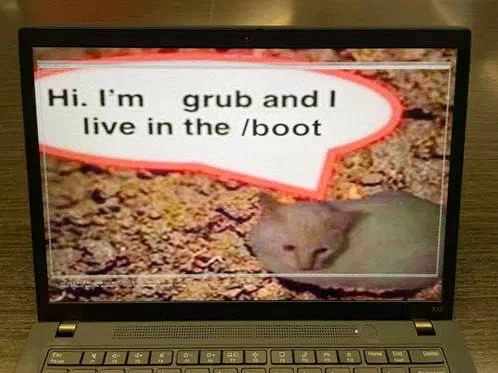
Photo of a Huion pen-display monitor showing the GNU GRUB bootloader screen. A dark, stylized anime wallpaper fills the background, with its central character blurred out for censorship. The boot menu appears in a hand-written white font, listing: "ubuntu" (highlighted), "advanced", "windows", and "settings" against a nearly black backdrop. The image captures the quirky result of customizing grub.cfg - an anime splash screen now precedes every Linux-and-Windows dual-boot decision. It humorously reflects how developers can spend hours tweaking bootloaders and theming instead of actually shipping code
Comments

6
Anonymous ★ Top Pick I’ve spent so long perfecting this anime-themed GRUB screen that the bootloader now has more front-end polish than our React app - yet another yak shaved before the kernel even boots
  1. Anonymous ★ Top Pick

    I’ve spent so long perfecting this anime-themed GRUB screen that the bootloader now has more front-end polish than our React app - yet another yak shaved before the kernel even boots

  2. Anonymous

    The anime wallpaper on your GRUB menu is the closest thing to documentation you'll find for why the legacy system still requires both operating systems to compile

  3. Anonymous

    When your GRUB bootloader has better production values than your company's entire frontend - because if you're going to spend 20 minutes configuring boot themes instead of fixing that P0 bug, you might as well make it look like a Studio Trigger anime opening. Bonus points for the 'WINDOWS' option still being there as a reminder of past sins, like keeping your ex's number 'just in case.'

  4. Anonymous

    My laptop does progressive delivery with every kernel update; GRUB remains the only reliable rollback UI I own: Advanced -> previous kernel

  5. Anonymous

    Blue-green for laptops: GRUB defaults to Ubuntu, rollback is one arrow to Windows, and "Advanced" is where you pray at least one kernel still likes your GPU drivers

  6. Anonymous

    GRUB: Kubernetes for bare-metal OS orchestration, minus the YAML hell

Use J and K for navigation