
Skip to content
DevMeme
583 of 7435
The Compulsive `ls`: A Developer's Nervous Tic
CLI Post #667, on Sep 17, 2019 in TG

The Compulsive `ls`: A Developer's Nervous Tic

Why is this CLI meme funny?

Level 1: Better Safe Than Sorry

Imagine you have a toy box in your room. You know all your favorite toys are inside because you put them there yesterday. But still, every time you go to play, you open the box and look inside again, just to be 100% sure all the toys are there. 😉 It’s a bit funny, right? You already remember what’s in there, but you check anyway to feel safe.

This meme is saying programmers do the same thing with their computer folders. Even when they already know what’s in a folder, they can’t help but peek again by listing out the files. It’s like double-checking the door is locked even though you just locked it. There’s no real need, but it gives a little extra peace of mind. The joke is funny because it shows even very experienced computer people have these quirky, cautious habits — they always check “just to be sure.”

Level 2: When in Doubt, ls

In simpler terms, this meme is talking about a habit many programmers have when using the command line interface (CLI). The CLI is that text-only window (the Terminal) where you type commands instead of clicking icons. One of the most common TerminalCommands is ls, which lists all the files and folders in your current directory (like peeking inside a folder). For example, if you type ls in a folder, you might see output like:

$ ls  
README.md   src/   tests/   package.json

This shows you the contents of the folder you’re in. Developers use ls all the time to orient themselves. Now, what the tweet is joking about is a reflex that many terminal users develop: they type ls almost automatically, even when they already know what they're going to see. It’s as if their fingers have a mind of their own.

Why would someone do that? Imagine you've been working on a project for weeks. You practically memorized the files in that directory. Still, every time you cd (change directory) into it, you immediately ls to list everything. It’s a habit born out of caution and routine. One reason is a "just to be sure" attitude — in tech there's a saying "trust but verify" which means even if you trust something, it’s good to double-check. Here, the developer trusts their memory but verifies by listing the files one more time. Nothing usually changes in that split second, but it gives peace of mind that you didn't make a mistake like moving to the wrong folder or forgetting a new file.

For newer developers, using ls often is a way to not get lost. When you're first learning the CLI, you might not remember every file name or which directory you're in, so listing contents helps you find your way. For veteran developers, though, they might know the directory like the back of their hand. The funny (and relatable) part is that they still can't shake the habit of checking. It's like how a pilot might go through the same pre-flight checklist every single time, even if they've done it a thousand times before — it’s routine and caution rolled into one.

This pattern is extremely relatable in the developer community. It's a little quirk of the DeveloperExperience when working with text terminals. So many people have found themselves typing ls without thinking that when someone points it out (like in this tweet), everyone goes "Haha, I thought it was just me!" That’s why it’s funny: it’s DeveloperHumor based on shared experience. The numbers on the tweet (likes, retweets) show a lot of folks felt seen. It's a tiny pain point in daily development life — not a serious problem, but a funny annoyance you notice about yourself.

From a developer productivity angle, typing ls each time is a very small extra step, and for a fast typer it’s almost no time at all. In fact, many experienced devs do it so fast it’s part of their muscle memory, like a dance move in their command sequence. It even has some practical benefits: you verify you’re in the right place and remind yourself of all the files present before doing something. Think of times you might run a command like rm (remove a file) or git pull (update code) — running ls first ensures you won’t delete the wrong file or you know exactly what might change. So this terminal_muscle_memory habit is about being careful. It’s the CLI equivalent of glancing at a map before taking a turn, even if you think you remember the way.

In summary, the meme is highlighting a little inside joke among programmers: no matter how experienced you are, you might catch yourself doing unnecessary things on the command line just out of habit. It’s a fun reminder that even experts operate on autopilot sometimes. TerminalCommands like ls become second nature. The tweet’s author is basically laughing at themselves for doing something somewhat silly — and thousands of other developers laughed along because they do it too. When in doubt (or even when not in doubt), we ls!

Level 3: Terminal Trust Issues

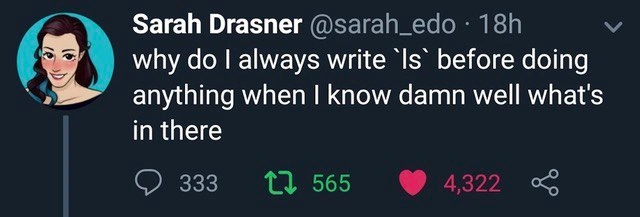
Even seasoned developers who live in the terminal have a hardwired reflex: type ls almost instinctively. This meme nails that compulsive behavior. The tweet jokes, “why do I always write ls before doing anything when I know damn well what's in there”. It's funny because the author is fully aware they “know damn well” the directory contents, yet they still run ls. It’s a self-aware poke at the muscle memory ingrained by years of using the CLI (Command Line Interface). Every experienced engineer reading it likely smirks and thinks, "Ha, I do that too."

Why does this habit exist? In one word: paranoia (the healthy kind). After enough time in production environments, developers develop “terminal trust issues.” You might think you remember every file in the folder, but there's a trust-but-verify mindset at play. Maybe you’ve been burned before: you assumed you were in the right directory or that no new files appeared, then ran a command and got unexpected results. Now, like a chef double-checking ingredients, you list the directory contents one more time. ls becomes a quick sanity check before proceeding, a way to verify your context. It’s like asking the computer, “Everything’s still where I left it, right?”

There's also pure muscle memory. The ls command (short for “list”) is one of the first commands you learn on Unix/Linux. Use it thousands of times, and typing ls at each prompt becomes as automatic as hitting Ctrl+S to save a file every few minutes (even if autosave is on!). The presence of a blinking cursor in a terminal can trigger a Pavlovian response: new prompt = type ls. It’s oddly comforting, giving you that familiar stream of filenames as a starting point. In fact, some developers joke that ls really stands for "let’s see what’s here (again)".

This developer humor resonates deeply because it’s a relatable dev experience. The tweet amassed thousands of likes because so many programmers have caught themselves doing exactly this. It highlights the gap between what we know logically and what our fingers do on autopilot. Even the most confident engineer has a slight flicker of doubt—“just triple-check we’re in the right place”—especially before a risky operation like deleting files or deploying code. It’s a mini ritual that says, “Better safe than sorry, even if I’m 99% sure.”

Interestingly, this habit is so common that many people customize their shell to do it for them. For example, one can set up an alias to automatically run ls every time they change directories:

# Auto-list contents on entering a directory (for bash/zsh)
alias cd='cd "$@" && ls'

Here the alias ensures that after you cd (change directory), ls runs immediately to show the new folder’s contents. It’s a quality-of-life tweak acknowledging that “Yep, I’m going to list those files anyway, so let’s automate it.” This might seem excessive, but it actually boosts developer productivity by reducing keystrokes for a TerminalCommands routine we do constantly. It’s a pragmatic embrace of the habit.

From an experience standpoint, always typing ls is mostly harmless — it costs a few milliseconds and can prevent costly mistakes. There’s an old sysadmin adage akin to “measure twice, cut once”: double-check your environment before you act. In the context of a shell, that translates to “list twice, execute once.” Seasoned devs have internalized that caution. They’ve seen things go wrong from wrong assumptions, so a quick ls is like glancing at your compass before marching on. Sure, you just looked at the map, but a quick re-check never hurts.

Ultimately, the meme is gently laughing at how DeveloperExperience (DX) shapes behavior: the command line’s minimalism (no visual clues, just a prompt) trains us to seek confirmation. It’s a comedic reflection on how working in text-only interfaces fosters quirky little habits. The real punchline is that even power users aren’t above these almost superstitious rituals. We trust our knowledge of the directory... but we verify anyway.

Description

A screenshot of a popular tweet by Sarah Drasner (@sarah_edo). The tweet reads, 'why do I always write `ls` before doing anything when I know damn well what's in there'. This post humorously captures a deeply ingrained, almost ritualistic, habit among developers and anyone who frequently uses a command-line interface. The act of typing `ls` (the command to list directory contents) serves as a mental checkpoint or a moment to pause and orient oneself before executing a more critical command, even when the user is fully aware of the directory's contents. It's a universally relatable developer quirk that speaks to the power of muscle memory and routine in a programmer's workflow

Comments

7
Anonymous ★ Top Pick Typing `ls` in a directory you haven't left is the developer's version of opening the fridge, seeing the same food, and closing it again. You don't expect a different result, but you do it for spiritual guidance
  1. Anonymous ★ Top Pick

    Typing `ls` in a directory you haven't left is the developer's version of opening the fridge, seeing the same food, and closing it again. You don't expect a different result, but you do it for spiritual guidance

  2. Anonymous

    When you’ve mmap’ed half your brain to bash history, an extra `ls` is still cheaper than the page fault

  3. Anonymous

    Running 'ls' before every command is just my terminal's way of asking "are you sure?" without the annoying popup dialog

  4. Anonymous

    We all know that developer who runs `ls` after every command like it's a mandatory syscall. It's the terminal equivalent of opening the fridge multiple times hoping something new appeared. The real pros have a three-step liturgy: `pwd` to remember where you are, `ls` to confirm what you already know is there, and `ls -la` because maybe you missed something the first time. It's not paranoia - it's defensive shell scripting. After all, the filesystem is eventually consistent, right?

  5. Anonymous

    ls is my idempotent preflight check - read‑only observability for $PWD that appeases the auditor in my head before I type the destructive stuff

  6. Anonymous

    Why trust memory when `ls -la` exposes the hidden .git gremlins plotting your next merge conflict?

  7. Anonymous

    Typing ls before anything is my human-in-the-loop CAP tradeoff: I spend a few milliseconds for consistency in my mental model and avoid an rm -rf . in the wrong mount

Use J and K for navigation


