The Bashrc Prank Even Prison Fears
Why is this CLI meme funny?
Level 1: The Fake Broken Door
Imagine that your house key still works, but a prankster puts a talking sign over the keyhole that says, “This key is broken” whenever you approach. You might waste hours replacing the key because you trust the message and never notice the sign. The big prisoner runs away because the tiny prisoner did that to a friend's computer—and arranged for the trick to return every time a new terminal opened.
Level 2: Bash Before Python
Bash is a command-line shell. It reads commands, expands special syntax, and launches builtins or programs. Python is a separate programming-language interpreter that Bash can start. When a user enters:
python app.py
Bash must decide what python means before Python ever sees app.py.
Several pieces participate in that decision:
- An alias replaces a command word with another piece of shell text, mainly for interactive convenience.
- A shell function is a named block of shell code and can also shadow an executable name.
- A builtin is implemented inside Bash itself, such as
cdoralias. PATHis an ordered list of directories Bash searches for executable files.- A dotfile is a normally hidden configuration file whose name begins with
., such as.bashrc.
The prank exploits the fact that developers often investigate the lower layers first. If python appears missing, they may run package managers or edit PATH. But an alias sits in front of that search. This is why type is useful: it asks the current shell what the name actually resolves to.
The error text is plausible for another reason. Some systems install the interpreter under python3 but do not provide a python command. A developer has probably seen command not found before, so the fake does not look exotic. Good error-message mimicry is social engineering for people who prefer stack traces to eye contact.
Misconfiguration errors differ from application bugs. The Python program may be perfectly valid, yet the surrounding environment prevents it from starting. A systematic troubleshooting order helps:
- Confirm the exact command and shell.
- Ask the shell how it resolves the name.
- Check aliases and functions before changing installations.
- Verify the executable and
PATH. - Inspect startup-file changes and reproduce in a clean shell.
The cartoon's tiny inmate is frightening because the alteration is small, persistent, and invisible in ordinary directory listings. A single character error in .bashrc can break a terminal honestly; a deliberate alias can make it lie.
Level 3: Crime Has a Syntax Error
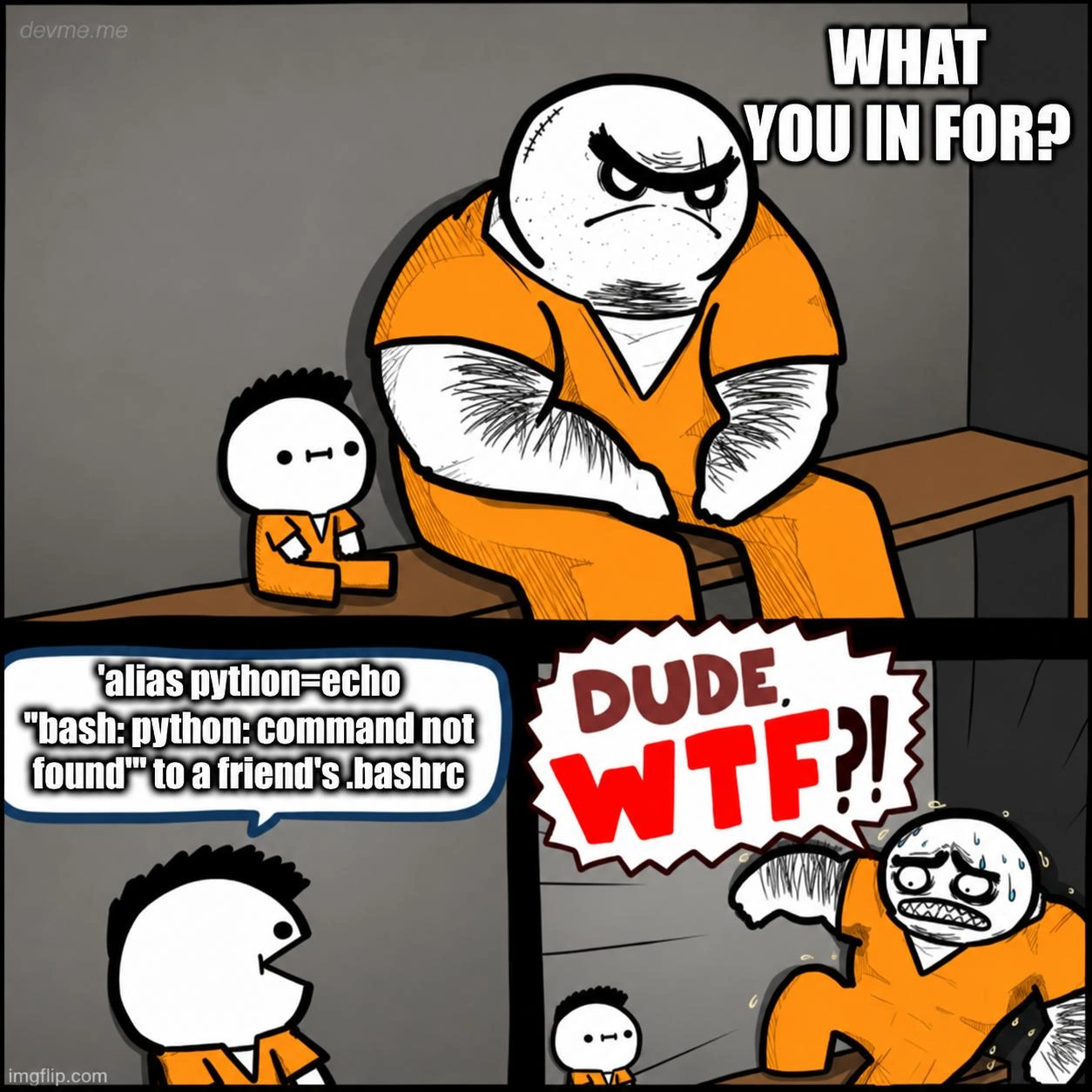
The visual hierarchy does most of the setup: a huge, scarred inmate in orange asks a tiny, expressionless prisoner, WHAT YOU IN FOR? The answer is not violence or theft but a one-line dotfile prank:
'alias python=echo "bash: python: command not found"' to a friend's .bashrc
The intimidating inmate immediately runs away sweating and shouts DUDE, WTF?! The scale reversal says that ordinary prison crimes are comprehensible; quietly corrupting a developer's shell environment is depravity beyond the yard's social contract. The small prisoner does not move because anyone capable of weaponizing .bashrc has already automated intimidation.
The intended mechanism is nasty because an alias is considered before Bash searches for an external command. If python expands to an echo command, typing python no longer reaches the real interpreter even when Python is correctly installed and present in PATH. The output resembles a genuine shell diagnostic:
bash: python: command not found
That sends the victim toward the wrong hypotheses: broken installation, bad virtual environment, changed PATH, missing package, or the modern distinction between python and python3. Reinstalling Python cannot fix a token that Bash rewrites before executable lookup. It is the command-line equivalent of replacing a fire alarm with a recording that says the batteries are missing.
There is, however, a glorious second-order bug: the line shown does not correctly define the intended alias. If the outer single quotes are merely punctuation around the displayed command, Bash sees roughly this:
alias python=echo "bash: python: command not found"
The alias builtin accepts arguments in name=value form. Because the value echo is not grouped with the following message, Bash defines only:
alias python='echo'
It then treats bash: python: command not found as the name of another alias to display and complains that no such alias exists. If the visible outer single quotes were copied literally into .bashrc, the shell would instead treat the entire quoted text as a command name and fail even more directly. The likely intended definition is:
alias python='echo "bash: python: command not found"'
So the meme about a configuration trap contains a quoting mistake in its own configuration trap. The feared mastermind would actually make python --version echo --version, which is less psychological warfare and more unusually personal tech support.
Even the corrected alias is an imperfect counterfeit. echo normally writes to standard output and exits successfully with status 0; a missing command diagnostic is written to standard error and the shell conventionally reports status 127. A human glancing at the terminal may be fooled, while a script that checks exit status or redirects streams may notice immediately. Authentic failure has an interface contract too.
The persistence comes from .bashrc, a hidden configuration file in a user's home directory. Bash reads it for interactive non-login shells, and login configurations often arrange to source it as well. Every new terminal can therefore reinstall the alias. Running unalias python fixes the current shell only; the next shell reads the malicious line again. That delayed resurrection is why dotfile bugs feel supernatural: the developer kills the symptom, opens another terminal, and the ghost has completed its startup sequence.
Scope matters. This prank mainly affects interactive Bash sessions in which alias expansion is enabled. It does not automatically affect Zsh, which has its own startup files, or every non-interactive script, where aliases are normally not expanded by default. A program launched through a shebang such as /usr/bin/env python3 also performs a different resolution path. python3 remains untouched unless separately shadowed. The meme depicts a targeted developer nuisance, not a universal operating-system infection.
The right debugging tool is shell introspection rather than another installer:
type -a python
alias python
command -V python
type -a can reveal aliases, functions, builtins, and executables associated with the name. alias python shows the alias definition directly. Quoting or escaping the command name, or using an appropriate command-resolution bypass, can help test whether a real executable still exists. After finding the source line, the durable repair is to remove it from the startup file and start or reload a clean shell. External which commands are less reliable for this investigation because they may report only executable files and miss shell constructs.
This is also a small security lesson. Dotfiles are not passive preferences; shell startup files are executed code. Anyone able to modify them can do much more than change colors or aliases. Teams that synchronize dotfiles, copy setup snippets, or run bootstrap installers should review changes and protect file ownership and permissions. The meme's prank requires access to the friend's account or files, but once that access exists, the alias is merely the clown horn on a much larger threat model.
The dark humor works because the damage is mostly time and trust. No interpreter has to be removed. The victim's mental model is attacked: a highly credible error appears at the exact moment a familiar tool should start. Debugging depends on believing observations, and forged observations turn expertise against the investigator. The more carefully the victim checks Python itself, the longer the one-line shell misdirection survives. Some crimes leave fingerprints; this one leaves a dotfile diff and a developer explaining for the fourth time that it worked yesterday.
Description
A three-panel, gray-walled prison cartoon shows a huge, scowling inmate in an orange uniform sitting beside a tiny, expressionless inmate and asking, "WHAT YOU IN FOR?" The small inmate answers that he added `'alias python=echo "bash: python: command not found"'` to a friend's `.bashrc`. In the final panel the previously intimidating prisoner bolts away sweating and shouts "DUDE, WTF?!" while the smaller figure remains motionless; `devme.me` and `imgflip.com` watermarks appear in the corners. The prank persistently shadows the real `python` command with a shell alias that prints a plausible missing-command error, making ordinary interpreter troubleshooting look like a configuration or installation failure.
Comments
1Comment deleted
Some crimes leave fingerprints; this one leaves a dotfile diff.