Skip to content
DevMeme
3497 of 7435
Angular Migration: The Copy-Paste Delusion
Frameworks Post #3833, on Oct 18, 2021 in TG

Angular Migration: The Copy-Paste Delusion

Why is this Frameworks meme funny?

Level 1: Square Peg, Round Hole

Imagine you have a set of puzzle pieces from an old puzzle and you try to put them into a brand new puzzle board. The pieces might look kind of similar, but they’re not made for that new puzzle, so they don’t fit. If you force them in, you just end up with a jumbled picture and lots of pieces popping out or breaking. In this meme’s story, one friend basically did that with computer code: they took code from an older Angular 6 project (old puzzle pieces) and dropped it into an Angular 11 project (the new puzzle board) thinking it would save time. But just like the wrong puzzle pieces, the old code doesn’t fit the new project – and the computer shows a bunch of error messages (like a big red warning saying “these pieces don’t go together!”). It’s funny because the friend who pasted the code is standing there looking proud, as if they solved the problem super fast, while in reality they’ve made a big mess that will take even more time to clean up. It’s a bit like someone confidently using a key from their old house on the door of their new house and then being surprised when the door won’t open and the alarm starts blaring. The humor comes from that silly confidence and the obvious incompatibility – we laugh because we know that shortcuts can backfire, and sometimes trying to cheat your way out of work ends up creating even more work!

Level 2: When Versions Collide

This meme highlights a classic frontend development problem: trying to mix code from one era with a framework from a later era. Angular is a popular framework for building web applications, and here we have two different versions of it colliding. Angular 6 (from around 2018) and Angular 11 (from 2020) might both be Angular in name, but under the hood they’re quite different. In software, a jump of five major versions usually means a lot of things have changed – new features get added, old ways of doing things get removed. It’s like the framework has grown up and maybe even changed its language a bit. So code written for Angular 6 isn’t guaranteed to understand Angular 11’s “language” without some translation.

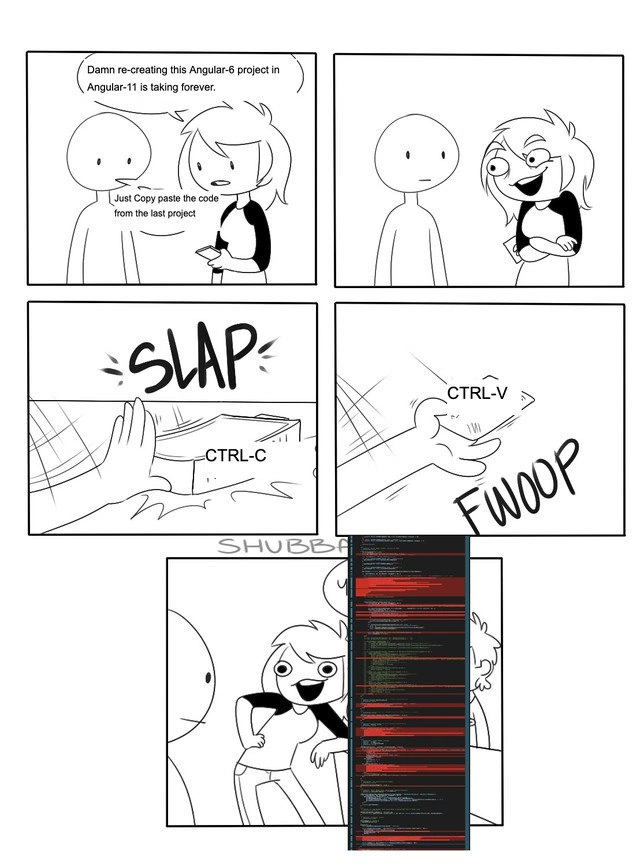
Now, one developer character in the comic is impatient with how long it’s taking to rebuild an old Angular-6 project in Angular-11. Their cheeky friend suggests a copy_paste_migration_strategy: “Just copy paste the code from the last project.” This is depicted literally with the keyboard shortcuts Ctrl-C (copy) and Ctrl-V (paste). In the comic panels, a giant hand labeled "CTRL-C" SLAPs a pile of code (imagine grabbing all the source files), and then another hand labeled "CTRL-V" throws them into the new project with a FWOOP. These sound effects and visuals turn a normally invisible action (copying digital text) into a physical, cartoony gag – it’s showing the speed and violence of this hasty code dump.

At first glance, copy-pasting code seems like it should save time. The code worked in the old project, so why reinvent it? But here’s the catch: Angular 11 expects things to be done its way, and the old Angular 6 code doesn’t follow all those new rules. When the second developer dumps the old code into the new Angular-11 project, the code editor (or IDE) immediately redlines almost everything. Those red highlights in the final panel are TypeScript compile errors. TypeScript is the programming language Angular apps are written in. It’s like JavaScript with extra strictness – it checks your code for mistakes before you even run it. When you see red error messages, it means the TypeScript compiler is saying “Hold on, something is not right here, I can’t even build this app!”

So why are there so many errors? A few reasons:

  • Changed or removed features: Angular 11 might not have some of the functions or classes that Angular 6 code uses. For instance, if the old code used a networking module that was deprecated (marked as old and to-be-removed) in Angular 6, Angular 11 may have completely deleted it. The new project literally can’t find that code, hence an error.
  • Different syntax or requirements: Over time, Angular introduced stricter rules for how you write components and use features. For example, modern Angular requires specifying certain options in decorators (like telling @ViewChild how to look for an element, using { static: true }), whereas older code might omit that. The Angular 11 compiler will complain until you add the proper syntax.
  • Dependency mismatches: Angular projects rely on other libraries (for data handling, reactive programming with RxJS, etc.). An Angular 6 project likely used older versions of these libraries. Angular 11 uses newer versions. If you copy the old code, it might call functions from RxJS or others that have changed names or behaviors in the newer version. Think of it like trying to use an old charger with a new phone – the plug shapes don’t match.

For a junior developer, the key takeaway is that software frameworks are not static; they keep evolving. This is often referred to as FrameworkFatigue when developers feel tired trying to keep up. A project made in Angular 6 and a project in Angular 11 are related (like cousins, not twins). You can’t just drop one into the other without making a lot of adjustments – a process we call migration or refactoring. Proper migration might involve reading upgrade guides, using Angular’s CLI tools (ng update commands) to automatically transform some of your code, and carefully testing everything. Skipping those steps and doing a raw copy-paste is like trying to jam two puzzle pieces together that clearly don’t fit.

The humor in this meme resonates with developers because we’ve all witnessed someone try a quick fix like this. The second stick-figure’s overly happy face after pasting the code is funny because it’s so overconfident. Meanwhile, the first developer (and the audience) are staring at a wall of red errors. It’s the programming equivalent of someone confidently saying “I fixed it in one go!” while behind them everything is on fire. Those red error messages (the red_error_overlay in the image) indicate that the app won’t even start until all those issues are resolved. In real life, a cascade of compile errors can be daunting – you might have to go through them one by one, updating function calls, importing correct modules, and sometimes rewriting chunks of code.

In short, CopyPasteCoding from an old project to a new framework version backfires here. The meme uses a simple comic setup to convey a lesson: jumping between major versions of a framework like Angular is not trivial. It pokes fun at the idea that “copy and paste” could replace understanding and effort. For junior devs, it’s a cautionary tale wrapped in humor: know that upgrading frameworks requires care, and a quick shortcut might lead you straight into a FrontendPainPoints quagmire of errors. The best part is how the meme exaggerates it – with SLAP, FWOOP, and a proud pose – to make the situation lighthearted and memorable.

Level 3: Ctrl-V Catastrophe

In this comic, a frontend developer attempts the ultimate shortcut: plucking an entire codebase from an Angular 6 project and dropping it wholesale into a shiny new Angular 11 app. Any seasoned developer can see the punchline coming a mile away. Angular is a heavy-duty framework that evolves quickly – jumping five major versions is like teleporting across time. The result? A crimson cascade of TypeScript errors flooding the IDE, as shown in that tall vertical panel tinted blood-red. It’s a comically exaggerated (yet painfully relatable) scenario of “just copy-paste the code” gone horribly wrong. The meme nails a classic FrameworkFatigue moment: the false promise that older code will magically work in a newer environment, because hey, it’s all Angular, right? – only to smack into the harsh reality of breaking changes.

For experienced developers, the humor comes from recognizing the hubris. The stick-figure with the maniacal grin suggests an “easy” migration – a proposal we’ve all heard (or shamefully made) under deadline pressure: “Don’t reinvent the wheel, just reuse the old code!” But when frameworks like Angular bump major versions, they often introduce API changes, deprecations, and stricter rules that make blind copy-pasting a one-way ticket to dependency hell. The comic exaggerates this with onomatopoeic flair: SLAP (the Ctrl-C hand smacking down a thick stack of code) and FWOOP (the Ctrl-V hand flinging it into the new project). It’s a visual metaphor for the brute-force approach – essentially dumping a stack of legacy code into a modern codebase and hoping for the best. Of course, what follows is an error explosion – the code editor lights up in red like a Christmas tree of failure. In the final panel, the copy-paster is striking a proud “job done!” pose, oblivious to the chaos they’ve unleashed. That contrast is the comedic heart of the meme: confidence in a quick fix versus the reality of a bug-ridden mess.

Technically speaking, why is this CopyPasteCoding folly so catastrophic? Between Angular 6 and Angular 11, hundreds of changes accumulated. Angular is a strongly typed framework using TypeScript, so even small inconsistencies turn into glaring compile-time errors. For example, Angular’s compiler and runtime underwent a major overhaul (Angular 11 uses the Ivy engine with stricter type checking, whereas Angular 6 relied on the older View Engine). Deprecated APIs from Angular 6 were completely removed by Angular 11 – so functions, classes, or imports that existed in the old project might simply not be there anymore. The “it compiles, ship it” mantra falls apart when it won’t even compile! Instead of a smooth paste, the developer is greeted with red squiggly lines and error messages for nearly every file. We’re talking about things like mismatched package versions (rxjs, Angular libraries, etc.), changed component metadata requirements, new Angular compiler options, and updated language syntax. In other words, the codebase’s entire foundation is different.

Consider a concrete example: Angular 6 allowed using the old Http service from @angular/http, but by Angular 11 that module is long gone – replaced by HttpClient from @angular/common/http. If our hapless developer copy-pasted a service written for Angular 6, it might look like this:

// Angular 6 code snippet (works in Angular 6, but not in Angular 11)
import { Http } from '@angular/http';  // Old HttpModule import (deprecated by Angular 6, removed by v11)
import { Injectable } from '@angular/core';
@Injectable()
export class DataService {
  constructor(private http: Http) {}        // using old Http service
  fetchData() {
    this.http.get('/api/data').subscribe(result => {
      console.log('Data:', result);
    });
  }
}

When thrown into an Angular 11 project, the above code blows up with errors, because @angular/http no longer exists in newer Angular. The developer would be forced to refactor it to use the modern API, for example:

// Angular 11 code snippet (updated for Angular 11)
import { HttpClient } from '@angular/common/http';  // New HttpClientModule import
import { Injectable } from '@angular/core';
@Injectable()
export class DataService {
  constructor(private http: HttpClient) {}      // using HttpClient instead
  fetchData() {
    this.http.get<AnyDataType>('/api/data').subscribe(result => {
      console.log('Data:', result);
    });
  }
}

Now multiply differences like this across an entire project – from routing configuration changes to stricter TypeScript compiler settings (Angular 11 often enables "strict": true by default, uncovering any sloppy coding practices that Angular 6 might have tolerated). It’s a deluge of compile errors. To a seasoned dev, each red line in that IDE screenshot tells a story: maybe a missing static flag on a ViewChild query (a requirement introduced in later Angular), or outdated third-party libraries that no longer integrate cleanly. The meme’s red_error_overlay is basically the Angular compiler screaming “I have no idea what half of this code is!”

What really sells the joke is how earnest the copy-paster appears. We’ve all met that over-optimistic colleague (or early-career version of ourselves) who thinks migrating a project is as easy as Ctrl+C, Ctrl+V. The FrontendPainPoints on display are exaggerated, but not far from reality: front-end frameworks change so fast that a 3-year-old project can feel like ancient history. Frameworks like Angular do provide official upgrade paths (ng update schematics that step-by-step adjust your code), but skipping multiple versions is notoriously tricky. The meme cleverly illustrates the temptation of a quick-and-dirty solution and the instant karma that ensues.

In summary, the experienced perspective sees this comic and laughs in recognition. It’s a satire of real-life bugsInSoftware born from technical debt and naive shortcuts. No, you usually can’t just copy-paste a large Angular codebase across a half-decade of framework evolution and expect it to work. The crimson error cascade in the last panel is an almost PTSD-inducing sight for any senior developer who’s been through a crazy upgrade. Yet, the absurd confidence of the copy-paster is endearing and funny – we’ve all been that person under pressure, praying our hacky shortcut doesn’t blow up. Spoiler: it usually does, exactly as this meme depicts. 😅

Description

A five-panel, black-and-white webcomic illustrating a developer's painful experience with framework migration. In the first panel, a character despairs, 'Damn re-creating this Angular-6 project in Angular-11 is taking forever.' A second character naively suggests, 'Just Copy paste the code from the last project.' The second panel shows the first character with a devious grin, deciding to take the bad advice. The third and fourth panels depict the action with onomatopoeia: 'SLAP' for a hand hitting CTRL-C, and 'FWOOP' for a hand pasting with CTRL-V. The final panel shows the character standing proudly next to a catastrophically long scroll of code in an editor, almost entirely highlighted in red, signifying countless errors. This comic perfectly captures the futility and disastrous outcome of trying to shortcut a complex migration process between major framework versions, a scenario all too familiar to senior engineers who understand that breaking changes make a simple copy-paste a recipe for disaster

Comments

17
Anonymous ★ Top Pick An optimist sees the Angular migration guide. A pessimist sees the breaking changes. A senior engineer sees a six-month project and just starts rewriting it from scratch
  1. Anonymous ★ Top Pick

    An optimist sees the Angular migration guide. A pessimist sees the breaking changes. A senior engineer sees a six-month project and just starts rewriting it from scratch

  2. Anonymous

    Pro tip: paste your 2018 Angular 6 code into an Angular 11 repo and watch the TypeScript compiler turn into an archaeologist, unearthing every deprecated pipe, RxJS operator, and life choice you made in the last five years

  3. Anonymous

    The real horror isn't copying code from the last project - it's realizing your 'last project' was Angular 6 when the client specifically asked for 'modern Angular,' and now you're explaining why half the dependencies are deprecated and the other half are security vulnerabilities that npm audit won't stop screaming about

  4. Anonymous

    Ah yes, the classic 'Angular 6 to 11 in one CTRL-V' migration strategy - because who needs to read CHANGELOG.md when you can just let npm's peer dependency resolver write your resignation letter for you? Five major versions, countless breaking changes in the renderer, Ivy compilation, and TypeScript requirements, but sure, that code from 2018 will definitely compile in 2020. The terminal's red waterfall of errors is just Angular's way of saying 'I tried to warn you about ViewEncapsulation.Native being removed, but you were too busy being efficient.'

  5. Anonymous

    Ctrl+V into Angular: because peer deps are peer pressure you can't audit away

  6. Anonymous

    Ctrl‑C/Ctrl‑V is the Angular migration strategy that converts ng update into peer‑dependency arbitration - then Ivy and RxJS pipeables flood tsc with red squiggles

  7. Anonymous

    Migration strategy: Ctrl+C from Angular 6, Ctrl+V into 11; the TypeScript compiler immediately charged compound interest on every implicit-any and RxJS import

  8. @paul_thunder 4y

    angular говно, получается?)

    1. @sylfn 4y

      そうだよ。 [yes] Please use English as main language in this chat. If you want to write message in other language, please translate it to English. Государственный язык этого чата --- английский. Если пишешь на любом другом, надо перевести сообщение на английский, чтобы всем было понятно, что написано в сообщении. Approximate translation: so, angular is shit?)

      1. @paul_thunder 4y

        sorry

    2. @Araalith 4y

      Same shit for almost any languge or framework. Backward compatibility isnt honored nowadays.

  9. @paul_thunder 4y

    yeah: "So, angular is shit then?"

    1. @ledzz1994 4y

      Migration from 2 to 12 takes an hour for medium sized project

  10. @kitbot256 4y

    2021 @ angular hmmm... ok

  11. @sashakity 4y

    "damn, migrating this codebase from c to c++ is hard" "just copy paste the code from the last project" "error: iso c++ forbids conversion of string constant to char *"

    1. Deleted Account 4y

      const it

      1. @sashakity 4y

        oh, thanks

Use J and K for navigation