Efficient Code, Inefficient Results
Why is this Bugs meme funny?
Level 1: Speed vs. Safety (The Cake Analogy)
Imagine you’re baking a cake with your friend. You want to impress everyone by baking it really fast. The recipe says to bake it at 350°F for an hour, but you decide to crank the oven up to 500°F so it’ll cook in half the time. 🚀 Sure, it’s cooking faster, but when you take it out, the outside is burnt black and the inside is gooey raw. Now, you excitedly tell your friend, “Look, I saved 30 minutes, this is so efficient!” But your friend (who was expecting a nice cake) is just staring at this smoking, half-raw mess, completely confused and not happy. All they see is that the cake is ruined. In this story, you are like the developer bragging about the speedy code, and your friend is like the boss seeing the errors. The funny part is that you focused so much on doing it fast and “efficiently” that you forgot to do it correctly. The lesson: being fast doesn’t help if you break the thing you’re trying to make better! Just like a properly baked cake, code needs to be done right first, before you try to make it extra quick.
Level 2: Premature Optimization Woes
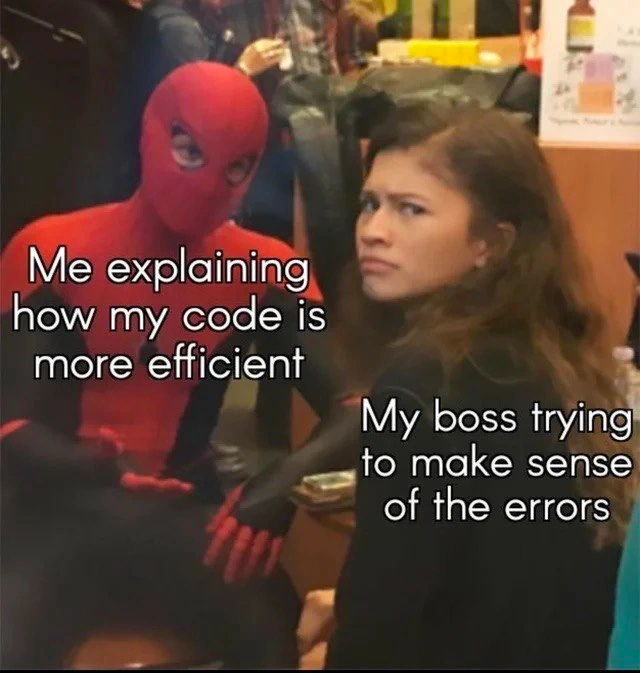
From a junior developer’s perspective, let’s break down what’s happening here. The meme sets up a situation many new coders might not have experienced yet, but it’s a rite of passage: efficiency vs. correctness. On the left, “Me explaining how my code is more efficient” – that’s the developer bragging about some improvement. Efficient code usually means code that runs faster or uses less memory/CPU. For instance, maybe they found a way to reduce the time complexity of a function (like from quadratic $O(n^2)$ to linear $O(n)$), or they optimized a loop so it does fewer operations. This is generally a good thing when needed – faster programs can handle more users or data.
However, the right side shows “My boss trying to make sense of the errors.” Uh-oh. That indicates the code might be efficient in theory, but it’s now throwing errors in the real world. An error in this context means the program is malfunctioning – perhaps crashing or producing exception messages (those scary multi-line stack traces you see when something goes wrong). The boss is looking at these error messages like, “What on earth happened?!” In software, we call these bugs – flaws in the code that cause incorrect behavior or crashes. When we say something went wrong in production, it means the bug is happening in the live application (the version of the software that real users or customers are using). A production bug is serious because it can affect users or business operations. So, if code is “efficient” but causing production errors, it’s a big problem. It’s like saying your car can go super fast now, but its wheels fall off whenever you actually drive it – not exactly a win. 🚗💥
This scenario highlights a common warning you might hear as a beginner: “Don’t optimize too early.” Why? Before making code faster, it’s more important that the code works correctly and is easy to understand. Premature optimization is when a programmer spends a lot of effort making some code very efficient before confirming that part of the code is even a performance bottleneck, or sometimes before the code is fully correct. It’s like tuning up a bicycle to be race-fast without first checking that the brakes work. You might end up with a very speedy bike that can’t stop – which is far worse! In coding, an overly optimized piece of code might become so complex that it’s hard to tell it has a bug, or the optimization itself might remove some necessary checks. For example, consider a simple Python snippet:
# Before optimization: safe and clear
if time != 0:
speed = distance / time
else:
speed = 0 # avoid division by zero
# After "optimization": faster but not safe
speed = distance / time # boom! crashes if time is 0
In the above example, the original code handled a special case (when time is 0) to avoid an error. The “optimized” version removed that check to make it seem more efficient (one less if condition, so theoretically a tiny bit faster), but now it will crash with a ZeroDivisionError if time ever happens to be zero. The programmer might proudly say, “Hey, now we do one less comparison every loop iteration, it’s more efficient!” – which is technically true, but the cost is that the program can explode when time=0. That’s not a good trade-off in real applications. This is a simple illustration of how chasing performance can introduce bugs if we’re not careful.
Now, the meme also touches on a communication gap. The developer in the Spider-Man costume is using superhero-level tech talk about efficiency improvements. The boss, on the other hand, likely has a more high-level view (maybe they’re a project manager or a non-technical stakeholder). She’s depicted as utterly confused, trying to “make sense of the errors.” If you’re a junior dev, you might not have been in many meetings yet, but this portrays a familiar scene: a developer starts explaining in depth why some code change is technically cool, but the manager or boss is looking at the glaring issue (the app isn’t working correctly) and not really following the technical jargon. ManagerExpectations are usually about delivering a product that works and keeps customers happy. They expect CodeQuality in terms of low bug counts and maintainability. So when faced with a flurry of error messages, a boss isn’t going to be impressed that the new code runs faster in theory. They’re going to ask, “Why are we seeing these errors? Can we fix this, ASAP?”
For a junior developer, the meme is a funny cautionary tale. It’s telling you: you might be excited to show off your coding skills by making something super fast or using fancy techniques (we’ve all been that excited newbie, optimizing bubble sort or using an exotic API to prove ourselves). But if those changes introduce problems, your lead or manager will be far more concerned about the bugs than the minor speed improvement. It’s generally better to first ensure your code is correct, well-tested, and easy to understand. Only then, if you actually need to improve performance (say the page is loading too slowly or the algorithm truly is a bottleneck), you profile and optimize the parts that matter. In other words, PerformanceOptimization should come with careful consideration and not at the expense of stability. The meme exaggerates this with the Spider-Man cosplay: the developer is acting like they saved the day, while the boss’s face (she almost looks like the really unimpressed MJ from the Spider-Man movies) says “You’ve got to be kidding me – the app’s breaking!” It perfectly captures that moment a lot of devs have with management when they get a little carried away with a tech improvement that backfires.
Level 3: Micro-optimizations, Macro Headaches
At the senior engineer perspective, this meme hits on the premature optimization trap that many experienced devs have seen (and maybe caused) before. The developer – proudly squatting in a Spider-Man suit – represents that heroic coder moment: “Look boss, I made the code super efficient!”. In theory, efficiency means the code runs faster or uses fewer resources. Maybe they replaced a clear algorithm with some bit-twiddling sorcery to save a few milliseconds, or switched to a lower-level language for a speed boost. But the punchline is in the boss’s bewildered expression: the application is now belching out error logs, and she’s left decoding a stack trace novel instead of enjoying any performance gains. Essentially, the dev’s micro-optimizations have led to macro-level problems in production.
This scenario showcases a classic disconnect between developer priorities and business realities. We have a dev in full superhero mode bragging about a 10% speed improvement, while the boss is stuck in DebuggingFrustration mode, thinking “We’ve got customers hitting errors – who cares if it was fast?!” It’s a satire of ManagerExpectations versus DeveloperFrustration. Management (especially non-engineering bosses or PMs) typically values CodeQuality in terms of reliability, maintainability, and user satisfaction. To them, an efficient system is one that works consistently and meets requirements – not one that’s theoretically faster but now broken. Meanwhile, the developer is focused on technical PerformanceOptimization details – like algorithmic complexity or memory usage – possibly losing sight of the bigger picture. The humor (and horror) is that by chasing a tiny performance win, the dev likely introduced new BugsInSoftware. Now the boss is looking at a screen of errors that weren’t there before, completely perplexed by the dev’s excited spiel about efficiency.
In real projects, this happens when engineers dive into optimizing code too early or without clear need. A well-worn industry proverb (attributed to computer science pioneer Donald Knuth) warns that:
“Premature optimization is the root of all evil.”
Why such strong language? Because optimizing prematurely often complicates the code and yields minimal actual benefit, all while increasing the risk of errors. Senior devs have learned that a clever optimization can backfire spectacularly if it makes the code harder to understand or if it bypasses important checks. For example, imagine a developer removing validation code to speed things up – sure, fewer checks might make a function run microseconds faster, but now it’s prone to crashing on bad input. The code might be technically more efficient under ideal conditions, but one unexpected value and you’ve got an exception blowing up in production. The boss in the meme doesn’t even care how the code got “faster”; she’s just seeing the aftermath – the app on fire with errors – and is understandably unimpressed by the dev’s wannabe heroics. From a senior viewpoint, this picture is too real: we’ve all seen a teammate (or ourselves) brag about a tiny speed-up, only to spend the night rolling back the change because it brought the system down. In production, stability and correctness beat theoretical efficiency every time. The developer dressed as Spider-Man is a perfect metaphor – he’s play-acting a superhero, but the boss’s face says “your so-called rescue just created more work.” With great power (or speed), comes great responsibility… including the responsibility to fix those errors at 3 AM.
Beyond the technical issues, there’s a communication gap underlined by this meme. The dev is deep in the weeds, talking about memory footprints, CPU cycles, or some slick new algorithm. The boss_confusion_mode (as tagged) reflects a manager trying to follow along but really thinking, “What about the errors I keep seeing in our bug tracker?” It highlights how communicationGap between technical and non-technical perspectives can lead to mismatched priorities. The developer’s efficiency pitch probably sounded like “If we switch to an O(n^2) O(n) algorithm here and manually manage the cache, we can handle 1000 more requests per second!” Meanwhile, the boss hears “blah blah” and is distracted by alerts of a new crash in production after the latest deployment. The humor is that both are talking past each other: one in superhero techno-jargon, and the other in pragmatic business concern. A senior engineer reading this nods knowingly – balancing performance enhancements with risk, and translating geek-speak into business value, is a learned skill. This meme is effectively a gentle roast of that over-eager dev inside all of us who once said, “But look how fast it runs!” only to get the response, “It doesn’t matter if it’s fast when it’s not working.”
Description
A meme featuring a person in a Spider-Man costume enthusiastically talking to actress Zendaya, who is looking back over her shoulder with a skeptical and annoyed expression. White text is overlaid on both figures. The text on Spider-Man reads, 'Me explaining how my code is more efficient'. The text on Zendaya reads, 'My boss trying to make sense of the errors'. This meme format captures the classic conflict between a developer's focus on technical elegance or performance and a manager's focus on stability and results. It humorously points out the folly of creating 'efficient' code that is ultimately incorrect or buggy, a scenario very familiar to senior engineers who have learned to prioritize correctness and clarity over premature or unnecessary optimization

Comments
7Comment deleted
The performance gains are theoretical, but the runtime errors are very, very real
Sure, the loop is now O(1) - as long as you ignore the new O(∞) on-call hours it generates
"Yes, I reduced the query time from 200ms to 50ms, but apparently 'undefined is not a function' in production is what we're discussing today."
The eternal engineering paradox: spending three days optimizing an O(n²) algorithm to O(n log n) that saves 50ms on a batch job that runs once a week, while the production API is throwing 500s because you forgot to handle null pointer exceptions. Your boss doesn't care that you reduced memory allocations by 30% when customers can't complete checkout. Sometimes 'good enough and working' beats 'theoretically optimal but brittle' - a lesson usually learned after the third 2 AM page about that clever optimization that assumed perfect input data
Shaved 40ms off p50 by skipping validation; p95 moved to 3am on‑call
Reduced Big-O, increased Oh-No - p95 dropped 20ms, the error budget hit zero, and SRE opened a SEV-1
Refactored to O(log n) glory, but now the boss's 'simple fix' request spawns a CAP theorem violation across the monolith