Skip to content
DevMeme
3359 of 7435
The Grand Circus of Modern Operating Systems
OperatingSystems Post #3690, on Sep 13, 2021 in TG

The Grand Circus of Modern Operating Systems

Why is this OperatingSystems meme funny?

Level 1: When Computers Join the Circus

Imagine your computer is like a big circus, with lots of acts all happening under one tent. This funny picture turns all the serious jobs a computer does into a circus show. Why is that funny? Because usually things like managing memory or stopping viruses are very serious, but here they’re drawn as clowns, magicians, and animals! It’s like if your homework or chores were drawn as a goofy cartoon – it makes hard things seem silly and easy to laugh at.

In the picture, each circus act is actually a part of how a computer’s operating system works (that’s the main program that runs everything on your computer). For example, there’s a tiny car overflowing with clowns – that’s making fun of what happens when too much stuff overloads a computer (just like too many clowns overload the car!). There’s a magician levitating a lady, which is a playful way to show how a computer can do tricks to run one machine inside another (kind of like an illusion). Lions jumping through hoops stand for sudden important tasks that jump in and need attention (interruptions – even computers get interrupted!). There’s even a wooden horse like in the old Trojan Horse story, except it means a sneaky bad program hiding in your computer.

All these goofy scenes take something that’s usually complicated and make it easy to remember by using a fun image. If you don’t know the computer terms, it still looks like a silly circus – clowns, races, magic tricks – and it might make you smile because it’s colorful and chaotic. But if you do know the terms, it’s even funnier because you see the clever joke: the artist found a perfect circus analogy for each tech idea. It’s a bit like an inside joke for computer people.

So, in simple terms: this picture is funny because it says “running a computer is like running a circus!” And honestly, sometimes it feels that way even to experts. There are so many things happening behind the scenes in your computer at once, it can seem as crazy as a three-ring circus with clowns and animals everywhere. By turning those hidden processes into a cartoon, the picture helps us laugh at how wild it all is. It shows that even in the tech world, we can poke fun at ourselves and our complicated gizmos. After all, why not have a little fun – learning about computers doesn’t need to be boring when you can imagine it as a big, zany circus!

Level 2: Behind Each Circus Trick

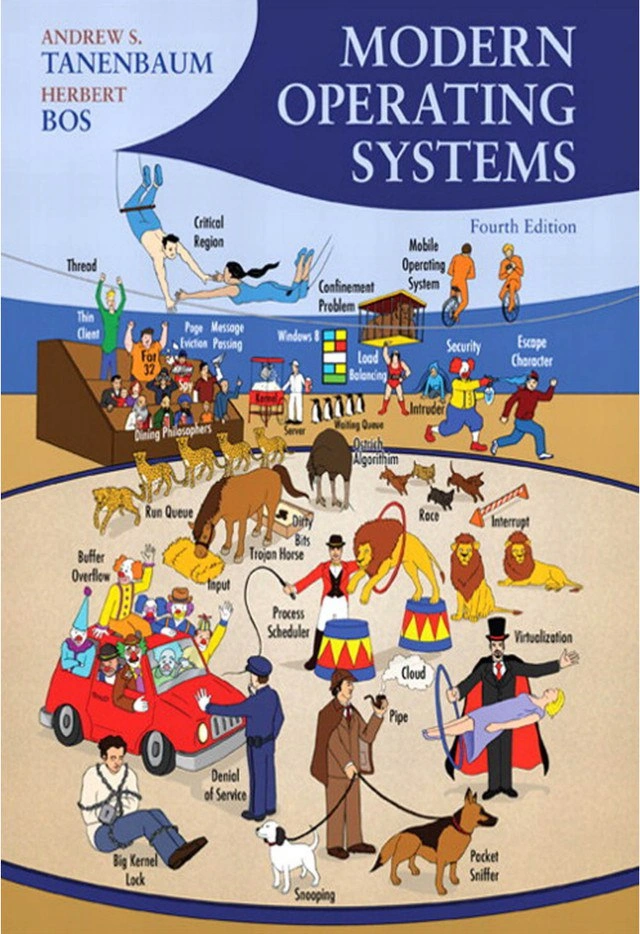
At first glance, this textbook cover just looks like a fun circus drawing, but every label is a real operating system term. For someone newer to these concepts, let’s decode what these mean in simple terms and why they’re depicted this way. Think of the Operating System (OS) as the ringmaster of your computer – it’s in charge of coordinating everything, just like a ringmaster runs the circus. The cover shows many acts, each representing a different job the OS does or problem it handles, but turned into a circus joke. Here’s what’s going on under the big top:

Process Scheduler – In a computer, many programs (processes) want to run at the same time, but the CPU can only do one at a time (or a few if you have multiple cores). The OS has a process scheduler that decides which program runs next, for how long, then switches to another – kind of like a ringmaster saying, “Now performing: the next act!” On the cover, the ringmaster character is labeled Process Scheduler because he’s the one orchestrating the show, just as the OS orchestrates the CPU’s time slices for programs. The Waiting Queue likely appears nearby as a line of performers or animals waiting for their turn – that’s just like programs waiting in line to use the CPU. The term run queue in OS jargon means the list of ready-to-run processes, which the scheduler manages. The cover humorously draws Run Queue as actual fast-running animals (cheetahs on a track) to symbolize processes that are ready and raring to go when given a chance.

Thread – A thread is like a smaller unit of execution within a process (imagine one performer inside an act). Threads allow a single program to do multiple things “at once” (concurrently), like one program having several performers doing different tricks simultaneously. The cover label Thread might be depicted by an actual thread or tightrope (since the word thread outside computing means a strand of string). In OS terms, threads share the same resources but can run in parallel, which is great for performance but also introduces complexity in keeping them synchronized.

Critical Region – When multiple threads are running, sometimes they need to access the same resource or data. A critical region (also known as a critical section) is a part of the program where you only allow one thread at a time, to prevent conflicts (imagine if two clowns try to drive the same tiny car at once – chaos!). To ensure safety, the OS uses locks or other mechanisms so only one thread enters that section at a time. The cover shows a trapeze or acrobatic stunt labeled Critical Region, suggesting it’s a high-risk area that only one performer can use at a time. This visual emphasizes that if more than one goes at once, the stunt could fail – just like errors occur if two threads interfere in a critical region.

Dining Philosophers – This is a famous thought experiment used in OS courses to illustrate problems of resource sharing and deadlock. Imagine five philosophers sitting around a table with five forks; each needs two forks to eat, but if each philosopher grabs one fork and waits for the other, they all starve – that’s a deadlock. In the cover, Dining Philosophers likely shows people or clowns at a dinner table in a silly way. It represents how the OS must handle resource allocation to avoid situations where processes endlessly wait on each other. It’s a whimsical drawing for a rather important concept: how to prevent everyone from waiting forever.

Race – Short for race condition, this term means the outcome of a program changes based on the unpredictable timing of events (like which thread finishes first). This is a bug that’s common in concurrent programming. The cover shows a literal horse race labeled "Race" to symbolize this idea. Why a race? Because in a CPU, if two tasks race to update a value and the “winner” isn’t guaranteed, you get inconsistent results – just like you can’t be sure which horse will win a race until it’s over. The horse imagery makes the idea very concrete: a race condition in code is like two horses neck-and-neck; depending on which one pulls ahead, you get a different winner (result). It’s a fun way to remember that timing matters.

Ostrich Algorithm – This one sounds strange, but it’s basically a policy of ignoring a problem and hoping it’s rare enough not to matter. In OS, the term is jokingly used for handling deadlocks by not handling them at all. If deadlocks (complete standstills) are very unlikely, an OS might do nothing special to prevent them, essentially “putting its head in the sand” like an ostrich. The cover shows an ostrich (probably literally burying its head) to represent this. It’s the artist’s way of labeling “here’s the OS ignoring a potential problem.” It teaches that sometimes, believe it or not, the solution is to do nothing and assume things will be fine (not always reassuring, but sometimes true!).

Now let’s talk about memory and storage, another area the OS manages, and how the cover illustrates those:

Buffer Overflow – A buffer is a fixed-size chunk of memory to hold data. A buffer overflow happens when a program tries to put more data into the buffer than it can hold. Think of pouring too much water into a glass – it spills over. In computing, that “spill” means the extra data overwrites whatever was next in memory, which can crash programs or create security vulnerabilities (hackers can exploit this to run malicious code). On the cover, Buffer Overflow might be shown by something like a clown over-stuffing a container or a car with too many people until it bursts – a comedic visual for a serious bug. It’s a memorable way to depict “too much stuff in too small a space causes an overflow.” If you’re new to coding, remember to always check your buffer sizes, so you don’t end up with an overflow (and maybe imagine a bunch of clowns tumbling out of a tiny car as a reminder!).

Page Eviction – Modern computers use a memory system with RAM and storage, and they move data between them in chunks called “pages.” When RAM is full, the OS needs to free up space by evicting (removing) some pages and writing them to disk (this is part of virtual memory management). Page eviction is like deciding which existing tenant (data) in memory to kick out to bring in a new one. The cover might show this as a strongman or bouncer tossing someone out of a tent (evicting them) labeled "Page Eviction." This corresponds to algorithms the OS uses (like LRU – Least Recently Used – which tosses out the page that hasn’t been used for the longest time, on the theory it won’t be needed soon). The circus eviction imagery makes the idea less abstract – you can picture memory pages as people in a room, and eviction as literally throwing one out to make space for another.

Dirty Bits – Despite the funny name, dirty bits are not mud on your computer. A dirty bit is a tiny flag (a single bit of information) that the OS uses to mark a memory page that has been modified (“dirtied”) since it was loaded into RAM. Why mark it? Because if the page is dirty, the OS knows that before evicting that page from memory, it needs to write the changes back to disk (to save the new data). If the page wasn’t modified (clean), it can be evicted without writing because the disk copy is already up-to-date. The cover might show Dirty Bits by literally having some animals or clowns get splattered with mud or paint – a playful way to represent “this thing has been altered and is now dirty.” In a real OS, dirty bits help optimize performance by avoiding unnecessary writes. It’s a small low-level detail, but important in how memory and storage interact.

FAT32 – This label is a pun on an older filesystem named FAT32. In computing, FAT stands for File Allocation Table, and 32 refers to the 32-bit version of it. It was widely used in earlier Windows operating systems (Windows 95/98 and on USB drives). It had limitations like maximum 4GB file sizes, which modern filesystems don’t have. On the cover, they play with the word “fat.” Instead of just writing FAT, they likely drew something literally fat with the number 32, perhaps a comically overweight character with “32” on their outfit or a big fat book labeled 32. It’s a visual pun: fat as in overweight vs FAT32 the filesystem. If you don’t know the tech term, it just looks silly (fat number 32?). If you do know it, you get the joke that a computer file system is being portrayed as a circus fat man.

Now onto how the OS deals with input/output and communication, and the corresponding gags:

Input – Simply put, input is any data or signals coming into the system (from keyboard, mouse, network, etc.). If “Input” is labeled on the cover, likely it’s an object or clown catching something – maybe a clown receiving pies or letters, indicating stuff coming in. It highlights that the OS has to handle input from various sources and feed it to programs. The OS abstracts input devices so that reading from a keyboard or a file can be handled in a uniform way. In the circus metaphor, input might be depicted as something like a mailbox, a funnel, or a performer taking items from the audience – showing data coming into the show.

Pipe – In operating systems, a pipe is a mechanism for inter-process communication that allows one program to send output directly as input to another (just like a physical pipe can carry water from one place to another). You might use pipes in a shell like ls | grep txt where the output of ls flows through a pipe to the grep command. On the cover, the label Pipe could be drawn as an actual pipe or a performer with a smoking pipe, but likely it’s a literal pipe prop connecting two things. This visual pun shows how data flows between processes. It’s an important concept especially in Unix-like systems, often represented by the | symbol in code, but much friendlier when imagined as an actual pipe you can see.

Message Passing – This is another way processes (or computers in a network) communicate: by sending discrete messages to each other. Instead of sharing the same memory, they exchange info by messages (like letters or baton tosses). On the cover, “Message Passing” might be illustrated by clowns passing a note or tossing an object to each other. It demonstrates the concept that the OS can facilitate processes talking to one another by passing messages, analogous to sending a letter via a postal service (the OS being the service that delivers it). For a newbie, it’s helpful to think of message passing as just programs sending mail to each other inside the computer – the cover basically shows that in a circus-y way.

Thin Client – A thin client is a lightweight computer that doesn’t do heavy processing itself but relies on a server for the real work. It’s “thin” because it has just enough power to handle input/output and display, and it sends most tasks to a beefier server (contrast with a “fat client” which does a lot locally). On the cover, Thin Client is likely shown as a literal thin person or a skinny clown, possibly next to a large server or feeding from it. It’s a punny way to depict a computing model. In real life, thin clients were popular in office networks where each user’s terminal just connected to a central mainframe or server that did all the computation. The image helps solidify that concept – you see a skinny performer relying on something else for support, just like the device relies on a server.

Mobile Operating System – This refers to OS software designed for mobile devices like smartphones or tablets (e.g., Android or iOS). They have to handle things differently (like touch screens, battery management, mobile processors). The cover includes Mobile Operating System perhaps by showing a character on the move or a mobile phone mascot on a unicycle – something that screams “mobile”. The idea is to remind us that OS concepts aren’t just for big PCs or servers, but also for the pocket-sized computers we carry. It’s a modern inclusion reflecting the tech world’s shift where mobile OSes are as important as desktop ones.

Windows 8 – This is the name of a specific OS (a version of Microsoft Windows released in 2012). The cover showing “Windows 8” on a banner or scoreboard is likely acknowledging contemporary operating systems that the book covers. It doesn’t really have a circus pun by itself (apart from maybe referencing the window concept or the number 8), but it places the reader in time: this book covers Windows 8 era tech. For someone new, just know Windows 8 was an operating system known for its big changes to the user interface (the tiled Start screen). On the cover, it might simply appear as part of the circus setting to represent the presence of actual OS case studies among the theoretical concepts – basically saying “real-world OS like Windows are in this book too.”

Finally, let’s look at the security and mischief side of the OS world, which the cover gleefully turns into a sideshow:

Security – An OS is responsible for security: protecting data, restricting access, and preventing bad things from happening. When you see a label like Security on the cover, it could be a guard, a safe, or a security checkpoint drawn in the circus. That character or object represents all the security measures an OS has (like user accounts, passwords, encryption, and permission checks). It’s the bouncer of the computer circus, ensuring that only the right people (or programs) can get to certain resources. The cover reminding us of security is a nod that operating systems always have to keep the circus from descending into chaos by keeping the “bad guys” out.

Trojan Horse – In computing, a Trojan Horse is a malicious program that tricks you by pretending to be harmless or useful, but when you run it, it delivers a nasty surprise (just like the ancient Greek story of soldiers hidden in a wooden horse given as a “gift”). On the cover, it’s literally drawn as a wooden horse with maybe some sneaky clowns inside. This visual pun is straightforward: it’s the classic image from the story, co-opted to represent malware hiding in plain sight. It emphasizes the concept that not everything is as it seems – a program might look fun like a free game, but inside it might be hiding a virus. For a learner, the takeaway is: beware of Trojans in tech means the same as in the tale – something bad disguised as good.

Intruder – Likely a figure shown sneaking around in the illustration. In the context of an OS, an intruder means an unauthorized person or software gaining access to the system. This could be a hacker breaching the system or malware doing something without permission. The cover personifying an Intruder (maybe a thief character creeping in) gives a face to that idea. It’s the OS’s job through security features to catch or block intruders. Seeing one on the cover reminds us that protecting against break-ins is part of the operating system’s circus of duties.

Denial of Service – A Denial of Service (DoS) attack is when a service (like a website or server) is bombarded with so many requests or so much data that it gets overwhelmed and legitimate users can’t use it (the service is effectively denied). The classic metaphor is an overload – and the cover nails it by showing a tiny car overstuffed with clowns labeled “Denial of Service.” Imagine too many clowns trying to squeeze into a car; eventually it won’t move or might break – that’s exactly how a server feels under a DoS attack. It can’t respond to real users because it’s jammed with junk traffic. This goofy circus stunt perfectly captures the concept for a newcomer: too much of anything, even funny clowns, can grind the show to a halt. It also hints at the absurdity of the attack – often the traffic in a DoS is nonsense, just like clowns whose only goal is to overload the car.

Snooping – In everyday language, snooping means spying or peeking into things that aren’t yours. In computing, it can refer to a couple of things: bus snooping in hardware (where one processor watches the data bus to keep its cache in sync) or just the general idea of spying on network traffic or system activity. The cover likely shows a dog or detective with a magnifying glass labeled “Snooping,” sniffing around. For someone new, you can interpret it as representing any kind of monitoring or eavesdropping activity. It’s part of the security theme, as snooping can be either something the OS itself does for caching (harmless, even necessary) or something an attacker does (malicious, like spying on your data). The image of a dog sniffing around simplifies the abstract idea: think of the OS or a hacker as that dog, trying to smell out what’s happening in the system.

Pocket Sniffer – This one’s a cute pun. There’s a term packet sniffer in networking, which is a tool that intercepts and logs traffic passing over a digital network – basically “sniffing” data packets to see what’s inside them. The cover artist turned packet into pocket, so a “pocket sniffer” is drawn literally as a dog sniffing someone’s pocket. It’s a visual joke: the dog is sniffing for something hidden, analogous to how a packet sniffer looks for information in network packets that might be secret or valuable. For a beginner, if you know the dog is actually representing a network analyzer tool, it clicks: the OS (or a tool running on it) can examine network traffic closely, just like a dog with a good nose can find the treat you hid. This teaches the idea of network monitoring in a memorable way – you won’t forget that packets can be “sniffed” once you’ve seen the doggy detective sniffing pockets.

Escape Character – In computing, an escape character is a special character (often a backslash \) that tells the system to treat the next character literally rather than as a command or terminator. For example, in a string you might write \" to include an actual quote mark instead of ending the string – the backslash “escapes” the special meaning. On the cover, Escape Character is shown as an escape artist (like a Houdini-style performer escaping chains or a locked box). It’s a pun: the word “character” can mean a letter or symbol, but also a person; and “escape” in both computing and magic means to get free of something. The cover’s escape artist visually conveys the idea of an escape character freeing the next symbol from being interpreted specially. If you’re new to this concept, just think of it this way: normally certain symbols in computer text do things (like newline or quote marks), but an escape character says “nope, treat the next symbol normally.” The circus image of a daring escape gives a fun mental picture for what could otherwise be an abstract concept in programming.

Whew, that’s a lot of terms – but that’s kind of the point! This single image manages to cram in a mini-dictionary of OS concepts and make them memorable. For a learner, it’s actually a fantastic memory aid. Each term that might seem dry in a textbook now has a vivid, funny image associated with it:

  • When you hear “race condition,” you might picture those horses and remember it’s about unpredictable timing.
  • “Buffer overflow” might bring to mind the clown car splitting at the seams, reminding you what happens when you exceed a limit.
  • “Dining philosophers” conjures a zany dinner table, hinting at the locking problem.
  • Even something like “Big Kernel Lock” can stick in your head if you recall a big lock and a tied-up performer, indicating the whole system being serialized by one giant lock.

As a newcomer, don’t worry if all these terms still sound a bit confusing. The key is that an operating system has to handle a lot of different jobs – it’s the master program that keeps everything working on your computer. This cover is showing you many of those jobs in a lighthearted way: managing processes (the performers), handling memory (the props and tents), ensuring security (the guards and sneaks), and coordinating input/output and communication between parts (the clowns passing notes and dogs sniffing around). Each joke has a real concept behind it. You might not remember every detail now, but if you keep this circus in mind, you’ll have a mental image for each concept as you learn more. It’s a clever way to see the “big picture” of OS topics. And importantly – it shows that even serious computer science ideas can have a fun side! Learning OS doesn’t have to be all dry text and diagrams; sometimes it can be a carnival ride of ideas.

Level 3: Three-Ring Kernel Circus

To a seasoned developer or sysadmin, this cover is hilariously on point. It transforms the hard grind of OperatingSystems internals into a circus, and oh boy, does that hit home once you've lived through some OS nightmares. Every element is a cheeky inside joke. Take the clown-packed car labeled Denial of Service: if you’ve ever managed servers, you know a Denial of Service attack feels exactly like an overloaded clown car – a ridiculous number of requests (clowns) jammed into a system (a tiny car) until it sputters and crashes. It’s funny and a flashback to that weekend you spent mitigating a traffic flood. Those clowns might look silly, but any senior dev who was on call during a DDoS will nervously chuckle at the memory of logs scrolling like a clown parade.

Look at the magician performing Virtualization on the right – a perfect metaphor. Virtualization in IT is essentially a magic trick: you make one computer pretend to be many, or conjure an entire machine in software. The cover nails this with a levitation act. Seasoned engineers remember when running multiple OS on one server seemed like sorcery (and in the early days of VMware or VirtualBox, it certainly felt magical when it didn’t crash). The magician’s act resonates because, in practice, virtualization can indeed feel like pulling a rabbit out of a hat – except the rabbit is a fully functional Linux instance. Those of us who have debugged a misbehaving VM or a container know the illusion can glitch, but seeing it depicted as stage magic is a light-hearted reminder of how far the illusion has come (and maybe how many mirrors and smoke we’ve dealt with behind the scenes).

The Race label on a horse race is another nod that makes experienced devs smirk. A race condition bug — where two threads or processes “race” to change data and the outcome depends on timing — can drive you crazy. It’s as chaotic and uncontrollable as betting on actual racing horses. One moment everything works, the next moment (with a slight timing difference) it all fails spectacularly. By showing literal horses racing, the cover visualizes that frantic unpredictability. Any programmer who’s added printf debugging and slowed down a bug enough to disappear knows how the mere act of observing can change the race outcome (Heisenbugs, anyone?). The horses on the cover capture the drama: who wins the race this time, Lion or Tiger? (And where did my global variable end up?) Lions and tigers and race conditions, oh my!

Speaking of lions: notice the trio of lions labeled Interrupt ready to pounce. If you’ve worked close to hardware or written an interrupt service routine, you know that interrupts are fierce and always strike when you least expect them. The lion tamer (perhaps nearby as the OS or developer) has to drop everything and deal with the interrupt, much like a CPU dropping its routine to handle an IRQ. It’s a brilliant analogy – an interrupt is an event that interrupts normal flow, much like a lion suddenly jumping through a hoop in front of you. For the onlookers (or junior devs), it’s exciting; for the one in charge (the OS dev or lion tamer), it’s a test of nerves and skill. Seasoned folks chuckle at this because we’ve all been that tamer at some point, wrestling with an unexpected interrupt (be it a hardware fault or just an urgent high-priority thread) that comes roaring in.

Security folks will appreciate the Trojan Horse rolling in and the guard dog Pocket Sniffer. The Trojan Horse, drawn literally, is almost too perfect – a senior dev recalls countless cautionary tales of malware hiding in email attachments or npm packages that seemed harmless. It’s both a humorous literalization and a reminder: beware of geeks bearing gifts! Seeing a Trojan Horse in a circus cover is like an Easter egg for infosec nerds. And that Pocket Sniffer dog sniffing away is a punny stand-in for packet sniffers like Wireshark. Anyone who’s debugged network traffic or hunted for intruders on a network has essentially played the bloodhound, sniffing packets for suspicious clues. The fact they drew it as a dog sniffing someone’s pocket is comedic gold – it’s an obvious pun in hindsight, which is what makes it so satisfying. A senior network engineer likely let out a groan-laugh: “Of course they had to make it a literal sniffing dog!” The Snooping label likely on a sneaky character or another dog touches on similar territory – perhaps referencing cache snooping in multiprocessor systems or just generic eavesdropping. Either way, if you’ve set up auditing or caught someone sniffing your Wi-Fi, you grin at the goofy reminder of a very real concern.

Then there’s the Big Kernel Lock – depicted as an actual big lock restraining something or someone (maybe a hapless performer tied up). This one elicits a knowing laugh from anyone who followed kernel development or dealt with multi-threading in the old Linux days. The Big Kernel Lock (BKL) was notorious for bottlenecking SMP machines; it’s the thing you curse when only one CPU core is doing work because the kernel won’t let others in at the same time. Seeing it on a cover is almost cathartic. It’s like the authors acknowledging, “Yes, that was a pretty big deal, and kind of absurd in retrospect – so here’s a huge padlock as a joke.” It’s a senior-level inside joke about how far OS design has come; Linux gradually broke the BKL into smaller locks over many years, a war story for kernel dev veterans. If you lived through that era (or read about it on LKML mailing list drama), you appreciate the joke and maybe nod in respect to the effort it took to tame that beast.

Even the more straightforward gags carry weight. The board labeled Windows 8 is a snapshot of the era (this 4th edition came out when Windows 8 was the new big thing). An experienced dev might chuckle because Windows 8… well, it had its circus moments (remember the Start screen controversy?). Including it in a circus could be a subtle dig or just a timely reference – hard to tell, but amusing either way to those of us who survived the Windows 8 UX saga. Fat 32 as a pun is like a joke only an older techie fully gets: younger devs might not have dealt with FAT32 file systems and their 4 GB file size limits, but seniors remember formatting USB drives and dealing with that relic. Seeing “Fat 32” in a lineup with modern terms is like spotting a veteran clown from the old circus troupe making a cameo. It adds a layer of nostalgia: “Hey, I remember when FAT32 was hot stuff… oh how times change.”

The cover really resonates because it mixes academic OS theory with real-world tech experiences. A senior engineer sees “Dining Philosophers” and remembers studying it in college and perhaps encountering a real deadlock in production that echoed that problem. The Ostrich Algorithm might recall a meeting where management literally said, “We’ll deal with that if it ever actually happens” – essentially adopting the ostrich approach in real life. The term Load Balancing might hit home if you've spent nights tweaking a load balancer’s configuration to share traffic, balancing on a knife’s edge like a unicyclist with plates. And the omnipresent Process Scheduler (the ringmaster) is something you’ve fought indirectly whenever you set process priorities, renice-d a CPU hog, or watched your high-perf job get context-switched out at the worst time. The ringmaster analogy is perfect: the OS scheduler is juggling CPU time like a circus juggler with too many balls, and somehow (most of the time) it keeps everything going without dropping them.

What ties it all together is a sort of “we’ve all been there” humor. The cover is essentially a big inside joke for the tech community. Senior devs, ops, and CS graduates can point at each tiny scene and exchange war stories:

  • Buffer Overflow causing a crash? “Haha, remember that C code exploit we had to patch?”
  • Interrupts like lions? “Yep, always jumping out right when I was tracing through something important – just like Murphy’s law, interrupts fire at the worst times.”
  • Thin Client booth? “Oh man, thin clients – we rolled those out back in early 2000s to save money, and half the users hated them. Good times.”
  • Cloud on a rope? “The cloud truly felt like a circus trick at first – now it's part of our daily infrastructure, but we all remember the first time someone said our data is just sitting somewhere out there.” It’s a visual feast of references that invites knowing smiles and the occasional groan (in a good way). By anthropomorphizing all these OS components and problems, the cover validates the shared experiences of developers. It says: “We know OS concepts can be chaotic – here, have a laugh at it!”

Tanenbaum and Bos managed to make an academic textbook cover into meme material by packing it with these references. It’s the kind of cover a CS professor can show on day one of an OS class to break the ice, and the kind a veteran engineer might frame on their office wall for a chuckle. After all, once you’ve spent years in this field, you start to see the humor in the chaos. The operating system really is a circus behind the scenes – and seeing clowns and lions do the jobs of processes and interrupts is both absurd and strangely accurate. This senior-level perspective enjoys the satire because it reflects a truth we only learn from experience: running a computer, much like running a circus, is a wild, complex balancing act – so you might as well laugh at the spectacle.

Level 4: Menagerie of Abstractions

Deep beneath the playful artwork lies a wealth of serious Operating Systems theory. Each circus gag on this cover actually alludes to fundamental CS concepts and historical OS lore. It's a three-ring circus of academic ideas. For instance, the famous Dining Philosophers problem (depicted by circus diners) isn’t just a joke – it’s a classic synchronization puzzle introduced by Edsger Dijkstra in 1965 to illustrate resource locking and potential deadlocks. In OS theory, dining philosophers model the challenges of allocating multiple resources (forks) to multiple processes without conflict. Turning them into a circus act makes light of a problem that has entire proofs and algorithms (like semaphores and monitors by Hoare) dedicated to solving it. Likewise, the trapeze artist labeled Critical Region references the formal concept of a critical section – a piece of code that must not be concurrently accessed. Tony Hoare’s monitors and Dijkstra’s mutex algorithms were mathematical answers to ensuring only one thread is in that region at a time. By showing it as an acrobat mid-flight, the cover humorously conveys how precarious and carefully synchronized such sections need to be (one slip and things fall apart!).

Another deep cut: the Confinement Problem on the cover points to a security theorem from 1973 by Butler Lampson. This problem asks, “How can we confine a program so it can’t leak information to anyone except its designated caller?” It’s a foundational question for sandboxing and secure OS design. Seeing it drawn as something like a caged act or restricted booth in the circus is a nod to that theoretical struggle – a bit of academic inside baseball hidden in plain sight as a carnival game. The Ostrich Algorithm (with a literal ostrich) references an OS strategy for dealing with deadlocks by simply ignoring them (burying your head in the sand) if they’re statistically rare. That tongue-in-cheek "algorithm" appears in OS textbooks as a reminder that sometimes the theoretically correct solution (designing complex deadlock detection) might be overkill; Tanenbaum’s book itself discusses it as a pragmatic trade-off. By including an ostrich in the menagerie, the cover winks at readers: even rigorous OS curriculum includes jokes about non-solutions.

Virtualization, showcased by the magician levitating an assistant, derives from deep principles of computer architecture and formal virtualization criteria (Popek and Goldberg’s 1974 paper laid out what makes a CPU virtualizable). The magic trick analogy isn’t just visual pun – virtualization really is about creating an illusion that multiple OS instances exist on one hardware or that one system is actually many. It’s a bit of computer science magic enabled by trap-and-emulate techniques and hardware support. The cover artistically reduces that complex feat to a classic levitation trick under the big top – an apt metaphor for the elegant deception that virtualization pulls off. Similarly, Load Balancing (perhaps depicted as a juggling act or a balanced scale) connects to algorithmic theory in distributed systems and scheduling. In theory, scheduling N tasks on M processors optimally is NP-hard, leading to various heuristic algorithms. The visual pun of balancing weights or juggling balls captures this idea of distributing workload evenly – a problem that has entire research papers and algorithms behind it (from round-robin to weighted least connections).

Memory management theory peeks through as well. Page Eviction is likely illustrated by someone being thrown out of a tent – a carnival twist on the page-replacement algorithms that decide which memory page to swap out when RAM is full. In OS theory, that’s where concepts like Belady’s optimal algorithm (theoretical best but unimplementable without future knowledge) and practical approximations like LRU come in. The cover’s comedic eviction highlights the underlying notion of memory pages being kicked out to disk to make room – a process governed by algorithms and even mathematical anomalies (Belady’s anomaly) studied in academia. And those Dirty Bits (maybe shown as literal dirt on a circus floor) represent a bit flag marking a modified page in memory. This tiny detail is rooted in hardware/OS co-design: a dirty bit is set when a page is written to, indicating it must be written back to disk before eviction – a concept stemming from the theoretical need to minimize I/O by only writing changed pages. Even the Buffer Overflow gag has gravitas behind it: buffer overflows tie into memory safety, which is studied in formal verification and language design. A buffer overflow is essentially writing past array bounds – something that can be explained by pointer arithmetic and machine memory layout. We’ve built entire disciplines (like secure coding practices and languages with bounds checking) to avoid this overflow pitfall. Seeing it depicted with clowns or exploding props is funny, but it underscores a very real consequence of the C memory model that theoreticians address with type systems and proofs to ensure safety.

One delightful historical nod is the inclusion of Big Kernel Lock. Andrew Tanenbaum (one of the authors of Modern Operating Systems) famously advocated for microkernels (MINIX) over big monolithic kernels (like early Linux). In fact, Tanenbaum and Linus Torvalds had a well-known debate in 1992 where Tanenbaum called Linux’s monolithic design “obsolete.” The Big Kernel Lock was a real Linux kernel mechanism that serialized access to the entire kernel on early SMP systems – conceptually simple, but bad for scalability. By portraying the Big Kernel Lock as a literal massive padlock restraining someone, the cover not only educates about kernel concurrency but also cheekily acknowledges a piece of OS history and the evolution from coarse-grained locks to finer-grained locking (and the microkernel vs monolithic discussion). Tanenbaum including this on the cover might even be a gentle self-jab: even a microkernel purist must teach the messy reality of giant locks in real kernels. Similarly, the mention of FAT32 (an old file system) on a textbook subtitled “Modern” OS is a historical wink. FAT32 was introduced in the 1990s and became ubiquitous on USB drives and Windows 9x systems. By drawing “Fat 32” as perhaps an overweight character or a big fat number 32, the cover artist turns a dry file system detail into a visual joke. Yet, it also subtly points out how far file systems have come (from FAT to NTFS to modern journaling systems) – hinting at the historical progress in storage management.

In summary, the cover masquerades as pure fun, but each element connects to rich CS fundamentals and even a bit of history. It’s a carnival of core concepts: process scheduling, memory management, concurrency bugs, security vulnerabilities – all paraded with circus flair. The academically inclined reader can appreciate how this textbook humor encapsulates decades of research: from Dijkstra’s concurrency patterns to Lampson’s security principles, from vintage file systems to modern virtualization feats. Under the big top of this illustration, serious theory and practice are performing in costume. The humor lands so well because the absurdity of a circus mirrors the complex juggling act an OS performs – and those of us who know the theory can admire how elegantly the chaos is captured. This menagerie of abstractions proves that even the most rigorous concepts can clown around while still teaching us something. 🎪

Description

The image is the cover of the textbook 'Modern Operating Systems, Fourth Edition' by Andrew S. Tanenbaum and Herbert Bos. The cover art is a detailed, whimsical illustration of a circus, where each act is a clever visual metaphor for a core operating system concept. For example, trapeze artists represent a 'Thread' and 'Critical Region'; a clown car stuffed with performers depicts 'Buffer Overflow'; a police officer stopping the car is 'Denial of Service'; a magician levitating a woman is 'Virtualization'; and philosophers dining around a table are the 'Dining Philosophers' problem. Other concepts illustrated include 'Process Scheduler' as a ringmaster, 'Trojan Horse', 'Big Kernel Lock', 'Packet Sniffer', 'Cloud', 'Pipe', 'Interrupt', 'Race' condition, and 'Load Balancing'. This image is a classic in computer science education, beloved by students and professionals for its creative and memorable way of visualizing the complex, often chaotic, interactions within an operating system
Comments

7
Anonymous ★ Top Pick Modern operating systems are a lot like this circus: everything seems chaotic, but a good scheduler keeps the clowns from crashing the lion act, mostly
  1. Anonymous ★ Top Pick

    Modern operating systems are a lot like this circus: everything seems chaotic, but a good scheduler keeps the clowns from crashing the lion act, mostly

  2. Anonymous

    The Tanenbaum circus is basically our architecture review: Denial-of-Service clowns in the front end, ‘Interrupt’ lions jumping the run queue, a magician branding the Big Kernel Lock as “cloud-native,” and management proudly adopting the Ostrich Algorithm as the incident playbook

  3. Anonymous

    After 20 years in the industry, you realize Tanenbaum's circus metaphor was actually understating the chaos - at least circus performers practice their acts and have safety nets

  4. Anonymous

    Tanenbaum's circus cover perfectly captures OS development: threads performing death-defying acts in the critical region, race conditions between the lions, and the ringmaster process scheduler desperately trying to maintain order while the Trojan Horse casually strolls through security. Meanwhile, the audience of thin clients watches from the cheap seats, blissfully unaware that the entire show is one buffer overflow away from a denial of service. At least the packet sniffer dogs are on duty - though they're probably just sniffing for memory leaks in the popcorn queue

  5. Anonymous

    Tanenbaum's circus nails it: kernel life's herding threads on trapeze while interrupts crash the big top - userspace was the escape act we all needed

  6. Anonymous

    Enterprise computing in one panel: the scheduler juggles the run queue as Interrupt cuts the line, Page Eviction tosses users, and the magician rebrands it as virtualization - meanwhile leadership asks for 99.99% SLO

  7. Anonymous

    Modern OS architecture: the Scheduler as ringmaster, Virtualization as stage magic, and a DoS clown car bypassing the Run Queue while the Big Kernel Lock naps

Use J and K for navigation