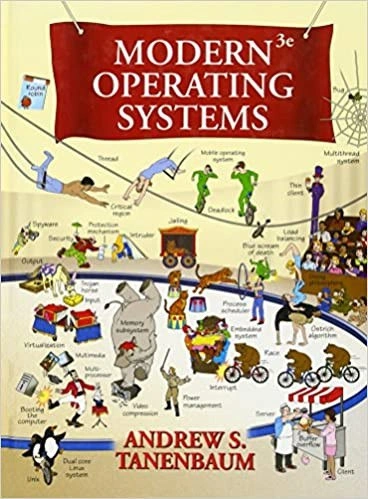
Classic Tanenbaum cover turns OS theory into a chaotic cartoon playground
Why is this OperatingSystems meme funny?
Level 1: One Crazy Playground
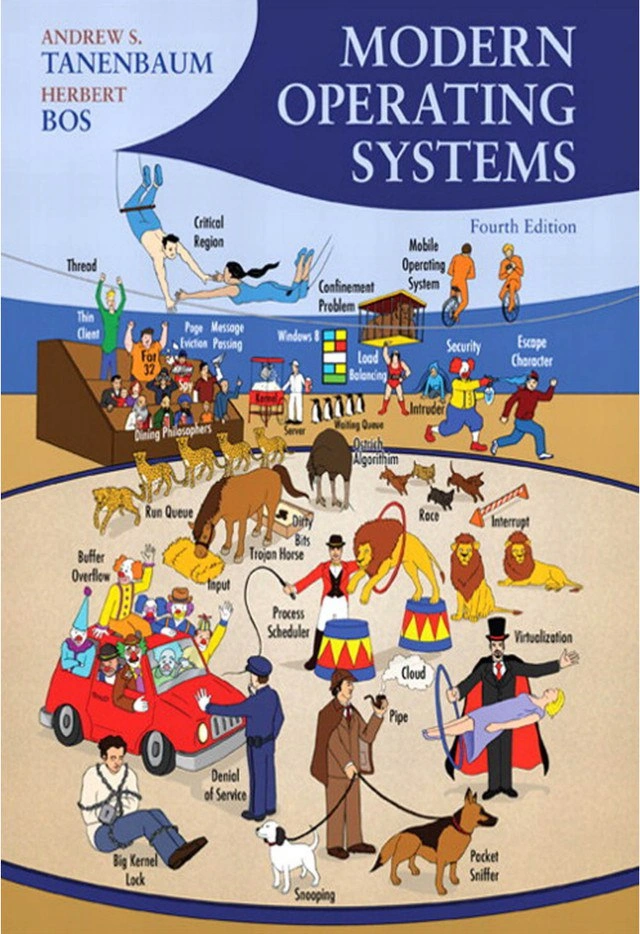
Imagine you peek inside a computer and instead of circuits and chips, you find a little cartoon city going crazy. There’s a traffic circle where tiny cars and bikes are all stuck (nothing’s moving!), a library with books flying off the shelves, penguins and robots running around, and little workers carrying files and plugging in cables everywhere. It looks like absolute mayhem, like a playground where every kid decided to play a different game all at once! This meme is funny because it shows the inside of a computer in a very silly, over-the-top way. In real life, an operating system (the master software in your computer) quietly handles a bunch of jobs so fast you don’t even notice. But here, all those hidden jobs – managing memory, running programs, saving files, showing pictures, keeping things secure – are turned into a cartoon bunch of characters doing wacky tasks in broad daylight. It’s like if you opened up a clock and saw little cartoon people moving the hands, oiling gears, ringing alarms – you’d giggle at how chaotic and cute it is. This picture makes us smile because it’s taking something super complicated and usually invisible, and making it look like a fun carnival inside the computer. It’s a crazy playground of tech ideas, and if you’ve learned about how computers work, you recognize each little gag and go, “Oh, I get it – that’s what’s happening in there!” Even if you haven’t, you can laugh at the sheer craziness of the scene. It’s the contrast between how serious a computer’s work really is and how goofy it’s portrayed here that makes it so amusing and charming.
Level 2: Under the OS Hood
This meme is basically a collage of all the big pieces that make a computer work behind the scenes. In simple terms, an Operating System (OS) is the master program that manages all the hardware and other programs on your computer. Think of the OS as a traffic controller and a manager: it decides which program runs when, manages memory, handles input/output devices, and provides security – all simultaneously. The core of an OS is called the kernel. The kernel is like the engine room of the computer – it has full control over the CPU (brain of the computer), memory, and devices, and it ensures that multiple programs (which we call processes) can run without interfering with each other. When you run an app or open a file, it’s the OS kernel that makes it happen, coordinating everything.
Now, on the cover each label refers to one of the OS’s duties. Process management is about handling processes (i.e. running programs). A process is essentially an instance of a program in execution – for example, your web browser is one process, your music player is another. The OS lets many processes run “at the same time” by quickly switching between them – this switching and allocating of CPU time is called CPU scheduling. It’s as if the OS is a busy chef with one stove and many dishes to cook; it gives each dish a little time on the flame in a round-robin way so everything gets cooked eventually. Related to processes are threads – which you can think of as smaller tasks or sub-processes within a process. If a process is like a department in a company, threads are like people in that department working on subtasks. For example, a web browser might have one thread handling page rendering and another playing a video. Concurrency is the general concept of lots of things happening in overlapping time periods – on a single CPU it’s achieved by fast switching, and on a computer with multiple CPU cores it truly can happen in parallel. But concurrency is tricky: if two threads try to access the same resource (say, two threads writing to the same file at once), you get conflicts or errors. So the OS provides synchronization mechanisms (like locks or semaphores, though those aren’t shown on the cover) to prevent chaos – basically rules to ensure only one thread uses a resource at a time when needed. The cover crams in “Threads,” “Concurrency,” and “Process management” to show this whole juggling act of running many tasks smoothly.
Then we have Memory management. Every running process needs memory (RAM) to store its code and data while it’s working. The OS is in charge of allocating memory to processes and keeping them from stepping on each other’s territory. If one program tries to use memory that’s not assigned to it, the OS intervenes and prevents it (otherwise one bugy program could overwrite another program’s data – not good!). The OS also uses virtual memory, which is a clever trick: it gives each process the illusion of having a large continuous block of memory, even if physically the RAM is smaller or fragmented. It does this by swapping out less-used data to the hard disk (into an area called swap or page file) and bringing it back to RAM when needed. That’s why on the cover you might see “Memory management” near some depiction of memory chips or maybe boxes being shuffled around – it’s all about moving data to the right place at the right time and keeping track of it. Think of the OS like a librarian in a library with limited shelf space: when the shelves (RAM) are full, the librarian can send some books to storage in the back (disk), and swap in the books that are needed right now. This way, everyone (every process) feels like they have the whole library, even though they’re actually sharing it.
File system is another key term visible on that cover. The file system is how the OS organizes files on storage (like your HDD or SSD). It’s basically a structured way to store and retrieve data, using directories (folders) and files. When you save a document, the OS’s file system decides where on the disk to put the data and records the filename in a directory. Later, when you open the file, the OS knows exactly which blocks on the disk to read. It’s analogous to a giant filing cabinet with an index: the OS is the clerk who knows how to find any file given its name and path. The cover’s busy artwork might show disks or a cabinet to hint at this. Along with that, I/O (Input/Output) is referenced – that’s a broad term for communication with devices. Input could be from your keyboard, mouse, or a microphone; output could be to your monitor, speakers, or printer. The OS has to handle I/O in an efficient way, often using special programs called device drivers to talk to each piece of hardware. For example, there’s a driver for your graphics card that the OS uses when it needs to draw stuff on screen. The cover featuring “I/O” could be illustrated with cables, screens, or robots carrying data from one place to another. Essentially, the OS acts as a translator and manager between programs and hardware devices so that, say, when a program wants to save a file (output to disk) or read a keystroke (input from keyboard), it happens reliably.
Security on the cover hints at the OS’s role as the guardian of the system. The OS enforces permissions and access controls: it decides which users and programs can do what. For instance, one program shouldn’t be allowed to directly read another program’s memory; and a normal user shouldn’t be able to do certain system-level changes without permission (that’s why installing software sometimes asks for an admin password – the OS is asking “hey, should I allow this?”). Security features include things like user accounts, passwords, file permissions (read/write/execute rights), and isolating processes so that a malicious app can’t hijack the whole system. In the cover’s cartoon world, “Security” might be represented by a padlock icon or a little police officer character. An everyday analogy: the OS is like a building security guard and each program is a visitor – the guard checks an ID and gives out badges with certain access (you can go to these rooms but not those). This keeps everyone safe and separated as needed.
Now, some of the labels on the cover refer to specialized or advanced topics. Deadlock, for example, is a classic problem in concurrent systems. A deadlock occurs when two or more processes are stuck waiting on each other and none can proceed. Imagine two people facing each other in a narrow corridor: “You move first.” “No, YOU move first.” – and so they freeze forever. In computer terms, maybe Process A holds Resource X and needs Resource Y, while Process B holds Y and needs X, so neither can continue. The OS can employ strategies to prevent or resolve deadlocks (like careful resource allocation or forcing one process to give up something), but it’s a tricky situation that every OS designer must consider. The cover likely depicts this with those vehicles in a loop or some characters in a standoff, visually explaining the concept: it’s a stalemate!
Real-time system refers to an operating system that is used in environments where timing is critical. For example, the software in an anti-lock braking system in a car, or the control system for an assembly-line robot, are real-time. The key here is that the OS guarantees responses within a strict deadline. If a sensor signals “temperature too high,” a real-time OS might have to respond by turning on a cooling system within, say, 100 milliseconds, or the system fails. This is different from a general-purpose OS like Windows or Linux on your PC, where delays of a second might just make things a bit laggy but not catastrophic. Real-time OSes are designed for predictability and reliability above all. On the cover, “Real-time system” might be shown with robots or industrial machines, because those are common uses of real-time computing (think factories, or even spacecraft!).
Mobile operating system is straightforward – it’s an OS for mobile devices like smartphones and tablets. Mobile OSes (like Android or iOS) are optimized for small devices with touchscreens, limited battery, and different hardware (GPS, camera, etc.). They manage resources a bit differently – for example, they might aggressively suspend background apps to save memory and power. Seeing “Mobile operating system” on the cover indicates that the book (and the meme) recognizes how OS concepts apply not just to big computers but also to the tiny computer in your pocket. The cartoon might show a phone or some mobile robots to represent this. It reminds us that while the basics (like process management or file systems) are common, mobile OSes have their own challenges (like power management or app sandboxing for security).
When the cover lists Distributed system and Client-server, it’s pointing toward how computers work together over networks. A distributed system is a collection of independent computers that appear to the user as a single coherent system. For example, Google’s search engine isn’t one computer, but thousands working in tandem – to you it feels like one service. In an OS textbook, you’d learn about distributed file systems (like how your files might live on multiple servers but seem like one storage to you) or distributed synchronization (making sure actions on different machines happen in the right order). The cartoon might represent this with multiple computers or servers connected by lines (wires) and sharing tasks. Client-server is a model within distributed systems: one machine (the server) provides a service, and another (the client) uses it. A common example is a web server (server) and your browser (client). The server “serves” data (like a webpage) and the client “consumes” or requests it. On the cover, maybe one cartoon character is labeled “Client” eagerly asking for something, and another labeled “Server” handing something over (perhaps literally a waiter serving a client at a table – a classic literal depiction). This model is fundamental in networking and distributed computing, and it’s cool to see it acknowledged on the cover—reminding new students that OS concepts aren’t just inside one PC, but also about coordinating many computers.
The term Multithreaded system also appears, which ties back to threads but at a larger scale. A multithreaded system is basically any system (could be an OS, could be an application) that uses multiple threads of execution to improve performance. For example, a database server might spawn many threads to handle multiple queries at once. The cover including this term emphasizes that handling multiple simultaneous activities is core to modern computing. It reiterates the idea of concurrency and parallelism, which we discussed earlier. In a way, it overlaps with process management and concurrency, so the cover is being very thorough listing it separately.
Finally, Virtualization and Multimedia round out the buzzwords on the cover. Virtualization is when the OS allows you to create virtual versions of something, often hardware. The most popular example is running a virtual machine – like running Windows inside a window on your Mac, or having a Linux VM on your Windows PC. The OS (or a software called a hypervisor) makes a “pretend” computer using software, and that pretend computer can boot another OS as if it were on real hardware. It’s a way to efficiently use one physical machine to run many separate environments. It’s also great for testing and sandboxing. If the cover shows “Virtualization,” perhaps it’s illustrated by a smaller computer inside a bigger computer, or a magician’s hat with many computers coming out – conveying the idea of one machine containing others. Multimedia in OS context refers to the handling of audio, video, and other media streams. An OS needs to be able to play videos and music smoothly, which involves timely scheduling (to keep frames of video coming in order) and fast I/O (reading data from disk or network without stalling). It also involves things like having drivers for video cards, sound cards, etc., and giving programs access to those in a coordinated way. On the cover, “Multimedia” might be depicted by musical notes or a video reel icon dancing around. Including it in the textbook cover highlights that modern operating systems have to manage not just text and number-crunching, but also rich media.
In summary, each label on that busy cover corresponds to a major responsibility or concept of operating systems. For a newcomer:
- The OS is the big boss program that runs the show on your computer.
- It handles who runs when (processes/threads scheduling),
- where things go in memory (memory management),
- how to store and find data (file systems),
- talking to hardware (I/O and drivers),
- keeping things safe (security), and even
- connecting computers together (distributed systems, client-server),
- plus special cases like real-time guarantees, virtual machines, and mobile devices.
That cover image takes all those parts – which you’d usually learn one by one – and throws them together in one scene. It’s a bit overwhelming at first glance, but that’s the point: an operating system is a complex mixture of many pieces, and seeing them all at once gives you an idea of just how much is going on under the OS hood. It’s like seeing all the gears and cogs of a big clock laid out at once – intimidating but also impressive. And if you know what each piece does, the picture becomes an entertaining puzzle of OS trivia, which is why those who know, find it amusing.
Level 3: Kernel Crash Course
For anyone who’s taken a serious Operating Systems course, this cover is both nostalgic and hilarious. It’s basically the entire OS syllabus crammed into one image – a wild visual overload that screams “Welcome to the madness of OS internals!” The humor lands because OS students and practitioners know how impossibly broad the topic is. The moment you see the banner “MODERN OPERATING SYSTEMS” and dozens of labels (processes, memory, threads, I/O, security, and more), you get flashbacks to that semester where you had to learn a bit of everything. It’s an inside joke: only those who survived that crash course truly appreciate the absurdity of depicting all of it at once, in cartoon form. It’s like a professor on day one saying, “Here’s everything we’ll cover,” and then unveiling this chaotic scene – you’d laugh nervously because it’s all coming your way.
Look closely at the cover’s details (the meme invites you to zoom in): it’s packed with clever little references that signal each OS concept. There’s likely a tiny forklift with the tag “System calls” or “Process management” – a pun on the Unix fork() system call that creates a new process (fork... forklift, get it?). Then you have a bunch of bicycles or vehicles on a looping road labeled “Concurrency” or “Threads” – a hint at multiple threads racing on the CPU, or perhaps a visualization of context switching where processes take turns in a roundabout. The “Deadlock” bit shows what looks like a traffic jam: carts and bikes stuck nose-to-nose, nobody able to move – a perfect metaphor (two processes waiting on each other, and nothing proceeds, just like cars gridlocked in an intersection). Over in one corner, you spot a familiar penguin 🐧 – that’s Tux, the Linux mascot, casually appearing near “Virtualization” or “Distributed system.” It’s a nod to the real-world OS that every student inevitably plays with or studies; after all, Linux is the poster child of modern OS implementations. This is especially cheeky because Andrew Tanenbaum (the textbook’s author) famously had debates with Linus Torvalds (creator of Linux) about OS design. Seeing Tanenbaum’s book include a penguin on the cover feels like a playful acknowledgement of Linux’s presence in OS education, despite their differences (a bit of “if you can’t beat ’em, join ’em” humor from the microkernel vs. monolithic kernel saga).
Every character on that cover is essentially an Easter egg for the initiated. The robots labeled “Real-time system” likely depict factories or machinery running on strict timing – conjuring images of assembly lines that OS students learn about when discussing real-time scheduling. The “Security” section might show a cartoon lock or a guard keeping villains out, alluding to user authentication and file permissions that protect the system. There might even be a drawn command-line prompt or a little person with a terminal for “Command interpreter” (the shell), highlighting that even the text interface to an OS is part of the whole circus. It’s Where’s Waldo: Operating System Edition – you can point at any random figure and find an inside reference to something from the class or the field. Part of the fun for seasoned folks is identifying as many as possible: “Oh, there’s a segment labeled Memory management next to some swapping crates – that’s totally about moving data between RAM and disk!” or “Haha, the file system is depicted as a file cabinet on wheels careening down the road.” The exaggeration of each concept makes it memorable and funny precisely because in real life these are invisible mechanisms, not literal cartoon characters zooming around.
The senior engineers and CS grads chuckle because we recall how overwhelming this all felt at first. That Tanenbaum cover basically says, “Operating systems will throw the kitchen sink at you.” And it’s true! In a single project or job, you might only deal with one or two of those areas at a time, but in an OS class (or when debugging really low-level issues), you suddenly need to grasp them all together. This cover is comedic because it visualizes that overload. It’s a bit like seeing your semester’s worth of nightmares in a funhouse mirror: you remember struggling with concurrency bugs that felt like untangling a bicycle pile-up, or tracking a memory leak like sorting a messy garage, or handling inter-process communication which sometimes felt as clunky as two cartoon robots exchanging data in buckets. The artwork is chaotic, but so is learning OS internals – it captures the feeling perfectly.
There’s also a warm sense of nostalgia here. The textbook Modern Operating Systems by Andrew S. Tanenbaum (especially the 3rd Edition depicted) is a classic in CS education. Many of today’s experts cut their teeth on it. So the cover itself has almost meme status in the CS community: it’s instantly recognizable to those who used the book in the 2000s, evoking memories of late-night study sessions and tough coding assignments. Perhaps you remember implementing a toy file system or a simplified scheduler as homework, and how magical (and frustrating) it was to see it finally work. Seeing all those concepts illustrated whimsically brings a smile because each one is a badge of honor: “I survived learning that!” It’s like an inside club – if you laugh, you probably earned your stripes dealing with those exact topics in real code or exams. The cover turned what could be a dry list of topics into a goofy panorama, almost as if to say, “Relax, we’ll have fun with this.” As a student you might not have found it funny (overwhelming as it was), but later on, when the concepts are comfortably under your belt, you can appreciate the joke in hindsight.
For veteran developers, the meme operates on another level too: it reminds us that under the hood of our everyday computing, all these things are happening. That friendly war between threads, the careful tracking of memory, the constant rhythm of CPU scheduling – it’s all real, just usually invisible. We might spend our days writing high-level application code, but when something goes wrong deep down (say, a mysterious performance hiccup or a multi-threading bug), suddenly we’re thrust back into this realm of disk I/O, paging, or lock contention. In those moments, the internal state of your system can indeed feel like a cartoon madhouse of subsystems misbehaving. Ever had a server freeze because of a deadlock? That term on the cover stops being a funny cartoon and becomes a 3 AM incident report headline. 😅 Experienced folks grin at the cover because it’s a truth wrapped in humor: running a computer is like coordinating a circus, and the OS is the ringleader trying to keep the show running smoothly. When the show doesn’t run smoothly (say, a kernel panic or a major OS crash), it’s as if all those cartoon characters on the cover collided in a heap. Better to laugh at the cartoon than cry over the crash dump, right?
In essence, the meme’s humor comes from recognition and exaggeration. It takes the sprawling complexity of operating systems that insiders know well, and exaggerates it into a single zany picture. It says, “Operating systems: yeah, it’s all this, all at once.” The joke’s on the sheer audacity of trying to depict it comprehensively. And it resonates because the people viewing this meme likely have been through it – they get each reference and appreciate the tongue-in-cheek way an academic staple is turned into lighthearted art. Tanenbaum managed to turn a daunting subject into a bit of a visual comedy, and that’s something both students and seasoned devs can chuckle at. It’s a shared wink that says, “We know this stuff is hard, but look, we can still have a laugh about it.”
Level 4: Carnival of Complexity
At the most granular level, an operating system is a microcosm of computer science theory – a place where algorithms, hardware, and formal proofs collide. This chaotic cover art playfully masks the heavy concepts underneath. For instance, the cartoon label Deadlock might show a silly traffic jam, but in theory it represents a circular wait in a resource allocation graph. Formally, deadlock occurs when a set of processes are each waiting for resources held by the other, creating a cycle with no escape. In textbooks, you learn the Coffman conditions (like mutual exclusion and circular wait) that characterize deadlocks, and algorithms like Dijkstra’s Banker’s algorithm that can avoid them by carefully granting resources. Seeing “Deadlock” on a road in the illustration is a tongue-in-cheek nod to these very real conditions – a whimsical depiction of a problem that in practice might require solving a complex graph cycle or even forcing a partial order to break the stalemate.
Likewise, concurrency and threads get a lighthearted portrayal (perhaps multiple tiny bikers racing around). But behind that stands the rigorous theory of multithreading: ensuring mutual exclusion, avoiding race conditions, and using synchronization primitives correctly. Computer scientists like Edsger Dijkstra introduced formal mechanisms (the concept of a semaphore in 1965) to handle concurrency. In class, you prove properties about critical sections and solve classic thought-experiments like the Dining Philosophers problem to reason about thread coordination. The cartoon may make concurrency look like a game, but in reality, reasoning about interleavings of threads often involves state machines or even temporal logic to prove that no two threads can, say, eat from the same bowl (or access the same memory) at once. We rely on hardware support like atomic instructions (compare_and_swap, anyone?) and memory barriers to implement these guarantees. It’s deep stuff – the kind of material covered in research papers and high-level courses – slyly hiding behind a funny image of “Threads” on a loop.
Even something as mundane-sounding as CPU scheduling has theoretical underpinnings. The cover’s chaotic roadway might hint at processes taking turns on a track, but achieving fairness and efficiency in scheduling can lead into heavy territory. Some scheduling problems reduce to known NP-hard problems (e.g. optimally scheduling tasks with deadlines across multiple processors is NP-hard). Real OS designs use algorithms like round-robin, priority scheduling, or multilevel feedback queues – the latter being an adaptive approach that even has roots in queuing theory and optimizations for different workload behaviors. In an academic OS course, you might discuss proofs of why certain scheduling algorithms minimize waiting time or how rate-monotonic scheduling is provably optimal for real-time periodic tasks under specific conditions. The cartoon version just shows the idea of “giving everyone a turn,” but behind it lurk proofs and theorems about response times and throughput.
Memory management is another deceptively cute label on that cover (maybe illustrated with a big RAM chip or a memory elf). In truth, memory management is laden with algorithms and hardware coordination. An OS uses virtual memory to give each process the illusion of a large, private address space. Under the hood this relies on hardware page tables, TLBs (Translation Lookaside Buffers), and paging algorithms. There are famous theoretical results here too – consider Belady’s anomaly which showed that for certain page access patterns, giving an algorithm more memory can actually cause more page faults (a counterintuitive result discovered in 1969). That finding was a surprise in algorithmic theory of paging. The OS cover can’t convey all that, but it hints at it by tagging “Memory management” as one of the many moving parts. If we peek deeper, we’d talk about algorithms like LRU (Least Recently Used) for page replacement, which ties into principles of locality that border on theoretical computer architecture and even probability theory (caching effectiveness, etc.). In short, behind the friendly “Memory” cartoon is a blend of algorithms and hardware cooperation – a dance between RAM and disk that’s been studied for decades.
Moving to the bottomless pit of security and privilege: the cover might show a lock or a guard character for “Security,” which is cute, but OS security gets into fundamental theory as well. The design of a secure OS involves the concept of a reference monitor (an abstract machine that mediates all access, defined in the 1970s as a fundamental security principle). Making sure the OS enforces isolation requires reasoning about all possible states a system can enter – which is why high-assurance systems sometimes employ formal verification. A real-world example: the seL4 microkernel was mathematically proven correct with respect to a specification – a huge theoretical accomplishment in OS research. Tanenbaum’s book touches on principles like access control, capabilities, and encryption. The cheery cover figure labeled “Security” belies the fact that you might need number theory (for cryptographic algorithms) or automata theory (for formal security models) to fully grasp how an OS keeps processes in line and intruders out.
Then there’s virtualization and distributed systems, the topics that bridge OS with broader systems theory. Virtualization (perhaps drawn on the cover as a PC inside another PC) actually connects to a famous theoretical result: the Popek and Goldberg virtualization theorem (1974) which outlines what it takes for an architecture to support efficient virtualization. It says, roughly, that an instruction set’s sensitive operations must be a subset of privileged operations – otherwise a virtual machine monitor can’t trap and emulate them easily. This is heavy stuff that deals with the formal properties of instruction sets. In practice it led to developments like x86 adding virtualization extensions (Intel VT-x, AMD-V) to satisfy those criteria (since x86 wasn’t originally fully virtualizable). Meanwhile, the “Distributed system” and “Client-server” cartoons point to an entirely different realm of complexity: distributed computing theory. Here we confront the CAP theorem (Brewer’s theorem) which asserts that a networked system can’t simultaneously have perfect Consistency, Availability, and Partition tolerance – a fundamental limit proven by Gilbert and Lynch. We also encounter consensus problems and impossibility results like the famous FLP theorem (Fischer-Lynch-Paterson) which proves that in an asynchronous distributed system, you can’t guarantee consensus in the presence of even one faulty process. These are deep theoretical pillars behind something as simple-sounding as “Distributed system” on the cover. Tanenbaum himself co-authored a well-known textbook on distributed systems, and in the OS book he introduces basics of networked OS design. The friendly “Client-server” illustration (maybe a literal client and waiter serving data) actually hides protocols and algorithms (two-phase commit, anyone?) that ensure multiple machines stay in sync. It’s a bit of academic legerdemain: extremely hard problems like consensus or clock synchronization (think Lamport’s logical clocks) get a friendly face in the artwork.
In summary, this chaotic cartoon cover is like a map of the theoretical landscape of operating systems. Each playful element corresponds to a serious area of study with its own rich history of research papers and hard-earned insights. From concurrency primitives described by pioneers like Dijkstra and Hoare, to scheduling algorithms analyzed with computational complexity, to the proofs ensuring an OS can be secure and robust, it’s all there in spirit. The humor is that these weighty concepts are presented as a carnival of cute figures – a dense Operatic (or should we say operating?) ensemble of ideas. Seasoned systems researchers and engineers spot this and chuckle: the cover is practically a checkpoint list of everything an OS grad student might tackle, condensed into one zany image. It’s the kernel of truth behind the joke: an entire field’s complexity rendered as an amusement park, inviting us to appreciate how far-reaching and interconnected operating systems really are.
Description
A busy textbook cover shows a red banner reading “MODERN OPERATING SYSTEMS 3e” above a looping roadway filled with cartoon figures, each tagged with operating-system topics. Visible call-outs include: “System calls,” “Process management,” “Memory management,” “File system,” “I/O,” “Security,” “Deadlock,” “Threads,” “Concurrency,” “Command interpreter,” “Real-time system,” “Mobile operating system,” “Distributed system,” “Client-server,” “Multithreaded system,” “Virtualization,” and “Multimedia.” Tiny bikes, forklifts, penguins, robots, and servers illustrate each concept while wires, disks, and screens clutter the scene. At the bottom, bold text states “ANDREW S. TANENBAUM.” The illustration humorously compresses an entire OS syllabus - kernels, scheduling, memory, and distributed coordination - into a single visual, making it an inside joke for anyone who has ever taken a systems course
Comments
6Comment deleted
Every time I open Tanenbaum, I’m reminded that an OS is basically a theme park where threads queue for the same mutex, a penguin swaps souvenirs to disk, and the deadlock ride never exits - exactly like our microservice platform, just with better documentation
Tanenbaum's cover perfectly captures production Kubernetes: a circus where every pod thinks it's the ringmaster, the scheduler is juggling flaming resources, and somewhere a lone SRE is the guy on the tightrope wondering why the safety net is labeled 'eventual consistency'
Ah yes, Tanenbaum's magnum opus - the book that taught a generation of engineers that operating systems are basically just elaborate theme parks where processes wait in line, memory gets fragmented like a poorly managed parking lot, and deadlocks are just four cyclists politely refusing to move at an intersection. The real kicker? After reading 1000+ pages about microkernels being architecturally superior, you'll spend your career maintaining monolithic Linux systems. At least the cover's whimsical illustration prepares you for the cognitive dissonance: OS theory is a delightful journey through elegant abstractions, while production systems are more like that one process stuck in uninterruptible sleep that not even kill -9 can touch
After a decade of cloud‑native, I still debug outages with the same chapters - scheduling, IPC, deadlocks, and memory pressure - just with more YAML and higher latency
Tanenbaum's OS circus: where every context switch is a trapeze act, and page faults are the elephant that always crashes the party
Rereading Tanenbaum and realizing our cloud-native stack is just an OS we rebuilt in userspace: Kubernetes as the scheduler, containers as processes, Kafka/gRPC for IPC - page faults now come in YAML