
Skip to content
DevMeme
6074 of 7435
A Catastrophic Linux Error: Installing a Steam Game to the EFI Partition
OperatingSystems Post #6652, on Apr 16, 2025 in TG

A Catastrophic Linux Error: Installing a Steam Game to the EFI Partition

Why is this OperatingSystems meme funny?

Level 1: Toy in the Engine

Imagine you have a special little box in your house where only very important stuff goes — say, the box where your parents keep the house keys and car keys. Now, picture yourself sneaking your favorite video game cartridge into that key box as a prank. The next morning, your mom goes to start the car and finds Terraria: The Game sitting where the car key should be! The car’s like, “Hmm, this isn’t the usual key, but it’s here so maybe I use it?” That’s basically what’s happening in this meme, but with a computer. The computer has a special place (the EFI partition) where it keeps the things it needs to start up (like keys to turn on). The joke is that someone almost put a game into that special place. So when the computer starts, it sees the game in its “important stuff” box and gets confused – it even offers “Do you want to start Terraria instead of your usual system?” It’s funny because the game absolutely doesn’t belong there, just like a toy doesn’t belong in the car’s ignition. It’s a silly mix-up: the kind that makes you slap your forehead and laugh, thinking, “Whoops, that’s not where that goes!”

Level 2: Don’t Click /efi

For a newer Linux user or junior dev, let’s break down what’s happening in this meme. First, some terminology: Linux treats drives and partitions a bit differently from Windows. Instead of drive letters, it “mounts” them into directories. For example, your main drive might be mounted at / (the root filesystem), your data partition might be at /media/DATA, etc. The EFI partition is a special small partition usually mounted at a location like /efi or /boot/efi. This partition contains the files needed to start up your computer – the bootloader and related firmware bits. It’s formatted in a way (usually FAT32) that your computer’s UEFI firmware (modern BIOS) can read before any operating system loads. In short, /efi is for boot stuff only, not regular programs or games.

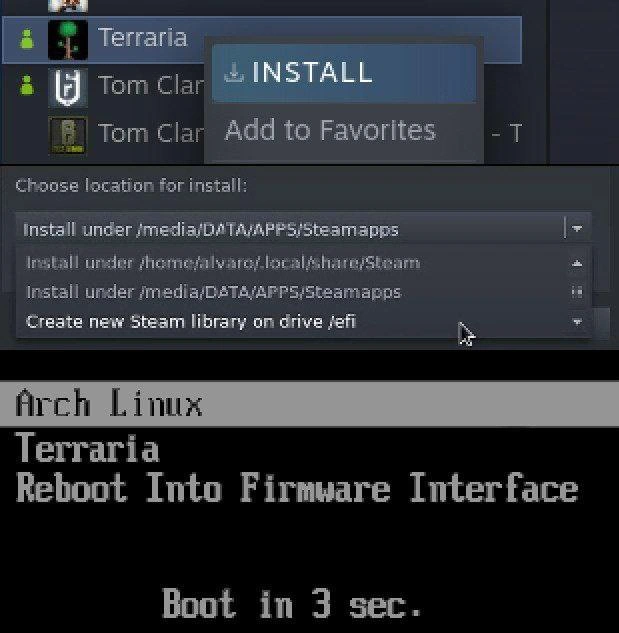
Now, Steam is the popular gaming platform, and on Linux it allows you to choose where to install your games. Typically, you might have a Steam library in your home folder (like /home/alvaro/.local/share/Steam) or on another drive where there’s lots of space (like /media/DATA/APPS/Steamapps). In the top image, Steam’s install menu is open for the game Terraria, and we see the option Create new Steam library on drive /efi. That means Steam detected the mounted /efi partition and is offering it as if it were just another drive to install the game. For a newcomer, that might not raise alarm, but it should – because /efi isn’t a normal location for software installations. It would be like Steam offering to install a game onto your C:\Windows\System32 folder on Windows – clearly not a sensible idea! This is a classic misconfiguration scenario: picking the wrong path for the job.

The bottom image is where the joke lands: it shows what looks like the GRUB bootloader screen. GRUB is the program that comes up when your computer starts (on many Linux setups, especially if you dual-boot). It lets you pick which operating system to start. In the meme’s fake boot menu, besides the normal "Arch Linux" entry (that’s the installed Linux OS) and the usual "Reboot Into Firmware Interface" (an option to go to BIOS/UEFI settings), there’s now an entry for "Terraria". Imagine that – a video game listed alongside your OS! This is not something that happens in a healthy system. It’s there for comedic effect, suggesting that if you installed the game in the EFI partition, the computer might get so confused that it treats the game as another OS to boot into. Normally, GRUB only lists actual installed operating systems. For example, if you had Windows and Arch dual-booting, you’d see entries for both. You definitely wouldn’t see individual games.

So why is this funny to those in the know? Because it’s a user error scenario taken to a ridiculous extreme. It’s as if someone accidentally told the computer, “Hey, this game is as important as the OS, put it in the startup list.” Newcomers learn quickly that certain parts of the system should not be touched for casual things. The file system hierarchy on Linux has specific purposes: /home for user files, /etc for configuration, /bin for essential binaries, and so on. The /efi (or /boot/efi) is for bootloaders. When installing software (like a game via Steam), the safe locations are usually somewhere in your home directory or other large data partitions. Choosing /efi would be a mistake – it could even prevent your computer from booting if that partition fills up or if important files are overwritten.

If you’re a junior dev or user, think of it this way: this meme is teaching an important lesson with humor. Always double-check where you’re installing things on a system like Linux. The interface might list every mount point, but not all “drives” are equal. One is literally the boot drive for your OS. The joke comes from imagining the consequence of that mistake: your system’s bootloader (GRUB) sees something weird in the boot partition and goes, “Uh, I found Terraria in here… I guess I’ll add it to the menu?” It’s a playful warning. Many of us have had minor scares with selecting the wrong disk or path (like mounting the wrong partition, or copying files to the wrong folder). This meme just blows it up into an absurd scenario to make it memorable. In summary, Terraria should live in your games library, and the EFI partition should stay pristine for the computer’s startup files — mix them up, and you get a funny but technically nightmarish situation.

Level 3: Gaming the Bootloader

For the experienced Linux user or sysadmin, this meme is a head-smacker with a side of dark humor. It’s poking fun at a user error so egregious that it borders on legendary: installing a video game onto the EFI System Partition. Why is that hilarious? Because the EFI partition is essentially your machine’s holy ground for boot files, and here Steam is cheerfully offering to dump a game there. The top screenshot shows the Steam client on Linux, where the install location dropdown includes an ominous option: “Create new Steam library on drive /efi.” Any veteran admin’s eyes would bulge at that — “Wait, Steam, you want to put game files on /efi?!” 😱 That’s like a big red button labeled “Do Not Press”. Linux gives you the power to mount any partition anywhere, and apparently Steam isn’t filtering out critical system mount points. In an Operating Systems context, this is a nightmare waiting to happen: the EFI partition is typically small and reserved exclusively for bootloaders. Filling it with game data could not only risk running out of space for real boot files, but also might overwrite or clutter the delicate boot file structure. Seasoned devs have war stories of systems failing to boot because the EFI partition was accidentally modified or filled up — it’s the kind of Misconfiguration that leads to panicked troubleshooting at 3 AM.

The bottom half of the meme doubles down on the joke: it mimics a GRUB boot menu that now includes a new entry for "Terraria". Normally, GRUB (the GRand Unified Bootloader many Linux distros use) lists installed OSes. You might see entries like “Arch Linux” and maybe “Windows 10” or recovery options. Here we see:

Arch Linux
Terraria
Reboot Into Firmware Interface
Boot in 3 sec.

This image implies that by installing Terraria to /efi, the game somehow became an entry in the bootloader menu, right alongside Arch Linux itself. It’s the ultimate “I regret nothing” moment of Gaming Culture on Linux. The seasoned crowd knows that GRUB can automatically find operating systems — it’s witty to imagine it stumbling upon a game and treating it like another OS. In reality, how could that happen? Possibly via GRUB’s os-prober script scanning the EFI partition and encountering something it thinks is an OS. Maybe a folder named after the game or an executable in an expected path tripped it up. It wouldn’t normally list a random game, but that’s the joke: by blurring the line between game files and system files, you’ve essentially tricked your bootloader. It’s a satire of System Administration gone wrong: as an admin, you rigorously segregate data and system partitions for safety, and here comes a casual install wizard unwittingly tempting you to violate that principle.

The humor also taps into the Arch Linux meme subculture. Arch users are known for doing everything manually and sometimes pushing Linux to its limits (“I use Arch, btw” bragging rights). An Arch user would be comfortable dealing with mount points and partitions — comfortable enough that this kind of risky option even appears. The meme caption “When Steam offers to put Terraria straight on your EFI partition” reads like a ridiculously daring challenge. It’s something only a very brave or very foolhardy user would even contemplate. In practice, a cautious power-user laughs because they know the danger; a newbie might not even realize '/efi' is not a normal data directory. This gap in understanding is exactly where many UserError horror stories begin. The senior perspective also appreciates the unexpected_boot_menu_entries angle — older hands have seen weird boot menu glitches. Maybe a mis-installed OS left a ghost entry, or dual-booting multiple Linux distros caused GRUB to list something like “Unknown Linux on sda3”. Seeing "Terraria" in that list is an exaggeration of those real experiences, turning a mild annoyance into a comedic scenario. It lampoons the fragility of boot configuration: one wrong move in disk management and your system might literally think a game is an OS.

Beyond the technical goof, there’s an ironic layer: modern games and platforms do blur the line with OSes (think of how the Steam Deck’s OS boots straight into Steam’s interface as if it is the OS). But here, Terraria (a 2D sandbox game) becoming a boot option on a desktop PC is pure absurdity. It tickles the veteran funny bone because it’s so wrong it’s funny. It’s the kind of tongue-in-cheek scenario you joke about but (hopefully) never actually do. In essence, this meme resonates with experienced developers and sysadmins because it encapsulates a systems administration nightmare in a lighthearted way. It’s a reminder that with great power (the freedom of Linux’s filesystem) comes great responsibility – and if you ignore that, you might just end up with a bootloader that tries to launch a video game at startup. It’s equal parts horrifying and hilarious, a perfect example of gallows humor in tech: “I’ve borked my bootloader before, but at least it didn’t try to boot Terraria!”.

Level 4: Mountpoint Mayhem

At the deepest technical level, this meme highlights a UEFI boot quirk born from a Steam on Linux misadventure. The EFI system partition (often mounted at **/efi** or **/boot/efi**) is a special FAT32 partition where the computer's firmware (UEFI) looks for boot loaders. Normally it contains files like bootx64.efi or GRUB’s .efi loader in directories (e.g. EFI/Arch/grubx64.efi). It’s definitely not intended for game installations. Here, Steam’s suggestion to create a library on the EFI mount point sets the stage for chaos: game files could end up in the firmware’s domain. Under the hood, if you pollute the EFI partition with unexpected files or folders, you can confuse boot management tools. For instance, Linux’s bootloader GRUB often runs an os-prober to detect other OSes by scanning disks for known boot signatures. A rogue directory like EFI/Terraria or a stray executable in the EFI partition might be misidentified as a new OS to boot. In a hypothetical extreme, one could even manually register a bogus UEFI boot entry for a game. Using the efibootmgr utility on Linux, an enterprising (or reckless) user can do:

# Create a fake UEFI boot option named "Terraria" (not advisable!)
sudo efibootmgr -c -L "Terraria" -l "\EFI\Terraria\terraria.efi"

This would place a boot entry called "Terraria" into the firmware’s NVRAM list. On reboot, the UEFI firmware and GRUB would dutifully display "Terraria" as if it were another OS. In reality, no one expects a game to reside in the boot sector of the disk—Operating Systems belong there, not Steam libraries. The meme plays with the low-level detail that the boot menu (especially on an Arch Linux system with GRUB) is just reading whatever boot entries it finds. The tiny FAT32 EFI partition (often ~100–500 MB) is meant only for bootloaders and related data; installing a game like Terraria there isn’t just humorous—it’s a file system boundary trespass. It’s as if the game’s files became entangled with the firmware’s expected files, creating a partition paradox. This situation satirizes the esoteric intersection of Disk Management and boot processes: a perfect storm where an ordinary game installation turns into UEFI bootloader hijinks. It tickles the brain of any systems engineer: the underlying system is treating a game as a bootable program because we put it in the sacred space reserved for OS boot code. In summary, at this deep level the humor springs from understanding how UEFI firmware and GRUB enumerate boot options by scanning partitions. The absurdity is rooted in the elegant but unforgiving logic of system boot: anything in the EFI partition looks like a boot candidate. Here, Terraria’s files in the wrong place accidentally wave a big flag saying “boot me!”, and the firmware/bootloader, being literal-minded, says “Sure, why not?” It’s a technical facepalm that touches on OS internals and partitioning practices only seasoned Systems Administration folks usually wrangle with.

Description

A two-panel meme illustrating a critical mistake a Linux user can make. The top panel shows a screenshot of the Steam client, where the user is in the process of installing the game 'Terraria'. The 'Choose location for install' dropdown menu is open, and the mouse cursor is ominously hovering over the option 'Create new Steam library on drive /efi'. The bottom panel reveals the disastrous consequence of this action: a screenshot of a system bootloader, likely GRUB, for an 'Arch Linux' system. The boot options now humorously list 'Terraria' as if it were an operating system, right alongside 'Arch Linux' and 'Reboot Into Firmware Interface'. A countdown, 'Boot in 3 sec.', is displayed at the bottom. The joke is aimed at experienced tech users who understand that the EFI System Partition (/efi) is a small, critical partition that contains the bootloaders and is essential for starting the computer. Installing a multi-gigabyte game to this location would overwrite the bootloader, corrupt the system, and render it unbootable. The punchline is the bootloader's absurd new entry, which perfectly visualizes how catastrophically wrong the user's choice was


Comments

13
Anonymous ★ Top Pick That's one way to get a game to boot in under 3 seconds. The OS, however, will now take slightly longer. Infinitely longer
  1. Anonymous ★ Top Pick

    That's one way to get a game to boot in under 3 seconds. The OS, however, will now take slightly longer. Infinitely longer

  2. Anonymous

    Nothing says "DevOps maturity" like promoting Terraria from userland to the firmware layer - next sprint we container-orchestrate /boot

  3. Anonymous

    The only thing more reliable than Arch breaking during a Steam install is the inevitable 'I use Arch BTW' comment that follows - though in this case, Arch is literally announcing itself mid-installation like an overeager intern interrupting a production deployment

  4. Anonymous

    Ah yes, the classic Arch Linux gaming experience: you try to install Terraria, and the system decides it's the perfect time to 'reboot into firmware interface' in 3 seconds. Who needs game saves when you can have BIOS settings? This is what happens when your bootloader has stronger opinions about your gaming choices than your package manager. At least it's not a kernel panic during a boss fight - though honestly, with Arch, that's just Tuesday. The real endgame content is getting Steam to launch without triggering a system-level existential crisis

  5. Anonymous

    Pro tip: don’t point Steam’s library at /efi - efibootmgr will promote Terraria to an OS and systemd-boot will dutifully give it a 3‑second SLA

  6. Anonymous

    Terraria on Arch: Dig straight down to /media/DATA for loot - er, storage space

  7. Anonymous

    Nothing says “Arch, btw” like putting your Steam library on /efi - GRUB starts treating Terraria like an initrd and your disaster recovery plan becomes ‘pacman -S grub && never touch mount points again.’

  8. @Similacrest 1y

    src

    1. @DerKnerd 1y

      What the flying fuck

    2. @ZgGPuo8dZef58K6hxxGVj3Z2 1y

      This is based af

  9. @SlavaAndreevich 1y

    you use Arch btw

  10. @samorosnie 1y

    i think to launch the first worms on a pc i was booting it. oh what a experience...

  11. @patsany_horosh_mne_v_dm_pisat 1y

    a yes, my favorite game launcher. BOOT MANAGER

Use J and K for navigation
