Skip to content
DevMeme
1197 of 7435
The Unholy Trinity of Production Incidents
OnCall ProductionIssues Post #1336, on Apr 20, 2020 in TG

The Unholy Trinity of Production Incidents

Why is this OnCall ProductionIssues meme funny?

Level 1: Always You Three

Imagine a teacher at school who’s constantly dealing with trouble – a broken window, paint spilled on the floor, a prank in the cafeteria. Every time something bad happens, it turns out the same three kids were involved. The teacher, exasperated, says, “Why is it always you three?” Those kids are always causing a mess, even if they don’t mean to. In the tech world, we have our own “three troublemakers” that seem to cause most of the problems when a website or app breaks. Those are SSL, certificates, and connection issues. Think of SSL as the school’s rule about talking in code (so only the right people understand) – if that goes wrong, nobody can understand each other. A certificate is like an ID card or a permission slip – if it’s expired or not signed properly, the door to the classroom stays locked. And a connection problem is like the school bus not running – if the bus (network) breaks down, kids (data) can’t even get to school. The meme jokes that whenever something goes wrong, it’s “always those three” causing the trouble. It’s funny in the way a parent might chuckle and shake their head when the same scamps do it again. We’re basically saying: “These three little rascals (SSL, certs, and network glitches) are often behind the mischief, and at this point, we’re not even surprised anymore.” It’s a playful way to vent about the fact that some problems just keep coming back, again and again, like the same trio of pranksters who never learn their lesson.

Level 2: Trio of Trouble

Let’s break down the “unholy trio” named in the meme – SSL, certs, and connection problems – and why they’re infamous in the tech world, especially in DevOps/SRE and on-call situations. Each term corresponds to a common root cause for why an application might suddenly stop working:

  • SSL/TLS Issues: SSL stands for Secure Sockets Layer, an old term often used interchangeably with TLS (Transport Layer Security), which is the modern protocol that secures data as it travels over a network. When you see the little padlock in your browser’s address bar, that’s TLS in action encrypting your connection. An SSL/TLS issue means something went wrong in the process of setting up that secure link. For example, the client and server might not agree on which encryption methods to use (imagine two people trying to communicate but not speaking a common language). This setup process is called the TLS handshake. If the handshake fails, you’ll typically get errors like SSLHandshakeException or a browser message saying “Secure connection failed”. It’s a bit like dialing a phone number, hearing the other side pick up, but then not being able to understand each other’s language – the call drops because a proper conversation couldn’t start. In practical terms, an SSL problem could arise if, say, the server only supports newer TLS versions and the client is very old (they can’t agree on protocol), or if there’s a misconfiguration on the server’s end (like supporting no overlapping cipher suites with the client). The result? The connection gets cut off before any real data transfers. In an on-call incident, if users can’t reach a service and there are messages about “SSL” or “handshake” in the logs, it points toward this kind of issue.

  • Certificate Problems: Digital certificates are like ID cards for websites and services. A certificate tells a user’s computer “This service is who it claims to be, and here’s the proof signed by someone you trust.” The “someone you trust” is a Certificate Authority – essentially a trusted company or entity (like Let’s Encrypt, DigiCert, or Comodo) that vouches for the certificate’s authenticity. For the encryption (TLS) to proceed, the certificate presented by the server must be valid: it must be signed by a known CA, issued for the correct domain name, and within its valid date range. A certificate expiry problem is incredibly common – certificates come with an expiration date (often 1 year or 90 days, etc.), after which they are no longer considered valid. If nobody renews the certificate in time, the server will keep presenting an ID that’s effectively “expired” or “invalid”, and browsers or clients will refuse to complete the connection. This results in errors like certificate has expired or ERR_CERT_DATE_INVALID (in Chrome) or a big scary browser warning page. It’s the equivalent of showing up at airport security with an ID that’s past its expiration date – you’re not getting through until you get a new valid ID. Aside from expiration, other cert issues include having a certificate not issued for the right host (e.g., the cert is for example.com but you’re on api.example.com – this mismatch triggers errors like SSL_ERROR_BAD_CERT_DOMAIN), or missing an intermediate certificate in the chain (which can make the cert untrusted even if the root CA is trusted). All of these will cause a secure connection to fail. In an on-call scenario, when you suspect a cert issue, engineers might run commands like openssl s_client -connect yoursite.com:443 or simply curl https://yoursite.com to see the error. A typical telltale output would be:

    $ curl -v https://yoursite.com
    ...
    * SSL certificate problem: certificate has expired
    * Closing connection 0
    curl: (60) SSL certificate problem: certificate has expired
    

    This basically screams “the certificate is no good anymore,” which is a clear call to action: time to install a new certificate.

  • Connection Problems: This is a broad category for any issue where the service isn’t reachable at all. If SSL or certs are the lock and key to the door, connection problems are like the door being completely blocked or the phone line being dead. These manifest as errors such as timeouts (Request timed out, Connection timed out) or network unreachable errors (Host not reachable, Connection refused). The root causes here can vary widely: maybe the server itself is down or crashed, maybe a network cable or switch failed, maybe a recent deploy changed an IP address or port and now the clients are pointing to nowhere. It can also include the notorious DNS issues — for instance, if someone unintentionally messed up the DNS records, the domain name might not resolve to the correct address anymore (so users are effectively knocking on the wrong door). A connection problem is basically when your app tries to call out to a service and hears nothing back. In on-call practice, if something times out, engineers start checking: “Is the server up? Can I ping it? Did our load balancer drop it? Is the network path clear?” Tools like ping, traceroute, or checking cloud provider status dashboards come into play. Often, what we find is something simple but critical: e.g., Oops, the firewall is blocking that port, or the service crashed and the auto-restart didn’t happen, or maybe there’s a regional outage with our ISP. These are the kind of issues that lead to vague incident report entries like “root cause: connectivity issue between Service A and Service B” – which is a fancy way of saying something in the network failed or changed unexpectedly.

Now, why does the meme specifically pin blame on these three (SSL, certs, connections)? Because in practice, they are extremely common culprits when things go wrong in production. They sit at different layers: network and transport layers (connection issues), security layer (TLS protocol issues), and trust/authentication layer (certificate issues). Many outages and incidents boil down to one of these layers failing. It’s almost a running joke: when an alert comes in, someone might half-jokingly ask, “Did the cert expire?” or “Is DNS down?” because those straightforward checks often do catch the problem.

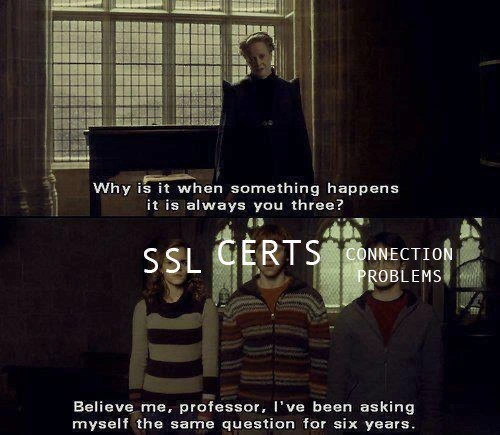
The meme uses a scene from Harry Potter to convey this with humor. In the image, a professor (McGonagall) asks Harry, Ron, and Hermione (who often got into trouble at school), why it’s always them whenever something happens. In the meme’s second panel, those three student characters have been labeled “SSL”, “CERTS”, and “CONNECTION PROBLEMS”. One of them replies with a subtitle, “Believe me, professor, I’ve been asking myself the same question for six years.” The joke here is two-fold:

  1. Recurring Issues: Just like those students were consistently causing trouble over years at Hogwarts, these technical issues have been causing repeated incidents for years in IT. The “six years” line emphasizes that this isn’t a new problem – it’s been a pattern for a long time (and indeed, anyone in tech for a while can attest that certificate expirations and network issues have been plaguing us for more than six years!).

  2. Inevitable Mischief: The students in the movie don’t intend to cause trouble every year; it just happens due to circumstances. Similarly, no one intends for an SSL cert to expire or a network route to fail, yet they seem to happen ** with almost story-like regularity**. The meme humorously portrays these system components as if they had a mind of their own, almost shrugging and saying, “Yeah, we cause a lot of issues… we wonder why, too!” It’s poking fun at the almost uncanny frequency of these particular root causes.

For a junior developer or someone new to on-call rotations, the lesson hidden in the humor is: Pay special attention to certificates, SSL/TLS settings, and basic connectivity. These are fundamentals that are easy to take for granted until they fail. A lot of newbie engineers assume if their code is correct, the system will run. But in real-world production, your code sits on a mountain of infrastructure and configurations. The code might be perfect, but if the certificate expires, the users still can’t use the service. Or if a network cable is unplugged, your service is down no matter how bug-free the code is. That’s why teams implement things like certificate expiry reminders, redundant network paths, and thorough monitoring. And yet, as the meme implies, these issues still slip through often enough to be a running gag.

In summary, SSL/TLS issues, certificate mishaps, and connection outages are like the three notorious pranksters in the school of production environments. This meme is a lighthearted way to say, “When something breaks, these are the guys we suspect first,” because experience has shown they’re frequently to blame. It’s funny and a bit painful – we laugh, then we double-check when our own certs are due to expire!

Level 3: The Usual Suspects

For anyone who’s been on on-call duty or debugged a late-night outage, this meme hits home immediately. It highlights the usual suspects behind many production incidents: SSL/TLS issues, expired or misconfigured certificates, and generic connection problems. The scene is borrowed from Harry Potter, where a weary Professor McGonagall addresses the trouble-prone trio of students. Here, those three students are relabeled as our troublesome trio in tech. The professor’s tired question, “Why is it when something happens, it is always you three?”, perfectly captures an SRE’s frustration during a post-incident meeting: How come it’s always SSL, certs, or connectivity acting up?

Anyone with a few firefights under their belt will likely chuckle (or groan) at this. We’ve all seen it: a critical service goes down, pager alerts are blaring, and everyone scrambles through dashboards and logs. Nine times out of ten, the root cause isn’t an exotic new bug or an advanced cyberattack — it’s something embarrassingly routine. The SSL certificate expired over the weekend. Or an intermediate cert wasn’t installed after a renewal, so clients suddenly don’t trust our site. Or maybe someone on the network team updated a firewall rule or a load balancer config, and now half the calls are timing out (connection problems galore). It’s as if these three are kids that DevOps teams keep catching sneaking out of class to cause mischief.

Consider some real-world scenarios that tech teams encounter:

  • A major company forgets to renew a certificate on a critical service. The cert reaches its NotAfter date and poof — at 00:00 UTC the service refuses all secure connections. Users wake up to errors, and engineers wake up to panic. (This isn’t hypothetical; it’s happened many times, even to big players. Microsoft Teams, for instance, had a notable outage in early 2020 due to an expired cert. The embarrassment is real.) The post-incident retrospective inevitably asks: “How did we let it expire… again?” It’s the tech equivalent of forgetting your keys and getting locked out of the house. After the third or fourth time, you start questioning your life choices.

  • Other times, everything was fine until someone tightened security settings without fully checking compatibility. Suddenly, TLS handshake errors flood the logs because the server now insists on a cipher or protocol version that some clients can’t speak. A typical example: an ops team disables older TLS 1.0/1.1 for compliance (good intention), but an old internal service or client library hasn’t been upgraded and only knows the older protocols. The result? Connection failures and a scramble to roll back or patch the client. The humor (in hindsight) is that we essentially shot ourselves in the foot by following best practices without accounting for all dependencies. It’s an “oops, we broke our own product’s handshakes” moment.

  • And then we have the classic mystery network outage. The app is running fine, the certificates are all valid, but nobody can reach the service. Cue the war-room call where someone inevitably asks, “Could it be DNS?” (A legendary phrase born of how often misconfigured DNS or cache issues cause outages). Or perhaps a cloud provider’s network is having hiccups. Maybe a fiber cable got cut, or a deploy changed the server’s IP and the firewall is blocking it now. These connection problems are the hardest to diagnose because everything by design is outside the application’s control. All you see is requests vanishing into a black hole. You’re left swapping out suspects: Is it the network? The load balancer? Did our container orchestrator kill something? Sometimes you even doubt the monitoring: Is it a real outage or just our monitoring can’t reach the server? (Yes, that happens too).

What makes this meme so relatable (and darkly funny) is that it encapsulates a form of shared PTSD among developers and SREs. We expect these failure patterns. Teams have internal checklists that practically read: “If site is down, check certificate expiration first. Then verify TLS settings and recent security updates. Then ping the network or try a traceroute.” This mirrors a teacher always checking on the three notorious kids whenever there’s trouble in class. It’s both humorous and exasperating that despite all our advanced tech, we’re often tripped up by such basic things.

There’s also an implied commentary on organizational habits. Why do these issues keep happening for six years (as the meme’s subtitle jokes)? Because humans are involved, and processes aren’t perfect. Certificates expire on a schedule that might outlive team members or get lost in email reminders. Ownership of certs can be muddy: Is it the dev team’s job? The IT security team’s? Maybe an external vendor’s? It only becomes everyone’s problem once it’s expired and causing an incident. As for network changes, one team’s “harmless config update” can be another team’s “surprise outage.” Maybe the network team wasn’t aware of an obscure dependency, or there was a documentation gap – classic DevOps coordination issues. And SSL/TLS configurations often sit in config files or server settings that people hesitate to touch if it’s working. Over years, those settings can become outdated, or someone updates them without testing every client, and suddenly legacy clients can’t connect. It’s hard to perfectly prevent these because the environment is always evolving.

Another reason this trio is always to blame: they often hide in plain sight. When an outage happens, our first assumption is usually a bug in the new code deployment or a database overload, something we did recently. It can take a while (and some humility) to pause and say, “Wait, did we miss an expired cert or a simple network misconfig?” I’ve seen seasoned engineers debug application logic for hours only to eventually discover nothing was wrong with the code – the database connection string in the config had an outdated hostname that no longer resolved (DNS strike again under the guise of “connection problem”). It’s facepalm-inducing. We’d rather chase an exotic bug than admit we let a certificate lapse. But eventually, someone sighs and checks the certificate store or runs openssl to inspect the connection, and there it is: verify error: certificate has expired 🙄. Cue the collective groan and a round of “I thought someone set up the auto-renew script!”

From a DevOps/SRE perspective, each of these culprits has prompted its own preventative practices. We set up certificate monitoring dashboards that flash giant warnings when a cert’s expiration date is near (ideally, we get yelled at before the outage, not after). We employ configuration management to ensure TLS settings are consistent and tested. We add health checks that include basic connectivity tests (can our server reach external dependencies? is DNS resolving correctly?). In theory, these should reduce incidents. In practice, something always slips through, especially in complex, distributed environments. Maybe the monitoring was checking the wrong certificate, or the TLS config change was urgent for a security fix and skipped the usual rollout process, or the connectivity issue was in an external dependency we weren’t watching. Murphy’s Law loves to exploit any gap.

Finally, the meme’s punchline has that student retort: “Believe me, professor, I’ve been asking myself the same question for six years.” In the tech context, it’s like these problems themselves are personified and even they are tired of being the scapegoats. For six years (an arbitrary long time in tech, enough for many incidents), we’ve seen the same story repeat. The humor has a touch of catharsis: operations folks jokingly wish they could banish SSL, certs, and network issues to Azkaban (the wizard prison) so they’d stop causing trouble. But alas, they are fundamental parts of our infrastructure – we can’t live without them, and we have to live with them. So we cope by making memes, sharing war stories, and automating what we can. Yet whenever an alert goes off, a little voice in the back of our heads whispers, “Check those usual suspects first.” After all, if something’s gone wrong, it’s pretty much a running gag that it’s always those three.

Level 4: The PKI Dark Arts

At the deepest level, this meme invokes the fundamentals of network security and the inevitability of failure in complex systems. Modern secure connections rely on a ritual of cryptography and trust known as the TLS handshake (successor to SSL). During this handshake, the client and server use public-key cryptography (think large prime numbers, elliptic curves, and one-way math functions) to agree on encryption keys. They also exchange a digital certificate as a proof of identity. This certificate is part of the Public Key Infrastructure (PKI), a globally distributed system of trust. It includes a chain of signatures from a trusted Certificate Authority (CA) down to the server’s certificate. Academically, it’s a beautiful design: if any link in this chain is broken (an expired certificate, an untrusted signer, a mismatched domain name), the entire connection is fail-closed for safety.

That safety-first design is like a strict professor: if something’s not 100% right, class is canceled. So a mere date on a certificate (NotAfter timestamp) can bring all communication to a halt at the stroke of midnight. This is a feature, not a bug—expired or invalid certs are rejected to prevent eavesdropping or man-in-the-middle attacks. But from the ops perspective, it’s a cryptographic conundrum: a single forgotten renewal can unexpectedly take down systems. The mathematics and protocols of SSL/TLS are unforgiving; there’s no partial credit for being “almost correct.” The browser or API client won’t say “close enough” – it will simply abort with an error. In theory, this rigidity upholds security. In practice, it means an overlooked certificate becomes a production incident precisely at the worst time (usually 3 AM, because of course it’s 3 AM).

Now consider connection problems from a theoretical lens. The internet is a layered architecture (OSI model) where each layer can introduce its own failures. At the physical and network layers, we grapple with the reality of packet loss, routing, and DNS resolution – essentially the fallibilities of distributed systems. There’s a bit of applied chaos theory here: as systems scale, the probability of some network component failing approaches 1. In distributed systems theory, we accept that partitions (network cut-offs) will happen (per the CAP theorem, we trade off consistency or availability during those). No matter how advanced our protocols, the underlying complexity means glitches are statistically inevitable. Hence, the wise old engineering joke: “It’s always DNS” — a nod to how often the seemingly arcane domain name system (or some network config) ends up being the hidden gremlin.

Bringing it back to the meme’s “unholy trio”: SSL, Certs, and Connection issues each represent a class of deep, systemic complexity. SSL/TLS issues might stem from protocol version mismatches or cipher suite negotiations – essentially the two sides failing to find a common cryptographic language. It’s reminiscent of speaking a magical incantation: both sides must get it exactly right (protocol version, cipher, key exchange method) or the spell fizzles out. Certificate issues come from the rigid rules of PKI: keys must be trusted and refreshed, which introduces time-based failure points (expirations) and dependency on external authorities (CAs, CRLs, OCSP responders). Even the most mathematically secure system is only as robust as its weakest human link, and forgetting to renew a certificate is a very human oops. Finally, connection problems are a reminder that beneath all our high-level abstractions, we’re at the mercy of cables, servers, and switches around the world. From a purely theoretical standpoint, these are independent failure domains — any one of them going down can stop the show. In practice, they have a nasty habit of converging during an incident, making the root cause a tangled mess of, say, an expired cert that also wasn’t noticed due to a flaky monitoring connection. It’s almost poetic (in a dark arts kind of way): the more layers of protection and abstraction we add, the more interplay and potential points of failure we introduce. This meme humorously acknowledges a hard truth of computing theory: complex systems fail in complex ways, yet often with familiarly recurring patterns. And when something breaks, the root of trust or the network itself is frequently at fault — as if some universal law of tech says these particular gremlins will always manifest eventually. The professor in the meme might as well be the universe asking, “Why is it always you three?”

Description

A two-panel meme using a scene from a Harry Potter movie. In the top panel, Professor McGonagall stands in a dimly lit, gothic-style room, looking down with exasperation and asking, 'Why is it when something happens it is always you three?'. The bottom panel shows the three protagonists, Hermione, Ron, and Harry, standing together looking troubled. White text is overlaid on the characters: Hermione is labeled 'SSL CERTS' and Harry is labeled 'CONNECTION PROBLEMS'. Ron, standing in the middle, is unlabeled, but the context implies he represents the third common culprit: DNS. The subtitled text from Ron reads, 'Believe me, professor, I've been asking myself the same question for six years.' This meme perfectly captures the frustrating reality for anyone in an operations or SRE role, where a disproportionate number of critical production issues can be traced back to one of these three notoriously finicky areas: expired or misconfigured SSL certificates, DNS resolution failures, or generic network connectivity issues. The joke resonates with experienced engineers who have spent countless hours troubleshooting these same fundamental problems

Comments

7
Anonymous ★ Top Pick It's always DNS, SSL, or BGP. But mostly it's DNS. Except when you've spent six hours blaming DNS and it turns out you forgot to renew the cert
  1. Anonymous ★ Top Pick

    It's always DNS, SSL, or BGP. But mostly it's DNS. Except when you've spent six hours blaming DNS and it turns out you forgot to renew the cert

  2. Anonymous

    Incident war room bingo: “curl --insecure” square gets stamped, someone pastes the expired cert’s NotAfter date, and the network team gets paged - all before the CEO finishes asking, “Is it a DDoS?”

  3. Anonymous

    After 15 years in the industry, I've learned that every production outage investigation eventually leads to one of three root causes: expired SSL certs, DNS propagation, or that one microservice nobody remembers deploying in 2019 that's somehow critical to everything

  4. Anonymous

    After 20 years in the industry, I've concluded that SSL certificates are the only technology that simultaneously expires, breaks in production at 3 AM, and somehow works perfectly on localhost. The trinity of 'SSL CERTS', 'CONNECTION', and 'PROBLEMS' is so inseparable that I'm convinced they're just three manifestations of the same cosmic force designed to humble senior engineers who thought they understood networking. The real mystery isn't why these three always appear together - it's why we still haven't automated away the pain of certificate management despite having orchestrated entire data centers

  5. Anonymous

    SSL certs: the only chain reaction where the intermediate link expires right before quarterly review

  6. Anonymous

    Every Sev‑1 starts as a “database outage” and ends as NTP drift, an expired intermediate, or SNI off - the SSL/certs/connection trifecta

  7. Anonymous

    Top three root causes by page volume: TLS, cert rotation, and “the network” - aka outages that deploy themselves

Use J and K for navigation