Skip to content
DevMeme
1074 of 7435
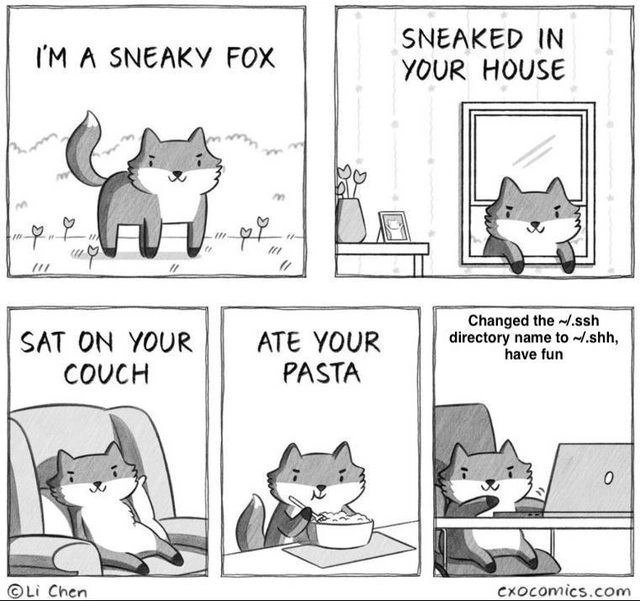
A Sneaky Fox's Ultimate Act of Developer Sabotage
Security Post #1206, on Mar 29, 2020 in TG

A Sneaky Fox's Ultimate Act of Developer Sabotage

Why is this Security meme funny?

Level 1: The Fox Hid Your Keys

Imagine you have a special key that lets you into your house, and you always keep this key in a particular drawer at home. One night, a sneaky little fox comes into your house. It doesn’t break anything or make a mess at first – it just tiptoes around doing minor naughty things (sits on your couch, munches on your bowl of pasta… silly stuff). But then, as a final prank, that fox takes the key from your special drawer and hides it in a different drawer labeled “shh” (as in “quiet!”). The next morning, you try to unlock your door or log into your secret treehouse, and your key is gone from its usual spot. You search and search the normal drawer and get really worried because suddenly you can’t get in. The fox is snickering in the corner saying, “Have fun!” because it knows you’re locked out until you realize where the key went.

This meme is funny because it’s just like that story, but with computers. Your computer needs a secret key file to log into other computers (servers), and it expects to find that key in a folder named .ssh (which is like the special drawer). The “sneaky fox” in the cartoon quietly renamed that folder to .shh (basically putting the keys in a different hiding spot named “shh”). So, when you (or your computer) went looking for the key, it wasn’t where it was supposed to be – and poof, you couldn’t unlock the door to your servers. It’s a lighthearted way to show how a tiny trick can cause a big problem, and it makes us laugh because the fox is so proud of itself for causing mischief. In simple terms: the fox hid your keys, you got locked out, and now you have to figure out the little prank it played to get your keys back. It’s a cute cartoon reminder that sometimes big problems can be caused by little hidden tricks!

Level 2: No Keys, No Login

If you’re newer to the command-line or haven’t managed servers before, here’s what’s going on: SSH stands for Secure Shell, a protocol and tool that lets you log into remote machines securely. Think of SSH like a special door to your servers that only opens if you have the right key. Now, on your computer, there’s a hidden folder called ~/.ssh (pronounced “dot S S H”) where your login keys and settings are usually kept. In Unix/Linux systems, ~ means “your home directory” (like your personal folder), and files or folders starting with a dot (.) are hidden by default (so .ssh is a hidden directory named "ssh").

Inside ~/.ssh, you typically store things like:

  • Your private keys (e.g., id_rsa or id_ed25519): these are like secret keys that prove your identity to the server.
  • Your public keys (id_rsa.pub, etc.): these go on the server side to declare “user X has a key that matches this.”
  • A file named authorized_keys (on the server) that lists which public keys are allowed to log in.
  • Known hosts and config files that help your SSH client know who it’s connecting to and how.

When you run ssh me@production-server, the SSH program on your PC automatically looks in ~/.ssh/ for an appropriate key to present to the server. It’s like reaching into your usual keyring for the door key. Now here’s the kicker: in the joke, the fox renamed the ~/.ssh folder to ~/.shh. That’s a tiny, almost unnoticeable change – just removing the letter “s” – but it completely confuses the SSH program. It’s as if someone moved your keys to a new secret drawer without telling you. Your SSH client obediently checks “Hey, are there any keys in ~/.ssh?” and finds nothing (because all your keys are sitting next door in a folder named .shh that it never checks). Result: SSH can’t use your keys, and you suddenly can’t log in to any server that requires key authentication. You either get asked for a password you might not even have, or you see an error saying your public key was denied. In plain terms, no keys, no entry.

For a junior developer or someone new to this, such a problem can be really confusing. Nothing changed with the servers, nothing obvious changed on your laptop, and yet boom – all remote connections are failing. The trick is that the change was hidden (literally, the folder is hidden and still there, but under a different name). The meme exaggerates it with a “sneaky fox” character, but it’s poking fun at a real troubleshooting scenario: “Why on earth can’t I SSH into my servers anymore?!” Eventually, you’d learn to check that your ~/.ssh folder is present and correctly named. Maybe you’d run ls -a ~ (to list all files including hidden ones) and spot a weird .shh directory you’ve never seen before. Lightbulb moment 💡: “Ohhh, that’s where my keys went!” Rename it back to .ssh and suddenly everything works again.

This comic is filed under DevOpsHumor and DebuggingFrustration because it highlights how a tiny config goof can lead to big headaches. DevOps engineers and system administrators deal with these kinds of issues regularly. For example, a simple typo in a config file or a misnamed directory can break an entire automation or prevent logins. It’s funny (in hindsight) because it’s so disproportionately frustrating relative to the simplicity of the fix. In this case, just one letter change—turning SSH’s folder into a shushing “.shh” quiet zone—locks out the user. The fox essentially performed a prank on the user’s computer, the kind you might jokingly pull on a coworker to give them a scare (though in real life, messing with someone’s SSH keys without permission is serious business 🚫🔑!). The meme’s charm is that it mixes a friendly cartoon style with a tech insider joke. Even if you didn’t fully understand SSH yet, the idea of a sneaky fox hiding something important (your login keys) conveys that something tricky has happened.

In summary, for a newcomer: the fox’s final line means it quietly hid your login credentials by renaming the folder that stores them. All your remote server doors slammed shut because, as far as your computer is concerned, you suddenly have no keys to use. The lesson lurking in the joke is also a good tip: when SSH isn’t working and you’re sure you set up your keys, double-check that your files are in the right place and have the right names. Sometimes the cause of a big problem is a surprisingly small detail. And in this case, that detail was as small as the difference between “ssh” and “shh” — literally one letter, but all the difference in the world for your logins.


Level 3: Dotfile Deception

In the final panel of this comic, our sly fox reveals the ultimate sysadmin prank:

“Changed the ~/.ssh directory name to ~/.shh, have fun.”

For seasoned developers and DevOps/SRE folks, that one-liner lands like a plot twist in a thriller. Renaming a hidden directory by a single character silently breaks SSH key authentication. This is peak SysadminHumor because it’s an absurdly simple tweak with outsized consequences – the kind of gremlin that sends you down a late-night debugging rabbit hole. The fox’s earlier shenanigans (sneaking in, lounging on your couch, eating your pasta) are trivial annoyances, but tampering with ~/.ssh escalates to a professional nightmare. It’s a clever blend of cute cartoon mischief and SecurityMisconfiguration reality: one extra “h” in .ssh (turning it into a hush-hush “.shh”) can lock you out of every server you own.

Under the hood, SSH (Secure Shell) clients rely on convention and configuration to locate your authentication keys. By default, OpenSSH looks in the user’s home directory for a folder literally named .ssh. Inside that folder live your precious credentials: private key files (like id_rsa or id_ed25519), public keys, the known_hosts file, and maybe an authorized_keys file on servers. The path ~/.ssh isn’t just a suggestion – it’s hard-coded into tools and muscle memory alike. Rename or move that directory, and suddenly the SSH client can’t find your keys or config. The result? Authentication failures across the board. You’ll be scratching your head when every login attempt yields an enigmatic “Permission denied (publickey)”. The computer hasn’t actually forgotten you – it just can’t see your keys anymore because a sneaky intruder stashed them in a new, unexpectedly named hiding spot.

This kind of hidden file hijinks is a classic cause of real-world debugging frustration. The humor here is that something so small and innocent-looking (.ssh vs .shh) can wreak absolute havoc on your day. It plays on the fact that in Unix-like systems, files or directories starting with a dot . are hidden from normal view. So not only did the fox rename your SSH directory, it remained invisible by design. You might list your home directory and not even notice anything missing – at first glance, nothing seems wrong, yet your SSH keys have effectively vanished into the ether. Only a careful ls -a (to show all files) would reveal the trick: a quietly giggling .shh directory sitting where .ssh should be. This is DebuggingTroubleshooting 101 illustrated in comic form: the culprit is right under your nose but concealed by a tiny detail.

From a senior engineer’s perspective, this scene triggers a mix of amusement and PTSD. We’ve all chased down baffling errors only to find a single-character typo or a misplaced file caused the issue. The meme nails that painful Eureka moment: “It was just a renamed folder? Are you kidding me?!” Here, the fox is basically representing Murphy’s Law in sysadmin life – if something can go wrong (and remain undetected), it will. The scenario also doubles as a security lesson: messing with SSH keys or config directories can be a legit attack. A malicious intruder who “sneaks into your house” (system) could pull exactly this move to lock you out of your own servers or to intercept your credentials later. It’s a denial-of-service by directory name. In practice, experienced DevOps engineers protect and monitor their ~/.ssh contents closely. Some might chuckle, “Haha, good one,” but also double-check that their dotfiles are backed up and not tampered with.

To illustrate the practical impact, here’s what the fox’s little trick looks like in the shell:

# The fox quietly renames your SSH config directory:
$ mv ~/.ssh ~/.shh    # .ssh -> .shh (shhh, it's hidden even deeper now)

# Later, you try to log in to a server as usual:
$ ssh me@production-server
Permission denied (publickey).   # 🔑💥 Your key isn't found, auth fails

That Permission denied (publickey) error is the bash-equivalent of the fox’s taunting “have fun.” With your ~/.ssh keys effectively “missing,” the server rejects you since you can’t prove who you are. Only after some head-scratching (and maybe running ssh -v for verbose logs) would you discover the cause. The fix, once you know it, is almost too easy: rename the folder back.

# Realizing the issue, you reverse the prank:
$ mv ~/.shh ~/.ssh    # restore the proper .ssh directory name

$ ssh me@production-server
Welcome to Production Server!   # 🎉🔐 Keys are visible again, login succeeds

“Have fun,” indeed. The humor lands because it’s painfully plausible: a single-letter change in a config path can feel like a sophisticated hack. This dotfile deception trope tickles those who’ve been burned by config files, environment variables, or scripts that seemed harmless. It’s the sort of bug that a junior dev might not catch for days, while a grizzled Cynical Veteran ops engineer might smirk and say, “Check your dotfiles, kid.” In summary, the meme uses an adorable fox and a play on “ssh/shh” to highlight a universal truth in tech: sometimes the biggest headaches come from the smallest, quietest quirks.


Description

This is a five-panel comic strip by Li Chen of cxocomics.com, featuring a cute, mischievous fox. The first four panels build a narrative of typical sneaky behavior: 'I'M A SNEAKY FOX', 'SNEAKED IN YOUR HOUSE', 'SAT ON YOUR COUCH', and 'ATE YOUR PASTA'. The humor escalates dramatically in the fifth panel. The fox is shown sitting in front of a laptop with a sly grin, and a text bubble reveals its final, most devious act: 'Changed the ~/.ssh directory name to ~/.shh, have fun'. The joke is deeply technical, targeting developers and system administrators. The '~/.ssh' directory is a critical folder on Unix-like systems that stores essential SSH keys for secure remote logins. Renaming it would instantly break all key-based authentication, leaving the user unable to connect to servers and utterly confused. The subtle change to '~/.shh' is a clever pun, making the prank both infuriating and hard to spot immediately
Comments

7
Anonymous ★ Top Pick The real horror isn't the renamed directory; it's knowing the fox probably did it with `mv ~/.ssh ~/.shh` and didn't even bother to `alias ssh='echo "shh... no keys for you"'`
  1. Anonymous ★ Top Pick

    The real horror isn't the renamed directory; it's knowing the fox probably did it with `mv ~/.ssh ~/.shh` and didn't even bother to `alias ssh='echo "shh... no keys for you"'`

  2. Anonymous

    Zero-trust, YubiKeys, and jump hosts everywhere - still no match for a fox who knows that `mv ~/.ssh ~/.shh` is a one-character denial-of-service on your entire career

  3. Anonymous

    The most diabolical part isn't the renamed directory - it's knowing that the first troubleshooting attempt will be 'ssh -vvv' which will helpfully tell you everything except that ~/.ssh doesn't exist, leading to hours of checking permissions, regenerating keys, and questioning your sanity before someone finally runs 'ls -la ~/' and discovers the crime

  4. Anonymous

    The beauty of this attack is that `ssh -vvv` will helpfully tell you it's looking for `~/.ssh/config` while you stare at your perfectly intact `~/.shh` directory, wondering why your muscle memory of typing 'ssh prod' now yields 'Host prod not found' instead of your usual production access. It's the filesystem equivalent of moving someone's desk two inches to the left every day - technically everything is there, just not where 20 years of POSIX conventions trained you to expect it

  5. Anonymous

    When the 'helpful' contractor gets SSH: couch warmed, pasta vanished, /bin/sh mv'd to /dev/null - enjoy hunting symlinks from backups

  6. Anonymous

    We finally implemented zero trust by renaming ~/.ssh to ~/.shh - keys are hush-hush and prod is blissfully unreachable

  7. Anonymous

    Rename ~/.ssh to ~/.shh and suddenly Git, Ansible, and every jump box enable silent mode - Permission denied (publickey) as a service

Use J and K for navigation