Skip to content
DevMeme
1819 of 7435
A Tale of Two Terminators: Windows vs. Unix Signal Handling
OperatingSystems Post #2027, on Sep 9, 2020 in TG

A Tale of Two Terminators: Windows vs. Unix Signal Handling

Why is this OperatingSystems meme funny?

Level 1: Asking vs Unplugging

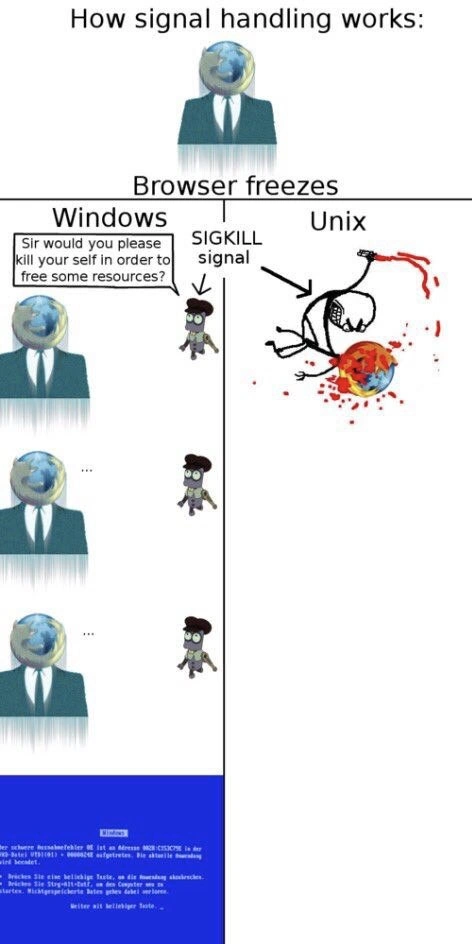
Imagine you have a toy robot that sometimes freezes and stops moving. There are two ways to deal with it. One way is like asking nicely: you gently tap the robot and say, “Hey buddy, could you please stop and reset?” You wait a bit, hoping it listens. This is what Windows does – it politely asks the stuck program to close itself. Sometimes the robot (or program) just ignores you and stays frozen, which can be pretty frustrating. The other way is like just cutting the power: you yank out the robot’s batteries or hit an off switch immediately. That’s what the Unix approach is like – no waiting or asking, just forcefully stopping the thing right away. The meme is funny because it shows Windows as the polite person asking the frozen browser to quit (with “please” and everything), while the browser just sits there silently. Then it shows Unix as someone who simply whacks the frozen browser on the head to stop it instantly. It’s like the difference between saying, “Could you pretty please go to sleep?” versus just turning off the light. The polite way is nicer but might not work, and the forceful way gets the job done but is a bit rough. The humor comes from seeing these two extremes side by side – one very civil and one comically extreme – to explain how different systems deal with a stuck application.

Level 2: End Task vs Kill -9

Let’s break down what’s happening in simpler technical terms. When a program like a web browser “freezes,” it means it has stopped responding to the operating system. Perhaps it got stuck in a loop or waiting for something that never happens – that’s a classic software bug scenario. Now, the operating system (OS) has to handle this misbehaving process.

  • On Windows: if an application hangs, you might see a prompt or be able to open the Task Manager and hit “End Task.” This is the Windows way of asking the program to please shut itself down. The OS will try a gentle approach first by sending a close event to the app (imagine the OS politely tapping the app on the shoulder saying, “Time to go now, OK?”). If the app still doesn’t respond, Windows can escalate to forcibly terminating it. In user-friendly terms, Windows often waits a bit and then might show a dialog: “ is not responding.” You as the user can choose to wait or force it to close. In the meme, the little character with glasses saying “Sir, would you please kill yourself to free some resources?” is a humorous way to depict that polite prompt. It’s what Windows essentially does – it requests the program to exit to free up the RAM and CPU it’s hogging. The Blue Screen of Death (BSOD) shown in the last Windows panel is that solid blue error screen with text that Windows displays if the operating system itself crashes. BSODs are serious and not routine for just a hung app; they usually mean the OS encountered a critical error (like faulty driver or hardware issue). The meme is joking that the browser freeze was so bad that it led to a BSOD. It’s an exaggeration – normally you’d just force-quit the app and maybe restart the browser, not the whole OS. But it captures the feeling of system failure we get when things spiral out of control on Windows.

  • On Unix/Linux: if a program is stuck, you or the system can send it a signal to terminate. The strongest one is SIGKILL (also called signal 9). When you run kill -9 <pid> in a terminal (where <pid> is the process ID of the frozen program), you’re telling the OS to immediately stop that process. There’s no pop-up or polite asking in this scenario – it’s a direct order. The program doesn’t get to save anything or ask “Are you sure?”; it just gets killed. In the meme’s Unix column, the “SIGKILL signal” arrow and the violent comic scene (stick figure chopping the head off the browser) dramatize this instant kill. It might look gruesome in cartoon form, but in reality it just means the process vanishes and frees up resources right away. If you’ve ever used a Mac or Linux and had to do a “Force Quit” on an app, that’s essentially what’s happening – the OS is performing a force-kill in the background. Unix-like systems also have gentler signals (for example, SIGTERM which is what kill without the -9 sends by default, equivalent to asking the program to quit nicely). But often if a program is truly frozen, users skip straight to the force kill because it’s guaranteed to work.

So, in summary: Windows vs Unix in a freeze scenario boils down to “ask to close” versus “kill immediately.” Windows tries a cooperative approach (which can be slow and might not succeed if the app is totally hung), while Unix systems use a more straightforward command to let the OS cut down the process. That’s why in the meme, Windows has multiple panels of waiting and ends with a system crash image, whereas Unix shows one swift action.

To give some real-world context, imagine you have a program that isn’t responding:

  • In Windows, you’d press Ctrl+Alt+Del, open Task Manager, find the process (say browser.exe), and click “End Task.” You might see a spinner or “Not Responding” message for a bit. If it doesn’t end, you might try again with more force (Task Manager has an option to force end the task). Usually, the program will close after that, but worst-case, if even the task manager can’t reclaim control (very rare these days), you’d reboot the computer (which is analogous to that BSOD scenario, since BSOD forces a reboot).

  • In a Unix-like system (Linux, macOS terminal, etc.), you’d open a shell and type ps or top to find the stuck program’s process ID, then type kill -9 <PID>. Alternatively, on a Mac you’d use “Force Quit” from the Apple menu or Activity Monitor. In any case, the unresponsive app is terminated almost instantly. There’s no waiting for the program to cooperate – the OS takes action immediately when you send SIGKILL. The trade-off is that any unsaved work in that app is lost (because it didn’t shut down gracefully).

The meme’s graphics illustrate these concepts in a fun way. The globe-headed business figure represents the browser process (since browsers are our common resource hogs). The small bespectacled guy on Windows side is like the Windows OS or perhaps the Task Manager politely asking the process to close. The three panels of the globe-headed figure just sitting (...) imply the browser_freeze is so bad it’s ignoring the OS. Finally, the blue screen is the OS giving up. On the Unix side, the stick figure with an arrow labeled “SIGKILL” is basically the Unix OS (or a user with root privileges) coming in like a hammer. The decapitation of the browser’s globe head with blood is a cartoon way to say “killed on the spot, no recovery.” In real computing terms, of course, no literal gore is involved – it just means the process was removed from memory. But the drawing uses dark humor to drive the point home.

For a newer developer or someone not deeply familiar with OS internals, the key takeaway is: different operating systems handle unresponsive programs differently. Windows will usually ask the program to quit (that’s why you get those dialogs or have to click “End Task”) and then handle it if it doesn’t comply, sometimes making you wait. Unix/Linux provides tools to directly kill the program (like the kill command or “Force Quit”) which act immediately. The meme simply personifies Windows as a polite but ultimately helpless gentleman, and Unix as a no-nonsense hitman for stuck processes. It’s exaggerating reality to comedic effect, but it’s rooted in real behavior: if you’ve ever had to troubleshoot a hung program, you’ve likely encountered these OS behaviors.

Level 3: Graceful vs Grim Reaper

From a seasoned developer’s perspective, this meme nails a familiar situation: your web browser freezes and each operating system handles it with a different attitude. The left side (Windows) is the gentlemanly approach – the OS basically says, “Pardon me, good sir, would you kindly terminate yourself to free up some memory and CPU?” It’s portrayed by a tiny, polite character with glasses timidly asking the globe-headed browser to quit. In meme terms, Windows is personified as a courteous office worker or butler who uses formal politeness even when things are going awry. And what does the unresponsive browser do in those left panels? Absolutely nothing – it just sits there with a blank stare (... in the speech bubble), ignoring the request. Every developer who’s dealt with a hung app in Windows can relate to that frustrating silence: you click the “End Task” or “Close program” button and then wait. Sometimes the title bar even adds “(Not Responding)” as if to acknowledge your pain. In real life, Windows might pop up a dialog that says something like “This program has stopped responding. You can wait for it to respond or close it.” – which is essentially what the meme’s formal request represents. The humor is that Windows is overly polite to a fault. It’s like asking, “Dear process, would you please commit suicide so that the system can continue?”

Windows OS: “Sir, would you please kill yourself in order to free some resources?”
Frozen Browser: ...

Of course, in the panels, the frozen browser doesn’t respond to the polite prompt (just as a real hung program ignores OS messages). After several futile polite attempts (those repeating panels with the ellipsis “...” convey the awkward waiting and asking again), the Windows path culminates in the infamous Blue Screen of Death. That blue crash screen with white text is instantly recognizable to any IT veteran – it’s the ultimate system failure image, basically a Windows kernel panic. The meme is cheekily suggesting that if a Windows process refuses to die gracefully, the whole operating system might throw up its hands and crash. It’s an exaggeration born from decades of Windows jokes: in earlier days, a single program going haywire (*thanks, *SoftwareBugs!) could sometimes destabilize the whole system, especially on Windows 95/98 or if it tangled with a bad device driver. Even though modern Windows (NT kernel onward) has better isolation, we’ve all had that experience of an app freeze that was so bad you had to hit Ctrl+Alt+Del, and occasionally even that wouldn’t work, forcing a full reboot. The BSOD panel is poking fun at that worst-case scenario – it’s Windows essentially saying “Well, if you won’t kill yourself, I guess I’ll die!” It’s dark humor in a sysadmin sense: the polite approach failed, leading to system crash. This aligns with the DebuggingFrustration of dealing with a completely unresponsive system: sometimes you’re left with no option but a hard reboot, which is the real-world equivalent of that BSOD.

Now, contrast that with the right side (Unix). Unix is depicted as a stick figure who doesn’t bother with any niceties – it goes straight for the executioner role: SIGKILL. In the illustration, an arrow labeled “SIGKILL signal” points to the stick figure decapitating the globe-headed browser in one swift, violent motion. There’s cartoon blood spraying everywhere, which is shockingly graphic but emphasizes the instant and forceful nature of the action. The Unix approach to a frozen process is portrayed as merciless. No polite dialogue, no waiting around – just kill the process outright and be done with it. This resonates with developers and system administrators because on a Unix/Linux system, when a program misbehaves (say your Chrome or Firefox process locks up and starts eating 100% CPU), the typical response is to open a terminal and do kill -9 <pid> (send a SIGKILL) without a second thought. It’s quick, it’s final, and the offending process is gone – much like that stick figure executioner lopping off the head. The meme exaggerates it as literal execution to make us laugh at how brutally effective the Unix method is. We often joke that “there’s no kill like overkill”, and kill -9 is exactly that overkill approach – no chance for the program to protest or survive.

What makes this really funny to folks experienced with both systems is the contrast of tone. Windows comes off as overly proper and ultimately ineffective (the process didn’t comply and the OS dramatically crashed), whereas Unix comes off as a cold, efficient killer (the problem was solved in an instant, albeit violently). This plays into the stereotypical personalities people assign to these OSes: Windows as the user-friendly, hand-holding OS that tries to do things “the right way,” sometimes resulting in comical SystemFailures when things don’t go as planned; Unix/Linux as the power-user’s OS that assumes you know what you’re doing – if you issue a kill command, it obeys without second guessing, even if that means nuking the process. There’s an implicit “Windows vs Unix” culture joke here too. Each panel humorously exemplifies the underlying philosophy:

  • Windows approach: Cooperative and GUI-driven. It’s like a well-mannered boss asking an employee to clock out because they’re causing problems. The boss uses polite language (“free some resources”) and waits, possibly filling out a crash report (Windows Error Reporting) if nothing happens. The meme shows multiple panels of inaction to mimic that agonizing delay when you’re staring at a frozen screen hoping it closes. The final BSOD is the comedic punchline – the polite boss got so stressed, he had a stroke (i.e., the whole system crashes). It riffs on the collective memory of Windows XP and earlier BSODs, or even modern ones, reminding us how jarring that blue screen is. In debugging terms, a BSOD is like the system saying “I couldn’t resolve this gracefully – here’s a memory dump and a sad reboot.”

  • Unix approach: Aggressive and command-line-driven. It’s like a gruff systems administrator who doesn’t bother asking the hung program to behave; they just pull the plug. In practice, on a Linux system, you often skip straight to kill -9 if a process is truly stuck (especially if you’re an impatient power user). The stick figure with an axe (or sword) chopping off the browser’s head, complete with a graphic stick figure decapitation, is a comically exaggerated visualization of how a SIGKILL feels — one moment the process is consuming resources, the next moment it’s terminated with extreme prejudice. It’s gruesome in the cartoon, but in reality it’s just a blink and the process is gone from your process list. For seasoned developers, there’s a bit of satisfaction in that immediacy: no dialog boxes, no “application not responding” nag – just bam, terminated. The humor has an element of wish-fulfillment too: remember all those times you wished you could just force-kill Microsoft Word when it froze during an important document? On Unix, you sort of can do that reliably with kill signals, and the meme plays that up.

Another layer to this joke is the notion of “politeness vs brutality”. We find it funny in part because it anthropomorphizes the OS behavior. Windows politely saying “please, sir” to a misbehaving program is absurd – it’s an anthropomorphic metaphor for how Windows tries to handle process termination gracefully. Unix acting like an executioner is equally absurd but in line with how we jokingly describe the kill -9 command. Developers often say “I had to kill -9 that process” with a kind of dark humor, as if they’re mafia bosses ordering a hit on the rogue process. This meme just visualizes that literally. It taps into our shared debugging and troubleshooting experiences: a hung process is like a betrayal by our code or tools, and we have different means to deal with it depending on the OS.

In real-world scenarios, a savvy engineer might point out that even on Unix/Linux, you usually try a gentler signal first (SIGTERM by default) before escalating to SIGKILL, and Windows actually does have a force-kill in the end. But the meme purposefully skips the subtlety for comedic clarity: Windows = gentle request (then collapse), Unix = immediate kill. It’s funny because it’s a caricature of truth. Anyone who’s been on an on-call rotation or spent late nights debugging will likely chuckle (or cringe) at this because they’ve lived it. You might recall tailing logs and seeing nothing happen, akin to those silent panels, before finally giving up and slamming the terminate button or running a kill command. The browser_freeze example is especially apt – browsers are notorious for eating memory or hanging, so it’s a scenario we all recognize. We laugh, perhaps a bit uncomfortably, because the Windows approach in the meme is painfully slow and polite, whereas the Unix approach is brutally effective – and depending on the situation, each one has happened to us.

Ultimately, the senior dev perspective sees commentary on system design trade-offs: Windows tries to be user-centric (don’t kill the app immediately, maybe the user has unsaved work; ask nicely first), which is great until it isn’t – sometimes that just prolongs the agony. Unix assumes the user is in control and can make the call to ax the process, prioritizing system responsiveness over the app’s feelings, so to speak. The meme exaggerates those traits to comedic effect. It’s the punchy, cartoonish depiction of something quite real: how differently two major OS families respond when a program goes off into la-la land. And as any experienced dev knows, when you’re staring at a frozen screen at 3 AM, sometimes you want the Windows approach (“maybe it will recover… let’s give it a chance”) and sometimes you channel the Unix approach (“enough is enough, kill it now!”). This meme gets a hearty laugh (or knowing groan) because it’s a scenario we’ve all debugged, dramatized in a way that’s both ridiculous and strangely accurate.

Level 4: The Non-Negotiable Signal

At the deepest technical level, this meme is contrasting two operating system philosophies of process termination. In a Unix-like system (e.g. Linux or macOS), a frozen process can be terminated by sending it a specific signal – an asynchronous software interrupt delivered by the kernel. The signal in question here is SIGKILL (signal number 9), which is essentially the nuclear option of Unix signals. When the kernel receives a request to kill(pid, SIGKILL), it immediately stops scheduling that process, frees its memory, closes open files, and forcibly removes the process from the system. Crucially, a SIGKILL cannot be caught or ignored by the target process – it’s a non-negotiable termination. The process doesn’t get a chance to clean up or ask questions; the kernel acts like an executioner carrying out an instant sentence. This design stems from Unix’s emphasis on robust process management in a multi-user environment: a misbehaving program must not be allowed to hog resources or lock the system, so the OS provides a guaranteed way to kill it.

On the other side, Windows operating systems don’t implement POSIX-style signals for process control; instead, they use a message-passing model and explicit API calls for termination. When a Windows GUI application becomes unresponsive (for example, your browser stops repainting its window due to a hang), the OS marks it as “Not Responding.” Under the hood, Windows relies on a mechanism tied to its GUI message loop – if a window isn’t processing messages (like WM_PAINT or WM_CLOSE) for a while, the OS assumes the app is frozen. A user can then click the close button or choose “End Task” via Task Manager. Initially, Windows will send a gentle WM_CLOSE message to the application’s window, essentially asking the program to gracefully exit. This is analogous to a softer signal (like a polite request) – the program can handle this message by saving data and closing itself. However, if the process is truly wedged (e.g. stuck in an infinite loop or deadlock), it won’t process that message at all. After a timeout, Windows can escalate to calling the TerminateProcess function on the hung program. TerminateProcess is a blunt force method that immediately kills the process at the OS level, more like a SIGKILL behind the scenes. But unlike Unix signals which are often issued by other programs or users via command like kill -9, Windows typically involves the user’s confirmation before taking this drastic action. The OS essentially says “I tried asking nicely, now I’m going to pull the plug.”

The meme exaggerates the outcomes: the Windows column ends in a Blue Screen of Death (the dreaded BSOD). A BSOD is actually a kernel-level crash of Windows (often caused by serious issues like driver faults or memory corruption) and not something that normally happens just because a single app froze. The inclusion of the BSOD here is a tongue-in-cheek way to depict a worst-case scenario – as if the browser’s refusal to die gracefully forced the entire Windows OS into a crash. (In reality, Windows isolating applications should prevent one hung user-mode process from blue-screening the system, but older Windows 9x systems or certain graphics driver hangs could indeed bring down the OS.) On Unix-like systems, the analog of a BSOD is a kernel panic, but that’s absent in the meme because in the Unix scenario the OS doesn’t panic – it simply does its job and mercilessly axes the offending process. The right side’s gory stick-figure decapitation is an over-the-top visualization of the SIGKILL signal in action: one moment the process is there, the next moment it’s gone, no ifs, ands, or buts.

In summary at this low level, we’re looking at OS-level signal handling versus message-based termination. Windows’ approach involves cooperative termination – giving the process a chance to shut down on its own – followed by an API-enforced kill if needed, whereas Unix’s SIGKILL is a preemptive strike that the process can’t resist. The meme’s humor is rooted in these design differences. It highlights a fundamental point of OS theory: graceful shutdown vs. forced termination, and the extreme imagery drives home how differently these systems handle a hung process. If we translate the panels into system calls, it’s like Windows is doing:

// Windows pseudo-code for ending a hung process
SendMessage(browserWindow, WM_CLOSE, 0, 0);  // ask the app to close itself politely
Sleep(timeout);
if (processStillNotTerminated) {
    TerminateProcess(browserProcessHandle, EXIT_FAILURE);  // enforce kill
}

Meanwhile, the Unix approach is essentially one line:

// Unix pseudo-code for killing a hung process
kill(browser_process_pid, SIGKILL);  // no negotiation, just kill

The contrast in algorithms is stark. One involves a polite request followed by a possible brute-force call (two-step, with a waiting period), and the other is a single-step immediate kill. This difference arises from decades of independent evolution in operating system design. Early Unix (dating back to the 1970s) introduced signals as a mechanism for inter-process control, which became part of the POSIX standards. Windows, on the other hand, with roots in VMS and influenced by a philosophy of user-centric interactivity, treats application shutdown more as a user action than an automatic OS signal. The result? When things go wrong, Windows will ask a process to terminate and perhaps gather crash data (user-mode minidumps, etc.), whereas Unix will simply reap the process (the kernel cleans it up, and the parent process gets a notification that its child died). This also reflects in resource handling: a killed Unix process might leave behind some orphaned resources (e.g. temporary files or shared memory segments) if it wasn’t cleaned up, but the OS ensures CPU/RAM are freed; Windows, by attempting a graceful close first, is hoping the app will release resources properly on its way out. If the app doesn’t comply, Windows ultimately forces it, risking that any in-memory data not saved is lost – but at least the system lives on. In the meme, of course, they joke that Windows itself keels over (blue screen) when a process won’t cooperate, which is a satirical twist.

All these nuances of process_signal_handling underscore the meme’s core joke: Unix doesn’t do polite. It sends a non-negotiable directive (SIGKILL) — depicted by the stick figure literally executing the frozen browser process — whereas Windows tries to be civilized about it — depicted by the little bespectacled figure pleading with the browser “please kill yourself to free resources,” as if the OS is a courteous butler. The low-level reality is that both systems have a notion of escalating from polite to forceful termination, but Unix’s culture and tooling (like the infamous kill -9) embrace the force-kill as a first-class action, while Windows’ user-facing approach prefers to invite the program to exit before resorting to the big guns. The meme distills that contrast in a darkly humorous, very systems programmer way.

Description

A vertically-oriented, multi-panel comic titled 'How signal handling works:' that compares the process termination philosophies of Windows and Unix when a browser freezes. The top panel shows a character with a globe for a head in a suit, representing a frozen browser process. The comic then splits into two columns. On the left, under 'Windows', a system process politely asks the browser, 'Sir would you please kill your self in order to free some resources?'. The browser process remains unresponsive through several panels, culminating in a Blue Screen of Death (BSOD) with German text. On the right, under 'Unix', the system process sends a 'SIGKILL signal'. This is depicted by a stick figure brutally and graphically killing the globe-headed process, which is lying in a pool of blood. The humor is aimed at experienced developers and system administrators, contrasting Windows' cooperative, message-based approach to closing applications (which can fail if the app is unresponsive) with the Unix/Linux kernel's absolute power to terminate any process immediately and forcefully with the SIGKILL (kill -9) signal, an unblockable command ensuring the process is stopped

Comments

7
Anonymous ★ Top Pick Windows sends WM_CLOSE, which is like asking a toddler to please stop screaming. SIGKILL is the kernel yeeting that toddler directly into the sun
  1. Anonymous ★ Top Pick

    Windows sends WM_CLOSE, which is like asking a toddler to please stop screaming. SIGKILL is the kernel yeeting that toddler directly into the sun

  2. Anonymous

    Windows politely sends WM_CLOSE hoping the browser does a clean COM teardown; Unix just fires kill -9 - because sometimes the fastest garbage collector is a coroner

  3. Anonymous

    The real difference between Windows and Unix: Windows asks your process to consider therapy before termination, while Unix just sends a hitman named SIGKILL who doesn't negotiate. At least Windows gives you a beautiful blue farewell screen in multiple languages - because even kernel panics deserve internationalization

  4. Anonymous

    The fundamental difference between Windows and Unix process management: Windows sends a strongly-worded letter requesting voluntary termination, while Unix just sends SIGKILL - the one signal that doesn't take 'no' for an answer. It's the difference between 'Would you kindly exit?' and 'kill -9' - because sometimes being polite just means your browser gets to keep eating RAM for another five minutes while you wait for it to 'think about' closing

  5. Anonymous

    Unix: SIGKILL - non-maskable, non-negotiable. Windows: End Task - posts WM_CLOSE to a dead message pump and waits for the reply until the kernel files the BSOD paperwork

  6. Anonymous

    Windows: 'Pretty please kill yourself.' Unix: SIGKILL - because in kernel space, due process is for suckers

  7. Anonymous

    Unix: kill -9 and the kernel quietly reclaims the heap; Windows: WM_CLOSE → three dots → TerminateProcess → BugCheck - aka performing garbage collection at the datacenter level

Use J and K for navigation