Skip to content
DevMeme
352 of 7435
The Junior Developer's Reaction to Git Blame
VersionControl Post #413, on Jun 2, 2019 in TG

The Junior Developer's Reaction to Git Blame

Why is this VersionControl meme funny?

Level 1: Caught Red-Handed

Imagine you and your friend painted on the wall when you weren’t supposed to. Now the teacher is checking the security camera to see who did it. You sit there nervously, eyes darting to the side, hoping you don’t get named as the culprit. That’s exactly the feeling this meme jokes about! In the programming world, there’s a tool (kind of like a security camera for code) that shows who wrote what. The senior developer is basically “rewinding the tape” to see who wrote a troubling piece of code. The junior developer is like the kid who knows they did the mischief – giving a guilty sideways glance, thinking “Uh oh, I’m about to get found out.” It’s funny because the junior can’t hide – their name is all over their work, just like having paint on your hands. So the whole joke is a silly way of saying: when the teacher figures out who drew on the wall, the guilty kid makes the exact face that monkey is making! In short, someone’s about to get caught red-handed, and they know it.

Level 2: Tracking the Culprit

Let’s break down the humor in simpler terms. Git is a popular tool called a version control system. It helps developers keep track of changes in code over time. Think of it like a big undo/redo history for a programming project, except it also records who made each change and when. All the code lives in a repository (repo for short), and every time someone makes changes, they “commit” those changes with their name and a timestamp. This means Git builds a detailed log of the project’s evolution line by line.

The command git blame is essentially asking Git: “For each line in this file, tell me who last changed it.” The word “blame” in the command is a bit tongue-in-cheek – it implies finding who’s responsible for a piece of code. When a developer runs git blame on a file, the output will show each line of code annotated with the name of the developer who wrote (or last modified) that line, along with the commit identifier and date. It’s commonly used when you’re trying to understand why the code is the way it is, or to find who to ask about a bug in that line. In other words, it’s like checking the fingerprints on a piece of code. If something looks wrong or is broken, git blame helps identify who wrote that change, so you can go “Aha, Alice wrote this part, let me ask her what’s going on here.” It’s a normal part of debugging and reviewing code in a team – kind of a code history lookup.

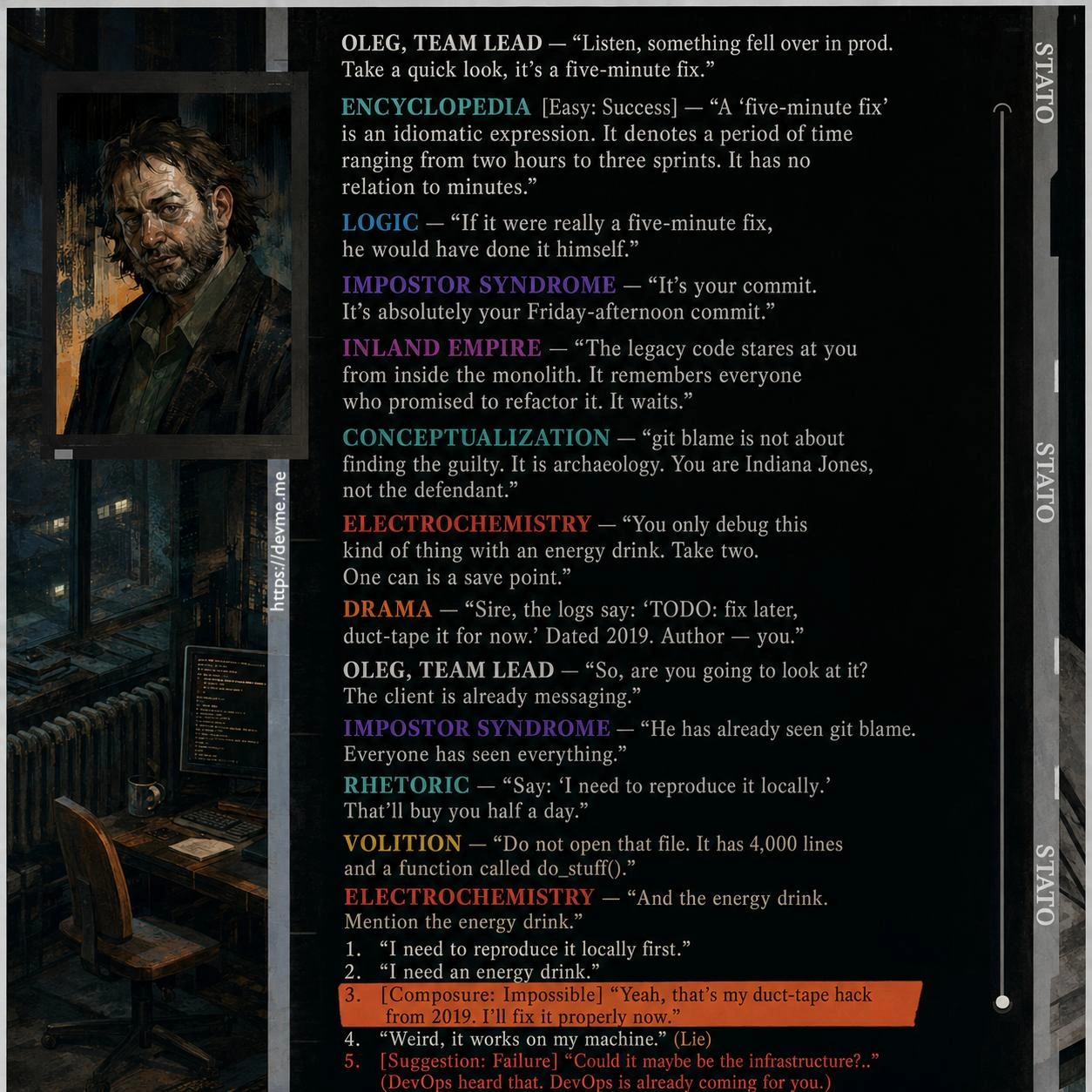
Now, imagine you are a junior developer (newer to the team, less experienced) and you’ve recently written some code that might not be perfect. Maybe there’s a bug that just popped up in the program, and it turns out it’s in the section of code you worked on. The senior developer (a more experienced teammate) starts investigating. One way seniors investigate issues is by running tools like git blame to see the history of the problematic code. In the meme, the text “Senior Dev: $ git blame” indicates exactly that: the senior is executing this command on the repository to find out who wrote the suspect lines.

The next line of the meme just says “Junior Dev:” with no text after it, but instead shows an image of a nervous-looking monkey puppet. This image is an Internet-famous meme (often called “awkward look monkey”). In the first panel of the image, the puppet looks straight ahead with a stiff, neutral expression; in the second panel, its eyes dart to the side and it looks really uncomfortable and guilty. People often use this meme image to humorously depict the feeling of “Oh no, that was me... I hope nobody finds out!” So here, the junior developer is that monkey puppet, giving a side-eye glance as if thinking, “Uh oh, I’m in trouble.” It’s a visual way to show the junior’s guilt and anxiety without needing any words.

Why would the junior dev feel anxious or guilty? Because git blame is about to reveal who wrote each line of code, and if the junior did indeed write the bug, their name is literally going to pop up on the senior’s screen next to that broken line. It’s like catching someone red-handed. In a programming team, nobody likes to be the one who introduced a bug or a problematic piece of code, especially if you’re new. Juniors often feel extra nervous about messing up. So the meme is poking fun at that common situation: the junior’s guilty conscience is activated the moment the senior starts digging through version control history. The phrase “git blame shame” is sometimes jokingly used to describe this – the slight embarrassment of knowing your code commit is about to be identified as the source of a problem.

This is all in good humor, of course. In reality, most teams treat bugs as a learning opportunity, not an occasion to literally blame someone. Modern software practices encourage blameless problem-solving – focusing on what went wrong in the code rather than who wrote it. Still, the tool’s name is blame, and it undeniably feels personal when your name shows up next to a bad line of code! The senior vs. junior dynamic adds to the humor because it’s often the senior engineers who know these tools well and aren’t afraid to use them, while junior engineers might not even realize at first that every line they write is being recorded in history. Once they do realize it (often the hard way, the first time someone runs git blame on their code), they can’t help but feel a bit exposed.

To put it simply, the meme is saying: when the senior developer uses Git to see who wrote a piece of bad code, the new guy on the team gets really nervous. It’s a scenario that has happened countless times in real life and thus has become a part of programmer humor. The categories like VersionControl and CodeReviews are directly referenced here: version control (Git) provides the blame tool, and code review or debugging sessions are when such a thing typically happens. It’s a little joke about accountability in coding. Every developer learns eventually that your code always carries your signature in the repository. And when things go wrong, someone will trace it back to that signature. The junior dev’s wide-eyed, side-glancing puppet face is exactly how it feels in that moment of awkward realization.

So, to recap this level in plain terms: Git’s blame command can show who wrote each line of code. A senior dev running this is about to find out who made a mistake. The junior dev, knowing they probably wrote the code in question, gives an awkward guilty look (like the meme’s monkey puppet) because they’re about to be revealed as the author. It’s a lighthearted take on how transparent code history is in software development, and how that transparency can make newbies feel exposed. Everyone who’s been a junior developer can relate to that anxious side-eye feeling when their work is under scrutiny!

Level 3: Commit History CSI

When a senior developer runs git blame, it’s like initiating a forensic investigation on the codebase. Git is a powerful version control system that tracks every change to the code, and the git blame command uses that history to display who last modified each line of a file – effectively pointing a finger at the “culprit” for each line. In this meme’s scenario, the Senior Dev has opened up this tool to find out who wrote a suspicious snippet of code. The text “Senior Dev: $ git blame” sets the stage: a bug or weird code behavior has prompted the experienced engineer to play detective and see which commit and which author introduced it. This is a common practice in code reviews and debugging sessions – a quick way to get context or accountability for a piece of code.

Now enter the Junior Dev’s perspective: as soon as they hear their senior teammate type out git blame, their heart skips a beat. The meme captures this with the famous monkey puppet side-eye image – a two-panel reaction where a puppet with red hair looks forward calmly, then in the next frame glances sideways with a terrified, guilty expression. This awkward side-eye is a staple in internet culture for moments of oh no, I hope nobody notices. Here it symbolizes the junior developer’s instant panic and guilt. Why? Because they suspect that the incriminating lines in question were written by them – possibly during a late-night coding session or a rushed commit that they hoped would go unnoticed. The Junior Dev knows that git blame is about to expose the code’s authorship (code_authorship_exposure), printing their name next to that buggy line for everyone to see. It’s a moment of git-blame shame (git_blame_shame) familiar to many new programmers.

The humor works on multiple levels. Veteran developers chuckle because they’ve been on both sides of this. As seniors, we rely on tools like git blame as our CSI kit for code – performing a line-by-line interrogation of the codebase to track down bugs or understand why something was done. It’s essentially doing code archaeology: uncovering who wrote what and when. We’ve all run git blame on a file and muttered, “Alright, who wrote this?” Only to find, sometimes to our own embarrassment, that we ourselves authored that line months ago! In this meme though, the target is clearly the junior developer’s code. The senior likely found some messy workaround or error and now the truth will be revealed with a single command.

There’s also an unspoken truth about the power dynamic here. In a team, a senior dev typically has more experience and authority, while a junior dev is still learning the ropes. When something goes wrong, the junior naturally worries that they’ll be blamed (in both the Git sense and the personal sense). The meme plays off that anxiety. The puppet’s wide-eyed look is basically the junior thinking: “Uh-oh… I’m about to be in trouble, aren’t I?” Everyone in software development recognizes that nervous feeling – it’s a relatable developer experience that fuels this bit of developer humor. The term “blame” itself in git blame is ironically perfect here: it suggests fault, even though in good engineering culture we focus on issues, not personal blame. (In fact, many teams prefer calling it git annotate to avoid a blame-oriented culture.) Nonetheless, in practice we all end up using git blame when chasing down a tricky bug.

To make matters more amusing, the senior developer likely isn’t literally angry – they just want to know the history of the code. Maybe they’ll ask the junior, “Hey, what was the idea here?” to understand the context. But in the junior’s mind, this feels like being called to the principal’s office. The meme exaggerates that feeling for comedic effect. The junior’s guilty face (developer_guilt_face) implies they’re bracing for impact, perhaps recalling every questionable code decision they made. It’s that classic “please don’t let it be me” moment. And let’s be honest: even senior devs snicker at this because we’ve all prayed at some point that when blame runs, it names someone else – ideally someone who left the company 😅. The shared experience of Git blame dread creates a bond across experience levels, which is why this meme hits home in workplaces.

In summary, this VersionControl joke highlights how a simple command like git blame can strike fear into the heart of a junior developer. It underscores the Senior vs Junior Developers dynamic during code reviews or bug hunts. The senior is calmly doing what they always do – using Git’s powerful history to track changes – while the junior is internally screaming, giving that side-eye like “maybe if I don’t move, they won’t see me.” It’s funny because it’s true: in tech, every line of code has a permanent record, and sooner or later, someone will run the history and find your name on that infamous line. The awkward puppet side-eye is the perfect metaphor for that universally awkward moment of being caught by your own code.

# A tiny dramatization of what the senior dev sees:
$ git blame src/app.py -L 120,122
^1a2b3c (Jane Senior 2023-06-01 10:15:42 +0000 120) def processData(data):
^4d5e6f (Joe Junior 2023-06-02 14:07:05 +0000 121)     result = quickHackFix(data)  # <- Oops, introduced a bug
^4d5e6f (Joe Junior 2023-06-02 14:07:05 +0000 122)     return result

# The output shows each line’s last commit: commit hashes, authors, dates, and the code.
# Line 121-122 clearly point to "Joe Junior" – caught red-handed for that quickHackFix!

In this dramatized git blame output, you can imagine Joe Junior sitting at his desk as these lines pop up on the senior’s screen. That “I’m in danger” feeling is exactly what the monkey puppet’s side-eye conveys. The senior now knows who wrote the code and will probably start asking questions – and the junior is awkwardly grinning or completely silent, much like the nervous puppet, hoping to somehow blend into the background. It’s a hilarious, slightly cringe-inducing slice of programming life that all developers can appreciate.

Description

A popular two-panel meme format featuring the Awkward Look Monkey Puppet. The top section has black text on a white background, stating 'Senior Dev: $ git blame'. Below this, the text 'Junior Dev:' introduces the image panel. The image shows a red monkey puppet with large, expressive eyes, first glancing nervously to the side and then staring forward with a look of intense anxiety. This meme visualizes a common scenario in software development where a senior developer uses the 'git blame' command to identify the author of a specific line of code, usually to investigate a bug or unexpected behavior. The junior developer's reaction captures the feeling of dread and being exposed, a relatable moment for anyone who has ever pushed buggy code and hopes nobody will notice. For senior developers, it's a humorous and nostalgic look at a rite of passage in a developer's career
Comments

7
Anonymous ★ Top Pick The fastest way to get a junior developer to start documenting their code is to type 'git bla' and just leave it there for a minute
  1. Anonymous ★ Top Pick

    The fastest way to get a junior developer to start documenting their code is to type 'git bla' and just leave it there for a minute

  2. Anonymous

    Senior dev: “Relax - I’m running `git blame --ignore-revs .newbie_mistakes` so your 3 AM ‘quick fix’ can remain in the witness-protection branch.”

  3. Anonymous

    The senior dev runs git blame to find who wrote the bug, knowing full well it was them six months ago during the "temporary workaround that became permanent" phase

  4. Anonymous

    The real power move is when the senior runs `git blame` and discovers they wrote that cursed code themselves three years ago, before the team adopted any of the architectural patterns they now religiously enforce. Suddenly it's 'legacy code that served its purpose at the time' rather than 'technical debt that needs immediate refactoring.'

  5. Anonymous

    We call it blameless, but the incident runbook still starts with git blame - poor man’s lineage tracing where the span ID is your email

  6. Anonymous

    Senior Dev: git blame. Junior Dev: realizing that the monorepo-wide whitespace PR should’ve been in .git-blame-ignore-revs

  7. Anonymous

    Git blame: where juniors learn that 'works on my machine' commits have SHA-1 alibis that never hold up

Use J and K for navigation