The Intern's Guide to Production Bug Fixes
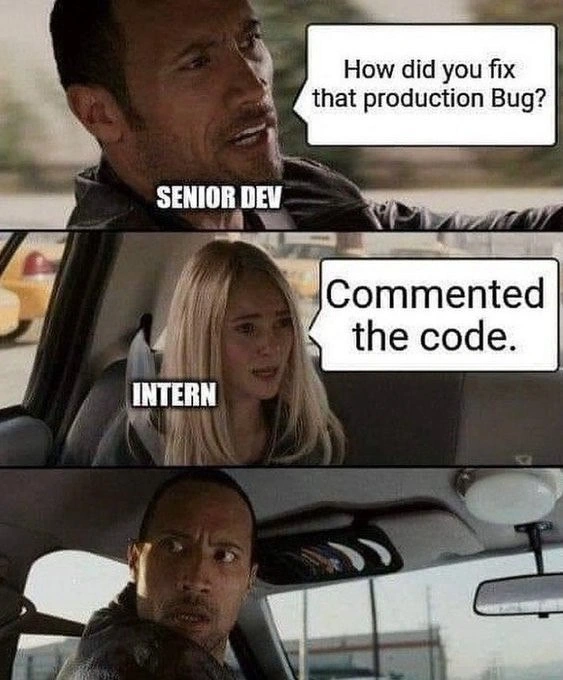
Why is this Bugs meme funny?
Level 1: Cover It Up
Imagine you have a big problem in your house: say, there’s a leak spilling water on the floor. A proper fix would be to find where the water is coming from and patch up the hole, right? Now instead, picture someone solving it by simply shutting off the valve so no water comes out at all, and then saying, “See, no more leak!” Sure, the water stopped leaking (yay!), but now you have no water flowing at all – they "fixed" the leak by turning off the water completely. That’s essentially what happened in this meme, but with computer code.
To use an even simpler example: imagine your room is super messy with toys all over the floor (that’s the “bug”). A real fix would be to put the toys back in their places on the shelf. But the intern’s style solution? They just grab all the toys and stuff them into the closet or push them under the bed, then quickly shut the door. 😅 Now the room looks clean because you can’t see the mess anymore. Problem solved, right? Well, not really – the mess is still there, just hidden. When your mom or dad comes in and asks if you cleaned your room, and you proudly say “Yep, all clean!”, they might walk over to the closet, open the door, and get a big surprise as everything tumbles out. They’d probably be shocked that this is how you “fixed” the messy room!
In the meme’s story, the intern did basically that with a computer program. There was a bad part of the program causing trouble (like the toys making a mess), and the intern “fixed” it by hiding that part of the program (like shoving toys in the closet) using a programmer trick called commenting out the code. The program stopped complaining (the room looks clean), but really nothing was truly fixed (the issue is just out of sight). The senior developer is like the parent in this situation, stunned that the intern didn’t actually solve the problem, they just covered it up. That surprised, speechless face in the last panel is basically saying, “I can’t believe that’s what you did!”
It’s funny in a simple way: the intern thought they found an easy shortcut to make the problem go away, and the experienced person can’t even find words – it’s a mix of “Well… technically you’re not wrong” and “Oh no, what have you done?!” We laugh because sometimes, when we’re new at something, we do things that seem clever and quick but totally miss the bigger picture. This meme is like a little story about learning that just hiding a problem doesn’t really fix it – and the face you might get from someone who knows better.
Level 2: Comment Out Cure
Let’s break down what’s happening in this meme in simpler terms. We have two characters: a senior developer (experienced programmer) and an intern (a junior or beginner programmer). The senior dev asks, “How did you fix that production bug?”
- Production bug: This means a software bug (an error or unexpected problem in the code) that happened in production, i.e., in the live application where real users/customers are affected. Production is the real-world running environment of the software, so a bug there is usually urgent to fix. It’s a scenario that can cause a lot of DebuggingFrustration because something is broken for users.
So, the senior dev is essentially asking: “What was your solution to that serious bug in the live system?”
The intern replies, “Commented the code.” What does that mean?
- Commented the code: In programming, to “comment out” code means to turn a line or block of code into a comment so that it won’t run anymore. Code comments are normally notes or explanations that programmers leave in the source code, and when the program runs, anything marked as a comment is ignored completely. Different programming languages have different ways to denote comments. For example, in Python you put a
#at the start of a line to make it a comment, and in Java/JavaScript/C-like languages you use//for single-line comments or/* ... */for multi-line comments.
If you comment out a piece of code, it’s like putting a strip of tape over a section of a machine – that section won’t function or do anything until the tape (comment) is removed. Programmers sometimes do this temporarily during bug fixing to quickly test if a certain line is the cause of a problem. It’s a bit of a quick diagnostic trick: “What happens if I disable this code? Does the bug disappear?” But it’s usually just one step in debugging, not the final solution.
However, in this meme, the intern made that the final solution. They encountered a troublesome code section that was causing an error, and instead of truly fixing the error, they disabled the code entirely by commenting it out. Here’s a tiny example to illustrate:
# Before fix: This code might be causing the bug
result = calculate_total(order) # This line was crashing for some orders
# Intern's "fix": comment out the buggy line
# result = calculate_total(order) # Now this line won't run at all
In the above snippet, the intern simply put a # in front of the problematic line result = calculate_total(order). That turns the whole line into a comment. Now, when the program runs, it will skip that line completely. The bug is "fixed" in the sense that the program no longer crashes on that line — but it’s only because the program isn’t doing that step anymore!
Why is the senior dev speechless? Because, while the error is gone, the cause of the bug hasn’t been fixed at all. The intern basically treated the symptom by removing the symptom. It’s like if a doctor asked how you cured a patient’s headache and you answered, “I cut off their head.” 😬 The headache is gone, sure, but that’s obviously not a real cure (and introduces a much bigger problem!). In software terms, commenting out the code is a very crude solution: the application may no longer complain or crash, but now whatever that code was supposed to do is not happening.
Let’s say that commented-out code was meant to charge a customer’s credit card or save some important data. If it’s not running, the bug (perhaps a crash) won’t happen, but now the app might quietly not process payments or skip saving crucial information. That’s a serious side effect! A senior developer knows this and would be concerned that the intern’s change might have unintended consequences. They’d likely follow up with: “Umm, you what? Did we just disable a feature?” The senior might be imagining all the new bugs or missing functionality that could result from this so-called fix. This is classic CodingHumor in tech circles: a newbie proudly announcing a simplistic solution that makes an experienced dev do a double-take.
Additionally, from a code quality standpoint, leaving code commented out in the codebase (especially in production code) is usually discouraged. It clutters the code and can confuse other developers in the future. If someone else later sees a chunk of code that’s just sitting there commented out, they’ll wonder, “Is this supposed to stay off? Was it commented out as a temporary hotfix? Should we delete it or fix it properly?” It creates uncertainty. This is why the senior dev is shocked – it indicates the intern might not understand proper debugging practices or the importance of clean code.
To put it simply, the intern's approach “fixed” the bug by hiding its effects rather than truly solving the underlying problem. It’s a bit like using duct-tape on a leaky pipe: the immediate dripping stops, but you haven’t really repaired the pipe. In a professional setting, a senior dev would want the intern (or whoever fixed the bug) to find out why the code was failing and address that — for example, maybe add a missing check, handle a null value, correct a calculation, or whatever the real fix is — instead of just shutting the code off.
The meme is funny to developers because it exaggerates a real scenario many have seen or worried about. It’s DeveloperHumor that highlights the gap in thinking between a junior and senior. The junior is relieved that “hey, the app isn’t crashing anymore, so job done!” 😇, while the senior is alarmed, thinking “what monster have we unleashed by doing that?!” 😱. The senior dev’s face — actor Dwayne "The Rock" Johnson looking mortified — perfectly captures that feeling of DebuggingFrustration mixed with astonishment. It’s a lighthearted reminder that quick fixes can be dangerous and that simply commenting out code is rarely the proper fix for a production issue (except maybe as a very temporary measure while you implement a real solution).
Level 3: No Code, No Bug
In the world of software development, there's a tongue-in-cheek mantra: no code, no bugs. In this meme, the intern took that idea quite literally. The scene is a classic car meme template: a senior developer (our driver, labeled "SENIOR DEV") asks the intern passenger how they managed to fix a nasty production bug. The intern’s matter-of-fact answer: “Commented the code.” The senior dev’s stunned face in the final panel says it all – it’s the look of a seasoned engineer momentarily speechless at a quick_and_dirty_solution that technically solved the problem by simply removing its cause.
From a senior’s perspective, this scenario is both hilarious and horrifying. When a critical issue hits a live system (ProductionBugs in the wild), experienced developers expect a careful debugging process: identify the root cause, apply a proper fix, test thoroughly, maybe add a regression test… you know, real BugFixing. What they do not expect is an intern mistake like literally disabling the offending code path. By commenting out the code, the intern essentially said, “Well, if the code is causing errors, let’s just not run it at all!” It’s a bit like solving your car’s constant engine misfire by yanking out the engine – sure, the misfire is gone (along with the entire engine). No code running, no bug triggered. Problem solved, right? 😅
The humor here plays on that grain of truth every senior dev knows: removing functionality will indeed remove the related bug. It’s a brutal last-resort production_bug_hotfix – akin to a surgeon amputating a limb to cure an infection. The SeniorVsJuniorDevelopers dynamic amplifies it further. A junior or intern might be unaware of the broader impact; they just see that error message and think, “get rid of whatever triggers it.” Meanwhile, the senior dev is thinking about code quality, long-term maintainability, and the feature that code was supposed to provide. Commenting out a chunk of code might stop an immediate failure (the app no longer crashes, the alert stops paging at 2 AM), but it’s also likely to introduce a hidden feature removal. If that code was important (handling payments, updating records, validating input, etc.), then effectively the intern’s “fix” is to make the app silently do nothing in that part! The bug is gone because the functionality is gone, which is not a real fix. This is why the senior dev’s face in the meme is a mix of disbelief and the debugging frustration of realizing the bug didn’t get fixed at all – it was just commented out of sight.
On top of that, leaving commented-out code in a codebase is usually frowned upon. It creates ghost code that future maintainers might trip over. Imagine reading the code later:
// Temporarily disabling this for now - TODO: fix later
// processOrder(order);
You’d wonder: Should I uncomment this? Is the bug fixed elsewhere? Why is this here? It adds to technical debt because someone, someday, has to clean it up or properly address it. Senior devs have been around long enough to foresee these headaches. They know that a quick fix in production that simply hides the issue is likely to cause confusion or failures down the line (maybe that code was important for data consistency, and now that it’s off, something else will break quietly).
This meme nails a common industry joke: when under pressure to fix something fast, rookies (and sometimes desperate exhausted pros at 3 AM) might do the simplest thing that makes the error go away – even if that means just commenting out the offending code. It’s a form of "shoot the messenger" debugging: the code throws an error, so you eliminate the code. The immediate crisis is averted, but at what cost? The senior’s aghast look is every lead developer who’s discovered a quick_and_dirty_solution deployed to production without considering the side effects. It’s funny because it’s true – many of us have either done something like this very early in our careers or have caught someone else doing it. The meme perfectly captures that OMG you did what? moment. In summary, the humor riffs on the contrast between proper Debugging_Troubleshooting discipline and a naive asymptomatic “fix” that’s more of a hack. It’s a gentle jab at junior devs and a cautionary tale about how not to handle a production issue (unless you enjoy giving your senior dev a mild heart attack).
Description
This is a three-panel meme using the 'The Rock Driving' format from the movie 'Race to Witch Mountain'. In the first panel, Dwayne 'The Rock' Johnson is driving a car and asks a question, with the text 'SENIOR DEV' labeling him. A speech bubble from him says, 'How did you fix that production Bug?'. The second panel shows a young woman in the passenger seat, labeled 'INTERN', who replies with a speech bubble, 'Commented the code.'. The third panel is a reaction shot of The Rock, now looking back at her with a wide-eyed, shocked, and horrified expression. The humor derives from the intern's naive and disastrous 'fix' - simply disabling the problematic code by commenting it out, rather than actually debugging and resolving the underlying issue. This is a classic rookie mistake that removes a symptom while potentially breaking entire features. The senior dev's look of sheer terror is deeply relatable to any experienced engineer who has had to mentor juniors and clean up the aftermath of a well-intentioned but catastrophic 'solution'

Comments
7Comment deleted
The intern's commit message was 'Fixing the bug.' The senior's revert commit message was 'Restoring the feature.'
“Ah, the classic two-slash feature flag - zero config, 100% blast radius, and a Git blame trail that’s basically a horror story.”
After 20 years in the industry, you realize the scariest production fixes aren't the ones that fail immediately - they're the ones that work just long enough to become undocumented dependencies that three other teams unknowingly rely on
Ah yes, the classic 'Schrödinger's Bug' approach - if you comment out the code, the bug simultaneously exists and doesn't exist until someone checks git blame. This intern just discovered that production incidents can't page you if the code path literally doesn't execute. It's technically a 100% success rate... until the feature is actually needed. Senior devs know this creates a ticking time bomb in the codebase - a future archaeologist will find this commented code with no context, no ticket reference, and wonder if uncommenting it will summon ancient demons or just break checkout again
Rediscovering the legacy feature flag: // - instant mitigation, infinite blast radius, zero change control
Commented‑out code is just an unmanaged feature flag - 100% off, zero telemetry, and an RCA the on‑call writes at 3am
Interns don't fix prod bugs - they // them into dead code purgatory, where they await resurrection during the next dependency upgrade