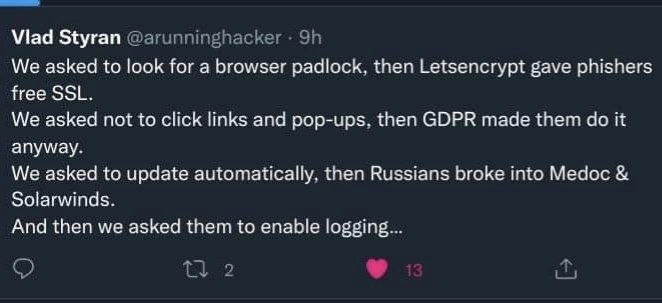
The Sisyphean Task of Cybersecurity Advice
Why is this Security meme funny?
Level 1: Plugging the Leaks
Imagine you’re in a small boat that has some leaks. You plug one hole to stop the water – it works for that spot, but then suddenly another leak springs open nearby. So you rush to plug that new hole, and pfft, a third leak starts on the other side of the boat! It feels like no matter what you do, water keeps finding a way to seep in. Frustrating, right?
This meme is joking that keeping computers safe can feel just like that leaky boat. Each “best practice” we tell people is like plugging one of the leaks to protect them. For example, we told everyone “look for the lock icon on websites” (one plug to stay safe). But then the bad guys found a way around that, like water finding a new hole – they got that lock icon on their fake websites too, so that trick didn’t guarantee safety anymore. So we tried another plug: “don’t click on random pop-ups or links.” Generally good advice! But then a new rule (like a law about privacy) meant even honest websites started showing lots of pop-ups that people had to click. Oops – now people are clicking everything, which is what we didn’t want. It’s like we plugged a second leak and a third one opened: “always update your software”, we said, hoping to keep people safe with the latest fixes. And yet, some clever hackers managed to sneak bad stuff in through an official software update, which is super sneaky – like someone dirtying the water that you thought was clean. By now, our boat (or our plan) has sprung leaks in unexpected ways. Finally we go, “let’s record everything that happens (enable logging) so we can catch problems.” That’s like saying, let’s keep an eye on all parts of the boat for new leaks. Honestly, that’s a good idea, but given our luck, the meme hints that something weird will happen with that too (maybe the log book itself gets wet, who knows!).
The funny part (and also the sad part) is how each smart fix ended up causing a new problem – just like each plug we put in the boat led to another leak somewhere else. It’s showing that in real life, especially in computer security, there’s no single easy solution. You fix one problem, another pops up. It’s a bit frustrating for the people trying to keep things safe, but all you can do is keep plugging leaks and hope you stay afloat. The meme makes us grin because we recognize that feeling: “Here we go again – fixed one thing, and now two more issues to chase!” It’s a never-ending game of staying one step ahead of the trouble.
Level 2: Unintended Consequences
Let’s break down what this meme is talking about in simpler terms. It lists some common security best practices – basically, the standard advice we give to people to stay safe online – and then shows how each one didn’t work out as planned in the real world. Think of it as “good idea, unexpected result.” Here are the four pieces of advice and what happened with each:
1. “Look for a browser padlock” (HTTPS) – You might have heard that you should check for the little padlock 🔒 icon in your web browser when you visit a website, especially if you’re about to enter sensitive information (like a password or credit card number). That padlock symbol means the site is using HTTPS – a secure, encrypted connection. Encrypted basically means any information you send to that site (or it sends to you) is scrambled so that eavesdroppers can’t read it. This is achieved via something called an SSL certificate (or more accurately TLS, but SSL is the old term everyone uses). For a long time, scammers and phishers (bad guys trying to steal your data by making fake websites) mostly didn’t bother with HTTPS – their fake sites would often be plain HTTP (no padlock), which made them easier to spot as unsafe. So the advice was: only trust sites with the padlock; if there’s no padlock, be very cautious.
What changed? In recent years, it became much easier to get that padlock. A service called Let’s Encrypt started offering free SSL certificates to anyone who owns a domain name. It was a huge win for the internet overall because now even small personal websites could be secure by default. But unfortunately, this also means phishers and attackers can get HTTPS certificates for their fake sites at no cost. They can create a website that looks just like your bank’s site (with a trick URL like
mybank-secure-login.cominstead ofmybank.com), obtain a legitimate certificate for it via Let’s Encrypt, and boom – padlock in the browser. To a normal user, the presence of the padlock now no longer guarantees “this site is trustworthy”; it only guarantees the connection is encrypted. The encryption keeps hackers from eavesdropping, but it doesn’t stop the site itself from being run by criminals. So the well-intentioned advice “look for the padlock” isn’t a reliable safety tip anymore. Attackers basically caught up with that advice and neutralized it. In short: HTTPS is everywhere (which is good), but that means bad guys have it too, so you can’t solely rely on the padlock to tell good sites from bad.2. “Don’t click links or pop-ups” – Another common security tip is to be careful about clicking on links, especially ones that come out of the blue (like in unsolicited emails or random pop-up messages on websites). Those can be traps to either lure you to phishing pages or to trick you into downloading malware. Similarly, if a random pop-up window appears saying “Your computer is infected, click here to clean it” – you’re supposed to not click it, because it’s likely fake and dangerous. Essentially, “think before you click” and if something looks fishy (or phishy!), just close it or ignore it. This is bread-and-butter security advice for everyday users.
What changed? A major DataPrivacy regulation called GDPR (which stands for General Data Protection Regulation) went into effect in the EU in 2018, and it affected websites worldwide. GDPR is all about protecting user privacy – one of its rules is that websites must get explicit user consent to collect or use certain types of data (like cookies that track your behavior). That’s why nowadays when you visit a site, you often see a banner or pop-up asking you to accept cookies or review privacy settings. These are GDPR cookie pop-ups, and they’re everywhere. They are legitimate – sites are required by law to show them. But it means even normal, safe websites are constantly popping up messages at you, asking you to click “Allow” or “Accept” or “OK”. Over time, people have gotten so used to clicking these privacy notices just to get them out of the way that it’s become almost automatic. This phenomenon is sometimes called click fatigue or consent fatigue – users are tired of all the prompts and just blindly click whatever button makes it go away. Attackers can exploit this conditioning. If a malicious pop-up or a fake “click here to verify your account” link shows up, a user might click it without thinking, because psychologically we’ve been trained that pop-ups are just an annoying routine now, not a real threat indicator. So the advice “avoid random links and pop-ups” has been undermined by the sheer number of legitimate things we’re forced to click because of privacy regulations. It’s a bit ironic: a law aimed at protecting users’ data inadvertently made many users less cautious with clicking – the exact opposite of what security advice recommends.
3. “Update your software automatically” – We’re always told to keep our software up to date. Whether it’s your phone, your laptop OS, your web browser, or the apps you use – installing updates promptly is crucial because those updates often include security patches (fixes for newly discovered vulnerabilities). If you delay updates, your system might have a known hole that attackers can exploit. So the standard best practice is: turn on automatic updates wherever possible, so you don’t even have to think about it – you’ll just always have the latest, safest version.
What changed? Hackers found a sneaky way to abuse our trust in updates. This is known as a supply chain attack, specifically targeting the software supply chain. Instead of attacking your computer directly, they attack the source of the software you install or update. Two high-profile examples mentioned are Medoc and SolarWinds:
- Medoc is a Ukrainian accounting software. In 2017, hackers (believed to be a Russian state-sponsored group) broke into the company that makes Medoc. They waited until the company rolled out an official software update and then injected malware (the NotPetya ransomware) into that update. So all the businesses that dutifully updated their Medoc software got hit with a destructive ransomware attack as a result. They were compromised because they updated, which is a nasty twist.
- SolarWinds Orion is a widely used IT management tool. In 2020, a sophisticated hacker group compromised SolarWinds’ build process and slipped a backdoor (malicious code) into a Orion software update. Thousands of organizations (including major companies and government agencies) installed that Trojanized update. They essentially invited the attackers inside their network by doing exactly what they were supposed to: updating their software.
These kinds of incidents are really rare but very damaging. They exploit the fact that we trust updates from legitimate vendors. Normally, updates are digitally signed and verified, so you know it’s from the real source – but if the source itself is compromised at the time of signing, the whole chain of trust collapses. The tweet’s point is that even this sound advice turned into a liability in those cases. It doesn’t mean “never update” (that would be worse in general), but it shows that attackers will even weaponize the update process itself if they can. For a junior developer or someone new to cybersecurity, the takeaway is: automatic updates are still important for everyday protection, but we’ve learned to be mindful that supply chain attacks are a thing. Now companies are investing in measures like better code signing, external code audits, and behavior monitoring to catch rogue updates. It’s a game of cat-and-mouse – strengthen one area (updates) and attackers look for a weaker link (like the update server or build pipeline).
4. “Enable logging” – Logging means keeping a record of important events in a system or application. For example, a server might log every user login attempt, or a firewall might log what traffic it blocked. These logs are indispensable for troubleshooting and security monitoring. If something goes wrong – say a server crashes or you suspect a hacker is in your network – logs are like the black box of an airplane, telling you what was happening under the hood. So one piece of advice to improve security is “enable logging and audit trails everywhere you can, and keep those logs.” Don’t just run blind; have data you can go back to. It’s part of a broader practice called observability or monitoring. In security specifically, you often hear about enabling things like “login auditing,” “HTTP request logging,” and so on, to catch anomalies or to do forensics after an incident.
What could go wrong? With the pattern we’ve seen, the tweet implies that even logging could have a catch. The ellipsis in “And then we asked them to enable logging…” suggests a grim punchline that we, as readers, are left to imagine. There are a few possibilities that someone with a bit of security knowledge might fill in:
- First, there’s a recent example: a vulnerability nicknamed Log4Shell (late 2021) showed that logging can introduce risk. In that case, a popular Java logging library (Log4j) had a flaw where if you logged a specially crafted string, it could actually execute code from a remote server. Attackers on the internet started trying to get any server to log that special string (like by sending it in an HTTP request, knowing the server might log the request). If the server had logging enabled with that vulnerable library, boom – the attacker could take control. So “enable logging” in that scenario literally opened a door to being hacked, which is super ironic. This was a big wake-up call that even something as mundane as writing to a log file isn’t always harmless.
- Second, there’s the issue of too much data. If you turn on every logging option and keep logs for a long time, you end up with mountains of information. Smaller organizations might drown in logs they don’t have the staff or tools to analyze. Important warnings can get lost in the noise (this is often called the “needle in a haystack” problem). So someone might brag “we have all the logs!”, but if no one is actually reviewing them or if alerts are just scrolling by, then logging didn’t actually help security – it just created an illusion of safety. Meanwhile, storing all that data can be expensive and complicated.
- Third, logs can raise privacy concerns and regulatory headaches. Since we mentioned GDPR: under privacy laws, logs that contain user identifiers (like IP addresses or usernames) are considered personal data. That means you have to protect logs and possibly redact or delete them after some time. We’ve seen cases where companies had the logs to investigate a breach, but legal told them “we can’t keep those for more than X days due to privacy policy,” which complicates incident response. In a less serious but still relevant way, enabling verbose logging can also affect performance or cost (writing massive logs to disk or cloud storage can slow things down or incur big bills).
So the meme hints: we told people “turn on logging, it’ll help security,” and the expectation is “just wait, this too will bite us somehow.” It’s a bit of a cynical view, but given the theme, it fits. The reality is, of course, logging is still a best practice – it’s just not a panacea. You have to manage logs wisely (secure them, parse them, prune them, etc.). The joke is that after seeing all the previous advice backfire, the author is preemptively facepalming at what might come of this last one. Maybe they recall a scenario where someone enabled logging and then the logs themselves got them in trouble, or maybe it’s just a wry “I can only imagine what’s next – because nothing ever goes smoothly in security.”
To sum up, each line of the tweet is showing a collision between theory and practice in cybersecurity:
- In theory, “HTTPS everywhere” was going to make the web safe. In practice, it made the padlock meaningless as a trust indicator because attackers got on board too (they just want to appear legit).
- In theory, telling users “be careful with clicks” should reduce malware infections. In practice, a well-meaning privacy law made even honest people bombard us with things to click, conditioning users to ignore warnings.
- In theory, automatic updates keep everyone safe from known threats. In practice, highly skilled hackers figured out how to turn trusted updates into trojans, creating an even bigger threat.
- In theory, extensive logging gives us visibility to catch hackers. In practice, logs can be overlooked, misused, or even become a new attack surface or compliance nightmare.
For someone early in their tech career, this meme is a bit of a cautionary lesson: security is a moving target. Best practices are essential, but they’re not foolproof guarantees. As technology and defenses evolve, attackers and unintended side-effects evolve too. It doesn’t mean the best practices are wrong – it means you always have to stay thoughtful and adaptive. The meme uses humor to illustrate a serious point: every simple rule in security eventually meets a scenario where it doesn’t work as expected.
If you’ve ever felt that securing systems is like a game you can’t definitively win, this meme validates that feeling. The field of cybersecurity (and IT in general) requires a lot of learning from failures. When something like the SolarWinds incident happens, the industry responds by developing new best practices (e.g. “time to also vet our suppliers and not blindly trust updates”). When Log4Shell hit, it reminded everyone to treat even internal logging with scrutiny and to keep software components updated (Log4j in this case). So the cycle continues: advice, failure, new advice. It’s a bit like a perpetual cat-and-mouse chase or as others say, a never-ending arms race between attackers and defenders.
In plain terms, the tweet writer (Vlad Styran) is making a tongue-in-cheek complaint: “We tried to do everything right, and somehow it still went wrong.” It’s funny because it’s relatable – many of us have experienced technology backfiring despite following guidelines. And it’s also a little bit of an eye-roll moment at how complex and ironic the world can be. After reading this, you might start questioning some of the simplistic advice and see the bigger picture: security and privacy are complicated, and there are no one-size-fits-all solutions. The best we can do is keep learning and adapting – and maybe maintain a sense of humor when things go sideways.
Level 3: No Good Deed Goes Unpwned
This meme highlights the dark irony of well-intentioned security best practices blowing up in our faces. It’s a veteran cybersecurity lament: every time we set a rule to protect people, the real world finds a way to turn it against us. The tweet runs through four stages of this infosec whack-a-mole:
“Look for the browser padlock” – Once upon a time, the golden rule of safe browsing was to check for the padlock icon in your browser’s address bar, indicating an HTTPS site. A padlock means the connection is encrypted with SSL/TLS, which is supposed to ensure DataPrivacy and trust. We drilled users to avoid plaintext HTTP and only trust HTTPS (secure sites). But then along came Let’s Encrypt, a service that gives out free SSL certificates to anyone who can prove control of a domain. Let’s Encrypt dramatically increased web security by making encryption accessible to all – but guess what? Phishers are “all” too. Now even a malicious phishing site can easily get a legitimate certificate and display the same comforting padlock. The browser_padlock_advice turned into a false sense of security. Users see the padlock and think “legit site,” while behind the scenes phishing_with_ssl is rampant. In other words, the bad guys got the same crypto badge as the good guys. The padlock went from a reliable safety indicator to a paradox: it tells you the connection is secure, but not who is on the other end. As a result, the phishers literally let themselves in with free SSL – and our once-sound advice blew up.
“Don’t click links and pop-ups” – Another classic SecurityBestPractices mantra: avoid clicking suspicious links or random pop-up windows. This is basic anti-malware and anti-phishing training. If an unexpected pop-up screams “You won a prize!” or a sketchy email says “click here,” you don’t click – simple. Users were finally learning to be wary of unsolicited dialogs… until the world (with good intentions) sabotaged that too. Enter GDPR (General Data Protection Regulation), Europe’s sweeping DataPrivacy law. GDPR requires websites to get explicit consent before tracking you or dropping cookies, meaning nearly every site now greets you with a cookie consent banner – essentially a legitimate pop-up that you must click to proceed. The result: users are inundated with so many pop-ups on every site that they’ve become numb. Clicking “I agree” or “OK” has become muscle memory. We told people to be cautious clickers, but GDPR’s well-meaning gdpr_cookie_popups trained everyone to click pop-ups all the time. The irony is brutal: a privacy law intended to protect users is indirectly eroding their security habits. Phishers and malware peddlers couldn’t be happier – after all, if a fake “system update” popup or a malicious link shows up, users might just assume “ugh, another consent thing” and click through without thinking. This is a textbook case of unintended consequences: we created click fatigue. In trying to enforce privacy standards, we inadvertently gave users popup PTSD, and the simple “don’t click sketchy things” rule got drowned in a sea of legit things you have to click.
“Update automatically” – In theory, keeping software up-to-date is one of the most important security habits. Automatic updates ensure you get critical patches ASAP, closing known vulnerabilities before attackers exploit them. Sysadmins nag everyone to enable auto-updates on everything from your OS to your browser plugins. It’s solid advice… until it isn’t. The tweet references two infamous cases: the Medoc incident and the SolarWinds hack. These were supply chain attacks – the nightmare scenario where attackers don’t directly hack your system, they infiltrate an upstream supplier or update server. In the NotPetya outbreak (2017), attackers believed to be Russian compromised the update mechanism of Medoc, a popular Ukrainian accounting software. When users faithfully downloaded the latest automatic update, they unwittingly pulled in destructive malware that wiped their systems. Similarly, in the SolarWinds Orion hack (disclosed late 2020), sophisticated attackers (again linked to Russia) inserted a backdoor into the SolarWinds network management software update. Thousands of organizations, including Fortune 500s and government agencies, installed that “trusted” update – effectively handing hackers the keys to their kingdom. These incidents turned the SoftwareUpdates best practice on its head: the very pipeline meant to secure your software became the attack vector. It’s a cruel twist. We told folks to patch, patch, patch – only to have automatic_updates_risks bite us in the worst way. The meme’s tone is half-joking, half-traumatized: “Sure, patch your systems… and maybe invite some nation-state hackers in while you’re at it.” After SolarWinds, some admins jokingly (or not) said, “I feel safer NOT updating for a while.” When best practices backfire this hard, you can almost hear the collective facepalm in the security community.
“Enable logging…” – And now the kicker: after all these backfires, the last line trails off with an ellipsis, implying “you can guess what happened next.” Enabling logging is generally smart. Logging means turning on detailed record-keeping in your software and systems – who did what, when, and where. It’s part of good Observability_Monitoring. Proper logs help in incident detection and digital forensics. For example, when a breach happens, you want those log files to retrace the hacker’s steps (failed logins, unusual access times, etc.). So security teams often plead, “please enable logging and keep the logs!” Many real-world organizations neglect logging or keep logs for too short a time, hampering investigations. So this advice is sound… but given the pattern, veterans expect a catch. The meme implies that after users finally start logging everything, something absurd will undermine it too. Perhaps compliance or DataPrivacy rules will clash with logs (since logs can contain personal data, e.g. IP addresses – cue GDPR again saying “you stored what about users?!”). Or maybe logging will introduce new technical risks: fun fact, a huge zero-day called Log4Shell (late 2021) showed that even a logging library could be exploited by a malicious input, leading to remote code execution. 😬 In other words, logging itself became an attack vector. If not that, then there’s the deluge problem: turning on every log is like drinking from a firehose – you get Gigabytes of data, overwhelm your analysts, and still miss the real threats hiding in the noise. The tweet doesn’t spell out the punchline, but anyone in security can fill in the blank: “...and then enabling logging caused __.” Maybe the logs got so verbose nobody looked at them, or the logging infrastructure got breached, or a critical alert was lost in the flood. The specific failure is left to our cynicism – after all, given recent history, we expect even this good deed to get punished.
In essence, this tweet memefies the cat-and-mouse nature of cybersecurity: every defensive rule spawns an offensive counter-move or an unintended side effect. It’s funny in a twisted way because it’s true. Seasoned developers and security engineers have lived through this whiplash:
- We say “use HTTPS for security”, and soon every site (good and evil) has HTTPS – great overall, but it means HTTPS is no longer a mark of legitimacy.
- We say “don’t click random stuff”, and then regulators unintentionally make everyone click random stuff (just to dismiss those darn banners).
- We push “auto-update everything”, and advanced attackers piggyback on that trust to deliver poisoned updates.
- We insist “log all the things”, and either we drown in data or discover that logs introduce new vulnerabilities or liabilities.
The meme resonates strongly with folks who navigate these Security trade-offs daily. It’s the exasperated chuckle of recognizing that in the real world, SecurityBestPractices are not magic spells – they all have limits. The defenders set up rules, the attackers (or fate) knock them down, and round and round we go. It underscores a kind of Murphy’s Law of InfoSec: anything that can be abused, eventually will be abused – even our safeguards. The tweet compresses years of hard lessons (and a bit of trauma) into four punchy lines. It’s both a cautionary tale and a coping mechanism: sometimes all you can do is laugh (and then double-check your logs).
To summarize the irony, consider this mini scorecard of each advice and its unexpected outcome:
| Security Advice | Intended Benefit | Real-World Backfire |
|---|---|---|
| Check for HTTPS padlock 🔒 | Ensure website is secure (encrypted) | Phishers also get padlocks with free certs (looks safe but isn’t) |
| Don’t click random pop-ups 🖱️ | Avoid dangerous links and malware | GDPR mandates constant pop-ups; users click “Allow” on everything |
| Auto-update your software 🔄 | Get security patches ASAP | Hackers hijacked update channels (e.g. SolarWinds) to push malware |
| Enable comprehensive logging 📜 | Have records for monitoring & forensics | Massive logs overwhelm or introduce new issues (and can even be exploited) |
Each row is a facepalm-worthy story of best-laid plans meeting chaotic reality. The humor here is that exasperated “of course this happened” feeling. Security folks share these stories like war veterans comparing scars. It’s a mix of “Can you believe this?” and “Yep, figures.”
In the end, the meme’s message isn’t “don’t do these best practices” – it’s more nuanced. It’s pointing out the constant arms race between defenders and attackers, and the law of unintended consequences in technology and policy. Every time we raise the bar on security or DataPrivacy, the world (or our adversaries) finds a way to limbo right under it. It’s a grim kind of validation for those who’ve been in the trenches: if you feel like every solution you implement just opens a new can of worms, you’re not alone – welcome to cybersecurity. No good deed goes un-pwned, indeed.
Description
This image is a screenshot of a tweet from user Vlad Styran (@arunninghacker) that captures the cyclical frustration of cybersecurity professionals. The tweet lists several security best practices that were once widely recommended to the public, followed by the unintended negative consequences that undermined them. First, it notes that users were told to look for the browser padlock, but Letsencrypt's free SSL certificates enabled phishers to get them easily. Second, users were told not to click pop-ups, but GDPR regulations then forced websites to present cookie consent pop-ups. Third, automatic updates were encouraged, but this became a vector for major supply-chain attacks like those on Medoc and Solarwinds. The tweet concludes with the ominous, unfinished thought: 'And then we asked them to enable logging...'. For experienced engineers, this is a deeply resonant and cynical take on the security landscape. It highlights how well-intentioned advice can be rendered useless by evolving threats, compliance requirements, or the weaponization of infrastructure, with the final line being a pointed reference to the then-recent and catastrophic Log4j/Log4Shell vulnerability, which was triggered by logging user-controlled data
Comments
8Comment deleted
The first rule of cybersecurity club is: Don't talk about cybersecurity club. The second rule is: Every piece of advice you give will eventually be weaponized into a CVE
Defense in depth 2023: phisher-issued HTTPS, GDPR-mandated clickbait, auto-updated backdoor, logs purged for privacy - yet the board still feels safer because the deck says “zero trust” in corporate font
Security best practices are like abstraction layers - each one solves the previous problem while introducing two new ones, except now they're your compliance team's favorite and you can't refactor them out
Security best practices have a great track record: each one works perfectly until attackers read the same checklist
This is the security equivalent of 'the road to hell is paved with good intentions' - we've essentially created a perfect storm where every security improvement becomes the next attack vector. Let's Encrypt democratized SSL, which is fantastic until you realize phishers now have the same green padlock as your bank. GDPR tried to protect privacy but trained an entire generation to blindly click 'Accept All Cookies' just to make the banner go away. And automatic updates? Well, when nation-state actors compromise your update server (looking at you, SolarWinds and MeDoc/NotPetya), suddenly that 'security feature' becomes the perfect delivery mechanism for malware to 18,000+ organizations. The ellipsis after 'enable logging' is chef's kiss - because we all know the punchline: comprehensive logging means attackers now have a detailed roadmap of your infrastructure, or your logs become the next compliance nightmare when they inevitably get breached. It's almost as if security is a complex, nuanced field that can't be reduced to simple rules... but hey, at least we have our checklists
We asked for logging, then Legal asked for anonymization, Finance asked for 7-day retention, and the attacker politely waited eight
Security best practices: the observer effect where mandating logs just logs your next breach
Enterprise security today: we taught users padlock=good, popups=bad, auto‑update=good; then Let’s Encrypt, GDPR banners, and SolarWinds said “plot twist” - now we beg for logging so at least the blast radius has a map