Skip to content
DevMeme
3867 of 7435
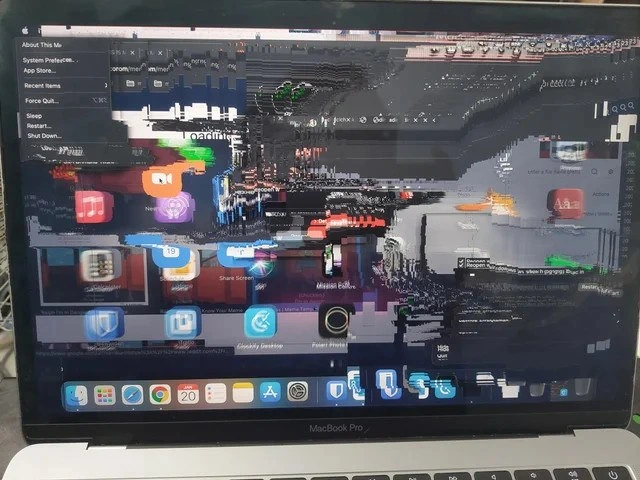
macOS Enters Abstract GPU Mode
Apple Post #4210, on Feb 14, 2022 in TG

macOS Enters Abstract GPU Mode

Why is this Apple meme funny?

Level 1: Fancy Screen, Broken Crayons

Imagine a very neat person carefully arranging stickers on a poster, but the crayons used to color the poster suddenly melt and smear everything sideways. You can still recognize a few labels and buttons, so it feels like the person is trying to stay organized, but the picture has turned into chaos. The joke is that even a polished Mac can fail in a messy, silly-looking way, just like any other computer.

Level 2: Pixels With Receipts

The main technical joke is about the difference between the interface and the machinery that displays the interface. macOS may still know that the Apple menu is open, but the screen is not presenting the desktop correctly.

Some useful terms:

  • GPU: the graphics processor that helps draw windows, animations, icons, and the desktop.
  • Framebuffer: memory containing the pixels that should appear on screen.
  • Compositor: the part of the OS that combines many app windows into one final desktop image.
  • Display artifact: a visible glitch, such as blocks, streaks, duplicated icons, or wrong colors.
  • WindowServer: a macOS system process involved in managing windows and screen updates.

For a junior developer, this is a familiar kind of troubleshooting trap. The symptom is visual, but the cause could live in software, drivers, hardware, heat, cables, memory, or OS state. The visible Dock icons and app tiles are not merely "ugly"; they are clues that old or malformed screen data is being reused instead of cleanly redrawn.

That is why the meme fits Apple, hardware, macOS, bugs, and display technology all at once. It takes the brand known for smooth UI and shows the underlying graphics stack coughing up rectangles like it has a deadline and no tests.

Level 3: WindowServer Modern Art

The photograph is funny because the MacBook Pro is still trying to perform dignity while the framebuffer has clearly been through a blender. The Apple menu is open and readable enough to show:

About This Mac System Preferences... App Store... Recent Items Force Quit... Sleep Restart... Shut Down...

Meanwhile the rest of the macOS desktop is smeared into repeated blocks, ghosted Dock icons, color fragments, and jagged horizontal corruption. That is the developer pain hiding under the Apple polish: the UI event path is alive enough to open a menu, but the graphics output path is producing accidental glitch art.

On macOS, applications do not normally paint straight onto the screen. Windows get composited by system graphics layers, scheduled through the OS, accelerated by the GPU, and finally pushed through the display hardware. When this kind of blocky corruption appears, the miserable part is the ambiguity. It could be a WindowServer crash, a driver bug, bad graphics memory, a failing panel cable, thermal instability, a compositor issue, or a machine that has simply decided retirement would be more honest.

The post message compares it to old Windows behavior where dragging a frozen window left trails across the screen. That reference works because both failures expose the same forbidden truth: every beautiful desktop is just a stack of rectangles, buffers, invalidation regions, and timing assumptions. When one layer stops repainting correctly, the illusion of a clean operating system vanishes and you get a haunted collage of previous frames.

The best part is that the visible menu offers Force Quit..., Restart..., and Shut Down..., which are exactly the rituals an engineer tries while pretending this is still a software problem. The machine is showing a hardware-shaped bug while politely handing you the usual software-shaped buttons. Very Apple: even the failure mode has a menu bar.

Description

A photo shows a MacBook Pro screen with the macOS desktop badly corrupted by blocky, multicolored display artifacts. The Apple menu is open in the upper left with visible items including "About This Mac", "System Preferences...", "App Store...", "Recent Items", "Force Quit...", "Sleep", "Restart...", and "Shut Down...", while the Dock and app icons are smeared and duplicated across the screen. The image works as developer humor because the supposedly polished Apple UI has degraded into what looks like a broken framebuffer, GPU fault, WindowServer crash, or display pipeline failure. For engineers, the joke is the familiar ambiguity of whether a visual glitch is software, graphics drivers, VRAM, the panel, or simply the machine asking for retirement.


Comments

9
Anonymous ★ Top Pick WindowServer rendered the desktop as a postmortem artifact and still insisted the Apple menu was fine.
  1. Anonymous ★ Top Pick

    WindowServer rendered the desktop as a postmortem artifact and still insisted the Apple menu was fine.

  2. @lord_nani 4y

    damn, acid hits hard

  3. @ilovethicktights 4y

    nope its modern art

  4. @kandiesky 4y

    I love to hate Apple. That helps my anger. Thanks!

  5. @ozalexo 4y

    Sell it as NFT! :-)

  6. @Rumbatutumba 4y

    steps to reproduce or bullshit

    1. @SamsonovAnton 4y

      It's a fake! Everyone knows Mac never hangs!

      1. @ZgGPuo8dZef58K6hxxGVj3Z2 4y

        Lmao

      2. @Alienatick 4y

        You need your pills

Use J and K for navigation