A Moment of Silence for Security Best Practices
Why is this Security meme funny?
Level 1: Key Under the Mat
Imagine a group of friends talking about the best ways to keep their homes safe — things like sturdy locks, alarm systems, maybe a secret hiding spot for a spare key. Meanwhile, you’re standing there remembering that you left your house key under the welcome mat. You’d feel pretty nervous and embarrassed, right? You know that hiding a key under the mat is a really insecure idea (any burglar would check there first!), and now your friends are describing much safer ideas.
In this meme, the puppet is basically you in that situation, giving a side-glance like “Uh oh… I did exactly the thing they’re warning against.” Storing a password in a cookie is like leaving your key in an obvious spot – it makes it easy for bad guys to get it. The puppet’s awkward look and quick glance away are a funny way to show that feeling when you realize you’ve done something unsafe and hope nobody notices. It’s funny in a silly lesson-learning way: we laugh, and we also remember not to hide our keys (or passwords) where just anyone can find them!
Level 2: Cookies Are Not Safes
Let’s break down why storing a password in a cookie is such a big deal, in simpler terms. First, what are cookies in web development? A cookie is a small piece of data that your browser stores for a website. The server uses cookies to remember things about you between page loads or visits – for example, keeping you logged in or remembering your site preferences. When you log into a site, the server might send a cookie to your browser to say “this user is authenticated” in the form of a session ID. That way, on your next request, your browser automatically includes that cookie, and the server knows “Oh, this request is from the same logged-in user as before.” Cookies are like the website handing your browser a little ID card to hold onto: useful, but it must be handled carefully.
Now, the mistake in the meme is what data that developer chose to put on the ID card. Instead of using a safe reference (like a random session ID or token), they put the actual password on it – and not in a protected form, but just plainly readable (this is what we mean by a plaintext password: the real password, not encrypted or hidden). Storing a plaintext password in a cookie means if anyone gets ahold of that cookie, they can see the password as if you wrote it on a sticky note. This is a big no-no in web_security_fail scenarios.
Let’s clarify a few terms and best practices that were violated here:
- Plaintext Password: This means the password is stored in its original, readable form (e.g.,
"SuperSecret123"is visible as-is). If something is plaintext, there’s no masking, encryption, or hashing. It’s like writing the password out and not even trying to hide it. In proper systems, passwords are usually stored in a hashed form on the server (a one-way scrambled version), so even if someone sees the stored value, they can’t easily get the original password. On the client side, you never need to keep the raw password after the user logs in — you only need to keep a proof that they are logged in (like a session token). - Cookie: A small data file saved by your browser for a website. It gets sent along with every request to that website’s domain. Cookies often store session IDs, not passwords. They also have security attributes like HttpOnly (which means JavaScript cannot read it, helping against XSS attacks) and Secure (which means it will only be sent over HTTPS, not plain HTTP, to protect it in transit). In our meme scenario, even if the developer set those flags, the fundamental issue remains: the cookie contains sensitive info it shouldn’t — namely, a password.
- Session ID: A session ID is a unique, random string that the server uses to identify a user’s session. Think of it like a ticket or a token: when you log in, the server says “Here’s your session ID, keep it safe.” Your browser stores it (often in a cookie), and on subsequent requests the server sees the ID and knows it’s you. Crucially, the session ID by itself doesn’t reveal your password or other secrets; it’s just an identifier. If someone steals a session ID, they might impersonate you for that session, but they still don’t have your actual login credentials, and the server can invalidate that ID to kick them out. This is far less dangerous than leaking a password which might be reused or hard to change quickly.
- OWASP Guidelines: These are guidelines from a respected security community (OWASP) that help developers avoid common security pitfalls. One of their core recommendations is to never store sensitive data (like passwords) in places that could be exposed on the client side. They recommend using strong hashing for passwords on the server and using secure cookies for sessions. Our embarrassed puppet friend clearly skipped the chapter on “Session Management” in the OWASP guide. 😅
When coworkers discuss best security practices, they’re talking about things like: “Hey, we should be using bcrypt to hash our passwords and compare hashes, not storing raw passwords,” or “We should implement secure, HttpOnly session cookies so the browser handles authentication safely.” Meanwhile, the developer in the meme did something dangerously simple: just stuck the password into a cookie value. It’s the equivalent of saying, “Nah, I’ll just trust that nobody will look.” For a junior developer or someone new to WebDev, it might not be immediately obvious why that’s so bad — hence the side-eye moment when they realize what everyone else on the team already knows.
This meme is a gentle jab at ourselves as developers. It’s DeveloperHumor highlighting a CodingMistake that likely every web security course or mentor warns against. If you’re newer to the field, the takeaway lesson is clear: Never store sensitive credentials on the client side in plain form. Use proper authentication flows:
- Let the server verify the password (which should be stored securely on the server, hashed and salted).
- Use a session cookie or token to keep the user logged in, not the password itself.
- Always consider what happens if that cookie falls into the wrong hands. If the answer is “they would have everything they need to be me,” then something is wrong with the design.
In short, cookies are convenient for sessions, but they’re not vaults or safes. They’re more like postcards — whatever you write on them could potentially be read by others if you’re not careful. Storing a password on a postcard that travels with each request? You can see why that’s a recipe for disaster! The puppet’s awkward reaction is a perfect self_deprecation: the developer is basically saying, “Yeah… in hindsight, that was dumb.” Live and learn!
Level 3: Half-Baked Security
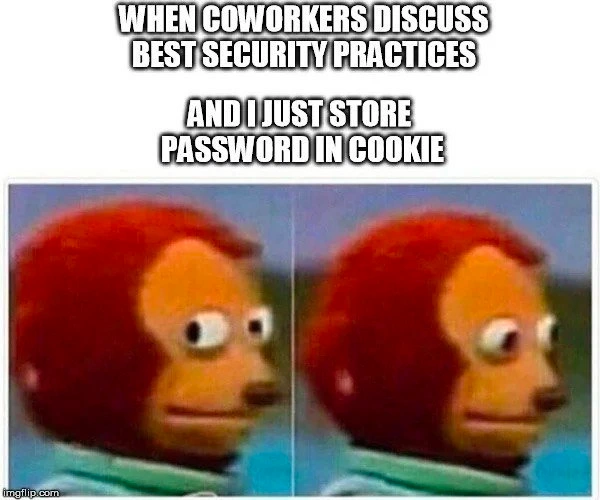
WHEN COWORKERS DISCUSS BEST SECURITY PRACTICES
AND I JUST STORE PASSWORD IN COOKIE
In this scene, a flustered developer (embodied by the awkward side-eye puppet) is quietly confessing a cardinal sin of web security: storing a user's password in a browser cookie. While coworkers earnestly debate best security practices (think password hashing, secure tokens, proper session management), our guilty friend realizes their approach is the exact opposite of those guidelines. The humor hits home for seasoned developers because it spotlights a cringeworthy security anti-pattern that everyone knows is wrong. The puppet’s anxious side-eye followed by looking away is basically saying, “I hope nobody finds out I did this horrifying thing.”
From an experienced perspective, this is a facepalm moment. Storing plaintext credentials in a cookie is like waving a red flag at every hacker and OWASP enthusiast. OWASP (the Open Web Application Security Project) publishes a top-10 list of web vulnerabilities, and Sensitive Data Exposure is right up there. Saving a plaintext password client-side is a textbook example of SensitiveDataExposure. Why? Because cookies can often be accessed by the client (and by malicious scripts if you’re not careful). Unless strict measures are in place (like the HttpOnly and Secure flags), any JavaScript running on the page (including injected malicious code from an XSS attack) can call document.cookie and steal whatever’s inside — in this case, the actual password. Even HttpOnly only protects against JavaScript access; if someone gets the cookie file from the user's machine or intercepts it over an insecure connection, boom: they have the keys to the kingdom. And if that password was reused on other sites (which users often unfortunately do), the damage goes beyond just this app.
Consider the workflow: a user logs in, and instead of properly handling that on the server and creating a session, the developer just does something like:
// A very bad practice: storing a plain password in a cookie
document.cookie = "password=SuperSecret123";
// ...Later, this cookie gets sent with each HTTP request. Yikes!
This is insecure_cookie_storage at its finest (or worst!). The password travels back and forth with each request, and anyone who can read the traffic or poke at the cookie store can see SuperSecret123 in all its glory. It's the exact opposite of what any SecurityBestPractices session would recommend. A more secure approach would be:
// A better practice: use a session token or similar instead of raw password
document.cookie = "sessionId=" + generateSecureToken(); // An arbitrary secret token
// The server maps this token to your session on the backend. The actual password stays safe on the server.
Here, sessionId is just a random token associated with a session on the server. Even if an attacker grabs that token, they only have access to that one session (and it can be expired or limited in scope), not the user's actual password. In a modern app, one might use a secure JWT or server-side session ID as a cookie — and importantly, mark it HttpOnly and Secure, so it's not accessible via JavaScript and only sent over HTTPS. Storing the password itself offers zero advantages and a truckload of risks.
The meme is painfully relatable because many of us have encountered (or shamefully written) code that takes a dodgy shortcut like this. It’s a form of self-deprecation in developer humor: we poke fun at our past CodingMistakes. The awkward puppet expression perfectly captures that “I messed up, didn’t I?” feeling when someone mentions proper procedures. Everyone in the room is discussing salting and hashing passwords, and you’re there thinking about how you literally put "password=123456" in a cookie yesterday. You can almost hear the collective gasp or see the widened eyes if that admission slipped out. It’s the awkward_puppet_reaction personified: “Heh, yeah… best practices… I totally follow those... except, um, about that one thing…”
Beyond the embarrassment lies a real lesson. Web developers (especially those new to security) might not initially realize how dangerous it is to keep sensitive secrets client-side. This meme hits on the disparity between Security theory and practice: the coworkers chat about doing things the right way (maybe referencing the OWASP Top 10 or company security policies), while our puppet friend’s implementation would make any security auditor break into a cold sweat. It’s a humorous reminder that SecurityBestPractices are often discussed in meetings, but tragically, not always implemented in code. And when the gap is this wide, it becomes comedy gold in retrospect (albeit a horror story in a security review!).
Description
This meme uses the 'Awkward Look Monkey Puppet' format, which consists of two adjacent, low-resolution images of a red monkey puppet. In the first panel, the puppet stares forward with wide, neutral eyes. In the second, it darts its eyes nervously to the side. Above the images, white text with a black outline reads, 'WHEN COWORKERS DISCUSS BEST SECURITY PRACTICES'. Below this, the punchline is delivered: 'AND I JUST STORE PASSWORD IN COOKIE'. The humor arises from the stark contrast between professional standards and a flagrantly insecure shortcut. Storing a password directly in a browser cookie is a cardinal sin in web security, making it easily accessible to attackers. The puppet's shifty-eyed glance perfectly captures the internal panic and guilt of a developer who knows they've committed a major technical foul and is hoping no one ever finds out

Comments
8Comment deleted
It's not a plaintext password in a cookie; it's a 'long-lived, client-side, unencrypted authentication token.' It's all about framing it for the product manager
While the team argues over mutual-TLS and CSP, my login flow quietly does `Set-Cookie: password=${pwd}; HttpOnly=false` - the only “zero-trust” here is in my next performance review
The same architect who rejected JWT for being "too stateless" is now storing passwords in cookies because "the browser handles expiration automatically."
Storing the password in a cookie is technically 'remember me' functionality - it's just that everyone on the network gets to remember it too
Nothing says 'I've read the OWASP Top 10' quite like storing passwords in cookies - it's like putting your house key under the doormat, then discussing advanced lock-picking techniques with your neighbors. At least you're consistent: if you're going to violate every security principle, might as well make it easily accessible via document.cookie for maximum efficiency
HttpOnly? Secure flag? Nah, just cookie = `pw=${btoa(cleartext)}` - pentest-proof until the first F12
Password-in-cookie: turns CSRF into credential forwarding and XSS into a password export feature
If your auth flow includes document.cookie = 'password=...', that’s not security - it’s precomputing the RCA