The Air-Gapped Mouse Protocol for Secure File Transfer
Why is this Juniors meme funny?
Level 1: The Mouse Isn't Magic
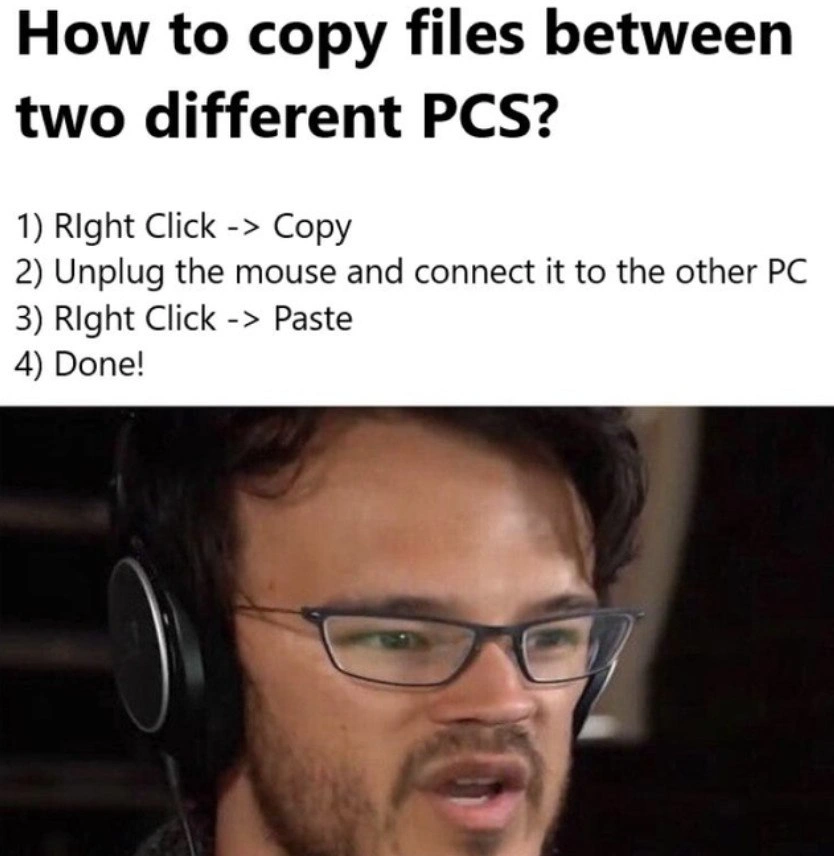
Imagine you wrote a note on a piece of paper and you want to give it to your friend. Instead of handing them the paper with the note, you just give them the pencil you used to write it and expect them to see the message. That sounds silly, right? The pencil itself doesn’t hold any of your words. In this meme, the junior developer is making that same kind of mistake – he thinks the computer’s mouse will somehow carry a file over to another computer, like a messenger carrying a letter. But the mouse is just a tool (like the pencil) and can’t magically hold the file. The reason the picture is funny is because even without knowing much about computers, you can tell that giving someone a pencil isn’t the same as giving them the note. The shocked face on the guy in the meme is basically saying, “Wait... you thought the file would be inside the mouse?!” We laugh because it’s a goofy misunderstanding, and it’s obvious that’s not how things work in real life.
Level 2: Clipboard vs Hardware
For a newer developer (or any computer novice), the steps in this meme might almost sound plausible. The question is how to copy files between two different PCs, and the "solution" given is to use the mouse as if it were a storage device: copy on one PC, then physically move the mouse to the other PC and paste. The joke here comes from a clear mix-up between a software concept (the clipboard) and a hardware tool (the mouse). Let's break down why this doesn't actually work in real life.
When you perform a "Copy" command on a computer, the thing you copied (whether it's text, an image, or a file) is stored in that computer's clipboard. The clipboard is not a physical object; it's an area of memory managed by the operating system. Think of it as a temporary holding bin inside your PC where the data sits when you hit copy. It exists only within that computer's RAM. So on PC #1, after you right-click and select "Copy" on a file, that file (or at least a reference to it) is now saved in PC1's clipboard in memory. Importantly, it hasn't left PC1 at all.
Now, what about the mouse? A computer mouse is an input device (a type of peripheral). Its job is to control the cursor and send click or movement signals to the computer. It does not have the capacity to store the file data you copied. (At most, some fancy mice remember settings like sensitivity or lighting, but they cannot hold, say, a 5 MB photo you copied.) So when our junior dev unplugs the mouse from PC1, it doesn't take the copied file along. All that happens is PC1 loses its mouse connection; the copied file is still sitting in PC1's clipboard (in PC1's memory). When he then plugs that same mouse into PC2, the second computer just recognizes a new mouse has been connected. PC2 will let you move the pointer and right-click, but PC2 has its own separate clipboard (currently empty). Since nothing was copied on PC2, there's no data there to paste. So when our junior tries "Paste" on the second machine, nothing happens. The file they wanted to transfer is still back on the first computer the whole time. Essentially, the mouse carried no information over — it was never meant to.
If you really want to copy files between two PCs, you need some way to actually transfer the data. One common method is using a network connection: for example, both PCs might be on the same Wi-Fi or wired network, and you could send the file over the network (through Windows File Sharing, emailing it to yourself, uploading to a cloud drive, using an FTP/SCP tool, etc.). Another method is using external storage. This is like the sneaker-net approach: you copy the file onto a device like a USB flash drive on PC1, then unplug that drive and plug it into PC2, and finally copy the file off the USB onto PC2. In that case, the USB drive is carrying the file data between the machines (because the file was actually saved onto the drive). That's fundamentally different from a mouse, which cannot store arbitrary file data. Tech folks jokingly refer to walking a disk or drive over to transfer files as "sneakernet" – it's old-fashioned but it works because the data is on an actual physical medium.
So the meme is highlighting a newbie mistake: the junior dev assumed the mouse could do a job it's not designed to do. It's like someone thinking that if you unplug your keyboard in the middle of typing, the letters you've typed will travel with the keyboard to another computer. The reaction image of the man staring in bafflement is basically how an experienced person would react: utterly confused and surprised that someone would try this. In short, the clipboard belongs to each computer separately, and the mouse is just a tool to tell the computer what to do. It doesn't hold any of the contents itself. This misunderstanding is pretty funny once you know the basics, and it's also a good lesson in the difference between a computer's hardware and its software processes.
Level 3: Mouse Memory Myth
Seasoned developers can't help but facepalm and chuckle at this clipboard misconception. The meme's top panel poses a naive question, "How to copy files between two different PCs?" and then jokingly instructs:
- Right Click -> Copy
- Unplug the mouse and connect it to the other PC
- Right Click -> Paste
- Done!
The bottom panel shows a headset-wearing guy staring in stunned disbelief, perfectly capturing the "Wait, you seriously tried that?" reaction. The humor arises from a junior dev literally believing the mouse hardware carries the copied file across machines. It's a hilariously wrong mental model that highlights the gulf between the physical tools we use and the invisible software processes that actually handle data.
In reality, the clipboard is a purely software mechanism — a reserved space in your computer's memory (RAM) where data is stored when you copy or cut something. When you do a "Copy" (say with Ctrl + C or a right-click menu) on a file, the operating system places a reference or the file data into this memory buffer on that same machine. There's no tiny gnome saving bits inside your mouse, and the mouse certainly isn't a USB drive with fur. The mouse pointer can initiate the copy command, but it doesn't hold onto the file like a treasure chest. So if a hapless newbie follows these steps, here's what actually happens: after "Copy" on PC1, the file's data sits in PC1's RAM. The moment they unplug the mouse, nothing about that data transfers with it (the data stays behind on PC1's clipboard, living in PC1's memory). Plugging the mouse into PC2 just tells PC2, "hey, there's a new input device attached." You can move the cursor and right-click on PC2, but PC2's clipboard is empty because you never copied anything on PC2. The result? Right Click -> Paste on the second machine either does nothing or shows a grayed-out option. The junior dev is left scratching their head, wondering where their file went, while the rest of us are either laughing or crying inside. (For once, this isn't about copying code from Stack Overflow — not your usual CopyPasteCoding blunder — it's a meta-level confusion about copy-paste itself!)
This absurd scenario is funny precisely because it's a mix of RelatableHumor and an innocent MisunderstandingTechnology. Many seasoned engineers have their own favorite "user error" stories from tech support or mentoring juniors. This meme might remind you of the classic myth of the CD-ROM drive as a cup holder, or the anecdote about someone looking for the "Any" key — it's the same flavor of confusion. It's a tech rite-of-passage to learn that software actions don't magically imprint data onto physical devices unless those devices are designed to store it. Transferring files between two PCs requires some deliberate method of sending the data: either a direct network link (e.g. copying over Wi-Fi or Ethernet, emailing the file, using a shared folder) or an intermediate storage device (like copying to a USB drive or external disk, then plugging that into the other machine). The hapless junior in the meme attempted an impossible DIY version of what's jokingly known as sneakernet. (Sneakernet is when you move data by physically carrying it, typically on a disk or drive, rather than over the network.) The concept of physically moving something to transfer data isn't wrong per se — using a USB stick to carry a file is perfectly legit — but here they picked the wrong thing to move. A mouse carries click signals, not file contents. It's like trying to use a screwdriver to hammer a nail: the tool just isn't made for that job.
Ultimately, this meme highlights a classic learning moment. The title itself jokes about a junior dev thinking the mouse carries the clipboard across machines. We laugh at the mistake, but we've all had moments early on where we misunderstood how a technology works. It's a prime example of the learning curve in action. After the giggles, it's a teachable situation: the newbie will hopefully learn that the clipboard is a software feature inside each computer, and that moving data between computers requires either a shared connection or a proper storage device. The reaction image — that shocked, disbelieving stare — is basically every experienced person saying, "I can't believe you tried that, but let me explain the right way." In the end, it's an endearing reminder that computers don't work by magic, and even the funniest misconceptions can be part of the journey from novice to knowledgeable.
Description
A two-part meme featuring a flawed set of instructions and a reaction image. The top section has a title in bold black text: 'How to copy files between two different PCS?'. Below this, a numbered list provides a nonsensical guide: '1) Right Click -> Copy', '2) Unplug the mouse and connect it to the other PC', '3) Right Click -> Paste', '4) Done!'. The bottom half of the image displays a popular reaction meme of YouTuber Markiplier, who is wearing headphones and glasses, looking utterly confused and bewildered by the absurdity of the instructions. The humor derives from the ridiculous premise that a computer mouse physically stores data for copy-paste operations, a classic joke format that preys on technical misunderstandings. For experienced developers, this is a nostalgic throwback to early internet humor and a relatable caricature of explaining technology to the profoundly non-technical

Comments
7Comment deleted
This is the physical layer of the OSI model that they never taught us about. It's not TCP/IP, it's MCP/IP: Mouse-Carried-Packet
We laughed at the intern for unplugging the mouse to “carry the clipboard,” then remembered our own air-gapped deployment pipeline is basically the same thing - just with an ISO 27001 budget line
This is the same energy as senior architects explaining to the C-suite why we can't just 'download more RAM' or why the blockchain won't fix our legacy COBOL system's Y2K patches that are still running in prod
Ah yes, the classic 'sneakernet 2.0' protocol - where the mouse becomes a USB drive with extra steps. This is what happens when someone takes 'clipboard' way too literally. In reality, we've evolved from physically carrying floppy disks between machines to... well, still physically carrying USB drives between air-gapped systems. But at least we've graduated from thinking the mouse stores the copied data in its scroll wheel. For actual file transfers, there's SCP, rsync, network shares, or if you're feeling fancy, a proper distributed file system - though I'll admit, unplugging the mouse is probably more reliable than debugging SMB permissions at 2 AM
Security killed cross-host clipboard, so we shipped KVM-but-only-the-M: air-gapped copy/paste with a throughput of one paste per context switch
Bold architecture: cross‑host clipboard replication over the HID layer; I’ll stick with scp/rsync - fewer mice per cluster
The caveman's rsync: --protocol=usb_mouse --buffer-size=one-click-at-a-time