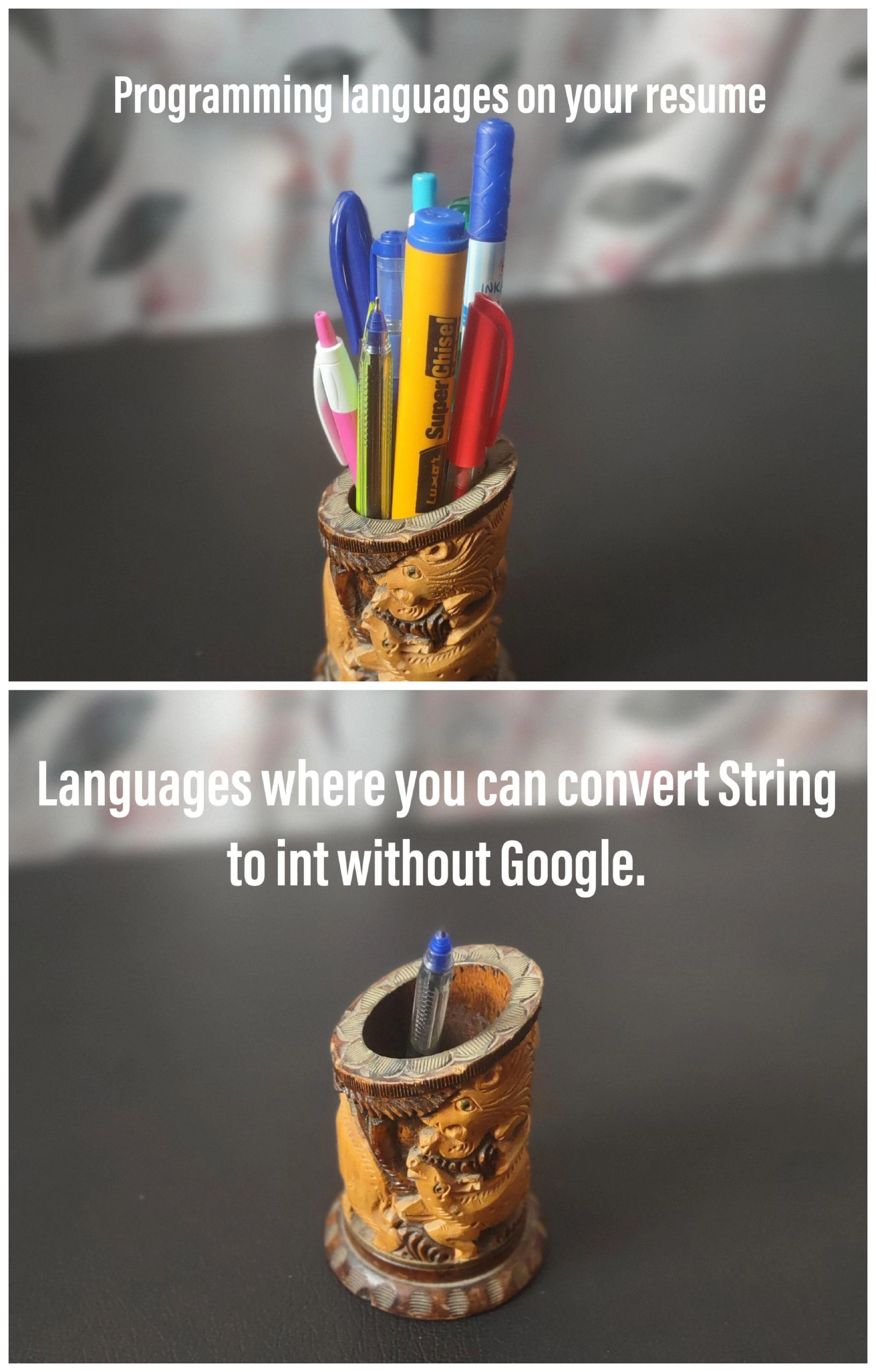
All the languages on your resume versus the ones you truly master
Why is this Languages meme funny?
Level 1: One True Pen
Imagine you tell all your friends that you have tons of toys and you can play with every one of them. You point to a big toy box showing off cars, action figures, puzzles, and games – that’s like the long list of programming languages on a résumé. It sounds impressive, right? But then one of your friends says, “Cool, let’s play with them right now!” Suddenly, you realize you only really know how to play with your one favorite toy without needing to read the instructions. Maybe it’s that one blue toy car you always race around. The other fancy toys you claimed you knew? For those, you’d secretly want to peek at the instruction book (or ask an adult how to use them). This is exactly what the meme is joking about. We sometimes boast about having a whole bunch of tools or skills (just like having all those pens or toys), but when it’s time to actually use them without any help, we might only be truly comfortable with one. It’s funny because it’s true: people often exaggerate what they can do, and it becomes obvious when they have to prove it. In simple terms, the meme is saying: you might say you know a lot, but you really only trust yourself with the one thing you’ve practiced the most. And that’s like having a full pen holder but only one pen that actually writes when you need it. It makes us laugh because we’ve all had moments like that, and it’s a friendly reminder to be honest about what we really know.
Level 2: Remember the Syntax
Let’s break this down for those newer to the DeveloperExperience_DX. The meme contrasts two situations: In the first, you have “Programming languages on your resume” — imagine a long list of coding languages you claim to know. In the photo, this is symbolized by a pen holder crammed with many pens and markers. In tech careers, it’s common (especially early on) to list every language you’ve touched: you did a semester of Java, a bit of JavaScript from a web course, some Python for a data science project, maybe a dash of C from that one systems class. That list grows like all those pens jammed in one cup. This is often done to show breadth of knowledge or to match job requirements, and sometimes it edges into resume_padding (adding skills to look more qualified). Career_HR reality is that job descriptions often ask for a broad array of skills, so juniors feel pressure to mention everything they've seen before.
Now the second panel is the reality check: “Languages where you can convert String to int without Google.” Converting a String to int is a super common basic_operation across programming – it means taking a piece of text that represents a number, like the characters "123", and turning it into the numeric value 123 your program can do math with. Each programming language provides a way to do this (often a built-in function or method). For example, in Python you’d simply call int("123"). In Java, you’d use Integer.parseInt("123"). In JavaScript, you might use parseInt("123", 10) or just the Number constructor. These are all examples of a conversion_function – a bit of code or function call that converts from one data type to another. The key joke is “without Google,” meaning from memory, without having to search online for the syntax. The bottom image – the nearly empty pen holder with just one blue pen – stands for the short list of languages you actually know so well that even a small task like this is second nature.
Why is this funny to developers? Because it’s RelatableHumor rooted in truth: when learning many languages, details blur together. A newer developer might familiarize themselves with multiple languages, but true language_mastery takes time. You might recall general concepts (like “I know this language can parse strings to numbers somehow...”), but the exact command or method name might slip your mind if you haven’t used that language in a while. So you end up searching online: that’s the google_dependency angle. It’s extremely common for programmers to quickly look up syntax or examples on Google or Stack Overflow—especially if they jump between languages. For instance, you might think, "Does PHP use intval() or just (int) to cast a string?" If you’re actively coding in PHP daily, you’d know it by heart; if not, you’d likely search for it. Relying on search engines is basically part of a developer’s toolkit (no shame in it!), but it does reveal which languages you haven’t mastered to an intuitive level.
This meme is also about the actual_skill_gap between what’s on paper and what’s in practice. For a junior dev, it’s a gentle lesson: just because you wrote “Proficient in C++” on your resume doesn’t mean you won’t blank on something simple in C++ if you haven’t actually coded in it recently. It’s the difference between learning a language and knowing it by heart. Think of it like studying for exams: you might have read about five chapters (covering lots of topics), but could you answer a specific question from chapter 3 without checking the textbook? If you can’t, you probably haven’t fully absorbed that chapter. Similarly, if you list five programming languages but have to search something basic in four of them, it suggests those are more like acquaintances than close friends. And that’s okay! Early in your career (and honestly, throughout it), you’re constantly learning. Over time, with enough use, details of a language stick in your memory. The LearningCurve to get to that point varies by person and language complexity. The meme humorously exposes this DeveloperReality: everyone has a much shorter list of technologies they are truly fluent in than the list they’ve been exposed to.
For context, “convert string to int” is used here as a litmus test of familiarity. It’s simple, but also something that every language does a bit differently. Those differences are the LanguageQuirks that can trip up even a studious learner. For example:
- Python:
int_str = int("42")(easy, just use theint()constructor function) - Java:
int num = Integer.parseInt("42");(use a method from theIntegerwrapper class) - JavaScript:
let n = parseInt("42", 10);(global function, and you often specify the base) - C#:
int x = Int32.Parse("42");orint y = Convert.ToInt32("42");(multiple ways via .NET libraries) - C:
int val = atoi("42");(from the C standard library; a bit old-school and doesn’t handle errors well) - Ruby:
num = "42".to_i(call the.to_imethod on the string object)
If you glance through these, you’ll notice the idea is the same – take a string, get a number – but the exact syntax and function names differ. A newcomer might memorize one or two of these but would likely need a quick documentation check for the others. Even experienced devs often mix up syntax when switching context: "Was it capital ParseInt or lowercase? Was it a function or a method on the string?" That’s why Googling is so prevalent; nobody can keep all those little details perfectly straight, especially not across many languages.
The meme’s second panel effectively asks: in how many of these languages could you write the correct conversion from string_to_int right now, off the top of your head? Maybe it’s only the one or two languages you use daily (hence the single pen). This ties into ImposterSyndrome, a feeling many developers get where they worry they’re not “real” programmers because they can’t recall everything by memory. But the joke here is a communal wink — most people can’t, and we all secretly rely on quick searches. In fact, turning to Google is such a normal part of programming that it’s often half-jokingly referred to as a developer’s superpower. So the meme isn’t really shaming anyone; it’s more like saying, “We’ve all been here, you’re not alone.” It’s a form of DeveloperSelfDeprecation where we admit our not-so-perfect memory in a fun way. After all, knowing how to find the answer is just as important as knowing the answer outright in this field. The real mastery comes with time and repetition — eventually, those conversion functions become like muscle memory. Until then, your résumé might be full of pens, but don’t worry if you still need a cheat sheet for most of them; even the pros are googling half the syntax anyway!
Level 3: Resume Overflow
At first glance, this meme hits on a classic piece of DeveloperHumor that’s all too familiar in the industry: the CareerExpectations we set with a jam-packed résumé versus the sobering DeveloperReality of what we actually remember when coding. The top panel’s carved pen holder overflowing with pens represents the resume_padding many developers do — listing every programming language they've ever dabbled in. We’ve all seen (or written) CVs boasting Languages like Python, Java, C++, JavaScript, Ruby, and Haskell, as if being a polyglot programmer is as simple as adding another pen to the cup. This is partly driven by Career_HR pressures: job listings often read like a kitchen-sink of buzzwords, so people cram their resumes with keywords to get past filters and impress recruiters. It’s resume-driven development in action, a tongue-in-cheek survival tactic in the hiring game. But then comes the punchline: the bottom panel’s nearly empty holder — a single blue pen left — captioned “Languages where you can convert String to int without Google.” This reveals the actual_skill_gap between claiming to know a language and mastering it to the point of memorizing even the simplest basic_operations. In other words, out of that long list of technologies, how many do you truly have on-call memory_recall for basic tasks like converting a string into an integer? For most of us, the honest answer is embarrassingly close to one.
This joke resonates with experienced devs because it’s a gentle roast of our collective reliance on documentation and google_dependency. Converting a string to an int is a trivial task every language supports, but each has its own little LanguageQuirks in syntax and functions. If you genuinely work in a language day in and day out (the ones you truly master), you’ll recall its conversion_function offhand. For example, a C++ veteran knows std::stoi or atoi by heart, a Java expert instinctively reaches for Integer.parseInt(), and a Pythonista doesn’t even blink before typing int("42"). But if you’ve only toyed with, say, Ruby or Go once or twice, you might draw a blank on whether it’s "42".to_i or strconv.Atoi("42") — that’s where the impulse to Google it kicks in. The meme is highlighting this in a self-deprecating way: sure, you “know” 10 languages, but do you even remember how to perform a basic type cast in most of them without Stack Overflow? The reason seasoned developers chuckle (and perhaps cringe) is because it uncovers our hidden ImposterSyndrome. We might worry, “Shouldn’t a real programmer be able to do something so simple from memory?” The reality is that forgetting exact syntax is extremely common when you juggle multiple technologies. In fact, DeveloperSelfDeprecation humor like this thrives on admitting that even seniors who architect complex systems sometimes blank on the smallest things outside their primary language. It’s a shared industry inside-joke: everyone uses Google as a second brain, even for one-liners that convert types.
From a senior perspective, this meme also touches on LanguageComparison and the learning trade-offs. Each programming language has a learning curve and idiomatic way to handle basic tasks. Mastery implies you’ve internalized those patterns. When you list many languages, what you often have is breadth-first knowledge: a mile wide and an inch deep. You might recall concepts but not precise details. The pen holder overflowing with pens hints at context-switching overload — it's tough to keep every detail fresh when you’ve written just “Hello World” in some language once. The lone pen in the bottom panel is the one language you’re deeply comfortable with, where muscle memory handles a simple thing like string parsing. Seasoned devs understand that being truly fluent in many languages is rare; most of us have one or two “native tongues” in code and a bunch of dialects we can get by in. That’s why this meme’s scenario is so RelatableHumor: it satirizes the difference between the image we present (Swiss Army Knife of programming skills) and the everyday reality (reaching for our preferred, trusty tool when a basic task arises). The humor might also serve as a subtle caution: don’t oversell yourself without practice, because the next interviewer might just ask you to write a quick string-to-int conversion in that obscure language on your resume — and you don’t want to be that developer furtively googling how to parse number X language on the spot. In summary, the senior take-away is a knowing smirk: language_mastery isn’t about how many pens you own, but about how effortlessly you can use them to write something meaningful (or in this case, how to parse "123" into 123 from memory). And yes, we’ve all been caught with an empty pen holder when the pressure is on.
// It's easy when you do it every day in one language:
int number = int.Parse("123"); // C# example – straightforward for a C# pro
// But in an older friend you listed on your CV...
#include <stdlib.h>
int num = atoi("123"); /* C library function – hope you remembered to include stdlib.h!
Also, atoi returns 0 on bad input, which can be a gotcha. */
// Meanwhile in a language you *barely* remember:
System.out.println(Integer.parseInt("123")); // Java – might take a moment to recall the class and method
Above: Realizing each language handles a simple “string to int” conversion differently. If you haven’t used one in a while, you might be reaching for Google or documentation. The code compiles; your confidence, not so much.
Description
Two-panel photo meme. Top panel: a carved wooden pen holder jam-packed with pens, markers, and a highlighter; white caption text reads “Programming languages on your resume.” Bottom panel: the same holder now nearly empty, containing only a single blue-ink pen; white caption text reads “Languages where you can convert String to int without Google.” The visual joke contrasts the long list of technologies people claim on CVs with the very few languages they can remember basic type-conversion syntax for without searching. It pokes fun at résumé padding, knowledge retention, and how a seemingly trivial task - parsing a string to an integer - exposes the real depth of a developer’s language proficiency
Comments
44Comment deleted
I can quote the CAP theorem backwards, but the second someone asks how to turn "42" into 42 my brain launches a tab war: atoi? strconv.Atoi? Integer.parseInt? - turns out being polyglot just means being fluent in Google
After 20 years in the industry, I've mastered 15 languages' hello world examples, but still can't remember if it's parseInt(), int.Parse(), Integer.valueOf(), or atoi() without checking - yet somehow my resume claims 'expert-level proficiency' in all of them
The brutal truth every senior engineer knows: you can claim fluency in a dozen languages on your resume, but the real test is whether you can write `parseInt()`, `int.Parse()`, `Integer.parseInt()`, or `std::stoi()` without opening a new tab. We've all been that architect in a design review who confidently discusses polyglot microservices architecture, then quietly Googles 'python string to int' when actually implementing the service. The gap between 'I've shipped production code in this' and 'I can write a for-loop without Stack Overflow' is the difference between a pen collection and that one reliable Bic you actually use
Polyglot resumes dazzle with rainbows, but prod code only trusts the black pen that parses strings from muscle memory - no Stack Overflow required
Resume says polyglot; the String→int test says polygoogler. If you can’t recall whether it’s atoi, stoi, Integer.parseInt, strconv.Atoi, or s.parse::<i32>(), you haven’t shipped with that language
My CV lists 12 languages; in prod my L1 cache remembers exactly three conversions - int(s), parseInt, and stoi - everything else page‑faults to Google
😂 Comment deleted
imho that's supposed to be sad, but at the same time its funny Comment deleted
a = "5" a = int(a) Comment deleted
python, which is not even my primary 🥲 Comment deleted
while writing in a less familiar language, I always try putting + before the variable to see if this works out: +a It works only in the damn JS Comment deleted
I always choose Number(a) instead. Readability is more important Comment deleted
😂😂😂😂💀 Comment deleted
In awk there is similar hack with str+0 Comment deleted
"0".parse::<i32>().unwrap() Comment deleted
C++: wtf are u talking about? Comment deleted
C programmers be like: Comment deleted
atoi() Comment deleted
Do you remember its parameters tho? Comment deleted
just char* Comment deleted
Oh, right, it's itoa that was a pain in the ass Comment deleted
And stoi() Comment deleted
returns int Comment deleted
as i remember errors are in errno Comment deleted
you can use sprintf it is easier Comment deleted
Perhaps you meant sscanf? Comment deleted
As int to char* conv? Comment deleted
As char* to int conversion, like stated in the meme. Comment deleted
I prefer atoi but yes sscanf is beter. But some one removed his comment with itoa.. Comment deleted
t = "1" as any as number Duck typing😶🌫 Comment deleted
and this comment was to his replay.. Comment deleted
(-(-“13”)) Comment deleted
I am just kidding dont cancel me Comment deleted
Maan can you send me your avatar? It's so hot and tasty Comment deleted
!!(-(-"1")) @lokot0k, this is the definitive answer to your recent question. https://t.me/dev_meme/5002?comment=70693 Comment deleted
Wow thanks Comment deleted
I am a bot, and this action was performed automatically. For any bugs and issues contact @dacoconutchemist Comment deleted
*grateful beep beep boop boop* Comment deleted
Seems like its finally working and we dont have to press the red button again Comment deleted
to_string(5) in cpp Comment deleted
other way (str -> int) C++: #include <sstream> int string_to_int(const string &s) { istringstream ss(s); int val; ss >> val; return val; } Comment deleted
wasnt there a stoi func? Comment deleted
idk, probably there is 🤷 Comment deleted
i mean, we can't use google, but we can probably use stackoverflow's own search? Comment deleted