Skip to content
DevMeme
4611 of 7435
The Simple Path Promised by the README vs. the Obstacle Course of Reality
Documentation Post #5057, on Dec 2, 2022 in TG

The Simple Path Promised by the README vs. the Obstacle Course of Reality

Why is this Documentation meme funny?

Level 1: No Walk in the Park

Imagine someone tells you, “Oh, it’s super easy to put this together, just follow the instructions!” You expect it will be as simple as taking a short walk down a road. But when you start, you find out the road is full of surprises: there’s a puddle you have to jump over, a big hole in the ground you need to go around, and even a shaky rope bridge you must balance across. It’s not a simple stroll at all – it’s an obstacle course! You feel confused and frustrated because you thought it would be straightforward, but instead it’s one challenge after another.

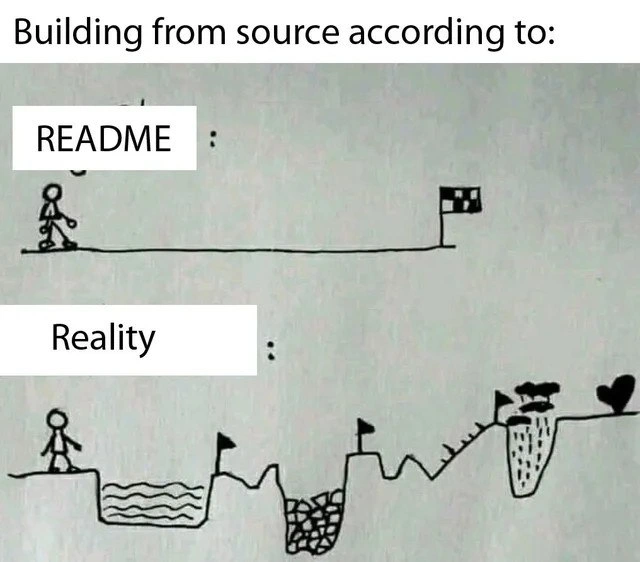
This meme is showing exactly that feeling. The top part (labeled “README”) is like the easy promise – a flat path with a finish line in sight, like saying “just do these steps and you’re done.” The bottom part (labeled “Reality”) is what really happens – the path has water, cliffs, and other obstacles, meaning a lot of unexpected problems pop up. It’s funny because it’s true: we’ve all been told something would be easy, then found out it was much harder in reality. Developers find this especially funny (and a bit painful) because it happens so often when setting up software. In simple terms, the meme is saying: “They told me it’d be easy, but it turned out to be a big tricky mess!” It uses the little stick figure and the obstacle course to make that point in a way anyone can understand.

Level 2: Hidden Dependencies

Why is this so familiar to developers? Let’s break it down in simpler terms. When a project says “build from source”, it means you have the program’s original code and you need to compile it yourself to get a working application. Projects include a README file (a documentation guide) that typically provides build instructions. In theory, following those instructions should be a straight path to success – like the stick figure in the top half, strolling on a flat line to a finish flag.

However, in reality, building software is often complicated by dependencies and environment requirements. A dependency is any external library or tool that the project needs. For example, a C++ project might depend on OpenSSL for encryption or SDL for graphics. If your system doesn’t already have these libraries (or the correct versions), the build will fail with errors. The meme’s “water pit” and “ravines” represent those missing pieces and problems:

  • The README might have said “just run make”, but you run it and get an error like “library not found” or “No such file or directory” for a header file. This means you needed to install another package first. The instructions left out a dependency that was assumed to be on your system.
  • Sometimes the instructions are out-of-date. Maybe the software moved to a new build system or requires a newer compiler now. If the README wasn’t updated, you’re following misleading directions. It’s like being given a map that doesn’t show all the detours.
  • There are also environment quirks: perhaps it works on the author’s machine because they have certain environment variables set or a specific OS configuration. On your machine, you encounter an error that the author never saw. This is the classic "works on my machine" scenario – the guide didn’t mention an assumption about the setup.

In the bottom half of the comic (labeled “Reality”), the stick person has to cross a drawn obstacle course with pits, rope bridges, and cliffs. Each of these obstacles is an analogy for real build troubles:

  • Pits of water could symbolize unexpected errors like a missing library or tool that causes you to stop and install something.
  • Jagged ravines might represent incompatibilities, say your compiler is too new or too old, and you have to find the right version or a workaround.
  • Rope bridges stand for the fragile fixes or workarounds you come up with (maybe searching Stack Overflow or the project’s GitHub issues for help) to bypass a problem and continue building.

The point is that the documentation (the README) often makes the build sound straightforward, but in practice, you hit all these hidden steps and pitfalls. This discrepancy is the documentation gap. It’s a huge part of developer pain points in many projects: new developers or users follow the documented steps and feel frustrated when things don’t "just work". If you’ve ever tried to compile an open-source tool and ended up installing a dozen other packages or editing config files, you’ve lived this meme. It’s a very relatable dev experience – developers often joke about how instructions say one thing, but you end up on a wild goose chase to actually get the software running.

Modern projects try to reduce this pain by using things like continuous integration (CI/CD pipelines) and containers (like Docker) to ensure the build environment is consistent. For instance, a CI system will run the whole build from scratch on a fresh machine to catch missing steps. But not every project is set up that way, and many READMEs assume you already know some setup steps. Until everything is automated perfectly, building from source can feel like that cartoon: you expected an easy run, and suddenly you’re an adventurer navigating a maze of technical problems. Understanding this, as a junior developer, helps you stay calm – it’s not your fault the build is failing! It’s just how complex software can be, and often the docs didn’t tell the full story. The meme humorously reminds us (and warns us) that README vs Reality are two very different things.

Level 3: The Build Gauntlet

Experienced developers instantly recognize this scenario: the README says “just run the build, it’ll be fine”, but actually building from source turns into a heroic obstacle course. The meme’s top half (the README view) promises a smooth, straight path to success – a single command, a quick make && make install, and you’re at the finish line. The bottom half (reality) shows the brutal truth: missing libraries, cryptic compiler errors, and environment quirks turn that simple build into a treacherous journey. It’s a comically exaggerated but painfully relatable dev experience. Seasoned engineers have waded through this dependency hell so often that we’ve almost made it a sport.

In the “Reality” drawing, each hazard flag might as well label a classic build failure or documentation gap:

  • Missing Dependencies: Right out of the gate, you step into a “water pit” of missing libraries. The README didn’t mention you need libSomething-dev installed. Now you’re googling error messages like fatal error: openssl/crypto.h: No such file or directory. Welcome to missing_dependency_hell dependency hell, where every library you didn’t know you needed is a fresh sinkhole.
  • Environment Quirks: Next, a jagged ravine appears – maybe the code only compiles on an older compiler, or it assumes a specific OS. The README cheerfully said “just run build”, but reality throws platform-specific pitfalls. For example, the build script might assume a UNIX-like environment, and Windows users plunge into a ravine of path issues and line-ending chaos. These hidden steps (like setting environment variables or installing system packages) weren’t in the instructions at all.
  • Outdated Instructions: You carefully cross a rickety rope bridge when the README itself is outdated. Perhaps the project switched from Makefile to CMake or from Maven to Gradle, but the README still shows the old commands. Now you’re balancing on a shaky fix – reading through commit logs or CI configuration to figure out how to actually build it. It’s practically an archeological expedition through the project’s BuildSystems settings.
  • Build Script Shenanigans: Every tiny flag on those hazards could mark a weird build step: maybe you have to run ./configure with specific flags, or apply a patch, or compile a sub-module separately. One moment you’re installing dependencies, next you’re editing a CMakeLists.txt or a Dockerfile just to get past an error. Each “flag” is a hard-won checkpoint on the trek through this build process gauntlet.

Throughout this journey, documentation humor writes itself. The meme exaggerates the terrain, but any senior developer can testify that sometimes “just build it” is a lie of omission. The documentation paints a utopia, but your console output tells a horror story. We laugh (often bitterly) because we’ve all lost hours (or days) fighting through such unexpected build issues – it’s an industry rite of passage. Modern DevOps practices (like containerized builds or continuous integration pipelines) try to improve developer experience by automating these steps, but when those aren’t provided, you’re on your own.

Why is it so funny and painful? Because we’ve all been that stick figure, confidently starting a build on Friday 4 PM (because the README said it’s easy) only to encounter a cascade of errors that feel like swinging over alligators. The developer frustration is real: you start out optimistic and end up muttering “works on my machine, huh? Must be nice.” It’s a shared pain point: the gap between developer expectations vs. reality in build instructions. This meme perfectly captures that collective experience, where the DevExperience promised by docs is vastly different from the rocky reality. In short, the README’s smooth road is a mirage, and any veteran knows to pack extra gear before attempting that “one-step” build.

Description

This is a two-panel, hand-drawn meme that contrasts expectations with reality when building a software project from its source code. The top panel, labeled 'README:', depicts a simple, straight path from a starting point to a finish line flag, implying an effortless process. The bottom panel, labeled 'Reality:', shows the same starting point but the path is a grueling obstacle course. The journey involves navigating a body of water, a pit of rocks, steep inclines, and a deep chasm with spikes. The meme humorously captures the universal developer experience of encountering outdated, incomplete, or overly simplified documentation. While the README suggests a quick and easy build, the reality is often a painful struggle with missing dependencies, environment configuration, and cryptic errors

Comments

7
Anonymous ★ Top Pick The README says './configure && make && make install'. The reality is you'll spend the next six hours on Stack Overflow, installing three different build toolchains, and questioning if the real dependency was a PhD in archaeology
  1. Anonymous ★ Top Pick

    The README says './configure && make && make install'. The reality is you'll spend the next six hours on Stack Overflow, installing three different build toolchains, and questioning if the real dependency was a PhD in archaeology

  2. Anonymous

    README: `make`; reality: six hours of LD_LIBRARY_PATH Jenga mediating a three-way turf war between system OpenSSL, Homebrew OpenSSL, and the vendored one hidden in /third_party

  3. Anonymous

    The README says 'just run make install' but doesn't mention you need to sacrifice a goat under a full moon while reciting the GNU manifesto backwards in ancient Sumerian to get the correct version of autoconf to recognize your perfectly standard C++17 compiler

  4. Anonymous

    Every README's 'Quick Start' section is just a Dunning-Kruger curve visualized as a straight line - written by someone who already has the exact right versions of 47 transitive dependencies, the correct LLVM toolchain, and whose machine mysteriously has that one obscure environment variable set from a project they worked on three years ago. Meanwhile, the rest of us are debugging why `./configure && make && make install` spawns a dependency resolution quest that would make a Dark Souls speedrunner weep

  5. Anonymous

    README: 100m dash to glory. Reality: Ironman through autotools, orphaned deps, and ABI mismatches

  6. Anonymous

    README: git clone && make. Reality: reconstruct the maintainer’s 2015 laptop, pacify a transitive OpenSSL ABI mismatch, toggle the one cursed CMake flag, and pray pkg-config remembers where libz went

  7. Anonymous

    The README says 'git clone && make'; the staff engineer reads it as 'bootstrap a hermetic toolchain, pin transitive deps, patch CMake, juggle PKG_CONFIG_PATH, and pretend Docker makes it reproducible'

Use J and K for navigation