Skip to content
DevMeme
1971 of 7435
The Perfect Explanation of Async Programming
CS Fundamentals Post #2193, on Oct 24, 2020 in TG

The Perfect Explanation of Async Programming

Why is this CS Fundamentals meme funny?

Level 1: Worth the Wait

Imagine you ask your friend to bake some cookies. Instead of standing in the kitchen doing nothing for 20 minutes while the cookies bake, you go play a video game and tell your friend, “Let me know when they’re ready.” You’re not ignoring the cookies – you’ll still get them – but you’re wisely using the waiting time to do something else. That’s basically what asynchronous programming is: letting a task happen in the background and doing other stuff until it’s time to come back for the result.

Now think of the phrase “Wait for it…” that people say right before a big surprise or the punchline of a joke. It means something good is coming, but you need to be patient for a moment. In the meme, someone asked, “Can you explain this waiting idea in just a few words?” and the cheeky answer was “Wait for it …”. This is funny because the answer itself tells you to be patient – exactly what you have to do in the story of the cookies (and in async programming). It’s a bit like if a teacher asked, “What does ‘patience’ mean?” and a student just replied, “Give me a minute.” The explanation becomes an example of itself. Developers found it hilarious and clever because it turned a hard computer concept into a simple, familiar idea: sometimes you just have to wait, and that’s okay because something great (whether yummy cookies or a program’s result) will be ready when the wait is over.

Level 2: Call Me Back Later

Let’s break down the tech behind the joke. Asynchronous programming means your code can handle other work without waiting for a task to finish right away. In synchronous (normal) programming, if you call a function that takes time (say, fetching data from a server), everything blocks – like a traffic jam – until that task completes. In async programming, you basically say, “Hey, go do this thing, and call me back later when you’re done.” This is exactly what happens with callbacks, promises, or async/await in languages like JavaScript (and Python, C#, etc. nowadays). It’s like ordering a package and not staying on the phone until the operator finds it – you hang up and let them notify you when it’s shipped.

In the meme, NodeSource (a Node.js company) asks for a five-words-or-less explanation. Node.js itself is famous for its event loop and non-blocking I/O. Here’s how that works in practice: Node will start an operation (like reading a file or making an HTTP request) and then immediately move on to handle other things, instead of freezing until the file or data is ready. When the operation eventually finishes, Node.js uses the event loop to notify your code – often by executing a callback function or resolving a promise. You literally wait for it to finish, but importantly, you’re not twiddling your thumbs in the meantime; the program is doing other useful work.

To manage these waits elegantly, modern JS introduced Promise objects and the async/await syntax. A Promise is an object that represents a result that isn’t there yet (it’s promised to arrive later). When you use await in an async function, it’s like telling the code: “Pause this function, but don’t block the whole program. Come back when the promise has a value.” For example:

console.log("1. Fetching data...");
// Start an async task (returns a promise, which is pending):
fetchDataFromAPI().then(data => {
  console.log("3. Got data:", data);
});
console.log("2. Continuing with other work...");

In this snippet, the console might log “1. Fetching data...”, then immediately “2. Continuing with other work...”, before the data comes back. Finally, when the data is ready, the callback in .then(...) runs and logs “3. Got data: ...”. The key point: the program didn’t stall at step 1 waiting for the API – it moved on, and the API call called back later with the result. If we rewrote this with async/await syntax, it would look like:

async function getDataAndProcess() {
  console.log("1. Fetching data...");
  let data = await fetchDataFromAPI();  // "wait for it..."
  console.log("2. Got data:", data);
}
getDataAndProcess();
console.log("Still doing other stuff while waiting...");

When our code hits that await line, it’s essentially doing what Raymond’s tweet says: “wait for it.” The function pauses at that point, but Node’s event loop keeps the engine running, perhaps logging the other message or handling another request. Once fetchDataFromAPI() finishes, the function resumes and prints the data. No time wasted blocked on the result.

Now, the humor of the meme is that Raymond managed to compress all of this into three words. By saying “Wait for it …”, he references the crucial behavior of async code (you must wait for results) and uses a familiar phrase that usually precedes something exciting. New developers learning AsyncAwait in JavaScript or Python often get tripped up by forgetting to wait for the result. This tweet is basically the TL;DR of their mentors’ advice: “Remember, you gotta wait for it, otherwise your code tries to use data that isn’t there yet!” It’s a friendly poke at how we explain async behavior. And since the prompt was a challenge to be brief, using a classic three-word punchline to capture a fundamental CS_Fundamentals concept makes it extra satisfying. It’s like an inside joke for anyone who struggled through tutorials on callbacks, then promises, and rejoiced when async/await made the code read like a story with a clear “wait here” sign.

Also noteworthy: Raymond Hettinger is a well-known figure in the Python community (he’s behind many beloved Python enhancements). Python added its own async and await keywords a few years ago, inspired by other languages’ success with handling concurrency. So a Pythonista jumping into a Node.js thread to drop an async truth-bomb highlights a cool camaraderie among DevCommunities – no matter if you’re team JavaScript or team Python, you know waiting is the name of the game. The tags like AsynchronousProgramming, JavaScript, NodeJS all point to this shared knowledge. New developers might not catch all these layers at first, but they’ll at least learn that async = not instant, you have to handle a waiting period. Once you’ve seen enough async code (and maybe debugged a few “why is nothing happening?!” moments), “Wait for it …” becomes the perfect tongue-in-cheek summary.

Level 3: Await the Punchline

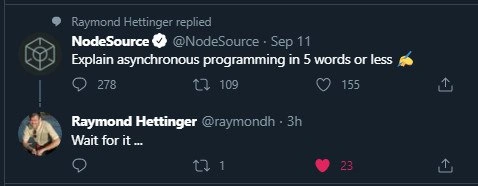
NodeSource tossed a challenge into the void of TechTwitter: “Explain asynchronous programming in 5 words or less.” That’s a tall order – async concepts can tangle even senior engineers in verbose explanations about threads, callbacks, and event loops. Enter Raymond Hettinger (a prominent Python core dev) with a reply so concise and clever that it stops the scrolling thumb: “Wait for it …”. In just three words (well under the five-word limit!), he nails the essence of asynchronous programming and lands a perfect punchline simultaneously.

Why is this brilliant? It’s a multi-layered joke seasoned for the developer palate:

  • Literal Definition: In async code, you often literally have to wait for an operation to complete without freezing everything. Raymond’s reply tells us to wait, mirroring how await works in code.
  • Tech Semantics: JavaScript (and now Python, where Raymond’s from) has an await keyword that means “wait for the promise to resolve here.” “Wait for it…” cheekily evokes that same idea. The ellipsis (...) even feels like a program pausing until a callback returns.
  • Comedic Timing: The phrase “Wait for it” is a classic setup in jokes, used to build anticipation for something awesome about to happen. Here, it is the joke and the explanation. The reader expects a grand reveal after “Wait for it…,” but that’s the entire answer – which is exactly how asynchronous calls work: you set something in motion and then nothing happens immediately… until it does.
  • Meta-Humor: The meme is self-referential. The best way to explain async is to demonstrate it. Raymond’s tweet almost feels like an asynchronous function: it returns instantly with a witty minimal answer, and the real payoff (“Oh, I get it!” laughter) hits your brain a moment later when the pun registers. It’s humor that fires a callback!

Seasoned developers chuckle because they’ve been in the trenches with async code. They know the event loop mantra: “don’t block, just schedule and wait.” Raymond’s quip is basically the event loop’s philosophy distilled into everyday language. It also speaks to countless experiences helping juniors debug why a variable is undefined – the answer is often, “You got the timing wrong – you have to wait for it!” This tweet triggers that collective memory. It even bridges communities: a Node.js thread gets hijacked (in a friendly way) by a Python guru, proving that AsynchronousProgramming pain and humor are universal across languages. In a world of over-explanations, seeing a concept explained this succinctly is both technically satisfying and hilariously unexpected. The result? A mic-drop moment on DevTwitter, with asynchronous design philosophy turned into a one-liner.

Description

This image is a screenshot of a Twitter exchange in dark mode. The initial tweet is from the verified account 'NodeSource' (@NodeSource), which posted on Sep 11: 'Explain asynchronous programming in 5 words or less'. Below this, there is a reply from 'Raymond Hettinger' (@raymondh), a well-known Python core developer. His reply, posted 3 hours prior to the screenshot, is simply: 'Wait for it ...'. The humor is a brilliant meta-joke. Hettinger's response not only literally tells the reader to wait, but it also serves as a perfect, three-word explanation of the essence of asynchronous programming: you execute an operation and then 'wait for it' to complete without blocking other operations. The ellipsis adds to the feeling of suspense, perfectly mirroring the concept. This level of wit is highly appreciated by senior developers who understand the nuances of async patterns (like promises or async/await) and the challenge of explaining them concisely

Comments

14
Anonymous ★ Top Pick Explaining async to a junior is easy: 'Just add .then() until the red squiggles go away.' Explaining it to a PM is harder: 'It's like I've started the coffee, but I can also make toast. No, the coffee isn't toast-flavored.'
  1. Anonymous ★ Top Pick

    Explaining async to a junior is easy: 'Just add .then() until the red squiggles go away.' Explaining it to a PM is harder: 'It's like I've started the coffee, but I can also make toast. No, the coffee isn't toast-flavored.'

  2. Anonymous

    “Wait for it…” - the most honest async API doc since we rebranded random latency as “eventual consistency.”

  3. Anonymous

    The beauty of Hettinger's response is that it works on three levels: it's literally what async code does (wait for operations), it's a perfect dad joke setup with the ellipsis creating actual waiting, and it's exactly the kind of elegant simplicity you'd expect from someone who's spent decades optimizing Python's internals - proving once again that the best abstractions are the ones that make you groan and nod simultaneously

  4. Anonymous

    Raymond Hettinger's response is a masterclass in technical communication: he doesn't just describe async programming, he *performs* it. The ellipsis isn't punctuation - it's a visual representation of the event loop spinning while we await resolution. It's the programming equivalent of showing, not telling. Meanwhile, the rest of us are still trying to explain Promises without drawing callback pyramids on whiteboards

  5. Anonymous

    Three-word spec for async: wait_for_it() - until someone uses await inside forEach and a 500MB JSON.parse blocks the event loop, turning 'less than five words' into five hours on call

  6. Anonymous

    Hettinger's 'Wait for it' - the event-loop haiku that outlives every senior dev's unresolved promise chain

  7. Anonymous

    Async in five words: We’ll call you back - eventually (backpressure permitting)

  8. @denisndenis 5y

    But its actually "don't wait for it"

    1. Deleted Account 5y

      !0

  9. @cheburgenashka 5y

    It for await

  10. @doorhinge 5y

    are you done yet

  11. @BerZerg 5y

    Noice

  12. @pavel_a_levin 5y

    Wait for it is actually for synchronous

  13. @jpleorx 5y

    Kinda true 🤔

Use J and K for navigation